# Structure of an HTML5 (H5) game
Typically most games distributors will host their games in a form that can be
easily played fullscreen, or iFrame'd into another web page or a WebView within
an app.
The page that hosts the game (i.e. the playable game canvas) contains
[the AdSense code](https://support.google.com/adsense/answer/9955214) ('the
tag'), loads the JavaScript logic for the game, and typically contains a canvas
element where the game is rendered.
Our goal with the Ad Placement API is to minimize the code you must add to your
game. So you can control the ads, without constantly having to change your game
and release new versions of it.
Review the conceptual structure of an HTML5 game in this figure. Sample code is available in the section [Example H5
game structure](https://developers.google.com/ad-placement/docs/html5-game-structure#example_h5_game_structure). 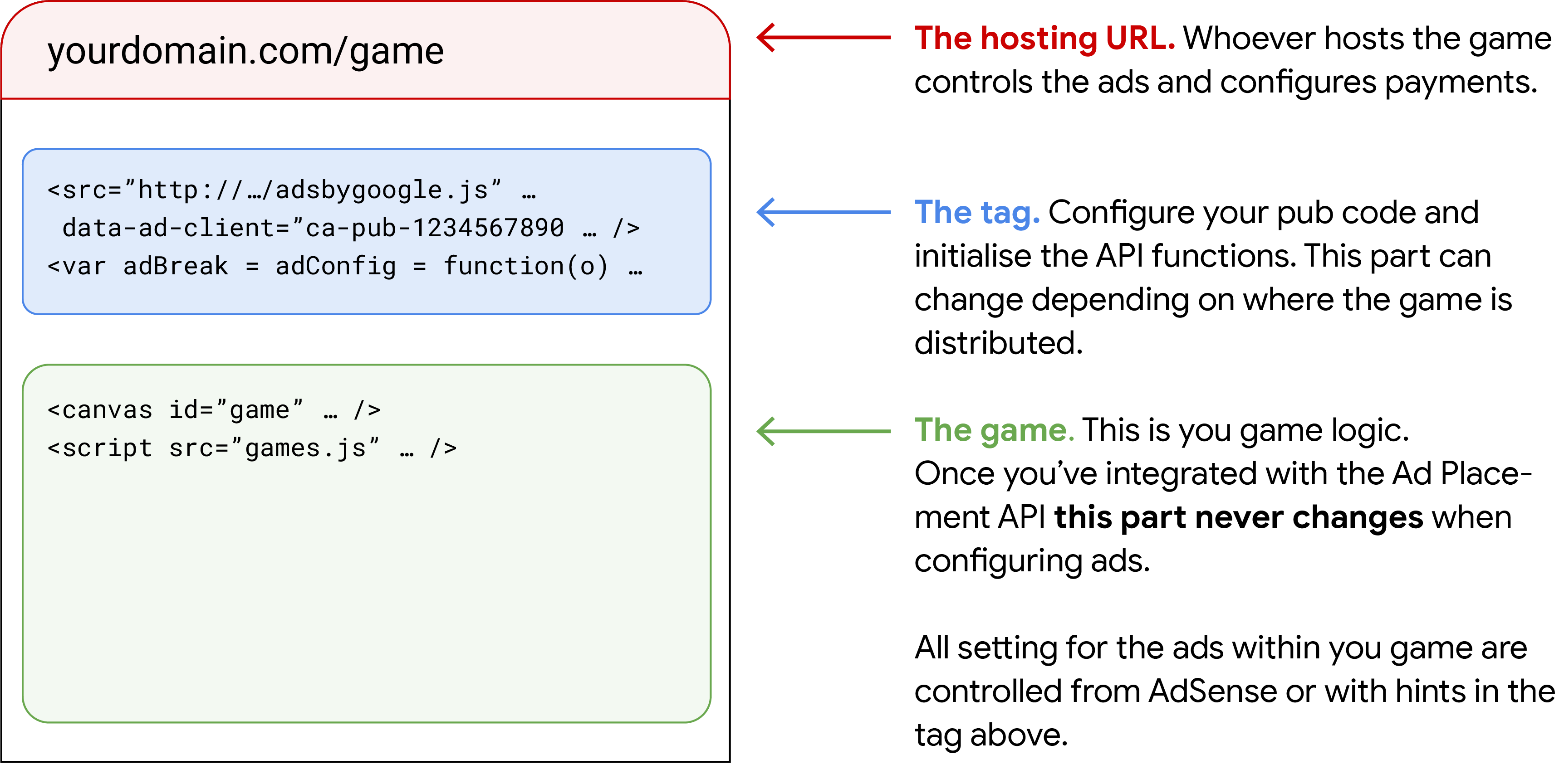
There are many ways that H5 games can be created, using javascript directly, or
third party libraries for 2D and 3D graphics that render to a canvas widget,
game engines, and in some cases quite complex cross-compilation processes from
other languages.
The Ad Placement API is designed to run within the same document as the game
canvas and the `adsbygoogle` tag. For example, if you add a game as an iFrame
into a larger page, the tag and all of the calls to the API should be made from
within that iFrame.
## Example H5 game structure
The following more detailed example shows the key parts of a typical game page.
There are many ways that H5 games can be created, using javascript directly, or
third party libraries for 2D and 3D graphics that render to a canvas widget,
game engines, and in some cases quite complex cross-compilation processes from
other languages. The precise details of your game may differ from this example.
## The Ad Placement tag ##
# Configure your monetisation settings here and place the standard
# boilerplate code for initialising the API functions. This code may change
# depending on where the game is being distributed (eg. a website, a super
# app, different publishers).
[...]
[...]
## Your game code ##
# This is your game logic that renders the playable canvas. Once you've
# integrated your game with the Ad Placement API, this code won't change due
# to ad configuration updates.
[...]
The Ad Placement API is designed to run within the same document as the game
canvas and the `adsbygoogle` tag. For example, if you add a game as an iFrame
into a larger page, the tag and all of the calls to the API should be made from
within that iFrame.
> [!NOTE]
> **Note:** If your game is embedded within an iframe on another page and the adsbygoogle tag is located within that iframe then make sure to add allow='autoplay'to the iframe element. This is a best practice and is necessary for certain ads to be eligible for your game.
## How H5 games are distributed
H5 games can be distributed in lots of different ways, and on lots of different
platforms. Often there can be different entities involved in the creation and
distribution of games including:
- **Developers** -- the people who create the games
- **Engines** -- companies that provide the tools to build them
- **Hosting providers** -- who host games
- **Distributors** -- that work with developers to build rich catalogs of games
- **Publishers** -- who own the **traffic source** and want to put games on their sites or apps
In many cases entities can span these roles---you might develop, host and
publish your own games.
Games can be played in different ways, that include:
- **Fullscreen** -- where they take over the entire screen for an immersive experience
- **iFrame/WebView** -- where they serve into a part of larger document
- **Embedded** -- where they're placed directly on pages that have other content
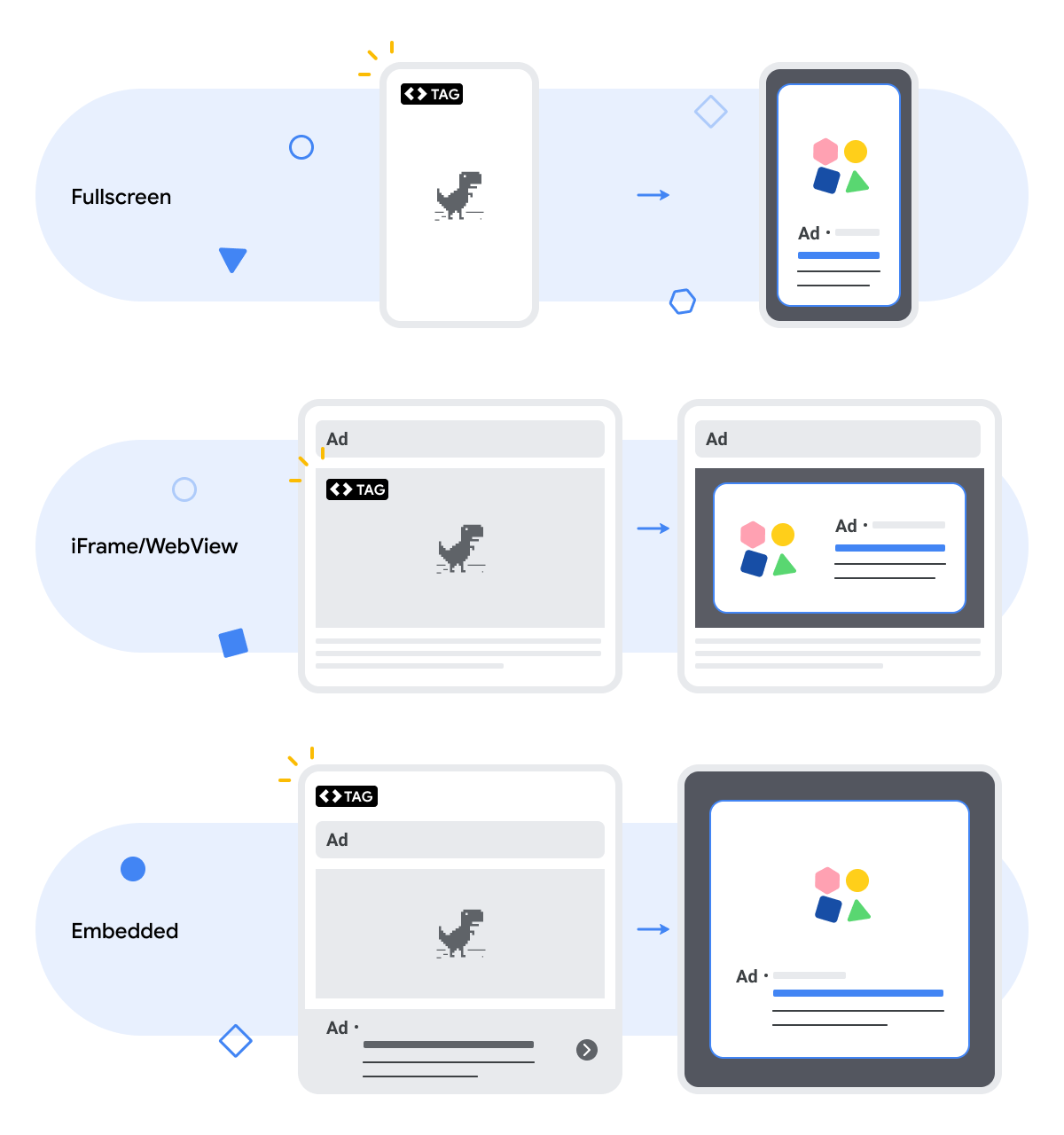
The fullscreen and iFrame experiences apply to both web and app ("iFrame" in
this case can also refer to a WebView embedded within an app)---we expect
the majority of games to be distributed in these ways. Embedded games are
web-only experiences.
### Remember
1. The HTML document that contains the tag is where the ad shows.
2. The ad must always fully cover the enclosing document.
3. The tag and the game should always be located within the same document.