[Download Native Templates](https://github.com/googleads/googleads-mobile-android-native-templates)
> [!IMPORTANT]
> **Key Point:** Before continuing, know how to [load a native
> ad](https://developers.google.com/admob/android/native#load-ad). Learn more about native ads in our [Native Ads
> Playbook](https://admob.google.com/home/resources/native-ads-playbook/).

Using native ads you can customize your ads resulting in a better user
experience. Better user experiences can increase engagement and improve your
overall yield.
In order to get the most out of native ads, it's important to style your ad
layouts so that they feel like a natural extension of your app. To help you get
started, we've created Native Templates.
Native Templates are code-complete views for your native ads, designed for fast
implementation and easy modification. With Native Templates, you can implement
your first native ad in just a few minutes, and you can quickly customize the
look and feel without a lot of code. You can place these templates anywhere you
want, such as in a recycler view used in a news feed, in a dialog, or anywhere
else in your app.
> [!NOTE]
> **Note:** If you're interested in designing your own native layouts from scratch, return to the [Native Advanced](https://developers.google.com/admob/android/native/advanced.md.txt) documentation instead.
Our native templates are provided as an Android Studio module, so it's easy to
include them in your project and use them however you like.
## Template sizes
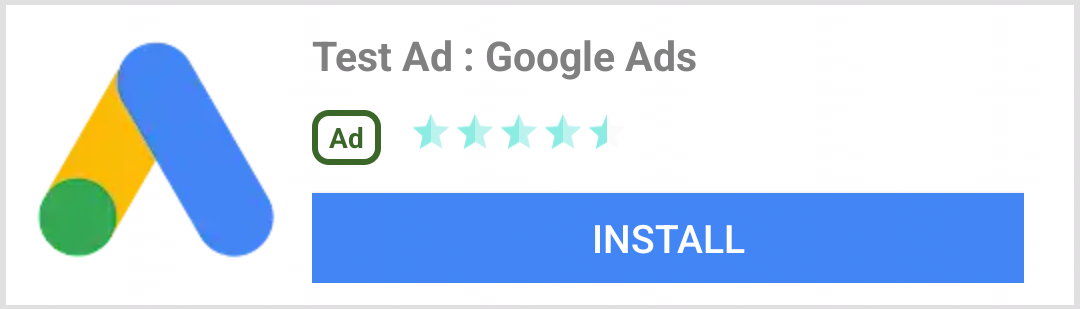
There are two templates: small and medium. They both use the `TemplateView`
class and both have a fixed aspect ratio. They will scale to fill the width of
their parent views.
### Small template
@layout/gnt_small_template_view
The small template is ideal for recycler views, or any time you need a long
rectangular ad view. For instance you could use it for in-feed ads.
### Medium template
@layout/gnt_medium_template_view
The medium template is meant to be a one-half to three-quarter page view but
can also be used in feeds. It is good for landing pages or splash pages.
Feel free to experiment with placement. Of course, you can also change the
source code and XML files to suit your requirements.

## Installing the native ad templates
To install the native templates, simply [download the zip file (using the
**Clone or download** option on
GitHub)](https://github.com/googleads/googleads-mobile-android-native-templates) and
import the module into your existing Android Studio project.
1. Choose **File \> New \> Import Module**.
2. Select the `nativetemplates` folder.

3. Add the following line to your app-level `build.gradle` file:
dependencies {
...
implementation project(':nativetemplates')
...
}
## Using the native ad templates
You can use the template in any layout XML file, like any other view
group.

Using the templates is a two-step process:
1. First, you need to include the template as part of your layout.
app:gnt_template_type="@layout/gnt_small_template_view"
android:layout_width="match_parent"
android:layout_height="match_parent" />
...
2. Next, you need to give your template your native ad when it loads:
MobileAds.initialize(this);
AdLoader adLoader = new AdLoader.Builder(this, "ca-app-pub-3940256099942544/2247696110")
.forNativeAd(new NativeAd.OnNativeAdLoadedListener() {
@Override
public void onNativeAdLoaded(NativeAd nativeAd) {
NativeTemplateStyle styles = new
NativeTemplateStyle.Builder().withMainBackgroundColor(background).build();
TemplateView template = findViewById(R.id.my_template);
template.setStyles(styles);
template.setNativeAd(nativeAd);
}
})
.build();
adLoader.loadAd(new AdRequest.Builder().build());
## Styles dictionary keys
There are two ways to style your template: using traditional layout XML and
using our `NativeTemplateStyle.Builder` object. The above code sample
demonstrates how to use the `NativeTemplateStyle.Builder` object to set the main
background color, but there are a variety of other options as well. Here are all
of the available builder methods. The builder returns a `NativeTemplateStyle`
object which overrides any XML layout styling. The XML layouts
`gnt_small_template.xml` and `gnt_medium_template.xml` use the same Android
styling parameters that you are already familiar with.
| Builder methods for native template style ||
|---|---|
| `withCallToActionTextTypeface` | `Typeface callToActionTextTypeface` The typeface for the call to action. |
| `withCallToActionTextSize` | `float callToActionTextSize` The size of the call to action text. |
| `withCallToActionTypefaceColor` | `int callToActionTypefaceColor` The color of the call to action text. |
| `withCallToActionBackgroundColor` | `ColorDrawable callToActionBackgroundColor` The background color of the call to action. |
| `withPrimaryTextTypeface` | `Typeface primaryTextTypeface` The typeface of the first row of text. |
| `withPrimaryTextSize` | `float primaryTextSize` The size of the first row of text. |
| `withPrimaryTextTypefaceColor` | `int primaryTextTypefaceColor` The color of the first row of text. |
| `withPrimaryTextBackgroundColor` | `ColorDrawable primaryTextBackgroundColor` The background color of the first row of text. |
| `withSecondaryTextTypeface` | `Typeface secondaryTextTypeface` The typeface of the second row of text. |
| `withSecondaryTextSize` | `float secondaryTextSize` The size of the second row of text. |
| `withSecondaryTextTypefaceColor` | `int secondaryTextTypefaceColor` The text color of the second row of text. |
| `withSecondaryTextBackgroundColor` | `ColorDrawable secondaryTextBackgroundColor` The background color of the second row of text. |
| `withTertiaryTextTypeface` | `Typeface tertiaryTextTypeface` The typeface of the third row of text. |
| `withTertiaryTextSize` | `float tertiaryTextSize` The size of the third row of text. |
| `withTertiaryTextTypefaceColor` | `int tertiaryTextTypefaceColor` The text color of the third row of text. |
| `withTertiaryTextBackgroundColor` | `ColorDrawable tertiaryTextBackgroundColor` The background color of the third row of text. |
| `withMainBackgroundColor` | `ColorDrawable mainBackgroundColor` The main background color. |
## Contribute
We've made Native Templates to help you develop native ads quickly.
We'd love to see you contribute to our
[GitHub](https://github.com/googleads/googleads-mobile-android-native-templates)
repo to add new templates or features. Send us a pull request and we'll take a
look.