This guide shows you how to use Google Mobile Ads Flutter Plugin to load and display
ads from LY Ads Network using [mediation](https://developers.google.com/admob/flutter/mediation.md.txt), covering
waterfall integrations. It covers how to add LY Ads Network to an ad unit's
mediation configuration, and how to integrate the LY Ads Network SDK and
adapter into a Flutter app.
## Supported integrations and ad formats
The AdMob mediation adapter for LY Ads Network
has the following capabilities:
| Integration ||
|---|---|
| Bidding | Yes |
| Waterfall | Yes |
| App Open | |
| Banner | Yes |
| Interstitial | Yes |
| Rewarded | Yes |
| Rewarded Interstitial | Yes |
| Native | Yes |
## Prerequisites
Before you continue, verify the following:
- Latest Google Mobile Ads Flutter Plugin version.
- Flutter framework version 3.7.0 or later.
- To deploy on Android
- Android API level 24 or later.
- To deploy on iOS
- iOS deployment target of 13.0 or later.
- A working Flutter project configured with Google Mobile Ads Flutter Plugin. See [Set up Google Mobile Ads Flutter Plugin](https://developers.google.com/admob/flutter/quick-start.md.txt) for details.
- [Set up AdMob Mediation](https://developers.google.com/admob/flutter/mediation.md.txt).
## Step 1: Set up configurations in LY Ads Network UI
- [Sign up and log in](https://adsnetwork.line.biz/) to your LY Ads Network account.
### Add a new application
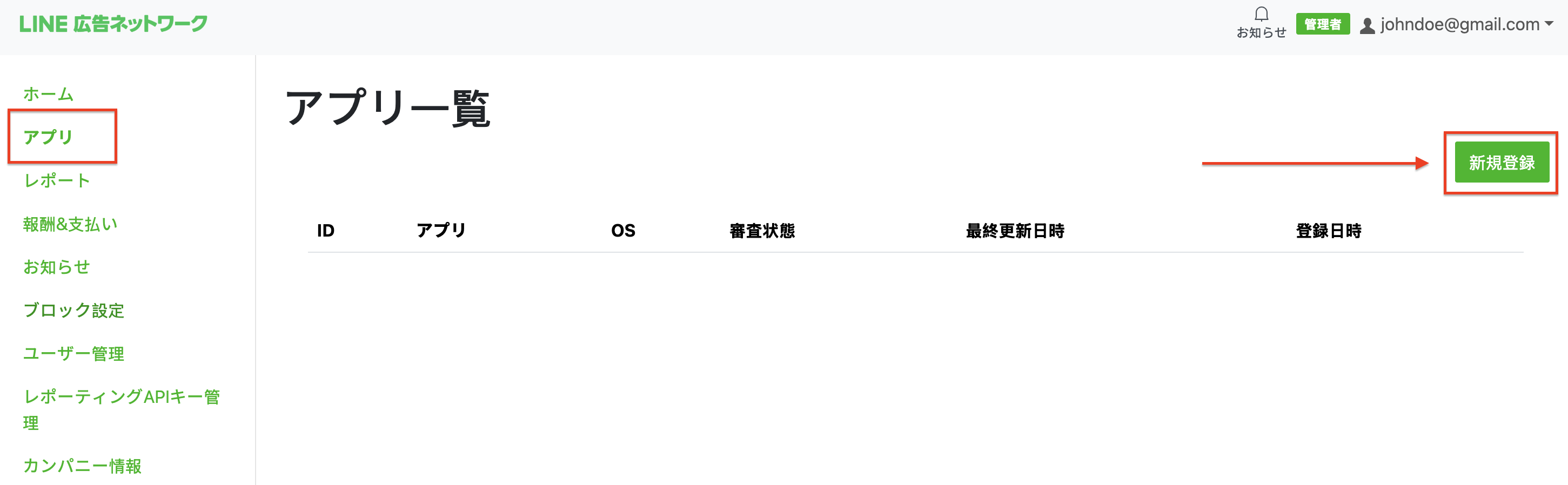
- Navigate to the **App** tab and click the **New registration** button.
- 
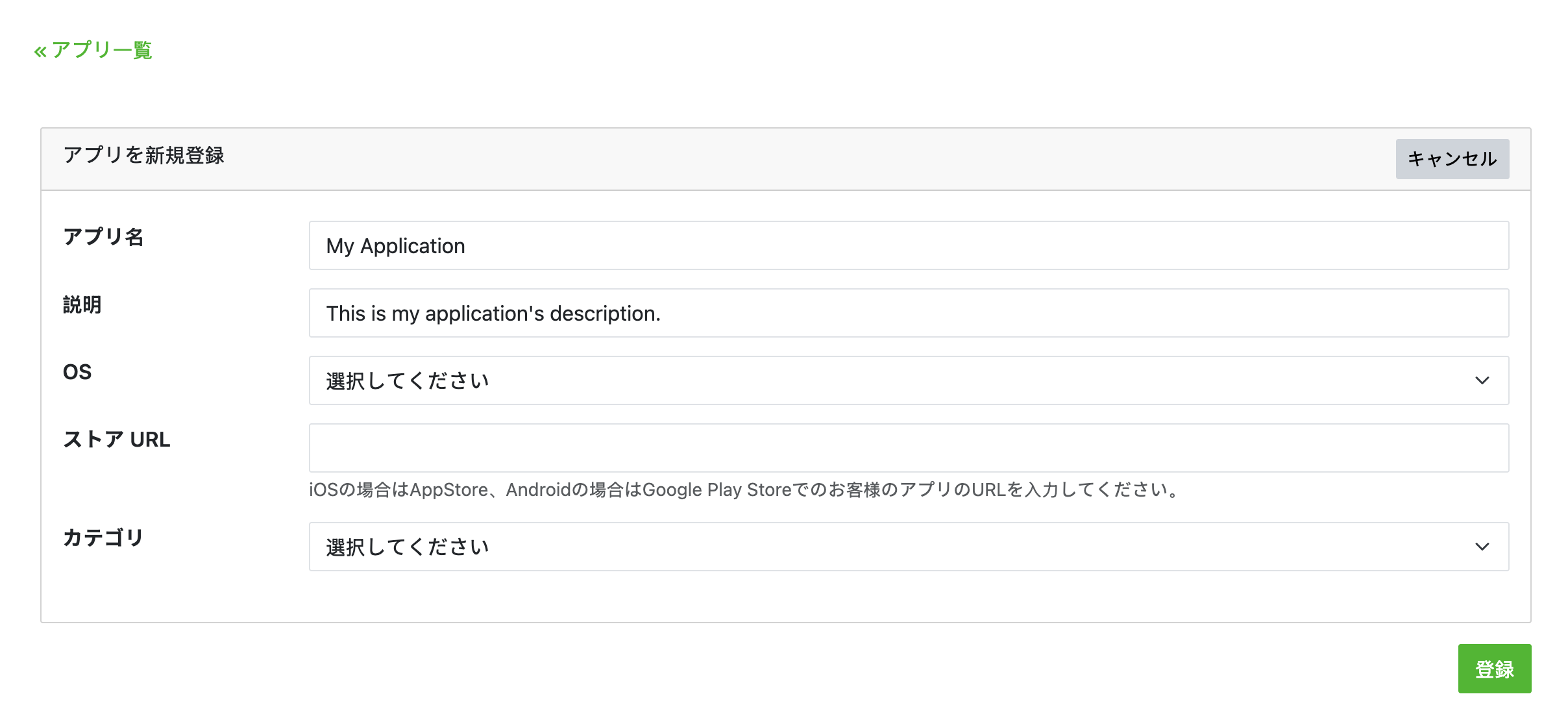
- Fill out the form and click **registration**.
> [!NOTE]
> **Note:** You will need to create a separate app for each platform you intend to support.
- 
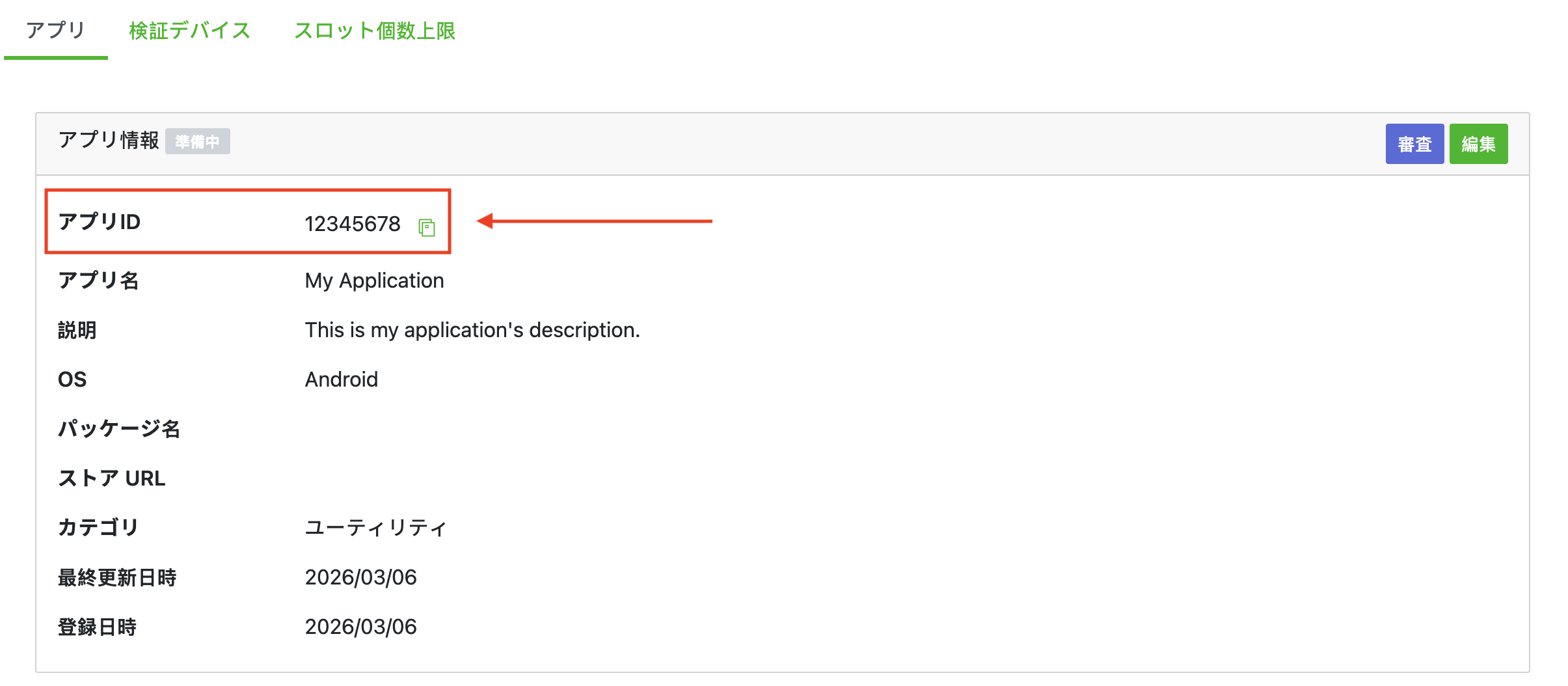
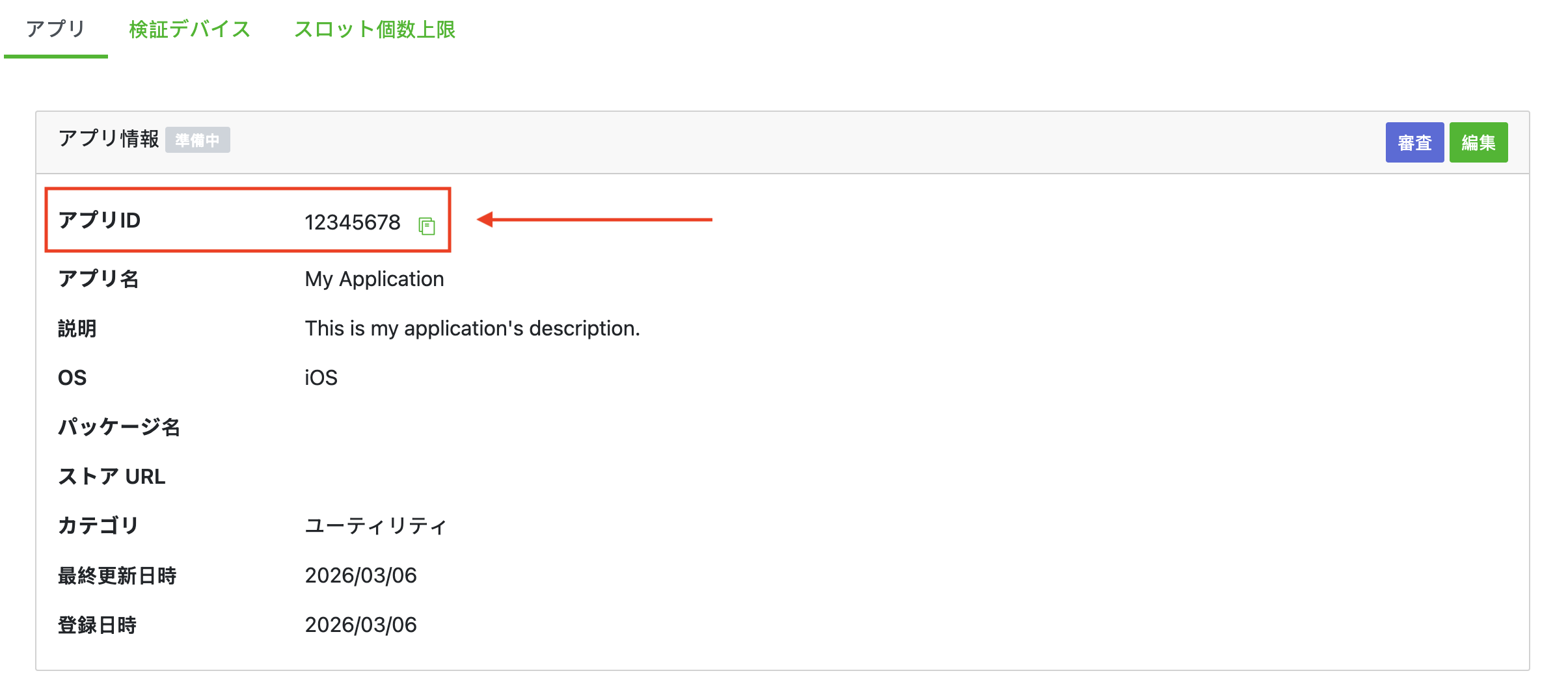
- Take note of the **App ID**.
### Android
### iOS
### Create an ad slot
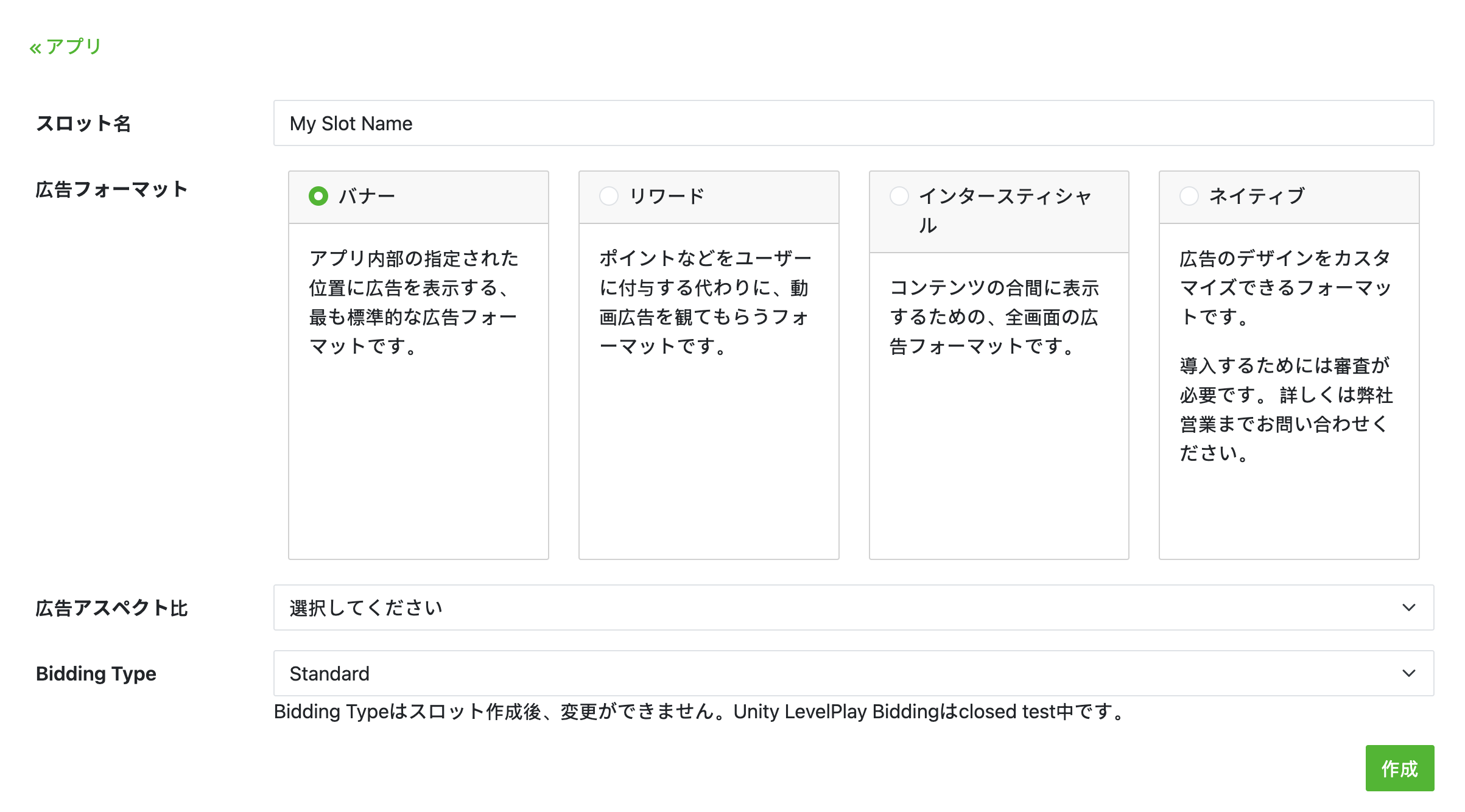
- On the **App** tab, select your app to view your app's details. Under the **Slot** section, click **Add**.
- 
- Fill out the form for details about the slot. For **Bidding Type** , select **Standard** to configure this slot for waterfall mediation, or **Google SDK Bidding** to configure this slot for Bidding. Click **Create** once the form is filled.
> [!NOTE]
> **Note:** The **Advertising format** and **Bidding Type** cannot be changed after registering the slot. Reach out to your LY Ads Network account manager to get access to create native ad placements in the LY Ads Network UI.
- 
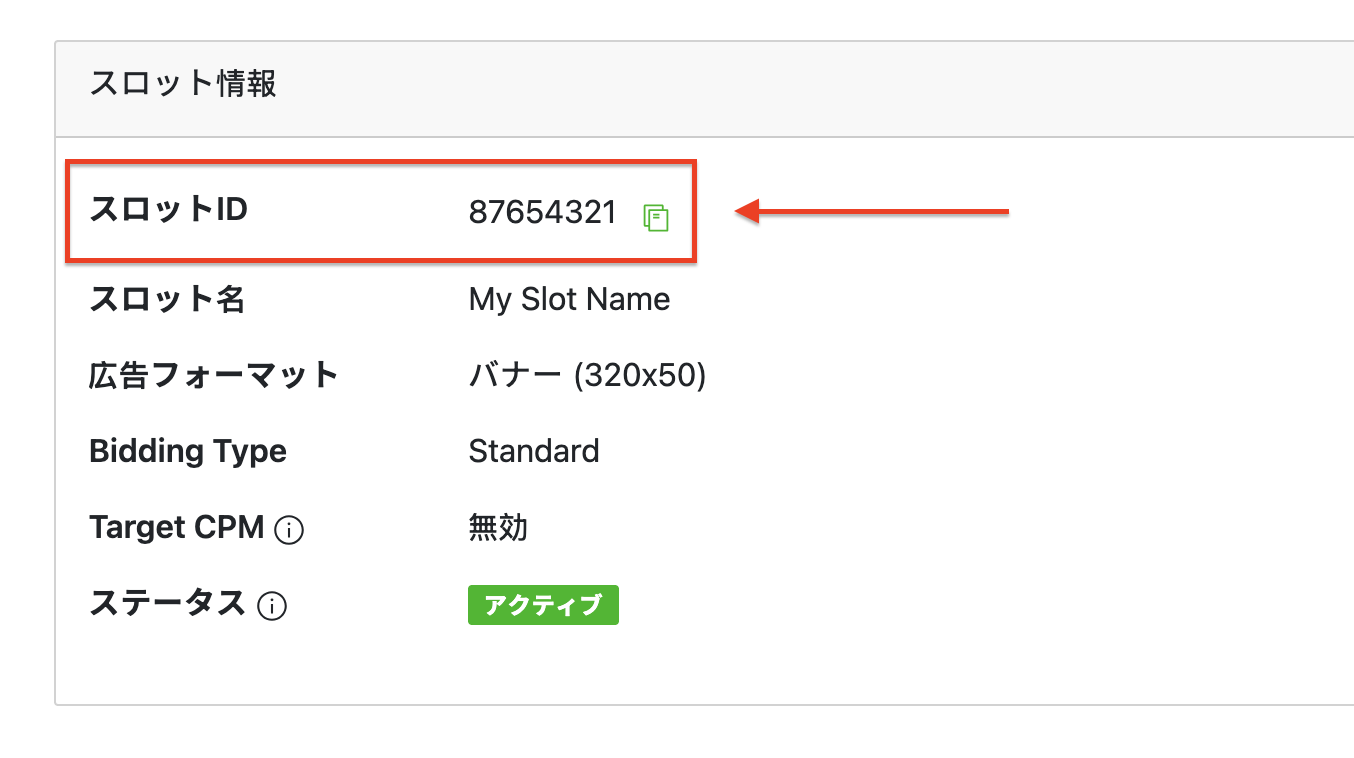
- Take note of the **Slot ID**.
- 
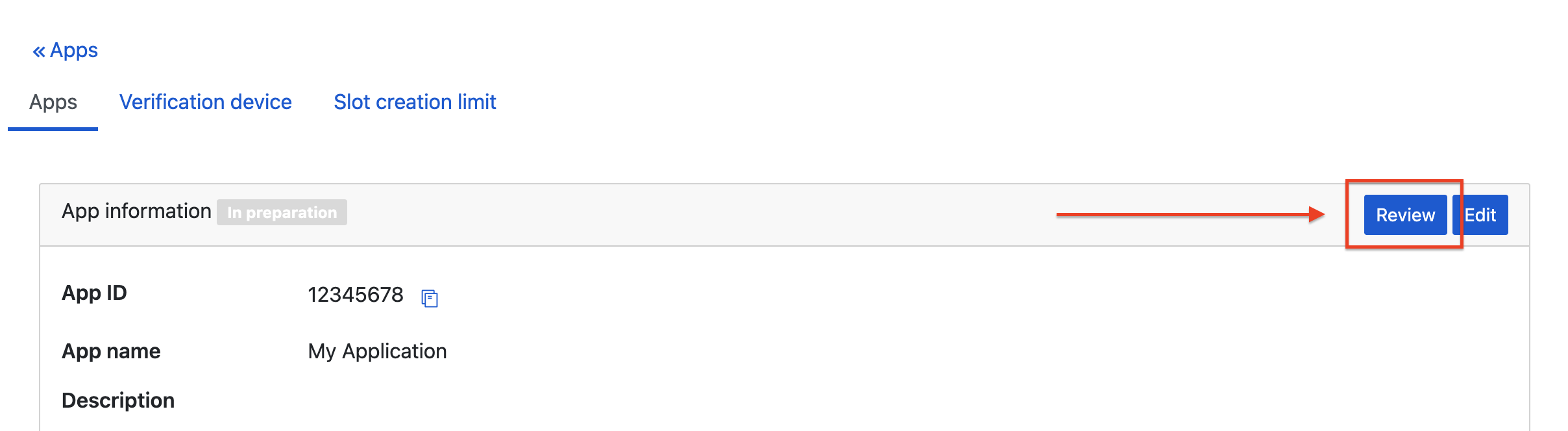
- After you create your first slot, click **Review** on your app's detail page to get approval from LY Ads Network. This may take some time. Contact your LY Ads Network representative if you have any questions.
- 
### Create a Reporting API Key
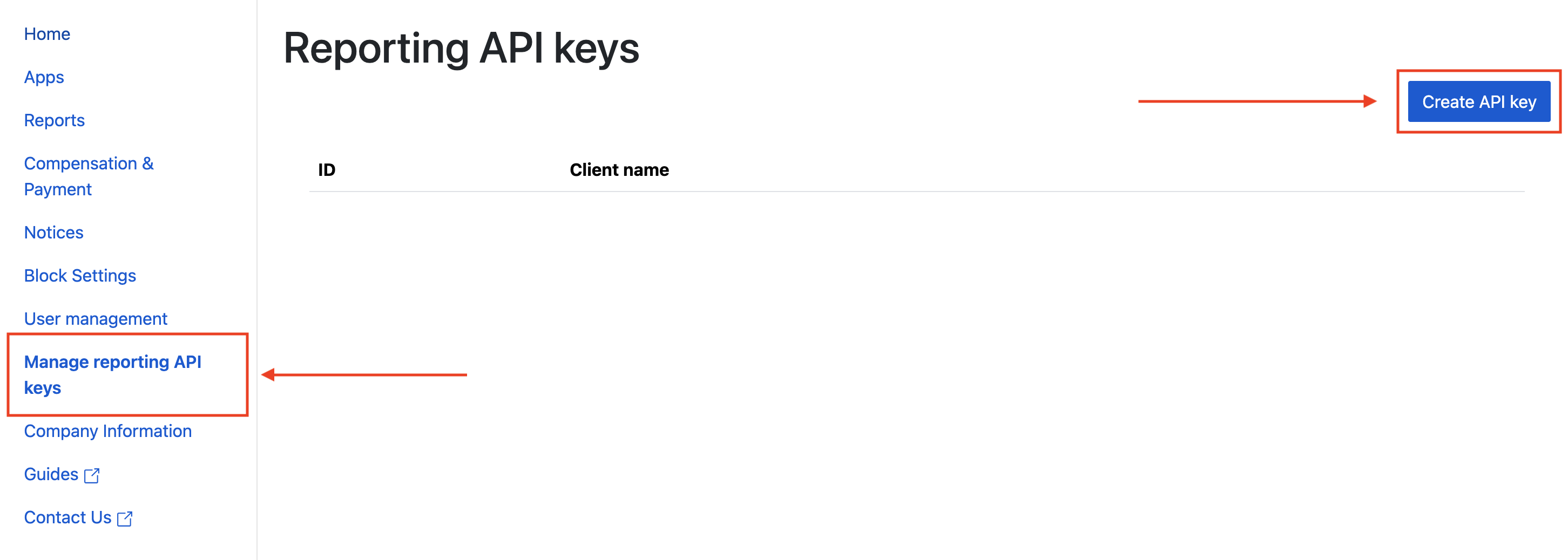
- Navigate to the **Managing reporting API keys** tab and click the **Create API key** button.
- 
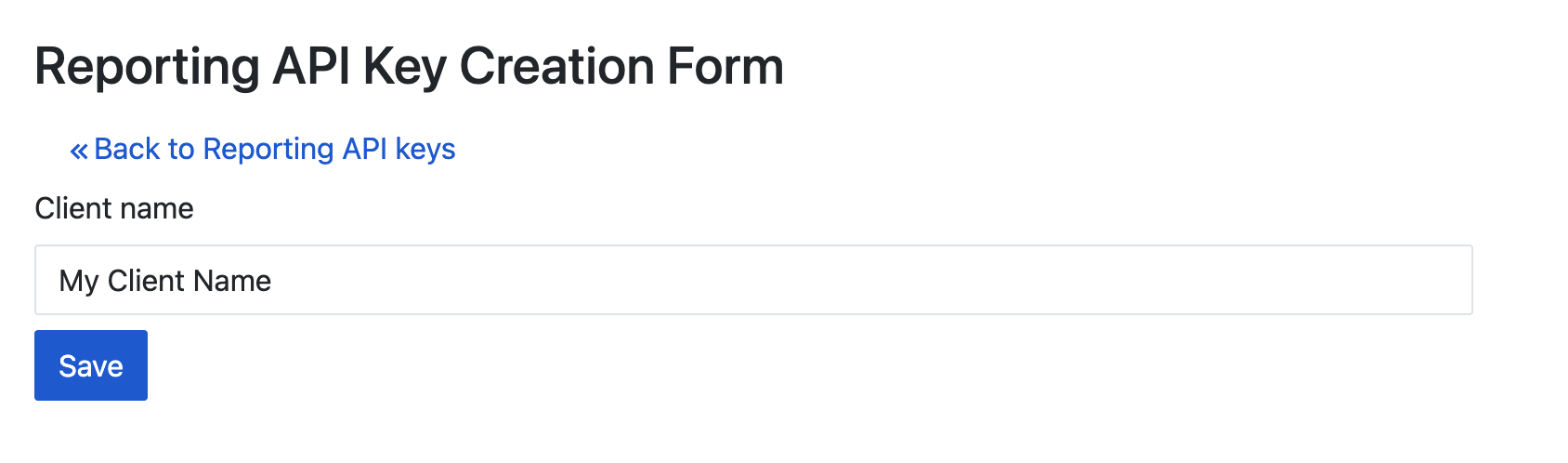
- Fill out the form and click **Save**.
- 
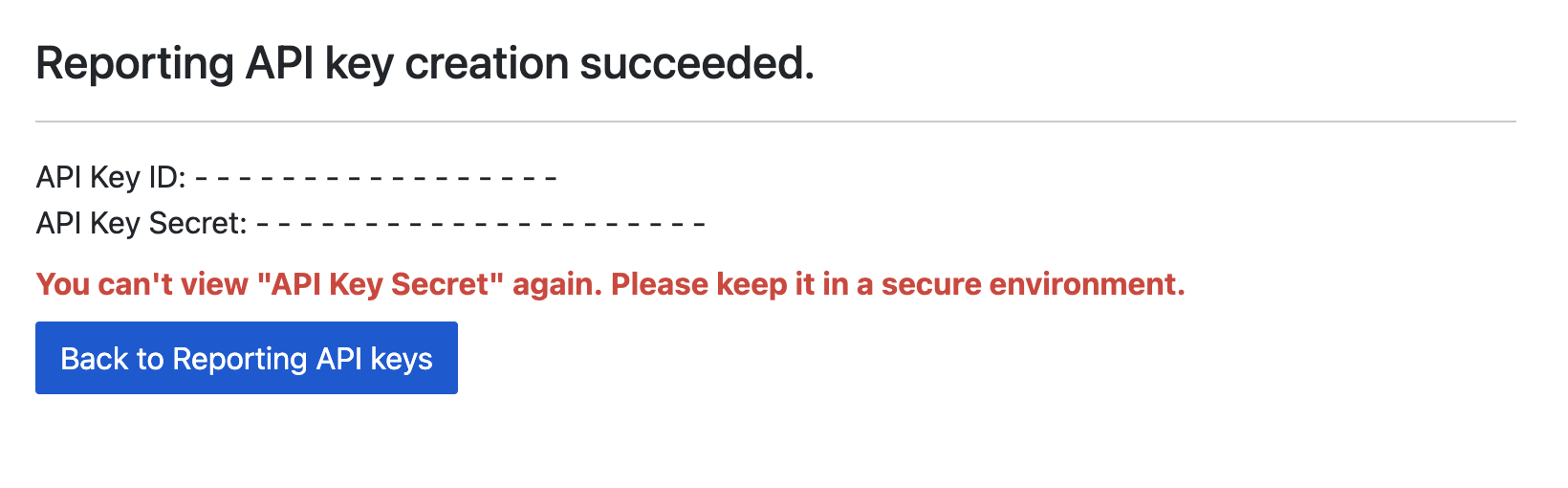
- Take note of your **API Key ID** and **API Key Secret**.
- 
### Update your app-ads.txt
- [Authorized Sellers for Apps app-ads.txt](https://iabtechlab.com/wp-content/uploads/2019/03/app-ads.txt-v1.0-final-.pdf) is an IAB Tech Lab initiative that helps ensure your app ad inventory is only sold through channels you've identified as authorized. To prevent a significant loss in ad revenue, you'll need to implement an `app-ads.txt` file. If you haven't done so already, [set up an app-ads.txt file for your app](https://support.google.com/admob/answer/9363762).
- To implement `app-ads.txt` for LY Ads Network, see [About app-ads.txt](https://adsnetwork-docs.linebiz.com/fivesdk-android/store-release/app-ads-txt.html).
## Step 2: Set up LY Ads Network demand in AdMob UI
### Configure mediation settings for your ad unit
### Android
For instructions, see step 2 in the guide for
[Android](https://developers.google.com/admob/android/mediation/line.md.txt#step-2).
### iOS
For instructions, see step 2 in the guide for
[iOS](https://developers.google.com/admob/ios/mediation/line.md.txt#step-2).
## Step 3: Import the LY Ads Network SDK and adapter
> [!NOTE]
> **Note:** Failure to integrate the compatible LY Ads Network and Google Mobile Ads SDK versions might lead to build issues.
### Integration through pub.dev
- Add the following dependency with the latest versions of the LY Ads Network SDK and adapter in your package's `pubspec.yaml` file:
```yaml
dependencies:
gma_mediation_line: ^2.2.2
```
### Manual Integration
- Download the latest version of Google Mobile Ads mediation plugin for [LY Ads Network](https://pub.dev/packages/gma_mediation_line/versions), extract the downloaded file, and add the extracted plugin folder (and its contents) to your Flutter project. Then, reference the plugin in your `pubspec.yaml` file by adding the following dependency:
```yaml
dependencies:
gma_mediation_line:
path: path/to/local/package
```
## Step 4: Add required code
### Android
No additional code is required for LY Ads Network integration.
### iOS
### SKAdNetwork integration
Follow [LY Ads Network's documentation](https://adsnetwork-docs.linebiz.com/fivesdk-ios/advanced/sk-ad-network.html)
to add the SKAdNetwork identifiers to your project's `Info.plist` file.
## Step 5: Test your implementation
### Enable test ads
- Make sure you [register your test device](https://developers.google.com/admob/flutter/test-ads.md.txt#enable_test_devices) for AdMob.
> [!IMPORTANT]
> **Important:** Disable test mode for AdMob and LY Ads Network before releasing your app.
### Verify test ads
- To verify that you are receiving test ads from LY Ads Network, enable [single ad source testing](https://developers.google.com/admob/flutter/ad-inspector.md.txt#single_ad_source_testing) in ad inspector using the **LY Ads Network** ad source(s).
## Optional steps
### Network-specific parameters
- The LY Ads Network Flutter mediation plugin supports the following additional request parameter which can be passed to the adapter through the `LineMediationExtras` class:
- `enableAdSound` : Specifies the default sound start state of banner, interstitial and rewarded ads.
- Here's a code example of how to create an ad request that sets these parameters:
```dart
LineMediationExtras lineExtras = LineMediationExtras(enableAdSound: true)
AdRequest request = AdRequest(
keywords: ['foo', 'bar'],
contentUrl: 'http://foo.com/bar.html',
mediationExtras: [lineExtras],
);
```
## Error codes
- If the adapter fails to receive an ad from LY Ads Network, publishers can check the underlying error from the ad response using [`ResponseInfo`](https://developers.google.com/admob/flutter/response-info.md.txt) under the following classes:
### Android
```java
com.line.ads
com.google.ads.mediation.line.LineMediationAdapter
```
### iOS
```objective-c
GADMediationAdapterLine
```
- Here are the codes and accompanying messages thrown by the LY Ads Network adapter when an ad fails to load:
### Android
| Error code | Domain | Reason |
|---|---|---|
| 1-10 | com.five_corp.ad | LY Ads Network SDK returned an SDK-specific error. See LY Ads Network's [documentation](https://adsnetwork-docs.linebiz.com/fivesdk-android/trouble-shooting/quick-diagnosis.html) for more details. |
| 101 | com.google.ads.mediation.line | Missing or invalid Application ID. |
| 102 | com.google.ads.mediation.line | Missing or invalid Slot ID. |
| 103 | com.google.ads.mediation.line | The requested ad size does not match a LY Ads Network supported banner ad size. |
| 104 | com.google.ads.mediation.line | Failed to load an interstitial or rewarded ad due to missing activity context. |
| 105 | com.google.ads.mediation.line | LY Ads Network SDK failed to show an interstitial or rewarded ad. |
| 106 | com.google.ads.mediation.line | Failed to load a native ad due to missing assets. |
| 107 | com.google.ads.mediation.line | FiveAd SDK returned a null ad loader. |
### iOS
| Error code | Domain | Reason |
|---|---|---|
| 1-10 | Sent by LY Ads Network SDK | LY Ads Network SDK returned an SDK-specific error. See LY Ads Network's [documentation](https://adsnetwork-docs.linebiz.com/fivesdk-ios/trouble-shooting/quick-diagnosis.html) for more details. |
| 101 | com.google.ads.mediation.line | Invalid server parameters (e.g. Missing Application ID or Slot ID). |
| 102 | com.google.ads.mediation.line | The requested ad size does not match a LY Ads Network supported banner ad size. |
| 103 | com.google.ads.mediation.line | Failed to load an information icon image asset in native ad. |
| 104 | com.google.ads.mediation.line | Failed to collect signals for bidding. |
| 105 | com.google.ads.mediation.line | Failed to initialize the LINE Ads SDK ad loader. |
## Line Flutter Mediation Adapter Changelog
#### Version 2.2.2
- Now requires minimum iOS version `15.0`.
- Fixed an iOS crash when passing `LineMediationExtras`.
- Supports [Line Android adapter version 3.1.1.2](https://github.com/googleads/googleads-mobile-android-mediation/blob/main/ThirdPartyAdapters/line/CHANGELOG.md#version-3112).
- Supports [Line iOS adapter version 3.1.1.0](https://github.com/googleads/googleads-mobile-ios-mediation/blob/main/adapters/Line/CHANGELOG.md#version-3110).
- Built and tested with the Google Mobile Ads Flutter Plugin version 9.1.0.
#### Version 2.2.1
- Supports [Line Android adapter version 3.1.1.2](https://github.com/googleads/googleads-mobile-android-mediation/blob/main/ThirdPartyAdapters/line/CHANGELOG.md#version-3112).
- Supports [Line iOS adapter version 3.1.1.0](https://github.com/googleads/googleads-mobile-ios-mediation/blob/main/adapters/Line/CHANGELOG.md#version-3110).
- Built and tested with the Google Mobile Ads Flutter Plugin version 9.1.0
#### Version 2.2.0
- Supports [Line Android adapter version 3.1.1.1](https://github.com/googleads/googleads-mobile-android-mediation/blob/main/ThirdPartyAdapters/line/CHANGELOG.md#version-3111).
- Supports [Line iOS adapter version 3.1.0.0](https://github.com/googleads/googleads-mobile-ios-mediation/blob/main/adapters/Line/CHANGELOG.md#version-3100).
- Built and tested with the Google Mobile Ads Flutter Plugin version 9.1.0
#### Version 2.1.3
- Updated to support Google Mobile Ads Flutter Plugin version 9.1.0.
- Added Swift Package Manager support.
- Supports [Line Android adapter version 3.1.1.1](https://github.com/googleads/googleads-mobile-android-mediation/blob/main/ThirdPartyAdapters/line/CHANGELOG.md#version-3111).
- Supports [Line iOS adapter version 3.0.1.2](https://github.com/googleads/googleads-mobile-ios-mediation/blob/main/adapters/Line/CHANGELOG.md#version-3012).
- Built and tested with the Google Mobile Ads Flutter Plugin version 9.1.0
#### Version 2.1.2
- Supports [Line Android adapter version 3.1.1.1](https://github.com/googleads/googleads-mobile-android-mediation/blob/main/ThirdPartyAdapters/line/CHANGELOG.md#version-3111).
- Supports [Line iOS adapter version 3.0.1.2](https://github.com/googleads/googleads-mobile-ios-mediation/blob/main/adapters/Line/CHANGELOG.md#version-3012).
- Built and tested with the Google Mobile Ads Flutter Plugin version 9.0.0
#### Version 2.1.1
- Supports [Line Android adapter version 3.1.1.0](https://github.com/googleads/googleads-mobile-android-mediation/blob/main/ThirdPartyAdapters/line/CHANGELOG.md#version-3110).
- Supports [Line iOS adapter version 3.0.1.2](https://github.com/googleads/googleads-mobile-ios-mediation/blob/main/adapters/Line/CHANGELOG.md#version-3012).
- Built and tested with the Google Mobile Ads Flutter Plugin version 9.0.0
#### Version 2.1.0
- Updated minimum Flutter version to 3.38.1
- Updated to support Google Mobile Ads Flutter Plugin version 8.0.0
- Supports [Line Android adapter version 3.1.0.0](https://github.com/googleads/googleads-mobile-android-mediation/blob/main/ThirdPartyAdapters/line/CHANGELOG.md#version-3100).
- Supports [Line iOS adapter version 3.0.1.0](https://github.com/googleads/googleads-mobile-ios-mediation/blob/main/adapters/Line/CHANGELOG.md#version-3010).
- Built and tested with the Google Mobile Ads Flutter Plugin version 8.0.0
#### Version 2.0.0
- Updated minimum Flutter version to 3.35.1
- Updated to support Google Mobile Ads Flutter Plugin version 7.0.0
- Supports [Line Android adapter version 3.0.1.0](https://github.com/googleads/googleads-mobile-android-mediation/blob/main/ThirdPartyAdapters/line/CHANGELOG.md#version-3010).
- Supports [Line iOS adapter version 3.0.0.0](https://github.com/googleads/googleads-mobile-ios-mediation/blob/main/adapters/Line/CHANGELOG.md#version-3000).
- Built and tested with the Google Mobile Ads Flutter Plugin version 7.0.0
#### Version 1.0.6
- Supports [Line Android adapter version 2.9.20251028.0](https://github.com/googleads/googleads-mobile-android-mediation/blob/main/ThirdPartyAdapters/line/CHANGELOG.md#version-29202510280).
- Supports [Line iOS adapter version 2.9.20251119.0](https://github.com/googleads/googleads-mobile-ios-mediation/blob/main/adapters/Line/CHANGELOG.md#version-29202511190).
- Built and tested with the Google Mobile Ads Flutter Plugin version 6.0.0
#### Version 1.0.5
- Supports [Line Android adapter version 2.9.20250924.1](https://github.com/googleads/googleads-mobile-android-mediation/blob/main/ThirdPartyAdapters/line/CHANGELOG.md#version-29202509241).
- Supports [Line iOS adapter version 2.9.20250930.0](https://github.com/googleads/googleads-mobile-ios-mediation/blob/main/adapters/Line/CHANGELOG.md#version-29202509300).
- Built and tested with the Google Mobile Ads Flutter Plugin version 6.0.0
#### Version 1.0.4
- Supports [Line Android adapter version 2.9.20250718.0](https://github.com/googleads/googleads-mobile-android-mediation/blob/main/ThirdPartyAdapters/line/CHANGELOG.md#version-29202507180).
- Supports [Line iOS adapter version 2.9.20250512.0](https://github.com/googleads/googleads-mobile-ios-mediation/blob/main/adapters/Line/CHANGELOG.md#version-29202505120).
- Built and tested with the Google Mobile Ads Flutter Plugin version 6.0.0
#### Version 1.0.3
- Supports [Line Android adapter version 2.9.20250519.0](https://github.com/googleads/googleads-mobile-android-mediation/blob/main/ThirdPartyAdapters/line/CHANGELOG.md#version-29202505190).
- Supports [Line iOS adapter version 2.9.20250512.0](https://github.com/googleads/googleads-mobile-ios-mediation/blob/main/adapters/Line/CHANGELOG.md#version-29202505120).
- Built and tested with the Google Mobile Ads Flutter Plugin version 6.0.0
#### Version 1.0.2
- Supports [Line Android adapter version 2.9.20250317.1](https://github.com/googleads/googleads-mobile-android-mediation/blob/main/ThirdPartyAdapters/line/CHANGELOG.md#version-29202503171).
- Supports [Line iOS adapter version 2.9.20241106.3](https://github.com/googleads/googleads-mobile-ios-mediation/blob/main/adapters/Line/CHANGELOG.md#version-29202411063).
- Built and tested with the Google Mobile Ads Flutter Plugin version 6.0.0
#### Version 1.0.1
- Supports [Line Android adapter version 2.9.20250110.1](https://github.com/googleads/googleads-mobile-android-mediation/blob/main/ThirdPartyAdapters/line/CHANGELOG.md#version-29202501101).
- Supports [Line iOS adapter version 2.9.20241106.2](https://github.com/googleads/googleads-mobile-ios-mediation/blob/main/adapters/Line/CHANGELOG.md#version-29202411062).
- Built and tested with the Google Mobile Ads Flutter Plugin version 5.3.1.
#### Version 1.0.0
- Initial release.
- Supports [Line Android adapter version 2.9.20250110.0](https://github.com/googleads/googleads-mobile-android-mediation/blob/main/ThirdPartyAdapters/line/CHANGELOG.md#version-29202501100).
- Supports [Line iOS adapter version 2.9.20241106.1](https://github.com/googleads/googleads-mobile-ios-mediation/blob/main/adapters/Line/CHANGELOG.md#version-29202411061).
- Built and tested with the Google Mobile Ads Flutter Plugin version 5.3.1.