# Support managed configurations
Some apps designed for enterprises include built-in settings called **managed
configurations** that IT admins can configure remotely. For example, an app may
have the option to only sync data when a device is connected to Wi-Fi. Providing
IT admins the ability to specify managed configurations and apply them to
devices is a requirement for all [solution sets](https://developers.google.com/android/work/requirements).
There are two ways you can support managed configurations in your EMM console:
- Create your own UI and apply the settings via `managedConfiguration` in [ApplicationPolicy](https://developers.google.com/android/management/reference/rest/v1/enterprises.policies#applicationpolicy).
- Add the managed configurations iframe to your console (instructions detailed below) and apply settings via `managedConfigurationTemplate` in [ApplicationPolicy](https://developers.google.com/android/management/reference/rest/v1/enterprises.policies#applicationpolicy)
*** ** * ** ***
The **managed configurations iframe** is an embeddable UI that lets IT admins
save, edit, and delete an app's managed configuration settings. You can, for
example, display a button (or similar UI element) in an app's details or
settings page that opens the iframe.
## Actions available to IT admins from the iframe
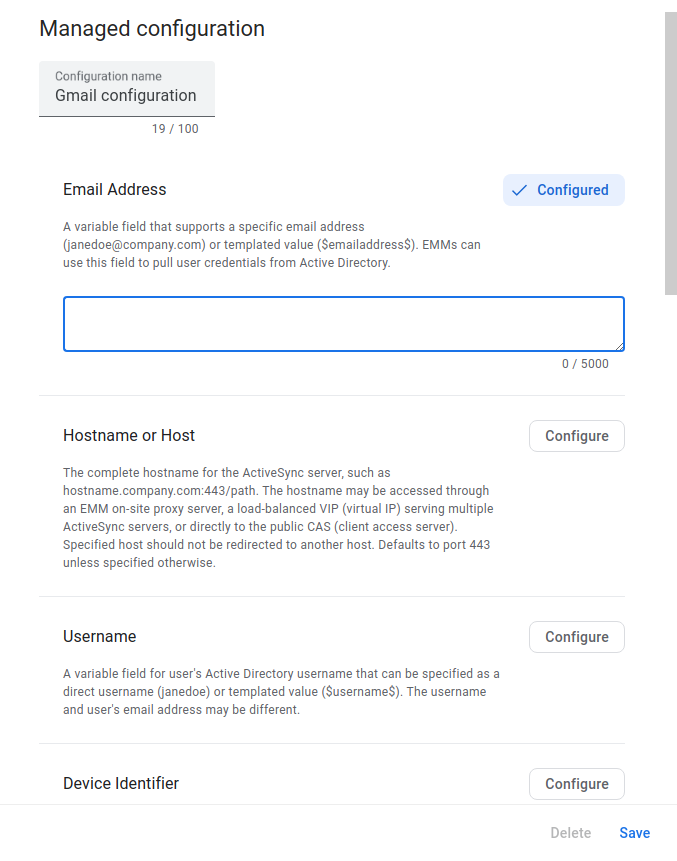 **Figure 1.** Example managed configurations iframe for Gmail.
#### Set and save configuration profiles
The iframe retrieves and displays the managed configurations schema for a
specified app. Within the iframe, an IT admin can set configurations and save
them as a configuration profile. Each time an IT admin saves a new
configuration profile, the iframe returns a unique identifier called `mcmId`.
This makes it possible for IT admins to create multiple profiles for the same
app.
#### Edit configuration profiles
The iframe is capable of displaying saved configuration profiles. IT admins can
update the settings within a profile and save their changes.
#### Delete configuration profiles
IT admins can delete configuration profiles from the iframe. This feature is
disabled by default.
## Add the iframe to your console
### Generate a web token
Use [`enterprises.webTokens.create`](https://developers.google.com/android/management/reference/rest/v1/enterprises.webTokens/create)
to generate a web token that identifies the enterprise, and set [`iframeFeature`](https://developers.google.com/android/management/reference/rest/v1/enterprises.webTokens#iframefeature) to
`MANAGED_CONFIGURATIONS`. You must include the returned token, along with other
parameters, when rendering the iframe in your console.
### Render the iframe
Here's an example of how to render the managed configurations iframe:
#### URL parameters
The table below lists all the available parameters for the iframe URL.
| Parameter | Required | Description |
|---|---|---|
| `token` | Yes | The token returned from `Enterprises.createWebToken`. |
| `packageName` | Yes | The product ID of the app. For example, `com.google.android.gm`. |
| `mcmId` | No | The ID of a managed configurations profile. |
| `canDelete` | No | If **TRUE** , enables a button in the iframe that allows IT admins to delete the managed configurations profile. If **FALSE** (default value), the button is disabled. |
| `locale` | No | A well-formed [BCP 47 language](https://www.w3.org/International/articles/language-tags/) tag that is used to localize the content in the iframe. If not specified, the default value is *en_US*. |
### Iframe events
You should also handle the following events as part of your integration.
| Event | Description |
|---|---|
| `onconfigupdated` | The user updates an existing managed configurations profile or creates a new one. This returns an object containing: ``` { "mcmId": The ID of the managed configurations profile. "name": The name of the updated or newly created managed configurations profile. } ``` |
| `onconfigdeleted` | The user deletes an existing managed configurations profile. This returns an object containing: ``` { "mcmId": The ID of the managed configurations profile. } ``` |
The sample below shows how to listen for `onconfigupdated`, as an example:
iframe.register('onconfigupdated', function(event) {
console.log(event);
}, gapi.iframes.CROSS_ORIGIN_IFRAMES_FILTER);
## Updates to an app's managed configurations schema
If the developer updates an app's managed configuration schema, saved
configuration profiles are automatically updated. For example, if the developer
removes an option, the option will be removed from all existing configuration
profiles for the app. If the developer adds an option, the default value for the
option (defined by the developer) will be added to all existing configuration
profiles for the app.
## Apply configuration profiles to policy
Each configuration profile is saved as a unique `mcmId`. To apply a
configuration profile to a policy, specify `mcmId` in
[`managedConfigurationTemplate`](https://developers.google.com/android/management/reference/rest/v1/enterprises.policies#ManagedConfigurationTemplate).
> [!WARNING]
> **Warning:** `ApplicationPolicy` returns an error if both `managedConfigurations` and `managedConfigurationTemplate` are set in a single policy. Please only set one.
*** ** * ** ***
## Understanding select/deselect behaviour
The managed configurations iframe now allows IT admins to explicitly deselect
the app restrictions of a managed configuration when they do not need them. This
is a change from previous behaviour and may have an impact to what restrictions
are sent to your app based on the admin's selection.
The section below outlines how the managed configurations iframe behaves with
this new deselect pattern and what developers can expect to be sent as part of
their managed configuration.
### Using default value for an app restriction
If the app restrictions with type [bool](https://developer.android.com/reference/android/content/RestrictionEntry#TYPE_BOOLEAN),
[choice](https://developer.android.com/reference/android/content/RestrictionEntry#TYPE_CHOICE),
[integer](https://developer.android.com/reference/android/content/RestrictionEntry#TYPE_INTEGER),
[multi-select](https://developer.android.com/reference/android/content/RestrictionEntry#TYPE_MULTI_SELECT)
or [string](https://developer.android.com/reference/android/content/RestrictionEntry#TYPE_STRING)
are provided with a default value, the default value will be applied as the
value of the app restriction when admins save the managed configuration without
applying any changes on that app restriction.
For example, with the following app restriction schema:
"restrictions": [{
"key": "bool_key",
"restrictionType": "bool",
"defaultValue": {
"type": "bool",
"valueBool": false
}
}]
The app restrictions sent to the device will be:
"restrictions": [{
"key": "bool_key",
"restrictionType": "bool",
"value": {
"type": "bool",
"valueBool": false
}
}]
### Without using default values for app restrictions
If the app restrictions with type [bool](https://developer.android.com/reference/android/content/RestrictionEntry#TYPE_BOOLEAN),
[choice](https://developer.android.com/reference/android/content/RestrictionEntry#TYPE_CHOICE),
[integer](https://developer.android.com/reference/android/content/RestrictionEntry#TYPE_INTEGER),
[multi-select](https://developer.android.com/reference/android/content/RestrictionEntry#TYPE_MULTI_SELECT)
or [string](https://developer.android.com/reference/android/content/RestrictionEntry#TYPE_STRING)
are not provided with a default value, these app restrictions will not be
included when admins save the managed configuration without applying any changes
on that app restriction.
For example, with the following app restriction schema:
"restrictions": [{
"key": "bool_key",
"restrictionType": "bool"
// defaultValue absent.
}]
The app restrictions sent to the device will be:
"restrictions": [
// Empty
]
### Using bundles within your schema
This section applies to [bundle](https://developer.android.com/reference/android/content/RestrictionEntry#TYPE_BUNDLE)
app restrictions:
#### Having at least one child app restriction with a default value in a bundle app restriction
If within the [bundle](https://developer.android.com/reference/android/content/RestrictionEntry#TYPE_BUNDLE)
app restriction at least one of the child app restrictions with type [bool](https://developer.android.com/reference/android/content/RestrictionEntry#TYPE_BOOLEAN),
[choice](https://developer.android.com/reference/android/content/RestrictionEntry#TYPE_CHOICE),
[integer](https://developer.android.com/reference/android/content/RestrictionEntry#TYPE_INTEGER),
[multi-select](https://developer.android.com/reference/android/content/RestrictionEntry#TYPE_MULTI_SELECT)
or [string](https://developer.android.com/reference/android/content/RestrictionEntry#TYPE_STRING)
are provided with a default value, the default value will be applied as the
value of the app restriction and those without default values will be excluded
when admins save the managed configuration without applying any changes on that
app restriction.
"restrictions": [{
"key": "bundle_key",
"restrictionType": "bundle",
"nestedRestriction": [{
"key": "bool_key_1",
"restrictionType": "bool",
"defaultValue": {
"type": "bool",
"valueBool": false
}
},
{
"key": "bool_key_2",
"restrictionType": "bool"
// defaultValue absent.
}
]
}]
The app restrictions sent to the device will be:
"restrictions": [{
"key": "bundle_key",
"restrictionType": "bundle",
"nestedRestriction": [{
"key": "bool_key_1",
"restrictionType": "bool",
"value": {
"type": "bool",
"valueBool": false
}
},
// The bool_key_2 child app restriction is not included.
]
}]
#### All child app restrictions without default values
If within the [bundle](https://developer.android.com/reference/android/content/RestrictionEntry#TYPE_BUNDLE)
app restriction all of the child app restrictions with type
[bool](https://developer.android.com/reference/android/content/RestrictionEntry#TYPE_BOOLEAN),
[choice](https://developer.android.com/reference/android/content/RestrictionEntry#TYPE_CHOICE),
[integer](https://developer.android.com/reference/android/content/RestrictionEntry#TYPE_INTEGER),
[multi-select](https://developer.android.com/reference/android/content/RestrictionEntry#TYPE_MULTI_SELECT)
or [string](https://developer.android.com/reference/android/content/RestrictionEntry#TYPE_STRING)
are not provided with a default value, the [bundle](https://developer.android.com/reference/android/content/RestrictionEntry#TYPE_BUNDLE)
app restriction will not be included when admins save the managed configuration
without applying any changes on that app restriction.
For example, with the following app restriction schema:
"restrictions": [{
"key": "bundle_key",
"restrictionType": "bundle",
"nestedRestriction": [{
"key": "bool_key_1",
"restrictionType": "bool",
// defaultValue absent.
},
{
"key": "bool_key_2",
"restrictionType": "bool"
// defaultValue absent.
}
]
}]
The app restrictions sent to the device will be:
"restrictions": [
// Empty
]
> [!NOTE]
> **Note:** This does not apply if the restriction is included in a `bundle_array`. See the following section for details.
### Using bundle_array within your schema
This section applies to [bundle_array](https://developer.android.com/reference/android/content/RestrictionEntry#TYPE_BUNDLE_ARRAY)
app restrictions. It is not relevant if the child app restrictions with type
[bool](https://developer.android.com/reference/android/content/RestrictionEntry#TYPE_BOOLEAN),
[choice](https://developer.android.com/reference/android/content/RestrictionEntry#TYPE_CHOICE),
[integer](https://developer.android.com/reference/android/content/RestrictionEntry#TYPE_INTEGER),
[multi-select](https://developer.android.com/reference/android/content/RestrictionEntry#TYPE_MULTI_SELECT)
or [string](https://developer.android.com/reference/android/content/RestrictionEntry#TYPE_STRING)
have default values.
For example, with the following app restriction schema:
"restrictions": [{
"key": "bundle_array_key",
"restrictionType": "bundleArray",
"nestedRestriction": [{
"key": "bundle_key",
"restrictionType": "bundle",
"nestedRestriction": [{
"key": "bool_key",
"restrictionType": "bool",
"defaultValue": {
"type": "bool",
"valueBool": true
}
}]
}]
}]
#### Having at least one bundle group in the bundle_array app restriction
If at least one [bundle](https://developer.android.com/reference/android/content/RestrictionEntry#TYPE_BUNDLE)
group is set, the [bundle_array](https://developer.android.com/reference/android/content/RestrictionEntry#TYPE_BUNDLE_ARRAY)
app restriction will be included when admins save the managed configuration.
The app restrictions sent to the device will be:
"restrictions": [{
"key": "bundle_array_key",
"restrictionType": "bundleArray",
"nestedRestriction": [{
"key": "bundle_key",
"restrictionType": "bundle",
"nestedRestriction": [{
"key": "bool_key",
"restrictionType": "bool",
"value": {
"type": "bool",
"valueBool": true
}
}]
}]
}]
If one restriction or bundle group is saved, **all restrictions/bundles**
within the entire `bundle_array` will be set by the following precedence:
- the value chosen by the admin
- the default value listed for that bundle/restriction.
- the value displayed in the iFrame if there is no default value
> [!NOTE]
> **Note:** It is strongly suggested to provide a default for restrictions/bundles included in a `bundle_array`, otherwise the bundle will use the value displayed in the iframe (the first value listed in the entries for that key).
#### No bundle groups in the bundle_array app restriction
The [bundle_array](https://developer.android.com/reference/android/content/RestrictionEntry#TYPE_BUNDLE_ARRAY)
app restriction will not be included when admins save the managed configuration
without adding a [bundle](https://developer.android.com/reference/android/content/RestrictionEntry#TYPE_BUNDLE)
group. The app restrictions sent to the device will be:
"restrictions": [
// Empty
]