# Overview
Android Enterprise is a Google-led initiative to enable the use of Android
devices and apps in the workplace. The program offers APIs and other tools for
developers to integrate support for Android into their enterprise mobility
management (EMM) solutions. This site provides developers with an overview of
the program and the background information required to start building an Android
Enterprise solution.
*** ** * ** ***
## Android devices: management use cases
This section describes the management options available in Android to support
managed deployments. You can use Android Enterprise's tools and services to
support any or all of the following options in your EMM solution.
### Work profile for employee-owned devices (BYOD)
 **Figure 1.** Personally-owned device with a work profile.
BYOD devices can be set up with a **work profile**---a feature
built into Android 5.1+ that allows work apps and data to be stored in a
separate, self-contained space within a device. An employee can continue to use
their device as normal; all their personal apps and data remain on the device's
primary profile.
An employee's organization has full management control of the apps, data, and
settings in their device's work profile, but has no visibility or access to the
device's personal profile. This distinct separation gives organizations control
over corporate data and security without compromising employee privacy.
### Work profile for mixed-used company-owned devices
 **Figure 2.** Company-owned device with a work profile
Work profiles can also be used to enable mixed work and personal use on
company-owned devices. Like with a personally-owned device, organizations have
full management control of the apps, data, and settings in a work profile.
With a device that's company-owned, organizations can also enforce many
device-wide policies (e.g configure Wi-Fi settings, block USB file transfers)
and restrictions that apply to a device's personal profile (e.g. disallow
certain apps).
These additional management capabilities allow organizations to keep
company-owned devices compliant with IT policies while maintaining employee
privacy---the personal profile of a company-owned device, including its apps,
data, and usage, aren't visible or accessible to organizations.
### Full management for work-only company-owned devices
 **Figure 3.** Fully managed device.
**Fully managed** deployments are for company-owned devices
intended *exclusively for work purposes* . With a fully managed Android 5.0+
device, organizations can enforce
[Android's full range of management policies](https://developers.google.com/android/work/requirements/fully-managed-device), including device-level policies that are
unavailable to work profiles.
### Full management for dedicated devices
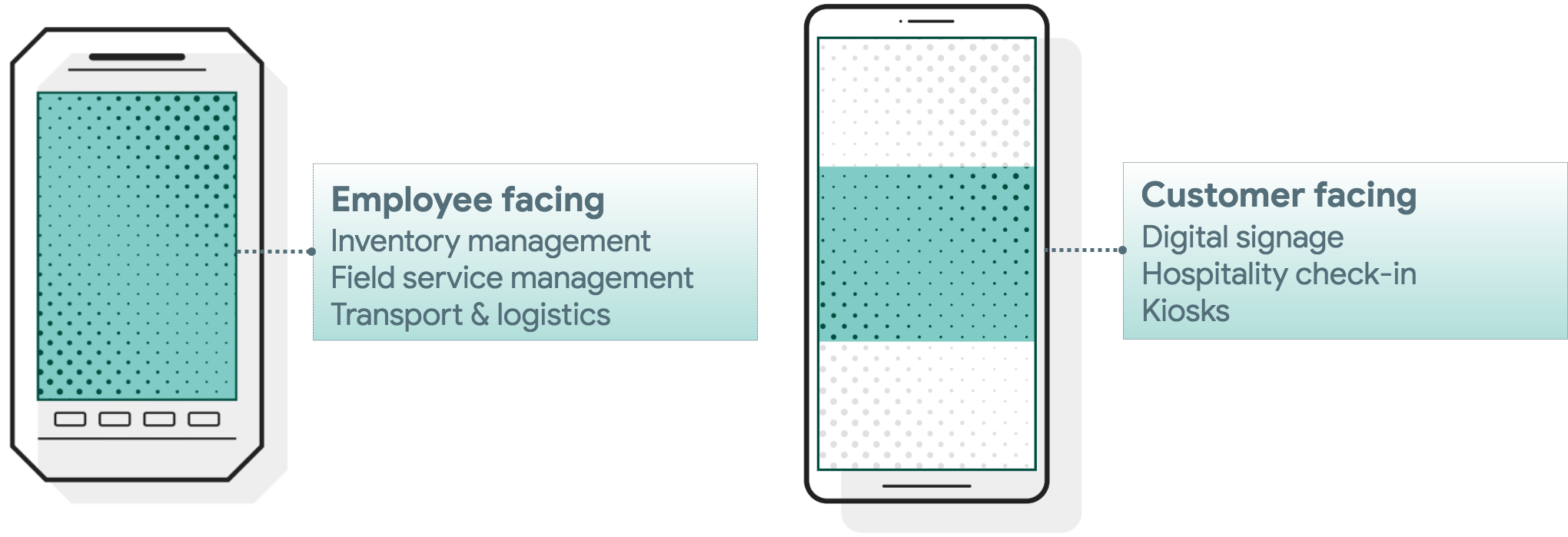 **Figure 4.** Left: Example employee-facing scenarios. Right: Example customer-facing scenarios.
**Dedicated devices** (formerly called corporate-owned
single-use, or COSU) are a subset of fully managed devices that serve a
specific purpose. Android comes with a broad set of management features that
allow organizations to configure devices for everything from employee-facing
factory and industrial environments, to customer-facing signage and kiosk
purposes.
Dedicated devices are typically locked to a single app or set of apps.
Android 6.0+ offers granular control over a device's lock screen, status bar,
keyboard, and other key features, to prevent users from enabling other apps or
performing other actions on dedicated devices.
*** ** * ** ***
## Integrate Android into your EMM solution
An Android Enterprise solution is a combination of three components: your EMM
console, [Android Device Policy](https://play.google.com/store/apps/details?id=com.google.android.apps.work.clouddpc),
and managed Google Play.
### EMM console
EMM solutions typically take the form of an EMM console---a web application you
develop that allows IT admins to manage their organization, devices, and apps.
To support these functions for Android, you integrate your console with the APIs
and UI components provided by Android Enterprise.
### Android Device Policy
All Android devices that an organization manages through your EMM console must
install [Android Device Policy](https://play.google.com/store/apps/details?id=com.google.android.apps.work.clouddpc)
during setup. Android Device Policy is an app supplied by Android that
automatically applies the management policies set in your EMM console to devices.
### Managed Google Play
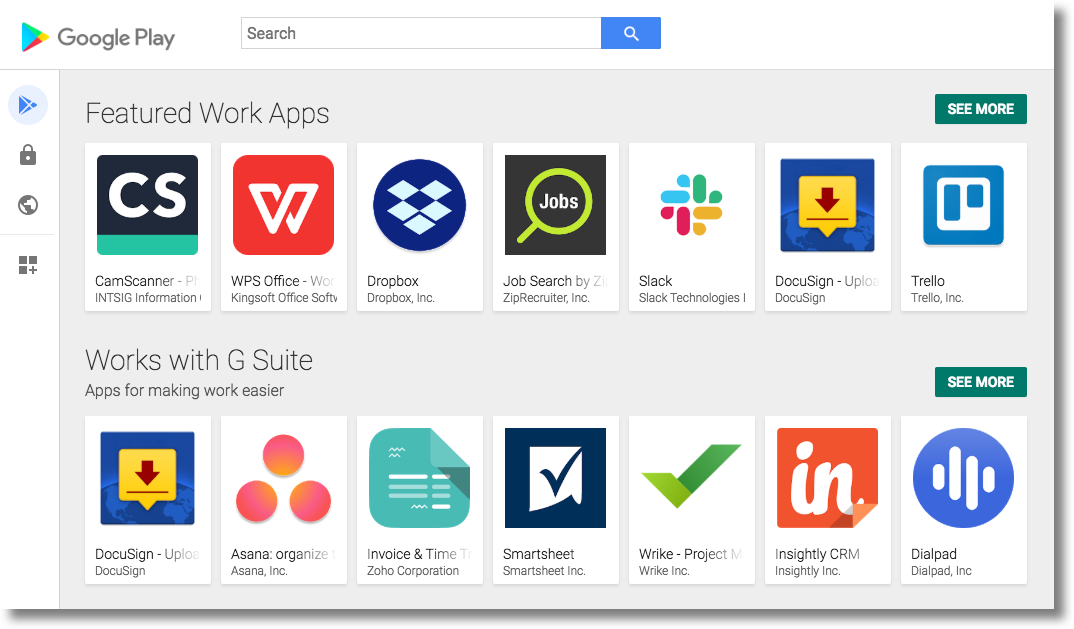 **Figure 5.** Managed Google Play.
Managed Google Play facilitates app management capabilities for Android
Enterprise solutions. It combines the familiar user experience and app store
features of Google Play with a set of management capabilities designed
specifically for organizations.
Managed Google Play can be embedded into your **EMM console** to provide
**IT admins** with features such as:
- Public app search
- Private app publishing
- Web app publishing
- App organization
On **managed devices**, managed Google Play is the organization's app store.
The interface is similar to Google Play---users can browse apps, view app details,
and install them. Unlike the public version of Google Play, users can only
install apps from managed Google Play that their organization approves for them.
*** ** * ** ***
## Android EMM lifecycle features
This section provides an overview of the major features you can integrate into
your EMM solution.
### Onboard new organizations
Android Enterprise provides APIs and an online setup flow for you to onboard new
organizations. When an organization completes the onboarding process, you create
an `Enterprise` resource for it.
> [!IMPORTANT]
> **Key Point:** An `Enterprise` represents the binding between the organization and your EMM solution---all the users and devices that the organization manages through your solution will belong to its `Enterprise`.
There are two types of enterprise bindings:
**managed Google Play Accounts enterprises** and **managed Google domains**.
### Managed Google Play Accounts enterprise
*This is a legacy enterprise binding type, used for organizations that signed-up before 2024. Organizations may be assigned a managed Google Play Accounts enterprise binding when they sign up now, to support certain unusual situations.*
With this type of enterprise binding, you may only provision managed Google
Play Accounts for devices and end users. Managed Google Play Accounts provide
access to managed Google Play, allowing users to install and use work apps selected by IT
admins. If the organization uses a 3rd-party identity service, you can link
managed Google Play Accounts with the organization's existing identity
accounts.
Managed Google Play Accounts have limited use, solely for managing apps with
the Google Play Store. These accounts can't be used with any other Google or
third-party services. Devices that only have a managed Google Play Account
won't be able to use [cross-device features](https://www.android.com/better-together/).
### Managed Google domain
With this type of enterprise binding, you can provision devices using either
managed Google Accounts or managed Google Play Accounts. In addition to managing
Android devices, the IT admin can use the managed Google domain to manage other
devices such as ChromeOS devices, and enable other Google services.
If the organization
[verifies their
domain](https://cloud.google.com/identity/docs/verify-domain), they can [sync
their organization's identities](https://support.google.com/a/topic/2679497) into the managed Google domain. When
setting up a device, each user will then be able to use the
[Google Account provisioning method](https://developers.google.com/android/work/play/emm-api/prov-devices#google_account_method).
The account will give them access to managed Google Play in
addition to any other Google services enabled through the Google Admin
console, including [cross-
device experiences](https://www.android.com/better-together/)
### Provision devices and work profiles
Provisioning is the process of setting up an Android device for management. It
typically involves transferring setup details (for example, corporate WiFi
credentials) to the device and installing Android Device Policy. For a full list
of provisioning methods, see the [Feature list](https://developers.google.com/android/work/requirements#1.-device-provisioning).
### Manage devices
After a device or work profile is provisioned, it's ready to be managed. Through
the Android Management API, Android supports [over 80 device and app management
policies](https://developers.google.com/android/work/requirements). Android Device Policy, the management app
installed during provisioning, applies policies set in the API to devices:
1. When a device or work profile is provisioned, Android Management API assigns it a unique device ID.
2. IT admins use an EMM console integrated with Android Management API to configure device and app management policies.
3. IT admins assign these policies to specific devices or work profiles (i.e. specific device IDs).
4. Android Management API sends the policies to the specified device IDs.
5. On each device or work profile, Android Device Policy enforces the policies it receives from Android Management API.
Android Management API and Android Device Policy handle steps 4 and 5
automatically, meaning there's no development effort required to communicate
policy settings to devices.
### Manage apps
With the [managed Google Play iframe](https://developers.google.com/android/management/apps#managed_google_play_iframe),
you can support app discovery, private app publishing, web app publishing, and
app organization into your EMM console with minimal integration effort.
Android Management API handles app distribution through the policy-based
approach described in the [Manage devices](https://developers.google.com/android/work/overview#manage_devices). The API supports
two primary methods of app distribution: adding an app to a device's managed
Play store app or remotely push installing an app to a device.
*** ** * ** ***
**Next:** [Develop your solution](https://developers.google.com/android/work/dev-options)