Learn how to use the
[Instant Placement API](https://developers.google.com/ar/develop/unity-arf/instant-placement/overview), or
[persistent raycasts](https://docs.unity3d.com/Packages/com.unity.xr.arfoundation@4.2/manual/raycast-manager.html#persistent-raycasts), in your own apps.
## Prerequisites
Make sure that you understand [fundamental AR concepts](https://developers.google.com/ar/develop/fundamentals)
and how to [configure an ARCore session](https://developers.google.com/ar/develop/unity-arf/session-config) before proceeding.
## Concept names
Names of certain concepts and methods may differ between AR Foundation and the
ARCore SDK for Unity. These are listed in the table below for easy reference.
|---|---|
| **AR Foundation** | **ARCore SDK for Unity** |
| [Persistent raycasts](https://docs.unity3d.com/Packages/com.unity.xr.arfoundation@4.2/manual/raycast-manager.html#:~:text=Persistent%20raycasts,ARRaycastManager%20component%20from%20script%20code.) | Instant Placement |
| `https://docs.unity3d.com/Packages/com.unity.xr.arfoundation@4.2/manual/raycast-manager.html#persistent-raycasts` | `https://developers.google.com/ar/reference/unity/class/GoogleARCore/Frame#raycastinstantplacement` |
| `https://docs.unity3d.com/Packages/com.unity.xr.arfoundation@4.2/api/UnityEngine.XR.ARFoundation.ARRaycast.html` | `https://developers.google.com/ar/reference/unity/struct/GoogleARCore/TrackableHit` |
| (No equivalence) | `https://developers.google.com/ar/reference/unity/class/GoogleARCore/InstantPlacementPoint` |
| `https://docs.unity3d.com/Packages/com.unity.xr.arfoundation@4.2/api/UnityEngine.XR.ARFoundation.ARTrackable-2.html#UnityEngine_XR_ARFoundation_ARTrackable_2_trackingState` | `https://developers.google.com/ar/reference/unity/class/GoogleARCore/InstantPlacementPoint#trackingmethod` |
## Prerequisites
This guide assumes you have already installed and configured Unity. If not, see
the [Getting started with ARCore Extensions for AR Foundation](https://developers.google.com/ar/develop/unity-arf/getting-started-extensions)
for installation and setup steps.
## Configure a new session with `ARRaycastManager`
Instant Placement (persistent raycasts) is available out of the box with the AR
Foundation package. Follow these steps to set up your scene.
### AR Foundation 4.x
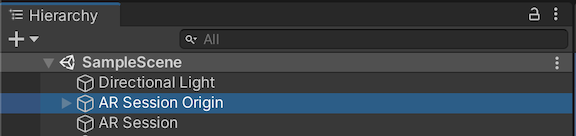
1. Add the predefined game objects **AR Session Origin** and
**AR Session**.
2. Add the **AR Raycast Manager** component into the
**AR Session Origin** game object.
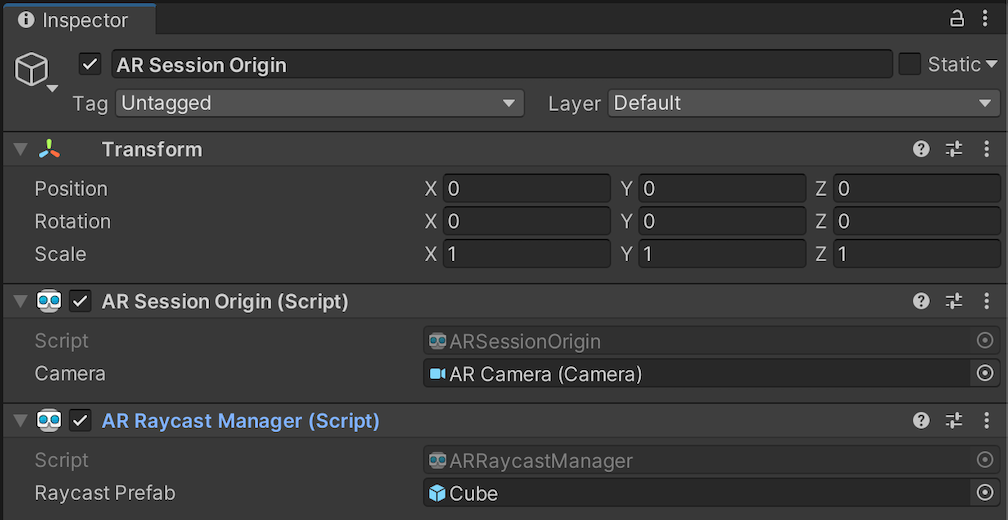
When Raycast Prefab is not null, [`ARRaycastManager`](https://docs.unity3d.com/Packages/com.unity.xr.arfoundation@4.2/manual/raycast-manager.html)
will instantiate the prefab and automatically sync its pose with the pose of
[`ARRaycast`](https://docs.unity3d.com/Packages/com.unity.xr.arfoundation@4.2/api/UnityEngine.XR.ARFoundation.ARRaycast.html).
### AR Foundation 5.x
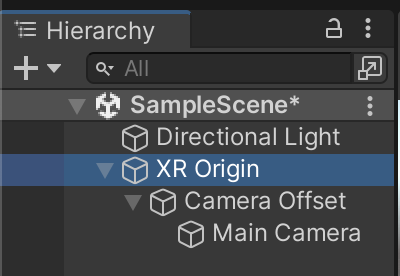
1. Add the predefined game objects **XR Origin** and
**AR Session**.
2. Add the **AR Raycast Manager** component into the
**XR Origin** game object.
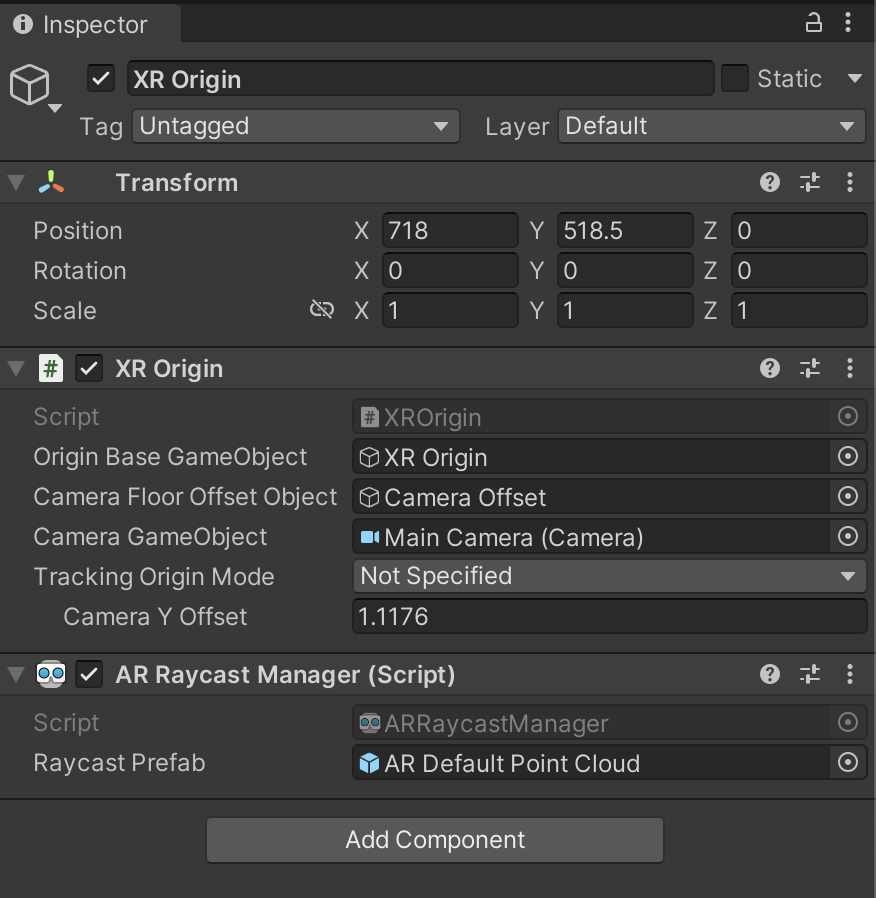
When Raycast Prefab is not null, [`ARRaycastManager`](https://docs.unity3d.com/Packages/com.unity.xr.arfoundation@4.2/manual/raycast-manager.html)
will instantiate the prefab and automatically sync its pose with the pose of
[`ARRaycast`](https://docs.unity3d.com/Packages/com.unity.xr.arfoundation@4.2/api/UnityEngine.XR.ARFoundation.ARRaycast.html).
### AR Foundation 6.x
1. Add the predefined game objects **XR Origin** and
**AR Session**.

2. Add the **AR Raycast Manager** component into the
**XR Origin** game object.

When Raycast Prefab is not null, [`ARRaycastManager`](https://docs.unity3d.com/Packages/com.unity.xr.arfoundation@4.2/manual/raycast-manager.html)
will instantiate the prefab and automatically sync its pose with the pose of
[`ARRaycast`](https://docs.unity3d.com/Packages/com.unity.xr.arfoundation@4.2/api/UnityEngine.XR.ARFoundation.ARRaycast.html).
## Place an object
In a new ARCore session, perform a hit test using
[`ARRaycastManager.AddRaycast(Vector2, float)`](https://docs.unity3d.com/Packages/com.unity.xr.arfoundation@4.2/api/UnityEngine.XR.ARFoundation.ARRaycastManager.html#UnityEngine_XR_ARFoundation_ARRaycastManager_AddRaycast_UnityEngine_Vector2_System_Single_).
public ARRaycastManager RaycastManager; // set from the Editor Inspector.
void Update()
{
Touch touch;
if (Input.touchCount < 1 || (touch = Input.GetTouch(0)).phase != TouchPhase.Began)
{
return;
}
if (EventSystem.current.IsPointerOverGameObject(touch.fingerId))
{
return;
}
ARRaycast raycast = RaycastManager.AddRaycast(touch.position, _estimateDistance);
if (raycast != null)
{
// You can instantiate a 3D object here if you haven't set Raycast Prefab in the scene.
...
}
}
## Monitor the ARRaycast tracking state
If ARCore has an accurate 3D pose, the [`ARRaycast.trackingState`](https://docs.unity3d.com/Packages/com.unity.xr.arfoundation@4.2/api/UnityEngine.XR.ARFoundation.ARTrackable-2.html#UnityEngine_XR_ARFoundation_ARTrackable_2_trackingState) will be [`Tracking`](https://docs.unity3d.com/Packages/com.unity.xr.arsubsystems@4.2/api/UnityEngine.XR.ARSubsystems.TrackingState.html).
Otherwise, it will start with [`Limited`](https://docs.unity3d.com/Packages/com.unity.xr.arsubsystems@4.2/api/UnityEngine.XR.ARSubsystems.TrackingState.html)
and transition to [`Tracking`](https://docs.unity3d.com/Packages/com.unity.xr.arsubsystems@4.2/api/UnityEngine.XR.ARSubsystems.TrackingState.html) once ARCore has an accurate 3D pose. Once the tracking state becomes [`Tracking`](https://docs.unity3d.com/Packages/com.unity.xr.arsubsystems@4.2/api/UnityEngine.XR.ARSubsystems.TrackingState.html),
it will not revert to
[`Limited`](https://docs.unity3d.com/Packages/com.unity.xr.arsubsystems@4.2/api/UnityEngine.XR.ARSubsystems.TrackingState.html).