> [!NOTE]
> **Try the snippets:** Import, deploy, and explore code snippets in context using a new
> Dialogflow agent.
>
### Explore in Dialogflow
Click **Continue** to import our Reprompts sample in Dialogflow. Then, follow the
steps below to deploy and test the sample:
1. Enter an agent name and create a new Dialogflow agent for the sample.
2. After the agent is done importing, click **Go to agent**.
3. From the main navigation menu, go to **Fulfillment**.
4. Enable the **Inline Editor** , then click **Deploy**. The editor contains the sample code.
5. From the main navigation menu, go to **Integrations** , then click **Google
Assistant**.
6. In the modal window that appears, enable **Auto-preview changes** and click **Test** to open the Actions simulator.
7. In the simulator, enter `Talk to my test app` to test the sample!
[Continue](https://console.dialogflow.com/api-client/#/oneclick?templateUrl=https:%2F%2Fstorage.googleapis.com%2Fdialogflow-oneclick%2Fone_click_artifacts%2FrepromptsOneClick.zip)
You can use the following features to handle cases where users don't provide
input to your Actions (no-input errors):
- **System-default reprompts** - These reprompt the user automatically with pre-canned reprompts that are generic for all cases.
- **Dynamic reprompts** - Declaring that you want to handle reprompting on your own, and receiving an intent (Actions SDK) or event (Dialogflow) every time a no-input occurs, so you can handle them on a case-by-case basis.
> [!NOTE]
> **Note:** Reprompts aren't supported on all Actions on Google surfaces. We recommend you handle no-input errors but keep in mind that they may not appear on all user devices.
## System-default reprompts
By default, when you return a response to the Assistant, the system uses
default reprompts to ask users to repeat or retype their input.
### Dialogflow
Dialogflow enforces a combined maximum of three no-match and no-input inputs.
Once a conversation reaches three collection attempts, your Dialogflow agent
will end the conversation with a default response. A no-match input in
Dialogflow is when one of your fallback intents is triggered.
> [!NOTE]
> **Note:** If Dialogflow webhook fulfillment is enabled, this limit is not automatically enforced.
## Dynamic reprompts
You can receive an intent or Dialogflow event every time your Action fails to
receive any input. This allows you to return a different response based on some
logic, if necessary, and reprompt the user appropriately.
### Dialogflow
You can create two types of no-input intents:
- **Normal intent** - This method doesn't apply any contexts, so will be triggered
when there isn't another, more contextual intent to trigger. This is useful
for general reprompts that you want to apply in most cases.
- **Follow-up intent** - Follow-up intents are enforced through Dialogflow
contexts, ensuring reprompts are triggered only after certain turns of the
conversation. This is useful for tailored reprompts that you want to apply to
specific situations.
To handle no-input events:
1. In the left navigation, click **Intents**.
2. Create a normal intent or follow-up intent.
- **For normal intents** : Click on the **+** icon by the **Intent** menu item and give your intent a name, like "Reprompt".

- **For follow-up intents** : Hover over the intent that you want to customize the no-input reprompt for and click on **Add follow-up intent \>
custom** . A new intent is created below the original intent.
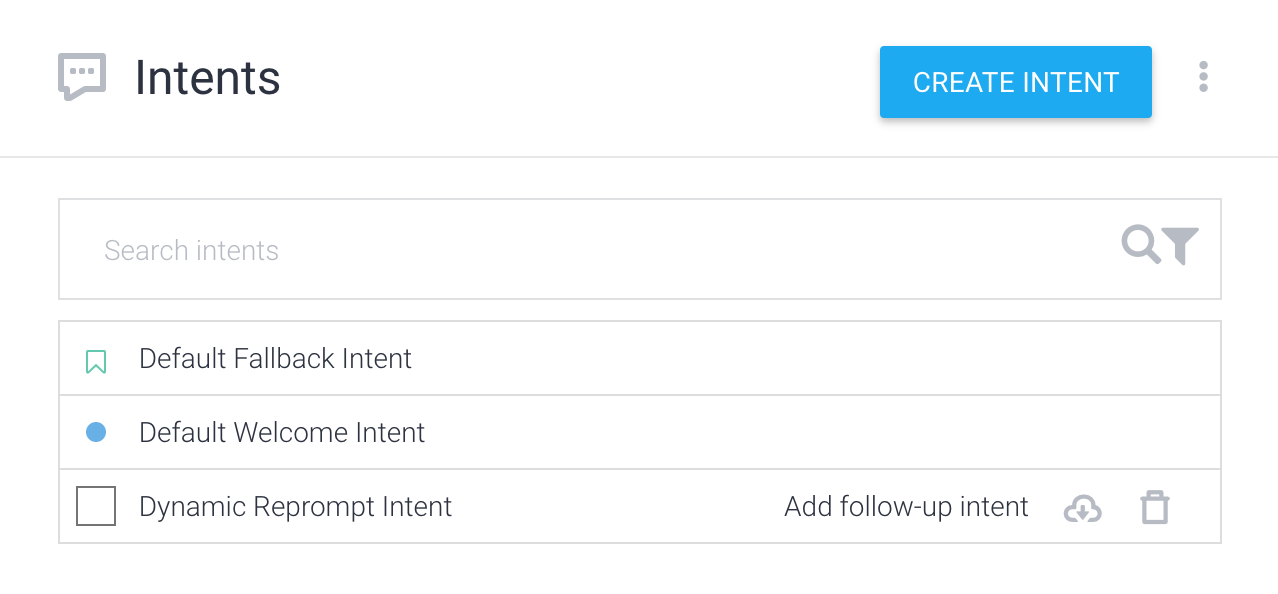
3. Click on the newly created intent to open the intent editor.
4. Click the **Events** section and enter "actions_intent_NO_INPUT" into the **Add event** field.
5. In the **Actions** section, enter an action name or use the one provided by default. For this example, we'll use "no.input".

6. Click **Save**.
7. In the left navigation, click **Integrations**
8. Choose **Google Assistant** and click **Test** to make sure the changes are reflected in your Actions project.
Whenever a no-input occurs for this intent, you can use
your fulfillment to return an appropriate response or create one in Dialogflow.
For example, here's some fulfillment code that uses the client library to
handle a normal no-input intent called "Reprompt".
### Node.js
```javascript
const {dialogflow} = require('actions-on-google');
const functions = require('firebase-functions');
const app = dialogflow({debug: true});
app.intent('Reprompt', (conv) => {
const repromptCount = parseInt(conv.arguments.get('REPROMPT_COUNT'));
if (repromptCount === 0) {
conv.ask(`What was that?`);
} else if (repromptCount === 1) {
conv.ask(`Sorry I didn't catch that. Could you repeat yourself?`);
} else if (conv.arguments.get('IS_FINAL_REPROMPT')) {
conv.close(`Okay let's try this again later.`);
}
});
exports.dialogflowFirebaseFulfillment = functions.https.onRequest(app);
```
### Java
```java
package com.example;
import com.google.actions.api.ActionRequest;
import com.google.actions.api.ActionResponse;
import com.google.actions.api.DialogflowApp;
import com.google.actions.api.ForIntent;
import com.google.actions.api.response.ResponseBuilder;
public class MyActionsApp extends DialogflowApp {
@ForIntent("Reprompt")
public ActionResponse reprompt(ActionRequest request) {
ResponseBuilder responseBuilder = getResponseBuilder(request);
int repromptCount = request.getRepromptCount();
String response;
if (repromptCount == 0) {
response = "What was that?";
} else if (repromptCount == 1) {
response = "Sorry, I didn't catch that. Could you repeat yourself?";
} else {
responseBuilder.endConversation();
response = "Okay let's try this again later.";
}
return responseBuilder.add(response).build();
}
}
```
### Request JSON
Note that the JSON below describes a webhook request.
```
{
"responseId": "f26a9188-4998-42eb-ac16-d0e6e273b137-712767ed",
"queryResult": {
"queryText": "actions_intent_NO_INPUT",
"parameters": {},
"allRequiredParamsPresent": true,
"fulfillmentText": "Webhook failed for intent: Reprompt",
"fulfillmentMessages": [
{
"text": {
"text": [
"Webhook failed for intent: Reprompt"
]
}
}
],
"outputContexts": [
{
"name": "projects/df-reprompts-kohler/agent/sessions/ABwppHFi9Dpwy6KiEtS0UIPDNVfa7mlkrPIEZRlikFkjuN_4SGPixgX8OCatpXu38ln7VG43-nk-7veZWhds3nLljA/contexts/actions_capability_media_response_audio"
},
{
"name": "projects/df-reprompts-kohler/agent/sessions/ABwppHFi9Dpwy6KiEtS0UIPDNVfa7mlkrPIEZRlikFkjuN_4SGPixgX8OCatpXu38ln7VG43-nk-7veZWhds3nLljA/contexts/actions_capability_account_linking"
},
{
"name": "projects/df-reprompts-kohler/agent/sessions/ABwppHFi9Dpwy6KiEtS0UIPDNVfa7mlkrPIEZRlikFkjuN_4SGPixgX8OCatpXu38ln7VG43-nk-7veZWhds3nLljA/contexts/actions_capability_audio_output"
},
{
"name": "projects/df-reprompts-kohler/agent/sessions/ABwppHFi9Dpwy6KiEtS0UIPDNVfa7mlkrPIEZRlikFkjuN_4SGPixgX8OCatpXu38ln7VG43-nk-7veZWhds3nLljA/contexts/google_assistant_input_type_voice"
},
{
"name": "projects/df-reprompts-kohler/agent/sessions/ABwppHFi9Dpwy6KiEtS0UIPDNVfa7mlkrPIEZRlikFkjuN_4SGPixgX8OCatpXu38ln7VG43-nk-7veZWhds3nLljA/contexts/actions_intent_no_input",
"parameters": {
"REPROMPT_COUNT": 2,
"IS_FINAL_REPROMPT": true
}
}
],
"intent": {
"name": "projects/df-reprompts-kohler/agent/intents/75dfd97d-6368-4436-9533-70f05ae76c96",
"displayName": "Reprompt"
},
"intentDetectionConfidence": 1,
"languageCode": "en"
},
"originalDetectIntentRequest": {
"source": "google",
"version": "2",
"payload": {
"user": {
"locale": "en-US",
"userVerificationStatus": "VERIFIED"
},
"conversation": {
"conversationId": "ABwppHFi9Dpwy6KiEtS0UIPDNVfa7mlkrPIEZRlikFkjuN_4SGPixgX8OCatpXu38ln7VG43-nk-7veZWhds3nLljA",
"type": "ACTIVE",
"conversationToken": "[]"
},
"inputs": [
{
"intent": "actions.intent.NO_INPUT",
"rawInputs": [
{
"inputType": "VOICE"
}
],
"arguments": [
{
"name": "REPROMPT_COUNT",
"intValue": "2"
},
{
"name": "IS_FINAL_REPROMPT",
"boolValue": true
}
]
}
],
"surface": {
"capabilities": [
{
"name": "actions.capability.MEDIA_RESPONSE_AUDIO"
},
{
"name": "actions.capability.ACCOUNT_LINKING"
},
{
"name": "actions.capability.AUDIO_OUTPUT"
}
]
},
"availableSurfaces": [
{
"capabilities": [
{
"name": "actions.capability.AUDIO_OUTPUT"
},
{
"name": "actions.capability.SCREEN_OUTPUT"
},
{
"name": "actions.capability.WEB_BROWSER"
}
]
}
]
}
},
"session": "projects/df-reprompts-kohler/agent/sessions/ABwppHFi9Dpwy6KiEtS0UIPDNVfa7mlkrPIEZRlikFkjuN_4SGPixgX8OCatpXu38ln7VG43-nk-7veZWhds3nLljA"
}
```
### Response JSON
Note that the JSON below describes a webhook response.
```
{
"payload": {
"google": {
"expectUserResponse": false,
"richResponse": {
"items": [
{
"simpleResponse": {
"textToSpeech": "Okay let's try this again later."
}
}
]
}
}
}
}
```
### Actions SDK
To handle no-input intents:
1. In a `conversations` object inside your action package, declare that you want to receive the `actions.intent.NO_INPUT` intent whenever a user doesn't provide input. Note: This is a global setting that applies to the entire conversation with the user, so you can't use system-default or static reprompting in conjunction with dynamic reprompting.
```
{
"actions": [
{
"description": "Default Welcome Intent",
"name": "MAIN",
"fulfillment": {
"conversationName": "conversation_1"
},
"intent": {
"name": "actions.intent.MAIN"
}
}
],
"conversations": {
"conversation_1": {
"name": "conversation_1",
"url": "YOUR_FULFILLMENT_URL",
"inDialogIntents": [
{
"name": "actions.intent.NO_INPUT"
}
]
}
}
}
```
2. When the Assistant doesn't receive any input from the user, you'll receive the no-input intent in the next request to your fulfillment. You can then process the intent and return an appropriate reprompt response. Here's an example:
### Node.js
```javascript
const {actionssdk} = require('actions-on-google');
const functions = require('firebase-functions');
const app = actionssdk({debug: true});
app.intent('actions.intent.MAIN', (conv) => {
conv.ask(`Hi! Try this sample on a speaker device, ` +
`and stay silent when the mic is open. If trying ` +
`on the Actions console simulator, click the no-input ` +
`button next to the text input field.`);
});
app.intent('actions.intent.TEXT', (conv, input) => {
conv.ask(`You said ${input}`);
conv.ask(`Try this sample on a speaker device, ` +
`and stay silent when the mic is open. If trying ` +
`on the Actions console simulator, click the no-input ` +
`button next to the text input field.`);
});
app.intent('actions.intent.NO_INPUT', (conv) => {
const repromptCount = parseInt(conv.arguments.get('REPROMPT_COUNT'));
if (repromptCount === 0) {
conv.ask(`What was that?`);
} else if (repromptCount === 1) {
conv.ask(`Sorry I didn't catch that. Could you repeat yourself?`);
} else if (conv.arguments.get('IS_FINAL_REPROMPT')) {
conv.close(`Okay let's try this again later.`);
}
});
exports.dialogflowFirebaseFulfillment = functions.https.onRequest(app);
```
### Java
```java
package com.example;
import com.google.actions.api.ActionRequest;
import com.google.actions.api.ActionResponse;
import com.google.actions.api.ActionsSdkApp;
import com.google.actions.api.ConstantsKt;
import com.google.actions.api.ForIntent;
import com.google.actions.api.response.ResponseBuilder;
import com.google.actions.api.response.helperintent.Confirmation;
import com.google.actions.api.response.helperintent.DateTimePrompt;
import com.google.actions.api.response.helperintent.Permission;
import com.google.actions.api.response.helperintent.Place;
import com.google.api.services.actions_fulfillment.v2.model.DateTime;
import com.google.api.services.actions_fulfillment.v2.model.Location;
public class MyActionsApp extends ActionsSdkApp {
@ForIntent("actions.intent.MAIN")
public ActionResponse welcome(ActionRequest request) {
ResponseBuilder responseBuilder = getResponseBuilder(request);
responseBuilder.add("Hi! Try this sample on a speaker device, and stay silent when the mic is open. If trying on the Actions console simulator, click the no-input button next to the text input field.");
return responseBuilder.build();
}
@ForIntent("actions.intent.TEXT")
public ActionResponse fallback(ActionRequest request) {
ResponseBuilder responseBuilder = getResponseBuilder(request);
responseBuilder.add("You said " + request.getRawInput().getQuery());
responseBuilder.add("Try this sample on a speaker device, and stay silent when the mic is open. If trying on the Actions console simulator, click the no-input button next to the text input field.");
return responseBuilder.build();
}
@ForIntent("actions.intent.NO_INPUT")
public ActionResponse reprompt(ActionRequest request) {
ResponseBuilder responseBuilder = getResponseBuilder(request);
int repromptCount = request.getRepromptCount();
String response;
if (repromptCount == 0) {
response = "What was that?";
} else if (repromptCount == 1) {
response = "Sorry, I didn't catch that. Could you repeat yourself?";
} else {
responseBuilder.endConversation();
response = "Okay let's try this again later.";
}
return responseBuilder.add(response).build();
}
}
```
### Request JSON
Note that the JSON below describes a webhook request.
```
{
"user": {
"locale": "en-US",
"userVerificationStatus": "VERIFIED"
},
"conversation": {
"conversationId": "ABwppHEVDuKUPjdZ4Ud-F2yBXN5ssRg2funUp59hSHQheAi-B5Y3EzehAKFtVwMkduqMRWscUp77ScrDjYnYxISqAM-qOXuXEuCw",
"type": "ACTIVE",
"conversationToken": "{\"data\":{}}"
},
"inputs": [
{
"intent": "actions.intent.NO_INPUT",
"rawInputs": [
{
"inputType": "VOICE"
}
],
"arguments": [
{
"name": "REPROMPT_COUNT",
"intValue": "2"
},
{
"name": "IS_FINAL_REPROMPT",
"boolValue": true
}
]
}
],
"surface": {
"capabilities": [
{
"name": "actions.capability.AUDIO_OUTPUT"
},
{
"name": "actions.capability.ACCOUNT_LINKING"
},
{
"name": "actions.capability.MEDIA_RESPONSE_AUDIO"
}
]
},
"availableSurfaces": [
{
"capabilities": [
{
"name": "actions.capability.SCREEN_OUTPUT"
},
{
"name": "actions.capability.WEB_BROWSER"
},
{
"name": "actions.capability.AUDIO_OUTPUT"
}
]
}
]
}
```
### Response JSON
Note that the JSON below describes a webhook response.
```
{
"expectUserResponse": false,
"finalResponse": {
"richResponse": {
"items": [
{
"simpleResponse": {
"textToSpeech": "Okay let's try this again later."
}
}
]
}
}
}
```