When returning a response to Google Assistant, you can use a subset of the
Speech Synthesis Markup Language ([SSML](https://www.w3.org/TR/speech-synthesis/)) in your responses. By
using SSML, you can make your conversation's responses seem more like natural
speech. The following shows an example of SSML markup and how it's read back by
Google Assistant.
SSML

```
function saySSML(conv) {
  const ssml = '<speak>' +
    'Here are <say-as interpret-as="characters">SSML</say-as> samples. ' +
    'I can pause <break time="3" />. ' +
    'I can play a sound <audio src="https://www.example.com/MY_WAVE_FILE.wav">your wave file</audio>. ' +
    'I can speak in cardinals. Your position is <say-as interpret-as="cardinal">10</say-as> in line. ' +
    'Or I can speak in ordinals. You are <say-as interpret-as="ordinal">10</say-as> in line. ' +
    'Or I can even speak in digits. Your position in line is <say-as interpret-as="digits">10</say-as>. ' +
    'I can also substitute phrases, like the <sub alias="World Wide Web Consortium">W3C</sub>. ' +
    'Finally, I can speak a paragraph with two sentences. ' +
    '<p><s>This is sentence one.</s><s>This is sentence two.</s></p>' +
    '</speak>';
  conv.ask(ssml);
}
```
JSON

```
{
  "expectUserResponse": true,
  "expectedInputs": [
    {
      "possibleIntents": [
        {
          "intent": "actions.intent.TEXT"
        }
      ],
      "inputPrompt": {
        "richInitialPrompt": {
          "items": [
            {
              "simpleResponse": {
                "textToSpeech": "<speak>Here are <say-as interpret-as=\"characters\">SSML</say-as> samples. I can pause <break time=\"3\" />. I can play a sound <audio src=\"https://www.example.com/MY_WAVE_FILE.wav\">your wave file</audio>. I can speak in cardinals. Your position is <say-as interpret-as=\"cardinal\">10</say-as> in line. Or I can speak in ordinals. You are <say-as interpret-as=\"ordinal\">10</say-as> in line. Or I can even speak in digits. Your position in line is <say-as interpret-as=\"digits\">10</say-as>. I can also substitute phrases, like the <sub alias=\"World Wide Web Consortium\">W3C</sub>. Finally, I can speak a paragraph with two sentences. <p><s>This is sentence one.</s><s>This is sentence two.</s></p></speak>"
              }
            }
          ]
        }
      }
    }
  ]
}
```

**Audio**

> [!NOTE]
> **Note:** For the `<audio>` SSML element, you must insert a reference to your hosted audio file. To help you enhance the user experience of your Actions, Google also provides some hosted audio files in the [sound library](https://developers.google.com/assistant/tools/sound-library.md.txt).

SSML is supported in the [Actions simulator](https://developers.google.com/assistant/console/simulator.md.txt), but not the Dialogflow
simulator.

## URLs in SSML

When defining an SSML response that only includes a URL, ampersands in that URL
can cause issues due to XML formatting. To ensure the URL is properly
referenced, replace instances of `&` with `&amp;`.

Even if your SSML response only includes a URL, Actions on Google requires
display text for the response. Because text inside the `<audio>` tag won't be
spoken by Assistant, you can insert filler text or a short description in your
`<audio>` tag to meet this requirement. Text inside the `<audio>` tag won't be
spoken by Assistant after the audio plays, and meets Action on Google's
requirement for a display text version of your SSML.

Here's an example of a problematic SSML response:

    <speak>
      <audio src="https://firebasestorage.googleapis.com/v0/b/project-name.appspot.com/o/audio-file-name.ogg?alt=media&token=XXXXXXXX-XXXX-XXXX-XXXX-XXXXXXXXXXXX">
      </audio>
    </speak>

The above example doesn't escape the `&` for proper XML formatting.

A fixed version of the same SSML response looks like this:

    <speak>
      <audio src="https://firebasestorage.googleapis.com/v0/b/project-name.appspot.com/o/audio-file-name.ogg?alt=media&amp;token=XXXXXXXX-XXXX-XXXX-XXXX-XXXXXXXXXXXX">
      text
      </audio>
    </speak>

## Support for SSML elements

The following sections describe the SSML elements and options that can be used in your Actions.

> [!NOTE]
> Note that not all of the elements and options described in the [W3 SSML specification](https://www.w3.org/TR/speech-synthesis/) are currently supported by the Actions on Google platform. This page details which elements and options are available for your application. The W3 reference links provided below may be helpful for additional context and examples.

## `<speak>`

The root element of the SSML response.

To learn more about the `speak` element, see the [W3 specification](https://www.w3.org/TR/speech-synthesis/#edef_speak).

### Example

```
<speak>
  my SSML content
</speak>
```

Your browser does not support the HTML5 Audio element.

## `<break>`

An empty element that controls pausing or other prosodic boundaries between words. Using `<break>` between any pair of tokens is optional. If this element is not present between words, the break is automatically determined based on the linguistic context.

To learn more about the `break` element, see the [W3 specification](https://www.w3.org/TR/speech-synthesis/#S3.2.3).

### Attributes

| Attribute | Description |
|---|---|
| `time` | Sets the length of the break by seconds or milliseconds (e.g. "3s" or "250ms"). |
| `strength` | Sets the strength of the output's prosodic break by relative terms. Valid values are: "x-weak", weak", "medium", "strong", and "x-strong". The value "none" indicates that no prosodic break boundary should be outputted, which can be used to prevent a prosodic break that the processor would otherwise produce. The other values indicate monotonically non-decreasing (conceptually increasing) break strength between tokens. The stronger boundaries are typically accompanied by pauses. |

### Example

The following example shows how to use the `<break>` element to pause between steps:

```
<speak>
  Step 1, take a deep breath. <break time="200ms"/>
  Step 2, exhale.
  Step 3, take a deep breath again. <break strength="weak"/>
  Step 4, exhale.
</speak>
```

Your browser does not support the HTML5 Audio element.

## `<say‑as>`

This element lets you indicate information about the type of text construct that is contained within the element. It also helps specify the level of detail for rendering the contained text.

The `<say‑as>` element has the required attribute, `interpret-as`, which determines how the value is spoken. Optional attributes `format` and `detail` may be used depending on the particular `interpret-as` value.

### Examples

The `interpret-as` attribute supports the following values:

- `currency`

  The following example is spoken as "forty two dollars and one cent". If the language attribute is omitted, it uses the current locale.

  ```
  <speak>
    <say-as interpret-as='currency' language='en-US'>$42.01</say-as>
  </speak>
      
  ```
- `telephone`

  See the `interpret-as='telephone'` description in the W3C SSML 1.0 [say-as attribute values](https://www.w3.org/TR/ssml-sayas/#S3.3) WG note.

  The following example is spoken as "one eight zero zero two zero two one two one two". If the "google:style" attribute is omitted, it speaks zero as letter O.

  The "google:style='zero-as-zero'" attribute currently only works in EN locales.

  ```
        <speak>
          <say-as interpret-as='telephone' google:style='zero-as-zero'>1800-202-1212</say-as>
        </speak>
      
  ```
- `verbatim` or `spell-out`

  The following example is spelled out letter by letter:

  ```
  <speak>
    <say-as interpret-as="verbatim">abcdefg</say-as>
  </speak>
      
  ```

  Your browser does not support the HTML5 Audio element.
- `date`

  The `format` attribute is a sequence of date field character codes. Supported field character codes in `format` are {`y`, `m`, `d`} for year, month, and day (of the month) respectively. If the field code appears once for year, month, or day then the number of digits expected are 4, 2, and 2 respectively. If the field code is repeated then the number of expected digits is the number of times the code is repeated. Fields in the date text may be separated by punctuation and/or spaces.

  The `detail` attribute controls the spoken form of the date. For `detail='1'` only the day fields and one of month or year fields are required, although both may be supplied. This is the default when less than all three fields are given. The spoken form is "The {ordinal day} of {month}, {year}".

  The following example is spoken as "The tenth of September, nineteen sixty":

  ```
  <speak>
    <say-as interpret-as="date" format="yyyymmdd" detail="1">
      1960-09-10
    </say-as>
  </speak>
      
  ```

  Your browser does not support the HTML5 Audio element.

  The following example is spoken as "The tenth of September":

  ```
  <speak>
    <say-as interpret-as="date" format="dm">10-9</say-as>
  </speak>
      
  ```

  Your browser does not support the HTML5 Audio element.

  For `detail='2'` the day, month, and year fields are required and this is the default when all three fields are supplied. The spoken form is "{month} {ordinal day}, {year}".

  The following example is spoken as "September tenth, nineteen sixty":

  ```
  <speak>
    <say-as interpret-as="date" format="dmy" detail="2">
      10-9-1960
    </say-as>
  </speak>
      
  ```

  Your browser does not support the HTML5 Audio element.
- `characters`

  The following example is spoken as "C A N":

  ```
  <speak>
    <say-as interpret-as="characters">can</say-as>
  </speak>
      
  ```

  Your browser does not support the HTML5 Audio element.
- `cardinal`

  The following example is spoken as "Twelve thousand three hundred forty five" (for US English) or "Twelve thousand three hundred and forty five (for UK English)":

  ```
  <speak>
    <say-as interpret-as="cardinal">12345</say-as>
  </speak>
      
  ```

  Your browser does not support the HTML5 Audio element.
- `ordinal`

  The following example is spoken as "First":

  ```
  <speak>
    <say-as interpret-as="ordinal">1</say-as>
  </speak>
      
  ```

  Your browser does not support the HTML5 Audio element.
- `fraction`

  The following example is spoken as "five and a half":

  ```
  <speak>
    <say-as interpret-as="fraction">5+1/2</say-as>
  </speak>
      
  ```

  Your browser does not support the HTML5 Audio element.
- `expletive` or `bleep`

  The following example comes out as a beep, as though it has been censored:

  ```
  <speak>
    <say-as interpret-as="expletive">censor this</say-as>
  </speak>
      
  ```

  Your browser does not support the HTML5 Audio element.
- `unit`

  Converts units to singular or plural depending on the number. The following example is spoken as "10 feet":

  ```
  <speak>
    <say-as interpret-as="unit">10 foot</say-as>
  </speak>
      
  ```

  Your browser does not support the HTML5 Audio element.
- `time`

  The following example is spoken as "Two thirty P.M.":

  ```
  <speak>
    <say-as interpret-as="time" format="hms12">2:30pm</say-as>
  </speak>
      
  ```

  Your browser does not support the HTML5 Audio element.

  The `format` attribute is a sequence of time field character codes. Supported field character codes in `format` are {`h`,`m`, `s`, `Z`, `12`, `24`} for hour, minute (of the hour), second (of the minute), time zone, 12-hour time, and 24-hour time respectively. If the field code appears once for hour, minute, or second then the number of digits expected are 1, 2, and 2 respectively. If the field code is repeated then the number of expected digits is the number of times the code is repeated. Fields in the time text may be separated by punctuation and/or spaces. If hour, minute, or second are not specified in the format or there are no matching digits then the field is treated as a zero value. The default `format` is "hms12".

  The `detail` attribute controls whether the spoken form of the time is 12-hour time or 24-hour time. The spoken form is 24-hour time if `detail='1'` or if `detail` is omitted and the format of the time is 24-hour time. The spoken form is 12-hour time if `detail='2'` or if `detail` is omitted and the format of the time is 12-hour time.

To learn more about the `say-as` element, see the [W3 specification](https://www.w3.org/TR/speech-synthesis/#S3.1.9).

## `<audio>`

Supports the insertion of recorded audio files and the insertion of other audio formats in conjunction with synthesized speech output.

### Attributes

| Attribute | Required | Default | Values |
|---|---|---|---|
| `src` | yes | n/a | A URI referring to the audio media source. Supported protocol is `https`. |
| `clipBegin` | no | 0 | A [TimeDesignation](https://www.w3.org/TR/speech-synthesis11/#def_time_designation) that is the offset from the audio source's beginning to start playback from. If this value is greater than or equal to the audio source's actual duration, then no audio is inserted. |
| `clipEnd` | no | infinity | A [TimeDesignation](https://www.w3.org/TR/speech-synthesis11/#def_time_designation) that is the offset from the audio source's beginning to end playback at. If the audio source's actual duration is less than this value, then playback ends at that time. If `clipBegin` is greater than or equal to `clipEnd`, then no audio is inserted. |
| `speed` | no | 100% | The ratio output playback rate relative to the normal input rate expressed as a percentage. The format is a positive [Real Number](https://www.w3.org/TR/speech-synthesis11/#def_real_number) followed by %. The currently supported range is \[50% (slow - half speed), 200% (fast - double speed)\]. Values outside that range may (or may not) be adjusted to be within it. |
| `repeatCount` | no | 1, or 10 if `repeatDur` is set | A [Real Number](https://www.w3.org/TR/speech-synthesis11/#def_real_number) specifying how many times to insert the audio (after clipping, if any, by `clipBegin` and/or `clipEnd`). Fractional repetitions aren't supported, so the value will be rounded to the nearest integer. Zero is not a valid value and is therefore treated as being unspecified and has the default value in that case. |
| `repeatDur` | no | infinity | A [TimeDesignation](https://www.w3.org/TR/speech-synthesis11/#def_time_designation) that is a limit on the duration of the inserted audio after the source is processed for `clipBegin`, `clipEnd`, `repeatCount`, and `speed` attributes (rather then the normal playback duration). If the duration of the processed audio is less than this value, then playback ends at that time. |
| `soundLevel` | no | +0dB | Adjust the sound level of the audio by `soundLevel`decibels. Maximum range is +/-40dB but actual range may be effectively less, and output quality may not yield good results over the entire range. |

The following are the currently supported settings for audio:

- Format: MP3 (MPEG v2)
  - 24K samples per second
  - 24K \~ 96K bits per second, fixed rate
- Format: Opus in Ogg
  - 24K samples per second (super-wideband)
  - 24K - 96K bits per second, fixed rate
- Format (deprecated): WAV (RIFF)
  - PCM 16-bit signed, little endian
  - 24K samples per second
- For all formats:
  - Single channel is preferred, but stereo is acceptable.
  - 240 seconds maximum duration. If you want to play audio with a longer duration, consider implementing a [media response](https://developers.google.com/actions/assistant/responses#media_responses).
  - 5 megabyte file size limit.
  - Source URL must use HTTPS protocol.
  - Our UserAgent when fetching the audio is "Google-Speech-Actions".

The contents of the `<audio>` element are optional and are used if the audio file cannot be played or if the output device does not support audio. The contents may include a `<desc>` element in which case the text contents of that element are used for display. For more information, see the Recorded Audio section in the [Responses Checklist](https://developers.google.com/actions/assistant/responses#ui_checklist).

The `src` URL must also be an https URL ([Google Cloud Storage](https://cloud.google.com/storage/docs/creating-buckets) can host your audio files on an https URL).

To learn more about media responses, see the [media response](https://developers.google.com/actions/assistant/responses#media_responses) section in the Responses guide.

To learn more about the `audio` element, see the [W3 specification](https://www.w3.org/TR/speech-synthesis/#S3.3.1).

### Example

```
<speak>
  <audio src="cat_purr_close.ogg">
    <desc>a cat purring</desc>
    PURR (sound didn't load)
  </audio>
</speak>
```

Your browser does not support the HTML5 Audio element.

## `<p>,<s>`

Sentence and paragraph elements.

To learn more about the `p` and `s` elements, see the [W3 specification](https://www.w3.org/TR/speech-synthesis/#edef_paragraph).

### Example

```
<p><s>This is sentence one.</s><s>This is sentence two.</s></p>
```

Your browser does not support the HTML5 Audio element.

### Best practices

- Use \<s\>...\</s\> tags to wrap full sentences, especially if they contain SSML elements that change prosody (that is, \<audio\>, \<break\>, \<emphasis\>, \<par\>, \<prosody\>, \<say-as\>, \<seq\>, and \<sub\>).
- If a break in speech is intended to be long enough that you can hear it, use \<s\>...\</s\> tags and put that break between sentences.

## `<sub>`

Indicate that the text in the alias attribute value replaces the contained text for pronunciation.

You can also use the `sub` element to provide a simplified pronunciation of a difficult-to-read word. The last example below demonstrates this use case in Japanese.

To learn more about the `sub` element, see the [W3 specification](https://www.w3.org/TR/speech-synthesis/#edef_sub).

### Examples

```
<sub alias="World Wide Web Consortium">W3C</sub>
```

Your browser does not support the HTML5 Audio element.

```
<sub alias="にっぽんばし">日本橋</sub>
```

Your browser does not support the HTML5 Audio element.

## `<mark>`

An empty element that places a marker into the text or tag sequence. It can be used to reference a
specific location in the sequence or to insert a marker into an output stream
for asynchronous notification.

> [!NOTE]
> **Note:** Follow these guidelines when you use the `mark` element:
>
> - Use the `START` and `END` marks instead of adding custom marks near the beginning or end of the SSML.
> - Do not add consecutive marks in your SSML. Marks in rapid succession might not generate events. Additionally, if there is no audio generated between marks, then events won't be generated. For example, avoid doing the following:   
>   ``Sentence 1. `<mark name=a><mark name=b>` Sentence 2.``   

> [!NOTE]
> **Note:** For convenience, you automatically get `START` and `END` events in your responses for [Interactive Canvas](https://developers.google.com/assistant/interactivecanvas.md.txt). These marks are not included in the W3 spec.

To learn more about the `mark` element, see the [W3 specification](https://www.w3.org/TR/speech-synthesis/#S3.3.2).

### Example

<br />

```
<speak>
Go from <mark name="here"/> here, to <mark name="there"/> there!
</speak>
```

Your browser does not support the HTML5 Audio element.

## `<prosody>`

Used to customize the pitch, speaking rate, and volume of text contained by the element. Currently the `rate`, `pitch`, and `volume` attributes are supported.

The `rate` and `volume` attributes can be set according to the [W3 specifications](https://www.w3.org/TR/speech-synthesis11/#S3.2.4). There are three options for setting the value of the `pitch` attribute:

> [!NOTE]
> **Note:** The `<prosody>` tags should only be used around a full sentence. Enclosing words within a sentence may cause unwanted pauses in speech.

| Attribute | Description |
|---|---|
| `name` | The string ID for each mark. |

| Option | Description |
|---|---|
| Relative | Specify a relative value (e.g. "low", "medium", "high", etc) where "medium" is the default pitch. |
| Semitones | Increase or decrease pitch by "**N** " semitones using "+**N** st" or "-**N**st" respectively. Note that "+/-" and "st" are required. |
| Percentage | Increase or decrease pitch by "**N** " percent by using "+**N** %" or "-**N**%" respectively. Note that "%" is required but "+/-" is optional. |

To learn more about the `prosody` element, see the [W3 specification](https://www.w3.org/TR/speech-synthesis11/#S3.2.4).

### Example

The following example uses the `<prosody>` element to speak slowly at 2 semitones lower than normal:

```
<prosody rate="slow" pitch="-2st">Can you hear me now?</prosody>
```

Your browser does not support the HTML5 Audio element.

## `<emphasis>`

Used to add or remove emphasis from text contained by the element. The `<emphasis>` element modifies speech similarly to `<prosody>`, but without the need to set individual speech attributes.

> [!NOTE]
> **Note:** The `<emphasis>` tags should only be used around a full sentence. Enclosing words within a sentence may cause unwanted pauses in speech.

This element supports an optional "level" attribute with the following valid values:

- `strong`
- `moderate`
- `none`
- `reduced`

To learn more about the `emphasis` element, see the [W3 specification](https://www.w3.org/TR/speech-synthesis11/#S3.2.2).

### Example

The following example uses the `<emphasis>` element to make an announcement:

```
<emphasis level="moderate">This is an important announcement</emphasis>
```

Your browser does not support the HTML5 Audio element.

## `<par>`

A parallel media container that allows you to play multiple media elements at once. The only allowed content is a set of one or more `<par>`, `<seq>`, and `<media>` elements. The order of the `<media>` elements is not significant.

Unless a child element specifies a different begin time, the implicit begin time for the element is the same as that of the `<par>` container. If a child element has an offset value set for its **begin** or **end** attribute, the element's offset will be relative to the beginning time of the `<par>` container. For the root `<par>` element, the begin attribute is ignored and the beginning time is when SSML speech synthesis process starts generating output for the root `<par>` element (i.e. effectively time "zero").

> [!NOTE]
> Note: This element is not a standard SSML element and is provided as an extra feature of the Actions on Google platform.

### Example

```
<speak>
  <par>
    <media xml:id="question" begin="0.5s">
      <speak>Who invented the Internet?</speak>
    </media>
    <media xml:id="answer" begin="question.end+2.0s">
      <speak>The Internet was invented by cats.</speak>
    </media>
    <media begin="answer.end-0.2s" soundLevel="-6dB">
      <audio
        src="https://actions.google.com/.../cartoon_boing.ogg"/>
    </media>
    <media repeatCount="3" soundLevel="+2.28dB"
      fadeInDur="2s" fadeOutDur="0.2s">
      <audio
        src="https://actions.google.com/.../cat_purr_close.ogg"/>
    </media>
  </par>
</speak>
```

Your browser does not support the HTML5 Audio element.

## `<seq>`

A sequential media container that allows you to play media elements one after another. The only allowed content is a set of one or more `<seq>`, `<par>`, and `<media>` elements. The order of the media elements is the order in which they are rendered.

The **begin** and **end** attributes of child elements can be set to offset values (see **Time Specification** below). Those child elements' offset values will be relative to the end of the previous element in the sequence or, in the case of the first element in the sequence, relative to the beginning of its `<seq>` container.

> [!NOTE]
> Note: This element is not a standard SSML element and is provided as an extra feature of the Actions on Google platform.

### Example

```
<speak>
  <seq>
    <media begin="0.5s">
      <speak>Who invented the Internet?</speak>
    </media>
    <media begin="2.0s">
      <speak>The Internet was invented by cats.</speak>
    </media>
    <media soundLevel="-6dB">
      <audio
        src="https://actions.google.com/.../cartoon_boing.ogg"/>
    </media>
    <media repeatCount="3" soundLevel="+2.28dB"
      fadeInDur="2s" fadeOutDur="0.2s">
      <audio
        src="https://actions.google.com/.../cat_purr_close.ogg"/>
    </media>
  </seq>
</speak>
```

Your browser does not support the HTML5 Audio element.

## `<media>`

Represents a media layer within a `<par>` or `<seq>` element. The allowed content of a `<media>` element is an SSML `<speak>` or `<audio>` element. The following table describes the valid attributes for a `<media>` element.

> [!NOTE]
> Note: This element is not a standard SSML element and is provided as an extra feature of the Actions on Google platform.

### Attributes

| Attribute | Required | Default | Values |
|---|---|---|---|
| **xml:id** | no | no value | A unique XML identifier for this element. Encoded entities are not supported. The allowed identifier values match the regular expression `"([-_#]|\p{L}|\p{D})+"`. See [XML-ID](http://www.w3.org/TR/xml-id/) for more information. |
| **begin** | no | 0 | The beginning time for this media container. Ignored if this is the root media container element (treated the same as the default of "0"). See the **Time specification** section below for valid string values. |
| **end** | no | no value | A specification for the ending time for this media container. See the **Time specification** section below for valid string values. |
| **repeatCount** | no | 1 | A [Real Number](https://www.w3.org/TR/speech-synthesis11/#def_real_number) specifying how many times to insert the media. Fractional repetitions aren't supported, so the value will be rounded to the nearest integer. Zero is not a valid value and is therefore treated as being unspecified and has the default value in that case. |
| **repeatDur** | no | no value | A [TimeDesignation](https://www.w3.org/TR/speech-synthesis11/#def_time_designation) that is a limit on the duration of the inserted media. If the duration of the media is less than this value, then playback ends at that time. |
| **soundLevel** | no | +0dB | Adjust the sound level of the audio by `soundLevel` decibels. Maximum range is +/-40dB but actual range may be effectively less, and output quality may not yield good results over the entire range. |
| **fadeInDur** | no | 0s | A [TimeDesignation](https://www.w3.org/TR/speech-synthesis11/#def_time_designation) over which the media will fade in from silent to the optionally-specified `soundLevel`. If the duration of the media is less than this value, the fade in will stop at the end of playback and the sound level will not reach the specified sound level. |
| **fadeOutDur** | no | 0s | A [TimeDesignation](https://www.w3.org/TR/speech-synthesis11/#def_time_designation) over which the media will fade out from the optionally-specified `soundLevel` until it is silent. If the duration of the media is less than this value, the sound level is set to a lower value to ensure silence is reached at the end of playback. |

### Time specification

A time specification, used for the value of \`begin\` and \`end\` attributes of `<media>` elements and media containers (`<par>` and `<seq>` elements), is either an offset value (for example, `+2.5s`) or a syncbase value (for example, `foo_id.end-250ms`).

- **Offset value** - Time offset value is an SMIL Timecount-value that allows values that match the regular expression: `"\s\*(+|-)?\s\*(\d+)(\.\d+)?(h|min|s|ms)?\s\*"`

  The first digit string is the whole part of the decimal number and the second digit string is the decimal fractional part. The default sign (i.e. "(+\|-)?") is "+". The unit values correspond to hours, minutes, seconds, and milliseconds respectively. The default for the units is "s" (seconds).
- **Syncbase value** - A syncbase value is an SMIL syncbase-value that allows values that match the regular expression: `"([-_#]|\p{L}|\p{D})+\.(begin|end)\s\*(+|-)\s\*(\d+)(\.\d+)?(h|min|s|ms)?\s\*"`

  The digits and units are interpreted in the same way as an offset value.

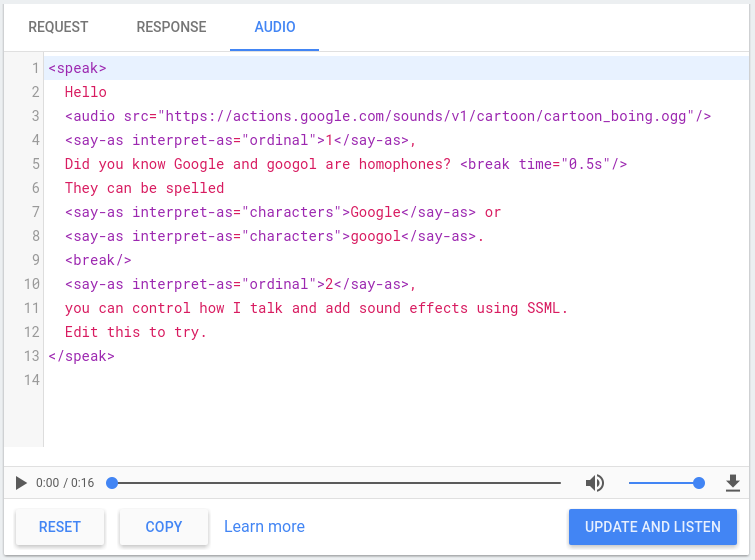
## TTS simulator

The [Actions console](https://console.actions.google.com) includes a TTS simulator that you can use to test SSML
with any of the above elements. You can find the TTS simulator in the console
under **Simulator \> Audio** . Type your text and SSML in the simulator and click
**Update and Listen** to hear the TTS output.
![](https://developers.google.com/static/assistant/actions/images/ssml-simulator.png)

You can also click the download button to save an `.mp3` file of your TTS
output.