> [!NOTE]
> **Try the snippets:** Import, deploy, and explore code snippets in context using a new
> Dialogflow agent.
>
### Explore in Dialogflow
Click **Continue** to import our Surface capabilities sample in Dialogflow. Then, follow the
steps below to deploy and test the sample:
1. Enter an agent name and create a new Dialogflow agent for the sample.
2. After the agent is done importing, click **Go to agent**.
3. From the main navigation menu, go to **Fulfillment**.
4. Enable the **Inline Editor** , then click **Deploy**. The editor contains the sample code.
5. From the main navigation menu, go to **Integrations** , then click **Google
Assistant**.
6. In the modal window that appears, enable **Auto-preview changes** and click **Test** to open the Actions simulator.
7. In the simulator, enter `Talk to my test app` to test the sample!
[Continue](https://console.dialogflow.com/api-client/#/oneclick?templateUrl=https:%2F%2Fstorage.googleapis.com%2Fdialogflow-oneclick%2Fone_click_artifacts%2Fsurface-capabilitiesOneClick.zip)
Your Actions can appear on a variety of surfaces, including audio-only
surfaces (smart speakers) and audio \& display surfaces (like smart displays and
mobile devices).
To design and build conversations that work well on all surfaces, use surface
capabilities to control and scope your conversations properly.
## Surface capabilities for Actions
Actions on Google let you control whether or not users can invoke your Action, based
on the surface they are using. If users try to invoke your Action on an
unsupported surface, they receive an error message telling them their device is
unsupported.
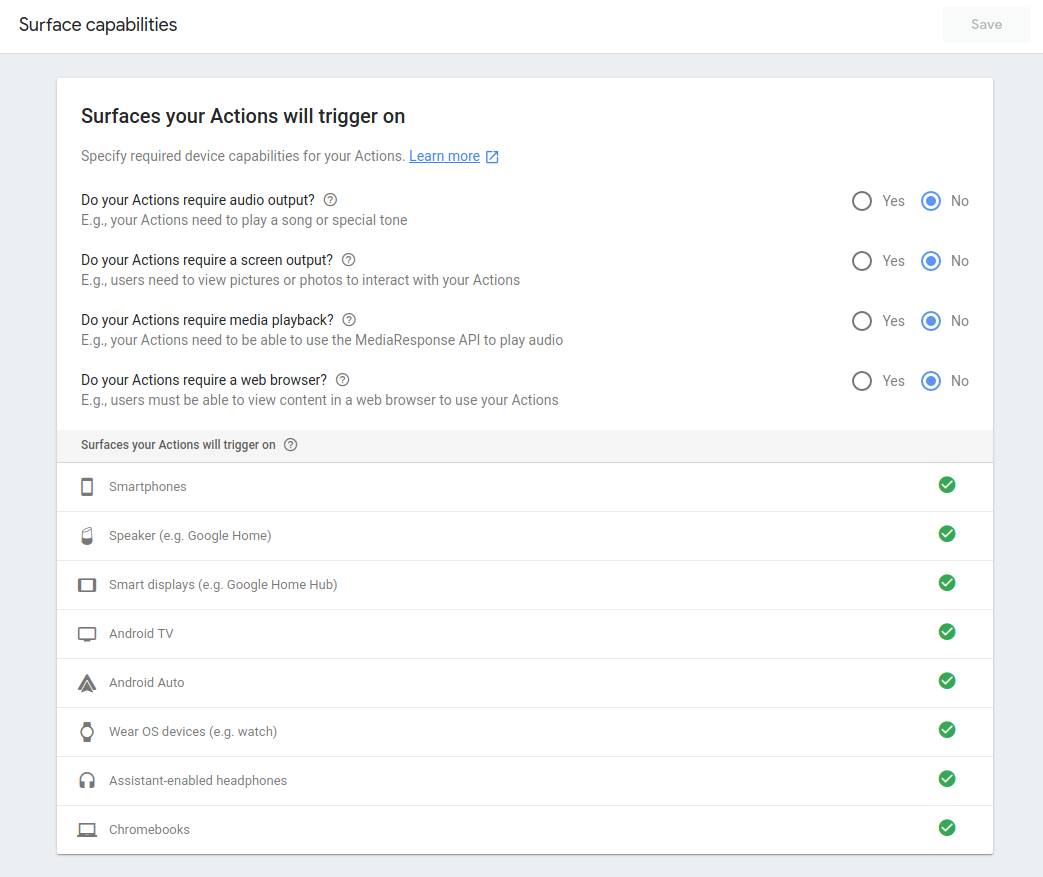
You define your Action's surface support in your Actions project.
> [!NOTE]
> **Note:** You should only check the media playback surface capability option if your entire Action depends on media playback. For example, if your Action doesn't do anything except play an audio track which outputs a media response, you would check this option. If your Action also provides other information, like stock market data, you would not check this option. In the latter case, you would programmatically check for the media playback surface capability and respond accordingly.
Your Action can appear on a variety of surfaces that
the Assistant supports, such as smartphones (Android and iOS) and
Google Home devices.
## Runtime surface capabilities
You can cater the user experience with runtime surface capabilities in two main ways:
- **Response branching** - Present different responses to users but have the same structure and flow for your conversation across different surfaces. For example, a weather Action might show a card with an image on a phone and play an audio file on Google Home, but the conversational flow is the same across surfaces.
- **Conversation branching** - Present users with completely different
conversation on each surface. For example, if you are building a food-ordering
app, you might want to provide a re-ordering flow on Google Home, but a full
cart assembly flow on mobile phones. To do conversation branching, scope
intent triggering in Dialogflow to certain surface capabilities with Dialogflow
contexts. The actual Dialogflow intents are not triggered unless a specific
surface capability is satisfied.
> [!NOTE]
> **Note:** Surface capabilities of a user's device may change mid-conversation. Do not depend on a constant set of capabilities once a conversation has started.
- **Multi-surface conversations** - Present users with a conversation on one
surface that transitions to another surface mid-conversation. For example, if
a user invokes your Action with images on an audio-only surface like Google
Home, you can build your Action to look for another surface with visual
capabilities and move the conversation there if possible.
### Response branching
Every time your fulfillment receives a request from the Google Assistant, you
can query the following surfaces (for example, Google Home or an Android phone)
capabilities:
### Node.js
```javascript
const hasScreen =
conv.surface.capabilities.has('actions.capability.SCREEN_OUTPUT');
// OR conv.screen;
const hasAudio =
conv.surface.capabilities.has('actions.capability.AUDIO_OUTPUT');
const hasMediaPlayback =
conv.surface.capabilities.has('actions.capability.MEDIA_RESPONSE_AUDIO');
const hasWebBrowser =
conv.surface.capabilities.has('actions.capability.WEB_BROWSER');
// Interactive Canvas must be enabled in your project to see this
const hasInteractiveCanvas =
conv.surface.capabilities.has('actions.capability.INTERACTIVE_CANVAS');
```
### Java
```java
boolean hasScreen = request.hasCapability(Capability.SCREEN_OUTPUT.getValue());
boolean hasAudio = request.hasCapability(Capability.AUDIO_OUTPUT.getValue());
boolean hasMediaPlayback = request.hasCapability(Capability.MEDIA_RESPONSE_AUDIO.getValue());
boolean hasWebBrowser = request.hasCapability(Capability.WEB_BROWSER.getValue());
// Interactive Canvas must be enabled in your project to see this
boolean hasInteractiveCanvas = request.hasCapability("INTERACTIVE_CANVAS");
```
### Node.js
```javascript
const hasScreen =
conv.surface.capabilities.has('actions.capability.SCREEN_OUTPUT');
// OR conv.screen;
const hasAudio =
conv.surface.capabilities.has('actions.capability.AUDIO_OUTPUT');
const hasMediaPlayback =
conv.surface.capabilities.has('actions.capability.MEDIA_RESPONSE_AUDIO');
const hasWebBrowser =
conv.surface.capabilities.has('actions.capability.WEB_BROWSER');
// Interactive Canvas must be enabled in your project to see this
const hasInteractiveCanvas =
conv.surface.capabilities.has('actions.capability.INTERACTIVE_CANVAS');
```
### Java
```java
boolean hasScreen = request.hasCapability(Capability.SCREEN_OUTPUT.getValue());
boolean hasAudio = request.hasCapability(Capability.AUDIO_OUTPUT.getValue());
boolean hasMediaPlayback = request.hasCapability(Capability.MEDIA_RESPONSE_AUDIO.getValue());
boolean hasWebBrowser = request.hasCapability(Capability.WEB_BROWSER.getValue());
// Interactive Canvas must be enabled in your project to see this
boolean hasInteractiveCanvas = request.hasCapability("INTERACTIVE_CANVAS");
```
### JSON
Note that the JSON below describes a webhook request.
```
{
"responseId": "206a66fb-a572-4cfc-9e41-8e2eb62fdf18-712767ed",
"queryResult": {
"queryText": "Current capabilities",
"parameters": {},
"allRequiredParamsPresent": true,
"fulfillmentText": "Webhook failed for intent: Current Capabilities",
"fulfillmentMessages": [
{
"text": {
"text": [
"Webhook failed for intent: Current Capabilities"
]
}
}
],
"outputContexts": [
{
"name": "projects/df-surface-caps-kohler/agent/sessions/ABwppHG7pYytu-kJGJApvrFTk2iNkshy-NLsjlzJg2ntVbxZkoz-rdFch3Fd8Vmlgf0VxmNSK1woelx1otayGwCnE8gzAQ/contexts/actions_capability_media_response_audio"
},
{
"name": "projects/df-surface-caps-kohler/agent/sessions/ABwppHG7pYytu-kJGJApvrFTk2iNkshy-NLsjlzJg2ntVbxZkoz-rdFch3Fd8Vmlgf0VxmNSK1woelx1otayGwCnE8gzAQ/contexts/actions_capability_audio_output"
},
{
"name": "projects/df-surface-caps-kohler/agent/sessions/ABwppHG7pYytu-kJGJApvrFTk2iNkshy-NLsjlzJg2ntVbxZkoz-rdFch3Fd8Vmlgf0VxmNSK1woelx1otayGwCnE8gzAQ/contexts/actions_capability_account_linking"
},
{
"name": "projects/df-surface-caps-kohler/agent/sessions/ABwppHG7pYytu-kJGJApvrFTk2iNkshy-NLsjlzJg2ntVbxZkoz-rdFch3Fd8Vmlgf0VxmNSK1woelx1otayGwCnE8gzAQ/contexts/actions_capability_web_browser"
},
{
"name": "projects/df-surface-caps-kohler/agent/sessions/ABwppHG7pYytu-kJGJApvrFTk2iNkshy-NLsjlzJg2ntVbxZkoz-rdFch3Fd8Vmlgf0VxmNSK1woelx1otayGwCnE8gzAQ/contexts/actions_capability_screen_output"
},
{
"name": "projects/df-surface-caps-kohler/agent/sessions/ABwppHG7pYytu-kJGJApvrFTk2iNkshy-NLsjlzJg2ntVbxZkoz-rdFch3Fd8Vmlgf0VxmNSK1woelx1otayGwCnE8gzAQ/contexts/google_assistant_input_type_touch"
}
],
"intent": {
"name": "projects/df-surface-caps-kohler/agent/intents/4e191eef-ba17-4f68-8a97-85a43cbc9ed1",
"displayName": "Current Capabilities"
},
"intentDetectionConfidence": 1,
"languageCode": "en"
},
"originalDetectIntentRequest": {
"source": "google",
"version": "2",
"payload": {
"user": {
"locale": "en-US",
"userVerificationStatus": "VERIFIED"
},
"conversation": {
"conversationId": "ABwppHG7pYytu-kJGJApvrFTk2iNkshy-NLsjlzJg2ntVbxZkoz-rdFch3Fd8Vmlgf0VxmNSK1woelx1otayGwCnE8gzAQ",
"type": "ACTIVE",
"conversationToken": "[]"
},
"inputs": [
{
"intent": "actions.intent.TEXT",
"rawInputs": [
{
"inputType": "TOUCH",
"query": "Current capabilities"
}
],
"arguments": [
{
"name": "text",
"rawText": "Current capabilities",
"textValue": "Current capabilities"
}
]
}
],
"surface": {
"capabilities": [
{
"name": "actions.capability.MEDIA_RESPONSE_AUDIO"
},
{
"name": "actions.capability.AUDIO_OUTPUT"
},
{
"name": "actions.capability.ACCOUNT_LINKING"
},
{
"name": "actions.capability.WEB_BROWSER"
},
{
"name": "actions.capability.SCREEN_OUTPUT"
}
]
},
"availableSurfaces": [
{
"capabilities": [
{
"name": "actions.capability.AUDIO_OUTPUT"
},
{
"name": "actions.capability.SCREEN_OUTPUT"
},
{
"name": "actions.capability.WEB_BROWSER"
}
]
}
]
}
},
"session": "projects/df-surface-caps-kohler/agent/sessions/ABwppHG7pYytu-kJGJApvrFTk2iNkshy-NLsjlzJg2ntVbxZkoz-rdFch3Fd8Vmlgf0VxmNSK1woelx1otayGwCnE8gzAQ"
}
```
### JSON
Note that the JSON below describes a webhook request.
```
{
"user": {
"locale": "en-US",
"userVerificationStatus": "VERIFIED"
},
"conversation": {
"conversationId": "ABwppHENuB8dw7LgVquXnW5Bmy9hwu1Qz4bsaL7uIb9vDSBYPAFhFgsMWnMV6m4JEDgaUWz9FUVuIhQqWh1KZ_jjTwKEIlza",
"type": "NEW"
},
"inputs": [
{
"intent": "actions.intent.TEXT",
"rawInputs": [
{
"inputType": "TOUCH",
"query": "Current capabilities"
}
],
"arguments": [
{
"name": "text",
"rawText": "Current capabilities",
"textValue": "Current capabilities"
}
]
}
],
"surface": {
"capabilities": [
{
"name": "actions.capability.MEDIA_RESPONSE_AUDIO"
},
{
"name": "actions.capability.SCREEN_OUTPUT"
},
{
"name": "actions.capability.WEB_BROWSER"
},
{
"name": "actions.capability.ACCOUNT_LINKING"
},
{
"name": "actions.capability.AUDIO_OUTPUT"
}
]
},
"availableSurfaces": [
{
"capabilities": [
{
"name": "actions.capability.WEB_BROWSER"
},
{
"name": "actions.capability.AUDIO_OUTPUT"
},
{
"name": "actions.capability.SCREEN_OUTPUT"
}
]
}
]
}
```
### Conversation branching
You can set up Dialogflow intents to only trigger on certain capabilities with
pre-defined Dialogflow *contexts*. Every time an intent gets matched, Dialogflow
automatically generates contexts from the set of surface capabilities the device
has available. You can specify one or more of these contexts as "input contexts"
for your intents. This allows you to gate intent triggering based on modality.
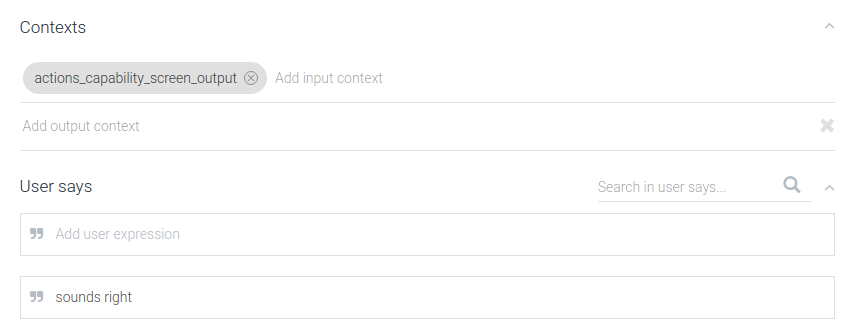
For instance, if you only want an intent to trigger on devices with screen output,
you can set an input context on the intent to be `actions_capability_screen_output`.
The following contexts are available:
- `actions_capability_audio_output` - The device has a speaker.
- `actions_capability_screen_output` - The device has an output display screen.
- `actions_capability_media_response_audio` - The device supports playback of media content.
- `actions_capability_web_browser` - The device supports a web browser. (This capability is currently not available for smart displays.)
Here's an example of an intent that will only trigger on surfaces with screens:
### Multi-surface conversations
At any point during your Action's flow, you can check if the user has any other
surfaces with a specific capability. If another surface with the requested
capability is available, you can then transfer the current
conversation over to that new surface.
> [!NOTE]
> **Note:** A conversation can only be transferred based on the screen capability with Android/iOS phone as the destination surface.
The flow for a surface transfer will work as follows:
1. **Check whether the user has an available surface**
In the webhook handler, you can query whether the user has a surface
available with a specific capability. Note that this surface must be tied to
the same Google account as the source surface.
### Node.js
```javascript
const screenAvailable =
conv.available.surfaces.capabilities.has(
'actions.capability.SCREEN_OUTPUT');
```
### Java
```java
String screen = Capability.SCREEN_OUTPUT.getValue();
boolean screenAvailable = false;
for (Surface surface : request.getAvailableSurfaces()) {
for (com.google.api.services.actions_fulfillment.v2.model.Capability capability :
surface.getCapabilities()) {
if (capability.getName().equals(screen)) {
screenAvailable = true;
break;
}
}
}
```
### Node.js
```javascript
const screenAvailable =
conv.available.surfaces.capabilities.has(
'actions.capability.SCREEN_OUTPUT');
```
### Java
```java
String screen = Capability.SCREEN_OUTPUT.getValue();
boolean screenAvailable = false;
for (Surface surface : request.getAvailableSurfaces()) {
for (com.google.api.services.actions_fulfillment.v2.model.Capability capability :
surface.getCapabilities()) {
if (capability.getName().equals(screen)) {
screenAvailable = true;
break;
}
}
}
```
### JSON
Note that the JSON below describes a webhook request.
```
{
"responseId": "206a66fb-a572-4cfc-9e41-8e2eb62fdf18-712767ed",
"queryResult": {
"queryText": "Current capabilities",
"parameters": {},
"allRequiredParamsPresent": true,
"fulfillmentText": "Webhook failed for intent: Current Capabilities",
"fulfillmentMessages": [
{
"text": {
"text": [
"Webhook failed for intent: Current Capabilities"
]
}
}
],
"outputContexts": [
{
"name": "projects/df-surface-caps-kohler/agent/sessions/ABwppHG7pYytu-kJGJApvrFTk2iNkshy-NLsjlzJg2ntVbxZkoz-rdFch3Fd8Vmlgf0VxmNSK1woelx1otayGwCnE8gzAQ/contexts/actions_capability_media_response_audio"
},
{
"name": "projects/df-surface-caps-kohler/agent/sessions/ABwppHG7pYytu-kJGJApvrFTk2iNkshy-NLsjlzJg2ntVbxZkoz-rdFch3Fd8Vmlgf0VxmNSK1woelx1otayGwCnE8gzAQ/contexts/actions_capability_audio_output"
},
{
"name": "projects/df-surface-caps-kohler/agent/sessions/ABwppHG7pYytu-kJGJApvrFTk2iNkshy-NLsjlzJg2ntVbxZkoz-rdFch3Fd8Vmlgf0VxmNSK1woelx1otayGwCnE8gzAQ/contexts/actions_capability_account_linking"
},
{
"name": "projects/df-surface-caps-kohler/agent/sessions/ABwppHG7pYytu-kJGJApvrFTk2iNkshy-NLsjlzJg2ntVbxZkoz-rdFch3Fd8Vmlgf0VxmNSK1woelx1otayGwCnE8gzAQ/contexts/actions_capability_web_browser"
},
{
"name": "projects/df-surface-caps-kohler/agent/sessions/ABwppHG7pYytu-kJGJApvrFTk2iNkshy-NLsjlzJg2ntVbxZkoz-rdFch3Fd8Vmlgf0VxmNSK1woelx1otayGwCnE8gzAQ/contexts/actions_capability_screen_output"
},
{
"name": "projects/df-surface-caps-kohler/agent/sessions/ABwppHG7pYytu-kJGJApvrFTk2iNkshy-NLsjlzJg2ntVbxZkoz-rdFch3Fd8Vmlgf0VxmNSK1woelx1otayGwCnE8gzAQ/contexts/google_assistant_input_type_touch"
}
],
"intent": {
"name": "projects/df-surface-caps-kohler/agent/intents/4e191eef-ba17-4f68-8a97-85a43cbc9ed1",
"displayName": "Current Capabilities"
},
"intentDetectionConfidence": 1,
"languageCode": "en"
},
"originalDetectIntentRequest": {
"source": "google",
"version": "2",
"payload": {
"user": {
"locale": "en-US",
"userVerificationStatus": "VERIFIED"
},
"conversation": {
"conversationId": "ABwppHG7pYytu-kJGJApvrFTk2iNkshy-NLsjlzJg2ntVbxZkoz-rdFch3Fd8Vmlgf0VxmNSK1woelx1otayGwCnE8gzAQ",
"type": "ACTIVE",
"conversationToken": "[]"
},
"inputs": [
{
"intent": "actions.intent.TEXT",
"rawInputs": [
{
"inputType": "TOUCH",
"query": "Current capabilities"
}
],
"arguments": [
{
"name": "text",
"rawText": "Current capabilities",
"textValue": "Current capabilities"
}
]
}
],
"surface": {
"capabilities": [
{
"name": "actions.capability.MEDIA_RESPONSE_AUDIO"
},
{
"name": "actions.capability.AUDIO_OUTPUT"
},
{
"name": "actions.capability.ACCOUNT_LINKING"
},
{
"name": "actions.capability.WEB_BROWSER"
},
{
"name": "actions.capability.SCREEN_OUTPUT"
}
]
},
"availableSurfaces": [
{
"capabilities": [
{
"name": "actions.capability.AUDIO_OUTPUT"
},
{
"name": "actions.capability.SCREEN_OUTPUT"
},
{
"name": "actions.capability.WEB_BROWSER"
}
]
}
]
}
},
"session": "projects/df-surface-caps-kohler/agent/sessions/ABwppHG7pYytu-kJGJApvrFTk2iNkshy-NLsjlzJg2ntVbxZkoz-rdFch3Fd8Vmlgf0VxmNSK1woelx1otayGwCnE8gzAQ"
}
```
### JSON
Note that the JSON below describes a webhook request.
```
{
"user": {
"locale": "en-US",
"userVerificationStatus": "VERIFIED"
},
"conversation": {
"conversationId": "ABwppHENuB8dw7LgVquXnW5Bmy9hwu1Qz4bsaL7uIb9vDSBYPAFhFgsMWnMV6m4JEDgaUWz9FUVuIhQqWh1KZ_jjTwKEIlza",
"type": "NEW"
},
"inputs": [
{
"intent": "actions.intent.TEXT",
"rawInputs": [
{
"inputType": "TOUCH",
"query": "Current capabilities"
}
],
"arguments": [
{
"name": "text",
"rawText": "Current capabilities",
"textValue": "Current capabilities"
}
]
}
],
"surface": {
"capabilities": [
{
"name": "actions.capability.MEDIA_RESPONSE_AUDIO"
},
{
"name": "actions.capability.SCREEN_OUTPUT"
},
{
"name": "actions.capability.WEB_BROWSER"
},
{
"name": "actions.capability.ACCOUNT_LINKING"
},
{
"name": "actions.capability.AUDIO_OUTPUT"
}
]
},
"availableSurfaces": [
{
"capabilities": [
{
"name": "actions.capability.WEB_BROWSER"
},
{
"name": "actions.capability.AUDIO_OUTPUT"
},
{
"name": "actions.capability.SCREEN_OUTPUT"
}
]
}
]
}
```
2. **Request to transfer the user to the new surface**
If there is an available surface with the needed capabilities, your Action will
need to ask the user if they want to transfer the conversation.
### Node.js
```javascript
if (conv.screen) {
conv.ask(`You're already on a screen device.`);
conv.ask('What else would you like to try?');
conv.ask(new Suggestions([
'Current Capabilities',
'Check Audio Capability',
'Check Screen Capability',
'Check Media Capability',
'Check Web Capability',
]));
return;
} else if (screenAvailable) {
const context =
`Let's move you to a screen device for cards and other visual responses`;
const notification = 'Try your Action here!';
const capabilities = ['actions.capability.SCREEN_OUTPUT'];
return conv.ask(new NewSurface({context, notification, capabilities}));
} else {
conv.ask('It looks like there is no screen device ' +
'associated with this user.');
conv.ask('What else would you like to try?');
conv.ask(new Suggestions([
'Current Capabilities',
'Check Audio Capability',
'Check Screen Capability',
'Check Media Capability',
'Check Web Capability',
]));
};
```
### Java
```java
ResponseBuilder responseBuilder = getResponseBuilder(request);
if (request.hasCapability(Capability.SCREEN_OUTPUT.getValue())) {
responseBuilder.add("You're already on a screen device");
responseBuilder.add("What else would you like to try?");
responseBuilder.addSuggestions(
new String[] {
"Transfer surface",
"Check Audio Capability",
"Check Screen Capability",
"Check Media Capability",
"Check Web Capability",
});
return responseBuilder.build();
} else if (screenAvailable) {
responseBuilder.add(
new NewSurface()
.setContext("Let's move you to a screen device for cards and other visual responses")
.setNotificationTitle("Try your Action here!")
.setCapabilities(Collections.singletonList(screen)));
return responseBuilder.build();
} else {
responseBuilder.add("It looks like there is no screen device associated with this user.");
responseBuilder.add("What else would you like to try?");
responseBuilder.addSuggestions(
new String[] {
"Transfer surface",
"Check Audio Capability",
"Check Screen Capability",
"Check Media Capability",
"Check Web Capability",
});
return responseBuilder.build();
}
```
### Node.js
```javascript
if (conv.screen) {
conv.ask(`You're already on a screen device.`);
conv.ask('What else would you like to try?');
conv.ask(new Suggestions([
'Transfer surface',
'Current capabilities',
]));
return;
} else if (screenAvailable) {
const context =
`Let's move you to a screen device for cards and other visual responses`;
const notification = 'Try your Action here!';
const capabilities = ['actions.capability.SCREEN_OUTPUT'];
return conv.ask(new NewSurface({context, notification, capabilities}));
} else {
conv.ask('It looks like there is no screen device ' +
'associated with this user.');
conv.ask('What else would you like to try?');
conv.ask(new Suggestions([
'Transfer surface',
'Current capabilities',
]));
};
```
### Java
```java
ResponseBuilder responseBuilder = getResponseBuilder(request);
if (request.hasCapability(Capability.SCREEN_OUTPUT.getValue())) {
responseBuilder.add("You're already on a screen device");
responseBuilder.add("What else would you like to try?");
responseBuilder.addSuggestions(
new String[] {
"Current capabilities", "Transfer surface",
});
return responseBuilder.build();
} else if (screenAvailable) {
responseBuilder.add(
new NewSurface()
.setContext("Let's move you to a screen device for cards and other visual responses")
.setNotificationTitle("Try your Action here!")
.setCapabilities(Collections.singletonList(screen)));
return responseBuilder.build();
} else {
responseBuilder.add("It looks like there is no screen device associated with this user.");
responseBuilder.add("What else would you like to try?");
responseBuilder.addSuggestions(
new String[] {
"Current capabilities", "Transfer surface",
});
return responseBuilder.build();
}
```
### JSON
Note that the JSON below describes a webhook response.
```
{
"payload": {
"google": {
"expectUserResponse": true,
"systemIntent": {
"intent": "actions.intent.NEW_SURFACE",
"data": {
"@type": "type.googleapis.com/google.actions.v2.NewSurfaceValueSpec",
"capabilities": [
"actions.capability.SCREEN_OUTPUT"
],
"context": "Let's move you to a screen device for cards and other visual responses",
"notificationTitle": "Try your Action here!"
}
}
}
}
}
```
### JSON
Note that the JSON below describes a webhook response.
```
{
"expectUserResponse": true,
"expectedInputs": [
{
"possibleIntents": [
{
"intent": "actions.intent.NEW_SURFACE",
"inputValueData": {
"@type": "type.googleapis.com/google.actions.v2.NewSurfaceValueSpec",
"capabilities": [
"actions.capability.SCREEN_OUTPUT"
],
"context": "Let's move you to a screen device for cards and other visual responses",
"notificationTitle": "Try your Action here!"
}
}
]
}
]
}
```
> [!NOTE]
> **Note:** Your current session and all its associated data is persisted to the new surface. This means any state from your previous surface, including the `conversationToken` (if you are using the [conversation HTTP/JSON webhook API](https://developers.google.com/assistant/df-asdk/reference/webhooks.md.txt)) and any Dialogflow output context, will be available on the new surface and the conversation ID will remain the same. If you are using the [Node.js client library](https://developers.google.com/assistant/df-asdk/reference/nodejsv2/overview.md.txt), you can use the `conv.data` property to store data.
> [!WARNING]
> **Warning:** If you request capabilities that don't exist on any of the user's available surfaces, you will see an error at runtime.
3. **Handle the user's response**
Based on the user's response to your request, your Action will either facilitate
the handoff or return control of the conversation to the original surface.
Either way, the next request to your endpoint will contain the `actions.intent.NEW_SURFACE`
intent, so you should build an intent that triggers on that event with a
corresponding handler in your webhook. In the handler code, you should
check whether or not the transfer was successful.
### Node.js
```javascript
app.intent('Transfer Surface - NEW_SURFACE', (conv, input, newSurface) => {
if (newSurface.status === 'OK') {
conv.ask('Welcome to a screen device!');
conv.ask(new BasicCard({
title: `You're on a screen device!`,
text: `Screen devices support basic cards and other visual responses!`,
}));
} else {
conv.ask(`Ok, no problem.`);
}
conv.ask('What else would you like to try?');
conv.ask(new Suggestions([
'Current Capabilities',
'Check Audio Capability',
'Check Screen Capability',
'Check Media Capability',
'Check Web Capability',
]));
});
```
### Java
```java
@ForIntent("Transfer Surface - NEW_SURFACE")
public ActionResponse newSurface(ActionRequest request) {
ResponseBuilder responseBuilder = getResponseBuilder(request);
Map newSurfaceStatus = request.getArgument("NEW_SURFACE").getExtension();
if (newSurfaceStatus.get("status").equals("OK")) {
responseBuilder.add("Welcome to a screen device!");
responseBuilder.add(
new BasicCard()
.setTitle("You're on a screened device!")
.setFormattedText("Screen devices support basic cards and other visual responses!"));
} else {
responseBuilder.add("Ok, no problem.");
}
responseBuilder.add("What else would you like to try?");
responseBuilder.addSuggestions(
new String[] {
"Transfer surface",
"Check Audio Capability",
"Check Screen Capability",
"Check Media Capability",
"Check Web Capability",
});
return responseBuilder.build();
}
```
### Node.js
```javascript
app.intent('actions.intent.NEW_SURFACE', (conv) => {
if (conv.arguments.get('NEW_SURFACE').status === 'OK') {
conv.ask('Welcome to a screen device!');
conv.ask(new BasicCard({
title: `You're on a screen device!`,
text: `Screen devices support basic cards and other visual responses!`,
}));
} else {
conv.ask(`Ok, no problem.`);
}
conv.ask('What else would you like to try?');
conv.ask(new Suggestions([
'Transfer surface',
'Current capabilities',
]));
});
```
### Java
```java
@ForIntent("actions.intent.NEW_SURFACE")
public ActionResponse newSurface(ActionRequest request) {
ResponseBuilder responseBuilder = getResponseBuilder(request);
Map newSurfaceStatus = request.getArgument("NEW_SURFACE").getExtension();
if (newSurfaceStatus.get("status").equals("OK")) {
responseBuilder.add("Welcome to a screen device!");
responseBuilder.add(
new BasicCard()
.setTitle("You're on a screened device!")
.setFormattedText("Screen devices support basic cards and other visual responses!"));
} else {
responseBuilder.add("Ok, no problem.");
}
responseBuilder.add("What else would you like to try?");
responseBuilder.addSuggestions(
new String[] {
"Current capabilities", "Transfer surface",
});
return responseBuilder.build();
}
```
### JSON
Note that the JSON below describes a webhook request.
```
{
"responseId": "94b74485-cd7a-4b3b-b96a-fec15f3a496c-712767ed",
"queryResult": {
"queryText": "actions_intent_NEW_SURFACE",
"parameters": {},
"allRequiredParamsPresent": true,
"fulfillmentText": "Webhook failed for intent: Transfer Surface - NEW_SURFACE",
"fulfillmentMessages": [
{
"text": {
"text": [
"Webhook failed for intent: Transfer Surface - NEW_SURFACE"
]
}
}
],
"outputContexts": [
{
"name": "projects/df-surface-caps-kohler/agent/sessions/ABwppHEfQy-JgH7nmiW5gHWiDEyvqNRSPv9zkd3qTVF7F8G8YXJFI2_yal335Co0Z-_N5oUBTmVO_DJUlQONqd5lUgZz-Q/contexts/actions_capability_screen_output"
},
{
"name": "projects/df-surface-caps-kohler/agent/sessions/ABwppHEfQy-JgH7nmiW5gHWiDEyvqNRSPv9zkd3qTVF7F8G8YXJFI2_yal335Co0Z-_N5oUBTmVO_DJUlQONqd5lUgZz-Q/contexts/actions_capability_web_browser"
},
{
"name": "projects/df-surface-caps-kohler/agent/sessions/ABwppHEfQy-JgH7nmiW5gHWiDEyvqNRSPv9zkd3qTVF7F8G8YXJFI2_yal335Co0Z-_N5oUBTmVO_DJUlQONqd5lUgZz-Q/contexts/actions_capability_audio_output"
},
{
"name": "projects/df-surface-caps-kohler/agent/sessions/ABwppHEfQy-JgH7nmiW5gHWiDEyvqNRSPv9zkd3qTVF7F8G8YXJFI2_yal335Co0Z-_N5oUBTmVO_DJUlQONqd5lUgZz-Q/contexts/actions_capability_media_response_audio"
},
{
"name": "projects/df-surface-caps-kohler/agent/sessions/ABwppHEfQy-JgH7nmiW5gHWiDEyvqNRSPv9zkd3qTVF7F8G8YXJFI2_yal335Co0Z-_N5oUBTmVO_DJUlQONqd5lUgZz-Q/contexts/actions_capability_account_linking"
},
{
"name": "projects/df-surface-caps-kohler/agent/sessions/ABwppHEfQy-JgH7nmiW5gHWiDEyvqNRSPv9zkd3qTVF7F8G8YXJFI2_yal335Co0Z-_N5oUBTmVO_DJUlQONqd5lUgZz-Q/contexts/google_assistant_input_type_voice"
},
{
"name": "projects/df-surface-caps-kohler/agent/sessions/ABwppHEfQy-JgH7nmiW5gHWiDEyvqNRSPv9zkd3qTVF7F8G8YXJFI2_yal335Co0Z-_N5oUBTmVO_DJUlQONqd5lUgZz-Q/contexts/actions_intent_new_surface",
"parameters": {
"NEW_SURFACE": {
"@type": "type.googleapis.com/google.actions.v2.NewSurfaceValue",
"status": "OK"
},
"text": ""
}
}
],
"intent": {
"name": "projects/df-surface-caps-kohler/agent/intents/9db3798d-bdac-4dc8-a8e7-52349a3af0e8",
"displayName": "Transfer Surface - NEW_SURFACE"
},
"intentDetectionConfidence": 1,
"languageCode": "en"
},
"originalDetectIntentRequest": {
"source": "google",
"version": "2",
"payload": {
"user": {
"locale": "en-US",
"userVerificationStatus": "VERIFIED"
},
"conversation": {
"conversationId": "ABwppHEfQy-JgH7nmiW5gHWiDEyvqNRSPv9zkd3qTVF7F8G8YXJFI2_yal335Co0Z-_N5oUBTmVO_DJUlQONqd5lUgZz-Q",
"type": "ACTIVE",
"conversationToken": "[]"
},
"inputs": [
{
"intent": "actions.intent.NEW_SURFACE",
"rawInputs": [
{
"inputType": "VOICE"
}
],
"arguments": [
{
"name": "NEW_SURFACE",
"extension": {
"@type": "type.googleapis.com/google.actions.v2.NewSurfaceValue",
"status": "OK"
}
},
{
"name": "text"
}
]
}
],
"surface": {
"capabilities": [
{
"name": "actions.capability.SCREEN_OUTPUT"
},
{
"name": "actions.capability.WEB_BROWSER"
},
{
"name": "actions.capability.AUDIO_OUTPUT"
},
{
"name": "actions.capability.MEDIA_RESPONSE_AUDIO"
},
{
"name": "actions.capability.ACCOUNT_LINKING"
}
]
},
"availableSurfaces": [
{
"capabilities": [
{
"name": "actions.capability.SCREEN_OUTPUT"
},
{
"name": "actions.capability.WEB_BROWSER"
},
{
"name": "actions.capability.AUDIO_OUTPUT"
}
]
}
]
}
},
"session": "projects/df-surface-caps-kohler/agent/sessions/ABwppHEfQy-JgH7nmiW5gHWiDEyvqNRSPv9zkd3qTVF7F8G8YXJFI2_yal335Co0Z-_N5oUBTmVO_DJUlQONqd5lUgZz-Q"
}
```
### JSON
Note that the JSON below describes a webhook request.
```
{
"user": {
"locale": "en-US",
"userVerificationStatus": "VERIFIED"
},
"conversation": {
"conversationId": "ABwppHENAOzBH5swn9iKb5QgUliTw4JLu5f86gS373tGtNvYcz1C3qHdorjcIb77o_PUleXGzIEFdPsl3-kmIAARvx67A7Ym",
"type": "NEW"
},
"inputs": [
{
"intent": "actions.intent.NEW_SURFACE",
"rawInputs": [
{
"inputType": "VOICE"
}
],
"arguments": [
{
"name": "NEW_SURFACE",
"extension": {
"@type": "type.googleapis.com/google.actions.v2.NewSurfaceValue",
"status": "OK"
}
},
{
"name": "text"
}
]
}
],
"surface": {
"capabilities": [
{
"name": "actions.capability.SCREEN_OUTPUT"
},
{
"name": "actions.capability.ACCOUNT_LINKING"
},
{
"name": "actions.capability.MEDIA_RESPONSE_AUDIO"
},
{
"name": "actions.capability.AUDIO_OUTPUT"
},
{
"name": "actions.capability.WEB_BROWSER"
}
]
},
"availableSurfaces": [
{
"capabilities": [
{
"name": "actions.capability.WEB_BROWSER"
},
{
"name": "actions.capability.AUDIO_OUTPUT"
},
{
"name": "actions.capability.SCREEN_OUTPUT"
}
]
}
]
}
```