

شرح دستگاه ابری (CDD) یک مفهوم کلی است که جنبههای مختلفی از ویژگیها و عملکرد یک دستگاه ابری را در بر میگیرد. CDD 1.0 (نسخهای از CDD که توسط GCP 2.0 پشتیبانی میشود) این مفاهیم را در پنج قالب سازماندهی میکند:
- CDD قابلیتها و ویژگیهای دستگاه را شرح میدهد.
- CJT (Cloud Job Ticket) گزینههای انتخاب شده برای یک دستور پشتیبانی شده توسط دستگاه را شرح میدهد.
- CDS (وضعیت دستگاه ابری) کل وضعیت معنایی دستگاه را توصیف میکند.
- CJS (وضعیت کار ابری) وضعیت معنایی کارها را روی دستگاه توصیف میکند.
- تنظیمات محلی ، تنظیمات قابل ویرایش توسط کاربر هستند که با استفاده عادی از دستگاه تغییر نمیکنند.
این فرمتها در بخشهای بعدی با استفاده از زبان Protobuf گوگل تعریف شدهاند. آنها به صورت رشتههای JSON سریالی شده از protobufها، به سرور Cloud Print ارسال و از آن دریافت میشوند، که نحوه ارائه مثالهای این صفحه نیز به همین صورت است.
نکته: کلمه کلیدی optional باید در این تعاریف protobuf نادیده گرفته شود. هر فیلدی که در توضیحات بالا با عبارت (required) مشخص شده باشد، الزامی است و سایر فیلدها اختیاری (یا تکراری) هستند.
شرح دستگاه ابری - قالب
CDD فرمتی است که قابلیتهای یک دستگاه متصل به فضای ابری، مانند چاپگر متصل به Google Cloud Print را توصیف میکند. برخی از نمونههای این قابلیتها ممکن است شامل موارد زیر باشد: چاپ رنگی، چاپ دورو یا پشتیبانی از چندین اندازه کاغذ.
توجه: توضیحات دستگاه ابری توسط Cloud منسوخ شده است، اما برای استفاده با API chrome.printing در افزونههای ChromeOS منسوخ نشده است.
در اینجا تعریف protobuf از ساختار داده سطح بالا، CDD، آمده است:
// Description of a cloud-enabled device's capabilities and properties. Also
// known as CDD.
message CloudDeviceDescription {

  // Version of the CDD in the form "X.Y" where changes to Y are backwards
  // compatible, and changes to X are not (required).
  optional string version = 1;

  // Section of the CDD that specifically describes printers.
  optional PrinterDescriptionSection printer = 101;

  // Section of the CDD that specifically describes scanners.
  optional ScannerDescriptionSection scanner = 102;
}
زبانهای مربوط به قابلیتهای چاپگر مانند XPS و PPD، قابلیتها را با استفاده از یک زبان عمومی مشخص میکنند و سپس از کلمات کلیدی برای تعیین اینکه کدام یک از این قابلیتها معنای خاصی دارند (مانند اینکه کدام قابلیت به رنگ سند اشاره دارد یا چند نسخه باید چاپ شود) استفاده میکنند. فرمت CDD با تعریف مجموعهای خاص از protobufهای سفارشی برای هر یک از قابلیتهای دستگاه، رویکرد متفاوتی را در پیش میگیرد.
GCP ابزاری تحت وب ارائه میدهد که میتواند به طور خودکار فایلهای XPS و PPD را به CDD ترجمه کند و با توجه به یک CDD معتبر، ظاهر رابط کاربری ما را به صورت بصری نمایش دهد.
میتوان دید که محتوای اصلی CDD به زیربخشهایی تقسیم شده است. در ابتدا، این زیربخشها چاپگر و اسکنر هستند. میتوان حدس زد که CDD میتواند نمایانگر یک چاپگر یا اسکنر یا حتی هر دو باشد: ترکیبی از چاپگر و اسکنر.
توجه: تعاریف protobuf بخشهای اسکنر CDD، CJT و CDS زمانی که GCP رسماً API اسکن ابری خود را منتشر کند، افشا خواهد شد.
بخش توضیحات چاپگر
این بخش از CDD قابلیتها و ویژگیهای یک چاپگر را شرح میدهد. در اینجا تعریف protobuf آمده است:
// Section of a CDD that describes the capabilities and physical units of a
// cloud-connected printer.
message PrinterDescriptionSection {

  // Content types (sometimes referred to as MIME types) that are supported by
  // the printer.
  //
  // The order of these types determines which content type the document should
  // be converted to. For example, if the types are ordered as:
  //
  //   [
  //     {"content_type": "application/pdf"},
  //     {"content_type": "image/pwg-raster"}
  //   ]
  //
  // Then the document's content type will first be matched to any content type
  // in the list. If there is a match, then the document will be sent to the
  // printer as is. If there is no match, then the document will be converted to
  // a content type which the server supports starting from the first option. In
  // this example, if the document is sent as "text/html" and the printer
  // supports "application/pdf" and "image/pwg-raster", then the document will
  // be converted to "application/pdf" and not "image/pwg-raster", because
  // "application/pdf" is declared earlier in this list.
  repeated SupportedContentType supported_content_type = 1;

  // Printing speeds that the printer can operate at.
  optional PrintingSpeed printing_speed = 2;

  // PWG raster configuration of the printer. Required if the printer supports
  // image/pwg-raster content type, and it should be omitted otherwise.
  // This allows a cloud service to understand how to rasterize a document in
  // PWG-raster for the printer.
  optional PwgRasterConfig pwg_raster_config = 3;

  // Physical model of the printer's input trays.
  repeated InputTrayUnit input_tray_unit = 4;

  // Physical model of the printer's output bins.
  repeated OutputBinUnit output_bin_unit = 5;

  // Physical model of the printer's markers.
  repeated Marker marker = 6;

  // Physical model of the printer's covers.
  repeated Cover cover = 7;

  // Physical model of the printer's media paths.
  repeated MediaPath media_path = 8;

  // Vendor-provided printer capabilities.
  repeated VendorCapability vendor_capability = 101;

  // Color printing capabilities of the printer.
  optional Color color = 102;

  // Duplexing capabilities of the printer.
  optional Duplex duplex = 103;

  // Page/paper orientation capabilities of the printer.
  optional PageOrientation page_orientation = 104;

  // Multiple copy capability of the printer.
  optional Copies copies = 105;

  // Page margins capability of the printer.
  optional Margins margins = 106;

  // Printing quality or dots-per-inch (DPI) capabilities of the printer.
  optional Dpi dpi = 107;

  // Page fitting capabilities of the printer.
  optional FitToPage fit_to_page = 108;

  // Page range selection capability of the printer.
  optional PageRange page_range = 109;

  // Page or media size capabilities of the printer.
  optional MediaSize media_size = 110;

  // Paper collation capability of the printer.
  optional Collate collate = 111;

  // Reverse order printing capability of the printer.
  optional ReverseOrder reverse_order = 112;
}
// Property that defines what content types the printer can print natively.
message SupportedContentType {
  // Content type (e.g. "image/png" or "application/pdf"). Use */* if your
  // printer supports all formats (required).
  optional string content_type = 1;

  // Minimum supported version of the content type if applicable (e.g. "1.5").
  optional string min_version = 2;

  // Maximum supported version of the content type if applicable (e.g. "1.5").
  optional string max_version = 3;
}
// Property that defines what speeds (in pages per minute) the printer can
// operate at.
message PrintingSpeed {
  // Available speed of the printer.
  //
  // Specify settings that are associated with the given speed. If a setting
  // is left unset, then it will be assumed that the speed is independent of
  // that setting. For example, the following Option
  //
  //   {
  //     "speed_ppm": 5.5,
  //     "color_type": ["STANDARD_MONOCHROME"],
  //     "media_size_name": ["NA_LETTER", "ISO_A4"]
  //   }
  //
  // indicates that the printer prints at 5.5 pages per minute when printing in
  // STANDARD_MONOCHROME in either NA_LETTER or ISO_A4 paper sizes.
  message Option {
    // Speed measured in pages per minute (required).
    optional float speed_ppm = 1;

    // Types of color settings that operate at this speed.
    repeated Color.Type color_type = 2;

    // Names of media sizes that operate at this speed.
    repeated MediaSize.Name media_size_name = 3;
  }

  // Speeds that the printer can operate at.
  repeated Option option = 1;
}
// Configuration of how printer should receive PWG raster images.
message PwgRasterConfig {

  message Resolution {
    optional int32 cross_feed_dir = 1;  // Horizontal resolution in DPI.
    optional int32 feed_dir = 2;  // Vertical resolution in DPI.
  }

  // Resolutions (in DPI) of the pages that the printer supports in PWG-raster
  // format. The resolution MUST be supported for every page media supported by
  // the printer. (Same as PwgRasterDocumentResolutionSupported PWG-raster
  // semantic model element.) This field is strongly recommended, as it helps
  // GCP to decide which resolutions are supported by the printer for PWG-raster
  // documents if it has to downscale the document to a lower resolution.
  //
  // This list can be a subset of the full set of resolutions supported by the
  // printer (in formats different from PWG-raster, e.g. PDF), but it MUST
  // include an NxN DPI resolution where N <= 360 and N evenly divides all
  // resolutions supported by the printer. A resolution NxN where N >= 600
  // (possibly 600 or 720) is also strongly recommended.
  //
  // GCP will generate PWG-raster pages not necessarily at the resolution
  // reported in the ticket, but the actual DPIs of the page (horizontal and
  // vertical) will always perfectly divide the corresponding values reported in
  // the ticket.
  repeated Resolution document_resolution_supported = 2;

  // List of PWG-raster document types (in terms of color space and bits per
  // color) supported by the printer. Color printers MUST support SRGB_8 and
  // possibly SGRAY_8. Monochrome printers must support either SRGB_8 or
  // SGRAY_8. However, any printer that doesn't support SGRAY_8 must be able
  // to perform conversion from RGB to grayscale if it receives a PWG-raster
  // document in SRGB and the print job ticket specifies monochrome printing.
  //
  // This field is strongly recommended, and we recommend to include all types
  // supported by the printer, as GCP may start serving more document types in
  // the future.
  repeated PwgDocumentTypeSupported document_type_supported = 3;

  // Describes which transformation needs to be applied to back pages in
  // duplexing in order to have them printed properly.
  // The value mainly depends on how duplexing works on the printer, and the
  // actual effect depends on which duplexing is specified in the ticket.
  enum DocumentSheetBack {
    // No special treatment for back pages (same as front page).
    NORMAL = 0;
    // Back pages are rotated 180 degrees if the document is portrait
    // (TwoSidedLongEdge duplexing).
    ROTATED = 1;
    // Back pages are rotated 180 degrees if the document is landscape
    // (TwoSidedShortEdge duplexing, opposite of ROTATED).
    MANUAL_TUMBLE = 2;
    // Page is flipped upside-down if portrait (TwoSidedLongEdge duplexing),
    // left-right if landscape (TwoSidedShortEdge duplexing).
    FLIPPED = 3;
  }
  // Same as PwgRasterDocumentSheetBack PWG-raster semantic model element.
  // Default value is ROTATED.
  optional DocumentSheetBack document_sheet_back = 4 [default = ROTATED];

  // Instructs GCP that the printer wants to print pages from the last to the
  // first. In that case GCP will stream PWG-raster pages in that order.
  optional bool reverse_order_streaming = 5;

  // Instructs GCP that the printer prefers receiving pages rotated 180 degrees.
  // This rotation is in addition to possible additional rotations of even pages
  // based on document_sheet_back in case of duplexing.
  optional bool rotate_all_pages = 6;

  // PWG-raster document types (in terms of color space and bits per color).
  // This list is based on the PWG-raster specs of March 14, 2012, and it
  // will be extended without notice if new types are added to newer versions
  // of the specs. If a new type is not accepted by GCP capability parser please
  // inform the GCP team. (This doesn't mean that GCP will start sending
  // documents of the new kind.)
  //
  // The string names are identical to the keyword attribute values in
  // PWG-raster documentation, except they are uppercase, and dashes are
  // replaced by underscores.
  enum PwgDocumentTypeSupported {
    BLACK_1 = 1;
    SGRAY_1 = 2;
    ADOBE_RGB_8 = 3;
    BLACK_8 = 4;
    CMYK_8 = 5;
    DEVICE1_8 = 6;
    DEVICE2_8 = 7;
    DEVICE3_8 = 8;
    DEVICE4_8 = 9;
    DEVICE5_8 = 10;
    DEVICE6_8 = 11;
    DEVICE7_8 = 12;
    DEVICE8_8 = 13;
    DEVICE9_8 = 14;
    DEVICE10_8 = 15;
    DEVICE11_8 = 16;
    DEVICE12_8 = 17;
    DEVICE13_8 = 18;
    DEVICE14_8 = 19;
    DEVICE15_8 = 20;
    RGB_8 = 21;
    SGRAY_8 = 22;
    SRGB_8 = 23;
    ADOBE_RGB_16 = 24;
    BLACK_16 = 25;
    CMYK_16 = 26;
    DEVICE1_16 = 27;
    DEVICE2_16 = 28;
    DEVICE3_16 = 29;
    DEVICE4_16 = 30;
    DEVICE5_16 = 31;
    DEVICE6_16 = 32;
    DEVICE7_16 = 33;
    DEVICE8_16 = 34;
    DEVICE9_16 = 35;
    DEVICE10_16 = 36;
    DEVICE11_16 = 37;
    DEVICE12_16 = 38;
    DEVICE13_16 = 39;
    DEVICE14_16 = 40;
    DEVICE15_16 = 41;
    RGB_16 = 42;
    SGRAY_16 = 43;
    SRGB_16 = 44;
  }

  // [Deprecated: Please use the other fields of PwgRasterConfig.]
  // Transformation to apply to pages during PWG rasterization.
  message Transformation {
    // Types of transformation operations to apply.
    enum Operation {
      // Rotate pages 180 degrees.
      ROTATE_180 = 0;

      // Flip pages along the long edge of the paper.
      FLIP_ON_LONG_EDGE = 1;

      // Flip pages along the short edge of the paper.
      FLIP_ON_SHORT_EDGE = 2;
    }

    // Selectors of which pages to apply the transformation to.
    enum Operand {
      // Apply transformation to all pages.
      ALL_PAGES = 0;
      // Apply transformation to even pages only when duplexing (deprecated,
      // instead use EVEN_PAGES and specify appropriate duplex types).
      ONLY_DUPLEXED_EVEN_PAGES = 1;
      // Apply transformation to odd pages only when duplexing (deprecated,
      // instead use ODD_PAGES and specify appropriate duplex types).
      ONLY_DUPLEXED_ODD_PAGES = 2;
      // Apply transformation to even pages.
      EVEN_PAGES = 3;
      // Apply transformation to odd pages.
      ODD_PAGES = 4;
    }
    // Required.
    optional Operation operation = 1;
    // Required.
    optional Operand operand = 2;
    // Duplex types that the transformation applies to. Leave empty if the
    // transformation is applicable to all duplex types.
    repeated Duplex.Type duplex_type = 3;
  }

  // [Deprecated and only partially supported. Please use the other fields of
  // PwgRasterConfig.
  // Out of all possible transformations GCP will only support rotating all
  // pages, but for that we strongly recommend using the rotate_all_pages
  // boolean field instead.]
  // What transformations to apply to pages in the print job.
  repeated Transformation transformation = 1;
}
// Physical model of a printer input tray.
message InputTrayUnit {
  // Enumeration of input tray types.
  enum Type {
    CUSTOM = 0;
    INPUT_TRAY = 1;
    BYPASS_TRAY = 2;
    MANUAL_FEED_TRAY = 3;
    LCT = 4;  // Large capacity tray.
    ENVELOPE_TRAY = 5;
    ROLL = 6;
  }

  // Vendor-provided ID of the input tray (required).
  optional string vendor_id = 1;

  // Type of input tray (required).
  optional Type type = 2;

  // Index of the input tray.
  optional int64 index = 3;

  // Non-localized custom display name of the input tray.
  // New CDDs should use custom_display_name_localized instead. It is required
  // that either custom_display_name or custom_display_name_localized is set if
  // the tray's type is CUSTOM.
  optional string custom_display_name = 4;

  // Translations of custom display name of the input tray.
  // If not empty, must contain an entry with locale == EN.
  repeated LocalizedString custom_display_name_localized = 5;
}
// Physical model of a printer output bin.
message OutputBinUnit {
  // Enumeration of output bin types.
  enum Type {
    CUSTOM = 0;
    OUTPUT_BIN = 1;
    MAILBOX = 2;
    STACKER = 3;
  }

  // Vendor-provided ID of the output bin (required).
  optional string vendor_id = 1;

  // Type of output bin (required).
  optional Type type = 2;

  // Index of the output bin.
  optional int64 index = 3;

  // Non-localized custom display name of the output bin.
  // New CDDs should use custom_display_name_localized instead. It is required
  // that either custom_display_name or custom_display_name_localized is set if
  // the bin's type is CUSTOM.
  optional string custom_display_name = 4;

  // Translations of custom display name of the output bin.
  // If not empty, must contain an entry with locale == EN.
  repeated LocalizedString custom_display_name_localized = 5;
}
// Physical model of a printer marker.
message Marker {
  // Enumeration of types of printer markers.
  enum Type {
    CUSTOM = 0;
    TONER = 1;
    INK = 2;
    STAPLES = 3;
  }

  // Message that describes the color of a marker.
  message Color {
    // Enumeration of color types of the printer marker.
    enum Type {
      CUSTOM = 0;
      BLACK = 1;
      COLOR = 2;
      CYAN = 3;
      MAGENTA = 4;
      YELLOW = 5;
      LIGHT_CYAN = 6;
      LIGHT_MAGENTA = 7;
      GRAY = 8;
      LIGHT_GRAY = 9;
      PIGMENT_BLACK = 10;
      MATTE_BLACK = 11;
      PHOTO_CYAN = 12;
      PHOTO_MAGENTA = 13;
      PHOTO_YELLOW = 14;
      PHOTO_GRAY = 15;
      RED = 16;
      GREEN = 17;
      BLUE = 18;
    }

    // Required.
    optional Type type = 1;

    // Non-localized custom display name of the color.
    // New CDDs should use custom_display_name_localized instead. It is required
    // that either custom_display_name or custom_display_name_localized is set
    // if the color's type is CUSTOM.
    optional string custom_display_name = 2;

    // Translations of custom display name of the color.
    // If not empty, must contain an entry with locale == EN.
    repeated LocalizedString custom_display_name_localized = 3;
  }

  // Vendor-provided ID of the marker (required).
  optional string vendor_id = 1;

  // Type of marker (required).
  optional Type type = 2;

  // Color of the marker. Only needed if marker type is INK or TONER.
  optional Color color = 3;

  // Non-localized custom display name of the marker.
  // New CDDs should use custom_display_name_localized instead. It is required
  // that either custom_display_name or custom_display_name_localized is set
  // if the marker's type is CUSTOM.
  optional string custom_display_name = 4;

  // Translations of custom display name of the marker.
  // If not empty, must contain an entry with locale == EN.
  repeated LocalizedString custom_display_name_localized = 5;
}
// Physical model of a printer cover.
message Cover {
  // Enumeration of cover types.
  enum Type {
    CUSTOM = 0;
    DOOR = 1;
    COVER = 2;
  }

  // Vendor-provided ID of the cover (required).
  optional string vendor_id = 1;

  // Type of the cover (required).
  optional Type type = 2;

  // Index of the cover.
  optional int64 index = 3;

  // Non-localized custom display name of the cover.
  // New CDDs should use custom_display_name_localized instead. It is required
  // that either custom_display_name or custom_display_name_localized is set
  // if the cover's type is CUSTOM.
  optional string custom_display_name = 4;

  // Translations of custom display name of the cover.
  // If not empty, must contain an entry with locale == EN.
  repeated LocalizedString custom_display_name_localized = 5;
}
// Physical model of a media path of a printer. Media paths are the paths
// through which print media flows.
message MediaPath {
  // Vendor-provided ID of a media path (required).
  optional string vendor_id = 1;
}
توجه: مدلهای سینیهای ورودی، سطلهای خروجی، نشانگرها، پوششها و مسیرهای رسانهای موجود در CDD چاپگر، هنگام نمایش وضعیت آن واحدها استفاده میشوند. آنها گزینههای چاپ قابل پیکربندی توسط کاربر را نشان نمیدهند .
// Flexible capability that can represent range-based, selection-based, or
// typed-value-based capabilities.
message VendorCapability {
  enum Type {
    RANGE = 0;
    SELECT = 1;
    TYPED_VALUE = 2;
  }

  // ID of the capability. Used in CJT to associate a ticket item with this
  // capability (required).
  optional string id = 1;

  // Non-localized user-friendly string to represent this capability.
  // New CDDs should use display_name_localized instead. It is required that
  // either display_name or display_name_localized is set.
  optional string display_name = 2;

  // Type of this capability (required).
  optional Type type = 3;

  // Range-based capability definition.
  optional RangeCapability range_cap = 4;

  // Selection-based capability definition.
  optional SelectCapability select_cap = 5;

  // Typed-value-based capability definition.
  optional TypedValueCapability typed_value_cap = 6;

  // Translations of display name of this capability.
  // If not empty, must contain an entry with locale == EN.
  repeated LocalizedString display_name_localized = 7;
}
// Message that stores capability information specific to range-based
// capabilities.
message RangeCapability {
  enum ValueType {
    FLOAT = 0;
    INTEGER = 1;
  }

  // Data type of the value of the range capability (required).
  optional ValueType value_type = 1;
  optional string default = 2;
  optional string min = 3;
  optional string max = 4;
}
// Selection-based device capability. Allows the user to select one or many of
// a set of options.
message SelectCapability {

  // A user-selectable option of the vendor capability.
  message Option {

    // A single string that represents the value of this option. This value
    // will be used in the VendorTicketItem.value field (required).
    optional string value = 1;

    // Non-localized user-friendly string to represent this option.
    // New CDDs should use display_name_localized instead. It is required that
    // either display_name or display_name_localized is set.
    optional string display_name = 2;

    // Whether this option is the default option. Only one option should be
    // marked as default.
    optional bool is_default = 3 [default = false];

    // Translations of display name of the option.
    // If not empty, must contain an entry with locale == EN.
    repeated LocalizedString display_name_localized = 4;
  }

  // List of options available for this capability.
  repeated Option option = 1;
}
// Message that stores capability information specific to typed-value-based
// capabilities.
message TypedValueCapability {
  enum ValueType {
    BOOLEAN = 0;
    FLOAT = 1;
    INTEGER = 2;
    STRING = 3;
  }

  // Type of data of the typed-value capability (required).
  optional ValueType value_type = 1;
  // Default value of the typed-value capability.
  optional string default = 2;
}
// Capability that defines the color options available on a device.
message Color {
  enum Type {
    STANDARD_COLOR = 0;
    STANDARD_MONOCHROME = 1;
    CUSTOM_COLOR = 2;
    CUSTOM_MONOCHROME = 3;
    AUTO = 4;
  }

  message Option {
    // ID to help vendor identify the color option (required for options of type
    // CUSTOM_COLOR and CUSTOM_MONOCHROME).
    optional string vendor_id = 1;

    // Type of color option used in UIs to differentiate color and non-color
    // options (required). Note that there can be any number of options of type
    // CUSTOM_COLOR and CUSTOM_MONOCHROME, but there should be at most one
    // option of each of the other types.
    optional Type type = 2;

    // Non-localized user-friendly string that represents this option.
    // New CDDs should use custom_display_name_localized instead. It is required
    // that either custom_display_name or custom_display_name_localized is set
    // for options of type CUSTOM_COLOR and CUSTOM_MONOCHROME. Options of each
    // of the other types will have their display name localized by the server.
    optional string custom_display_name = 3;

    // Whether this option should be selected by default. Only one option
    // should be set as default.
    optional bool is_default = 4 [default = false];

    // Translations of custom display name of the option.
    // If not empty, must contain an entry with locale == EN.
    repeated LocalizedString custom_display_name_localized = 5;
  }

  repeated Option option = 1;

  // Whether the capability should always reset to the default option,
  // regardless of the last user selected option. Only valid if a default
  // option is configured.
  optional reset_to_default = 2 [default = false];
}
// Capability that defines the duplexing options available on a device.
message Duplex {
  enum Type {
    NO_DUPLEX = 0;
    LONG_EDGE = 1;
    SHORT_EDGE = 2;
  }

  message Option {
    optional Type type = 1 [default = NO_DUPLEX];
    optional bool is_default = 2 [default = false];
  }

  repeated Option option = 1;

  // Whether the capability should always reset to the default option,
  // regardless of the last user selected option. Only valid if a default
  // option is configured.
  optional reset_to_default = 2 [default = false];
}
// Capability that defines the page orientation options available on a device.
message PageOrientation {
  enum Type {
    PORTRAIT = 0;
    LANDSCAPE = 1;
    AUTO = 2;
  }

  message Option {
    // Type of page orientation (required).
    optional Type type = 1;
    optional bool is_default = 2 [default = false];
  }

  repeated Option option = 1;
}
// Capability that defines a default and maximum value for multiple copies on a
// device.
message Copies {
  optional int32 default = 1;
  optional int32 max = 2;
}
// Capability that defines the margins available on a device.
// Margins are measured in microns.
// For the chrome.printing API, the options listed are the only ones supported by the printer.
message Margins {
  // Enumerates the set of predefined types of margins.
  // NOTE: Starting with Chrome 145, the chrome.printing API does not use this Type enum.
  enum Type {
    BORDERLESS = 0;
    STANDARD = 1;
    CUSTOM = 2;
  }

  message Option {
    // Type of margin option. (Starting with Chrome 145, not used by chrome.printing API)
    optional Type type = 1;

    // Top margin of the page (required).
    optional int32 top_microns = 2;

    // Right margin of the page (required).
    optional int32 right_microns = 3;

    // Bottom margin of the page (required).
    optional int32 bottom_microns = 4;

    // Left margin of the page (required).
    optional int32 left_microns = 5;

    optional bool is_default = 6 [default = false];
  }

  repeated Option option = 1;
}
// Capability that defines the 2D image quality levels available on a device.
message Dpi {
  message Option {
    // Horizontal DPI (required).
    optional int32 horizontal_dpi = 1;

    // Vertical DPI (required).
    optional int32 vertical_dpi = 2;

    optional bool is_default = 3 [default = false];

    // Non-localized custom display name to override the default display name
    // which consists of "{$horizontal_dpi}x{$vertical_dpi} dpi".
    // New CDDs should use custom_display_name_localized instead.
    optional string custom_display_name = 4;

    // Vendor-provided ID for the dpi option. Used to disambiguate dpi options
    // that may have the same horizontal and vertical dpi but a different effect
    // on the printer.
    optional string vendor_id = 5;

    // Translations of custom display name of the option, if empty,
    // "{$horizontal_dpi}x{$vertical_dpi} dpi" will be used. If not empty, must
    // contain an entry with locale == EN.
    repeated LocalizedString custom_display_name_localized = 6;
  }

  repeated Option option = 1;
  optional int32 min_horizontal_dpi = 2;
  optional int32 max_horizontal_dpi = 3;
  optional int32 min_vertical_dpi = 4;
  optional int32 max_vertical_dpi = 5;

  // Whether the capability should always reset to the default option,
  // regardless of the last user selected option. Only valid if a default
  // option is configured.
  optional reset_to_default = 6 [default = false];
}
// Capability that defines the page fitting options available on a device.
message FitToPage {
  // Enumeration of page fitting algorithms. Starting with Chrome 145, these values correspond to
  // IPP print-scaling keywords.
  enum Type {
    AUTO = 0;         // Automatically select fitting method.
    AUTO_FIT = 1;     // Scale using either fit or none, depending on ipp-attribute-fidelity.
    FILL = 2;         // Scale to fill the entire printable area, potentially cropping.
    FIT = 3;          // Scale to fit the printable area, preserving aspect ratio and no cropping.
    NONE = 4;         // No scaling.
  }

  message Option {
    // Type of fitting algorithm (required).
    optional Type type = 1;
    optional bool is_default = 2 [default = false];
  }

  // Lists the scaling types supported by the printer.
  repeated Option option = 1;
}
// Capability that defines a default page-range selection on a device.
message PageRange {

  // Interval of pages in the document to print.
  message Interval {
    // Beginning of the interval (inclusive) (required).
    optional int32 start = 1;

    // End of the interval (inclusive). If not set, then the interval will
    // include all available pages after start.
    optional int32 end = 2;
  }

  repeated Interval default = 1;
}
// Capability that defines the media sizes available on a device.
message MediaSize {
  // Enumeration of media size names. This is used for UI purposes.
  enum Name {
    CUSTOM = 0;

    // North American standard sheet media names.
    NA_INDEX_3X5 = 100;
    NA_PERSONAL = 101;
    NA_MONARCH = 102;
    NA_NUMBER_9 = 103;
    NA_INDEX_4X6 = 104;
    NA_NUMBER_10 = 105;
    NA_A2 = 106;
    NA_NUMBER_11 = 107;
    NA_NUMBER_12 = 108;
    NA_5X7 = 109;
    NA_INDEX_5X8 = 110;
    NA_NUMBER_14 = 111;
    NA_INVOICE = 112;
    NA_INDEX_4X6_EXT = 113;
    NA_6X9 = 114;
    NA_C5 = 115;
    NA_7X9 = 116;
    NA_EXECUTIVE = 117;
    NA_GOVT_LETTER = 118;
    NA_GOVT_LEGAL = 119;
    NA_QUARTO = 120;
    NA_LETTER = 121;
    NA_FANFOLD_EUR = 122;
    NA_LETTER_PLUS = 123;
    NA_FOOLSCAP = 124;
    NA_LEGAL = 125;
    NA_SUPER_A = 126;
    NA_9X11 = 127;
    NA_ARCH_A = 128;
    NA_LETTER_EXTRA = 129;
    NA_LEGAL_EXTRA = 130;
    NA_10X11 = 131;
    NA_10X13 = 132;
    NA_10X14 = 133;
    NA_10X15 = 134;
    NA_11X12 = 135;
    NA_EDP = 136;
    NA_FANFOLD_US = 137;
    NA_11X15 = 138;
    NA_LEDGER = 139;
    NA_EUR_EDP = 140;
    NA_ARCH_B = 141;
    NA_12X19 = 142;
    NA_B_PLUS = 143;
    NA_SUPER_B = 144;
    NA_C = 145;
    NA_ARCH_C = 146;
    NA_D = 147;
    NA_ARCH_D = 148;
    NA_ASME_F = 149;
    NA_WIDE_FORMAT = 150;
    NA_E = 151;
    NA_ARCH_E = 152;
    NA_F = 153;

    // Chinese standard sheet media size names.
    ROC_16K = 200;
    ROC_8K = 201;
    PRC_32K = 202;
    PRC_1 = 203;
    PRC_2 = 204;
    PRC_4 = 205;
    PRC_5 = 206;
    PRC_8 = 207;
    PRC_6 = 208;
    PRC_3 = 209;
    PRC_16K = 210;
    PRC_7 = 211;
    OM_JUURO_KU_KAI = 212;
    OM_PA_KAI = 213;
    OM_DAI_PA_KAI = 214;
    PRC_10 = 215;

    // ISO standard sheet media size names.
    ISO_A10 = 301;
    ISO_A9 = 302;
    ISO_A8 = 303;
    ISO_A7 = 304;
    ISO_A6 = 305;
    ISO_A5 = 306;
    ISO_A5_EXTRA = 307;
    ISO_A4 = 308;
    ISO_A4_TAB = 309;
    ISO_A4_EXTRA = 310;
    ISO_A3 = 311;
    ISO_A4X3 = 312;
    ISO_A4X4 = 313;
    ISO_A4X5 = 314;
    ISO_A4X6 = 315;
    ISO_A4X7 = 316;
    ISO_A4X8 = 317;
    ISO_A4X9 = 318;
    ISO_A3_EXTRA = 319;
    ISO_A2 = 320;
    ISO_A3X3 = 321;
    ISO_A3X4 = 322;
    ISO_A3X5 = 323;
    ISO_A3X6 = 324;
    ISO_A3X7 = 325;
    ISO_A1 = 326;
    ISO_A2X3 = 327;
    ISO_A2X4 = 328;
    ISO_A2X5 = 329;
    ISO_A0 = 330;
    ISO_A1X3 = 331;
    ISO_A1X4 = 332;
    ISO_2A0 = 333;
    ISO_A0X3 = 334;
    ISO_B10 = 335;
    ISO_B9 = 336;
    ISO_B8 = 337;
    ISO_B7 = 338;
    ISO_B6 = 339;
    ISO_B6C4 = 340;
    ISO_B5 = 341;
    ISO_B5_EXTRA = 342;
    ISO_B4 = 343;
    ISO_B3 = 344;
    ISO_B2 = 345;
    ISO_B1 = 346;
    ISO_B0 = 347;
    ISO_C10 = 348;
    ISO_C9 = 349;
    ISO_C8 = 350;
    ISO_C7 = 351;
    ISO_C7C6 = 352;
    ISO_C6 = 353;
    ISO_C6C5 = 354;
    ISO_C5 = 355;
    ISO_C4 = 356;
    ISO_C3 = 357;
    ISO_C2 = 358;
    ISO_C1 = 359;
    ISO_C0 = 360;
    ISO_DL = 361;
    ISO_RA2 = 362;
    ISO_SRA2 = 363;
    ISO_RA1 = 364;
    ISO_SRA1 = 365;
    ISO_RA0 = 366;
    ISO_SRA0 = 367;

    // Japanese standard sheet media size names.
    JIS_B10 = 400;
    JIS_B9 = 401;
    JIS_B8 = 402;
    JIS_B7 = 403;
    JIS_B6 = 404;
    JIS_B5 = 405;
    JIS_B4 = 406;
    JIS_B3 = 407;
    JIS_B2 = 408;
    JIS_B1 = 409;
    JIS_B0 = 410;
    JIS_EXEC = 411;
    JPN_CHOU4 = 412;
    JPN_HAGAKI = 413;
    JPN_YOU4 = 414;
    JPN_CHOU2 = 415;
    JPN_CHOU3 = 416;
    JPN_OUFUKU = 417;
    JPN_KAHU = 418;
    JPN_KAKU2 = 419;

    // Other metric standard sheet media size names.
    OM_SMALL_PHOTO = 500;
    OM_ITALIAN = 501;
    OM_POSTFIX = 502;
    OM_LARGE_PHOTO = 503;
    OM_FOLIO = 504;
    OM_FOLIO_SP = 505;
    OM_INVITE = 506;
  }

  message Option {
    optional Name name = 1 [default = CUSTOM];
    // Both of the fields ("width_microns" and "height_microns") are required
    // if "is_continuous_feed" is set to false. If "is_continuous_feed" is set
    // to true only one of these fields is required.
    optional int32 width_microns = 2;
    optional int32 height_microns = 3;
    optional bool is_continuous_feed = 4 [default = false];
    optional bool is_default = 5 [default = false];

    // Non-localized user-friendly string that represents this option.
    // New CDDs should use custom_display_name_localized instead. It is required
    // that either custom_display_name or custom_display_name_localized is set
    // for options whose "name" field is CUSTOM.
    optional string custom_display_name = 6;

    // Vendor-provided ID for the media size option. Used to disambiguate media
    // sizes that may have the same width and height but a different effect on
    // the printer.
    optional string vendor_id = 7;

    // Translations of custom display name of the option.
    // If not empty, must contain an entry with locale == EN.
    repeated LocalizedString custom_display_name_localized = 8;

    // Specifies the bounding box of the imageable area. All 4 fields have to
    // be set for the bounding box to be valid. The imageable area is only applicable when
    // the feed is not continuous.
    optional int32 imageable_area_top_microns = 9;
    optional int32 imageable_area_right_microns = 10;
    optional int32 imageable_area_bottom_microns = 11;
    optional int32 imageable_area_left_microns = 12;
  }

  repeated Option option = 1;
  optional int32 max_width_microns = 2;
  optional int32 max_height_microns = 3;
  optional int32 min_width_microns = 4;
  optional int32 min_height_microns = 5;

  // Whether the capability should always reset to the default option,
  // regardless of the last user selected option. Only valid if a default
  // option is configured.
  optional reset_to_default = 6 [default = false];
}
// Capability that defines the default collation setting on a device.
message Collate {
  optional bool default = 1 [default = true];
}
// Capability that defines the default reverse-printing-order setting on a
// device.
message ReverseOrder {
  optional bool default = 1 [default = false];
}
// A localized human-readable string translated to a specific locale.
// It is recommended to include translations of custom strings only for locales
// for which significant use of the device can be expected. If the translation
// of a custom string for a user's language and country (e.g. ZH_TW) is not
// present, GCP will display the translation for the base language (e.g. ZH).
// If neither translation is present, the translation for EN (which is required
// in every list of localized strings) will be displayed.
message LocalizedString {
  // Locale that the string is translated to (required).
  optional Locale locale = 1;
  // Translated content of the string (required).
  optional string value = 2;

  enum Locale {
    AF = 0;
    AM = 1;
    AR = 2;
    AR_XB = 3;
    BG = 4;
    BN = 5;
    CA = 6;
    CS = 7;
    CY = 8;
    DA = 9;
    DE = 10;
    DE_AT = 11;
    DE_CH = 12;
    EL = 13;
    EN = 14;
    EN_GB = 15;
    EN_IE = 16;
    EN_IN = 17;
    EN_SG = 18;
    EN_XA = 19;
    EN_XC = 20;
    EN_ZA = 21;
    ES = 22;
    ES_419 = 23;
    ES_AR = 24;
    ES_BO = 25;
    ES_CL = 26;
    ES_CO = 27;
    ES_CR = 28;
    ES_DO = 29;
    ES_EC = 30;
    ES_GT = 31;
    ES_HN = 32;
    ES_MX = 33;
    ES_NI = 34;
    ES_PA = 35;
    ES_PE = 36;
    ES_PR = 37;
    ES_PY = 38;
    ES_SV = 39;
    ES_US = 40;
    ES_UY = 41;
    ES_VE = 42;
    ET = 43;
    EU = 44;
    FA = 45;
    FI = 46;
    FR = 47;
    FR_CA = 48;
    FR_CH = 49;
    GL = 50;
    GU = 51;
    HE = 52;
    HI = 53;
    HR = 54;
    HU = 55;
    HY = 56;
    ID = 57;
    IN = 58;
    IT = 59;
    JA = 60;
    KA = 61;
    KM = 62;
    KN = 63;
    KO = 64;
    LN = 65;
    LO = 66;
    LT = 67;
    LV = 68;
    ML = 69;
    MO = 70;
    MR = 71;
    MS = 72;
    NB = 73;
    NE = 74;
    NL = 75;
    NO = 76;
    PL = 77;
    PT = 78;
    PT_BR = 79;
    PT_PT = 80;
    RM = 81;
    RO = 82;
    RU = 83;
    SK = 84;
    SL = 85;
    SR = 86;
    SR_LATN = 87;
    SV = 88;
    SW = 89;
    TA = 90;
    TE = 91;
    TH = 92;
    TL = 93;
    TR = 94;
    UK = 95;
    UR = 96;
    VI = 97;
    ZH = 98;
    ZH_CN = 99;
    ZH_HK = 100;
    ZH_TW = 101;
    ZU = 102;
  }
}
مثال CDD
در اینجا مثالی از اینکه یک CDD برای یک چاپگر جوهر افشان "معمولی" که از چاپ رنگی، چاپ چندین نسخه و اندازههای مختلف صفحه پشتیبانی میکند و میتواند از چاپ بومی فایلهای PDF، JPEG و متن ساده پشتیبانی کند، چگونه میتواند باشد، آورده شده است:
{
  "version": "1.0",
  "printer": {
    "supported_content_type": [
      {"content_type": "application/pdf", "min_version": "1.5"},
      {"content_type": "image/jpeg"},
      {"content_type": "text/plain"}
    ],
    "input_tray_unit": [
      {
        "vendor_id": "tray",
        "type": "INPUT_TRAY"
      }
    ],
    "marker": [
      {
        "vendor_id": "black",
        "type": "INK",
        "color": {"type": "BLACK"}
      },
      {
        "vendor_id": "color",
        "type": "INK",
        "color": {"type": "COLOR"}
      }
    ],
    "cover": [
      {
        "vendor_id": "front",
        "type": "CUSTOM",
        "custom_display_name": "front cover"
      }
    ],
    "vendor_capability": [],
    "color": {
      "option": [
        {"type": "STANDARD_MONOCHROME"},
        {"type": "STANDARD_COLOR", "is_default": true},
        {
          "vendor_id": "ultra-color",
          "type": "CUSTOM_COLOR",
          "custom_display_name": "Best Color"
        }
      ]
    },
    "copies": {
      "default": 1,
      "max": 100
    },
    "media_size": {
      "option": [
        {
          "name": "ISO_A4",
          "width_microns": 210000,
          "height_microns": 297000,
          "is_default": true
        },
        {
          "name": "NA_LEGAL",
          "width_microns": 215900,
          "height_microns": 355600
        },
        {
          "name": "NA_LETTER",
          "width_microns": 215900,
          "height_microns": 279400
        }
      ]
    }
  }
}
بلیط کار ابری
پس از اینکه کاربر انتخاب و مقادیر قابلیتهای دستگاه را برای آمادهسازی یک کار چاپ پیکربندی کرد، یک بلیط کار ابری یا به اختصار "بلیط" ساخته میشود تا به چاپگر یا دستگاه دیگر نحوه انجام کار را آموزش دهد. این بلیط از کلاینت چاپ (مثلاً برنامه تلفن همراه) به سرویس ابری (مثلاً GCP) ارسال میشود و همراه با دادههای کار ذخیره میشود. مانند CDD، CJT به بخشهای خاص دستگاه تقسیم میشود. به عنوان مثال، بخشهای جداگانهای از اقلام بلیط مربوط به چاپگرها و موارد مربوط به اسکنرها وجود دارد.
توجه: درخواست کار ابری توسط Cloud منسوخ شده است، اما برای استفاده با API chrome.printing در افزونههای ChromeOS منسوخ نشده است.
در اینجا تعریف اولیه از CJT آمده است:
// Description of how a cloud job (e.g. print job, scan job) should be handled
// by the cloud device. Also known as CJT.
message CloudJobTicket {

  // Version of the CJT in the form "X.Y" where changes to Y are backwards
  // compatible, and changes to X are not (required).
  optional string version = 1;

  // Section of CJT pertaining to cloud printer ticket items.
  optional PrintTicketSection print = 101;

  // Section of CJT pertaining to cloud scanner ticket items.
  optional ScanTicketSection scan = 102;
}
بخش چاپ بلیط
بخش بلیط چاپ در CJT نحوه مدیریت یک کار چاپ توسط یک چاپگر متصل به ابر را شرح میدهد. در اینجا تعریف protobuf از بخش بلیط چاپ آمده است:
// Section of a CJT which describes how a print job should be handled by a
// cloud-connected printer.
message PrintTicketSection {
  repeated VendorTicketItem vendor_ticket_item = 1;
  optional ColorTicketItem color = 2;
  optional DuplexTicketItem duplex = 3;
  optional PageOrientationTicketItem page_orientation = 4;
  optional CopiesTicketItem copies = 5;
  optional MarginsTicketItem margins = 6;
  optional DpiTicketItem dpi = 7;
  optional FitToPageTicketItem fit_to_page = 8;
  optional PageRangeTicketItem page_range = 9;
  optional MediaSizeTicketItem media_size = 10;
  optional CollateTicketItem collate = 11;
  optional ReverseOrderTicketItem reverse_order = 12;
}
// Ticket item indicating what value for a vendor-specific capability to use.
message VendorTicketItem {
  // ID of vendor-specific capability that this ticket item refers to
  // (required).
  optional string id = 1;

  // Value of ticket item (required).
  optional string value = 2;
}
// Ticket item indicating which color option to use.
message ColorTicketItem {
  // Vendor ID of the color (required if the type is CUSTOM_COLOR or
  // CUSTOM_MONOCHROME).
  optional string vendor_id = 1;

  // Type of the color (required).
  optional Color.Type type = 2;
}
// Ticket item indicating which duplexing option to use.
message DuplexTicketItem {
  // Type of duplexing (required).
  optional Duplex.Type type = 1;
}
// Ticket item indicating which page orientation option to use.
message PageOrientationTicketItem {
  // Page orientation type (required).
  optional PageOrientation.Type type = 1;
}
// Ticket item indicating how many copies to produce.
message CopiesTicketItem {
  // Number of copies to print (required).
  optional int32 copies = 1;
}
// Ticket item indicating what margins to use (in microns).
// The combination of top, right, bottom, and left microns MUST match
// one of the Option entries in the printer's CDD Margins capability.
message MarginsTicketItem {
  // Top margin of the page in microns (required).
  optional int32 top_microns = 1;

  // Right margin of the page in microns (required).
  optional int32 right_microns = 2;

  // Bottom margin of the page in microns (required).
  optional int32 bottom_microns = 3;

  // Left margin of the page in microns (required).
  optional int32 left_microns = 4;
}
// Ticket item indicating what image resolution to use.
message DpiTicketItem {
  // Horizontal DPI to print at (required).
  optional int32 horizontal_dpi = 1;

  // Vertical DPI to print at (required).
  optional int32 vertical_dpi = 2;

  // Vendor-provided ID of the Dpi option. Needed to disambiguate Dpi options
  // that have the same DPI values, but may have a different effect for the
  // printer.
  optional string vendor_id = 3;
}
// Ticket item indicating what page-fitting algorithm to use.
message FitToPageTicketItem {
  // Type of page fitting (required).
  // This value MUST match one of the FitToPage.Type values listed
  // in an Option within the printer's CDD FitToPage capability.
  optional FitToPage.Type type = 1;
}
// Ticket item indicating what pages to use.
message PageRangeTicketItem {
  repeated PageRange.Interval interval = 1;
}
// Ticket item indicating what media size to use.
message MediaSizeTicketItem {
  // Width (in microns) of the media to print to.
  optional int32 width_microns = 1;

  // Height (in microns) of the media to print to.
  optional int32 height_microns = 2;

  // Whether the media size selection is continuously fed. If false, both width
  // and height must be set. If true, only one need be set.
  optional bool is_continuous_feed = 3 [default = false];

  // Vendor-provided ID of the MediaSize option. Needed to disambiguate media
  // sizes that may have the same width and height, but may have a different
  // effect for the printer.
  optional string vendor_id = 4;
}
// Ticket item indicating whether to collate pages.
message CollateTicketItem {
  // Whether to print collated (required).
  optional bool collate = 1;
}
// Ticket item indicating whether to print in reverse.
message ReverseOrderTicketItem {
  // Whether to print in reverse (required).
  optional bool reverse_order = 1;
}
مثال CJT
در اینجا یک نمونه بلیط تهیه شده برای مثال CDD "چاپگر معمولی" در بالا آمده است:
{
  "version": "1.0",
  "print": {
    "vendor_ticket_item": [],
    "color": {"type": "STANDARD_MONOCHROME"},
    "copies": {"copies": 3}
  }
}
ما به زودی یک ابزار وب برای ترجمه بلیطهای چاپی با فرمت CJT به فرمتهای بلیط بومی (JSON برای PPD و یک سند psf:PrintTicket برای XPS) اضافه خواهیم کرد.
وضعیت دستگاه ابری
کل وضعیت دستگاه توسط یک پیام CloudDeviceState نمایش داده میشود. دستگاههای مختلف از بخشهای مختلف این پیام استفاده میکنند. دستگاههای چندمنظوره میتوانند از چندین یا همه بخشهای تعریفشده استفاده کنند. انتظار میرود بخشهای بیشتری در آینده اضافه شوند، زیرا Cloud Print مجموعه انواع دستگاههایی را که پشتیبانی میکند گسترش میدهد.
// Represents the entire cloud-connected device state.
message CloudDeviceState {

  // Supported device states.
  enum StateType {

    // Device is ready to accept jobs. Self-testing, low power and all other
    // states in which the device can start processing newly submitted jobs
    // without user intervention should be mapped into this state.
    IDLE = 0;

    // Processing jobs (e.g. printing).
    PROCESSING = 1;

    // Device cannot process jobs. User should fix the problem to resume the
    // processing (e.g. printer is out of paper).
    STOPPED = 2;
  }

  // Device cloud connectivity state.
  enum CloudConnectionStateType {
    UNKNOWN = 0;
    NOT_CONFIGURED = 1;
    ONLINE = 2;
    OFFLINE = 3;
  }

  // Version of the CDS in the form "X.Y" where changes to Y are backwards
  // compatible, and changes to X are not (required).
  optional string version = 1;

  // Whether device is connected to the server. It is not intended to be
  // reported by the device, it's set by the server.
  optional CloudConnectionStateType cloud_connection_state = 2;

  // Defined for devices with printing capabilities.
  optional PrinterStateSection printer = 3;

  // Defined for devices with scanning capabilities.
  optional ScannerStateSection scanner = 4;
}
بخش وضعیت چاپگر
دستگاههایی که قابلیت چاپ دارند از این بخش برای نمایش وضعیت واحد چاپ استفاده میکنند.
// Represents the printer state.
message PrinterStateSection {

  // Current printer state (required).
  optional CloudDeviceState.StateType state = 1;

  // State of the input trays.
  optional InputTrayState input_tray_state = 2;

  // State of the output bins.
  optional OutputBinState output_bin_state = 3;

  // State of the markers.
  optional MarkerState marker_state = 4;

  // State of the printer doors/covers/etc.
  optional CoverState cover_state = 5;

  // State of the printer media paths.
  optional MediaPathState media_path_state = 6;

  // Vendor-specific printer state.
  optional VendorState vendor_state = 101;
}
// State of the device's input trays.
message InputTrayState {

  message Item {

    enum StateType {
      // Tray is functional.
      OK = 0;
      // Tray is out of media. Treated as error.
      EMPTY = 1;
      // Tray is open. Treated as error.
      OPEN = 2;
      // Tray is installed, but turned off or disconnected. Treated as error.
      OFF = 3;
      // Tray is present, but not functioning properly. Treated as error.
      FAILURE = 4;
    }

    // ID of the tray (refers to CDD model) (required).
    optional string vendor_id = 1;

    // Current tray state (required).
    optional StateType state = 2;
    // Loaded media level, percent. Ranges from 0 (empty) to 100 (fully loaded).
    optional int32 level_percent = 3;
    // Vendor-specific message, ignored when state == OK.
    optional string vendor_message = 101;
  }

  repeated Item item = 1;
}
// State of the device's output bins.
message OutputBinState {

  message Item {

    enum StateType {
      // Bin is functional.
      OK = 0;
      // Bin is full and cannot receive any more output. Treated as error.
      FULL = 1;
      // Bin is open. Treated as error.
      OPEN = 2;
      // Bin is installed, but turned off or disconnected. Treated as error.
      OFF = 3;
      // Bin is present, but not functioning properly. Treated as error.
      FAILURE = 4;
    }

    // ID of the bin (refers to CDD model) (required).
    optional string vendor_id = 1;

    // Current bin state (required).
    optional StateType state = 2;
    // Used space, percent. Ranges from 0 (empty) to 100 (full).
    optional int32 level_percent = 3;
    // Vendor-specific message, ignored when state == OK.
    optional string vendor_message = 101;
  }

  repeated Item item = 1;
}
// State of the device markers (toner/ink/staples/etc).
message MarkerState {

  message Item {

    enum StateType {
      // Marker is functional.
      OK = 0;
      // Marker resource is exhausted. Treated as error.
      EXHAUSTED = 1;
      // Marker is removed. Treated as error.
      REMOVED = 2;
      // Marker is present, but not functioning properly. Treated as error.
      FAILURE = 3;
    }

    // ID of the marker (refers to CDD model) (required).
    optional string vendor_id = 1;

    // Current marker state (required).
    optional StateType state = 2;
    // Marker supply amount, percent. Ranges from 0 to 100.
    optional int32 level_percent = 3;
    // Estimated number of pages for which the marker supply amount will last.
    optional int32 level_pages = 4;
    // Vendor-specific message, ignored when state == OK.
    optional string vendor_message = 101;
  }

  repeated Item item = 1;
}
// State of the device covers (door/cover/etc).
message CoverState {

  message Item {

    enum StateType {
      // Default cover state (closed, does not need any attention).
      OK = 0;
      // Cover is open. Treated as error.
      OPEN = 1;
      // Cover is not functioning properly. Treated as error.
      FAILURE = 2;
    }

    // ID of the cover (refers to CDD model) (required).
    optional string vendor_id = 1;

    // Current cover state (required).
    optional StateType state = 2;
    // Vendor-specific message, ignored when state == OK.
    optional string vendor_message = 101;
  }

  repeated Item item = 1;
}
// State of the device media paths.
message MediaPathState {

  message Item {

    enum StateType {
      // Path is functioning.
      OK = 0;
      // Media is jammed. Treated as error.
      MEDIA_JAM = 1;
      // Path is present, but not functioning properly. Treated as error.
      FAILURE = 2;
    }

    // ID of the media path (refers to CDD model) (required).
    optional string vendor_id = 1;

    // Current state (required).
    optional StateType state = 2;
    // Vendor-specific message, ignored when state == OK.
    optional string vendor_message = 101;
  }

  repeated Item item = 1;
}
توجه: همانطور که در توضیحات مربوط به هر فیلد vendor_id در تعاریف protobuf بالا اشاره شده است، شناسه فروشنده هر آیتم وضعیت برای یک واحد فیزیکی در یک پیام CDS باید با شناسه فروشنده یک واحد فیزیکی مربوطه در CDD مطابقت داشته باشد.
// Vendor-specific state.
message VendorState {

  message Item {

    enum StateType {
      ERROR = 0;
      WARNING = 1;
      INFO = 2;
    }

    // Severity of the state (required).
    optional StateType state = 1;
    // Non-localized user-readable state description.
    // New vendor state items should use description_localized instead. It is
    // required that either description or description_localized is set.
    optional string description = 2;
    // Translations of state description.
    // If not empty, must contain an entry with locale == EN.
    repeated LocalizedString description_localized = 3;
  }

  repeated Item item = 1;
}
نکته: توصیه میشود در صورت امکان، برای هماهنگی با پیامهای محلی تولید شده از دادههای وضعیت معنایی (مثلاً "جوهر مشکی خالی است") از انتهای پیامهای فروشنده، نقطه حذف شود.
مثال CDS
در اینجا یک نمونه CDS برای «چاپگر معمولی» از مثال CDD در حالتی که کارتریج جوهر خالی دارد، آورده شده است. به موارد زیر توجه کنید:
- کارها در حال بررسی هستند، از این رو دستگاه در وضعیت متوقف شده قرار دارد.
- سرور فرض میکند که واحدهای دستگاهی که وضعیت آنها در CDS ذکر نشده است (در این مورد سینی ورودی و پوشش جلویی) در وضعیت OK هستند و هیچ اطلاعات اضافی مانند "level_percent" برای گزارش ندارند.
- فیلد "cloud_connection_state" حذف شده است؛ این فیلد توسط سرور در CDS برگردانده شده توسط رابطهای /printer و /search تنظیم خواهد شد (اگر "semanticState" به عنوان یک فیلد اضافی درخواست شده باشد).
{
  "version": "1.0",
  "printer": {
    "state": "STOPPED",
    "marker_state": {
      "item": [
        {
          "vendor_id": "black",
          "state": "EXHAUSTED",
          "level_percent": 0
        },
        {
          "vendor_id": "color",
          "state": "OK",
          "level_percent": 88,
          "level_pages": 100
        }
      ]
    }
  }
}
تفسیر CDS Diff
پارامتر semantic_state_diff از رابط /update به عنوان یک پیام معمولی CloudDeviceState همانطور که در بالا تعریف شد ارائه میشود، اما به صورت زیر به عنوان یک "diff" در CDS ذخیره شده برای چاپگر تفسیر میشود.
- فیلدهای حذف شده در diff در CDS اصلی تغییر نمیکنند.
- فیلدهای پیام تو در تو در PrinterStateSection و ScannerStateSection که با مقادیر خالی ارائه میشوند (مثلاً
"marker_state": {}) حذف میشوند. - فیلدهای نوع اولیه یا شمارشی و فیلدهای پیام تو در تو که دارای مقادیر غیرتهی هستند، اضافه یا تغییر داده میشوند.
- فیلد "version" را همیشه میتوان هنگام استفاده از پارامتر "semantic_state_diff" حذف کرد. وقتی این فیلد حذف شود و چاپگر قبلاً CDS خود را تنظیم نکرده باشد، سرور Cloud Print فرض میکند که diff ارائه شده از آخرین نسخه استفاده میکند و فیلد نسخه را بر این اساس تنظیم میکند.
وضعیت رابط کاربری دستگاه ابری
فرمت CDS بلافاصله برای نمایش معنادار وضعیت دستگاه به کاربران مناسب نیست، بنابراین فرمت "وضعیت رابط کاربری" با درخواست "uiState" به عنوان یک فیلد اضافی قابل بازگشت است. تعریف protobuf این فرمت در زیر آمده است.
// Represents a cloud device's state in a form convenient for display in a UI.
message CloudDeviceUiState {

  enum Summary {
    IDLE = 0;
    PROCESSING = 1;
    STOPPED = 2;
    OFFLINE = 3;
  }

  enum Severity {
    NONE = 0;
    LOW = 1;
    MEDIUM = 2;
    HIGH = 3;
  }

  // Device state summary (required).
  optional Summary summary = 1 [default = IDLE];

  // Overall severity (error level) of the device state (required).
  // Must only be HIGH in the case that the device is STOPPED.
  optional Severity severity = 2 [default = NONE];

  // In the descriptions of the following three fields, "CDS is nontrivial"
  // means that CDS is present and there is at least one state item in its
  // PrinterStateSection or ScannerStateSection which is "interesting" enough
  // to produce a UI state item for.

  // Number of issues detected.
  // Present if and only if CDS is nontrivial.
  optional int32 num_issues = 3 [default = 0];

  // Heuristically determined most relevant message from a state item.
  // Present if and only if CDS is nontrivial, the device is not OFFLINE, and
  // the maximum severity of a state item is at least MEDIUM if the device is
  // IDLE or PROCESSING, or at least LOW if the device is STOPPED.
  optional string caption = 4;

  // State items specific to the printing capability of the device.
  // Present if and only if CDS is nontrivial and this CloudDeviceUiState object
  // is being returned in a single printer lookup or in a recent printer search.
  optional PrinterUiStateSection printer = 5;
}
// Contains one UI state item for each CDS state item using the information
// obtained from cross-referencing the CDD.
message PrinterUiStateSection {

  // A UI state item with a severity level and either:
  // (1) a localized message and UI-displayable data from the properties and
  //     state of a particular unit of the device, or
  // (2) a possibly non-localized vendor state message.
  message Item {

    // The severity of this individual state item (required).
    optional CloudDeviceUiState.Severity severity = 1;

    // A message produced from a state item, e.g. Black ink level is 60%. This
    // message may not be localized if it is from a VendorState.Item (required).
    optional string message = 2;

    // A non-localized vendor-specific message that provides additional
    // information about the state of the device unit described by this item.
    optional string vendor_message = 3;

    // The fullness level of an input tray, output bin or marker.
    optional int32 level_percent = 4;

    // The color of a marker.
    optional cloudprint.capabilities.Marker.Color.Type color = 5;
  }

  repeated Item vendor_item = 1;
  repeated Item input_tray_item = 2;
  repeated Item output_bin_item = 3;
  repeated Item marker_item = 4;
  repeated Item cover_item = 5;
  repeated Item media_path_item = 6;
}
مثالهای CloudDeviceUiState
این پیام CloudDeviceUiState است که از CDS مثال بالا توسط رابط /search (برای زبان انگلیسی) تولید میشود. این شکل سبک CloudDeviceUiState است.
{
  "summary": "STOPPED",
  "severity": "HIGH",
  "num_issues": 1,
  "caption": "Ink is empty"
}
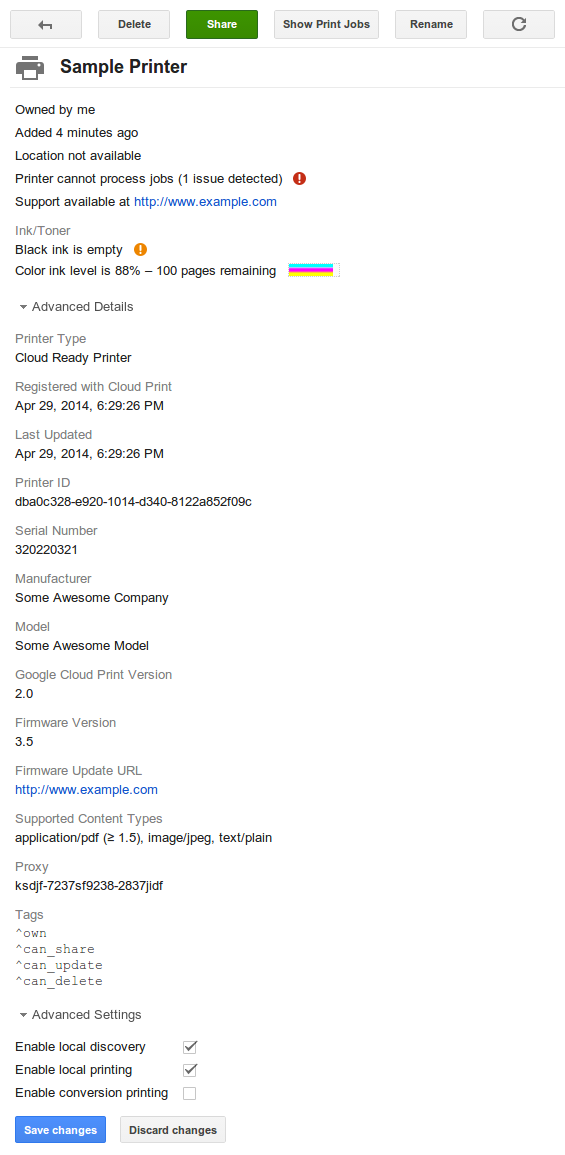
این پیام CloudDeviceUiState است که از همان CDS توسط رابط /printer (برای زبان انگلیسی) تولید میشود. این شکل کامل CloudDeviceUiState با ارجاع متقابل به آیتمهای حالت در CDS با واحدهای فیزیکی شرح داده شده در CDD با استفاده از شناسه فروشنده محاسبه میشود.
{
  "summary": "STOPPED",
  "severity": "HIGH",
  "num_issues": 1,
  "caption": "Black ink is empty",
  "printer": {
    "marker_item": [
      {
        "severity": "MEDIUM",
        "message": "Black ink is empty",
        "color": "BLACK"
      },
      {
        "severity": "NONE",
        "message": "Color ink level is 88% – 100 pages remaining",
        "level_percent": 88,
        "color": "COLOR"
      }
    ]
  }
}
برای مشاهده نحوه نمایش این چاپگر در صفحه مدیریت GCP از تاریخ ۲۹ آوریل ۲۰۱۴، اینجا کلیک کنید.
وضعیت کار ابری
بخش مستقل از نوع دستگاه از وضعیت یک کار در یک دستگاه ابری توسط یک پیام JobState نمایش داده میشود. شمارش نوع، مجموعه پایهای از وضعیتهای تعریف شده برای چرخه عمر عمومی کار را تعریف میکند. این انواع وضعیت مختص کارهای چاپگر نیستند، اما ممکن است برای کارها در هر نوع دستگاهی اعمال شوند.
// Contains the device-agnostic state of a job on a cloud device.
message JobState {

  // Supported job state types.
  enum Type {

    // Job is being created and is not ready for processing yet.
    DRAFT = 0;

    // Submitted and ready, but should not be processed yet.
    HELD = 1;

    // Ready for processing.
    QUEUED = 2;

    // Currently being processed.
    IN_PROGRESS = 3;

    // Was in progress, but stopped due to error or user intervention.
    STOPPED = 4;

    // Processed successfully.
    DONE = 5;

    // Aborted due to error or by user action (cancelled).
    ABORTED = 6;
  }

  message UserActionCause {

    // Next number = 2.
    enum ActionCode {
      // User has cancelled the job.
      CANCELLED = 0;
      // User has paused the job.
      PAUSED = 1;
      // User has performed some other action.
      OTHER = 100;
    }

    // Code for the user action which caused the current job state (required).
    optional ActionCode action_code = 1;
  }

  message DeviceStateCause {

    // Next number = 5.
    enum ErrorCode {
      // Error due to input tray problem.
      INPUT_TRAY = 0;
      // Error due to marker problem.
      MARKER = 1;
      // Error due to a problem in the media path.
      MEDIA_PATH = 2;
      // Error due to media size problem.
      MEDIA_SIZE = 3;
      // Error due to media type problem.
      MEDIA_TYPE = 4;
      // Error due to some other device state.
      OTHER = 100;
    }

    // Error code for the device state which caused the current job state
    // (required).
    optional ErrorCode error_code = 1;
  }

  message DeviceActionCause {

    // Next number = 4.
    enum ErrorCode {
      // Error while downloading job.
      DOWNLOAD_FAILURE = 0;
      // Error due to invalid job ticket.
      INVALID_TICKET = 1;
      // A generic printing error occurred.
      PRINT_FAILURE = 2;
      // The document is too large for the printer.
      DOCUMENT_TOO_LARGE = 3;
      // Error due to some other device action.
      OTHER = 100;
    }

    // Error code for the device action which caused the current job state
    // (required).
    optional ErrorCode error_code = 1;
  }

  message ServiceActionCause {

    // Next number = 16.
    enum ErrorCode {
      COMMUNICATION_WITH_DEVICE_ERROR = 0;
      CONVERSION_ERROR = 1;
      CONVERSION_FILE_TOO_BIG = 2;
      CONVERSION_UNSUPPORTED_CONTENT_TYPE = 3;
      DELIVERY_FAILURE = 11;
      EXPIRATION = 14;
      FETCH_DOCUMENT_FORBIDDEN = 4;
      FETCH_DOCUMENT_NOT_FOUND = 5;
      GOOGLE_DRIVE_QUOTA = 15;
      INCONSISTENT_JOB = 6;
      INCONSISTENT_PRINTER = 13;
      PRINTER_DELETED = 12;
      REMOTE_JOB_NO_LONGER_EXISTS = 7;
      REMOTE_JOB_ERROR = 8;
      REMOTE_JOB_TIMEOUT = 9;
      REMOTE_JOB_ABORTED = 10;
      OTHER = 100;
    }

    // Error code for the service action which caused the current job state
    // (required).
    optional ErrorCode error_code = 1;
  }

  // Current job state type (required).
  optional Type type = 1;

  // Exactly one of the following four fields must be set if and only if the
  // state type is ABORTED or STOPPED.
  // For example:
  // - {"type": "ABORTED", "user_action_cause": {"action_code": "CANCELLED"}}
  //   interpreted as the job was cancelled by the user.
  // - {"type": "STOPPED", "device_state_cause": {"error_code": "MEDIA_PATH"}}
  //   interpreted as the job was stopped due to a temporary problem with the
  //   media path, such as paper jam (the specific cause will be discerned from
  //   the device state by the server).
  // - {"type": "ABORTED",
  //    "device_action_cause": {"error_code": "DOWNLOAD_FAILURE"}}
  //   interpreted as the job was aborted due to a download failure.

  // If present, job state was changed due to user action.
  optional UserActionCause user_action_cause = 2;

  // If present, job state was changed due to device state change.
  optional DeviceStateCause device_state_cause = 3;

  // If present, job state was changed due to device action.
  optional DeviceActionCause device_action_cause = 4;

  // If present, job state was changed due to service (Cloud Print) action.
  // Should only be set by the Cloud Print server.
  optional ServiceActionCause service_action_cause = 5;
}
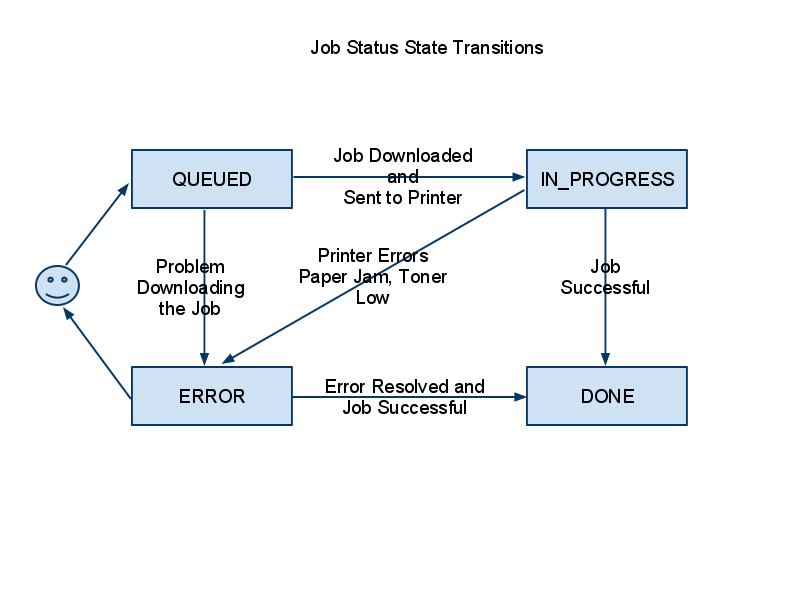
انتقال نوع وضعیت کار مورد انتظار و پشتیبانی شده توسط Cloud Print:
وضعیت شغلی قدیمی
انواع وضعیتهای کاری تعریفشده در بالا جایگزین enum وضعیتهای کاری قدیمی مورد استفاده در رابطهای /submit، /jobs و /control میشوند، اما enum وضعیت همچنان برای سازگاری با نسخههای قبلی پشتیبانی میشود. وضعیتهای کاری قدیمی ممکن عبارتند از:- در صف انتظار: کار تازه اضافه شده و هنوز دانلود نشده است
- IN_PROGRESS: کار دانلود شده و به صف چاپگر بومی سمت کلاینت اضافه شده است
- انجام شد: کار با موفقیت چاپ شد
- خطا: به دلیل وجود خطا، کار قابل چاپ نیست
- ارسال شده: کار به سرویس شخص ثالث ارسال شد (فقط برای چاپگر FedEx استفاده میشود)
- نگهداشته شده: کار با موفقیت ارسال شد اما قبل از قرار گرفتن در صف انتظار، منتظر اقدام کاربر است.
و شرایط انتقال بین این وضعیتها را میتوان در اینجا مشاهده کرد.
وضعیت شغلی سطح بالا
یک دستگاه واحد میتواند چندین عملکرد داشته باشد (مثلاً چاپ و اسکن)، اما یک کار در چنین دستگاهی فقط توسط یک عملکرد انجام میشود. بنابراین، برای هر عملکرد دستگاه پشتیبانی شده، یک قالب وضعیت کار سطح بالا وجود دارد.
وضعیت کار چاپ
وضعیت کار چاپ (PJS) روی سرور ذخیره میشود و میتواند توسط همه کلاینتهایی که به کار دسترسی دارند، دریافت شود.
// Represents the current state of a print job on a cloud device.
message PrintJobState {

  // Version of the PJS in the form "X.Y" where changes to Y are backwards
  // compatible, and changes to X are not (required).
  optional string version = 1;

  // Current state of the job (required).
  optional JobState state = 2;

  // Number of successfully printed pages. Printer should use this value to
  // restart interrupted/suspended print jobs from the next page.
  // Printer can only increase the number of pages printed.
  optional int32 pages_printed = 3;

  // Number of attempts to deliver the print job.
  optional int32 delivery_attempts = 4;
}
تفاوت وضعیت کار چاپ
دستگاههای ابری میتوانند با ارسال پیام PrintJobStateDiff، درخواست تغییر وضعیت کار را برای هر کاری که در وضعیت نهایی (انجام شده یا لغو شده) نیست، بدهند.
// Diff that can be applied to a PrintJobState message. Any omitted field will
// not be changed.
message PrintJobStateDiff {

  // New job state.
  optional JobState state = 1;

  // New number of pages printed.
  optional int32 pages_printed = 2;
}
با پشتیبانی Cloud Print از عملکردهای بیشتر دستگاه، فرمتهای وضعیت کار سطح بالا بیشتری اضافه خواهند شد.
مثالهای PrintJobStateDiff
پیام PrintJobStateDiff برای کاری که به تازگی وارد حالت IN_PROGRESS شده است:
{
  "state": {"type": "IN_PROGRESS"}
}
پیام PrintJobStateDiff برای همان کار پس از چاپ صفحه اول یک سند چند صفحهای:
{
  "pages_printed": 1
}
پیام PrintJobStateDiff برای همان کاری که کاربر هنگام چاپ صفحه سوم لغو کرده است:
{
  "state": {
    "type": "ABORTED",
    "user_action_cause": {"action_code": "CANCELLED"}
  },
  "pages_printed": 3
}
وضعیت رابط کاربری کار چاپ
فرمت PrintJobState بلافاصله برای نمایش معنادار وضعیت کار به کاربران مناسب نیست، بنابراین فرمت "وضعیت رابط کاربری" برای همه کارها برگردانده میشود. تعریف protobuf این فرمت در زیر آمده است.
// Represents a print job's state in a form convenient for display in a UI.
message PrintJobUiState {

  enum Summary {
    DRAFT = 0;
    QUEUED = 1;
    IN_PROGRESS = 2;
    PAUSED = 3;
    DONE = 4;
    CANCELLED = 5;
    ERROR = 6;
    EXPIRED = 7;
  }

  // Job state summary (required).
  optional Summary summary = 1;

  // Localized string describing the progress of the job, e.g. the number of
  // attempts to deliver it or the number of pages which have been printed.
  optional string progress = 2;

  // Localized string describing the cause of an abnormal state of the job.
  optional string cause = 3;
}
مثالهای PrintJobUiState
در اینجا پیام PrintJobUiState برای کاری که در حال چاپ صفحه دوم از یک سند ۴ صفحهای است، آمده است.
{
  "summary": "IN_PROGRESS",
  "progress": "Pages printed: 1 of 4"
}
در صورتی که کاربر کار را در رابط کاربری چاپگر پس از چاپ صفحه سوم اما قبل از اتمام چاپ صفحه چهارم لغو کرده باشد، پیام PrintJobUiState برای همان کار به صورت زیر نمایش داده میشود.
{
  "summary": "CANCELLED",
  "progress": "Pages printed: 3 of 4",
  "cause": "Cancelled by user"
}
تنظیمات محلی
تنظیمات قابل ویرایش توسط کاربر که با استفاده عادی از دستگاه تغییر نمیکنند، به فرمت زیر به سرور Cloud Print ارسال و از آن دریافت میشوند:
// Contains current and pending local settings.
message LocalSettings {

  // Contains settings that do not change with normal use of the device.
  message Settings {

    // Whether Privet local discovery is enabled (required).
    optional bool local_discovery = 1;

    // Whether Privet access token API should be exposed on the local network.
    optional bool access_token_enabled = 2;

    // Whether Privet local printing API should be exposed on the local network.
    optional bool printer/local_printing_enabled = 3;

    // Whether Privet local printing may send jobs to the server for conversion.
    optional bool printer/conversion_printing_enabled = 4;

    // Number of seconds between XMPP channel pings.
    optional int32 xmpp_timeout_value = 5;
  }

  // Current local settings.
  // Required (for GCP 2.0) to be provided by the device via the /register
  // interface. Should be provided or confirmed by the device via the /update
  // interface as necessary. Prohibited to be provided by clients. Always
  // present in the local_settings field returned by the /printer interface.
  optional Settings current = 1;

  // Pending local settings.
  // Prohibited to be provided by the device. Provided by clients via the
  // /update interface. Present in the local_settings field returned by the
  // /printer interface if a client has provided pending local settings but the
  // device has not yet confirmed them as current.
  optional Settings pending = 2;
}
مثالهای تنظیمات محلی
مثالی از مقدار پارامتر local_settings که توسط دستگاه به رابط /register یا /update ارائه میشود:
{
  "current": {
    "local_discovery": true,
    "access_token_enabled": true,
    "printer/local_printing_enabled": true,
    "printer/conversion_printing_enabled": true,
    "xmpp_timeout_value": 300
  }
}
مثالی از مقدار پارامتر local_settings که توسط یک کلاینت به رابط /update ارائه میشود:
{
  "pending": {
    "local_discovery": true,
    "access_token_enabled": true,
    "printer/local_printing_enabled": false,
    "printer/conversion_printing_enabled": false,
    "xmpp_timeout_value": 500
  }
}
مثالی از فیلد local_settings که توسط رابط /printer قبل از اینکه دستگاه تنظیمات در حال بررسی را تأیید کند، برگردانده میشود:
"local_settings": {
  "current": {
    "local_discovery": true,
    "access_token_enabled": true,
    "printer/local_printing_enabled": true,
    "printer/conversion_printing_enabled": true,
    "xmpp_timeout_value": 300
  },
  "pending": {
    "local_discovery": true,
    "access_token_enabled": true,
    "printer/local_printing_enabled": false,
    "printer/conversion_printing_enabled": false,
    "xmpp_timeout_value": 500
  }
}