This page describes how to tweak the ranking of the search results returned
by your search engines.
1. [Overview](https://developers.google.com/custom-search/docs/ranking#overview)
2. [Boosting Results with Keywords](https://developers.google.com/custom-search/docs/ranking#keywords)
3. [Changing Search Results with Labels](https://developers.google.com/custom-search/docs/ranking#labels)
4. [Tagging Sites with Labels](https://developers.google.com/custom-search/docs/ranking#tag)
5. [](https://developers.google.com/custom-search/docs/ranking#tag) [Modulating the Effects of Labels](https://developers.google.com/custom-search/docs/ranking#score)
## Overview
Say that you've compiled a list of sites that you want your search engine to
cover, but when you test out some queries, the search results do not quite match
what you had in mind. The results that you think are most relevant to the query
are not at the top of the page. Or perhaps you want to give preference to
webpages from your favorite research institution or your own website. You can
straighten that out by promoting or demoting results. Programmable Search Engine lets you
tune results by three means: keywords, weighted labels, and scores. Keywords and
weights are defined in the [context file](https://developers.google.com/custom-search/docs/context), while scores
are defined in the [annotations](https://developers.google.com/custom-search/docs/annotations) file.
- **Keywords** are a quick way of boosting certain webpages in your search results and getting more search results about a particular subject.
- **Weighted labels** tell Programmable Search Engine whether to exclude, promote, or demote a site. How much a site is promoted or demoted depends on the weights that you apply to the labels.
- **Scores**, which are applied to individual annotations, temper or reverse the influence of the weighted labels. They add another layer of granularity to the fine-tuning of the ranking.
Weights in labels and scores in annotations are the primary knobs and dials
for changing the ranking of search results. Both have values that range from
`-1.0` to `+1.0`. You can promote and demote sites by
turning the dials (increasing or decreasing values) with scores and weights.
You have strong influence over the ranking, but you do not have absolute
control over the results. The promotion or demotion of results is a function of
many parameters, including the relevancy of the webpage, the choice of keywords,
the weight on the labels, the scores in the annotations, and so on.
[Back to top](https://developers.google.com/custom-search/docs/ranking#top)
## Boosting Results with Keywords
Keywords are the quickest way to change results. Programmable Search Engine boosts
webpages that include your keywords. It can also retrieve more search results
about that subject. So if your search results seem paltry, try adding keywords.
While Programmable Search Engine boosts webpages that contain those keywords, it does not
demote or filter out webpages that don't contain the keywords.
Keywords are a way for you to apply the intent of your users to the search
engine. For example, when users of the yoga search engine search for "mat",
they are actually searching for "yoga mat", not "Miller Analogy Test" or
"house mats". Think about the main focus of your search engine and the context
of your users' search queries. In our search engine example, "yoga" would be an
obvious keyword. Don't use keywords that are too broad or straddle too many
categories. For example, "exercise" and "eastern practices" would retrieve many
webpages that have nothing to do with yoga. The best keywords describe the
content of the sites that your search engine covers.
Start out with a single word first, and see if you can get the results that
you want. If you don't get enough results, try using multiple keywords. You can
also use phrases, which are series of words enclosed within quotation marks
(for example, "yoga pose"), but single-word keywords are better. Programmable Search Engine
interprets `yoga pose stretch` as three keywords, "yoga", "stretch",
and "pose".
Keywords are not independent from each other; they work together. So if you
have the keywords "yoga" and "pose", webpages that contain "yoga" and webpages
that contain "pose" get boosted, but webpages that contain both "yoga" and
"pose" get boosted even more.
### Example: Keywords
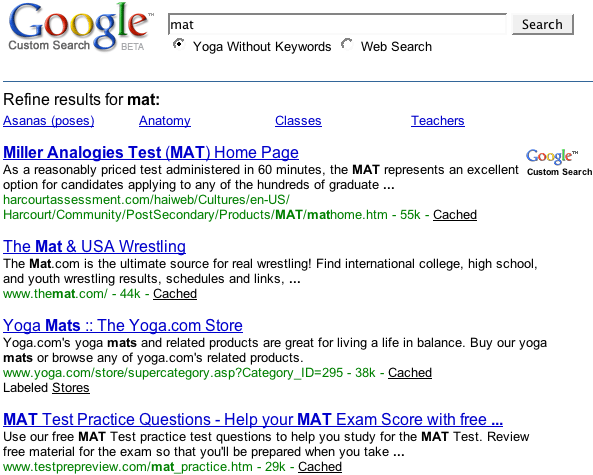
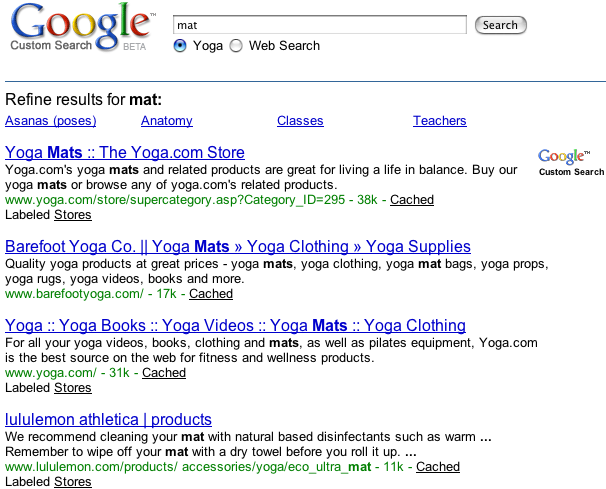
Let's compare search results for "mat" in two versions of a yoga programmable
search engine.
**Figure 1:**Results for the search query "mat"
from a search engine that does not use keywords. (To see the entire result set,
click the image.)
[](https://www.google.com/cse?q=mat&cx=005239880967462049052:mdwcyik6y9m%00)
**Figure 2:** Results for the search query "mat"
from a search engine with the keyword "yoga".
[](https://www.google.com/cse?q=mat&cx=005239880967462049052:412vkh_dcla)
In the version with the "yoga" keyword, webpages that contain the keyword
are promoted in the results page.
[Back to top](https://developers.google.com/custom-search/docs/ranking#top)
### Creating Keywords
You can create as many keywords as you want, as long as you don't exceed 100
characters. The easiest way to create keywords is through the **Basics** section of the **Overview** page in the Control Panel.
You can use that tab to experiment, trying
out different keywords and checking out their effects on the results page. If
you don't like the results, you can easily remove a keyword and try another
one.
If you want to create keywords in your context file, you can use the
`keywords` attribute of the `CustomSearchEngine` element
to define the keyword values. Separate keywords from each other using a single
space. Enclose phrases in quotation marks; you can use either the punctuation
mark (`"`) or the character entity (`"`).
```
```
## Changing Search Results with Labels
The other way to change search results is with labels, which are the
workhorses of search results ranking, determining how sites should be treated.
You can use two kinds of labels: search engine labels and refinement labels.
Search engine labels determine which sites should be covered by the search
engine. They are invisible to your users and run in the background; hence,
their parent element is called `BackgroundLabels`. Refinement labels,
on the other hand, are visible to your users and show up as links. Refinements
are discussed in detail in the [Refining Searches](https://developers.google.com/custom-search/docs/refinements)
page. Most of this page focuses on search engine labels, although
[modes](https://developers.google.com/custom-search/docs/ranking#mode), [weights](https://developers.google.com/custom-search/docs/ranking#weight), and [scores](https://developers.google.com/custom-search/docs/ranking#score) operate in the same way in both search engine and refinement
labels.
The following code shows the two kinds of labels in the context file:
```
```
When you first [create a
Programmable Search Engine](https://programmablesearchengine.google.com/controlpanel/create) using the Control Panel, Programmable Search Engine creates two
search engine labels for you. The labels have modes, which determine how the
sites should be treated. One of them is exclusive
(`mode="ELIMINATE"`), and the other one is inclusive
(`mode="FILTER"`). (You can change the mode for the inclusive label
from "FILTER" to "BOOST" after creating the Programmable Search Engine).
[Back to top](https://developers.google.com/custom-search/docs/ranking#top)
### Using Labels
To use search engine labels, do the following:
1. In the context file, create or redefine search engine labels.
1. Define the label name. You can accept the name generated by the Control Panel, or you can define your own.
2. [Define the mode](https://developers.google.com/custom-search/docs/ranking#mode).
3. *Optional* . [Define the weights](https://developers.google.com/custom-search/docs/ranking#weight).
2. In the annotations file, [tag sites](https://developers.google.com/custom-search/docs/ranking#tag) with labels.
### Example: Context File with Labels
The following is a truncated example of a context file with search engine
labels.
```
ge&escri BacLabel< name="_excl>ude<_" >m"/
/BackgroundLabels
/Context
/CustomSearchEngine
```
[Back to top](https://developers.google.com/custom-search/docs/ranking#top)
### Defining the Mode of the Label
Whether a site is promoted, demoted, or excluded depends on the search engine
label it is associated with. A search engine label can have the following
modes:
**Note:** Follow the capitalization. Use uppercase
letters for the modes.
| Mode | Does the following... | Use this mode if... |
|---|---|---|
| `ELIMINATE` | Excludes sites tagged with this label from your search engine. | You want to exclude webpages that rank highly on Google search but are not that great for your audience. For example, if you are creating a search engine for the scientific study of hamsters, you would use labels with `ELIMINATE` mode to exclude high-ranking sites that feature pet care information, dancing hamsters, and hamsters who can sing in an annoying voice and play the banjo at the same time. |
| `FILTER` | Includes only sites tagged with this label, and excludes everything else. | You want the search engine to search only your site, affiliated sites, or sites that focus on a particular subject. Because the coverage of such search engines is restricted to a handful of sites, you can have more precise control over the ranking of the search results. Changing the order of the search results using weights is discussed in the [next section](https://developers.google.com/custom-search/docs/ranking#score). For example, if you want to create a search engine just for your website, have a single site tagged with a label that has the `FILTER` mode. The search results will include only pages from your website and nothing else. |
| `BOOST` | Includes all websites in your search engine, but promotes or demotes sites with this label. How much a site is promoted or demoted depends on the weight you assign to it. | You want a broad search engine that emphasizes some sites but does not exclude other sites altogether. For example, if you want to create a search engine with a wide coverage, but you are partial to your own website (the best website ever!), use labels with the `BOOST` mode. |
[Back to top](https://developers.google.com/custom-search/docs/ranking#top)
### Creating Weighted Labels
Once you have labels that include, promote, or exclude sites, you can assign
weights to the inclusive labels. Weights let you define how much a label should
promote or demote a tagged site. The values for weights can range from
`-1.0` to `+1.0`. The weight range gives you fairly
refined control over sites. A positive weight in the label emphasizes sites
tagged with it, while a negative weight, de-emphasizes.
The following code shows a weighted label:
```