# Filtering and sorting search results
## Overview
To help users get to the right pages on your site, Programmable Search Engine provides structured search operators that enable you to drill down into subsets of search results based on [structured data](https://developers.google.com/custom-search/docs/structured_data) found in your pages or the metadata associated with the images on your sites.
For **image search** , Google relies on both structured data on your pages and image metadata discovered when crawling your site. We recommend that all webmasters become familiar with our [image publishing guidelines](http://www.google.com/support/webmasters/bin/answer.py?answer=114016).
1. [Web search](https://developers.google.com/custom-search/docs/structured_search#web)
- [Overview](https://developers.google.com/custom-search/docs/structured_search#overview)
- [Filter by Attribute](https://developers.google.com/custom-search/docs/structured_search#filter_by_attribute)
- [Filter by Tree Branch](https://developers.google.com/custom-search/docs/structured_search#filter_by_branch)
- [Sort by Attribute](https://developers.google.com/custom-search/docs/structured_search#sort_by_attribute)
- [Bias by Attribute](https://developers.google.com/custom-search/docs/structured_search#bias_by_attribute)
- [Restrict to Range](https://developers.google.com/custom-search/docs/structured_search#restrict_to_range)
2. [Image search](https://developers.google.com/custom-search/docs/structured_search#image)
- [Filter by Attribute](https://developers.google.com/custom-search/docs/structured_search#image_filter_attribute)
3. [Structured Search in the Programmable Search Element](https://developers.google.com/custom-search/docs/structured_search#structured_search_element)
## Web search
Unlike text, which is a free form sequence of words, structured data is
logically organized into a set of objects with a set of attributes.
Programmable Search Engine extracts a variety of structured data for use by structured
search operators, including dates, authors, ratings and prices; this is the
same data available for use in [custom snippets](https://developers.google.com/custom-search/docs/snippets). In
addition, Programmable Search Engine supports structured data in any of the following formats:
- **[PageMap:](https://developers.google.com/custom-search/docs/structured_data#pagemaps)** A PageMap explicitly represents structured data as DataObjects with Attributes and values, encoded as an XML block embedded in a web page. Programmable Search Engine makes all well formed PageMap data available for structured search operators; it can also be used in [custom snippets](https://developers.google.com/custom-search/docs/snippets#creating_snippets).
- **[`meta` tags:](https://developers.google.com/custom-search/docs/structured_data#metags)** Google extracts selected content from `meta` tags of the form ``. A `meta` tag of the form `` can be used with a search operator of the form: `&sort=metatags-pubdate`.
- **[Page Dates:](https://developers.google.com/custom-search/docs/structured_data#page_dates)** Google estimates the date for a page based the URL, title, byline date and other features. This date can be used with the sort operator using the special structured data type `date`, as in `&sort=date`.
- **[Rich Snippets Data:](https://developers.google.com/custom-search/docs/structured_data#rich_snippets)** Google also extracts a subset of the data from public standards like:
- **[JSON-LD](https://developers.google.com/custom-search/docs/structured_data#jsonld)**,
- **[Microformats](https://developers.google.com/custom-search/docs/structured_data#microformats)**,
- **[RDFa](https://developers.google.com/custom-search/docs/structured_data#rdfa)**
- and **[Microdata](https://developers.google.com/custom-search/docs/structured_data#microdata)**
for use in Programmable Search Engine's structured data operators. For example, to sort pages marked up with the Microformat `hrecipe` standard based on their ratings, use `&sort=recipe-ratingstars`.
[More information about providing structured data](https://developers.google.com/custom-search/docs/structured_data).
If your pages include structured data, you can then apply Programmable Search Engine's
structured search operators to restrict your searches to fields with particular
data values, strictly sort by numerical values, bias towards certain values
rather than sort, or even restrict to a given numerical range of values.
Programmable Search Engine supports the following search operators over structured data:
- [Filter by Attribute](https://developers.google.com/custom-search/docs/structured_search#filter_by_attribute) which is available for all structured data formats except JSON-LD.
- [Filter by tree branch](https://developers.google.com/custom-search/docs/filter_by_branch) which is available for JSON-LD, Microformat and RDFa
- [Sort by Attribute](https://developers.google.com/custom-search/docs/structured_search#sort_by_attribute)
- [Bias by Attribute](https://developers.google.com/custom-search/docs/structured_search#bias_by_attribute)
- [Restrict to Range](https://developers.google.com/custom-search/docs/structured_search#restrict_to_range)
[Back to top](https://developers.google.com/custom-search/docs/structured_search#top)
### Filter by Attribute
Filtering by attribute enables you to select three kinds of results:
- Results with a specific attached DataObject, such as a review
- Results with a DataObject with a given field, such as a review with a price range.
- Results with a specific value of a field, such as a review with 5 stars.
To filter by attribute, add a
`more:pagemap:TYPE-NAME:VALUE`
operator to a search query. This restricts search results to pages which
have structured data that exactly matches that type, name and value. (Programmable Search Engine
will convert up to 200 attributes per page, starting with pagemap data,
followed by JSON-LD, microformat, metatags, RDFa, and microdata). Attributes should not be more
than 128 characters long.
You can generalize this operator by omitting `VALUE` to match
all instances of the named field or omitting `-NAME:VALUE`
to match all objects of a given type.
To see how the complete operator is constructed from structured data,
recall the example we used earlier:
```
[halloween more:pagemap:document-author:lisamorton]
```
Breaking down the `more:pagemap:document-author:lisamorton`
restriction in more detail,
the `more:` operator is what Programmable Search Engine uses
for refinement labels, the `pagemap:` part of the refinement
tells us to refine results by specific attributes in the indexed PageMaps,
and the remaining elements of the operator---`document-author` and
`lisamorton`---specify the content the restriction drills
down into. Recall the PageMap from the example:
```
The Five Scariest Traditional Halloween Stories
lisamorton
```
The `document-author:` qualifier of the operator tells us to look
for the DataObject with type `document` with an Attribute named `author`.
This structured data key is followed by the value `lisamorton`,
which must match exactly the value of the Attribute to be returned in a
search containing this restriction.
`more:p:document-author:lisamorton`
When filtering by Attribute, you can create more complex filters (and shorter
commands) by using a compact query. For instance, you could add the following
PageMap for a URL:
```
horror
fiction
Irish
```
To retrieve results for the query "Irish AND fiction", use the following:
```
more:p:document-keywords:irish*fiction
```
This is equivalent to `more:pagemap:document-keywords:Irish more:pagemap:document-keywords:fiction`.
To retrieve the results for "Irish AND (fiction OR horror)", use the following:
```
more:p:document-keywords:irish*fiction,irish*horror
```
[Back to top](https://developers.google.com/custom-search/docs/structured_search#top)
### Filter by Branch
*Filter by branch* is a variation of *filter by attribute* that is available for
JSON-LD, Microformat and RDFa. It is the *only* type of filter by attribute
available for JSON-LD structured data.
If the structured data does not contain trees, or only contains trees without
children, the restricts are the same as filter by attribute.
However, trees with children have restricts that contain:
type-name for each node from the root out to the leaf node, so a tree where:
- The root is of type *Event*
- A child is named *rating*
- That child has a type of *AggregateRating*
- The child has an attribute with name *ratingCount* and value *22*
Will generate the restrict: more:pagemap:event-rating-aggregaterating-ratingcount:22 for the branch ending at the rating count.
### Using Filter by Attribute or Branch with Other Features
You can use this open-ended syntax for drill down into content specified in
PageMaps on the documents on your site; you can also use this same syntax
with almost all other types of [structured data](https://developers.google.com/custom-search/docs/structured_data)
supported by Google, excluding only the
[estimated page date](https://developers.google.com/custom-search/docs/structured_data#page_dates). You can
also use these `more:pagemap:` operators with
[refinement labels](http://www.google.com/support/customsearch/bin/answer.py?answer=70359) or
[hidden query elements](http://www.google.com/support/forum/p/customsearch/thread?tid=3b8c2315d4ce9c85)
to filter results by attributes that are important to your application,
so end users will not have to type these restriction qualifiers directly.
You can also omit parts of the search operator. In the example above,
note that the PageMap specifies a DataObject of type `document` and
an attribute of type `author`. But not every page on your site may be
a document, and not all documents may have an attributed author. If you
use an operator of the form `more:pagemap:document-author`,
the returned results will include all pages with an `author` Attribute
in the `document` DataObject, regardless of what the value of the
Attribute is. Similarly, `more:pagemap:document` will return
all results with PageMaps that have DataObjects of type `document`,
regardless of what fields are on that DataObject.
#### Tokenizing Text Values for Restricts
Attribute values which contain spaces, punctuation, or special characters
are almost always split into separate tokens; for example, an attribute
value of "Programmable Search Engine@google" would be split into three separate tokens,
"custom", "search" and "google". This permits searches on a single word
embedded in a larger sequence of words and punctuation, such as an production
description. (Programmable Search Engine will extract up to 10 tokens per string, so if your
attribute value contains more than 10 words, not all may be available for restricting
results.)
For example, the following PageMap includes a production description of
[Programmable Search Engine](https://programmablesearchengine.googleblog.com//):
```
Programmable Search Engine provides customized search engines
```
The following restriction would find all pages with `product-description`
attributes about "search":
```
[more:pagemap:product-description:search]
```
More rules for tokenizing text values:
- Text values are convert to lower case for restricts
- For strings up to six tokens long, an additional restrict is generated for the entire string, with blanks replaced by `_`, like `please_attend`.
- Separate restricts are not generated for *stop words* , words like the, a, but and hence that are less useful for searching. So, the text value: "the main point" would generate restricts for main, point, and the_main_point but would not generate a restrict for the.
- Only the first ten words in the text value are used to form restricts.
- Punctuation characters that are not treated as delimiters are converted to underscores, `_`.
#### Drilling Into Tokenized Values Using Multiple Restrictions
To drill down more deeply, you can add other restrictions; for example,
to get only pages that describe products of search engine, add the restrictions:
```
[more:pagemap:product-description:search more:pagemap:product-description:engine]
```
The ordering of the `more:pagemap:` restrictions is not significant;
tokens are extracted from an attribute value into an unordered set.
These restrictions
are combined by default with an AND; however, you could also combine them with an
[OR operator](http://www.google.com/support/websearch/bin/answer.py?answer=136861)
to get results that match either restrict. For example, the following is a search that
would match content from either about search or game:
```
[more:pagemap:product-description:search OR more:pagemap:product-description:game]
```
One exception to tokenization is for attribute values which are URLs. Since
tokens from URLs have marginal usefulness, we do not generate any token from
attribute values which are valid URL.
In certain cases---for example, when short tokens are frequently found together,
Programmable Search Engine may combine them to create supertokens. For example, if the tokens
"President" and "Obama" frequently appear next to each other, Programmable Search Engine may
create the supertoken "president_obama". As a result, `[more:pagemap:leaders-name:president_obama]`
will return the same results as `[more:pagemap:leaders-name:president AND more:pagemap:leaders-name:obama]`.
Another principal exception to tokenization based on punctuation is
the forward slash '/' when it separates numbers. Attribute values
of the form 'NUMBER/NUMBER' or 'NUMBER/NUMBER/NUMBER' are treated
as single contiguous tokens; for example,
'3.5/5.0' and '[09/23/2006](https://programmablesearchengine.googleblog.com/2009/10/three-birthday-candles-for-custom-search.html)'
are treated as single tokens. For example, to
search on an Attribute with a value of '2006/09/23', use the restrict:
```
[more:pagemap:birth-date:2006/09/23]
```
Joining based on slashes only works when the forward slash is between
numbers without spaces; spaces between the slash and the number will
result in the creation of separate tokens. Furthermore, numbers joined
by slashes must match exactly; the Filter by Attribute operator does
not interpret these values as fractions or dates. Programmable Search Engine's
other structured search operators, such as
[Sort by Attribute](https://developers.google.com/custom-search/docs/structured_search#sort_by_attribute) and
[Restrict to Range](https://developers.google.com/custom-search/docs/structured_search#restrict_to_range), do interpret
these numbers as fractions and dates; see the documentation on
[Providing Structured Data](https://developers.google.com/custom-search/docs/structured_data) for
more details.
[Back to top](https://developers.google.com/custom-search/docs/structured_search#top)
### Restricts from JSON-LD
[JSON-LD](https://json-ld.org) is a powerful, standard, format for structured data.
The data is formatted as [JSON](https://www.json.org) and placed in a
`
```
It will generate the following *restricts*:
- more:pagemap:aggregaterating-ratingcount:22
- more:pagemap:aggregaterating-ratingvalue:4.4
- more:pagemap:aggregaterating-itemreviewed-event-description:please_attend
- more:pagemap:aggregaterating-itemreviewed-event-description:please
- more:pagemap:aggregaterating-itemreviewed-event-description:attend
- more:pagemap:aggregaterating-itemreviewed-event-name:presenting_foo
- more:pagemap:aggregaterating-itemreviewed-event-name:presenting
- more:pagemap:aggregaterating-itemreviewed-event-name:foo
- more:pagemap:aggregaterating-itemreviewed-event-startdate:2022-05-24
- more:pagemap:aggregaterating-itemreviewed-event-location:back_room
- more:pagemap:aggregaterating-itemreviewed-event-location:back
- more:pagemap:aggregaterating-itemreviewed-event-location:room
For JSON-LD, we only generate restricts for the entire path from the root,
see [Filter by Branch](https://developers.google.com/custom-search/docs/filter_by_branch).
However, a root of a JSON-LD tree has leaf nodes as children the
resulting restricts have the same form as Attribute Restricts. Some of the restricts in the
example above are formed from leaf nodes at the root and take the Attribute Restrict's
(type-name-value) form, like: more:pagemap:aggregaterating-ratingcount:22
**Note:** Other structured data formats permit strings up to 128 bytes long, but for
JSON-LD, all strings are truncated to about 50 characters---making an effort not to end
the string mid-word. Depending on word-length, this may limit the number of tokens generated
from the string more strictly than the limit to ten tokens.
[Back to top](https://developers.google.com/custom-search/docs/structured_search#top)
### Sort by Attribute
Sometimes it isn't enough to limit a search to a specific type of results;
for example, in a search over restaurant reviews you might want the highest
rated restaurants to appear at the top of the list. You can achieve this
with Programmable Search Engine's sort by attribute feature, which changes the
ordering of results based on the values of structured data attributes.
Sorting is activated by adding a
`&sort=TYPE-NAME:DIRECTION`
URL parameter to the request URL to your Programmable Search Engine.
Like structured search, sort by attribute depends on structured data on
your pages; unlike structured search, however, sorting requires that the
field has a numerical interpretation, such as numbers and dates.
In its simplest form, you specify a structured data type based on
a Data Object type and
Attribute name in a PageMap and add it to the request URL as
`&sort=TYPE-NAME`. For example, to sort by
date on a page that represents its data as type `date`
and name `sdate`, use the following syntax:
```
https://www.google.com/cse?cx=000525776413497593842:aooj-2z_jjm&q=comic+con&sort=date-sdate
```
This by default performs a hard sort in descending order - that is,
search results are ordered strictly by the date, with the most recent
dates (that translate to the largest numbers) ordered first.
If you want to change the sort ordering to ascending, append an
`:a` to the field (or append a `:d` to explicitly
specify descending). For example, to show the oldest results first,
you could use a restriction of the form:
```
https://www.google.com/cse?cx=000525776413497593842:aooj-2z_jjm&q=comic+con&sort=date-sdate:a
```
Sorted results from your engine are presented based on the value those
pages have in their PageMaps for that DataObject and Attribute. Pages
which lack PageMaps, that DataObject type or a parsable value for that
Attribute will not show up in a hard sort. In the examples above, pages
without a `date-sdate` attribute will not show up
in the results. Hard sorting cannot be combined with the Bias by Attribute
feature described in the next section, but it can be combined with
[Filter by Attribute](https://developers.google.com/custom-search/docs/structured_search#filter_by_attribute) and
[Restrict to Range](https://developers.google.com/custom-search/docs/structured_search#restrict_to_range).
[Back to top](https://developers.google.com/custom-search/docs/structured_search#top)
### Bias by Attribute
Sometimes you do not want to exclude results which do not have a value;
for example you wanted to search for Lebanese cuisine; a variety of
different restaurants might match, from pure Lebanese (most relevant) to
Greek (least relevant). For this case you can use strong or weak
biasing, which will strongly or weakly promote results which have your
value but will not exclude results which lack it. You specify a strong
or weak bias by appending a second value after the sorting direction:
`&sort=TYPE-NAME:DIRECTION:STRENGTH`,
either `:s` for strong bias or
`:w` for weak bias (and `:h` for hard
sort, though adding `:h` is optional as it is the default).
For example, adding a strong bias would ensure that the best
rated Mediterranean restaurants would outperform the worst rated
Mediterranean restaurants, but make it unlikely that they would outrank
an exact match on a Lebanese restaurant:
```
https://www.google.com/cse?cx=12345:example&q=lebanese+restaurant&sort=review-rating:d:s
```
Multiple biases can be combined using the comma operator:
```
https://www.google.com/cse?cx=12345:example&q=lebanese+restaurant&sort=review-rating:d:s,review-pricerange:d:w
```
The ordering of the biases does not matter.
However, hard sort cannot be combined with any other sort as it enforces
a strict ordering. The last sort operator you specify in the list will
override all previous sort and bias operators.
[Back to top](https://developers.google.com/custom-search/docs/structured_search#top)
### Restrict to Range
To include results between a range of values or above or below a value,
use a range restriction. Range restricts are specified by an `:r`
appended to the attribute name, followed by the upper and lower bound on the
attribute values: `&sort=TYPE-NAME:r:LOWER:UPPER`.
For example, to include only reviews written between March and April
2009, you could specify a range restriction of:
```
https://www.google.com/cse?cx=12345:example&q=lebanese+restaurant&sort=review-date:r:20090301:20090430
```
For the Restrict to Range operator, Google supports numbers
in float format and dates in
[ISO 8601](http://en.wikipedia.org/wiki/ISO_8601)
`YYYYMMDD` without dashes.
You do not need to specify either an upper or a lower bound: for
example, to specify only dates before 2009, you could write:
```
https://www.google.com/cse?cx=12345:example&q=lebanese+restaurant&sort=review-date:r::20091231
```
To include only ratings over 3 stars, use the following:
```
https://www.google.com/cse?cx=12345:example&q=lebanese+restaurant&sort=rating-stars:r:3.0
```
Ranges are inclusive, and can be combined with the comma operator with
each other or with either one sort or one or more bias criteria. Note
that combining a range restrict with both a sort and bias criteria will
result in only a sort over items with values in the range. For example,
to sort by rating only items with three or more stars, use the following:
```
https://www.google.com/cse?cx=12345:example&q=lebanese+restaurant&sort=rating-stars,rating-stars:r:3.0
```
You can sort over one criterian and restrict by range over another.
For example, to sort by rating only items reviewed in the month of
October, use the following:
```
https://www.google.com/cse?cx=12345:example&q=lebanese+restaurant&sort=rating-stars,review-date:r:20101001:20101031
```
## Image search
When you enable Image search for your search engine, Google will display image results in a separate tab. You can enable image search by using the Programmable Search Engine control panel or by updating your context.xml file.
Image Search relies on the information Google discovers when crawling your site. To improve how your images are displayed in search results (both in Programmable Search Engine and Google Web Search), it's a good idea to become familiar with Google's [image publishing guidelines](http://www.google.com/support/webmasters/bin/answer.py?answer=114016).
### Filter by image attribute
Like Web Search, Image Search search supports filtering on attributes such as `src`, `alt`, and `title`.
[Back to top](https://developers.google.com/custom-search/docs/structured_search#top)
## Structured Search in the Programmable Search Element
Structured search features can also be used in conjunction with the Google
Programmable Search Element. Just like with the operators expressed in the query
or URL parameters, structured search in the element first requires that
the pages you are searching over be marked up with the attributes you want
to search by; then the Programmable Search Element's `sort` operator
combined with `more:pagemap:` operators in the query will
sort or restrict search results appropriately.
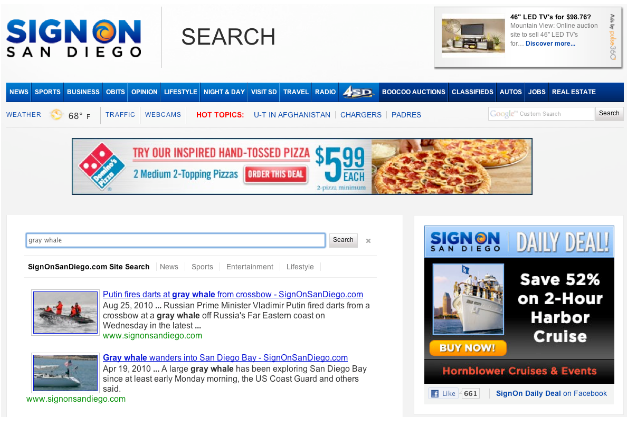
For example, SignOnSanDiego.com, a California news portal, uses the
Programmable Search Element to render recent stories with photos in the results:
> 
To ensure readers see not only the most relevant, but also timely news,
SignOnSanDiego uses the Bias by Attribute with a "strong" weight towards
recent publication dates. SignOnSanDiego implements these date attributes
with PageMaps; one used by SignOnSanDiego looks like this:
```
```
To apply Sort by Attribute over this field, you set the
`sort` option in the search code for the
Programmable Search Element as shown below:
```
...
...
```
Just like the URL `&sort=` parameter described above, the sort option in the Programmable Search Element
``
takes a combined attribute name, like `date-sdate`, and several optional
parameters separated by colons. In this case, SignOnSanDiego specified
sorting in descending order `d` using the strong bias
`s` flavor of the operator. If you don't provide
qualifiers, the default is to use a descending order with a hard sort,
just as it is in the URL operator case.
The sort option also enables the Restrict by Range feature. For example
a site like SignOnSanDiego might enable users to search for articles
published between August 25 and September 9 in 2010. To implement this,
you can set the sort options to
`date-sdate:r:20100825:20100907`. This again uses the combined
attribute name `date-sdate`, but instead restricts to the
range `r` of specified values `20100825:20100907`.
As with the URL parameter, you can omit the upper or lower item of the
range in the `sort` option of the Programmable Search Element.
Another powerful feature of the sort option is that you can combine Sort by
Attribute and Restrict by Range. You can combine multiple operators in
the sort option using a comma. For example, to combine
SignOnSanDiego's strong bias with the above date restrict, you would
specify `date-sdate:d:s,date-sdate:r:20100825:20100907`. This
feature can combine distinct attributes; for example, a movie review
site might display the most highly rated movies released within the last
week with the option `review-rating,release-date:r:20100907:`.
Please refer to [this page](https://developers.google.com/custom-search/docs/element#supported_attributes) for all supported attributes.
You can also use Filter by Attribute with the Programmable Search Element.
For example, take our [earlier example](https://developers.google.com/custom-search/docs/structured_search#tokenization) with
pages that had `linked-blog` attributes; to create a custom
search control that only returned pages that linked to use the following code
to inject a `more:pagemap:linked-blog:blogspot` operator into
every query:
```
...
...
```
This method is relatively inflexible because it adds a restriction to all
queries issued from this control. To see other options, consult the documentation
on the
[Programmable Search Element](https://developers.google.com/custom-search/docs/element).
[Back to top](https://developers.google.com/custom-search/docs/structured_search#top)
## Exploring Other Features
Structured search features are a powerful set of options that give you
a great deal of control over your search application, allowing you to
use custom attributes to order and restrict your search results in very
powerful ways for your users. Structured search also works well with
other Programmable Search Engine features such as custom result snippets.
For more information:
- If you want to learn more about what structured data Google supports, see [Providing Structured Data](https://developers.google.com/custom-search/docs/structured_data).
- If you want to learn more about using structured data for snippets, see [Customizing Your Result Snippets](https://developers.google.com/custom-search/docs/snippets).