This page refers to the XML version of the Custom Search JSON API, which is available only to
[Google Site Search](http://www.google.com/sitesearch/) customers.
1. [Overview](https://developers.google.com/custom-search/docs/xml_results#Overview)
2. [Programmable Search Engine Request Format](https://developers.google.com/custom-search/docs/xml_results#WebSearch_Request_Format)
1. [Request Overview](https://developers.google.com/custom-search/docs/xml_results#wsRequestFormat)
2. [Query Terms](https://developers.google.com/custom-search/docs/xml_results#wsQueryTerms)
3. [Request Parameters](https://developers.google.com/custom-search/docs/xml_results#wsRequestParameters)
1. [Sample WebSearch Queries](https://developers.google.com/custom-search/docs/xml_results#wsSampleQueries)
2. [WebSearch Query Parameter Definitions](https://developers.google.com/custom-search/docs/xml_results#WebSearch_Query_Parameter_Definitions)
3. [Advanced Search](https://developers.google.com/custom-search/docs/xml_results#wsAdvancedSearch)
4. [Advanced Search Query Parameters](https://developers.google.com/custom-search/docs/xml_results#Advanced_Search_Query_Parameters)
5. [Special Query Terms](https://developers.google.com/custom-search/docs/xml_results#wsSpecialQueryTerms)
6. [Sample Image Queries](https://developers.google.com/custom-search/docs/xml_results#isSampleImageQueries)
7. [Image Search Query Parameters](https://developers.google.com/custom-search/docs/xml_results#isSampleImageQueryParameters)
8. [Request Limits](https://developers.google.com/custom-search/docs/xml_results#wsRequestLimits)
4. [Internationalizing Queries and Results Presentation](https://developers.google.com/custom-search/docs/xml_results#wsInternationalizing)
1. [Character Encoding](https://developers.google.com/custom-search/docs/xml_results#wsCharacterEncoding)
2. [Interface Languages](https://developers.google.com/custom-search/docs/xml_results#wsInterfaceLanguages)
3. [Simplified and Traditional Chinese Search](https://developers.google.com/custom-search/docs/xml_results#chineseSearch)
5. [Filtering Results](https://developers.google.com/custom-search/docs/xml_results#wsFilteringResults)
1. [Automatic Filtering of Search Results](https://developers.google.com/custom-search/docs/xml_results#automaticFiltering)
2. [Language and Country Filtering](https://developers.google.com/custom-search/docs/xml_results#wsFilteringCollections)
3. [Filtering Adult Content with SafeSearch](https://developers.google.com/custom-search/docs/xml_results#safeSearchLevels)
3. [XML Results](https://developers.google.com/custom-search/docs/xml_results#XML_Results)
1. [Google XML Results DTD](https://developers.google.com/custom-search/docs/xml_results#xmlResultsDTD)
2. [About the XML Response](https://developers.google.com/custom-search/docs/xml_results#xmlNotes)
3. [XML Results for Regular, Image, and
Advanced Search Queries](https://developers.google.com/custom-search/docs/xml_results#XML_Results_for_Regular_and_Advanced_Search_Queries)
1. [Regular/Advanced Search: Sample Query and XML Result](https://developers.google.com/custom-search/docs/xml_results#wsXMLExample)
2. [Regular/Advanced Search: XML Tags](https://developers.google.com/custom-search/docs/xml_results#wsXMLTags)
3. [XML Results for Image Search Queries](https://developers.google.com/custom-search/docs/xml_results#XML_Results_for_Image_Search_Queries)
4. [Image Search: Sample Query and XML Result](https://developers.google.com/custom-search/docs/xml_results#isXMLExample)
5. [Image Search: XML Tags](https://developers.google.com/custom-search/docs/xml_results#isXMLTags)
## Overview
The Google WebSearch service enables Google Site Search
customers to display Google search results on their own web sites. The
WebSearch service uses a simple HTTP-based protocol to serve search
results. Search administrators have complete control over the way they
request search results and the way they present those results to the
end user. This document describes the technical details of the Google
search request and results formats.
To retrieve Google WebSearch results, your application sends
Google a simple HTTP request. Google then returns search results in XML
format. XML-formatted results give you the ability to customize
the way search results are displayed.
## WebSearch Request Format
- [Request
Overview](https://developers.google.com/custom-search/docs/xml_results#wsRequestFormat)
- [Query Terms](https://developers.google.com/custom-search/docs/xml_results#wsQueryTerms)
- [Request Parameters](https://developers.google.com/custom-search/docs/xml_results#wsRequestParameters)
- [Sample WebSearch Queries](https://developers.google.com/custom-search/docs/xml_results#wsSampleQueries)
- [WebSearch Query
Parameter Definitions](https://developers.google.com/custom-search/docs/xml_results#WebSearch_Query_Parameter_Definitions)
- [Sample Image Queries](https://developers.google.com/custom-search/docs/xml_results#isSampleImageQueries)
- [Image Search Query
Parameter Definitions](https://developers.google.com/custom-search/docs/xml_results#isSampleImageQueryParameters)
- [Advanced Search](https://developers.google.com/custom-search/docs/xml_results#wsAdvancedSearch)
- [Advanced Search
Query Parameters](https://developers.google.com/custom-search/docs/xml_results#Advanced_Search_Query_Parameters)
- [Special Query Terms](https://developers.google.com/custom-search/docs/xml_results#wsSpecialQueryTerms)
- [Request Limits](https://developers.google.com/custom-search/docs/xml_results#wsRequestLimits)
### Request Overview
The Google search request is a standard HTTP `GET` command. It
includes a collection of parameters relevant to your
queries. These parameters are included in the request URL as name=value
pairs separated by ampersand (\&) characters. Parameters include
data like the search query and a unique engine ID (`cx`) that identifies the
engine that is making the HTTP request. The WebSearch or Image Search service returns
XML results in response to your HTTP requests.
### Query Terms
Most search requests include one or more query terms. A query term
appears as the value of a parameter in the search request.
Query terms can specify several types of information to filter and
organize the search results that Google returns. Queries can specify:
- **Words or phrases** to include or exclude
- All of the words in a search query (default)
- An exact phrase in the search query
- Any word or phrase in a search query
- **Where in a document** to look for the search terms
- Anywhere in the document (default)
- Only in links in the document
- **Restrictions on the documents themselves**
- Including or excluding documents of particular file types (such as PDF files or Word documents)
- **Special URL queries** that return information about a given URL, rather than doing a search
- Queries that return general information about a URL, such as its Open Directory category, snippet or language
- Queries that return the set of web pages that link to a URL
- Queries that return a set of web pages similar to a given URL
**Default Search**
Search query parameter values must be URL-escaped. Note that you
would substitute the plus sign ("+") for any whitespace sequences in
the search query. This is discussed further in the [URL Escaping](https://developers.google.com/custom-search/docs/xml_results#urlEscaping) section of this document.
The search query term is submitted to the WebSearch service using
the **[q](https://developers.google.com/custom-search/docs/xml_results#qsp)** parameter. A
sample search query term is:
```
q=horses+cows+pigs
```
By default, the Google WebSearch service only returns documents that
include all of the terms in the search query.
### Request Parameters
This section lists the parameters that you can use when making a
search request. The parameters are split into two lists. The [first list](https://developers.google.com/custom-search/docs/xml_results#WebSearch_Query_Parameter_Definitions) contains parameters that are relevant to all search requests. The [second list](https://developers.google.com/custom-search/docs/xml_results#wsAdvancedSearch) contains parameters that
are
only relevant to advanced search requests.
Three request parameters are required:
- The [client](https://developers.google.com/custom-search/docs/xml_results#clientsp) parameter must be set to `google-csbe`
- The [output](https://developers.google.com/custom-search/docs/xml_results#outputsp) parameter specifies the format of the returned XML results; results can be returned with (xml) or without (`xml_no_dtd`) a reference to Google's DTD. We recommend setting this value to `xml_no_dtd`. **Note:** If you do not specify this parameter, then results will be returned in HTML instead of XML.
- The [cx](https://developers.google.com/custom-search/docs/xml_results#cxsp) parameter which represents the unique ID of the engine.
The most commonly used request parameters other than the ones
mentioned above are:
- [num](https://developers.google.com/custom-search/docs/xml_results#numsp)---the requested number of search results
- [q](https://developers.google.com/custom-search/docs/xml_results#qsp)---the search term(s)
- [start](https://developers.google.com/custom-search/docs/xml_results#startsp)---the starting index for the results
#### Sample WebSearch Queries
The examples below show a couple of WebSearch HTTP requests to
illustrate how different query parameters are used. Definitions for the
different query parameters are provided in the [WebSearch Query
Parameter Definitions](https://developers.google.com/custom-search/docs/xml_results#WebSearch_Query_Parameter_Definitions) and the [Advanced Search Query
Parameters](https://developers.google.com/custom-search/docs/xml_results#Advanced_Search_Query_Parameters) sections of this document.
This request asks for the first 10 results (`start=0&num=10`)
for the query term "red sox" (`q=red+sox`). The query also
specifies that results should come from Canadian web sites (`cr=countryCA`)
and should be written in French (`lr=lang_fr`). Finally, the query
specifies values for the [client](https://developers.google.com/custom-search/docs/xml_results#clientsp), [output](https://developers.google.com/custom-search/docs/xml_results#outputsp),
and [cx](https://developers.google.com/custom-search/docs/xml_results#cxsp) parameters, all three of which are required.
```
http://www.google.com/search?
start=0
&num=10
&q=red+sox
&cr=countryCA
&lr=lang_fr
&client=google-csbe
&output=xml_no_dtd
&cx=00255077836266642015:u-scht7a-8i
```
This example uses some of the [advanced search query
parameters](https://developers.google.com/custom-search/docs/xml_results#Advanced_Search_Query_Parameters) to further customize the search query. This request uses the [as_q](https://developers.google.com/custom-search/docs/xml_results#as_qsp)
parameter (`as_q=red+sox`) instead of the [q](https://developers.google.com/custom-search/docs/xml_results#qsp) parameter. It also uses the
[as_eq](https://developers.google.com/custom-search/docs/xml_results#as_eqsp) parameter to exclude any documents containing the word "Yankees" from the
search results (`as_eq=yankees`).
```
http://www.google.com/search?
start=0
&num=10
&as_q=red+sox
&as_eq=Yankees
&client=google-csbe
&output=xml_no_dtd
&cx=00255077836266642015:u-scht7a-8i
```
#### WebSearch Query Parameter Definitions
| c2coff ||
|---|---|
| **Description** | **Optional** . The **c2coff** parameter enables or disables the [Simplified and Traditional Chinese Search](https://developers.google.com/custom-search/docs/xml_results#chineseSearch) feature. The default value for this parameter is `0` (zero), meaning that the feature is enabled. Values for the `c2coff` parameter are: | Value | Action | |---|---| | 1 | Disabled | | 0 | Enabled | |
| **Examples** | `q=google&c2coff=1` |
| client ||
|---|---|
| **Description** | **Required** . The `client` parameter must be set to `google-csbe`. |
| **Examples** | `q=google&client=google-csbe` |
| cr ||
|---|---|
| **Description** | **Optional** . The `cr` parameter restricts search results to documents originating in a particular country. You may use [Boolean operators](https://developers.google.com/custom-search/docs/xml_results#booleanOperators) in the `cr` parameter's value. Google WebSearch determines the country of a document by analyzing: - the top-level domain (TLD) of the document's URL - the geographic location of the Web server's IP address See the [Country (cr) Parameter Values](https://developers.google.com/custom-search/docs/xml_results_appendices#countryCollections) section for a list of valid values for this parameter. |
| **Examples** | `q=Frodo&cr=countryNZ` |
| cx ||
|---|---|
| **Description** | **Required** . The `cx` parameter specifies a unique code that identifies a custom search engine. You must specify a Programmable Search Engine using the `cx` parameter to retrieve search results from that engine. To find the value of the `cx` parameter, go to Control Panel \> Codes tab of your engine and you will find it in the text area under 'Paste this code in the page where you'd like your search box to appear. The search results will be shown on a Google-hosted page.' |
| **Examples** | `q=Frodo&cx=00255077836266642015:u-scht7a-8i` |
| filter ||
|---|---|
| **Description** | **Optional** . The **filter** parameter activates or deactivates the automatic filtering of Google search results. See the [Automatic Filtering](https://developers.google.com/custom-search/docs/xml_results#automaticFiltering) section of this document for more information about Google's search results filters. The default value for the `filter` parameter is `1`, which indicates that the feature is enabled. Valid values for this parameter are: | Value | Action | |---|---| | 1 | Disabled | | 0 | Enabled | **Note:** By default, Google applies filtering to all search results to improve the quality of those results. |
| **Examples** | `q=google&filter=0` |
| gl ||
|---|---|
| **Description** | **Optional** . The `gl` parameter value is a two-letter country code. For WebSearch results, the `gl` parameter boosts search results whose country of origin matches the parameter value. See the [Country Codes](https://developers.google.com/custom-search/docs/xml_results_appendices#countryCodes) section for a list of valid values. Specifying a `gl` parameter value in WebSearch requests should improve the relevance of results. This is particularly true for international customers and, even more specifically, for customers in English-speaking countries other than the United States. |
| **Examples** | This request boosts documents written in the United Kingdom in WebSearch results: `q=pizza&gl=uk` |
| hl ||
|---|---|
| **Description** | **Optional** . The `hl` parameter specifies the interface language (host language) of your user interface. To improve the performance and the quality of your search results, you are strongly encouraged to set this parameter explicitly. See the [Interface Languages](https://developers.google.com/custom-search/docs/xml_results#wsInterfaceLanguages) section of [Internationalizing Queries and Results Presentation](https://developers.google.com/custom-search/docs/xml_results#wsInternationalizing) for more information and [Supported Interface Languages](https://developers.google.com/custom-search/docs/xml_results_appendices#interfaceLanguages) for a list of supported languages. |
| **Examples** | This request targets ads for wine in French. (*Vin* is the French term for wine.) `q=vin&ip=10.10.10.10&ad=w5&hl=fr` |
| hq ||
|---|---|
| **Description** | **Optional** . The `hq` parameter appends the specified query terms to the query, as if they were combined with a logical AND operator. |
| **Examples** | This request searches for 'pizza' AND 'cheese'. The expression is the same as `q=pizza+cheese`. `q=pizza&hq=cheese` |
| ie ||
|---|---|
| **Description** | **Optional** . The `ie` parameter sets the character encoding scheme that should be used to interpret the query string. The default `ie` value is `latin1`. See the [Character Encoding](https://developers.google.com/custom-search/docs/xml_results#wsCharacterEncoding) section for a discussion of when you might need to use this parameter. See the [Character Encoding Schemes](https://developers.google.com/custom-search/docs/xml_results#characterEncodings) section for the list of possible `ie` values. |
| **Examples** | `q=google&ie=utf8&oe=utf8` |
| lr ||
|---|---|
| **Description** | **Optional** . The `lr` (language restrict) parameter restricts search results to documents written in a particular language. Google WebSearch determines the language of a document by analyzing: - the top-level domain (TLD) of the document's URL - language meta tags within the document - the primary language used in the body text of the document - secondary languages, if any, used in the body text of the document See the [Language (`lr`) Collection Values](https://developers.google.com/custom-search/docs/xml_results_appendices#languageCollections) section for a list of valid values for this parameter. |
| **Examples** | `q=Frodo&lr=lang_en` |
| num ||
|---|---|
| **Description** | **Optional** . The `num` parameter identifies the number of search results to return. The default `num` value is `10`, and the maximum value is `20`. If you request more than 20 results, only 20 results will be returned. **Note:** If the total number of search results is less than the requested number of results, all available search results will be returned. |
| **Examples** | `q=google&num=10` |
| oe ||
|---|---|
| **Description** | **Optional** . The `oe` parameter sets the character encoding scheme that should be used to decode the XML result. The default `oe` value is `latin1`. See the [Character Encoding](https://developers.google.com/custom-search/docs/xml_results#wsCharacterEncoding) section for a discussion of when you might need to use this parameter. See the [Character Encoding Schemes](https://developers.google.com/custom-search/docs/xml_results#characterEncodings) section for the list of possible `oe` values. |
| **Examples** | `q=google&ie=utf8&oe=utf8` |
| output ||
|---|---|
| **Description** | **Required** . The `output` parameter specifies the format of the XML results. The only valid values for this parameter are `xml` and `xml_no_dtd`. The chart below explains how these parameter values differ. | Value | Output Format | |---|---| | `xml_no_dtd` | The XML results will not include a !DOCTYPE statement. **(Recommended)** | | `xml` | The XML results will contain a Google DTD reference. The second line of the result will identify the document definition type (DTD) that the results use: ``` ``` | |
| **Examples** | `output=xml_no_dtd output=xml` |
| q ||
|---|---|
| **Description** | **Optional** . The `q` parameter specifies the search query entered by the user. Even though this parameter is optional, you must specify a value for at least one of the query parameters ([as_epq](https://developers.google.com/custom-search/docs/xml_results#as_epqsp), [as_lq](https://developers.google.com/custom-search/docs/xml_results#as_lqsp), [as_oq](https://developers.google.com/custom-search/docs/xml_results#as_oqsp), [as_q](https://developers.google.com/custom-search/docs/xml_results#as_qsp) to get search results. There are also a number of special query terms that can be used as part of the `q` parameter's value. Please see [Special Query Terms](https://developers.google.com/custom-search/docs/xml_results#wsSpecialQueryTerms) for a list and definitions of these terms. The Google Search Control Panel includes a report of the top queries submitted using the `q` parameter. **Note:** The value specified for the **q** parameter must be URL-escaped. |
| **Examples** | `q=vacation&as_oq=london+paris` |
| safe ||
|---|---|
| **Description** | **Optional** . The `safe` parameter indicates how search results should be filtered for adult and pornographic content. The default value for the `safe` parameter is `off`. Valid parameter values are: | Value | Action | |---|---| | `off` | Disable SafeSearch | | `medium` | Enable SafeSearch | | `high` | Enable a stricter version of SafeSearch | See the [Filtering Adult Content with SafeSearch](https://developers.google.com/custom-search/docs/xml_results#safeSearchLevels) section for more details about this feature. |
| **Examples** | `q=adult&safe=high` |
| start ||
|---|---|
| **Description** | **Optional** . The `start` parameter indicates the first matching result that should be included in the search results. The `start` parameter uses a zero-based index, meaning the first result is 0, the second result is 1 and so forth. The `start` parameter works in conjunction with the [num](https://developers.google.com/custom-search/docs/xml_results#numsp) parameter to determine which search results to return. Note that no more than 1000 results will ever be returned for any query, even if more than 1000 documents match the query, so setting start to 1000 or more will produce no results. |
| **Examples** | `start=10` |
| sort ||
|---|---|
| **Description** | **Optional** . The `sort` parameter specifies that the results be sorted according to the specified expression. For example, sort by date. |
| **Examples** | `sort=date` |
| ud ||
|---|---|
| **Description** | **Optional** . The `ud` parameter indicates whether the XML response should include the IDN-encoded URL for the search result. IDN (International Domain Name) encoding allows domains to be displayed using local languages, for example: http://www.花井鮨.com Valid values for this parameter are `1` (default), meaning the XML result should include IDN-encoded URLs, and `0`, meaning the XML result should not include IDN-encoded URLs. If the `ud` parameter is set to `1`, the IDN-encoded URL will appear in in the **[UD](https://developers.google.com/custom-search/docs/xml_results#results_xml_tag_UD)** tag in your XML results. If the `ud` parameter is set to `0`, the URL in the example above would be displayed as: http://www.xn--elq438j.com. **Note:** This is a beta feature. |
| **Examples** | `q=google&ud=1` |
#### Advanced Search
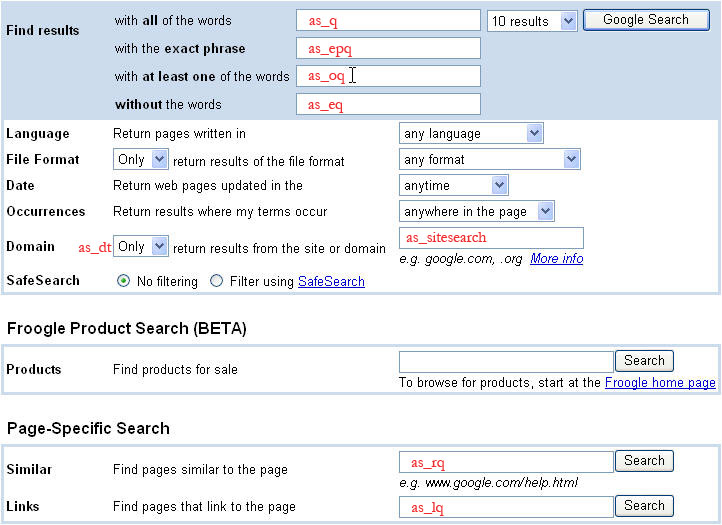
The additional query parameters listed below the image are relevant to advanced search queries.
When you submit an advanced search, the values of several parameters (e.g. [as_eq](https://developers.google.com/custom-search/docs/xml_results#as_eqsp),
[as_epq](https://developers.google.com/custom-search/docs/xml_results#as_epqsp), [as_oq](https://developers.google.com/custom-search/docs/xml_results#as_oqsp), etc.) are all factored into the query
terms for that search. The image shows Google's Advanced Search page. On the image, the name of each
advanced search parameter is written in red text inside of or next to
the field on the page to which that parameter corresponds.
#### Advanced Search Query Parameters
| as_dt ||
|---|---|
| **Description** | **Optional** . The `as_dt` parameter controls whether to include or exclude results from the site named in the `as_sitesearch` parameter. The values `i` and `e` denote inclusion and exclusion respectively. |
| **Examples** | `as_dt=i,as_dt=e` |
| as_epq ||
|---|---|
| **Description** | **Optional** . The `as_epq` parameter identifies a phrase that all documents in the search results must contain. You can also use the [phrase search](https://developers.google.com/custom-search/docs/xml_results#PhraseSearchqt) query term to search for a phrase. |
| **Examples** | `as_epq=abraham+lincoln` |
| as_eq ||
|---|---|
| **Description** | **Optional** . The `as_eq` parameter identifies a word or phrase that should not appear in any documents in the search results. You can also use the [exclude](https://developers.google.com/custom-search/docs/xml_results#Excludeqt) query term to ensure that a particular word or phrase will not appear in the documents in a set of search results. |
| **Examples** | `q=bass&as_eq=music`. |
| as_lq ||
|---|---|
| **Description** | **Optional** . The `as_lq` parameter specifies that all search results should contain a link to a particular URL. You can also use the [link:](https://developers.google.com/custom-search/docs/xml_results#BackLinksqt) query term for this type of query. |
| **Examples** | `as_lq=www.google.com` |
| as_nlo ||
|---|---|
| **Description** | **Optional** . The `as_nlo` parameter specifies the starting value for a search range. Use `as_nlo` and `as_nhi` to append an inclusive search range of `as_nlo...as_nhi` to the query. |
| **Examples** | The following sets a search range of 5 to 10, inclusive: `as_nlo=5&as_nhi=10` |
| as_nhi ||
|---|---|
| **Description** | **Optional** . The `as_nhi` parameter specifies the ending value for a search range. Use `as_nlo` and `as_nhi` to append an inclusive search range of `as_nlo...as_nhi` to the query. |
| **Examples** | The following sets a search range of 5 to 10, inclusive: `as_nlo=5&as_nhi=10` |
| as_oq ||
|---|---|
| **Description** | **Optional** . The `as_oq` parameter provides additional search terms to check for in a document, where each document in the search results must contain at least one of the additional search terms. You can also use the [Boolean OR](https://developers.google.com/custom-search/docs/xml_results#BooleanOrqt) query term for this type of query. |
| **Examples** | `q=vacation&as_oq=London+Paris` |
| as_q ||
|---|---|
| **Description** | **Optional** . The `as_q` parameter provides search terms to check for in a document. This parameter is also commonly used to allow users to specify additional terms to search for within a set of search results. |
| **Examples** | `q=president&as_q=John+Adams` |
| as_qdr ||
|---|---|
| **Description** | **Optional** . The `as_qdr` parameter requests search results from a specified time period (quick date range). The following values are supported: `d[number]` requests results from the specified number of past days. `w[number]` requests results from the specified number of past weeks. `m[number]` requests results from the specified number of past months. `y[number]` requests results from the specified number of past years. |
| **Examples** | This example requests results from the past year: `as_qdr=y` This example requests results from the past 10 days: `as_qdr=d10` |
| as_sitesearch ||
|---|---|
| **Description** | **Optional** . The `as_sitesearch` parameter allows you to specify that all search results should be pages from a given site. By setting the `as_dt` parameter, you can also use it to exclude pages from a given site from your search resutls. |
| **Examples** | `q=vacation&as_sitesearch=www.google.com` |
#### Special Query Terms
Google WebSearch allows the use of several special query terms that
access additional capabilities of the Google search engine. These
special query terms should be included in the value of the [q](https://developers.google.com/custom-search/docs/xml_results#qsp) request parameter. Like other query terms, the
special query terms must be [URL-escaped](https://developers.google.com/custom-search/docs/xml_results#urlEscaping). A
number of the special query terms contain a colon (:). This character
must also be URL-escaped; its URL-escaped value is `%3A`.
| Back Links \[link:\] ||
|---|---|
| **Description** | The `link:` query term retrieves the set of Web pages that link to a particular URL. The search query should be formatted as `link:URL` with no space between the `link:` query term and the URL. The URL-escaped version of `link:` is `link%3A`. You can also use the [as_lq](https://developers.google.com/custom-search/docs/xml_results#as_lqsp) request parameter to submit a `link:` request. **Note:** You cannot specify any other query terms when using `link:`. |
| **Examples** | `http://www.google.com/search?q=link%3Awww.example.com` |
| Boolean OR Search \[ OR \] ||
|---|---|
| **Description** | The `OR` query term retrieves documents that include one of a series of (two or more) query terms. To use the `OR` query term, you would insert the search term `OR`, in uppercase letters, between each term in the series. You can also use the [as_oq](https://developers.google.com/custom-search/docs/xml_results#as_oqsp) request parameter to submit a search for any term in a set of terms. Note: If a search request specifies the query "London+OR+Paris", the search results will include documents containing at least one of those two words. In some cases, documents in the search results may contain both words. |
| **Examples** | Search for London or Paris: **User input:** `london OR paris` **Query term:** `q=london+OR+paris` Search for vacation and either London or Paris: **Query term:** `q=vacation+london+OR+paris` Search for vacation and one of London, Paris or chocolates: **Query term:** ` q=vacation+london+OR+paris+OR+chocolates` Search for vacation and chocolates and either london or paris, with the least weight being given to chocolates: **Query term:** ` q=vacation+london+OR+paris+chocolates` Search for vacation, chocolates and flowers in documents that also contain either London or Paris: **Query term:** ` q=vacation+london+OR+paris+chocolates+flowers` Search for vacation and one of London or Paris and also search for one of chocolates or flowers: **Query term:** ` q=vacation+london+OR+paris+chocolates+OR+flowers` |
| Exclude Query Term \[-\] ||
|---|---|
| **Description** | The exclude (`-`) query term restricts results for a particular search request to documents that do **not** contain a particular word or phrase. To use the exclude query term, you would preface the word or phrase to be excluded from the matching documents with "-" (a minus sign). The URL-escaped version of `-` is `%2D`. The exclude query term is useful when a search term has more than one meaning. For example, the word "bass" could return results about either fish or music. If you were looking for documents about fish, you could exclude documents about music from your search results by using the exclude query term. You can also use the [as_eq](https://developers.google.com/custom-search/docs/xml_results#as_eqsp) request parameter to exclude documents matching a particular word or phrase from search results. |
| **Examples** | **User input:** ` bass -music` **Query term:** ` q=bass+%2Dmusic` |
| File Type Exclusion \[ -filetype: \] ||
|---|---|
| **Description** | The `-filetype:` query term excludes documents with a particular file extension, such as ".pdf" or ".doc" from search results. The search query should be formatted as `-filetype:EXTENSION` with no space between the `-filetype:` query term and the specified extension. The URL-escaped version of `-filetype:` is `%2Dfiletype%3A`. Note: You can exclude multiple file types from search results by adding more `-filetype:` query terms to your query. You should have one `-filetype:` query term in your search query for each file extension that should be excluded from the search results. Filetypes supported by Google include: - Adobe Portable Document Format (pdf) - Adobe PostScript (ps) - Lotus 1-2-3 (wk1, wk2, wk3, wk4, wk5, wki, wks, wku) - Lotus WordPro (lwp) - Macwrite (mw) - Microsoft Excel (xls) - Microsoft PowerPoint (ppt) - Microsoft Word (doc) - Microsoft Works (wks, wps, wdb) - Microsoft Write (wri) - Rich Text Format (rtf) - Shockwave Flash (swf) - Text (ans, txt). Additional filetypes may be added in the future. An up-to-date list can always be found in Google's [file type FAQ](http://www.google.com/help/faq_filetypes.html#what). |
| **Examples** | This example returns documents that mention "Google" but that are not PDF documents: ` q=Google+%2Dfiletype%3Apdf` This example returns documents that mention "Google" but excludes both PDF and Word documents: ` q=Google+%2Dfiletype%3Apdf+%2Dfiletype%3Adoc` |
| File Type Filtering \[ filetype: \] ||
|---|---|
| **Description** | The `filetype:` query term restricts search results to documents with a particular file extension, such as ".pdf" or ".doc". The search query should be formatted as **filetype:EXTENSION** with no space between the `filetype:` query term and the specified extension. The URL-escaped version of `filetype:` is `filetype%3A`. You can restrict search results to documents matching one of several file extensions by adding more `filetype:` query terms to your query. You should have one `filetype:` query term in your search query for each file extension that should be included in the search results. Multiple `filetype:` query terms must be separated using the `OR` query term. By default, search results will include documents with any file extension. Filetypes supported by Google include: - Adobe Portable Document Format (pdf) - Adobe PostScript (ps) - Lotus 1-2-3 (wk1, wk2, wk3, wk4, wk5, wki, wks, wku) - Lotus WordPro (lwp) - Macwrite (mw) - Microsoft Excel (xls) - Microsoft PowerPoint (ppt) - Microsoft Word (doc) - Microsoft Works (wks, wps, wdb) - Microsoft Write (wri) - Rich Text Format (rtf) - Shockwave Flash (swf) - Text (ans, txt). Additional filetypes may be added in the future. An up-to-date list can always be found in Google's [file type FAQ](http://www.google.com/help/faq_filetypes.html#what). |
| **Examples** | This example returns PDF documents that mention "Google": `q=Google+filetype%3Apdf` This example returns PDF and Word documents that mention "Google": `q=Google+filetype%3Apdf+OR+filetype%3Adoc` |
| Include Query Term \[+\] ||
|---|---|
| **Description** | The include (+) query term specifies that a word or phrase must occur in all documents included in the search results. To use the include query term, you would preface the word or phrase that must be included in all search results with "+" (a plus sign). The URL-escaped version of `+` (a plus sign) is **%2B**. You should use `+` before a common word that Google normally discards before identifying search results. |
| **Examples** | **User input:** ` Star Wars Episode +I` **Query term:** ` q=Star+Wars+Episode+%2BI` |
| Links Only Search, all terms \[ allinlinks: \] ||
|---|---|
| **Description** | The `allinlinks:` query term requires documents in search results to contain all of the words in the search query in URL links. The search query should be formatted as `allinlinks:` followed by the words in your search query. If your search query includes the `allinlinks:` query term, Google will only check the URL links in documents for the words in your search query, ignoring other text in the documents, the document titles and the URLs of each document. Note that the document URL is different from the URL links contained in the document. The URL-escaped version of `allinlinks:` is `allinlinks%3A`. |
| **Examples** | **User input:** `allinlinks: Google search` **Query term:** `q=allinlinks%3A+Google+search` |
| Phrase Search ||
|---|---|
| **Description** | The phrase search (") query term allows you to search for complete phrases by enclosing the phrases in quotation marks or by connecting them with hyphens. The URL-escaped version of `"` (a quotation mark) is `%22`. Phrase searches are particularly useful if you are searching for famous quotes or proper names. You can also use the [as_epq](https://developers.google.com/custom-search/docs/xml_results#as_epqsp) request parameter to submit a phrase search. |
| **Examples** | **User input:** `"Abraham Lincoln"` **Query term:** `q=%22Abraham+Lincoln%22` |
| Web Document Info \[info:\] ||
|---|---|
| **Description** | The `info:` query term retrieves general information about a URL as long as that URL is included in Google's search index. The search query should be formatted as **info:URL** with no space between the `info:` query term and the URL. The URL-escaped version of `info:` is **info%3A**. **Note:** You cannot specify any other query terms when using `info:`. |
| **Examples** | **User input:** ` info:www.google.com` **Query term:** `q=info%3Awww.google.com` |
#### Sample Image Queries
The examples below show a couple of Image HTTP requests to illustrate how different query parameters are used. Definitions for the different query parameters are provided in the Image Query Parameter Definitions sections of this document.
This request asks for the first 5 results (`start=0&num=5`) for the query term "monkey" (`q=monkey`), of filetype .png. Finally, the query specifies values for the `client`, `output`, and `cx` parameters, all three of which are required.
```
http://www.google.com/cse?
searchtype=image
start=0
&num=5
&q=monkey
&as_filetype=png
&client=google-csbe
&output=xml_no_dtd
&cx=00255077836266642015:u-scht7a-8i
```
#### Image Search Query Parameters
| as_filetype ||
|---|---|
| **Description** | **Optional** . Returns images of a specified type. Allowed values are: `bmp`, `gif`, `png`, `jpg`, and `svg`. |
| **Examples** | `q=google&as_filetype=png` |
| imgsz ||
|---|---|
| **Description** | **Optional**. Returns images of a specified size, where size can be one of: - `icon` (small) - `small|medium|large|xlarge` (medium) - `xxlarge` (large) - `huge` (extra-large) |
| **Examples** | `q=google&as_filetype=png&imgsz=icon` |
| imgtype ||
|---|---|
| **Description** | **Optional**. Returns images of a type, which can be one of: - `clipart` (clipart) - `face` (face) - `lineart` (lineart) - `news` (news) - `photo` (photo) |
| **Examples** | `q=google&as_filetype=png&imgtype=photo` |
| imgc ||
|---|---|
| **Description** | **Optional**. Returns black and white, grayscale, or color images: - `mono` (black and white) - `gray` (grayscale) - `color` (color) |
| **Examples** | `q=google&as_filetype=png&imgc=gray` |
| imgcolor ||
|---|---|
| **Description** | **Optional**. Returns images of a specific dominant color: - `yellow` - `green` - `teal` - `blue` - `purple` - `pink` - `white` - `gray` - `black` - `brown` |
| **Examples** | ` q=google&as_filetype=png&imgcolor=yellow` |
| as_rights ||
|---|---|
| **Description** | **Optional**. Filters based on licensing. Supported values include: - `cc_publicdomain` - `cc_attribute` - `cc_sharealike` - `cc_noncommercial` - `cc_nonderived` |
| **Examples** | `q=cats&as_filetype=png&as_rights=cc_attribute` |
#### Request Limits
The chart below lists limitations on the search requests that you
send to Google:
| Component | Limit | Comment |
|---|---|---|
| Search request length | 2048 bytes | |
| Number of query terms | 10 | includes terms in the following parameters: [q](https://developers.google.com/custom-search/docs/xml_results#qsp), [as_epq](https://developers.google.com/custom-search/docs/xml_results#as_epqsp), [as_eq](https://developers.google.com/custom-search/docs/xml_results#as_eqsp), [as_lq](https://developers.google.com/custom-search/docs/xml_results#as_lqsp), [as_oq](https://developers.google.com/custom-search/docs/xml_results#as_oqsp), [as_q](https://developers.google.com/custom-search/docs/xml_results#as_qsp) |
| Number of results | 20 | If you set the [num](https://developers.google.com/custom-search/docs/xml_results#numsp) parameter to a number greater than 20, only 20 results are returned. To get more results, you would need to send multiple requests and increment the value of the [start](https://developers.google.com/custom-search/docs/xml_results#startsp) parameter with each request. |
### Internationalizing Queries and Results Presentation
The Google WebSearch service enables you to search for documents in
multiple languages. You can specify the character encoding that should
be used to interpret your HTTP request and to encode your XML response
(using the [ie](https://developers.google.com/custom-search/docs/xml_results#iesp) and [oe](https://developers.google.com/custom-search/docs/xml_results#oesp) search
parameters). You can also filter results to only include documents
written in certain languages.
The following sections discuss issues related to searching in
multiple languages:
- [Character
Encoding](https://developers.google.com/custom-search/docs/xml_results#wsCharacterEncoding)
- [Interface Languages](https://developers.google.com/custom-search/docs/xml_results#wsInterfaceLanguages)
- [Simplified and Traditional Chinese
Search](https://developers.google.com/custom-search/docs/xml_results#chineseSearch)
#### Character Encoding
Servers send data, such as web pages, to user agents, such as
browsers, as a sequence of encoded bytes. The user agent then decodes
the bytes into a sequence of characters. When sending requests to the
WebSearch service, you can specify the encoding schemes for both your
search query and for the XML response that you receive.
You can use the [ie](https://developers.google.com/custom-search/docs/xml_results#iesp) request parameter to specify
the encoding mechanism for the characters in your HTTP request. You can
also use the [oe](https://developers.google.com/custom-search/docs/xml_results#oesp) parameter to specify the encoding
scheme that Google should use to encode your XML response. If you are
using an encoding scheme other than `ISO-8859-1` (or `latin1`), please ensure that you specify the correct values
for the [ie](https://developers.google.com/custom-search/docs/xml_results#iesp) and [oe](https://developers.google.com/custom-search/docs/xml_results#oesp) parameters.
**Note:** If you are providing search functionality for multiple
languages, we recommend you use the `utf8` (UTF-8) encoding value
for both the [ie](https://developers.google.com/custom-search/docs/xml_results#iesp) and [oe](https://developers.google.com/custom-search/docs/xml_results#oesp) parameters.
Please refer to the [Character
Encoding Schemes](https://developers.google.com/custom-search/docs/xml_results_appendices#characterEncodings) appendix for a complete list of the values that
you can use for the [ie](https://developers.google.com/custom-search/docs/xml_results#iesp) and [oe](https://developers.google.com/custom-search/docs/xml_results#oesp) parameters.
For more general information about character encoding, please see .
#### Interface Languages
You can use the [hl](https://developers.google.com/custom-search/docs/xml_results#hlsp) request parameter to
identify the language of your graphical interface. The [hl](https://developers.google.com/custom-search/docs/xml_results#hlsp) parameter value may affect XML search results, especially on
international queries when language restriction (using the [lr](https://developers.google.com/custom-search/docs/xml_results#lrsp) parameter) is not explicitly specified. In such
cases, the [hl](https://developers.google.com/custom-search/docs/xml_results#hlsp) parameter may promote search results
in the same language as the user's input language.
We suggest you explicitly set the [hl](https://developers.google.com/custom-search/docs/xml_results#hlsp) parameter
in search results to ensure that Google selects the highest quality
search results for each query.
Please see the [Supported Interface
Languages](https://developers.google.com/custom-search/docs/xml_results_appendices#interfaceLanguages) section for a complete list of valid values for the [hl](https://developers.google.com/custom-search/docs/xml_results#hlsp) parameter.
#### Searching for Documents Written in Specific Languages
You can use the [lr](https://developers.google.com/custom-search/docs/xml_results#lrsp) request parameter to
restrict search results to documents that are written in a particular
language or set of languages.
The [lr](https://developers.google.com/custom-search/docs/xml_results#lrsp) parameter supports [Boolean Operators](https://developers.google.com/custom-search/docs/xml_results#booleanOperators) to allow you to specify
multiple languages that should be included (or excluded) from search
results.
The following examples show how you might use [Boolean Operators](https://developers.google.com/custom-search/docs/xml_results#booleanOperators) to request documents in
different languages.
For documents written in Japanese:
```
lr=lang_jp
```
For documents written in Italian or German:
```
lr=lang_it|lang_de
```
For documents not written in Hungarian or Czech:
```
lr=(-lang_hu).(-lang_cs)
```
Please see the [Language Collection
Values](https://developers.google.com/custom-search/docs/xml_results_appendices#languageCollections) section for a complete list of possible values for the [lr](https://developers.google.com/custom-search/docs/xml_results#lrsp) parameter and the [Boolean
Operators](https://developers.google.com/custom-search/docs/xml_results#booleanOperators) section for a complete discussion of the use of these
operators.
#### Simplified and Traditional Chinese Search
Simplified Chinese and Traditional Chinese are two writing variants
of the Chinese language. The same concept may be written differently in
each variant. Given a query in one of the variants, the Google
WebSearch service can return results that include pages in both
variants.
To use this feature:
1. Set the [c2coff](https://developers.google.com/custom-search/docs/xml_results#c2coffsp) request parameter to 0
and
2. Do one of the following:
- Do not set the [lr](https://developers.google.com/custom-search/docs/xml_results#lrsp) request parameter
or
- Set the [lr](https://developers.google.com/custom-search/docs/xml_results#lrsp) request parameter to lr=lang_zh-TW\|lang_zh-CN
The following example shows the query parameters you would include in a request for results
in both simplified and traditional Chinese. (Note that additional required information, such
as the [client](https://developers.google.com/custom-search/docs/xml_results#clientsp), is not included in the example.)
```
search?hl=zh-CN
&lr=lang_zh-TW|lang_zh-CN
&c2coff=0
```
### Filtering Results
Google WebSearch provides a number of ways to filter your search
results:
- [Automatic
Filtering of Search Results](https://developers.google.com/custom-search/docs/xml_results#automaticFiltering)
- [Language and Country Filtering](https://developers.google.com/custom-search/docs/xml_results#wsFilteringCollections)
- [Filtering Adult Content with
SafeSearch](https://developers.google.com/custom-search/docs/xml_results#safeSearchLevels)
#### Automatic Filtering of Search Results
In an effort to provide the best search results possible, Google
uses two techniques to automatically filter search results that are
generally considered undesirable:
- **Duplicate Content**---If multiple documents contain the
same information, then only the most relevant document of that set is
included in your search results.
- **Host Crowding** ---If there are many search results from the
same site, Google may not show all the results from that site or may
show the results lower in
the ranking than they otherwise would have been.
We recommend you leave these filters on for typical search requests
because the filters significantly enhance the quality of most search
results. However, you can bypass these automatic filters by setting the [filter](https://developers.google.com/custom-search/docs/xml_results#filtersp) query parameter to **0** in your
search request.
#### Language and Country Filtering
The Google WebSearch service returns results from a master index of
all Web documents. The master index contains subcollections of
documents that are grouped by particular attributes, including language
and country of origin.
You can use the [lr](https://developers.google.com/custom-search/docs/xml_results#lrsp) and [cr](https://developers.google.com/custom-search/docs/xml_results#crsp) request parameters to restrict search results to subcollections of
documents that are written in particular languages or originate from
particular countries, respectively.
Google WebSearch determines the language of a document by analyzing:
- the top-level domain (TLD) of the document's URL
- language meta tags within the document
- the primary language used in the body text of the document
Please also see the definition of the [lr](https://developers.google.com/custom-search/docs/xml_results#lrsp) parameter, the section on [Searching for
Documents Written in Specific Languages](https://developers.google.com/custom-search/docs/xml_results#wsLanguageFiltering) and the [Language Collection Values](https://developers.google.com/custom-search/docs/xml_results_appendices#languageCollections) that can be
used as values for the [lr](https://developers.google.com/custom-search/docs/xml_results#lrsp) parameter for more
information on restricting results based on language.
Google WebSearch determines the country of a document by analyzing:
- the top-level domain (TLD) of the document's URL
- the geographic location of the Web server's IP address
Please also see the definition of the [cr](https://developers.google.com/custom-search/docs/xml_results#crsp) parameter and the [Country Collection
Values](https://developers.google.com/custom-search/docs/xml_results_appendices#countryCollections) that can be used as values for the [cr](https://developers.google.com/custom-search/docs/xml_results#crsp) parameter for more information on restricting results by country of
origin.
Note: You can combine language
values and country values to customize your search results. For
example, you could request documents that are written in French and
come from France or Canada, or you could request documents that come
from Holland and are not written in English. The [lr](https://developers.google.com/custom-search/docs/xml_results#lrsp) and [cr](https://developers.google.com/custom-search/docs/xml_results#crsp) parameters both support [Boolean Operators](https://developers.google.com/custom-search/docs/xml_results#booleanOperators).
#### Filtering Adult Content with SafeSearch
Many Google customers do not want to display search results for
sites
that contain adult content. Using our SafeSearch filter, you can screen
for search results that contain adult content and eliminate them.
Google's filters use proprietary technology to check keywords, phrases
and URLs. While no filters are 100 percent accurate, SafeSearch will
remove the overwhelming majority of adult content from your search
results.
Google strives to keep SafeSearch as current and comprehensive as
possible by continually crawling the Web and by incorporating updates
from user suggestions.
SafeSearch is available in the following languages:
|---|---|
| Dutch English French German | Italian Portuguese (Brazilian) Spanish Traditional Chinese |
You can adjust the degree to which Google filters your results for
adult content using the [safe](https://developers.google.com/custom-search/docs/xml_results#safesp) query parameter.
The following table explains Google's SafeSearch settings and how those
settings will affect your search results:
| SafeSearch Level | Description |
|---|---:|
| high | Enables a stricter version of safe search. |
| medium | Blocks web pages containing pornography and other explicit sexual content. |
| off | Does not filter adult content from search results. |
**\*** The default SafeSearch setting is **off** .
If you have SafeSearch activated and you find sites that contain
offensive content in your results, please email the site's URL to [safesearch@google.com](mailto:safesearch@google.com), and we
will investigate the site.
## XML Results
- [Google XML
Results DTD](https://developers.google.com/custom-search/docs/xml_results#xmlResultsDTD)
- [About the XML Response](https://developers.google.com/custom-search/docs/xml_results#xmlNotes)
- [XML
Results for Regular and Advanced Search Queries](https://developers.google.com/custom-search/docs/xml_results#XML_Results_for_Regular_and_Advanced_Search_Queries)
- [Regular/Advanced Search: Sample Query
and XML Result](https://developers.google.com/custom-search/docs/xml_results#wsXMLExample)
- [Regular/Advanced Search: XML Tags](https://developers.google.com/custom-search/docs/xml_results#wsXMLTags)
### Google XML Results DTD
Google uses the same DTD to describe the XML format for all types of
search results. Many of the tags and attributes are applicable for all
search types. Some tags, however, are applicable only for certain
search types. Consequently, the definitions in the DTD may be less
restrictive than the definitions given in this document.
This document describes those aspects of the DTD that are relevant
for WebSearch. When you look at the DTD, if you're working on
WebSearch, you can safely ignore tags and attributes that are not
documented here. If the definition differs between the DTD and the
documentation, that fact is noted in this document.
Google can return XML results either with or without a reference to
the most recent DTD. The DTD is a guide to help search administrators
and XML parsers understand Google's XML results. Because Google's XML
grammar may change from time to time, you should not configure your
parser to use the DTD to validate each XML result.
Additionally, you should not configure your XML parser to fetch the
DTD each time you submit a search request. Google updates the DTD
infrequently, and these requests create unnecessary delay and bandwidth
requirements.
Google recommends that you use the **xml_no_dtd** output format to get XML results.
If you specify the **xml** [output](https://developers.google.com/custom-search/docs/xml_results#outputsp) format in your search request,
the only difference is the inclusion of the following line in the XML results:
```
```
You can access the latest DTD at
.
Please note that not all features in the DTD may be available or supported at this time.
### About the XML Response
- All element values are valid HTML suitable for display unless otherwise noted in the XML tag definitions.
- Some element values are URLs that need to be HTML-encoded before they are displayed.
- Your XML parser should ignore undocumented attributes and tags. This allows your application to continue working without modification if Google adds more features to the XML output.
- Certain characters must be escaped when included as values in XML tags. Your XML processor should convert these entities back to the appropriate characters. If you do not convert entities properly, the browser may, for example, render the \& character as "\&". The [XML
Standard](http://www.w3.org/TR/1998/REC-xml-19980210#dt-escape) documents these characters; these characters are reproduced in the table below:
| Character | Escaped Forms | Entity | Character Code |
|---|---|---|---|
| Ampersand | \& | \& | \& |
| Single Quote | ' | ' | \' |
| Double Quote | " | \" | \" |
| Greater Than | \> | \> | \> |
| Less Than | \< | \< | \< |
### XML Results for Regular and Advanced Search Queries
#### Regular/Advanced Search: Sample Query and XML Result
This sample WebSearch request asks for 10 results (`num=10`)
about the search term "socer" (`q=socer`), which is the word
"soccer" intentionally spelled wrong for this example.)
```
http://www.google.com/search?
q=socer
&hl=en
&start=10
&num=10
&output=xml
&client=google-csbe
&cx=00255077836266642015:u-scht7a-8i
```
This request yields the XML result below. Note that there are
several comments in the XML result to indicate where certain tags not
included in the result would appear.
```
0.452923socersoccerSample Vacation CSErestaurantswineriesgolf courseshotelsnightlifesoccer sites6080
/*
* The https://developers.google.com/custom-search/docs/xml_results#results_xml_tag_FI tag after the comment indicates that the result
* set has been filtered. If the number of results were exact, the
* https://developers.google.com/custom-search/docs/xml_results#results_xml_tag_FI tag would be replaced by an https://developers.google.com/custom-search/docs/xml_results#results_xml_tag_XT tag in the same format.
*/
/*
* Since the request is for the first page of results, the https://developers.google.com/custom-search/docs/xml_results#results_xml_tag_PU tag,
* which contains a link to the *previous* page of search results,
* is not included in this XML result. If the sample result did include
* a previous page of results, it would be listed here, in the same format
* as the https://developers.google.com/custom-search/docs/xml_results#results_xml_tag_NU tag on the following line
*/
/search?q=socer&hl=en&lr=&ie=UTF-8&output=xml&client=test&start=10&sa=Nhttp://www.soccerconnection.net/http://www.soccerconnection.net/SoccerConnection.netMay 21, 2007soccer; players; coaches; ball; world cup;...en
SoccerConnection.net
Post your soccer resume directly on the Internet.
/*
* The result includes nine more results, each enclosed by an https://developers.google.com/custom-search/docs/xml_results#results_xml_tag_R tag.
*/
```
#### Regular/Advanced Search: XML Tags
XML responses for regular search requests and advanced search
requests both use the same set of XML tags. These XML tags are shown in
the XML example above and explained in the tables below.
The XML tags below are listed alphabetically by tag name, and each
tag definition contains a description of the tag, an example showing
how the tag would appear in an XML result and the format of the tag's
content. If the tag is a subtag of another XML tag or if the tag has
subtags or attributes of its own, that information is also provided in
the tag's definition table.
Certain symbols may be displayed next to some subtags in the
definitions below. These symbols, and their meanings, are:
? = optional subtag
\* = zero or more instances of the subtag
+ = one or more instances of the subtag
|---|---|---|---|---|---|---|---|---|---|---|---|---|---|---|---|---|---|
| [A](https://developers.google.com/custom-search/docs/xml_results#results_xml_tag_anchor_text) | [B](https://developers.google.com/custom-search/docs/xml_results#results_xml_tag_BLOCK) | [C](https://developers.google.com/custom-search/docs/xml_results#results_xml_tag_C) | [D](https://developers.google.com/custom-search/docs/xml_results#results_xml_tag_DI) | [F](https://developers.google.com/custom-search/docs/xml_results#results_xml_tag_Facet) | [G](https://developers.google.com/custom-search/docs/xml_results#results_xml_tag_GSP) | [H](https://developers.google.com/custom-search/docs/xml_results#results_xml_tag_HAS) | [I](https://developers.google.com/custom-search/docs/xml_results#results_xml_tag_ISURL) | [L](https://developers.google.com/custom-search/docs/xml_results#results_xml_tag_L) | [M](https://developers.google.com/custom-search/docs/xml_results#results_xml_tag_M) | [N](https://developers.google.com/custom-search/docs/xml_results#results_xml_tag_NB) | [P](https://developers.google.com/custom-search/docs/xml_results#results_xml_tag_PARAM) | [Q](https://developers.google.com/custom-search/docs/xml_results#results_xml_tag_Q) | [R](https://developers.google.com/custom-search/docs/xml_results#results_xml_tag_R) | [S](https://developers.google.com/custom-search/docs/xml_results#results_xml_tag_S) | [T](https://developers.google.com/custom-search/docs/xml_results#results_xml_tag_T) | [U](https://developers.google.com/custom-search/docs/xml_results#results_xml_tag_U) | [X](https://developers.google.com/custom-search/docs/xml_results#results_xml_tag_XT) |
| anchor_text ||
|---|---|
| **Definition** | The **\** tag specifies the text that you should display to users to identify a [refinement label](https://developers.google.com/custom-search/docs/xml_results#results_xml_tag_label) associated with a search result set. Since refinement labels replace nonalphanumeric characters with underscores, you should not display the value of the [\](https://developers.google.com/custom-search/docs/xml_results#results_xml_tag_label) tag in your user interface. Instead, you should display the value of the **\** tag. |
| **Example** | \golf courses\ |
| **Subtag of** | [FacetItem](https://developers.google.com/custom-search/docs/xml_results#results_xml_tag_FacetItem) |
| **Content Format** | Text |
| BLOCK ||
|---|---|
| **Definition** | This tag encapsulates the contents of a block in a body line of a promotion result. Each block has subtags [T](https://developers.google.com/custom-search/docs/xml_results#results_xml_tag_T), [U](https://developers.google.com/custom-search/docs/xml_results#results_xml_tag_U), and [L](https://developers.google.com/custom-search/docs/xml_results#results_xml_tag_L). A nonempty [T](https://developers.google.com/custom-search/docs/xml_results#results_xml_tag_T) tag denotes that the block contains text; nonempty [U](https://developers.google.com/custom-search/docs/xml_results#results_xml_tag_U) and [L](https://developers.google.com/custom-search/docs/xml_results#results_xml_tag_L) tags denote that the block contains a link (with URL given in the [U](https://developers.google.com/custom-search/docs/xml_results#results_xml_tag_U) subtag and anchor text in the [L](https://developers.google.com/custom-search/docs/xml_results#results_xml_tag_L) subtag). |
| **Subtags** | [T](https://developers.google.com/custom-search/docs/xml_results#results_xml_tag_T), [U](https://developers.google.com/custom-search/docs/xml_results#results_xml_tag_U), [L](https://developers.google.com/custom-search/docs/xml_results#results_xml_tag_L) |
| **Subtag of** | [BODY_LINE](https://developers.google.com/custom-search/docs/xml_results#results_xml_tag_BODY_LINE) |
| **Content Format** | Empty |
| BODY_LINE ||
|---|---|
| **Definition** | This tag encapsulates the contents of a line in the body of promoted result. Each body line consists of several [BLOCK](https://developers.google.com/custom-search/docs/xml_results#results_xml_tag_BLOCK) tags, which either contain some text or a link with URL and anchor text. |
| **Subtags** | [BLOCK](https://developers.google.com/custom-search/docs/xml_results#results_xml_tag_BLOCK)\* |
| **Subtag of** | [SL_MAIN](https://developers.google.com/custom-search/docs/xml_results#results_xml_tag_SL_MAIN) |
| **Content Format** | Empty |
| C ||
|---|---|
| **Definition** | The **\** tag indicates that the WebSearch service can retrieve a cached version of this search result URL. You cannot retrieve cached pages through the XML API, but you can redirect users to [www.google.com](http://www.google.com/) for this content. |
| **Attributes** | | Name | Format | Description | |---|---|---| | SZ | Text (Integer + "k") | Provides the size of the cached version of the search result in kilobytes ("k"). | | CID | Text | Identifies a document in Google's cache. To fetch the document from the cache, send a search term built as follows: cache:*CIDtext* :*escapedURL* The escaped URL is available in the [UE](https://developers.google.com/custom-search/docs/xml_results#results_xml_tag_UE) tag. | |
| **Example** | \ |
| **Subtag of** | [HAS](https://developers.google.com/custom-search/docs/xml_results#results_xml_tag_HAS) |
| **Content Format** | Empty |
| C2C ||
|---|---|
| **Definition** | The **\** tag indicates that the result refers to a Traditional Chinese language page. This tag appears only when [Simplified and Traditional Chinese Search](https://developers.google.com/custom-search/docs/xml_results#chineseSearch) is enabled. See the [c2coff](https://developers.google.com/custom-search/docs/xml_results#c2coffsp) query parameter definition for more information about enabling and disabling this feature. |
| **Content Format** | Text |
| Context ||
|---|---|
| **Definition** | The **\** tag encapsulates a list of refinement labels associated with a set of search results. |
| **Example** | \ |
| **Subtags** | [title](https://developers.google.com/custom-search/docs/xml_results#results_xml_tag_title), [Facet](https://developers.google.com/custom-search/docs/xml_results#results_xml_tag_Facet)+ |
| **Content Format** | Container |
| CRAWLDATE ||
|---|---|
| **Definition** | The **\** tag identifies the date that the page was last crawled. `CRAWLDATE` is not returned for every search result page. |
| **Example** | \May 21, 2005\ |
| **Subtag of** | [R](https://developers.google.com/custom-search/docs/xml_results#results_xml_tag_R) |
| **Content Format** | Text |
| DI ||
|---|---|
| **Definition** | The **\** tag encapsulates Open Directory Project (ODP) category information for a single search result. |
| **Example** | \ |
| **Subtags** | [DT](https://developers.google.com/custom-search/docs/xml_results#results_xml_tag_DT)?, [DS](https://developers.google.com/custom-search/docs/xml_results#results_xml_tag_DS)? |
| **Subtag of** | [HAS](https://developers.google.com/custom-search/docs/xml_results#results_xml_tag_HAS) |
| **Content Format** | Empty |
| DS ||
|---|---|
| **Definition** | The **\** tag provides the summary listed for a single category in the ODP directory. |
| **Example** | \Post your \<b\>soccer\</b\> resume directly on the Internet.\ |
| **Subtag of** | [DI](https://developers.google.com/custom-search/docs/xml_results#results_xml_tag_DI) |
| **Content Format** | Text (may contain HTML) |
| DT ||
|---|---|
| **Definition** | The **\** tag provides the title for a single category listed in the ODP directory. |
| **Example** | \SoccerConnection.net\ |
| **Subtag of** | [DI](https://developers.google.com/custom-search/docs/xml_results#results_xml_tag_DI) |
| **Content Format** | Text (may contain HTML) |
| Facet ||
|---|---|
| **Definition** | The **\** tag contains a logical grouping of [\](https://developers.google.com/custom-search/docs/xml_results#results_xml_tag_FacetItem) tags. You can create these groupings using the [Programmable Search Engine Engine XML Specification format](https://developers.google.com/custom-search/docs/context). If you do not create these groupings, the results_xml_tag_Context\>\ tag will contain up to four **\** tags. The items within each **\** tag will be grouped for display purposes but may not have a logical relationship. |
| **Example** | \ |
| **Subtags** | [FacetItem](https://developers.google.com/custom-search/docs/xml_results#results_xml_tag_FacetItem)+, [title](https://developers.google.com/custom-search/docs/xml_results#results_xml_tag_title)+ |
| **Subtag of** | [Context](https://developers.google.com/custom-search/docs/xml_results#results_xml_tag_Context) |
| **Content Format** | Container |
| FacetItem ||
|---|---|
| **Definition** | The **\** tag encapsulates information about a refinement label associated with a set of search results. |
| **Example** | \ |
| **Subtags** | [label](https://developers.google.com/custom-search/docs/xml_results#results_xml_tag_label), [anchor_text](https://developers.google.com/custom-search/docs/xml_results#results_xml_tag_anchor_text)+ |
| **Subtag of** | [Facet](https://developers.google.com/custom-search/docs/xml_results#results_xml_tag_Facet) |
| **Content Format** | FacetItem |
| FI ||
|---|---|
| **Definition** | The **\** tag serves as a flag that indicates whether document filtering was performed for the search. See the [Automatic Filtering](https://developers.google.com/custom-search/docs/xml_results#automaticFiltering) section of this document for more information about Google's search results filters. |
| **Example** | \ |
| **Subtag of** | [RES](https://developers.google.com/custom-search/docs/xml_results#results_xml_tag_RES) |
| **Content Format** | Empty |
| GSP ||
|---|---|
| **Definition** | The **\** tag encapsulates all data returned in Google XML search results. "GSP" is an abbreviation for "Google Search Protocol". |
| **Attributes** | | Name | Format | Description | |:---|---|---:| | **VER** | Text (Integer) | The **VER** attribute specifies the version of the search results output. The current output version is "3.2". | |
| **Example** | \ |
| **Subtags** | [PARAM](https://developers.google.com/custom-search/docs/xml_results#results_xml_tag_PARAM)+, [Q](https://developers.google.com/custom-search/docs/xml_results#results_xml_tag_Q), [RES](https://developers.google.com/custom-search/docs/xml_results#results_xml_tag_RES)?, [TM](https://developers.google.com/custom-search/docs/xml_results#results_xml_tag_TM) |
| **Content Format** | Empty |
| HAS ||
|---|---|
| **Definition** | The **\** tag encapsulates information about any [special search request parameters](https://developers.google.com/custom-search/docs/xml_results#wsSpecialQueryTerms) supported for a particular URL. **Note:** The definition of **\** for WebSearch is more restrictive than in the [DTD](http://www.google.com/google.dtd). |
| **Subtags** | [DI](https://developers.google.com/custom-search/docs/xml_results#results_xml_tag_DI)?, [L](https://developers.google.com/custom-search/docs/xml_results#results_xml_tag_L)?, [C](https://developers.google.com/custom-search/docs/xml_results#results_xml_tag_C)?, [RT](https://developers.google.com/custom-search/docs/xml_results#results_xml_tag_RT)? |
| **Subtag of** | [R](https://developers.google.com/custom-search/docs/xml_results#results_xml_tag_R) |
| ISURL ||
|---|---|
| **Definition** | Google returns the **\** tag if the associated search query is a URL. |
| **Subtag of** | [GSP](https://developers.google.com/custom-search/docs/xml_results#results_xml_tag_GSP) |
| **Content Format** | Empty |
| L ||
|---|---|
| **Definition** | The presence of the **\** tag indicates that the WebSearch service can find other sites that link to this search result URL. To find such sites, you would use the [link:](https://developers.google.com/custom-search/docs/xml_results#BackLinksqt) special query term. |
| **Subtag of** | [HAS](https://developers.google.com/custom-search/docs/xml_results#results_xml_tag_HAS) |
| **Content Format** | Empty |
| label ||
|---|---|
| **Definition** | The **\** tag specifies a refinement label that you can use to filter the search results that you receive. To use a refinement label, add the string **more:\[\[label tag value\]\]** to the value of the **q** parameter in your HTTP request to Google as shown in the following example. Please note that this value must be URL-escaped before you send the query to Google. ``` This example uses the refinement label golf_courses to filter search results about Palm Springs: q=Palm+Springs+more:golf_courses The URL-escaped version of this query is: q=Palm+Springs+more%3Agolf_courses ``` **Note:** The **\** tag is not the same as the **\** tag, which identifies a refinement label associated with a particular URL in your search results. |
| **Example** | \golf_courses\ |
| **Subtag of** | [FacetItem](https://developers.google.com/custom-search/docs/xml_results#results_xml_tag_FacetItem) |
| **Content Format** | Text |
| LANG ||
|---|---|
| **Definition** | The **\** tag contains Google's best guess of the language of the search result. |
| **Example** | \en\ |
| **Subtag of** | [R](https://developers.google.com/custom-search/docs/xml_results#results_xml_tag_R) |
| **Content Format** | Text |
| M ||
|---|---|
| **Definition** | The **\** tag identifies the estimated total number of results for the search. **Note:**This estimate may not be accurate. |
| **Example** | \16200000\ |
| **Subtag of** | [RES](https://developers.google.com/custom-search/docs/xml_results#results_xml_tag_RES) |
| **Content Format** | Text |
| NB ||
|---|---|
| **Definition** | The **\** tag encapsulates navigation information---links to the next page of search results or the previous page of search results---for the result set. Note: This tag is only present if more results are available. |
| **Example** | \ |
| **Subtags** | [NU](https://developers.google.com/custom-search/docs/xml_results#results_xml_tag_NU)?, [PU](https://developers.google.com/custom-search/docs/xml_results#results_xml_tag_PU)? |
| **Subtag of** | [RES](https://developers.google.com/custom-search/docs/xml_results#results_xml_tag_RES) |
| **Content Format** | Empty |
| NU ||
|---|---|
| **Definition** | The **\** tag contains a relative link to the next page of search results. |
| **Example** | \/search?q=flowers\&num=10\&hl=en\&ie=UTF-8 \&output=xml\&client=test\&start=10\ |
| **Subtag of** | [NB](https://developers.google.com/custom-search/docs/xml_results#results_xml_tag_NB) |
| **Content Format** | Text (Relative URL) |
| PARAM ||
|---|---|
| **Definition** | The **\** tag identifies an input parameter submitted in the HTTP request associated with the XML result. Information about the parameter is contained in the tag attributes---name, value, original_value---and there will be one PARAM tag for each parameter submitted in the HTTP request. |
| **Attributes** | | Name | Format | Description | |:---|---|---:| | **name** | Text | Input parameter name. | | **value** | HTML | HTML-formatted version of the input parameter value. | | **original_value** | Text | Original [URL-escaped](https://developers.google.com/custom-search/docs/xml_results#urlEscaping) version of the input parameter value. | |
| **Example** | \ |
| **Subtag of** | [GSP](https://developers.google.com/custom-search/docs/xml_results#results_xml_tag_GSP) |
| **Content Format** | Complex |
| PU ||
|---|---|
| **Definition** | The **\** tag provides a relative link to the previous page of search results. |
| **Example** | \/search?q=flowers\&num=10\&hl=en\&output=xml \&client=test\&start=10\ |
| **Subtag of** | [NB](https://developers.google.com/custom-search/docs/xml_results#results_xml_tag_NB) |
| **Content Format** | Text (Relative URL) |
| Q ||
|---|---|
| **Definition** | The **\** tag identifies the search query submitted in the HTTP request associated with the XML result. |
| **Example** | \pizza\ |
| **Subtag of** | [GSP](https://developers.google.com/custom-search/docs/xml_results#results_xml_tag_GSP) |
| **Content Format** | Text |
| R ||
|---|---|
| **Definition** | The **\** tag encapsulates the details of an individual search result. **Note:** The definition of the **\** tag for WebSearch is more restrictive than in the [DTD](http://www.google.com/google.dtd). |
| **Attributes** | | Name | Format | Description | |---|---|---| | N | Text (Integer) | Indicates the index (1-based) of this search result. | | MIME | Text | Indicates the MIME type of the search result. | |
| **Subtags** | [U](https://developers.google.com/custom-search/docs/xml_results#results_xml_tag_U), [UE](https://developers.google.com/custom-search/docs/xml_results#results_xml_tag_UE), [T](https://developers.google.com/custom-search/docs/xml_results#results_xml_tag_T)?, [CRAWLDATE](https://developers.google.com/custom-search/docs/xml_results#results_xml_tag_CRAWLDATE), [S](https://developers.google.com/custom-search/docs/xml_results#results_xml_tag_S)?, [LANG](https://developers.google.com/custom-search/docs/xml_results#results_xml_tag_LANG)?, [HAS](https://developers.google.com/custom-search/docs/xml_results#results_xml_tag_HAS) |
| **Subtag of** | [RES](https://developers.google.com/custom-search/docs/xml_results#results_xml_tag_RES) |
| RES ||
|---|---|
| **Definition** | The **\** tag encapsulates the set of individual search results and details about those results. |
| **Attributes** | | Name | Format | Description | |---|---|---| | SN | Text (Integer) | Indicates the index (1-based) of the first search result returned in this result set. | | EN | Text (Integer) | Indicates the index (1-based) of the last search result returned in this result set. | |
| **Example** | \ |
| **Subtags** | [M](https://developers.google.com/custom-search/docs/xml_results#results_xml_tag_M), [FI](https://developers.google.com/custom-search/docs/xml_results#results_xml_tag_FI)?, [XT](https://developers.google.com/custom-search/docs/xml_results#results_xml_tag_XT)?, [NB](https://developers.google.com/custom-search/docs/xml_results#results_xml_tag_NB)?, [R](https://developers.google.com/custom-search/docs/xml_results#results_xml_tag_R)\* |
| **Subtag of** | [GSP](https://developers.google.com/custom-search/docs/xml_results#results_xml_tag_GSP) |
| **Content Format** | Empty |
| S ||
|---|---|
| **Definition** | The **\** tag contains an excerpt for a search result that shows query terms highlighted in bold. Line breaks are included in the excerpt for proper text wrapping. |
| **Example** | \Washington (CNN) -- A bid to end the Senate standoff over President \<b\>Bush\'s\</b\> judicial picks would let five nominees advance to a final vote while preserving the \<b\>...\<b\>...\</b\>\ |
| **Subtag of** | [R](https://developers.google.com/custom-search/docs/xml_results#results_xml_tag_R) |
| **Content Format** | Text (HTML) |
| SL_MAIN ||
|---|---|
| **Definition** | This tag encapsulates the contents of a promotion result. Use for parsing promotions. The anchor text and URL of the title link are contained in [T](https://developers.google.com/custom-search/docs/results_xml_tag_T) and [U](https://developers.google.com/custom-search/docs/results_xml_tag_T) subtags respectively. The lines of body text and links are contained in [BODY_LINE](https://developers.google.com/custom-search/docs/results_xml_tag_BODY_LINE) subtags. |
| **Subtags** | [BODY_LINE](https://developers.google.com/custom-search/docs/xml_results#results_xml_tag_BODY_LINE)\*, [T](https://developers.google.com/custom-search/docs/xml_results#results_xml_tag_T), [U](https://developers.google.com/custom-search/docs/xml_results#results_xml_tag_U) |
| **Subtag of** | [SL_RESULTS](https://developers.google.com/custom-search/docs/xml_results#results_xml_tag_SL_RESULTS) |
| **Content Format** | Empty |
| SL_RESULTS ||
|---|---|
| **Definition** | Container tag for promoted results. One of these will appear whenever you have a promotion in your search results. The [SL_MAIN](https://developers.google.com/custom-search/docs/xml_results#results_xml_tag_SL_MAIN) subtag contains the main result data. |
| **Subtags** | [SL_MAIN](https://developers.google.com/custom-search/docs/xml_results#results_xml_tag_SL_MAIN)\* |
| **Subtag of** | [R](https://developers.google.com/custom-search/docs/xml_results#results_xml_tag_R) |
| **Content Format** | Empty |
| Spelling ||
|---|---|
| **Definition** | The **\** tag encapsulates an alternate spelling suggestion for the submitted query. This tag only appears on the first page of search results. Spelling suggestions are available in English, Chinese, Japanese and Korean. **Note:** Google will only return spelling suggestions for queries where the [gl](https://developers.google.com/custom-search/docs/xml_results#glsp) parameter value is in lowercase letters. |
| **Example** | \ |
| **Subtags** | [Suggestion](https://developers.google.com/custom-search/docs/xml_results#results_xml_tag_Suggestion) |
| **Subtag of** | [GSP](https://developers.google.com/custom-search/docs/xml_results#results_xml_tag_GSP) |
| **Content Format** | Empty |
| Suggestion ||
|---|---|
| **Definition** | The **\** tag contains an alternate spelling suggestion for the submitted query. You can use the tag's content to suggest the alternate spelling to your search user. The value of the q attribute is the URL-escaped spelling suggestion that you can use as a query term. |
| **Attributes** | |---|---|---| | **Name** | **Format** | **Description** | | q | Text | The **q** attribute specifies the [URL-escaped](https://developers.google.com/custom-search/docs/xml_results#urlEscaping) version of the spelling suggestion. | |
| **Example** | \\<b\>\<i\>soccer\</i\>\</b\>\ |
| **Subtag of** | [Spelling](https://developers.google.com/custom-search/docs/xml_results#results_xml_tag_Spelling) |
| **Content Format** | Text (HTML) |
| T ||
|---|---|
| **Definition** | The **\** tag contains the title of the result. |
| **Example** | \Amici's East Coast Pizzeria\ |
| **Subtag of** | [R](https://developers.google.com/custom-search/docs/xml_results#results_xml_tag_R) |
| **Content Format** | Text (HTML) |
| title ||
|---|---|
| **Definition** | As a child of **\** , the **\** tag contains the name of your Programmable Search Engine. As a child of **\** , the **\** tag provides a title for a set of facets. |
| **Example** | As a child of \: \My Search Engine\ As a child of \: \facet title\ |
| **Subtag of** | [Context](https://developers.google.com/custom-search/docs/xml_results#results_xml_tag_Context), [Facet](https://developers.google.com/custom-search/docs/xml_results#results_xml_tag_Facet) |
| **Content Format** | Text |
| TM ||
|---|---|
| **Definition** | The **\** tag identifies the total server time needed to return search results, measured in seconds. |
| **Example** | \0.100445\ |
| **Subtag of** | [GSP](https://developers.google.com/custom-search/docs/xml_results#results_xml_tag_GSP) |
| **Content Format** | Text (Floating-point number) |
| TT ||
|---|---|
| **Definition** | The **\** tag provides a search tip. |
| **Example** | \\<i\>Tip: For most browsers, pressing the Return key produces the same results as clicking the Search button.\</i\>\ |
| **Subtag of** | [GSP](https://developers.google.com/custom-search/docs/xml_results#results_xml_tag_GSP) |
| U ||
|---|---|
| **Definition** | The **\** tag provides the URL of the search result. |
| **Example** | \http://www.dominos.com/\ |
| **Subtag of** | [R](https://developers.google.com/custom-search/docs/xml_results#results_xml_tag_R) |
| **Content Format** | Text (Absolute URL) |
| UD ||
|---|---|
| **Definition** | The **\** tag provides the IDN-encoded (International Domain Name) URL for the search result. The value allows domains to be displayed using local languages. For example, the IDN-encoded URL **http://www.%E8%8A%B1%E4%BA%95.com** could be decoded and displayed as **http://www.花井鮨.com** . This **\** tag will only be included in search results for requests that included the [ud](https://developers.google.com/custom-search/docs/xml_results#udsp) parameter. **Note:** This is a beta feature. |
| **Example** | \http://www.%E8%8A%B1%E4%BA%95.com/\ |
| **Subtag of** | [R](https://developers.google.com/custom-search/docs/xml_results#results_xml_tag_R) |
| **Content Format** | Text (IDN-encoded URL) |
| UE ||
|---|---|
| **Definition** | The **\** tag provides the URL of the search result. The value is URL-escaped so that it is suitable for passing as a query parameter in a URL. |
| **Example** | \http://www.dominos.com/\ |
| **Subtag of** | [R](https://developers.google.com/custom-search/docs/xml_results#results_xml_tag_R) |
| **Content Format** | Text (URL-escaped URL) |
| XT ||
|---|---|
| **Definition** | The **\** tag indicates that the estimated total number of results, as specified by the [M](https://developers.google.com/custom-search/docs/xml_results#results_xml_tag_M) tag, actually represents the exact total number of results. See the [Automatic Filtering](https://developers.google.com/custom-search/docs/xml_results#automaticFiltering) section of this document for more details. |
| **Example** | \ |
| **Subtag of** | [RES](https://developers.google.com/custom-search/docs/xml_results#results_xml_tag_RES) |
| **Content Format** | Empty |
### XML Results for Image Search Queries
This sample Image request asks for 5 results (num=5) about the search term "monkey" (q=monkey).
```
http://www.google.com/cse?
searchtype=image
&num=2
&q=monkey
&client=google-csbe
&output=xml_no_dtd
&cx=00255077836266642015:u-scht7a-8i
```
This request yields the XML result below.
```
0.395037monkeysdomestigeek2500000/images?q=monkeys&num=2&hl=en&client=google-csbe&cx=011737558837375720776:mbfrjmyam1g&boostcse=0&output=xml_no_dtd
&ie=UTF-8&oe=UTF-8&tbm=isch&ei=786oTsLiJaaFiALKrPChBg&start=2&sa=N
http://www.flickr.com/photos/fncll/135465558/
http://farm1.static.flickr.com/46/135465558_123402af8c.jpg
http://farm1.static.flickr.com/46/135465558_123402af8c.jpg
Computer Monkeys | Flickr - Photo Sharing!01146034800Computer Monkeys | Flickren88386
http://www.flickr.com/photos/flickerbulb/187044366/
http://farm1.static.flickr.com/73/187044366_506a1933f4.jpg
http://farm1.static.flickr.com/73/187044366_506a1933f4.jpg
one. ugly. monkey. | Flickr - Photo Sharing!
01152514800one. ugly. monkey.en58339
```
#### Image Search: XML Tags
The table below shows additional XML tags used in XML responses for image search queries.
Certain symbols may be displayed next to some subtags in the
definitions below. These symbols, and their meanings, are:
? = optional subtag
\* = zero or more instances of the subtag
+ = one or more instances of the subtag
| RG ||
|---|---|
| **Definition** | The **\** tag encloses the details of an individual image search result. |
| **Attributes** | | Name | Format | Description | |---|---|---| | N | Text (Integer) | Indicates the index (1-based) of this search result. | | MIME | Text | Indicates the MIME type of the search result. | |
| **Subtag of** | [RES](https://developers.google.com/custom-search/docs/xml_results#results_xml_tag_RES) |
| RU ||
|---|---|
| **Definition** | The **\** tag encloses details of each image search result. |
| **Subtag of** | [R](https://developers.google.com/custom-search/docs/xml_results#results_xml_tag_R) |