[Android permissions](https://developer.android.com/guide/topics/permissions/overview) aim to protect the privacy of an Android user. They prompt
the user when apps want to access data types for sensitive data like contacts or photos, and
system features like location or step detection. Users grant these permissions
when first downloading your app.
If your app needs access to any of [these data types](https://developers.google.com/fit/android/authorization#data_types_that_need_android_permissions)
(a subset of the Google Fit data types), request the relevant
Android permission before requesting the OAuth permissions.
[See below](https://developers.google.com/fit/android/authorization#requesting_android_permissions).
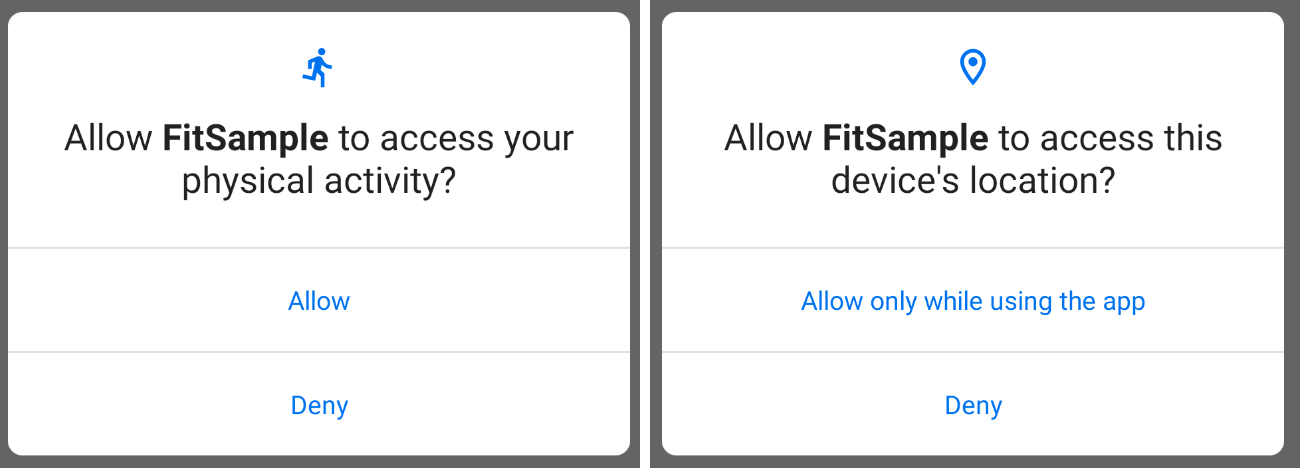 **Figure 1.**The Android permissions consent screen.
*** ** * ** ***
## Data types that need Android permissions
To access these physical activity data types, you'll need to [request the `ACTIVITY_RECOGNITION` Android permission](https://developers.google.com/fit/android/authorization#requesting_android_permissions):
- To [record](https://developers.google.com/android/reference/com/google/android/gms/fitness/RecordingClient) these data types:
- `com.google.step_count.delta`
- `com.google.step_count.cumulative`
- `com.google.step_count.cadence`
- `com.google.activity.segment`
- `com.google.calories.expended`
- To [read](https://developers.google.com/android/reference/com/google/android/gms/fitness/HistoryClient) these data types:
- `com.google.step_count.delta`
- `com.google.step_count.cumulative`
- `com.google.step_count.cadence`
- `com.google.activity.segment`
- `com.google.activity.exercise`
To access these data types, you'll need to [request the `ACCESS_FINE_LOCATION` Android permission](https://developer.android.com/reference/android/Manifest.permission.html#ACCESS_FINE_LOCATION):
- To read these data types:
- `com.google.distance.delta`
- `com.google.location.sample`
- `com.google.location.bounding_box`
- `com.google.speed`
To [record](https://developers.google.com/android/reference/com/google/android/gms/fitness/RecordingClient) these data types, you'll need to [request the `BODY_SENSORS` Android permission](https://developer.android.com/reference/android/Manifest.permission.html#BODY_SENSORS):
- `com.google.heart_rate.bpm`
## Requesting Android permissions
Learn about [requesting Android permissions](https://developer.android.com/training/permissions/requesting), the
[physical activity recognition permission](https://developer.android.com/about/versions/10/privacy/changes#physical-activity-recognition), the
[fine location permission](https://developers.google.com/maps/documentation/android-sdk/location#location_permissions), and the [body sensors permission](https://developer.android.com/reference/android/Manifest.permission.html#BODY_SENSORS).
To access the data types above with the Google Fit APIs, you'll need to
implement logic to handle requesting Android permissions for both Android 10 and
previous versions of Android. These examples use the [`ACTIVITY_RECOGNITION`](https://developer.android.com/reference/android/Manifest.permission#ACTIVITY_RECOGNITION) permission.
### Android 10
So your app can target API level 29 or above, request the permission from the
user, and register the permission in the application manifest file.
1. [Add the permission to the manifest file](https://developer.android.com/training/permissions/requesting#perm-add).
2. [Check if the permission is granted](https://developer.android.com/training/permissions/requesting#perm-check):
if (ContextCompat.checkSelfPermission(thisActivity, Manifest.permission.ACTIVITY_RECOGNITION)
!= PackageManager.PERMISSION_GRANTED) {
// Permission is not granted
}
3. If permission isn't already granted, request the permission:
ActivityCompat.requestPermissions(thisActivity,
arrayOf(Manifest.permission.ACTIVITY_RECOGNITION),
MY_PERMISSIONS_REQUEST_ACTIVITY_RECOGNITION)
### Android 9 and below
So your app can target API level 28 or below:
1. Request the `com.google.android.gms.permission.ACTIVITY_RECOGNITION` permission.
2. [Add the permission to the manifest file](https://developer.android.com/training/permissions/requesting#perm-add).
> [!CAUTION]
> **Caution:** If your app targets API level 28 or below but is running on Android 10, the `com.google.android.gms.permission.ACTIVITY_RECOGNITION` permission is converted into a pre-granted runtime permission which can be revoked by the user. If revoked, your app's access to these [physical activity
> data types](https://developers.google.com/fit/android/authorization#data_types_that_need_android_permissions) will be blocked. Update your app to handle this situation.