You can use the Google Ads API to manage online click conversions in Google Ads. Online
click conversions help you track ads that led to sales in the online world, such
as through a website.
Online conversions are tracked using the [Google tag](https://support.google.com/google-ads/answer/11994839), but you
can adjust or enhance them using the Google Ads API.
If you already have the Google tag set up and want to adjust your online
conversions, see the [conversion adjustments](https://developers.google.com/google-ads/api/docs/conversions/upload-adjustments.md.txt) page. If you
have the Google tag set up and you want to enhance your online conversions with
user-provided data, also known as
[Enhanced conversions for web](https://support.google.com/google-ads/answer/15713840), continue reading.
## Enhanced conversions for web
The following section explains how to enhance online click conversions, also
known as **Enhanced conversions for web**.
Enhanced conversions for web requires setting up a tag that automatically sends
a click identifier, like a GCLID, and an order ID to Google Ads when a user
converts. You have the option of setting up enhanced conversions through
[Google Tag Manager](https://support.google.com/google-ads/answer/13262500), the [Google tag](https://support.google.com/google-ads/answer/13258081), or the Google Ads API.
Using the Google Ads API gives you the advantage of sending first-party conversion data
within 24 hours of the conversion event, instead of at the same time. This makes
it possible to locate first-party data from a variety of sources, such as a
customer database or CRM system.
### How enhanced conversions for web works
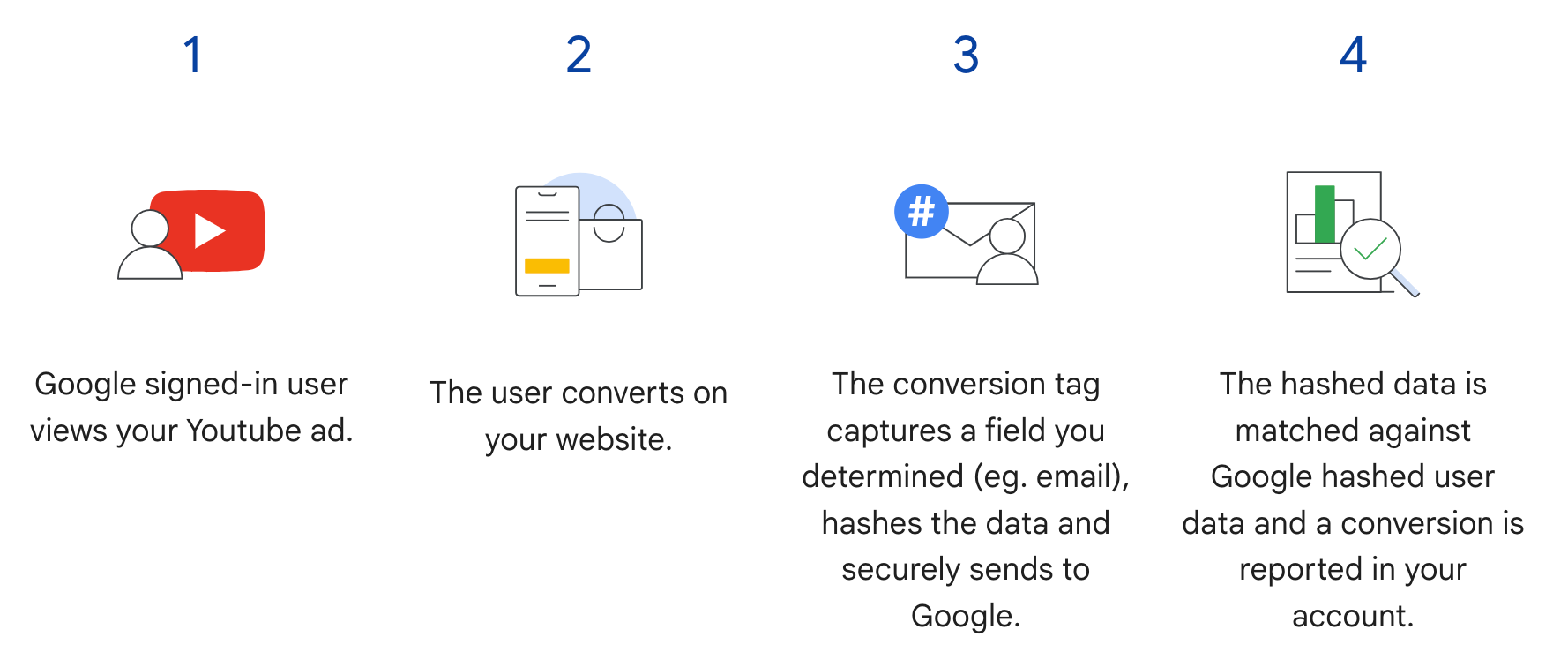
Enhanced conversions for web in the Google Ads API supplements step 3 in the following
diagram. Instead of sending the hashed user information when the user converts,
the tag sends just the GCLID and the order ID, and you send hashed user
information later by importing the order ID along with the hashed data. To learn
more about enhanced conversions for web, see
[About enhanced conversions](https://support.google.com/google-ads/answer/9888656).
### Prerequisites
You must accept the [customer data terms](https://support.google.com/adspolicy/answer/7475709) before you can
use enhanced conversions for web. You can verify whether the customer data terms
have been accepted by issuing the following query to the Google Ads conversion
customer:
```sql
SELECT
customer.id,
customer.conversion_tracking_setting.accepted_customer_data_terms
FROM customer
```
If `accepted_customer_data_terms` is `false`, follow the instructions in
[Set up enhanced conversions for web](https://support.google.com/google-ads/answer/13261987#setup_enhanced_conversions) to complete this
prerequisite.
### Configure tagging
You can configure tagging for your website by following the instructions in
[Set up enhanced conversions for web using the Google Ads API](https://support.google.com/google-ads/answer/12215519).
It is recommended that you also
[add transaction IDs (order IDs)](https://support.google.com/google-ads/answer/6386790) to your conversion tracking
tag to assist with conversion matching.
### API implementation
Here is the overall flow for importing enhanced conversions for web in the
Google Ads API.
1. [Normalize and hash the user-provided data](https://developers.google.com/google-ads/api/docs/conversions/upload-online.md.txt#prepare-data), such as email
address, phone number, and mailing address.
2. [Populate `ConversionAdjustment` objects](https://developers.google.com/google-ads/api/docs/conversions/upload-online.md.txt#populate-conversions-adjustments) with the
normalized and hashed user-provided data.
3. [Import the `ConversionAdjustment` objects](https://developers.google.com/google-ads/api/docs/conversions/upload-online.md.txt#upload) to the
[`ConversionAdjustmentUploadService`](https://developers.google.com/google-ads/api/reference/rpc/v26/ConversionAdjustmentUploadService.md.txt).
4. [Review your imports](https://developers.google.com/google-ads/api/docs/conversions/upload-online.md.txt#review).
### Normalize and hash user-provided data
For privacy considerations, the following data must be hashed using SHA-256
before being imported:
- Email address
- Phone number
- First name
- Last name
- Street address
*Don't hash* the following data:
- Country
- State
- City
- Zip code
In order to standardize the hash results, do the following prior to hashing one
of these values:
- Remove leading and trailing whitespaces.
- Convert the text to lowercase.
- Format phone numbers according to the [E.164 standard](https://en.wikipedia.org/wiki/E.164).
#### Email address formatting for enhanced conversions
To ensure the highest match rates for enhanced conversions, you must properly
format and hash email addresses using the following steps:
1. **Apply standard normalization (all email addresses):**
- Remove any leading and trailing ASCII whitespace.
- Convert all characters in the email address to lowercase.
2. **Apply domain-specific normalization (`gmail.com` and `googlemail.com`
only):**
- After lowercasing the email address, check whether the domain (after the `@` symbol) is `gmail.com` or `googlemail.com`.
- **Remove periods (`.`):** From the username portion (before the `@` symbol), remove all period characters.
- **Remove plus suffixes (`+`):** From the username portion, remove the first plus sign (`+`) and all subsequent characters up to the `@` symbol.
- Example: `Jane.Doe+Shopping@googlemail.com` first becomes `jane.doe+shopping@googlemail.com` (lowercase), and then `janedoe@googlemail.com` (Gmail and Googlemail rules).
- **Other domains:** For any domain *other than* `gmail.com` or `googlemail.com`, do *not* remove periods or plus suffixes from the username. Only apply standard normalization (trim whitespace and convert to lowercase).
- Example: `user.name+NYC@Example.com` is normalized to `user.name+nyc@example.com`.
3. **Hash the normalized email address:**
- Encode the normalized email string as **UTF-8** bytes.
- Hash the UTF-8 bytes using the **SHA-256** algorithm.
- Format the resulting digest as a **lowercase hexadecimal string** (64 characters).
> [!NOTE]
> **Note:** The email normalization requirements for enhanced conversions are distinct from how Google's system internally handles email variations for Customer Match. For enhanced conversions, you must perform the domain-specific normalization for `gmail.com` and `googlemail.com` (removing periods and plus suffixes from the username) *before* you hash the data. Failing to do so produces different hash values than Google expects for these domains, leading to missed matches.
```python
import hashlib
import re
def normalize_and_hash_email(email: str) -> str:
"""Normalizes and SHA-256 hashes an email address for enhanced conversions."""
normalized = email.strip().lower()
parts = normalized.split("@")
if len(parts) != 2:
raise ValueError("Invalid email address format.")
username, domain = parts
if domain in ("gmail.com", "googlemail.com"):
username = username.replace(".", "")
username = re.sub(r"\+.*$", "", username)
normalized = f"{username}@{domain}"
return hashlib.sha256(normalized.encode("utf-8")).hexdigest()
```
#### Code example
This example shows how to normalize and hash user-provided data.
### Java
```java
private String normalizeAndHash(MessageDigest digest, String s, boolean trimIntermediateSpaces)
throws UnsupportedEncodingException {
// Normalizes by first converting all characters to lowercase, then trimming spaces.
String normalized = s.toLowerCase();
if (trimIntermediateSpaces) {
// Removes leading, trailing, and intermediate spaces.
normalized = normalized.replaceAll("\\s+", "");
} else {
// Removes only leading and trailing spaces.
normalized = normalized.trim();
}
// Hashes the normalized string using the hashing algorithm.
byte[] hash = digest.digest(normalized.getBytes("UTF-8"));
StringBuilder result = new StringBuilder();
for (byte b : hash) {
result.append(String.format("%02x", b));
}
return result.toString();
}
/**
* Returns the result of normalizing and hashing an email address. For this use case, Google Ads
* requires removal of any '.' characters or trailing '+' and characters that follow it from the
* username portion of the email address if the domain is {@code gmail.com} or {@code
* googlemail.com}.
*
* @param digest the digest to use to hash the normalized string.
* @param emailAddress the email address to normalize and hash.
*/
private String normalizeAndHashEmailAddress(MessageDigest digest, String emailAddress)
throws UnsupportedEncodingException {
// Removes all whitespace (leading, trailing, and intermediate) from the email address.
String normalizedEmail = emailAddress.toLowerCase().replaceAll("\\s+", "");
String[] emailParts = normalizedEmail.split("@", 2);
if (emailParts.length == 2 && emailParts[1].matches("^(gmail|googlemail)\\.com$")) {
// Removes any '.' characters from the portion of the email address before the domain if the
// domain is gmail.com or googlemail.com.
emailParts[0] = emailParts[0].replaceAll("\\.", "");
// Removes any '+' and all characters that follow it from the portion of the email address
// before the domain if the domain is gmail.com or googlemail.com.
emailParts[0] = emailParts[0].replaceAll("\\+.*", "");
normalizedEmail = String.format("%s@%s", emailParts[0], emailParts[1]);
}
return normalizeAndHash(digest, normalizedEmail, true);
}
/**
* Returns the result of normalizing and hashing a phone number. For this use case, Google Ads
* requires phone numbers to be in E.164 format.
*
* @param digest the digest to use to hash the normalized string.
* @param phoneNumber the phone number to normalize and hash.
*/
private String normalizeAndHashPhoneNumber(MessageDigest digest, String phoneNumber)
throws UnsupportedEncodingException {
// Removes non-digit characters and prepends a leading '+' sign.
String digitsOnly = phoneNumber.replaceAll("[^0-9]", "");
String formattedPhone = "+" + digitsOnly;
if (!formattedPhone.matches("^\\+[1-9]\\d{6,14}$")) {
throw new IllegalArgumentException("Phone number must be in E.164 format: " + phoneNumber);
}
return normalizeAndHash(digest, formattedPhone, true);
}
```
### C#
```c#
///
/// Normalizes the email address and hashes it. For this use case, Google Ads requires
/// removal of any '.' characters preceding gmail.com or
/// googlemail.com.
///
/// The email address.
/// The hash code.
private string NormalizeAndHashEmailAddress(string emailAddress)
{
string normalizedEmail = emailAddress.ToLower();
string[] emailParts = normalizedEmail.Split('@');
if (emailParts.Length > 1 && (emailParts[1] == "gmail.com" ||
emailParts[1] == "googlemail.com"))
{
// Removes any '.' characters from the portion of the email address before
// the domain if the domain is gmail.com or googlemail.com.
emailParts[0] = emailParts[0].Replace(".", "");
normalizedEmail = $"{emailParts[0]}@{emailParts[1]}";
}
return NormalizeAndHash(normalizedEmail);
}
///
/// Normalizes and hashes a string value.
///
/// The value to normalize and hash.
/// The normalized and hashed value.
private static string NormalizeAndHash(string value)
{
return ToSha256String(digest, ToNormalizedValue(value));
}
///
/// Hash a string value using SHA-256 hashing algorithm.
///
/// Provides the algorithm for SHA-256.
/// The string value (e.g. an email address) to hash.
/// The hashed value.
private static string ToSha256String(SHA256 digest, string value)
{
byte[] digestBytes = digest.ComputeHash(Encoding.UTF8.GetBytes(value));
// Convert the byte array into an unhyphenated hexadecimal string.
return BitConverter.ToString(digestBytes).Replace("-", string.Empty);
}
///
/// Removes leading and trailing whitespace and converts all characters to
/// lower case.
///
/// The value to normalize.
/// The normalized value.
private static string ToNormalizedValue(string value)
{
return value.Trim().ToLower();
}
```
### PHP
```php
private static function normalizeAndHash(
string $hashAlgorithm,
string $value,
bool $trimIntermediateSpaces
): string {
// Normalizes by first converting all characters to lowercase, then trimming spaces.
$normalized = strtolower($value);
if ($trimIntermediateSpaces === true) {
// Removes leading, trailing, and intermediate spaces.
$normalized = str_replace(' ', '', $normalized);
} else {
// Removes only leading and trailing spaces.
$normalized = trim($normalized);
}
return hash($hashAlgorithm, strtolower(trim($normalized)));
}
/**
* Returns the result of normalizing and hashing an email address. For this use case, Google
* Ads requires removal of any '.' characters preceding "gmail.com" or "googlemail.com".
*
* @param string $hashAlgorithm the hash algorithm to use
* @param string $emailAddress the email address to normalize and hash
* @return string the normalized and hashed email address
*/
private static function normalizeAndHashEmailAddress(
string $hashAlgorithm,
string $emailAddress
): string {
$normalizedEmail = strtolower($emailAddress);
$emailParts = explode("@", $normalizedEmail);
if (
count($emailParts) > 1
&& preg_match('/^(gmail|googlemail)\.com\s*/', $emailParts[1])
) {
// Removes any '.' characters from the portion of the email address before the domain
// if the domain is gmail.com or googlemail.com.
$emailParts[0] = str_replace(".", "", $emailParts[0]);
$normalizedEmail = sprintf('%s@%s', $emailParts[0], $emailParts[1]);
}
return self::normalizeAndHash($hashAlgorithm, $normalizedEmail, true);
}
```
### Python
```python
def normalize_and_hash_email_address(email_address):
"""Returns the result of normalizing and hashing an email address.
For this use case, Google Ads requires removal of any '.' characters
preceding "gmail.com" or "googlemail.com"
Args:
email_address: An email address to normalize.
Returns:
A normalized (lowercase, removed whitespace) and SHA-265 hashed string.
"""
normalized_email = email_address.strip().lower()
email_parts = normalized_email.split("@")
# Check that there are at least two segments
if len(email_parts) > 1:
# Removes any '.' and '+' characters from the portion of the email address
# before the domain
chars_to_remove = ".+"
translation_table = str.maketrans("", "", chars_to_remove)
email_parts[0] = email_parts[0].translate(translation_table)
normalized_email = "@".join(email_parts)
return normalize_and_hash(normalized_email)
def normalize_and_hash(s):
"""Normalizes and hashes a string with SHA-256.
Private customer data must be hashed during upload, as described at:
https://support.google.com/google-ads/answer/9888656
Args:
s: The string to perform this operation on.
Returns:
A normalized (lowercase, removed whitespace) and SHA-256 hashed string.
"""
return hashlib.sha256(s.strip().lower().encode()).hexdigest()
```
### Ruby
```ruby
# Returns the result of normalizing and then hashing the string using the
# provided digest. Private customer data must be hashed during upload, as
# described at https://support.google.com/google-ads/answer/9888656.
def normalize_and_hash(str)
# Remove leading and trailing whitespace and ensure all letters are lowercase
# before hasing.
Digest::SHA256.hexdigest(str.strip.downcase)
end
# Returns the result of normalizing and hashing an email address. For this use
# case, Google Ads requires removal of any '.' characters preceding 'gmail.com'
# or 'googlemail.com'.
def normalize_and_hash_email(email)
email_parts = email.downcase.split("@")
# Removes any '.' characters from the portion of the email address before the
# domain if the domain is gmail.com or googlemail.com.
if email_parts.last =~ /^(gmail|googlemail)\.com\s*/
email_parts[0] = email_parts[0].gsub('.', '')
end
normalize_and_hash(email_parts.join('@'))
end
```
### Perl
```perl
sub normalize_and_hash {
my $value = shift;
my $trim_intermediate_spaces = shift;
if ($trim_intermediate_spaces) {
$value =~ s/\s+//g;
} else {
$value =~ s/^\s+|\s+$//g;
}
return sha256_hex(lc $value);
}
# Returns the result of normalizing and hashing an email address. For this use
# case, Google Ads requires removal of any '.' characters preceding 'gmail.com'
# or 'googlemail.com'.
sub normalize_and_hash_email_address {
my $email_address = shift;
my $normalized_email = lc $email_address;
my @email_parts = split('@', $normalized_email);
if (scalar @email_parts > 1
&& $email_parts[1] =~ /^(gmail|googlemail)\.com\s*/)
{
# Remove any '.' characters from the portion of the email address before the
# domain if the domain is 'gmail.com' or 'googlemail.com'.
$email_parts[0] =~ s/\.//g;
$normalized_email = sprintf '%s@%s', $email_parts[0], $email_parts[1];
}
return normalize_and_hash($normalized_email, 1);
}
```
### curl
> [!NOTE]
> **Note:** While a direct REST code sample for this step isn't provided here, you can achieve this using a manual REST request.
>
> Refer to the Google Ads API REST interface documentation and the method-specific reference pages. You will need to construct the JSON payload based on the proto definitions.
>
> Key Resources:
>
> - [Using REST](https://developers.google.com/google-ads/api/rest/overview.md.txt)
> - [REST Interface Structure](https://developers.google.com/google-ads/api/rest/design/overview.md.txt)
> - [JSON Field Mappings](https://developers.google.com/google-ads/api/rest/design/json-mappings.md.txt)
> - Consult the [REST API Reference](https://developers.google.com/google-ads/api/reference/rpc/latest/overview) for the specific service and method.
### Populate ConversionAdjustment objects
The following section demonstrates how to construct an enhancement adjustment
that contains an order ID, plus identifiers for email address, phone number, and
physical address, with standardization and hashing applied as required. As a
best practice, include `gclid` on the adjustment if it's available.
This step is nearly identical to the
[Import conversion adjustments](https://developers.google.com/google-ads/api/docs/conversions/upload-adjustments.md.txt) guide, with a few caveats:
> [!NOTE]
> **Note:** Any [`restatement_value`](https://developers.google.com/google-ads/api/reference/rpc/v26/RestatementValue.md.txt) is ignored. To restate the value for a conversion, send a separate operation with `adjustment_type` set to `RESTATEMENT`. See the [adjustments guide](https://developers.google.com/google-ads/api/docs/conversions/upload-adjustments.md.txt) for more information.
- Populate [`user_identifiers`](https://developers.google.com/google-ads/api/reference/rpc/v26/ConversionAdjustment.md.txt#user_identifiers) with the normalized and hashed user data. If you have multiple user identifiers available, create a separate `UserIdentifier` for each one, up to five identifiers.
### Java
```java
// Creates a builder for constructing the enhancement adjustment.
ConversionAdjustment.Builder enhancementBuilder =
ConversionAdjustment.newBuilder().setAdjustmentType(ConversionAdjustmentType.ENHANCEMENT);
// Extracts user email, phone, and address info from the raw data, normalizes and hashes it,
// then wraps it in UserIdentifier objects.
// Creates a separate UserIdentifier object for each. The data in this example is hardcoded, but
// in your application you might read the raw data from an input file.
// IMPORTANT: Since the identifier attribute of UserIdentifier
// (https://developers.google.com/google-ads/api/reference/rpc/latest/UserIdentifier) is a
// oneof
// (https://protobuf.dev/programming-guides/proto3/#oneof-features), you must set only ONE of
// hashedEmail, hashedPhoneNumber, mobileId, thirdPartyUserId, or addressInfo. Setting more
// than one of these attributes on the same UserIdentifier will clear all the other members
// of the oneof. For example, the following code is INCORRECT and will result in a
// UserIdentifier with ONLY a hashedPhoneNumber.
//
// UserIdentifier incorrectlyPopulatedUserIdentifier =
// UserIdentifier.newBuilder()
// .setHashedEmail("...")
// .setHashedPhoneNumber("...")
// .build();
ImmutableMap.Builder rawRecordBuilder =
ImmutableMap.builder()
// Email address that includes a period (.) and plus (+) suffix before the Gmail domain.
.put("email", "alex.2+myalias@gmail.com")
// Address that includes all four required elements: first name, last name, country
// code, and postal code.
.put("firstName", "Alex")
.put("lastName", "Quinn")
.put("countryCode", "US")
.put("postalCode", "94045")
// Phone number to be converted to E.164 format, with a leading '+' as required.
.put("phone", "+1 800-555-0102")
// This example lets you put conversion details as arguments, but in reality you might
// store this data alongside other user data, so we include it in this sample user
// record.
.put("orderId", orderId)
.put("conversionActionId", Long.toString(conversionActionId))
.put("currencyCode", "USD");
// Adds entries for the optional fields.
if (conversionDateTime != null) {
rawRecordBuilder.put("conversionDateTime", conversionDateTime);
}
if (userAgent != null) {
rawRecordBuilder.put("userAgent", userAgent);
}
// Builds the map representing the record.
Map rawRecord = rawRecordBuilder.build();
// Creates a SHA256 message digest for hashing user identifiers in a privacy-safe way, as
// described at https://support.google.com/google-ads/answer/9888656.
MessageDigest sha256Digest = MessageDigest.getInstance("SHA-256");
// Creates a list for the user identifiers.
List userIdentifiers = new ArrayList<>();
// Creates a user identifier using the hashed email address, using the normalize and hash method
// specifically for email addresses.
UserIdentifier emailIdentifier =
UserIdentifier.newBuilder()
// Optional: specify the user identifier source.
.setUserIdentifierSource(UserIdentifierSource.FIRST_PARTY)
// Uses the normalize and hash method specifically for email addresses.
.setHashedEmail(normalizeAndHashEmailAddress(sha256Digest, rawRecord.get("email")))
.build();
userIdentifiers.add(emailIdentifier);
// Checks if the record has a phone number, and if so, adds a UserIdentifier for it.
if (rawRecord.containsKey("phone")) {
UserIdentifier hashedPhoneNumberIdentifier =
UserIdentifier.newBuilder()
.setHashedPhoneNumber(
normalizeAndHashPhoneNumber(sha256Digest, rawRecord.get("phone")))
.build();
// Adds the hashed phone number identifier to the UserData object's list.
userIdentifiers.add(hashedPhoneNumberIdentifier);
}
// Checks if the record has all the required mailing address elements, and if so, adds a
// UserIdentifier for the mailing address.
if (rawRecord.containsKey("firstName")) {
// Checks if the record contains all the other required elements of a mailing address.
Set missingAddressKeys = new HashSet<>();
for (String addressKey : new String[] {"lastName", "countryCode", "postalCode"}) {
if (!rawRecord.containsKey(addressKey)) {
missingAddressKeys.add(addressKey);
}
}
if (!missingAddressKeys.isEmpty()) {
System.out.printf(
"Skipping addition of mailing address information because the following required keys"
+ " are missing: %s%n",
missingAddressKeys);
} else {
// Creates an OfflineUserAddressInfo object that contains all the required elements of a
// mailing address.
OfflineUserAddressInfo addressInfo =
OfflineUserAddressInfo.newBuilder()
.setHashedFirstName(
normalizeAndHash(sha256Digest, rawRecord.get("firstName"), false))
.setHashedLastName(normalizeAndHash(sha256Digest, rawRecord.get("lastName"), false))
.setCountryCode(rawRecord.get("countryCode"))
.setPostalCode(rawRecord.get("postalCode"))
.build();
UserIdentifier addressIdentifier =
UserIdentifier.newBuilder().setAddressInfo(addressInfo).build();
// Adds the address identifier to the UserData object's list.
userIdentifiers.add(addressIdentifier);
}
}
// Adds the user identifiers to the enhancement adjustment.
enhancementBuilder.addAllUserIdentifiers(userIdentifiers);
```
### C#
```c#
// Normalize and hash the raw data, then wrap it in UserIdentifier objects.
// Create a separate UserIdentifier object for each. The data in this example is
// hardcoded, but in your application you might read the raw data from an input file.
//
// IMPORTANT: Since the identifier attribute of UserIdentifier
// (https://developers.google.com/google-ads/api/reference/rpc/latest/UserIdentifier)
// is a oneof
// (https://protobuf.dev/programming-guides/proto3/#oneof-features), you must set
// only ONE of hashed_email, hashed_phone_number, mobile_id, third_party_user_id,
// or address-info. Setting more than one of these attributes on the same UserIdentifier
// will clear all the other members of the oneof. For example, the following code is
// INCORRECT and will result in a UserIdentifier with ONLY a hashed_phone_number:
// UserIdentifier incorrectlyPopulatedUserIdentifier = new UserIdentifier()
// {
// HashedEmail = "..."
// HashedPhoneNumber = "..."
// }
UserIdentifier addressIdentifier = new UserIdentifier()
{
AddressInfo = new OfflineUserAddressInfo()
{
HashedFirstName = NormalizeAndHash("Dana"),
HashedLastName = NormalizeAndHash("Quinn"),
HashedStreetAddress = NormalizeAndHash("1600 Amphitheatre Pkwy"),
City = "Mountain View",
State = "CA",
PostalCode = "94043",
CountryCode = "US"
},
// Optional: Specifies the user identifier source.
UserIdentifierSource = UserIdentifierSource.FirstParty
};
// Creates a user identifier using the hashed email address.
UserIdentifier emailIdentifier = new UserIdentifier()
{
UserIdentifierSource = UserIdentifierSource.FirstParty,
// Uses the normalize and hash method specifically for email addresses.
HashedEmail = NormalizeAndHashEmailAddress("dana@example.com")
};
// Adds the user identifiers to the enhancement adjustment.
enhancement.UserIdentifiers.AddRange(new[] { addressIdentifier, emailIdentifier });
```
### PHP
```php
// Creates the conversion enhancement.
$enhancement =
new ConversionAdjustment(['adjustment_type' => ConversionAdjustmentType::ENHANCEMENT]);
// Extracts user email, phone, and address info from the raw data, normalizes and hashes it,
// then wraps it in UserIdentifier objects.
// Creates a separate UserIdentifier object for each. The data in this example is hardcoded,
// but in your application you might read the raw data from an input file.
// IMPORTANT: Since the identifier attribute of UserIdentifier
// (https://developers.google.com/google-ads/api/reference/rpc/latest/UserIdentifier) is a
// oneof
// (https://protobuf.dev/programming-guides/proto3/#oneof-features), you must set only ONE
// of hashedEmail, hashedPhoneNumber, mobileId, thirdPartyUserId, or addressInfo. Setting
// more than one of these attributes on the same UserIdentifier will clear all the other
// members of the oneof. For example, the following code is INCORRECT and will result in a
// UserIdentifier with ONLY a hashedPhoneNumber.
//
// $incorrectlyPopulatedUserIdentifier = new UserIdentifier([
// 'hashed_email' => '...',
// 'hashed_phone_number' => '...'
// ]);
$rawRecord = [
// Email address that includes a period (.) before the Gmail domain.
'email' => 'alex.2@example.com',
// Address that includes all four required elements: first name, last name, country
// code, and postal code.
'firstName' => 'Alex',
'lastName' => 'Quinn',
'countryCode' => 'US',
'postalCode' => '94045',
// Phone number to be converted to E.164 format, with a leading '+' as required.
'phone' => '+1 800 5550102',
// This example lets you input conversion details as arguments, but in reality you might
// store this data alongside other user data, so we include it in this sample user
// record.
'orderId' => $orderId,
'conversionActionId' => $conversionActionId,
'conversionDateTime' => $conversionDateTime,
'currencyCode' => 'USD'
];
// Creates a list for the user identifiers.
$userIdentifiers = [];
// Uses the SHA-256 hash algorithm for hashing user identifiers in a privacy-safe way, as
// described at https://support.google.com/google-ads/answer/9888656.
$hashAlgorithm = "sha256";
// Creates a user identifier using the hashed email address, using the normalize and hash
// method specifically for email addresses.
$emailIdentifier = new UserIdentifier(
[
// Uses the normalize and hash method specifically for email addresses.
'hashed_email' => self::normalizeAndHashEmailAddress(
$hashAlgorithm,
$rawRecord['email']
),
// Optional: Specifies the user identifier source.
'user_identifier_source' => UserIdentifierSource::FIRST_PARTY
]
);
$userIdentifiers[] = $emailIdentifier;
// Checks if the record has a phone number, and if so, adds a UserIdentifier for it.
if (array_key_exists('phone', $rawRecord)) {
$hashedPhoneNumberIdentifier = new UserIdentifier(
[
'hashed_phone_number' => self::normalizeAndHash(
$hashAlgorithm,
$rawRecord['phone'],
true
)
]
);
// Adds the hashed email identifier to the user identifiers list.
$userIdentifiers[] = $hashedPhoneNumberIdentifier;
}
// Checks if the record has all the required mailing address elements, and if so, adds a
// UserIdentifier for the mailing address.
if (array_key_exists('firstName', $rawRecord)) {
// Checks if the record contains all the other required elements of a mailing
// address.
$missingAddressKeys = [];
foreach (['lastName', 'countryCode', 'postalCode'] as $addressKey) {
if (!array_key_exists($addressKey, $rawRecord)) {
$missingAddressKeys[] = $addressKey;
}
}
if (!empty($missingAddressKeys)) {
printf(
"Skipping addition of mailing address information because the "
. "following required keys are missing: %s%s",
json_encode($missingAddressKeys),
PHP_EOL
);
} else {
// Creates an OfflineUserAddressInfo object that contains all the required
// elements of a mailing address.
$addressIdentifier = new UserIdentifier(
[
'address_info' => new OfflineUserAddressInfo(
[
'hashed_first_name' => self::normalizeAndHash(
$hashAlgorithm,
$rawRecord['firstName'],
false
),
'hashed_last_name' => self::normalizeAndHash(
$hashAlgorithm,
$rawRecord['lastName'],
false
),
'country_code' => $rawRecord['countryCode'],
'postal_code' => $rawRecord['postalCode']
]
)
]
);
// Adds the address identifier to the user identifiers list.
$userIdentifiers[] = $addressIdentifier;
}
}
// Adds the user identifiers to the conversion.
$enhancement->setUserIdentifiers($userIdentifiers);
```
### Python
```python
# Extracts user email, phone, and address info from the raw data, normalizes
# and hashes it, then wraps it in UserIdentifier objects. Creates a separate
# UserIdentifier object for each. The data in this example is hardcoded, but
# in your application you might read the raw data from an input file.
# IMPORTANT: Since the identifier attribute of UserIdentifier
# (https://developers.google.com/google-ads/api/reference/rpc/latest/UserIdentifier)
# is a oneof
# (https://protobuf.dev/programming-guides/proto3/#oneof-features), you must
# set only ONE of hashed_email, hashed_phone_number, mobile_id,
# third_party_user_id, or address_info. Setting more than one of these
# attributes on the same UserIdentifier will clear all the other members of
# the oneof. For example, the following code is INCORRECT and will result in
# a UserIdentifier with ONLY a hashed_phone_number:
#
# incorrectly_populated_user_identifier = client.get_type("UserIdentifier")
# incorrectly_populated_user_identifier.hashed_email = "...""
# incorrectly_populated_user_identifier.hashed_phone_number = "...""
raw_record = {
# Email address that includes a period (.) before the Gmail domain.
"email": "alex.2@example.com",
# Address that includes all four required elements: first name, last
# name, country code, and postal code.
"first_name": "Alex",
"last_name": "Quinn",
"country_code": "US",
"postal_code": "94045",
# Phone number to be converted to E.164 format, with a leading '+' as
# required.
"phone": "+1 800 5550102",
# This example lets you input conversion details as arguments, but in
# reality you might store this data alongside other user data, so we
# include it in this sample user record.
"order_id": order_id,
"conversion_action_id": conversion_action_id,
"conversion_date_time": conversion_date_time,
"currency_code": "USD",
"user_agent": user_agent,
}
# Constructs the enhancement adjustment.
conversion_adjustment = client.get_type("ConversionAdjustment")
conversion_adjustment.adjustment_type = (
client.enums.ConversionAdjustmentTypeEnum.ENHANCEMENT
)
# Creates a user identifier using the hashed email address, using the
# normalize and hash method specifically for email addresses.
email_identifier = client.get_type("UserIdentifier")
# Optional: Specifies the user identifier source.
email_identifier.user_identifier_source = (
client.enums.UserIdentifierSourceEnum.FIRST_PARTY
)
# Uses the normalize and hash method specifically for email addresses.
email_identifier.hashed_email = normalize_and_hash_email_address(
raw_record["email"]
)
# Adds the email identifier to the conversion adjustment.
conversion_adjustment.user_identifiers.append(email_identifier)
# Checks if the record has a phone number, and if so, adds a UserIdentifier
# for it.
if raw_record.get("phone") is not None:
phone_identifier = client.get_type("UserIdentifier")
phone_identifier.hashed_phone_number = normalize_and_hash(
raw_record["phone"]
)
# Adds the phone identifier to the conversion adjustment.
conversion_adjustment.user_identifiers.append(phone_identifier)
# Checks if the record has all the required mailing address elements, and if
# so, adds a UserIdentifier for the mailing address.
if raw_record.get("first_name") is not None:
# Checks if the record contains all the other required elements of a
# mailing address.
required_keys = ["last_name", "country_code", "postal_code"]
# Builds a new list of the required keys that are missing from
# raw_record.
missing_keys = [
key for key in required_keys if key not in raw_record.keys()
]
if len(missing_keys) > 0:
print(
"Skipping addition of mailing address information because the"
f"following required keys are missing: {missing_keys}"
)
else:
# Creates a user identifier using sample values for the user address,
# hashing where required.
address_identifier = client.get_type("UserIdentifier")
address_info = address_identifier.address_info
address_info.hashed_first_name = normalize_and_hash(
raw_record["first_name"]
)
address_info.hashed_last_name = normalize_and_hash(
raw_record["last_name"]
)
address_info.country_code = raw_record["country_code"]
address_info.postal_code = raw_record["postal_code"]
# Adds the address identifier to the conversion adjustment.
conversion_adjustment.user_identifiers.append(address_identifier)
```
### Ruby
```ruby
# Extracts user email, phone, and address info from the raw data, normalizes
# and hashes it, then wraps it in UserIdentifier objects. Creates a separate
# UserIdentifier object for each. The data in this example is hardcoded, but
# in your application you might read the raw data from an input file.
# IMPORTANT: Since the identifier attribute of UserIdentifier
# (https://developers.google.com/google-ads/api/reference/rpc/latest/UserIdentifier)
# is a oneof
# (https://protobuf.dev/programming-guides/proto3/#oneof-features), you must
# set only ONE of hashed_email, hashed_phone_number, mobile_id,
# third_party_user_id, or address_info. Setting more than one of these
# attributes on the same UserIdentifier will clear all the other members of
# the oneof. For example, the following code is INCORRECT and will result in
# a UserIdentifier with ONLY a hashed_phone_number:
#
# incorrectly_populated_user_identifier.hashed_email = "...""
# incorrectly_populated_user_identifier.hashed_phone_number = "...""
raw_record = {
# Email address that includes a period (.) before the Gmail domain.
"email" => "alex.2@example.com",
# Address that includes all four required elements: first name, last
# name, country code, and postal code.
"first_name" => "Alex",
"last_name" => "Quinn",
"country_code" => "US",
"postal_code" => "94045",
# Phone number to be converted to E.164 format, with a leading '+' as
# required.
"phone" => "+1 800 5550102",
# This example lets you input conversion details as arguments, but in
# reality you might store this data alongside other user data, so we
# include it in this sample user record.
"order_id" => order_id,
"conversion_action_id" => conversion_action_id,
"conversion_date_time" => conversion_date_time,
"currency_code" => "USD",
"user_agent" => user_agent,
}
enhancement = client.resource.conversion_adjustment do |ca|
ca.conversion_action = client.path.conversion_action(customer_id, conversion_action_id)
ca.adjustment_type = :ENHANCEMENT
ca.order_id = order_id
# Sets the conversion date and time if provided. Providing this value is
# optional but recommended.
unless conversion_date_time.nil?
ca.gclid_date_time_pair = client.resource.gclid_date_time_pair do |pair|
pair.conversion_date_time = conversion_date_time
end
end
# Creates a user identifier using the hashed email address, using the
# normalize and hash method specifically for email addresses.
ca.user_identifiers << client.resource.user_identifier do |ui|
# Uses the normalize and hash method specifically for email addresses.
ui.hashed_email = normalize_and_hash_email(raw_record["email"])
# Optional: Specifies the user identifier source.
ui.user_identifier_source = :FIRST_PARTY
end
# Checks if the record has a phone number, and if so, adds a UserIdentifier
# for it.
unless raw_record["phone"].nil?
ca.user_identifiers << client.resource.user_identifier do |ui|
ui.hashed_phone_number = normalize_and_hash_email(raw_record["phone"])
end
end
# Checks if the record has all the required mailing address elements, and if
# so, adds a UserIdentifier for the mailing address.
unless raw_record["first_name"].nil?
# Checks if the record contains all the other required elements of a
# mailing address.
required_keys = ["last_name", "country_code", "postal_code"]
# Builds a new list of the required keys that are missing from
# raw_record.
missing_keys = required_keys - raw_record.keys
if missing_keys
puts(
"Skipping addition of mailing address information because the" \
"following required keys are missing: #{missing_keys}"
)
else
ca.user_identifiers << client.resource.user_identifier do |ui|
ui.address_info = client.resource.offline_user_address_info do |info|
# Certain fields must be hashed using SHA256 in order to handle
# identifiers in a privacy-safe way, as described at
# https://support.google.com/google-ads/answer/9888656.
info.hashed_first_name = normalize_and_hash( raw_record["first_name"])
info.hashed_last_name = normalize_and_hash( raw_record["last_name"])
info.postal_code = normalize_and_hash(raw_record["country_code"])
info.country_code = normalize_and_hash(raw_record["postal_code"])
end
end
end
end
```
### Perl
```perl
# Construct the enhancement adjustment.
my $enhancement =
Google::Ads::GoogleAds::V26::Services::ConversionAdjustmentUploadService::ConversionAdjustment
->new({
adjustmentType => ENHANCEMENT
});
# Extract user email, phone, and address info from the raw data,
# normalize and hash it, then wrap it in UserIdentifier objects.
# Create a separate UserIdentifier object for each.
# The data in this example is hardcoded, but in your application
# you might read the raw data from an input file.
#
# IMPORTANT: Since the identifier attribute of UserIdentifier
# (https://developers.google.com/google-ads/api/reference/rpc/latest/UserIdentifier)
# is a oneof
# (https://protobuf.dev/programming-guides/proto3/#oneof-features), you must set
# only ONE of hashed_email, hashed_phone_number, mobile_id, third_party_user_id,
# or address-info. Setting more than one of these attributes on the same UserIdentifier
# will clear all the other members of the oneof. For example, the following code is
# INCORRECT and will result in a UserIdentifier with ONLY a hashed_phone_number:
#
# my $incorrect_user_identifier = Google::Ads::GoogleAds::V26::Common::UserIdentifier->new({
# hashedEmail => '...',
# hashedPhoneNumber => '...',
# });
my $raw_record = {
# Email address that includes a period (.) before the Gmail domain.
email => 'alex.2@example.com',
# Address that includes all four required elements: first name, last
# name, country code, and postal code.
firstName => 'Alex',
lastName => 'Quinn',
countryCode => 'US',
postalCode => '94045',
# Phone number to be converted to E.164 format, with a leading '+' as
# required.
phone => '+1 800 5550102',
# This example lets you input conversion details as arguments,
# but in reality you might store this data alongside other user data,
# so we include it in this sample user record.
orderId => $order_id,
conversionActionId => $conversion_action_id,
conversionDateTime => $conversion_date_time,
currencyCode => "USD",
userAgent => $user_agent,
};
my $user_identifiers = [];
# Create a user identifier using the hashed email address, using the normalize
# and hash method specifically for email addresses.
my $hashed_email = normalize_and_hash_email_address($raw_record->{email});
push(
@$user_identifiers,
Google::Ads::GoogleAds::V26::Common::UserIdentifier->new({
hashedEmail => $hashed_email,
# Optional: Specify the user identifier source.
userIdentifierSource => FIRST_PARTY
}));
# Check if the record has a phone number, and if so, add a UserIdentifier for it.
if (defined $raw_record->{phone}) {
# Add the hashed phone number identifier to the list of UserIdentifiers.
push(
@$user_identifiers,
Google::Ads::GoogleAds::V26::Common::UserIdentifier->new({
hashedPhoneNumber => normalize_and_hash($raw_record->{phone}, 1)}));
}
# Confirm the record has all the required mailing address elements, and if so, add
# a UserIdentifier for the mailing address.
if (defined $raw_record->{firstName}) {
my $required_keys = ["lastName", "countryCode", "postalCode"];
my $missing_keys = [];
foreach my $key (@$required_keys) {
if (!defined $raw_record->{$key}) {
push(@$missing_keys, $key);
}
}
if (@$missing_keys) {
print
"Skipping addition of mailing address information because the following"
. "keys are missing: "
. join(",", @$missing_keys);
} else {
push(
@$user_identifiers,
Google::Ads::GoogleAds::V26::Common::UserIdentifier->new({
addressInfo =>
Google::Ads::GoogleAds::V26::Common::OfflineUserAddressInfo->new({
# First and last name must be normalized and hashed.
hashedFirstName => normalize_and_hash($raw_record->{firstName}),
hashedLastName => normalize_and_hash($raw_record->{lastName}),
# Country code and zip code are sent in plain text.
countryCode => $raw_record->{countryCode},
postalCode => $raw_record->{postalCode},
})}));
}
}
# Add the user identifiers to the enhancement adjustment.
$enhancement->{userIdentifiers} = $user_identifiers;
```
### curl
> [!NOTE]
> **Note:** While a direct REST code sample for this step isn't provided here, you can achieve this using a manual REST request.
>
> Refer to the Google Ads API REST interface documentation and the method-specific reference pages. You will need to construct the JSON payload based on the proto definitions.
>
> Key Resources:
>
> - [Using REST](https://developers.google.com/google-ads/api/rest/overview.md.txt)
> - [REST Interface Structure](https://developers.google.com/google-ads/api/rest/design/overview.md.txt)
> - [JSON Field Mappings](https://developers.google.com/google-ads/api/rest/design/json-mappings.md.txt)
> - Consult the [REST API Reference](https://developers.google.com/google-ads/api/reference/rpc/latest/overview) for the specific service and method.
- Set [`order_id`](https://developers.google.com/google-ads/api/reference/rpc/v26/ConversionAdjustment.md.txt#order_id), [`adjustment_type`](https://developers.google.com/google-ads/api/reference/rpc/v26/ConversionAdjustment.md.txt#adjustment_type) (`ENHANCEMENT`), and [`conversion_action`](https://developers.google.com/google-ads/api/reference/rpc/v26/ConversionAdjustment.md.txt#conversion_action) (`WEBPAGE`), along with optional [`gclid_date_time_pair`](https://developers.google.com/google-ads/api/reference/rpc/v26/ConversionAdjustment.md.txt#gclid_date_time_pair) (formatted as `yyyy-mm-dd HH:mm:ss+|-HH:mm`, for example: `2022-01-01 19:32:45-05:00` (ignoring daylight saving time) ) and [`user_agent`](https://developers.google.com/google-ads/api/reference/rpc/v26/ConversionAdjustment.md.txt#user_agent):
### Java
```java
// Sets the conversion action.
enhancementBuilder.setConversionAction(
ResourceNames.conversionAction(
customerId, Long.parseLong(rawRecord.get("conversionActionId"))));
// Sets the order ID. Enhancements MUST use order ID instead of GCLID date/time pair.
enhancementBuilder.setOrderId(rawRecord.get("orderId"));
// Sets the conversion date and time if provided. Providing this value is optional but
// recommended.
if (rawRecord.containsKey("conversionDateTime")) {
enhancementBuilder.setGclidDateTimePair(
GclidDateTimePair.newBuilder()
.setConversionDateTime(rawRecord.get("conversionDateTime")));
}
// Sets the user agent if provided. This should match the user agent of the request that sent
// the original conversion so the conversion and its enhancement are either both attributed as
// same-device or both attributed as cross-device.
if (rawRecord.containsKey("userAgent")) {
enhancementBuilder.setUserAgent(rawRecord.get("userAgent"));
}
```
### C#
```c#
// Set the conversion action.
enhancement.ConversionAction =
ResourceNames.ConversionAction(customerId, conversionActionId);
// Set the order ID. Enhancements MUST use order ID instead of GCLID date/time pair.
enhancement.OrderId = orderId;
// Sets the conversion date and time if provided. Providing this value is optional but
// recommended.
if (string.IsNullOrEmpty(conversionDateTime))
{
enhancement.GclidDateTimePair = new GclidDateTimePair()
{
ConversionDateTime = conversionDateTime
};
}
// Sets optional fields where a value was provided.
if (!string.IsNullOrEmpty(userAgent))
{
// Sets the user agent. This should match the user agent of the request that
// sent the original conversion so the conversion and its enhancement are either
// both attributed as same-device or both attributed as cross-device.
enhancement.UserAgent = userAgent;
}
```
### PHP
```php
// Sets the conversion action.
$enhancement->setConversionAction(
ResourceNames::forConversionAction($customerId, $rawRecord['conversionActionId'])
);
// Sets the order ID. Enhancements MUST use order ID instead of GCLID date/time pair.
if (!empty($rawRecord['orderId'])) {
$enhancement->setOrderId($rawRecord['orderId']);
}
// Sets the conversion date and time if provided. Providing this value is optional but
// recommended.
if (!empty($rawRecord['conversionDateTime'])) {
// Sets the conversion date and time if provided. Providing this value is optional but
// recommended.
$enhancement->setGclidDateTimePair(
new GclidDateTimePair(
[
'conversion_date_time' => $rawRecord['conversionDateTime']
]
)
);
}
// Sets the user agent if provided. This should match the user agent of the request that
// sent the original conversion so the conversion and its enhancement are either both
// attributed as same-device or both attributed as cross-device.
if (!empty($rawRecord['userAgent'])) {
$enhancement->setUserAgent($rawRecord['userAgent']);
}
```
### Python
```python
conversion_action_service = client.get_service("ConversionActionService")
# Sets the conversion action.
conversion_adjustment.conversion_action = (
conversion_action_service.conversion_action_path(
customer_id, raw_record["conversion_action_id"]
)
)
# Sets the order ID. Enhancements MUST use order ID instead of GCLID
# date/time pair.
conversion_adjustment.order_id = order_id
# Sets the conversion date and time if provided. Providing this value is
# optional but recommended.
if raw_record.get("conversion_date_time"):
conversion_adjustment.gclid_date_time_pair.conversion_date_time = (
raw_record["conversion_date_time"]
)
# Sets optional fields where a value was provided
if raw_record.get("user_agent"):
# Sets the user agent. This should match the user agent of the request
# that sent the original conversion so the conversion and its
# enhancement are either both attributed as same-device or both
# attributed as cross-device.
conversion_adjustment.user_agent = user_agent
```
### Ruby
```ruby
ca.conversion_action = client.path.conversion_action(customer_id, conversion_action_id)
ca.adjustment_type = :ENHANCEMENT
ca.order_id = order_id
# Sets the conversion date and time if provided. Providing this value is
# optional but recommended.
unless conversion_date_time.nil?
ca.gclid_date_time_pair = client.resource.gclid_date_time_pair do |pair|
pair.conversion_date_time = conversion_date_time
end
end
# Creates a user identifier using the hashed email address, using the
# normalize and hash method specifically for email addresses.
ca.user_identifiers << client.resource.user_identifier do |ui|
# Uses the normalize and hash method specifically for email addresses.
ui.hashed_email = normalize_and_hash_email(raw_record["email"])
# Optional: Specifies the user identifier source.
ui.user_identifier_source = :FIRST_PARTY
end
# Checks if the record has a phone number, and if so, adds a UserIdentifier
# for it.
unless raw_record["phone"].nil?
ca.user_identifiers << client.resource.user_identifier do |ui|
ui.hashed_phone_number = normalize_and_hash_email(raw_record["phone"])
end
end
# Checks if the record has all the required mailing address elements, and if
# so, adds a UserIdentifier for the mailing address.
unless raw_record["first_name"].nil?
# Checks if the record contains all the other required elements of a
# mailing address.
required_keys = ["last_name", "country_code", "postal_code"]
# Builds a new list of the required keys that are missing from
# raw_record.
missing_keys = required_keys - raw_record.keys
if missing_keys
puts(
"Skipping addition of mailing address information because the" \
"following required keys are missing: #{missing_keys}"
)
else
ca.user_identifiers << client.resource.user_identifier do |ui|
ui.address_info = client.resource.offline_user_address_info do |info|
# Certain fields must be hashed using SHA256 in order to handle
# identifiers in a privacy-safe way, as described at
# https://support.google.com/google-ads/answer/9888656.
info.hashed_first_name = normalize_and_hash( raw_record["first_name"])
info.hashed_last_name = normalize_and_hash( raw_record["last_name"])
info.postal_code = normalize_and_hash(raw_record["country_code"])
info.country_code = normalize_and_hash(raw_record["postal_code"])
end
end
end
end
# Sets optional fields where a value was provided.
unless user_agent.nil?
# Sets the user agent. This should match the user agent of the request
# that sent the original conversion so the conversion and its enhancement
# are either both attributed as same-device or both attributed as
# cross-device.
ca.user_agent = user_agent
end
```
### Perl
```perl
# Set the conversion action.
$enhancement->{conversionAction} =
Google::Ads::GoogleAds::V26::Utils::ResourceNames::conversion_action(
$customer_id, $raw_record->{conversionActionId});
# Set the order ID. Enhancements MUST use order ID instead of GCLID date/time pair.
$enhancement->{orderId} = $raw_record->{orderId};
# Set the conversion date and time if provided. Providing this value is optional
# but recommended.
if (defined $raw_record->{conversionDateTime}) {
$enhancement->{gclidDateTimePair} =
Google::Ads::GoogleAds::V26::Services::ConversionAdjustmentUploadService::GclidDateTimePair
->new({
conversionDateTime => $raw_record->{conversionDateTime}});
}
# Set the user agent if provided. This should match the user agent of the
# request that sent the original conversion so the conversion and its enhancement
# are either both attributed as same-device or both attributed as cross-device.
if (defined $raw_record->{userAgent}) {
$enhancement->{userAgent} = $raw_record->{userAgent};
}
```
### curl
> [!NOTE]
> **Note:** While a direct REST code sample for this step isn't provided here, you can achieve this using a manual REST request.
>
> Refer to the Google Ads API REST interface documentation and the method-specific reference pages. You will need to construct the JSON payload based on the proto definitions.
>
> Key Resources:
>
> - [Using REST](https://developers.google.com/google-ads/api/rest/overview.md.txt)
> - [REST Interface Structure](https://developers.google.com/google-ads/api/rest/design/overview.md.txt)
> - [JSON Field Mappings](https://developers.google.com/google-ads/api/rest/design/json-mappings.md.txt)
> - Consult the [REST API Reference](https://developers.google.com/google-ads/api/reference/rpc/latest/overview) for the specific service and method.
#### Request and ConversionAdjustment schema summary
The following tables summarize the top-level fields on
[`UploadConversionAdjustmentsRequest`](https://developers.google.com/google-ads/api/reference/rpc/v26/UploadConversionAdjustmentsRequest.md.txt)
and the per-item fields on [`ConversionAdjustment`](https://developers.google.com/google-ads/api/reference/rpc/v26/ConversionAdjustment.md.txt)
(`conversion_adjustments[]`) when uploading enhanced conversions for web using
[`ConversionAdjustmentUploadService.UploadConversionAdjustments`](https://developers.google.com/google-ads/api/reference/rpc/v26/ConversionAdjustmentUploadService/UploadConversionAdjustments.md.txt):
| Request field | Requirement | Format and constraints |
|---|---|---|
| `customer_id` | Required | Set to the **Google Ads conversion customer** ID (`google_ads_conversion_customer` on `customer.conversion_tracking_setting`), without hyphens. |
| `conversion_adjustments[]` | Required | Up to 2,000 [`ConversionAdjustment`](https://developers.google.com/google-ads/api/reference/rpc/v26/ConversionAdjustment.md.txt) entries per request (`TOO_MANY_ADJUSTMENTS_IN_REQUEST`). |
| `partial_failure` | Required | Must be set to `true` so valid adjustments are processed and row-level errors are returned in [`partial_failure_error`](https://developers.google.com/google-ads/api/reference/rpc/v26/UploadConversionAdjustmentsResponse.md.txt#partial_failure_error). |
| `validate_only` | Optional | When `true`, validates the request without executing adjustments. |
| `job_id` | Optional | Positive `int32` (`1` to `2^31 - 1`; `0` is the unset sentinel and returns `INVALID_JOB_ID` if specified) to group multiple requests under a single logical job in [`job_summaries`](https://developers.google.com/google-ads/api/reference/rpc/v26/OfflineConversionUploadClientSummary.md.txt#job_summaries). |
Each [`ConversionAdjustment`](https://developers.google.com/google-ads/api/reference/rpc/v26/ConversionAdjustment.md.txt) in
`conversion_adjustments[]` (up to 2,000 adjustments per request) supports the
following fields:
| `ConversionAdjustment` field | Requirement | Format and constraints |
|---|---|---|
| `adjustment_type` | Required | Must be set to `ENHANCEMENT` ([`ConversionAdjustmentType`](https://developers.google.com/google-ads/api/reference/rpc/v26/ConversionAdjustmentTypeEnum.ConversionAdjustmentType.md.txt)). |
| `conversion_action` | Required | Resource name (`customers/{conversion_customer_id}/conversionActions/{action_id}`) of an `ENABLED` conversion action with `type = WEBPAGE` created at least 6 hours before the upload (`TOO_RECENT_CONVERSION_ACTION`). |
| `order_id` | Required | Transaction ID of the conversion to enhance; must match the order ID sent by the [website conversion tag](https://developers.google.com/google-ads/api/docs/conversions/upload-online.md.txt#tagging). |
| `user_identifiers[]` | Required | One to five [`UserIdentifier`](https://developers.google.com/google-ads/api/reference/rpc/v26/UserIdentifier.md.txt) objects per enhancement. Set optional `user_identifier_source` (such as `FIRST_PARTY`) and **one** identifier per entry: • `hashed_email`: SHA-256 hex string. • `hashed_phone_number`: [E.164](https://en.wikipedia.org/wiki/E.164) SHA-256 hex string. • `address_info`: [`OfflineUserAddressInfo`](https://developers.google.com/google-ads/api/reference/rpc/v26/OfflineUserAddressInfo.md.txt) with SHA-256 hashed `hashed_first_name`, `hashed_last_name`, `hashed_street_address`, and unhashed `city`, `state`, `country_code`, `postal_code`. |
| `gclid_date_time_pair` | Optional (recommended) | [`GclidDateTimePair`](https://developers.google.com/google-ads/api/reference/rpc/v26/ConversionAdjustment.md.txt#gclid_date_time_pair) containing `gclid` and `conversion_date_time` ( `yyyy-mm-dd HH:mm:ss+|-HH:mm`, for example: `2022-01-01 19:32:45-05:00` (ignoring daylight saving time) , for example, `2026-06-01 14:30:00-04:00`) of the original conversion. Conversions older than 54 days cannot be adjusted (`CONVERSION_EXPIRED`). |
| `adjustment_date_time` | Optional | Timestamp ( `yyyy-mm-dd HH:mm:ss+|-HH:mm`, for example: `2022-01-01 19:32:45-05:00` (ignoring daylight saving time) ) when the adjustment occurred; if set, must be after `conversion_date_time`. |
| `user_agent` | Optional | HTTP `User-Agent` header string from the original conversion request so the conversion and enhancement share the same device attribution (`same-device` or `cross-device`). |
| `restatement_value` | Don't set on `ENHANCEMENT` | Ignored when `adjustment_type` is `ENHANCEMENT`. Send a separate operation with `adjustment_type = RESTATEMENT` to change a conversion's value. |
### Import conversion enhancements
> [!IMPORTANT]
> **Important:** An enhanced conversion should be imported within 24 hours of the original conversion. We recommend importing at least several minutes before the end of the 24-hour period for a margin of safety from differences between system clocks.
### Java
```java
// Creates the conversion adjustment upload service client.
try (ConversionAdjustmentUploadServiceClient conversionUploadServiceClient =
googleAdsClient.getLatestVersion().createConversionAdjustmentUploadServiceClient()) {
// Uploads the enhancement adjustment. Partial failure should always be set to true.
// NOTE: This request contains a single adjustment as a demonstration. However, if you have
// multiple adjustments to upload, it's best to upload multiple adjustments per request
// instead of sending a separate request per adjustment. See the following for per-request
// limits:
// https://developers.google.com/google-ads/api/docs/best-practices/quotas#conversion_adjustment_upload_service
UploadConversionAdjustmentsResponse response =
conversionUploadServiceClient.uploadConversionAdjustments(
UploadConversionAdjustmentsRequest.newBuilder()
.setCustomerId(Long.toString(customerId))
.addConversionAdjustments(enhancementBuilder)
// Enables partial failure (must be true).
.setPartialFailure(true)
.build());
```
### C#
```c#
// Uploads the enhancement adjustment. Partial failure should always be set to true.
//
// NOTE: This request contains a single adjustment as a demonstration.
// However, if you have multiple adjustments to upload, it's best to upload
// multiple adjustmenst per request instead of sending a separate request per
// adjustment. See the following for per-request limits:
// https://developers.google.com/google-ads/api/docs/best-practices/quotas#conversion_adjust
UploadConversionAdjustmentsResponse response =
conversionAdjustmentUploadService.UploadConversionAdjustments(
new UploadConversionAdjustmentsRequest()
{
CustomerId = customerId.ToString(),
ConversionAdjustments = { enhancement },
// Enables partial failure (must be true).
PartialFailure = true,
});
```
### PHP
```php
// Issues a request to upload the conversion enhancement.
$conversionAdjustmentUploadServiceClient =
$googleAdsClient->getConversionAdjustmentUploadServiceClient();
// NOTE: This request contains a single adjustment as a demonstration. However, if you have
// multiple adjustments to upload, it's best to upload multiple adjustments per request
// instead of sending a separate request per adjustment. See the following for per-request
// limits:
// https://developers.google.com/google-ads/api/docs/best-practices/quotas#conversion_adjustment_upload_service
$response = $conversionAdjustmentUploadServiceClient->uploadConversionAdjustments(
// Enables partial failure (must be true).
UploadConversionAdjustmentsRequest::build($customerId, [$enhancement], true)
);
```
### Python
```python
# Creates the conversion adjustment upload service client.
conversion_adjustment_upload_service = client.get_service(
"ConversionAdjustmentUploadService"
)
# Uploads the enhancement adjustment. Partial failure should always be set
# to true.
# NOTE: This request only uploads a single conversion, but if you have
# multiple conversions to upload, it's still best to upload them in a single
# request. See the following for per-request limits for reference:
# https://developers.google.com/google-ads/api/docs/best-practices/quotas#conversion_upload_service
response = conversion_adjustment_upload_service.upload_conversion_adjustments(
customer_id=customer_id,
conversion_adjustments=[conversion_adjustment],
# Enables partial failure (must be true).
partial_failure=True,
)
```
### Ruby
```ruby
response = client.service.conversion_adjustment_upload.upload_conversion_adjustments(
customer_id: customer_id,
# NOTE: This request only uploads a single conversion, but if you have
# multiple conversions to upload, it's still best to upload them in a single
# request. See the following for per-request limits for reference:
# https://developers.google.com/google-ads/api/docs/best-practices/quotas#conversion_upload_service
conversion_adjustments: [enhancement],
# Partial failure must be set to true.
partial_failure: true,
)
```
### Perl
```perl
# Upload the enhancement adjustment. Partial failure should always be set to true.
#
# NOTE: This request contains a single adjustment as a demonstration.
# However, if you have multiple adjustments to upload, it's best to
# upload multiple adjustments per request instead of sending a separate
# request per adjustment. See the following for per-request limits:
# https://developers.google.com/google-ads/api/docs/best-practices/quotas#conversion_adjustment_upload_service
my $response =
$api_client->ConversionAdjustmentUploadService()
->upload_conversion_adjustments({
customerId => $customer_id,
conversionAdjustments => [$enhancement],
# Enable partial failure (must be true).
partialFailure => "true"
});
```
### curl
> [!NOTE]
> **Note:** While a direct REST code sample for this step isn't provided here, you can achieve this using a manual REST request.
>
> Refer to the Google Ads API REST interface documentation and the method-specific reference pages. You will need to construct the JSON payload based on the proto definitions.
>
> Key Resources:
>
> - [Using REST](https://developers.google.com/google-ads/api/rest/overview.md.txt)
> - [REST Interface Structure](https://developers.google.com/google-ads/api/rest/design/overview.md.txt)
> - [JSON Field Mappings](https://developers.google.com/google-ads/api/rest/design/json-mappings.md.txt)
> - Consult the [REST API Reference](https://developers.google.com/google-ads/api/reference/rpc/latest/overview) for the specific service and method.
#### REST request and response structure
When calling
[`ConversionAdjustmentUploadService.UploadConversionAdjustments`](https://developers.google.com/google-ads/api/reference/rpc/v26/ConversionAdjustmentUploadService/UploadConversionAdjustments.md.txt)
over REST, send a `POST` request with `partialFailure` set to `true`:
```console
POST https://googleads.googleapis.com/v26/customers/{customer_id}:uploadConversionAdjustments
```
```json
{
"partialFailure": true,
"jobId": 2001,
"conversionAdjustments": [
{
"conversionAction": "customers/{customer_id}/conversionActions/{conversion_action_id}",
"adjustmentType": "ENHANCEMENT",
"orderId": "ORDER-2026-1001",
"gclidDateTimePair": {
"gclid": "EAIaIQobChMI...",
"conversionDateTime": "2026-06-01 14:30:00-04:00"
},
"userAgent": "Mozilla/5.0 (Macintosh; Intel Mac OS X 10_15_7)",
"userIdentifiers": [
{
"userIdentifierSource": "FIRST_PARTY",
"hashedEmail": "f660ab912ec121d1b1e928a0bb4bc61b15f5ad44d5efdc4e1c92a25e99b8e44a"
},
{
"userIdentifierSource": "FIRST_PARTY",
"hashedPhoneNumber": "42975f8f9e46c2e13c1a2294957e5cb8d8e6f4f7341a036c6e595bc9f5e24621"
},
{
"userIdentifierSource": "FIRST_PARTY",
"addressInfo": {
"hashedFirstName": "a665a45920422f9d417e4867efdc4fb8a04a1f3fff1fa07e998e86f7f7a27ae3",
"hashedLastName": "b3a8e0e1f9ab1bfe3a36f231f676f78bb30a519d2b21e6c530c0eee8ebb4a5d0",
"hashedStreetAddress": "35a9e381b1a27567549b5f8a6f783c167ebf809f1c4d6a9e367240484d8ce281",
"city": "New York",
"state": "NY",
"postalCode": "10011",
"countryCode": "US"
}
}
]
},
{
"conversionAction": "customers/{customer_id}/conversionActions/{conversion_action_id}",
"adjustmentType": "ENHANCEMENT",
"userIdentifiers": [
{
"userIdentifierSource": "FIRST_PARTY",
"hashedEmail": "f660ab912ec121d1b1e928a0bb4bc61b15f5ad44d5efdc4e1c92a25e99b8e44a"
}
]
}
]
}
```
In this two-adjustment batch where the second adjustment omits `orderId`,
successful rows return populated
[`ConversionAdjustmentResult`](https://developers.google.com/google-ads/api/reference/rpc/v26/ConversionAdjustmentResult.md.txt) entries in `results[]`,
while failed rows return empty `{}` objects in `results[]` alongside row-level
error details in `partialFailureError` on
[`UploadConversionAdjustmentsResponse`](https://developers.google.com/google-ads/api/reference/rpc/v26/UploadConversionAdjustmentsResponse.md.txt):
```json
{
"results": [
{
"gclidDateTimePair": {
"gclid": "EAIaIQobChMI...",
"conversionDateTime": "2026-06-01 14:30:00-04:00"
},
"orderId": "ORDER-2026-1001",
"conversionAction": "customers/{customer_id}/conversionActions/{conversion_action_id}",
"adjustmentType": "ENHANCEMENT"
},
{}
],
"jobId": "2001",
"partialFailureError": {
"code": 3,
"message": "The required field was not present., at conversion_adjustments[1].order_id",
"details": [
{
"@type": "type.googleapis.com/google.ads.googleads.v26.errors.GoogleAdsFailure",
"errors": [
{
"errorCode": {
"fieldError": "REQUIRED"
},
"message": "The required field was not present.",
"location": {
"fieldPathElements": [
{
"fieldName": "conversion_adjustments",
"index": 1
},
{
"fieldName": "order_id"
}
]
}
}
]
}
]
}
}
```
### Review your imports
Use the enhanced conversions API [diagnostics report](https://support.google.com/google-ads/answer/10036798) to
validate that your enhanced conversions for web are working effectively and to
diagnose issues in your setup.
Use [offline data diagnostics](https://developers.google.com/google-ads/api/docs/conversions/upload-summaries.md.txt) to review the overall health of
your recent imports.
#### Query upload diagnostics with GAQL
You can also inspect account-level upload health, recent job counts, and error
alerts programmatically by querying
[`offline_conversion_upload_client_summary`](https://developers.google.com/google-ads/api/docs/conversions/upload-summaries.md.txt) against the
conversion customer ID:
```sql
SELECT
customer.id,
offline_conversion_upload_client_summary.client,
offline_conversion_upload_client_summary.status,
offline_conversion_upload_client_summary.total_event_count,
offline_conversion_upload_client_summary.successful_event_count,
offline_conversion_upload_client_summary.success_rate,
offline_conversion_upload_client_summary.pending_event_count,
offline_conversion_upload_client_summary.pending_rate,
offline_conversion_upload_client_summary.last_upload_date_time,
offline_conversion_upload_client_summary.alerts,
offline_conversion_upload_client_summary.daily_summaries,
offline_conversion_upload_client_summary.job_summaries
FROM offline_conversion_upload_client_summary
```
> [!NOTE]
> **Note:** A successful import response from the API does not necessarily mean the conversions have been attributed. See [Data discrepancies after a successful upload](https://support.google.com/google-ads/answer/13321563#Datadiscrepanciesaftersuccessfulupload) for more details on data discrepancies after a successful import.
When reporting on conversion metrics for your campaigns, refer to
[Mapping user interface metrics](https://developers.google.com/google-ads/api/docs/conversions/reporting.md.txt#map-metrics) to correlate Google Ads UI metrics with
Google Ads API reporting fields. You can also query the
[`conversion_action`](https://developers.google.com/google-ads/api/fields/v26/conversion_action.md.txt) resource to view the total
number of conversions and the total conversion value for a given conversion
action.
### Best practices
Keep the following best practices in mind when implementing enhanced conversions
for web.
#### Check for the customer identifier
When you import conversions, the customer ID must be set to the account that
contains the conversion action and that does the conversion tracking. To check
this setting, query the serving Google Ads [`Customer`](https://developers.google.com/google-ads/api/fields/v26/customer.md.txt) resource
for the [`ConversionTrackingSetting`](https://developers.google.com/google-ads/api/reference/rpc/v26/ConversionTrackingSetting.md.txt). Issue the
following query with [`GoogleAdsService.SearchStream`](https://developers.google.com/google-ads/api/reference/rpc/v26/GoogleAdsService/SearchStream.md.txt) to find
the value of
`customer.conversion_tracking_setting.google_ads_conversion_customer`.
```sql
SELECT
customer.conversion_tracking_setting.google_ads_conversion_customer,
customer.conversion_tracking_setting.conversion_tracking_status,
customer.conversion_tracking_setting.conversion_tracking_id,
customer.conversion_tracking_setting.cross_account_conversion_tracking_id
FROM customer
```
Set `customer_id` to the `google_ads_conversion_customer` value in your requests
to import conversions.
#### Include multiple identifiers if you have them
If you have the GCLID for a conversion, we recommend sending it in addition to
the `user_identifiers` for improved performance. Further, if you have more than
one `UserIdentifier` for the conversion, including all of these can improve the
likelihood of a match. Include all identifiers on the same
`ConversionAdjustment`.
#### Review partial failure errors when setting up your integration
When you're first setting up your enhanced conversions for web integration,
review and address any partial errors in the
[`partial_failure_error`](https://developers.google.com/google-ads/api/reference/rpc/v26/UploadConversionAdjustmentsResponse.md.txt#partial_failure_error)
field of the response. If there are issues in your setup, you can inspect this
field to investigate and address them. For more details and examples related to
partial failure error handling, visit the dedicated
[partial failure guide](https://developers.google.com/google-ads/api/docs/best-practices/partial-failures.md.txt).
Once you've resolved any issues that surfaced in partial failure errors and your
integration is complete, switch to using
[offline data diagnostics](https://developers.google.com/google-ads/api/docs/conversions/upload-summaries.md.txt) to regularly review the health of
your conversions.
#### Batch multiple adjustments in a single request
If you have multiple adjustments to import, batch the operations (up to 2,000
conversion adjustments per request) into one
[`UploadConversionAdjustmentsRequest`](https://developers.google.com/google-ads/api/reference/rpc/v26/UploadConversionAdjustmentsRequest.md.txt),
rather than sending an import request per adjustment.
Check the [quota guide](https://developers.google.com/google-ads/api/docs/best-practices/quotas.md.txt#conversion-adjustment-upload-service) for limits on the number of adjustments per
request. If you want [offline data diagnostics](https://developers.google.com/google-ads/api/docs/conversions/upload-summaries.md.txt) to group a set
of requests under the same logical job, set the [`job_id`](https://developers.google.com/google-ads/api/reference/rpc/v26/UploadConversionAdjustmentsRequest.md.txt#job_id) of all
the requests to the same value.
### Troubleshooting
Use the enhanced conversions API [**diagnostics report**](https://support.google.com/google-ads/answer/10036798) to
validate that your enhanced conversions for web are working effectively and to
diagnose issues in your setup.
#### Debug common errors
The following guidance helps you diagnose and fix common errors with enhanced
conversions for web.
| Error ||
|---|---|
| [`CONVERSION_NOT_FOUND`](https://developers.google.com/google-ads/api/reference/rpc/v26/ConversionAdjustmentUploadErrorEnum.ConversionAdjustmentUploadError.md.txt#conversion_not_found) | A conversion for the supplied conversion action and conversion identifier pair or `order_id` couldn't be found. Verify the conversion is a Google Ads conversion for the [Google Ads conversion customer](https://developers.google.com/google-ads/api/docs/conversions/getting-started.md.txt#conversion_tracking_setup) specified in the request's `customer_id`. In addition, verify that the conversion was not for a click where `gbraid `or `wbraid` was populated instead of [`gclid`](https://support.google.com/google-ads/answer/9744275). Google Ads does not support enhanced conversions for web for these conversions. |
| [`CUSTOMER_NOT_ACCEPTED_CUSTOMER_DATA_TERMS`](https://developers.google.com/google-ads/api/reference/rpc/v26/ConversionAdjustmentUploadErrorEnum.ConversionAdjustmentUploadError.md.txt#customer_not_accepted_customer_data_terms) | The customer data terms and conditions have not been accepted for the `customer_id` of the request. Find instructions for this in the [prerequisites](https://developers.google.com/google-ads/api/docs/conversions/upload-online.md.txt#prerequisites) guide. |
| [`CONVERSION_ALREADY_ENHANCED`](https://developers.google.com/google-ads/api/reference/rpc/v26/ConversionAdjustmentUploadErrorEnum.ConversionAdjustmentUploadError.md.txt#conversion_already_enhanced) | This conversion has already received an adjustment with the given `order_id` and `conversion_action`. Make sure to provide a unique `order_id` for each conversion. |
| [`CONVERSION_ACTION_NOT_ELIGIBLE_FOR_ENHANCEMENT`](https://developers.google.com/google-ads/api/reference/rpc/v26/ConversionAdjustmentUploadErrorEnum.ConversionAdjustmentUploadError.md.txt#conversion_action_not_eligible_for_enhancement) | The `conversion_action` supplied is not eligible for enhanced conversions for web. In the Google Ads UI, make sure you check the **Turn on enhanced conversions** box on the conversion action referenced in your request. Find instructions for this in the [Help Center](https://support.google.com/google-ads/answer/13261987#setup_enhanced_conversions). |