# Integrate One Tap using an iframe
Google One Tap can be rendered inside an iframe (hereinafter referred to as
Intermediate Iframe) hosted by your own website. There isn't any perceivable
change on One Tap UX when an intermediate iframe is used.
The intermediate iframe based integration brings some flexibilities and risks:
- **Embedded UX for One Tap and subsequent UX flow**.
After the One Tap UX is done, you can display subsequent UX flow inside the
intermediate iframe. Thus, One Tap and subsequent UX can be both embedded
into the current content page. See an example below.
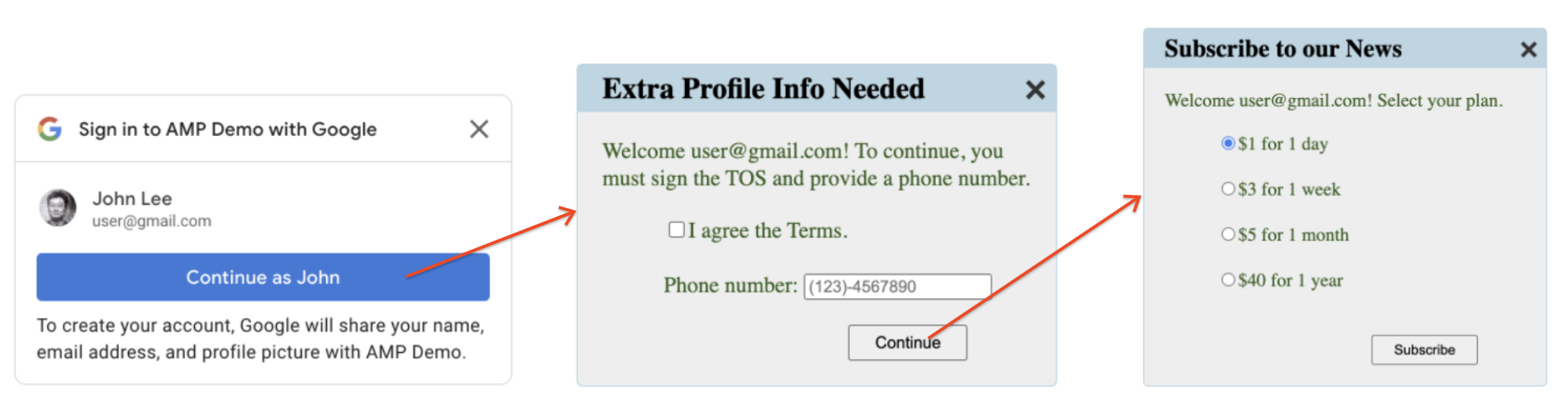
Without the intermediate iframe, normally you need a full page navigation to
display subsequent UX flow, which may be intrusive in some cases.
- **Integrate Once, and Display Everywhere**.
All the One Tap integration code (One Tap API invocation and subsequent UX
handling) are encapsulated in the intermediate iframe. On content pages,
where One Tap may display, all you need to do is to embed the intermediate
iframe.
This architecture allows the separation of concerns, and thus decreases your
integration and maintenance cost.
- **Limit the ID Token Exposure Scope**.
The ID tokens are consumed directly by the intermediate iframe. They are
never exposed to the content pages. This architecture may dramatically
decrease the ID tokens exposure scope.
The intermediate iframe way also works well with websites that already have
a dedicated login-related sub domain (say, login.example.com) and multiple
content-related sub domains (say, sports.example.com and games.example.com).
- **One Tap Displaying Domains**.
As required by Google's [OAuth policies](https://developers.google.com/identity/protocols/oauth2/policies), all domains that receive OAuth
responses need to be pre-registered in Google Cloud console. With normal One
Tap integration, developers need to pre-register all domains that One Tap
may display, since ID tokens will be passed back to these domains. Some
websites allow their users to dynamically create sub domains, which are
impossible to be pre-registered. As a result, One Tap cannot be displayed in
these dynamically created sub domains.
This issue can be fixed by leveraging the intermediate iframe. In this case,
only the domain of the intermediate iframe needs to be pre-registered. There
is no need to register the content page domains, since ID Tokens are not
exposed to these content pages.
- **Privacy Risks**.
Developers must take measures to prevent the intermediate iframes to be
embedded into unexpected domains. For example, malicious.com may embed your
intermediate iframe, and thus display your One Tap UX on their website. This
will definitely cause lots of privacy concerns from end users.
> [!WARNING]
> **Warning:** Your subsequent UX is exposed to unexpected framing too. Attackers may forge a URL so as to embed one UI of your subsequent UX directly. Be sure to verify parent iframe origin on every step of your subsequent UX.
> [!IMPORTANT]
> **Key Point:** Verify parent origin by calling the `verifyParentOrigin` API from the [intermediate iframe support library](https://developers.google.com/identity/gsi/web/amp/intermediate-support-reference) on every step of your subsequent UX flows.
> [!NOTE]
> **Note:** No need to call the `verifyParentOrigin` API when displaying One Tap. One Tap already performs the verification. Only call the `verifyParentOrigin` API when implementing your subsequent UX.
- **Security Risks**.
Due to the above-mentioned unexpected framing issue, your intermediate
iframe should never send security or privacy sensitive data to its parent
frame, such as ID tokens, session cookie values, user data, etc. Failure to
follow this rule may put your websites in danger.
> [!WARNING]
> **Warning:** The intermediate iframe must not send OAuth tokens, session cookies values, or user data to its parent frame.
## Render One Tap in the Intermediate Iframe
To display One Tap inside the intermediate iframe, place the following code
snippet into the HTML code of the intermediate iframe:
If the `data-allowed_parent_origin` attribute is used, Google One Tap runs
in intermediate iframe mode. You can set one domain or a comma-separated
domain list as the attribute value. Wildcard subdomains are also supported.
## Integrate One Tap with FedCM in a cross-origin iframe
When One Tap API is called from cross-origin iframes, you must add
[`allow="identity-credentials-get"`](https://developers.google.com/privacy-sandbox/cookies/fedcm/implement#call_fedcm_from_within_a_cross-origin_iframe) attribute to all level of
parent frames if your app calls One Tap API from [cross-origin](https://web.dev/articles/same-site-same-origin) iframes.
If your app uses [Intermediate Iframe API](https://developers.google.com/identity/gsi/web/amp/nonamp-reference) to embed One Tap, no
additional attribute is needed since it supports FedCM cross-origin iframes.
However, if you embed a page using the [Intermediate Iframe API](https://developers.google.com/identity/gsi/web/amp/nonamp-reference) within
another iframe, you must add the attribute to all parent iframes.
An iframe is considered as cross-origin if its
[origin](https://web.dev/articles/same-site-same-origin) is not exactly the same as the
parent origin. For example:
- Different domains: `https://example1.com` and `https://example2.com`
- Different top-level domains: `https://example.uk` and `https://example.jp`
- Subdomains: `https://example.com` and `https://login.example.com`
When using One Tap in a cross-origin iframe, users may encounter a
confusing experience. The One Tap prompt displays the **top-level** domain's
name, not the iframe's, as a security measure to prevent credential harvesting.
However, the ID tokens are issued to the iframe's origin. Review this
[GitHub issue](https://github.com/w3c-fedid/FedCM/issues/449) for more details.
Because this discrepancy can be misleading, only using One Tap in cross-origin
but [same-site](https://web.dev/articles/same-site-same-origin) iframes is a **supported** method. For example, a page on
the top-level domain `https://www.example.com` using iframe to embeds a page
with One Tap on `https://login.example.com`. The One Tap prompt would display
"Sign in to example.com with google.com".
All other cases like different domains are **unsupported**. Instead, consider
alternative integration methods like:
- Implementing the [Sign in with Google button](https://developers.google.com/identity/gsi/web/guides/personalized-button).
- Implementing One Tap on the top-level domain
- Utilizing the [Google OAuth 2.0 endpoints](https://developers.google.com/identity/protocols/oauth2) for more customized integration.
- If you're embedding a third-party site within an iframe and can't modify its One Tap implementation, you can prevent the One Tap prompt from appearing within the iframe. To do this, remove the [`allow="identity-credentials-get"`](https://developers.google.com/privacy-sandbox/cookies/fedcm/implement#call_fedcm_from_within_a_cross-origin_iframe) attribute from the iframe tag in the parent frame. This will suppress the prompt, and you can then guide your users to the embedded site's sign-in page directly.
> [!NOTE]
> **Note:** The intermediate iframe is supposed to be in an iframe. Confirm that your frontend settings allow this.
> [!NOTE]
> **Note:** Use [`data-skip_prompt_cookie`](https://developers.google.com/identity/gsi/web/guides/toggle-display-with-cookies) attribute to toggle One Tap display based on your session cookie status.
## (Optional) Render Subsequent UX in the Intermediate Iframe
In the login response, you can return whatever HTML code, which may display some
visible content to end users. For example, asking for extra profile information,
or agreeing on TOS. Once the page is submitted, you can display further pages.
For example, for a payment or subscription.
You can resize the intermediate iframe:
In summary, with intermediate iframe, the full sign-in or sign-up UX flows can
be implemented as embedded UX.
> [!NOTE]
> **Note:** For simplicity and security, the intermediate iframe and all subsequent UIs must be from the same origin.
> [!WARNING]
> **Warning:** Verify the parent page domain on each page load to prevent unexpected iframing.
> [!TIP]
> **Tip:** Use the utility methods in the [intermediate iframe support library](https://developers.google.com/identity/gsi/web/amp/intermediate-support-reference) to verify parent frame origin or resize intermediate iframe.
For the first page after One Tap UX, you need to call the `notifyParentResize()`
method twice due to following reasons.
1. The intermediate iframe is set to hidden when One Tap UX is done.
2. The `offsetHeight` attribute value of an element is 0 when it's hidden.
In the first call, you can resize the iframe height to 1px just to make it
visible. Then, after the `offsetHeight` attribute value is available, you can
resize it to suitable height.
The following example code shows how to validate parent origin and resize the
intermediate iframe for the for UI after One Tap UX.
## Remove the Intermediate Iframe on UX Done
You must notify the parent content page to remove the intermediate iframe when
the UX flow is done. To this end, you can place the following code snippet in
your login response code.
If the UX flow is skipped, the `notifyParentClose` method need to be called
instead.
> [!IMPORTANT]
> **Key Point:** Call `notifyParentDone()` or `notifyParentClose()` when the UX flow is done or skipped, to allow the parent frame to remove the intermediate iframe.
> [!NOTE]
> **Note:** You may return an HTML page without any visible content, just to call call the `notifyParentDone` or `notifyParentClose` method.
## Embed Intermediate Iframe into HTML Pages
Place the following code snippet into any HTML pages the you want Google One Tap
to display:
The `data-src` attribute is the URI of your intermediate iframe.
> [!NOTE]
> **Note:** Two JavaScript libraries are provided for intermediate iframe based integration. The [intermediate iframe library](https://developers.google.com/identity/gsi/web/amp/nonamp-reference) (with URL like '.../gsi/intermediate') is used to embed intermediate iframes into HTML content pages. The [intermediate iframe support library](https://developers.google.com/identity/gsi/web/amp/intermediate-support-reference) (with URL like '.../gsi/intermediatesupport') is used by subsequent UX to manipulate the intermediate inframe.
> [!NOTE]
> **Note:** See [Display One Tap in AMP pages](https://developers.google.com/identity/gsi/web/amp/amp) on how to embed intermediate iframe into AMP pages.