 Crosswalk and sidewalk details 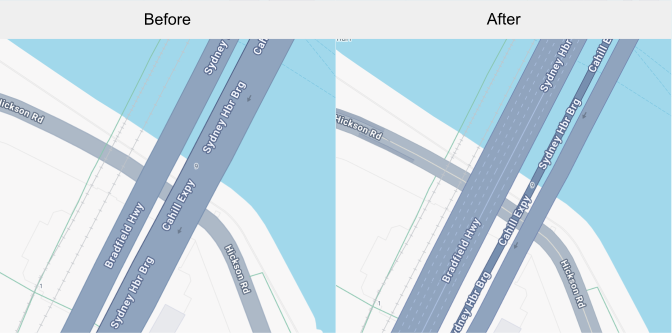 Lane markings and road widths
Between February 2025 and August 2025, Google Maps Platform
will add road level details such as crosswalks, sidewalks, lane markings, and
road widths to the default map style for the APIs and SDKs listed in this
document. To confirm compatibility with your maps experience, you can opt in to
use the road level details earlier than August, depending on the product you
use.
After mid-August 2025, road level details will always be enabled by
default for **all versions** of the APIs and SDKS.
The visibility of these details are available at zoom levels 17+ and may vary
over time. Details such as lane markings may not appear on all roads even in
areas that support lane markings.
When you increase zoom levels to 17+ with road level details enabled, Road map
feature types such as highways and arterials will disappear and be replaced by
the new Road detail map feature called Surface. To ease the transition of
styles from a Road map feature to the Surface map feature, you can
customize the zoom level style using cloud-based maps styling. For more
details, see [Preview road level details](https://developers.google.com/maps/documentation/javascript/cloud-customization/zoom-levels-leg#road-detail-preview).
## Feature availability by product
Google Maps Platform will release new versions for each of the APIs and SDKs
with road level details enabled by default according to the schedule in the
following table. To use the road level details, update to the listed version (or
subsequent).
> [!IMPORTANT]
> **Important:** After mid-August 2025, road level details will be enabled by default for all versions of the following APIs and SDKs.
| **Product** | **Update details** | **Rollout date** | **Available?** |
|---|---|---|---|
| Cloud-based maps styling | Use the style editor to preview and style road level details such as crosswalks and intersection signage. For more information, see [Preview road level details](https://developers.google.com/maps/documentation/javascript/cloud-customization/zoom-levels-leg#road-detail-preview). | February 27, 2025 |  |
| Maps JavaScript API | [Beta channel](https://developers.google.com/maps/documentation/javascript/versions.md.txt#beta-channel) | November 2024 |  |
| Maps JavaScript API | [Weekly channel](https://developers.google.com/maps/documentation/javascript/versions.md.txt#weekly-channel), v3.61 and newer. | May 2025 |  |
| Maps JavaScript API | [Quarterly channel](https://developers.google.com/maps/documentation/javascript/versions.md.txt#quarterly-channel) and all frozen versions. | August 2025 |  |
| Maps SDK for Android | v19.1.0 with the new map renderer.
For details, see [New Map Renderer](https://developers.google.com/maps/documentation/android-sdk/renderer.md.txt). For more information on updating versions, see [Maps SDK for Android versions](https://developers.google.com/maps/documentation/android-sdk/versions.md.txt). | February 20, 2025 |  |
| Maps SDK for iOS | v9.3.0
For more information on updating versions, see [Maps SDK for iOS versions](https://developers.google.com/maps/documentation/ios-sdk/versions.md.txt). | January 27, 2025 |  |
| Navigation SDK for Android | v6.1.0
For more information on updating [versions](https://developers.google.com/maps/documentation/navigation/android-sdk/release-notes.md.txt), see [Navigation SDK setup](https://developers.google.com/maps/documentation/navigation/android-sdk/setup-overview.md.txt). | February 11, 2025 |  |
| Navigation SDK for iOS | v9.3.0
For more information on updating [versions](https://developers.google.com/maps/documentation/navigation/ios-sdk/release-notes.md.txt), see [Install the Navigation SDK](https://developers.google.com/maps/documentation/navigation/ios-sdk/config#install-the-sdk). | January 27, 2025 |  |
| Maps Static API | The updated map style will be applied when available. | May 2025 |  |
| Maps Embed API | The updated map style will be applied when available. | May 2025 |  |
| Map Tiles API - 2D Roadmap | The updated map style will be applied when available. | May 2025 |  |
## Opt out
Opt out by not adopting the version of the API or SDK listed in the table.
After mid-August 2025, **every version** of the Google Maps Platform products
will show the road level details and the option to opt out will no longer be
available.