**European Economic Area (EEA) developers**
> [!NOTE]
> If your billing address is in the European Economic Area, effective on 8 July 2025, the [Google Maps Platform EEA Terms of Service](https://cloud.google.com/terms/maps-platform/eea) will apply to your use of the Services. Functionality varies by region. [Learn more](https://developers.google.com/maps/comms/eea/faq.md.txt).
> [!NOTE]
> This product is in [Legacy status](https://developers.google.com/maps/legacy.md.txt). As of October 2026, Distance Matrix API (Legacy) can no longer be enabled for new Google Cloud projects. Existing projects remain fully supported. For new features and improved performance, [migrate to the Routes
> API](https://developers.google.com/maps/documentation/routes/migrate-routes).
[Video](https://www.youtube.com/watch?v=kfj93TVbao0)
## Introduction
The Distance Matrix API (Legacy) is a service that accepts an HTTPS request
containing origins and destinations for a given mode of transport. For each
combination of origin and destination, it returns travel distance and duration.
## Why use the Distance Matrix API (Legacy)
You can use the Distance Matrix API (Legacy) to help determine the most efficient
travel routes between multiple possible origins and destinations. For
example, which workers to send to job sites, or from which warehouses to send
packages.
> [!IMPORTANT]
> This API is now in [legacy
> mode](https://developers.google.com/maps/legacy). Use [Compute Route Matrix](https://developers.google.com/maps/documentation/routes/compute-route-matrix-over.md.txt) instead.
## What you can do with the Distance Matrix API (Legacy)
With the Distance Matrix API (Legacy), you can provide travel distance and time for
a matrix of origins and destinations. You can specify several options, including
mode of transportation, such as driving, biking, transit or walking, as well as
transit modes, such as bus, subway, train, tram, or rail.
The Distance Matrix API (Legacy) provides information based on the recommended route
between start and end points. You can request these kinds of distance data:
- Distance for a selected travel mode
- Distance in kilometers or miles
- Estimated travel time in traffic
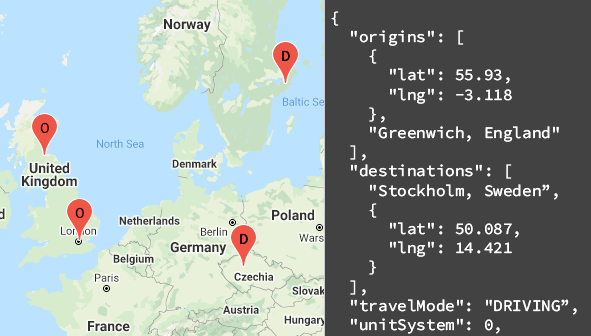
## How the Distance Matrix API (Legacy) works
The Distance Matrix API (Legacy) uses any number of origins (starting points) and
destinations, and returns the distance and travel time between each origin and
all requested destinations, starting with the first origin in the request and
proceeding step-wise to the next.
For example, if your request specifies A and B as origins, and C and D as
destinations, it returns distances and travel time in this order:
- A to C
- A to D
- B to C
- B to D
The following example shows a request for two origins:
Washington, DC and Boston, with a single destination, New York City, NY, in
JSON format:
```
https://maps.googleapis.com/maps/api/distancematrix/json
?destinations=New%20York%20City%2C%20NY
&origins=Washington%2C%20DC%7CBoston
&units=imperial
&key=YOUR_API_KEY
```
### Resources
The following table summarizes the resources available through the
Distance Matrix API (Legacy) along with the data it returns.
| Data resources | Data returned | Return format |
|---|---|---|
| [Distance matrix](https://developers.google.com/maps/documentation/distance-matrix/distance-matrix.md.txt) Supply origins and destinations in the form of place IDs, addresses, or latitude/longitude coordinates. | - Distance and travel time between each origin and each destination - Duration in traffic if you've specified the driving mode and a departure time | - JSON - XML |
## How to use the Distance Matrix API (Legacy)
|---|---|---|
| 1 | **Get set up** | Start with [Set up your Google Cloud project](https://developers.google.com/maps/documentation/distance-matrix/cloud-setup.md.txt) and complete the setup instructions that follow. |
| 2 | **Try a distance matrix request** | Once you have an API key, you can start testing out the Distance Matrix API (Legacy) directly from your browser. See [Sample requests](https://developers.google.com/maps/documentation/distance-matrix/start.md.txt#sample-request) in the *Get started* guide for examples. |
| 3 | **Compose a more complex request** | Try a request that supplies multiple origins and destinations. Learn about optional parameters to constrain calculations, such as a specified departure time, or route restrictions. See [Optional parameters](https://developers.google.com/maps/documentation/distance-matrix/distance-matrix.md.txt#optional-parameters) in the *Distance Matrix (Legacy) request and response* guide. |
| 4 | **Understand response basics** | Explore the data responses to prepare to use distance matrix data for your app. See [Distance matrix responses](https://developers.google.com/maps/documentation/distance-matrix/distance-matrix.md.txt#distance-matrix-responses) for details. |
| 5 | **Incorporate distance matrix data into your own app!** | You can use this data to calculate travel distance and time. |
### Available client libraries
Call this API in the language of
your choice through one of the following client libraries:
- [Java
Client for Google Maps Services](https://github.com/googlemaps/google-maps-services-java)
- [Python
Client for Google Maps Services](https://github.com/googlemaps/google-maps-services-python)
- [Go Client
for Google Maps Services](https://github.com/googlemaps/google-maps-services-go)
- [Node.js
Client for Google Maps Services](https://github.com/googlemaps/google-maps-services-js)
The Java Client, Python Client, Go Client and Node.js Client for Google Maps
Services are community-supported client libraries, open sourced under the
[Apache 2.0 License](http://www.apache.org/licenses/LICENSE-2.0).
Download them from GitHub, where you can also find installation instructions and sample code.
## What's next
- **Start using the Distance Matrix (Legacy)** : Go to [Get Started](https://developers.google.com/maps/documentation/distance-matrix/start.md.txt).
- **Get started with sample requests and responses** : Go to [Distance Matrix
request and response](https://developers.google.com/maps/documentation/distance-matrix/distance-matrix).
- **Follow best practices** : Go to [Web Service Best
Practices](https://developers.google.com/maps/documentation/distance-matrix/web-service-best-practices).