Select platform: [Android](https://developers.google.com/maps/documentation/android-sdk/infowindows.md.txt "View this page for the Android platform docs.") [iOS](https://developers.google.com/maps/documentation/ios-sdk/infowindows.md.txt "View this page for the iOS platform docs.") [JavaScript](https://developers.google.com/maps/documentation/javascript/infowindows.md.txt "View this page for the JavaScript platform docs.")
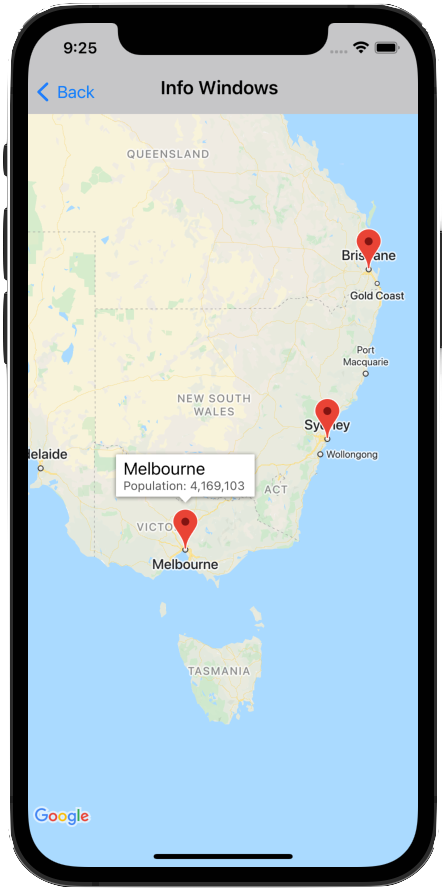
An info window allows you to display information to the user when they tap on a
marker.
An info window is drawn oriented against the device's screen, centered above
its associated marker. The default info window contains the title in bold,
with the snippet text below the title.
The contents of the info window are defined by the `title` and
`snippet` properties of the marker. Clicking the marker does not display an
info window if both the `title` and `snippet` properties are blank or `nil`.
Only one info window is displayed at a time. If a user taps on
another marker, the current window is hidden and the new info window opens.
If the user clicks on a marker that is currently showing an info window, that
info window closes and reopens.
Create a custom info window to add additional text or images. A custom
info window gives you complete control of the appearance of the popup.
## Add an info window
The following snippet creates a simple marker, with only a title for the text
of the info window.
### Swift
```swift
let position = CLLocationCoordinate2D(latitude: 51.5, longitude: -0.127)
let london = GMSMarker(position: position)
london.title = "London"
london.map = mapView
```
### Objective-C
```objective-c
CLLocationCoordinate2D position = CLLocationCoordinate2DMake(51.5, -0.127);
GMSMarker *london = [GMSMarker markerWithPosition:position];
london.title = @"London";
london.map = mapView;
```
With the `snippet` property, you can add additional text that will appear
below the title in a smaller font. Strings that are longer than the width of
the info window are automatically wrapped over several lines. Very long
messages may be truncated.
### Swift
```swift
london.title = "London"
london.snippet = "Population: 8,174,100"
london.map = mapView
```
### Objective-C
```objective-c
london.title = @"London";
london.snippet = @"Population: 8,174,100";
london.map = mapView;
```
## Show/hide an info window
Info windows are designed to respond to user touch events on the marker.
You can show or hide an info window programmatically by setting the `selectedMarker`
property of [`GMSMapView`](https://developers.google.com/maps/documentation/ios-sdk/reference/objc/Classes/GMSMapView.md.txt):
- Set `selectedMarker` to the name of the marker to show it.
- Set `selectedMarker` to `nil` to hide it.
### Swift
```swift
london.title = "London"
london.snippet = "Population: 8,174,100"
london.map = mapView
// Show marker
mapView.selectedMarker = london
// Hide marker
mapView.selectedMarker = nil
```
### Objective-C
```objective-c
london.title = @"London";
london.snippet = @"Population: 8,174,100";
london.map = mapView;
// Show marker
mapView.selectedMarker = london;
// Hide marker
mapView.selectedMarker = nil;
```
## Setting an info window to refresh automatically
Set [`tracksInfoWindowChanges`](https://developers.google.com/maps/documentation/ios-sdk/reference/objc/Classes/GMSMarker.md.txt#tracksinfowindowchanges) on the
marker to `YES` or `true` if you want new properties or the content of the info
window to be immediately displayed when changed, rather than having to wait for
the info window to hide and then show again. The default is `NO` or `false`.
### Swift
```swift
london.tracksInfoWindowChanges = true
```
### Objective-C
```objective-c
london.tracksInfoWindowChanges = YES;
```
To decide when to set the
[`tracksInfoWindowChanges`](https://developers.google.com/maps/documentation/ios-sdk/reference/objc/Classes/GMSMarker.md.txt#tracksinfowindowchanges) property, you
should weigh up performance considerations against the advantages of having the
info window redrawn automatically. For example:
- If you have a series of changes to make, you can change the property to `YES` then back to `NO`.
- When an animation is running or the contents are being loaded asynchronously, you should keep the property set to `YES` until the actions are complete.
Refer also to the [notes for consideration](https://developers.google.com/maps/documentation/ios-sdk/infowindows.md.txt#iconview-considerations) when
using the `iconView` property of the marker.
## Changing the position of an info window
An info window is drawn oriented against the device's screen, centered
above its associated marker. You can alter the position of the info window
relative to the marker by setting the `infoWindowAnchor` property. This
property accepts a `CGPoint`, defined as an (x,y) offset where both x and y
range between 0.0 and 1.0. The default offset is (0.5, 0.0), that is, the center
top. Setting the `infoWindowAnchor` offset is useful for aligning the info
window against a custom icon.
### Swift
```swift
london.infoWindowAnchor = CGPoint(x: 0.5, y: 0.5)
london.icon = UIImage(named: "house")
london.map = mapView
```
### Objective-C
```objective-c
london.infoWindowAnchor = CGPointMake(0.5, 0.5);
london.icon = [UIImage imageNamed:@"house"];
london.map = mapView;
```
## Handling events on info windows
You can listen to the following info window events:
- [`mapView:markerInfoWindow:`](https://developers.google.com/maps/documentation/ios-sdk/reference/objc/Protocols/GMSMapViewDelegate.md.txt#-mapview:markerinfowindow:)
--- Called when a marker is about to become selected.
Can optionally return a custom info window, as a `UIView`, to use for
the marker. See [Custom info windows](https://developers.google.com/maps/documentation/ios-sdk/infowindows.md.txt#custom-info-windows) below for more information.
- [`mapView:markerInfoContents:`](https://developers.google.com/maps/documentation/ios-sdk/reference/objc/Protocols/GMSMapViewDelegate.md.txt#-mapview:markerinfocontents:)
--- Called when `mapView:markerInfoWindow` returns nil.
- [`mapView:didCloseInfoWindowOfMarker:`](https://developers.google.com/maps/documentation/ios-sdk/reference/objc/Protocols/GMSMapViewDelegate.md.txt#-mapview:didcloseinfowindowofmarker:)
--- Called when the marker's info window is closed.
- [`mapView:didLongPressInfoWindowOfMarker:`](https://developers.google.com/maps/documentation/ios-sdk/reference/objc/Protocols/GMSMapViewDelegate.md.txt#-mapview:didlongpressinfowindowofmarker:)
--- Called after a marker's info window has been long pressed.
To listen to events, you must implement the
[`GMSMapViewDelegate`](https://developers.google.com/maps/documentation/ios-sdk/reference/objc/Protocols/GMSMapViewDelegate.md.txt) protocol. See the
[guide to events](https://developers.google.com/maps/documentation/ios-sdk/events.md.txt) and the list of methods on the
[`GMSMapViewDelegate`](https://developers.google.com/maps/documentation/ios-sdk/reference/objc/Protocols/GMSMapViewDelegate.md.txt).
[GitHub](https://github.com/googlemaps-samples/maps-sdk-for-ios-samples)
includes samples that demonstrates how to handle info window events:
- [Objective-C](https://github.com/googlemaps-samples/maps-sdk-for-ios-samples/blob/a1e79007cbc5a99579dbe2adeb23ab155030da46/GoogleMaps/GoogleMapsDemos/Samples/MarkerInfoWindowViewController.m)
- [Swift](https://github.com/googlemaps-samples/maps-sdk-for-ios-samples/blob/main/GoogleMaps-Swift/GoogleMapsSwiftDemos/Swift/Samples/MarkerInfoWindowViewController.swift)
## Custom info windows
[Video](https://www.youtube.com/watch?v=ILiBXYscsyY)
Customize the contents of info windows by creating a subclass of
[`UIView`](https://developer.apple.com/documentation/uikit/uiview)
that defines the layout of the custom info window. In that subclass,
define the view however you'd like. For example, you can use custom
[`UILabel`](https://developer.apple.com/documentation/uikit/uilabel)
instances to display title and snippet text and other views, such as
[`UIImageView`](https://developer.apple.com/documentation/uikit/uiimageview)
instances, to add images displayed in the info window.
Ensure that your `ViewController` implements the
[`GMSIndoorDisplayDelegate`](https://developers.google.com/maps/documentation/ios-sdk/reference/objc/Protocols/GMSIndoorDisplayDelegate.md.txt)
protocol and defines a listener for the
[mapView:markerInfoWindow:](https://developers.google.com/maps/documentation/ios-sdk/reference/objc/Protocols/GMSMapViewDelegate.md.txt#-mapview:markerinfowindow:)
event. This event listener is called when a marker is about to become
selected, and lets you return an instance of your custom `UIView` class to
define the custom info window used by the marker.
> [!NOTE]
> **Note:** The info window that is drawn is not a live view. The view is rendered as an image at the time it is returned. Any subsequent changes to the view will not be reflected by the info window on the map. Set [`tracksInfoWindowChanges`](https://developers.google.com/maps/documentation/ios-sdk/reference/objc/Classes/GMSMarker.md.txt#tracksinfowindowchanges) on the marker to `YES` or `true` if you want new properties or the content of the info window to be immediately displayed when changed as shown above in [Setting an info window to refresh automatically](https://developers.google.com/maps/documentation/ios-sdk/infowindows.md.txt#set-an-info-window-to-refresh-automatically).
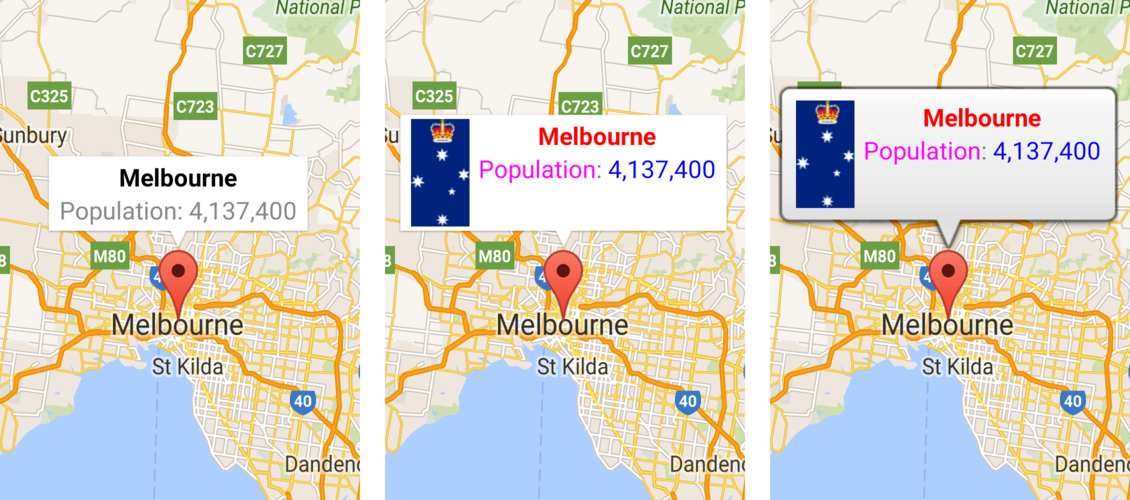
The images below show a default info window, an info window with customized
contents, and an info window with customized frame and background.
The code samples on
[GitHub](https://github.com/googlemaps-samples/maps-sdk-for-ios-samples/tree/main/GoogleMaps)
provided with the Maps SDK for iOS
include samples of custom info windows. For example, see the definition of
[MarkerInfoWindowViewController.m](https://github.com/googlemaps-samples/maps-sdk-for-ios-samples/blob/main/GoogleMaps/GoogleMapsDemos/Samples/MarkerInfoWindowViewController.m)
(Objective-C) or
[MarkerInfoWindowViewController.swift](https://github.com/googlemaps-samples/maps-sdk-for-ios-samples/blob/main/GoogleMaps-Swift/GoogleMapsSwiftDemos/Swift/Samples/MarkerInfoWindowViewController.swift)
(Swift).
See [code samples](https://developers.google.com/maps/documentation/ios-sdk/code-samples) for information on downloading and running
these samples.