> [!WARNING]
> This product or feature is in Preview (pre-GA). Pre-GA products and features might have limited support, and changes to pre-GA products and features might not be compatible with other pre-GA versions. Pre-GA Offerings are covered by the [Google
> Maps Platform Service Specific Terms](https://cloud.google.com/maps-platform/terms/maps-service-terms). For more information, see the [launch stage
> descriptions](https://developers.google.com/maps/launch-stages).
**Important** : All apps developed for use with Android Auto must follow an approved process for safety. This guide provides standard practices to follow, but you must still submit your app for approval before you can launch it for Android Auto. See [Distribute Android Auto apps for
cars](https://developer.android.com/training/cars/distribute) for specifics.
This section describes how you can use the
Navigation SDK with the Android for Cars App library to
display your app's navigation experience on in-dash [head
units](https://en.wikipedia.org/wiki/Automotive_head_unit). If a
user's in-dash system supports Android Auto, users can use your app directly
on their car's display by connecting their phone to the unit. Voice guidance
also runs on the car's speakers.
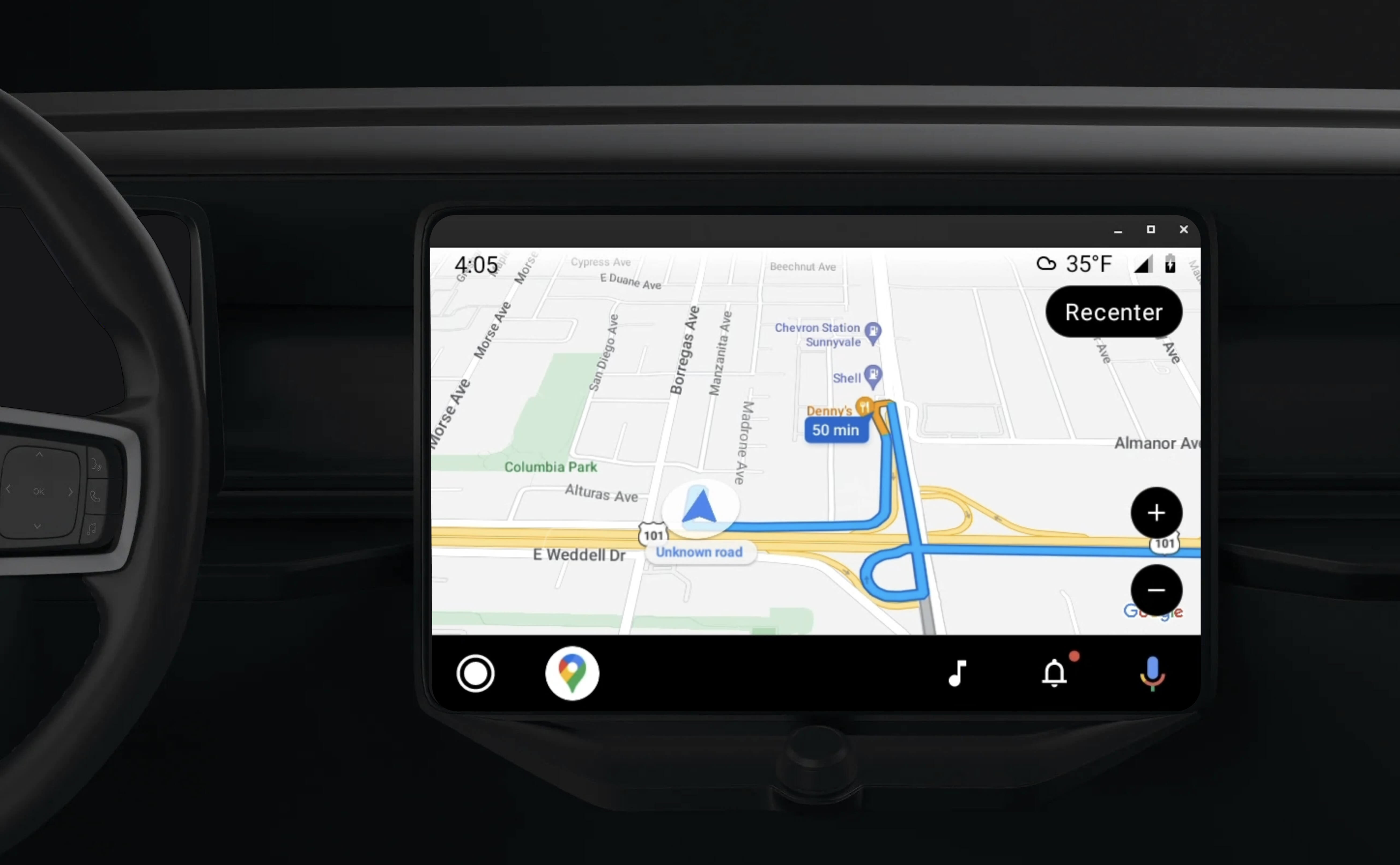
The [Android for Cars App
Library](https://developer.android.com/training/cars/apps)
enables Android applications to run on Android Auto by providing a set of visual
templates approved for driver safety. These templates purposefully restrict the
in-dashboard UI controls from those of the phone in order to reduce driver
distraction.
When you enable your Navigation SDK-powered app to work
with Android Auto, you provide an additional view for the navigation experience.
This allows for two map views---one for the phone and one for the head unit. Both
displays receive guidance from `Navigator.java`, which is a singleton.
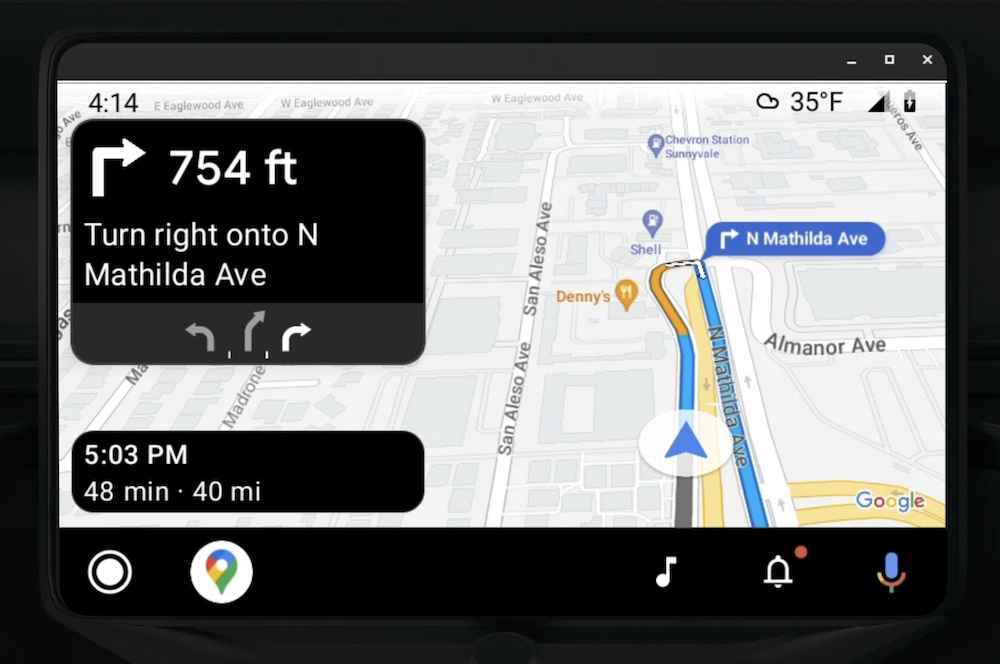
**The in-dashboard system displays the safety approved interactive
elements** so that the user can safely navigate to their destination
without undue distraction. The user can also interact with your
app-specific functionality, such as accepting or rejecting orders, or
viewing the location of the customer on a map. Order status updates can also
appear on the in-dashboard unit.
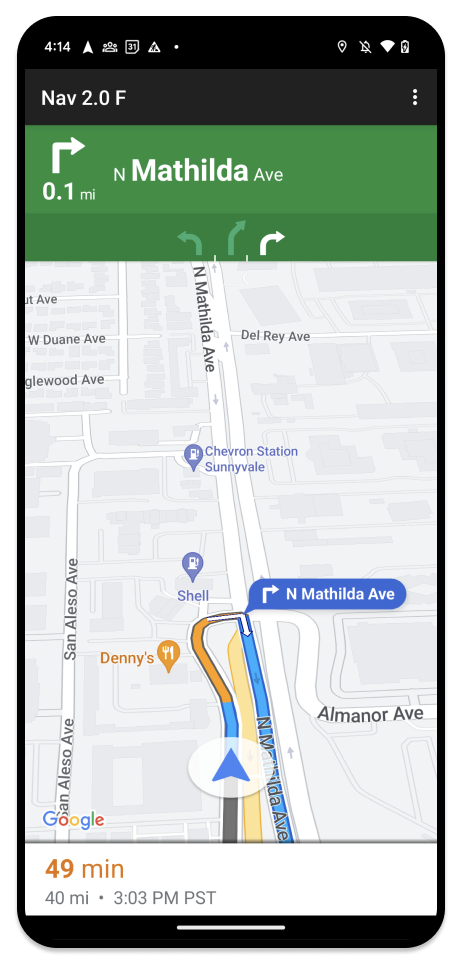
**The attached phone can continue displaying the standard
Navigation SDK experience** or any other view or
workflow in your application. This feature lets you continue to provide custom
functionality that might not work well on a car screen.
## Set up
The first part of getting your app working with Android Auto involves setting
up a car service with Android Auto and then enabling the TurnByTurn library
in your Navigation SDK app.
### Start with Android Auto
Before you begin working with the Navigation SDK
features designed to work with Android Auto, you must set up a car service for
your app so that Android Auto can discover it.
Follow these steps, all of which can be found in the [Android for
Cars](https://developer.android.com/training/cars) developers
documentation:
1. [Familiarize](https://developer.android.com/training/cars) yourself with the basic Android Auto features.
2. [Install](https://developer.android.com/training/cars/apps#install-library) the Android for Cars App Library.
3. [Configure](https://developer.android.com/training/cars/apps#configure-manifest-files) your app's manifest file to include Android Auto.
4. [Declare](https://developer.android.com/training/cars/apps#api-level) a minimum car-app level of 1 in your manifest.
5. [Create](https://developer.android.com/training/cars/apps#create-carappservice) your `CarAppService` and session.
### Set up the Navigation SDK
Once you have established your car app service, you're ready to work with the
Navigation SDK.
1. [Set up your project](https://developers.google.com/maps/documentation/navigation/android-sdk/set-up-project), if you haven't already integrated the Navigation SDK into your app.
2. [Enable the TurnbyTurn guidance feed](https://developers.google.com/maps/documentation/navigation/android-sdk/tbt-feed) for your app.
3. Optional. [Use generated icons](https://developers.google.com/maps/documentation/navigation/android-sdk/tbt-feed-display#use_generated_icons) from the Navigation SDK.
4. [Draw the map](https://developer.android.com/training/cars/apps/navigation#drawing-the-map) using the `NavigationViewForAuto` class on the Android Auto Surface provided in the `Screen` class.
5. [Populate the Android Auto Navigation template](https://developers.google.com/maps/documentation/navigation/android-sdk/android-auto?section=surface-callbacks#populate_navigation_information) with the data from the TurnbyTurn library.
Now that you have a registered service for providing navigation information to
your app and your app can connect to Android Auto, you're ready to create the
rest of the navigation elements necessary for your app to work properly with
Android Auto:
- [Draw the map and navigation UI](https://developers.google.com/maps/documentation/navigation/android-sdk/android-auto?section=surface-callbacks#draw_the_map_and_navigation_ui)
- [Enable map interaction](https://developers.google.com/maps/documentation/navigation/android-sdk/android-auto?section=surface-callbacks#enable_map_interaction)
- [Display navigation directions](https://developers.google.com/maps/documentation/navigation/android-sdk/android-auto?section=surface-callbacks#display_navigation_directions)
- [Ensure correct maneuver types](https://developers.google.com/maps/documentation/navigation/android-sdk/android-auto?section=surface-callbacks#ensure_correct_maneuver_types)
## Draw the map and navigation UI
The `NavigationViewForAuto` class renders a map and navigation UI on Android
Auto screens. It provides much of the same functionality as the `NavigationView`
for phones, but with limited interactivity. Use `NavigationViewForAuto` to draw
onto the
[Surface](https://developer.android.com/reference/android/view/Surface)
provided by Android Auto:
private boolean isSurfaceReady(SurfaceContainer surfaceContainer) {
return surfaceContainer.getSurface() != null
&& surfaceContainer.getDpi() != 0
&& surfaceContainer.getHeight() != 0
&& surfaceContainer.getWidth() != 0;
}
@Override
public void onSurfaceAvailable(@NonNull SurfaceContainer surfaceContainer) {
if (!isSurfaceReady(surfaceContainer)) {
return;
}
virtualDisplay =
getCarContext()
.getSystemService(DisplayManager.class)
.createVirtualDisplay(
VIRTUAL_DISPLAY_NAME,
surfaceContainer.getWidth(),
surfaceContainer.getHeight(),
surfaceContainer.getDpi(),
surfaceContainer.getSurface(),
DisplayManager.VIRTUAL_DISPLAY_FLAG_OWN_CONTENT_ONLY);
presentation = new Presentation(getCarContext(), virtualDisplay.getDisplay());
navigationView = new NavigationViewForAuto(getCarContext());
navigationView.onCreate(null);
navigationView.onStart();
navigationView.onResume();
presentation.setContentView(navigationView);
presentation.show();
navigationView.getMapAsync(googleMap -> this.googleMap = googleMap);
}
@Override
public void onSurfaceDestroyed(@NonNull SurfaceContainer surfaceContainer) {
navigationView.onPause();
navigationView.onStop();
navigationView.onDestroy();
presentation.dismiss();
virtualDisplay.release();
}
## Enable map interaction
For driver safety, Android Auto limits screen surface interaction to a
series of
[SurfaceCallback](https://developer.android.com/training/cars/apps/navigation#surface-callback)
methods. Use these callbacks to support limited driver interaction with the map
on an in-dash screen. For example, `onClick` and `onScale` correspond to *tap*
and *pinch* gestures from the user. Interactivity callbacks must use the [map
action
strip](https://developer.android.com/training/cars/apps/navigation#map-action-strip)
as follows:
- To receive map interactivity callbacks, your app must use an *Action.PAN*
button.
- To support additional user actions, add buttons to the map action strip.
### Enable surface callbacks
@NonNull
@Override
public Template onGetTemplate() {
return new NavigationTemplate.Builder()
.setActionStrip(new ActionStrip.Builder().build())
.setMapActionStrip(new ActionStrip.Builder().addAction(Action.PAN).build())
.build();
}
### Zoom with pinch
@Override
public void onScale(float focusX, float focusY, float scaleFactor) {
CameraUpdate update =
CameraUpdateFactory.zoomBy((scaleFactor - 1),
new Point((int) focusX, (int) focusY));
googleMap.animateCamera(update); // map is set in onSurfaceAvailable.
}
### Panning
@Override
public void onScroll(float distanceX, float distanceY) {
googleMap.moveCamera(CameraUpdateFactory.scrollBy(distanceX, distanceY));
}
## Display navigation directions
This section covers how to set up an observer for navigation posts and to
populate navigation directions in the turn card template.

The Android Auto [Navigation
Template](https://developer.android.com/reference/androidx/car/app/navigation/model/NavigationTemplate)
provides a turn card that displays navigation information related to the current
trip. The TurnByTurn library in Navigation SDK provides this
navigation information, which your code uses to populate the Android Auto
navigation template.
> [!NOTE]
> **Note:** Before continuing, make sure you've followed the steps in [Enable
> turn-by-turn guidance feed](https://developers.google.com/maps/documentation/navigation/android-sdk/tbt-feed) guide and have a registered service for providing navigation information.
### Set up an observer
In the following example, *SampleApplication* is a custom application class that
maintains a `MutableLiveData` object. When the observer receives an
update from the navigator object, it posts this `NavInfo` object to the
`NavInfoMutableLiveData` maintained by the `SampleApplication` class.
The following example registers an observer for this object in its
implementation of the Android Auto
[Screen](https://developer.android.com/reference/androidx/car/app/Screen).
public SampleAndroidAutoNavigationScreen(@NonNull CarContext carContext,
SampleApplication application) {
super(carContext);
getCarContext().getCarService(AppManager.class).setSurfaceCallback(this);
application.getNavInfoMutableLiveData().observe(this, this::processNextStep);
}
### Populate navigation information
The following code snippet shows how to populate the Android Auto template with
the current routing information, including steps, distances, and icons. You can
read more about these display elements in [Populate the feed
display](https://developers.google.com/maps/documentation/navigation/android-sdk/tbt-feed-display).
#### Expand to see the code example.
```
private RoutingInfo currentRoutingInfo;
@NonNull
@Override
public Template onGetTemplate() {
NavigationTemplate.Builder navigationTemplateBuilder =
new NavigationTemplate.Builder()
.setActionStrip(...)
.setMapActionStrip(...)
if (currentRoutingInfo != null) {
navigationTemplateBuilder.setNavigationInfo(currentRoutingInfo);
}
return navigationTemplateBuilder.build();
}
private void processNextStep(NavInfo navInfo) {
if (navInfo == null || navinfo.getCurrentStep() == null) {
return;
}
/**
* Converts data received from the Navigation data feed
* into Android-Auto compatible data structures. For more information
* see the "Ensure correct maneuver types" below.
*/
Step currentStep = buildStepFromStepInfo(navInfo.getCurrentStep());
Distance distanceToStep =
buildDistanceFromMeters(navInfo.getDistanceToCurrentStepMeters());
currentRoutingInfo =
new RoutingInfo.Builder().setCurrentStep(currentStep, distanceToStep).build();
// Invalidate the current template which leads to another onGetTemplate call.
invalidate();
}
private Step buildStepFromStepInfo(StepInfo stepInfo) {
IconCompat maneuverIcon =
IconCompat.createWithBitmap(stepInfo.getManeuverBitmap());
Maneuver.Builder
maneuverBuilder = newManeuver.Builder(
ManeuverConverter
.getAndroidAutoManeuverType(stepInfo.getManeuver()));
CarIcon maneuverCarIcon = new CarIcon.Builder(maneuverIcon).build();
maneuverBuilder.setIcon(maneuverCarIcon);
Step.Builder stepBuilder =
new Step.Builder()
.setRoad(stepInfo.getFullRoadName())
.setCue(stepInfo.getFullInstructionText())
.setManeuver(maneuverBuilder.build());
if (stepInfo.getLanes() != null
&& stepInfo.getLanesBitmap() != null) {
for (Lane lane : buildAndroidAutoLanesFromStep(stepInfo)) {
stepBuilder.addLane(lane);
}
IconCompat lanesIcon =
IconCompat.createWithBitmap(stepInfo.getLanesBitmap());
CarIcon lanesImage = new CarIcon.Builder(lanesIcon).build();
stepBuilder.setLanesImage(lanesImage);
}
return stepBuilder.build();
}
/*
* Constructs a {@code Distance} object in imperial measurement units.
* In a real world scenario, units would be based on locale.
*/
private Distance buildDistanceFromMeters(int distanceMeters) {
// Distance can be negative so set the min distance to 0.
int remainingFeet = (int) max(0, distanceMeters * DistanceConstants.FEET_PER_METER);
double remainingMiles = ((double) remainingFeet) / DistanceConstants.FEET_PER_MILE;
// Only use the tenths place digit if distance is less than 10 miles and show
// feet if distance is less than 0.25 miles.
if (remainingMiles >= DistanceConstants.MIN_MILES_TO_SHOW_INTEGER) {
return Distance.create((int) round(remainingMiles), Distance.UNIT_MILES);
} else if (remainingMiles >= 0.25) {
return Distance.create((int) remainingMiles, Distance.UNIT_MILES);
} else {
return Distance.create(remainingFeet, Distance.UNIT_FEET);
}
}
```
## Verify correct maneuver types
The kinds of maneuvers used in the Android Auto Car library correspond
one-to-one to maneuvers provided by the TurnByTurn library. However, you must
convert the Navigation SDK maneuvers to a valid
declaration in the Android Auto Car library. The following table shows the
correspondence for a handful of fields, followed by a sample converter utility
for your convenience.
| Turn-by-Turn Library Maneuver | Android Auto Maneuver |
|---|---|
| `DEPART` | `TYPE_DEPART` |
| `DESTINATION` | `TYPE_DESTINATION` |
| `DESTINATION_LEFT` | `TYPE_DESTINATION_LEFT` |
| `DESTINATION_RIGHT` | `TYPE_DESTINATION_RIGHT` |
| `TURN_U_TURN_CLOCKWISE` | `TYPE_U_TURN_RIGHT` |
| `ON_RAMP_LEFT` | `TYPE_ON_RAMP_NORMAL_LEFT` |
| `ON_RAMP_RIGHT` | `TYPE_ON_RAMP_NORMAL_RIGHT` |
| `ON_RAMP_SLIGHT_LEFT` | `TYPE_ON_RAMP_SLIGHT_LEFT` |
| `FORK_RIGHT` | `TYPE_FORK_RIGHT` |
#### Expand to see the code example.
```
import com.google.android.libraries.mapsplatform.turnbyturn.model.Maneuver;
import com.google.common.collect.ImmutableMap;
import javax.annotation.Nullable;
/** Converter that converts between turn-by-turn and Android Auto Maneuvers. */
public final class ManeuverConverter {
private ManeuverConverter() {}
// Map from turn-by-turn Maneuver to Android Auto Maneuver.Type.
private static final ImmutableMap MANEUVER_TO_ANDROID_AUTO_MANEUVER_TYPE =
ImmutableMap.builder()
.put(Maneuver.DEPART, androidx.car.app.navigation.model.Maneuver.TYPE_DEPART)
.put(Maneuver.DESTINATION, androidx.car.app.navigation.model.Maneuver.TYPE_DESTINATION)
.put(
Maneuver.DESTINATION_LEFT,
androidx.car.app.navigation.model.Maneuver.TYPE_DESTINATION_LEFT)
.put(
Maneuver.DESTINATION_RIGHT,
androidx.car.app.navigation.model.Maneuver.TYPE_DESTINATION_RIGHT)
.put(Maneuver.STRAIGHT, androidx.car.app.navigation.model.Maneuver.TYPE_STRAIGHT)
.put(Maneuver.TURN_LEFT, androidx.car.app.navigation.model.Maneuver.TYPE_TURN_NORMAL_LEFT)
.put(
Maneuver.TURN_RIGHT,
androidx.car.app.navigation.model.Maneuver.TYPE_TURN_NORMAL_RIGHT)
.put(Maneuver.TURN_KEEP_LEFT, androidx.car.app.navigation.model.Maneuver.TYPE_KEEP_LEFT)
.put(Maneuver.TURN_KEEP_RIGHT, androidx.car.app.navigation.model.Maneuver.TYPE_KEEP_RIGHT)
.put(
Maneuver.TURN_SLIGHT_LEFT,
androidx.car.app.navigation.model.Maneuver.TYPE_TURN_SLIGHT_LEFT)
.put(
Maneuver.TURN_SLIGHT_RIGHT,
androidx.car.app.navigation.model.Maneuver.TYPE_TURN_SLIGHT_RIGHT)
.put(
Maneuver.TURN_SHARP_LEFT,
androidx.car.app.navigation.model.Maneuver.TYPE_TURN_SHARP_LEFT)
.put(
Maneuver.TURN_SHARP_RIGHT,
androidx.car.app.navigation.model.Maneuver.TYPE_ON_RAMP_SHARP_RIGHT)
.put(
Maneuver.TURN_U_TURN_CLOCKWISE,
androidx.car.app.navigation.model.Maneuver.TYPE_U_TURN_RIGHT)
.put(
Maneuver.TURN_U_TURN_COUNTERCLOCKWISE,
androidx.car.app.navigation.model.Maneuver.TYPE_U_TURN_LEFT)
.put(
Maneuver.MERGE_UNSPECIFIED,
androidx.car.app.navigation.model.Maneuver.TYPE_MERGE_SIDE_UNSPECIFIED)
.put(Maneuver.MERGE_LEFT, androidx.car.app.navigation.model.Maneuver.TYPE_MERGE_LEFT)
.put(Maneuver.MERGE_RIGHT, androidx.car.app.navigation.model.Maneuver.TYPE_MERGE_RIGHT)
.put(Maneuver.FORK_LEFT, androidx.car.app.navigation.model.Maneuver.TYPE_FORK_LEFT)
.put(Maneuver.FORK_RIGHT, androidx.car.app.navigation.model.Maneuver.TYPE_FORK_RIGHT)
.put(
Maneuver.ON_RAMP_UNSPECIFIED,
androidx.car.app.navigation.model.Maneuver.TYPE_ON_RAMP_NORMAL_RIGHT)
.put(
Maneuver.ON_RAMP_LEFT,
androidx.car.app.navigation.model.Maneuver.TYPE_ON_RAMP_NORMAL_LEFT)
.put(
Maneuver.ON_RAMP_RIGHT,
androidx.car.app.navigation.model.Maneuver.TYPE_ON_RAMP_NORMAL_RIGHT)
.put(
Maneuver.ON_RAMP_KEEP_LEFT,
androidx.car.app.navigation.model.Maneuver.TYPE_ON_RAMP_NORMAL_LEFT)
.put(
Maneuver.ON_RAMP_KEEP_RIGHT,
androidx.car.app.navigation.model.Maneuver.TYPE_ON_RAMP_NORMAL_RIGHT)
.put(
Maneuver.ON_RAMP_SLIGHT_LEFT,
androidx.car.app.navigation.model.Maneuver.TYPE_ON_RAMP_SLIGHT_LEFT)
.put(
Maneuver.ON_RAMP_SLIGHT_RIGHT,
androidx.car.app.navigation.model.Maneuver.TYPE_ON_RAMP_SLIGHT_RIGHT)
.put(
Maneuver.ON_RAMP_SHARP_LEFT,
androidx.car.app.navigation.model.Maneuver.TYPE_ON_RAMP_SHARP_LEFT)
.put(
Maneuver.ON_RAMP_SHARP_RIGHT,
androidx.car.app.navigation.model.Maneuver.TYPE_ON_RAMP_SHARP_RIGHT)
.put(
Maneuver.ON_RAMP_U_TURN_CLOCKWISE,
androidx.car.app.navigation.model.Maneuver.TYPE_ON_RAMP_U_TURN_RIGHT)
.put(
Maneuver.ON_RAMP_U_TURN_COUNTERCLOCKWISE,
androidx.car.app.navigation.model.Maneuver.TYPE_ON_RAMP_U_TURN_LEFT)
.put(
Maneuver.OFF_RAMP_LEFT,
androidx.car.app.navigation.model.Maneuver.TYPE_OFF_RAMP_NORMAL_LEFT)
.put(
Maneuver.OFF_RAMP_RIGHT,
androidx.car.app.navigation.model.Maneuver.TYPE_OFF_RAMP_NORMAL_RIGHT)
.put(
Maneuver.OFF_RAMP_KEEP_LEFT,
androidx.car.app.navigation.model.Maneuver.TYPE_OFF_RAMP_SLIGHT_LEFT)
.put(
Maneuver.OFF_RAMP_KEEP_RIGHT,
androidx.car.app.navigation.model.Maneuver.TYPE_OFF_RAMP_SLIGHT_RIGHT)
.put(
Maneuver.OFF_RAMP_SLIGHT_LEFT,
androidx.car.app.navigation.model.Maneuver.TYPE_OFF_RAMP_SLIGHT_LEFT)
.put(
Maneuver.OFF_RAMP_SLIGHT_RIGHT,
androidx.car.app.navigation.model.Maneuver.TYPE_OFF_RAMP_SLIGHT_RIGHT)
.put(
Maneuver.OFF_RAMP_SHARP_LEFT,
androidx.car.app.navigation.model.Maneuver.TYPE_OFF_RAMP_NORMAL_LEFT)
.put(
Maneuver.OFF_RAMP_SHARP_RIGHT,
androidx.car.app.navigation.model.Maneuver.TYPE_OFF_RAMP_NORMAL_RIGHT)
.put(
Maneuver.ROUNDABOUT_CLOCKWISE,
androidx.car.app.navigation.model.Maneuver.TYPE_ROUNDABOUT_ENTER_AND_EXIT_CW)
.put(
Maneuver.ROUNDABOUT_COUNTERCLOCKWISE,
androidx.car.app.navigation.model.Maneuver.TYPE_ROUNDABOUT_ENTER_AND_EXIT_CCW)
.put(
Maneuver.ROUNDABOUT_STRAIGHT_CLOCKWISE,
androidx.car.app.navigation.model.Maneuver.TYPE_ROUNDABOUT_ENTER_CW)
.put(
Maneuver.ROUNDABOUT_STRAIGHT_COUNTERCLOCKWISE,
androidx.car.app.navigation.model.Maneuver.TYPE_ROUNDABOUT_ENTER_CCW)
.put(
Maneuver.ROUNDABOUT_LEFT_CLOCKWISE,
androidx.car.app.navigation.model.Maneuver
.TYPE_ROUNDABOUT_ENTER_AND_EXIT_CW_WITH_ANGLE)
.put(
Maneuver.ROUNDABOUT_LEFT_COUNTERCLOCKWISE,
androidx.car.app.navigation.model.Maneuver
.TYPE_ROUNDABOUT_ENTER_AND_EXIT_CCW_WITH_ANGLE)
.put(
Maneuver.ROUNDABOUT_RIGHT_CLOCKWISE,
androidx.car.app.navigation.model.Maneuver
.TYPE_ROUNDABOUT_ENTER_AND_EXIT_CW_WITH_ANGLE)
.put(
Maneuver.ROUNDABOUT_RIGHT_COUNTERCLOCKWISE,
androidx.car.app.navigation.model.Maneuver
.TYPE_ROUNDABOUT_ENTER_AND_EXIT_CCW_WITH_ANGLE)
.put(
Maneuver.ROUNDABOUT_SLIGHT_LEFT_CLOCKWISE,
androidx.car.app.navigation.model.Maneuver
.TYPE_ROUNDABOUT_ENTER_AND_EXIT_CW_WITH_ANGLE)
.put(
Maneuver.ROUNDABOUT_SLIGHT_LEFT_COUNTERCLOCKWISE,
androidx.car.app.navigation.model.Maneuver
.TYPE_ROUNDABOUT_ENTER_AND_EXIT_CCW_WITH_ANGLE)
.put(
Maneuver.ROUNDABOUT_SLIGHT_RIGHT_CLOCKWISE,
androidx.car.app.navigation.model.Maneuver
.TYPE_ROUNDABOUT_ENTER_AND_EXIT_CW_WITH_ANGLE)
.put(
Maneuver.ROUNDABOUT_SLIGHT_RIGHT_COUNTERCLOCKWISE,
androidx.car.app.navigation.model.Maneuver
.TYPE_ROUNDABOUT_ENTER_AND_EXIT_CCW_WITH_ANGLE)
.put(
Maneuver.ROUNDABOUT_SHARP_LEFT_CLOCKWISE,
androidx.car.app.navigation.model.Maneuver
.TYPE_ROUNDABOUT_ENTER_AND_EXIT_CW_WITH_ANGLE)
.put(
Maneuver.ROUNDABOUT_SHARP_LEFT_COUNTERCLOCKWISE,
androidx.car.app.navigation.model.Maneuver
.TYPE_ROUNDABOUT_ENTER_AND_EXIT_CCW_WITH_ANGLE)
.put(
Maneuver.ROUNDABOUT_SHARP_RIGHT_CLOCKWISE,
androidx.car.app.navigation.model.Maneuver
.TYPE_ROUNDABOUT_ENTER_AND_EXIT_CW_WITH_ANGLE)
.put(
Maneuver.ROUNDABOUT_SHARP_RIGHT_COUNTERCLOCKWISE,
androidx.car.app.navigation.model.Maneuver
.TYPE_ROUNDABOUT_ENTER_AND_EXIT_CCW_WITH_ANGLE)
.put(
Maneuver.ROUNDABOUT_U_TURN_CLOCKWISE,
androidx.car.app.navigation.model.Maneuver
.TYPE_ROUNDABOUT_ENTER_AND_EXIT_CW_WITH_ANGLE)
.put(
Maneuver.ROUNDABOUT_U_TURN_COUNTERCLOCKWISE,
androidx.car.app.navigation.model.Maneuver
.TYPE_ROUNDABOUT_ENTER_AND_EXIT_CCW_WITH_ANGLE)
.put(
Maneuver.ROUNDABOUT_EXIT_CLOCKWISE,
androidx.car.app.navigation.model.Maneuver.TYPE_ROUNDABOUT_EXIT_CW)
.put(
Maneuver.ROUNDABOUT_EXIT_COUNTERCLOCKWISE,
androidx.car.app.navigation.model.Maneuver.TYPE_ROUNDABOUT_EXIT_CCW)
.put(Maneuver.FERRY_BOAT, androidx.car.app.navigation.model.Maneuver.TYPE_FERRY_BOAT)
.put(Maneuver.FERRY_TRAIN, androidx.car.app.navigation.model.Maneuver.TYPE_FERRY_TRAIN)
.put(Maneuver.NAME_CHANGE, androidx.car.app.navigation.model.Maneuver.TYPE_NAME_CHANGE)
.buildOrThrow();
/** Represents the roundabout turn angle for a slight turn in either right or left directions. */
private static final int ROUNDABOUT_ANGLE_SLIGHT = 10;
/** Represents the roundabout turn angle for a normal turn in either right or left directions. */
private static final int ROUNDABOUT_ANGLE_NORMAL = 45;
/** Represents the roundabout turn angle for a sharp turn in either right or left directions. */
private static final int ROUNDABOUT_ANGLE_SHARP = 135;
/** Represents the roundabout turn angle for a u-turn in either right or left directions. */
private static final int ROUNDABOUT_ANGLE_U_TURN = 180;
/**
* Returns the corresponding {@link androidx.car.app.navigation.model.Maneuver.Type} for the given
* direction {@link Maneuver}
*
* @throws {@link IllegalArgumentException} if the given maneuver does not have a corresponding
* Android Auto Maneuver type.
*/
public static int getAndroidAutoManeuverType(@Maneuver int maneuver) {
if (MANEUVER_TO_ANDROID_AUTO_MANEUVER_TYPE.containsKey(maneuver)) {
return MANEUVER_TO_ANDROID_AUTO_MANEUVER_TYPE.get(maneuver);
}
throw new IllegalArgumentException(
String.format(
"Given turn-by-turn Maneuver %d cannot be converted to an Android Auto equivalent.",
maneuver));
}
/**
* Returns the corresponding Android Auto roundabout angle for the given turn {@link Maneuver}.
* Returns {@code null} if given maneuver does not involve a roundabout with a turn.
*/
@Nullable
public static Integer getAndroidAutoRoundaboutAngle(@Maneuver int maneuver) {
if (maneuver == Maneuver.ROUNDABOUT_LEFT_CLOCKWISE
|| maneuver == Maneuver.ROUNDABOUT_RIGHT_CLOCKWISE
|| maneuver == Maneuver.ROUNDABOUT_LEFT_COUNTERCLOCKWISE
|| maneuver == Maneuver.ROUNDABOUT_RIGHT_COUNTERCLOCKWISE) {
return ROUNDABOUT_ANGLE_NORMAL;
}
if (maneuver == Maneuver.ROUNDABOUT_SHARP_LEFT_CLOCKWISE
|| maneuver == Maneuver.ROUNDABOUT_SHARP_RIGHT_CLOCKWISE
|| maneuver == Maneuver.ROUNDABOUT_SHARP_LEFT_COUNTERCLOCKWISE
|| maneuver == Maneuver.ROUNDABOUT_SHARP_RIGHT_COUNTERCLOCKWISE) {
return ROUNDABOUT_ANGLE_SHARP;
}
if (maneuver == Maneuver.ROUNDABOUT_SLIGHT_LEFT_CLOCKWISE
|| maneuver == Maneuver.ROUNDABOUT_SLIGHT_RIGHT_CLOCKWISE
|| maneuver == Maneuver.ROUNDABOUT_SLIGHT_LEFT_COUNTERCLOCKWISE
|| maneuver == Maneuver.ROUNDABOUT_SLIGHT_RIGHT_COUNTERCLOCKWISE) {
return ROUNDABOUT_ANGLE_SLIGHT;
}
if (maneuver == Maneuver.ROUNDABOUT_U_TURN_CLOCKWISE
|| maneuver == Maneuver.ROUNDABOUT_U_TURN_COUNTERCLOCKWISE) {
return ROUNDABOUT_ANGLE_U_TURN;
}
return null;
}
}
```
## Related documentation
- [Enable turn-by-turn guidance feed](https://developers.google.com/maps/documentation/navigation/android-sdk/tbt-feed): Integrate turn-by-turn functionality first so you app can work with Android Auto.
- [Populate the feed display](https://developers.google.com/maps/documentation/navigation/android-sdk/tbt-feed-display): Access data fields for guidance info and use icons.