Select platform: [Android](https://developers.google.com/maps/documentation/places/android-sdk/place-autocomplete.md.txt "View this page for the Android platform docs.") [iOS](https://developers.google.com/maps/documentation/places/ios-sdk/place-autocomplete.md.txt "View this page for the iOS platform docs.") [JavaScript](https://developers.google.com/maps/documentation/javascript/place-autocomplete-overview.md.txt "View this page for the JavaScript platform docs.") [Web Service](https://developers.google.com/maps/documentation/places/web-service/place-autocomplete.md.txt "View this page for the Web Service platform docs.")
**European Economic Area (EEA) developers**
> [!NOTE]
> If your billing address is in the European Economic Area, effective on 8 July 2025, the [Google Maps Platform EEA Terms of Service](https://cloud.google.com/terms/maps-platform/eea) will apply to your use of the Services. Functionality varies by region. [Learn more](https://developers.google.com/maps/comms/eea/faq.md.txt).
The Autocomplete (New) service is an iOS API that
returns place suggestions in response to a request. In the request, specify a
text search string and geographic bounds that control the search area.
The Autocomplete (New) service can match on full
words and substrings of the input, resolving place names, addresses, and [plus
codes](https://plus.codes). Applications can therefore send queries as the user
types, to provide on-the-fly place suggestions.
**Place suggestions** are places, such as businesses, addresses, and points of
interest, based on the specified input text string and search area.
For example, you call the API using as input a string that contains a partial
user input, "Spagh", with the search area limited to New York City. The response
then contains a list of **place suggestions** that match the search string and
search area, such as the restaurant named "Cafe Spaghetti", along with details
about the place.
The returned **place suggestions** are designed to be presented to the user so
that they can select the desired place. You can make a [Place Details
(New)](https://developers.google.com/maps/documentation/places/ios-sdk/details-place) request to get more
information about any of the returned place suggestions.
You can integrate Autocomplete (New) functionality into your app in two main
ways:
- [Get place predictions programmatically](https://developers.google.com/maps/documentation/places/ios-sdk/place-autocomplete.md.txt#autocomplete-requests): Call the API directly to retrieve predictions and display them in a custom user interface.
- [Add the Place Autocomplete widget](https://developers.google.com/maps/documentation/places/ios-sdk/place-autocomplete.md.txt#autocomplete-widget): Provides a ready-to-use search autocomplete experience that displays predictions as the user types.
> [!NOTE]
> **Note:** The Autocomplete (New) widget is only available in the Places Swift SDK for iOS version 10.0.0 and later. For more information, see [Places Swift for
> iOS](https://developers.google.com/maps/documentation/places/ios-sdk/google-places-swift).
## Get place predictions programmatically
## Autocomplete (New) requests
Create an autocomplete request by calling a method on the
[`GMSPlacesClient`](https://developers.google.com/maps/documentation/places/ios-sdk/reference/objc/Classes/GMSPlacesClient.md.txt).
You can pass parameters in the
[`GMSAutocompleteRequest`](https://developers.google.com/maps/documentation/places/ios-sdk/reference/objc/Classes/GMSAutocompleteRequest.md.txt)
object. The response provides Autocomplete suggestions within a
[`GMSAutocompletePlaceSuggestion`](https://developers.google.com/maps/documentation/places/ios-sdk/reference/objc/Classes/GMSAutocompleteSuggestion.md.txt)
object.
The API key and
[`query`](https://developers.google.com/maps/documentation/places/ios-sdk/reference/objc/Classes/GMSAutocompleteRequest.md.txt#query)
parameters are required. You can also include
[`GMSAutocompleteSessionToken`](https://developers.google.com/maps/documentation/places/ios-sdk/reference/objc/Classes.md.txt#gmsautocompletesessiontoken)
to associate requests with a billing session and
[`GMSAutocompleteFilter`](https://developers.google.com/maps/documentation/places/ios-sdk/reference/objc/Classes/GMSAutocompleteFilter.md.txt)
to apply to the results.
#### Places Swift SDK version
Create an autocomplete request by calling a method on the
[`PlacesClient`](https://developers.google.com/maps/documentation/places/ios-sdk/reference/swift/Classes/PlacesClient.md.txt).
You can pass parameters in the
[`AutocompleteRequest`](https://developers.google.com/maps/documentation/places/ios-sdk/reference/swift/Structs/AutocompleteRequest.md.txt)
object. The response provides Autocomplete suggestions within a
[`AutocompletePlaceSuggestion`](https://developers.google.com/maps/documentation/places/ios-sdk/reference/swift/Structs/AutocompletePlaceSuggestion.md.txt)
object.
The API key and [`query`](https://developers.google.com/maps/documentation/places/ios-sdk/reference/swift/Structs/AutocompleteRequest.md.txt#query) parameters are required. You can also include
[`AutocompleteSessionToken`](https://developers.google.com/maps/documentation/places/ios-sdk/reference/swift/Structs/AutocompleteSessionToken.md.txt)
to associate requests with a billing session and
[`AutocompleteFilter`](https://developers.google.com/maps/documentation/places/ios-sdk/reference/swift/Structs/AutocompleteFilter.md.txt)
to apply to the results.
For more information about required and optional parameters, see [the parameters
section of this
document](https://developers.google.com/maps/documentation/places/ios-sdk/place-autocomplete#required_parameters).
### Places Swift SDK
```swift
let center = (37.3913916, -122.0879074)
let northEast = (37.388162, -122.088137)
let southWest = (37.395804, -122.077023)
let bias = RectangularCoordinateRegion(northEast: northEast, southWest: southWest)
let filter = AutocompleteFilter(types: [ .restaurant ], origin: center, coordinateRegionBias: bias)
let autocompleteRequest = AutocompleteRequest(query: "Sicilian piz", filter: filter)
switch await placesClient.fetchAutocompleteSuggestions(with: autocompleteRequest) {
case .success(let autocompleteSuggestions):
// Handle suggestions.
case .failure(let placesError):
// Handle error.
}
```
### Swift
```swift
let token = GMSAutocompleteSessionToken()
let northWestBounds = CLLocationCoordinate2DMake(40.921628, -73.700051)
let southEastBounds = CLLocationCoordinate2DMake(40.477398, -74.259087)
let filter = GMSAutocompleteFilter()
filter.types = [kGMSPlaceTypeRestaurant]
filter.locationBias = GMSPlaceRectangularLocationOption(northWestBounds, southEastBounds)
let request = GMSAutocompleteRequest(query:"Spagh")
request.filter = filter
request.sessionToken = token
GMSPlacesClient.shared().fetchAutocompleteSuggestions(from: request, callback: { ( results, error ) in
if let error = error {
print("Autocomplete error: \(error)")
return
}
if let autocompleteResults = results {
for result in autocompleteResults {
print("Result \(String(describing: result.placeSuggestion?.placeID)) with \(String(describing: result.placeSuggestion?.attributedFullText))")
}
}
})
```
### Objective-C
```objective-c
CLLocationCoordinate2D northEast = CLLocationCoordinate2DMake(37.388162, -122.088137);
CLLocationCoordinate2D southWest = CLLocationCoordinate2DMake(37.395804, -122.077023);
GMSAutocompleteFilter *filter = [[GMSAutocompleteFilter alloc] init];
filter.types = @[ kGMSPlaceTypeRestaurant ];
filter.locationBias = GMSPlaceRectangularLocationOption(northEast, southWest);
GMSAutocompleteRequest *request = [[GMSAutocompleteRequest alloc] initWithQuery:@"Sicilian piz"];
request.sessionToken = token;
request.filter = filter;
[[GMSPlacesClient sharedClient] fetchAutocompleteSuggestionsFromRequest:request callback:^(NSArray * results, NSError * error){
// Handle response
for (GMSAutocompleteSuggestion *suggestion in results) {
if (suggestion.placeSuggestion) {
// Show place suggestion data.
}
}
}];
```
## Autocomplete (New) responses
Autocomplete returns an array of up to five
`GMSAutocompleteSuggestion` instances. The array contains:
- `placeID`
- `types`: Types that apply to this place.
- `distanceMeters`: Distance from origin.
- `attributedFullText`: Full human-readable text of a suggestion.
- `attributedPrimaryText`: Human-readable primary text of a suggestion.
- `attributedSecondaryText`: Human-readable secondary text of a suggestion.
- `structuredFormat`: The specific name and disambiguating text, like city or region.
## Required parameters
### query
The text string on which to search. Specify full words and substrings, place
names, addresses, and [plus codes](https://plus.codes). The
Autocomplete (New) service returns candidate matches
based on this string and orders results based on their perceived relevance.
## Optional parameters
### sessionToken
Session tokens are user-generated strings that track
Autocomplete (New) calls---both calls made through the
widget and programmatic calls---as "sessions."
Autocomplete (New) uses session tokens to group the
query and selection phases of a user autocomplete search into a discrete session
for billing purposes.
You can expose your Places Autocomplete session token in order to pass it to other services that are not a part of the Places SDK for iOS, such as to [Address Validation](https://developers.google.com/maps/documentation/address-validation/overview.md.txt):
### Places Swift SDK
```swift
let token = AutocompleteSessionToken()
let filter = AutocompleteFilter(origin: CLLocationCoordinate2DMake(39.7, -94.5))
let request = AutocompleteRequest(query: "Piz", sessionToken: token, filter: filter)
PlacesClient.shared.fetchAutocompleteSuggestions(request: request) {
case .success(let suggestions):
...
case .failure(let placesError):
print(placesError)
}
// pass token's string format to use with a service that is not a part of iOS SDK.
print("token: \(token)")
```
### Objective-C
```objective-c
GMSAutocompleteRequest *request = [[GMSAutocompleteRequest alloc] initWithQuery:@"Piz"];
GMSAutocompleteSessionToken *token = [[GMSAutocompleteSessionToken alloc] init];
request.sessionToken = token;
GMSAutocompleteFilter *filter = [[GMSAutocompleteFilter alloc] init];
filter.origin = [[CLLocation alloc] initWithLatitude:39.7 longitude:-94.5];
filter.locationBias = GMSPlaceRectangularLocationOption(topLocation, bottomLocation);
request.filter = filter;
[[GMSPlacesClient sharedClient] fetchAutocompleteSuggestionsFromRequest:request
callback:^(NSArray *_Nullable results,
NSError *_Nullable error) {
...
}];
// pass token's string format to use with a service that is not a part of iOS SDK.
NSLog(@"%@", token.description);
```
See [Session
tokens](https://developers.google.com/maps/documentation/places/ios-sdk/place-session-tokens) for more information.
### Optional AutocompleteFilter parameters
#### types
A place can only have a **single primary type** from types [Table
A](https://developers.google.com/maps/documentation/places/ios-sdk/place-types#table-a) or [Table
B](https://developers.google.com/maps/documentation/places/ios-sdk/place-types#table-b) associated with it.
For example, the primary type might be `mexican_restaurant` or `steak_house`.
By default, the API returns all places based on the `input` parameter,
regardless of the primary type value associated with the place. Restrict results
to be of a certain primary type or primary types by passing the `types`
parameter.
Use this parameter to specify up to five type values from [Table
A](https://developers.google.com/maps/documentation/places/ios-sdk/place-types#table-a) or [Table
B](https://developers.google.com/maps/documentation/places/ios-sdk/place-types#table-b). A place must match
one of the specified primary type values to be included in the response.
The request is rejected with an `INVALID_REQUEST` error if:
- More than five types are specified.
- Any unrecognized types are specified.
For example, to limit results to sporting goods stores, specify that type in
your `AutocompleteFilter`:
### Places Swift SDK
```swift
let filter = AutocompleteFilter(types: [ PlaceType(rawValue: "sporting_goods_store") ])
```
### Swift
```swift
let filter = GMSAutocompleteFilter()
filter.types = ["sporting_goods_store"]
```
### Objective-C
```objective-c
GMSAutocompleteFilter *filter = [[GMSAutocompleteFilter alloc] init];
filter.types = @[ "sporting_goods_store" ];
```
#### countries
Only include results from the list of specified regions, specified as an array
of up to 15 [ccTLD ("top-level
domain")](https://en.wikipedia.org/wiki/Country_code_top-level_domain#Latin_Character_ccTLDs)
two-character values. If omitted, no restrictions are applied to the response.
For example, to limit the regions to Germany and France:
### Places Swift SDK
```swift
let filter = AutocompleteFilter(countries: ["DE", "FR"])
```
### Swift
```swift
let filter = GMSAutocompleteFilter()
filter.countries = ["DE", "FR"]
```
### Objective-C
```objective-c
GMSAutocompleteFilter *filter = [[GMSAutocompleteFilter alloc] init];
filter.countries = @[ @"DE", @"FR" ];
```
If you specify both `locationRestriction` and `countries`, the results are
located in the area of intersection of the two settings.
#### inputOffset
The zero-based Unicode character offset indicating the cursor position in
`input`. The cursor position can influence what predictions are returned. If
empty, it defaults to the length of `input`.
#### locationBias or locationRestriction
You can specify `locationBias` or `locationRestriction`, but not both, to define
the search area. Think of `locationRestriction` as specifying the region which
the results must be within, and `locationBias` as specifying the region that the
results must be near but can be outside of the area.
> [!NOTE]
> **Note:** If you omit both `locationBias` and `locationRestriction`, then the API uses IP biasing by default. With IP biasing, the API uses the IP address of the device to bias the results.
- `locationBias` specifies an area to search. This location serves as a bias,
which means results around the specified location can be returned, including
results outside the specified area.
- `locationRestriction` specifies an area to search. Results outside the
specified area are not returned.
Specify the `locationBias` or `locationRestriction` region as a rectangular
viewport or as a circle.
A circle is defined by center point and radius in meters. The radius must be
between 0.0 and 50000.0, inclusive. The default value is 0.0. For
`locationRestriction`, you must set the radius to a value greater than 0.0.
Otherwise, the request returns no results.
For example:
### Places Swift SDK
```swift
let center = CLLocationCoordinate2DMake(40.477398, -74.259087)
let bias = CircularCoordinateRegion(center: center, radius: 1000.0)
let filter = AutocompleteFilter(coordinateRegionBias: bias)
```
### Swift
```swift
let center = CLLocationCoordinate2DMake(40.730610, -73.935242)
let radius = 1000.0
filter.locationBias = GMSPlaceCircularLocationOption(center, radius)
```
### Objective-C
```objective-c
CLLocationCoordinate2D center = CLLocationCoordinate2DMake(40.730610, -73.935242);
radius = 1000.0;
GMSAutocompleteFilter *filter = [[GMSAutocompleteFilter alloc] init];
filter.locationBias = GMSPlaceCircularLocationOption(center, radius);
```
A rectangle is a latitude-longitude viewport, represented as two diagonally
opposite `low` and `high` points. A viewport is considered a closed region,
meaning it includes its boundary. The latitude bounds must range between -90 to
90 degrees inclusive, and the longitude bounds must range between -180 to 180
degrees inclusive:
- If `low` = `high`, the viewport consists of that single point.
- If `low.longitude` \> `high.longitude`, the longitude range is inverted (the viewport crosses the 180 degree longitude line).
- If `low.longitude` = -180 degrees and `high.longitude`= 180 degrees, the viewport includes all longitudes.
- If `low.longitude` = 180 degrees and `high.longitude` = -180 degrees, the longitude range is empty.
Both `low` and `high` must be populated, and the represented box cannot be
empty. An empty viewport results in an error.
For example, this viewport fully encloses New York City:
### Places Swift SDK
```swift
let northEast = CLLocationCoordinate2DMake(40.477398, -74.259087)
let southWest = CLLocationCoordinate2DMake(40.921628, -73.700051)
let filter = AutocompleteFilter(coordinateRegionBias: bias)
```
### Swift
```swift
let high = CLLocationCoordinate2DMake(40.921628, -73.700051)
let low = CLLocationCoordinate2DMake(40.477398, -74.259087)
let filter = GMSAutocompleteFilter()
filter.locationBias = GMSPlaceRectangularLocationOption(high, low)
```
### Objective-C
```objective-c
CLLocationCoordinate2D high = CLLocationCoordinate2DMake(40.477398, -74.259087);
CLLocationCoordinate2D low = CLLocationCoordinate2DMake(440.921628, -73.700051);
GMSAutocompleteFilter *filter = [[GMSAutocompleteFilter alloc] init];
filter.locationBias = GMSPlaceRectangularLocationOption(high, low);
```
#### origin
The origin point from which to calculate straight-line distance to the
destination (returned as `distanceMeters`). If this value is omitted,
straight-line distance won't be returned. Must be specified as latitude and
longitude coordinates:
### Places Swift SDK
```swift
let filter = AutocompleteFilter(origin: CLLocation(latitude: 37.395804, longitude: -122.077023))
```
### Swift
```swift
let filter = GMSAutocompleteFilter()
filter.origin = CLLocation(latitude: 37.395804, longitude: -122.077023)
```
### Objective-C
```objective-c
GMSAutocompleteFilter *filter = [[GMSAutocompleteFilter alloc] init];
filter.origin = [[CLLocation alloc] initWithLatitude:37.395804 longitude: -122.077023];
```
#### regionCode
The region code used to format the response, specified as a [ccTLD ("top-level
domain")](https://en.wikipedia.org/wiki/Country_code_top-level_domain#Latin_Character_ccTLDs)
two-character value. Most ccTLD codes are identical to ISO 3166-1 codes, with
some notable exceptions. For example, the United Kingdom's ccTLD is "uk"
(.co.uk) while its ISO 3166-1 code is "gb" (technically for the entity of "The
United Kingdom of Great Britain and Northern Ireland").
If you specify an invalid region code, the API returns an `INVALID_ARGUMENT`
error. The parameter can affect results based on applicable law.
#### shouldIncludePureServiceAreaBusinesses
If `true`, returns pure service area businesses in the response array. A pure
service area business is a business that visits or delivers to customers
directly, but does not serve customers at their business address.
For example:
### Places Swift SDK
```swift
let filter = AutocompleteFilter()
filter.shouldIncludePureServiceAreaBusinesses = true
```
### Swift
```swift
let filter = AutocompleteFilter()
filter.shouldIncludePureServiceAreaBusinesses = true
```
### Objective-C
```objective-c
GMSAutocompleteFilter *filter = [[GMSAutocompleteFilter alloc] init];
filter.shouldIncludePureServiceAreaBusinesses = YES;
```
## Add the Place Autocomplete widget
To more easily provide a consistent place autocomplete experience, you can add
the Place Autocomplete widget to your app. The widget provides a dedicated,
full-screen interface that handles user input and displays place predictions to
the user while returning
[`AutocompletePlaceSuggestion`](https://developers.google.com/maps/documentation/places/ios-sdk/reference/swift/Structs/AutocompletePlaceSuggestion.md.txt)
objects to the app. You can then make a [Place Details
(New)](https://developers.google.com/maps/documentation/places/ios-sdk/details-place) request to get
additional information about any of the place predictions.
> [!NOTE]
> **Note:** The Autocomplete (New) widget is only available in the Places Swift SDK for iOS version 10.0.0 and later. For more information, see [Places Swift for
> iOS](https://developers.google.com/maps/documentation/places/ios-sdk/google-places-swift).
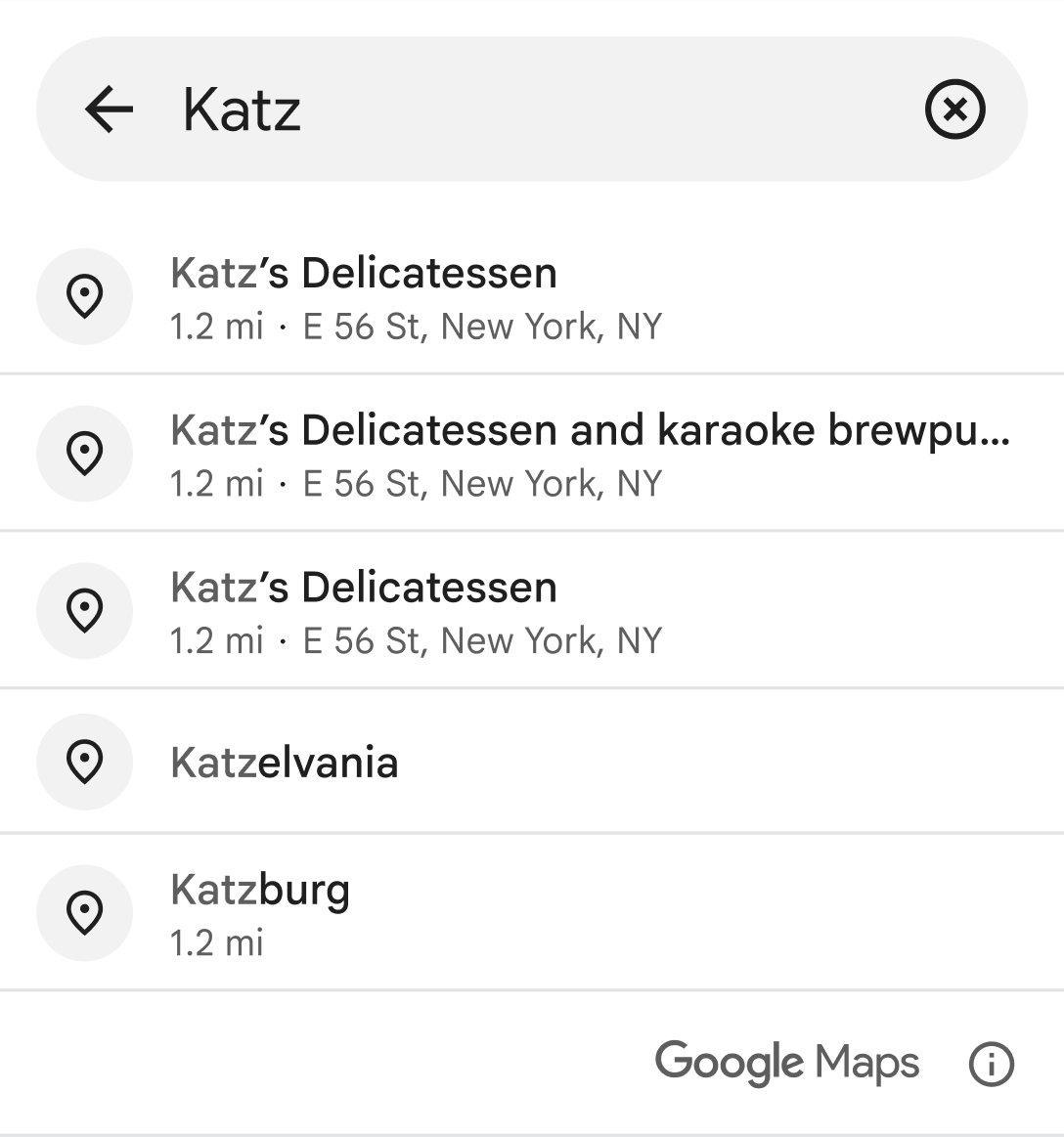
Like when [getting place predictions programmatically](https://developers.google.com/maps/documentation/places/ios-sdk/place-autocomplete.md.txt#autocomplete-requests),
the Place Autocomplete widget lets you use [session
tokens](https://developers.google.com/maps/documentation/places/ios-sdk/place-autocomplete#session-tokens) to
group autocomplete requests into session for billing purposes. You can pass a
session token by calling
[`AutocompleteSessionToken()`](https://developers.google.com/maps/documentation/places/ios-sdk/reference/swift/Structs/AutocompleteSessionToken.md.txt).
If you don't provide a session token, the widget will create an Autocomplete
session token for you, which can then be obtained from the `onSelection`
callback. For more information on using session tokens, see [About session
tokens](https://developers.google.com/maps/documentation/places/ios-sdk/place-session-tokens).
> [!NOTE]
> **Note:** Using session tokens is optional, but recommended.
When the `show` binding value is set to `true`, the user will be brought to a
full screen view where they can select a place. As the user types, the widget
returns suggestions for places such as businesses, addresses, and points of
interest. When the user selects a place, the widget calls the `onSelection`
handler with the selected place, and closes the fullscreen view.
### Place Autocomplete widget parameters
In addition to the [parameters available
programmatically](https://developers.google.com/maps/documentation/places/ios-sdk/place-autocomplete#required_parameters),
the Place Autocomplete widget also offers the following parameters.
#### show
`show` specifies whether the widget is shown.
#### onSelection
The closure to run when a place is selected.
#### onError
The closure to run when an error occurs. A
[`PlacesError`](https://developers.google.com/maps/documentation/places/ios-sdk/reference/swift/Enums/PlacesError.md.txt)
will be passed if an error occurs.
#### Content and theme customization
The
[`AutocompleteUICustomization`](https://developers.google.com/maps/documentation/places/ios-sdk/reference/swift/Structs/AutocompleteUICustomization.md.txt)
parameters specify the UI cusomizations to apply to the widget. The
customization options are:
- [`AutocompleteListDensity`](https://developers.google.com/maps/documentation/places/ios-sdk/reference/swift/Enums/AutocompleteListDensity.md.txt). This parameter lets you choose the density of the suggestion list, either `multiLine` or `twoLine`.
- [`AutocompleteUIIcon`](https://developers.google.com/maps/documentation/places/ios-sdk/reference/swift/Enums/AutocompleteUIIcon.md.txt). This parameter lets you choose whether to show the default icon for each list item.
- [`theme`](https://developers.google.com/maps/documentation/places/ios-sdk/reference/swift/Structs/AutocompleteUICustomization.md.txt#theme). This parameter specifies a custom theme that overrides any of the default style attributes. You can customize the colors, typography, spacing, borders, and corners of your Place Autocomplete component. The default is `PlacesMaterialTheme`. Any theme attributes that are not overridden use the default styles.
> [!NOTE]
> **Note:** For reference on the theme attributes that you can customize, see the UI Kit [Custom
> styling](https://developers.google.com/maps/documentation/places/ios-sdk/places-ui-kit-custom-styling) page.
[See a full code
example](https://developers.google.com/maps/documentation/places/ios-sdk/place-autocomplete#add_a_places_autocomplete_widget).
## Autocomplete (New) examples
### Use locationRestriction and locationBias
Autocomplete (New) uses IP biasing by default to
control the search area. With IP biasing, the API uses the IP address of the
device to bias the results. You can optionally use [`locationRestriction` or
`locationBias`](https://developers.google.com/maps/documentation/places/ios-sdk/place-autocomplete#locationbias_or_locationrestriction), but not both, to specify
an area to search.
Location restriction specifies the area to search. Results outside the specified
area are not returned. The following example uses location restriction to limit
the request to a circular location restriction with a 5000-meter radius centered
on San Francisco:
### Places Swift SDK
```swift
let center = (37.775061, -122.419400)
let radius = 5000.0
let restriction = CircularCoordinateRegion(center: center, radius: radius)
let filter = AutocompleteFilter(coordinateRegionRestriction: restriction)
let token = AutocompleteSessionToken()
let autocompleteRequest = AutocompleteRequest(query: "Sicilian piz", sessionToken: token, filter: filter)
switch await placesClient.fetchAutocompleteSuggestions(with: autocompleteRequest) {
case .success(let autocompleteSuggestions):
for suggestion in autocompleteSuggestions {
switch suggestion {
case .place:
// Show place suggestion data.
}
}
case .failure(let placesError):
// Handle error.
}
```
### Swift
```swift
let token = GMSAutocompleteSessionToken()
let center = CLLocationCoordinate2DMake(37.775061, -122.419400)
let radius = 5000.0
let filter = GMSAutocompleteFilter()
filter.locationRestriction = GMSPlaceCircularLocationOption(center, radius)
let request = GMSAutocompleteRequest(query:"Piz")
request.filter = filter
request.sessionToken = token
GMSPlacesClient.shared().fetchAutocompleteSuggestions(from: request, callback: { ( results, error ) in
if let error = error {
print("Autocomplete error: \(error)")
return
}
if let autocompleteResults = results {
for result in autocompleteResults {
print("Result \(String(describing: result.placeSuggestion?.placeID)) with \(String(describing: result.placeSuggestion?.attributedFullText))")
}
}
})
```
### Objective-C
```objective-c
CLLocationCoordinate2D center = CLLocationCoordinate2DMake(37.775061, -122.419400);
radius = 5000.0;
GMSAutocompleteFilter *filter = [[GMSAutocompleteFilter alloc] init];
filter.locationRestriction = GMSPlaceCircularLocationOption(center, radius);
GMSAutocompleteRequest *request = [[GMSAutocompleteRequest alloc] initWithQuery:@"Sicilian piz"];
request.sessionToken = token;
request.filter = filter;
[[GMSPlacesClient sharedClient] fetchAutocompleteSuggestionsFromRequest:request callback:^(NSArray * results, NSError * error){
// Handle response
for (GMSAutocompleteSuggestion *suggestion in results) {
if (suggestion.placeSuggestion) {
// Show place suggestion data.
}
}
}];
```
With location bias, the location serves as a bias, which means results around
the specified location can be returned, including results outside the specified
area. The next example changes the previous request to use location bias:
### Places Swift SDK
```swift
let center = (37.775061, -122.419400)
let radius = 5000.0
let bias = CircularCoordinateRegion(center: center, radius: radius)
let filter = AutocompleteFilter(coordinateRegionBias: bias)
let token = AutocompleteSessionToken()
let autocompleteRequest = AutocompleteRequest(query: "Sicilian piz", sessionToken: token, filter: filter)
switch await placesClient.fetchAutocompleteSuggestions(with: autocompleteRequest) {
case .success(let autocompleteSuggestions):
for suggestion in autocompleteSuggestions {
switch suggestion {
case .place:
// Show place suggestion data.
}
}
case .failure(let placesError):
// Handle error.
}
```
### Swift
```swift
let token = GMSAutocompleteSessionToken()
let center = CLLocationCoordinate2DMake(37.775061, -122.419400)
let radius = 5000.0
let filter = GMSAutocompleteFilter()
filter.locationBias = GMSPlaceCircularLocationOption(center, radius)
let request = GMSAutocompleteRequest(query:"Piz")
request.filter = filter
request.sessionToken = token
GMSPlacesClient.shared().fetchAutocompleteSuggestions(from: request, callback: { ( results, error ) in
if let error = error {
print("Autocomplete error: \(error)")
return
}
if let autocompleteResults = results {
for result in autocompleteResults {
print("Result \(String(describing: result.placeSuggestion?.placeID)) with \(String(describing: result.placeSuggestion?.attributedFullText))")
}
}
})
```
### Objective-C
```objective-c
CLLocationCoordinate2D center = CLLocationCoordinate2DMake(37.775061, -122.419400);
radius = 5000.0;
GMSAutocompleteFilter *filter = [[GMSAutocompleteFilter alloc] init];
filter.locationBias = GMSPlaceCircularLocationOption(center, radius);
GMSAutocompleteRequest *request = [[GMSAutocompleteRequest alloc] initWithQuery:@"Sicilian piz"];
request.sessionToken = token;
request.filter = filter;
[[GMSPlacesClient sharedClient] fetchAutocompleteSuggestionsFromRequest:request callback:^(NSArray * results, NSError * error){
// Handle response
for (GMSAutocompleteSuggestion *suggestion in results) {
if (suggestion.placeSuggestion) {
// Show place suggestion data.
}
}
}];
```
### Use types
Use the types parameter to restrict results from a request to be of a certain
type as listed in [Table
A](https://developers.google.com/maps/documentation/places/ios-sdk/place-types#table-a) and [Table
B](https://developers.google.com/maps/documentation/places/ios-sdk/place-types#table-b). You can specify an
array of up to five values. If omitted, all types are returned.
The following example specifies a query string of "Soccer" and uses the types
parameter to restrict results to establishments of type
`"sporting_goods_store"`:
### Places Swift SDK
```swift
let filter = AutocompleteFilter(types: [ PlaceType(rawValue: "sporting_goods_store") ])
let token = AutocompleteSessionToken()
let autocompleteRequest = AutocompleteRequest(query: "Soccer", sessionToken: token, filter: filter)
switch await placesClient.fetchAutocompleteSuggestions(with: autocompleteRequest) {
case .success(let autocompleteSuggestions):
for suggestion in autocompleteSuggestions {
switch suggestion {
case .place:
// Show place suggestion data.
}
}
case .failure(let placesError):
// Handle error.
}
```
### Swift
```swift
let token = GMSAutocompleteSessionToken()
let filter = GMSAutocompleteFilter()
filter.types = ["sporting_goods_store"]
let request = GMSAutocompleteRequest(query:"Soccer")
request.filter = filter
request.sessionToken = token
GMSPlacesClient.shared().fetchAutocompleteSuggestions(from: request, callback: { ( results, error ) in
if let error = error {
print("Autocomplete error: \(error)")
return
}
if let autocompleteResults = results {
for result in autocompleteResults {
print("Result \(String(describing: result.placeSuggestion?.placeID)) with \(String(describing: result.placeSuggestion?.attributedFullText))")
}
}
})
```
### Objective-C
```objective-c
GMSAutocompleteFilter *filter = [[GMSAutocompleteFilter alloc] init];
filter.types = @[ "sporting_goods_store" ];
GMSAutocompleteRequest *request = [[GMSAutocompleteRequest alloc] initWithQuery:@"Soccer"];
request.sessionToken = token;
request.filter = filter;
[[GMSPlacesClient sharedClient] fetchAutocompleteSuggestionsFromRequest:request callback:^(NSArray * results, NSError * error){
// Handle response
for (GMSAutocompleteSuggestion *suggestion in results) {
if (suggestion.placeSuggestion) {
// Show place suggestion data.
}
}
}];
```
### Use origin
When you include the [`origin`](https://developers.google.com/maps/documentation/places/ios-sdk/place-autocomplete.md.txt#origin) parameter in the request, specified as
latitude and longitude coordinates, the API includes the straight-line distance
from the origin to the destination in the response. The response returns the
distance as `distanceMeters`.
This example sets the origin to the center of San Francisco:
### Places Swift SDK
```swift
let filter = AutocompleteFilter(origin: CLLocation(latitude: 37.7749, longitude: -122.4194))
let token = AutocompleteSessionToken()
let autocompleteRequest = AutocompleteRequest(query: "Amoeba", sessionToken: token, filter: filter)
switch await placesClient.fetchAutocompleteSuggestions(with: autocompleteRequest) {
case .success(let autocompleteSuggestions):
for suggestion in autocompleteSuggestions {
switch suggestion {
case .place:
// Show place suggestion data.
}
}
case .failure(let placesError):
// Handle error.
}
```
### Swift
```swift
let token = GMSAutocompleteSessionToken()
let origin = CLLocation(latitude: 37.7749, longitude: -122.4194)
let filter = GMSAutocompleteFilter()
filter.origin = origin
let request = GMSAutocompleteRequest(query:"Amoeba")
request.filter = filter
request.sessionToken = token
GMSPlacesClient.shared().fetchAutocompleteSuggestions(from: request, callback: { ( results, error ) in
if let error = error {
print("Autocomplete error: \(error)")
return
}
if let autocompleteResults = results {
for result in autocompleteResults {
print("Result \(String(describing: result.placeSuggestion?.placeID)) with \(String(describing: result.placeSuggestion?.attributedFullText)) and distance: \(String(describing: result.placeSuggestion?.distanceMeters))")
}
}
})
```
### Objective-C
```objective-c
GMSAutocompleteFilter *filter = [[GMSAutocompleteFilter alloc] init];
filter.origin = [[CLLocation alloc] initWithLatitude:37.395804 longitude:-122.077023];
GMSAutocompleteRequest *request = [[GMSAutocompleteRequest alloc] initWithQuery:@"Amoeba"];
request.sessionToken = token;
request.filter = filter;
[[GMSPlacesClient sharedClient] fetchAutocompleteSuggestionsFromRequest:request callback:^(NSArray * results, NSError * error){
// Handle response
for (GMSAutocompleteSuggestion *suggestion in results) {
if (suggestion.placeSuggestion) {
// Show place suggestion data.
}
}
}];
```
### Customize content and theme
### Swift
```swift
let uiCustomization = AutocompleteUICustomization(
listDensity: .multiLine,
listItemIcon: .noIcon,
theme: PlacesMaterialTheme()
)
```
### Add a Places Autocomplete widget (full code)
### Places Swift SDK
```swift
struct PlaceAutocompleteDemoView: View {
@State private var fetchedPlace: Place?
@State private var placesError: PlacesError?
@State private var showWidget = false
public var body: some View {
VStack {
Button("Search for a place") {
showWidget.toggle()
}
.placeAutocomplete(
show: $showWidget,
onSelection: { (autocompletePlaceSuggestion, autocompleteSessionToken) in
Task {
let placesClient = await PlacesClient.shared
let fetchPlaceRequest = FetchPlaceRequest(
placeID: autocompletePlaceSuggestion.placeID,
placeProperties: [.displayName, .formattedAddress],
sessionToken: autocompleteSessionToken
)
switch await placesClient.fetchPlace(with: fetchPlaceRequest) {
case .success(let place):
print("Fetched place: \(place)")
self.fetchedPlace = place
case .failure(let placesError):
print("Failed to fetch place: \(placesError)")
self.placesError = placesError
}
}
},
onError: { placesError in
self.placesError = placesError
}
)
}
}
}
```
## Autocomplete (New) optimization
This section describes best practices to help you make the most of the
Autocomplete (New) service.
Here are some general guidelines:
- The quickest way to develop a working user interface is to use the Maps JavaScript API [Autocomplete (New) widget](https://developers.google.com/maps/documentation/javascript/place-autocomplete-new.md.txt), Places SDK for Android [Autocomplete (New) widget](https://developers.google.com/maps/documentation/places/android-sdk/place-autocomplete.md.txt#autocomplete-widget), or Places SDK for iOS [Autocomplete (New) widget](https://developers.google.com/maps/documentation/places/ios-sdk/place-autocomplete.md.txt#autocomplete-widget).
- Understand essential Autocomplete (New) [data fields](https://developers.google.com/maps/documentation/places/ios-sdk/data-fields.md.txt) from the start.
- Location biasing and location restriction fields are optional but can have a significant impact on autocomplete performance.
- Use error handling to make sure your app degrades gracefully if the API returns an error.
- Make sure your app handles when there is no selection and offers users a way to continue.
### Cost optimization best practices
### Basic cost optimization
[Video](https://www.youtube.com/watch?v=VOP8cvCLGac)
To optimize the cost of using the Autocomplete (New)
service, use field masks in Place Details (New) and Autocomplete (New) widgets to return only the
Autocomplete (New) [data fields](https://developers.google.com/maps/documentation/places/ios-sdk/data-fields.md.txt)
you need.
### Advanced cost optimization
Consider programmatic implementation of Autocomplete (New) to access
[SKU: Autocomplete Request pricing](https://developers.google.com/maps/billing-and-pricing/sku-details/places.md.txt#places_autocomplete-request-new-ess-sku)
and request [Geocoding API results](https://developers.google.com/maps/documentation/geocoding/overview#results) about the selected place instead of Place Details (New). Per-request pricing paired with Geocoding API is more cost-effective than per-session (session-based) pricing if both of the following conditions are met:
- If you only need the latitude and longitude or address of the user's selected place, the Geocoding API delivers this information for less than a Place Details (New) call.
- If users select an autocomplete prediction within an average of four Autocomplete (New) predictions requests or fewer, per-request pricing can be more cost-effective than per-session pricing.
To choose the Autocomplete (New) implementation that costs the least for your application, find the row in the following table that matches what your application needs.
| What your application needs | Average Autocomplete (New) requests before a user selects a prediction | Recommended implementation |
|---|---|---|
| Place details other than the address and location, such as the place name, business status, or opening hours | Any number | [Session-based Autocomplete (New) with Place Details (New)](https://developers.google.com/maps/documentation/places/ios-sdk/place-autocomplete.md.txt#select-place-details) |
| Only the address and latitude/longitude of the selected prediction | Four or fewer | [Per-request Autocomplete (New) with the Geocoding API](https://developers.google.com/maps/documentation/places/ios-sdk/place-autocomplete.md.txt#select-location-performant) |
| Only the address and latitude/longitude of the selected prediction | More than four | [Session-based Autocomplete (New) for address-only applications](https://developers.google.com/maps/documentation/places/ios-sdk/place-autocomplete.md.txt#select-location-nonperformant) |
Geocoding API could be a more cost-effective option than Place Details (New) for your application, depending on the performance of your Autocomplete (New) usage. Every application's Autocomplete (New) efficiency varies depending on what users are entering, where the application is being used, and whether [performance optimization best practices](https://developers.google.com/maps/documentation/places/ios-sdk/place-autocomplete.md.txt#perf-best-practices) have been implemented.
To find the average number of requests for the table, analyze how many characters a user types on average before selecting a Autocomplete (New) prediction in your application.
### Session-based Autocomplete (New) with Place Details (New)
**Use session-based Autocomplete (New) with Place Details (New).**
Since your application requires Place Details (New), such as the place name, business status,
or opening hours, your implementation of Autocomplete (New) should use a session token
(programmatically or built into the
[JavaScript](https://developers.google.com/maps/documentation/javascript/place-autocomplete-new.md.txt),
[Android](https://developers.google.com/maps/documentation/places/android-sdk/place-autocomplete.md.txt#autocomplete-widget),
or [iOS](https://developers.google.com/maps/documentation/places/ios-sdk/place-autocomplete.md.txt#autocomplete-widget)
widgets)
[per session](https://developers.google.com/maps/documentation/places/ios-sdk/session-pricing.md.txt) plus applicable Places SKUs,
depending on which place data fields you request.^[1](https://developers.google.com/maps/documentation/places/ios-sdk/place-autocomplete.md.txt#fn1)^
**Widget implementation**
Session management is automatically built into the
[JavaScript](https://developers.google.com/maps/documentation/javascript/place-autocomplete-new.md.txt),
[Android](https://developers.google.com/maps/documentation/places/android-sdk/place-autocomplete.md.txt#autocomplete-widget),
or [iOS](https://developers.google.com/maps/documentation/places/ios-sdk/place-autocomplete.md.txt#autocomplete-widget)
widgets. This includes both the Autocomplete (New) requests and the Place Details (New) request
on the selected prediction. Be sure to specify the `fields` parameter in order to
ensure you are only requesting the
Autocomplete (New) [data fields](https://developers.google.com/maps/documentation/places/ios-sdk/data-fields.md.txt)
you need.
**Programmatic implementation**
Use a
[session token](https://developers.google.com/maps/documentation/places/ios-sdk/session-pricing.md.txt)
with your Autocomplete (New) requests. When requesting Place Details (New) about the selected prediction, include the following parameters:
1. The place ID from [the Autocomplete (New) response](https://developers.google.com/maps/documentation/places/ios-sdk/place-autocomplete.md.txt#programmatic-response)
2. The session token used in the Autocomplete (New) request
3. The `fields` parameter specifying the Autocomplete (New) [data fields](https://developers.google.com/maps/documentation/places/ios-sdk/data-fields.md.txt) you need
### Per-request Autocomplete (New) with the Geocoding API
**Implement Autocomplete (New) programmatically without session tokens and call Geocoding API on the selected place prediction.**
Geocoding API delivers addresses and latitude/longitude coordinates.
Making four
[Autocomplete Requests](https://developers.google.com/maps/billing-and-pricing/sku-details/places.md.txt#places_autocomplete-request-new-ess-sku)
requests plus a [Geocoding API](https://developers.google.com/maps/billing-and-pricing/sku-details/places.md.txt#geocoding-ess-sku)
call about the selected place prediction is less than the per-session Autocomplete (New)
cost per session.^[1](https://developers.google.com/maps/documentation/places/ios-sdk/place-autocomplete.md.txt#fn1)^
Consider employing [performance best practices](https://developers.google.com/maps/documentation/places/ios-sdk/place-autocomplete.md.txt#perf-best-practices) to help your users get the prediction they're looking for in even fewer characters.
### Session-based Autocomplete (New) for address-only applications
**Use session-based Autocomplete (New) with Place Details (New).**
Since the average number of requests you expect to make before a user selects a
Autocomplete (New) prediction exceeds the cost of per-session pricing, your implementation
of Autocomplete (New) should use a session token for both the Autocomplete (New) requests
and the associated Place Details (New) request
[per session](https://developers.google.com/maps/documentation/places/ios-sdk/session-pricing.md.txt).
^[1](https://developers.google.com/maps/documentation/places/ios-sdk/place-autocomplete.md.txt#fn1)^
**Widget implementation**
Session management is automatically built into the
[JavaScript](https://developers.google.com/maps/documentation/javascript/place-autocomplete-new.md.txt),
[Android](https://developers.google.com/maps/documentation/places/android-sdk/place-autocomplete.md.txt#autocomplete-widget),
or [iOS](https://developers.google.com/maps/documentation/places/ios-sdk/place-autocomplete.md.txt#autocomplete-widget)
widgets. This includes both the Autocomplete (New) requests and the Place Details (New)
request on the selected prediction. Be sure to specify the `fields` parameter
in order to ensure you are only requesting the fields you need.
**Programmatic implementation**
Use a
[session token](https://developers.google.com/maps/documentation/places/ios-sdk/session-pricing.md.txt)
with your Autocomplete (New) requests.
When requesting Place Details (New) about the selected prediction,
include the following parameters:
1. The place ID from [the Autocomplete (New) response](https://developers.google.com/maps/documentation/places/ios-sdk/place-autocomplete.md.txt#programmatic-response)
2. The session token used in the Autocomplete (New) request
3. The `fields` parameter specifying fields such as address and geometry
**Consider delaying Autocomplete (New) requests**
You can employ strategies such as delaying a Autocomplete (New) request until the user has typed in the first three or four characters so that your application makes fewer requests. For example, making Autocomplete (New) requests for each character *after* the user has typed the third character means that if the user types seven characters then selects a prediction for which you make one Geocoding API request, the total cost would be for 4 Autocomplete (New) Per Request + Geocoding.^[1](https://developers.google.com/maps/documentation/places/ios-sdk/place-autocomplete.md.txt#fn1)^
If delaying requests can get your average programmatic request below four, you can follow the guidance for [performant Autocomplete (New) with Geocoding API](https://developers.google.com/maps/documentation/places/ios-sdk/place-autocomplete.md.txt#select-location-performant) implementation. Note that delaying requests can be perceived as latency by the user who might be expecting to see predictions with every new keystroke.
Consider employing [performance best practices](https://developers.google.com/maps/documentation/places/ios-sdk/place-autocomplete.md.txt#perf-best-practices) to help your users get the prediction they're looking for in fewer characters.
*** ** * ** ***
1. For costs, see [Google Maps Platform pricing lists](https://developers.google.com/maps/billing-and-pricing/pricing.md.txt).
### Performance best practices
[Video](https://www.youtube.com/watch?v=bv1p4s_d8OM)
The following guidelines describe ways to optimize Autocomplete (New) performance:
- Add country restrictions, [location biasing](https://developers.google.com/maps/documentation/places/ios-sdk/place-autocomplete.md.txt#location_biasing), and (for programmatic implementations) language preference to your Autocomplete (New) implementation. Language preference is not needed with widgets since they pick language preferences from the user's browser or mobile device.
- If Autocomplete (New) is accompanied by a map, you can bias location by map viewport.
- In situations when a user does not choose one of the Autocomplete (New) predictions, generally because none of those predictions are the result-address wanted, you can reuse the original user input to attempt to get more relevant results:
- If you expect the user to enter only address information, reuse the original user input in a call to the [Geocoding API](https://developers.google.com/maps/documentation/geocoding/overview).
- If you expect the user to enter queries for a specific place by name or address, use a Place Details (New) request. If results are only expected in a specific region, use [location biasing](https://developers.google.com/maps/documentation/places/ios-sdk/place-autocomplete.md.txt#location_biasing).
Other scenarios when it's best to fall back to the Geocoding API include:
- Users inputting subpremise addresses, such as addresses for specific units or apartments within a building. For example, the Czech address "Stroupežnického 3191/17, Praha" yields a partial prediction in Autocomplete (New).
- Users inputting addresses with road-segment prefixes like "23-30 29th St, Queens" in New York City or "47-380 Kamehameha Hwy, Kaneohe" on the island of Kauai in Hawai'i.
### Location biasing
Bias results to a specified area by passing a `location` parameter and a `radius`
parameter. This instructs Autocomplete (New) to *prefer* showing results
within the defined area. Results outside of the defined area may still be
displayed. You can use the `includedRegionCodes` parameter to filter results
to show only those places within a specified country.
> [!WARNING]
> **Warning:** If `radius` is not provided, the `location` parameter is ignored.
> [!TIP]
> Establishment results generally don't rank highly enough to show in results when the search area is large. If you want establishments to appear in mixed establishment/geocode results, you can specify a smaller radius. Alternatively, use `types=establishment` to restrict results to establishments only.
### Location restricting
Restrict results to a specified area by passing a `locationRestriction` parameter.
You may also restrict results to the region defined by `location`
and a `radius` parameter, by adding the
`locationRestriction`
parameter. This instructs Autocomplete (New) to return *only*
results within that region.
> [!NOTE]
> **Note:** Location restrictions are only applied to entire routes. Synthetic results located outside the location restriction may be returned based on a route that overlaps with the location restriction.