The Places API (New) returns information about a place in a response.
Along with factual content, such as an address and phone number, the response
can also contain content that users have contributed on Google Maps, such as
reviews and photos. In addition, when you use [Gemini model capabilities for
Places API (New)](https://developers.google.com/maps/documentation/places/web-service/experimental/places-generative),
the response can include generative data aggregated and summarized from a LLM.
Although Google has implemented a series of measures to identify problematic
content before it is returned by the Places API (New), we also provide a
way for users to flag inappropriate content so that Google can remove it. With
this release, the Places API (New) includes the new `flagContentUri` field
in all reviews, photos, and generative summaries included in a
Places API (New) response. This field contains a link, including a unique
content identifier, that lets users notify Google of inappropriate content.
For example, you make a request that returns five individual reviews for a
place. Each individual review includes the new `flagContentUri` field with a
unique identifier for that review so that a user can report an issue with any or
all of the reviews.
The API Explorer lets you make live requests so that you can get familiar with
these new options:
[Try it!](https://developers.google.com/maps/documentation/places/web-service/content-reporting.md.txt#try-it)
## Link format
The URL contained in the `flagContentUri` field includes a unique identifier for
the content. Browsing to this link opens a Google-hosted web page in the form:
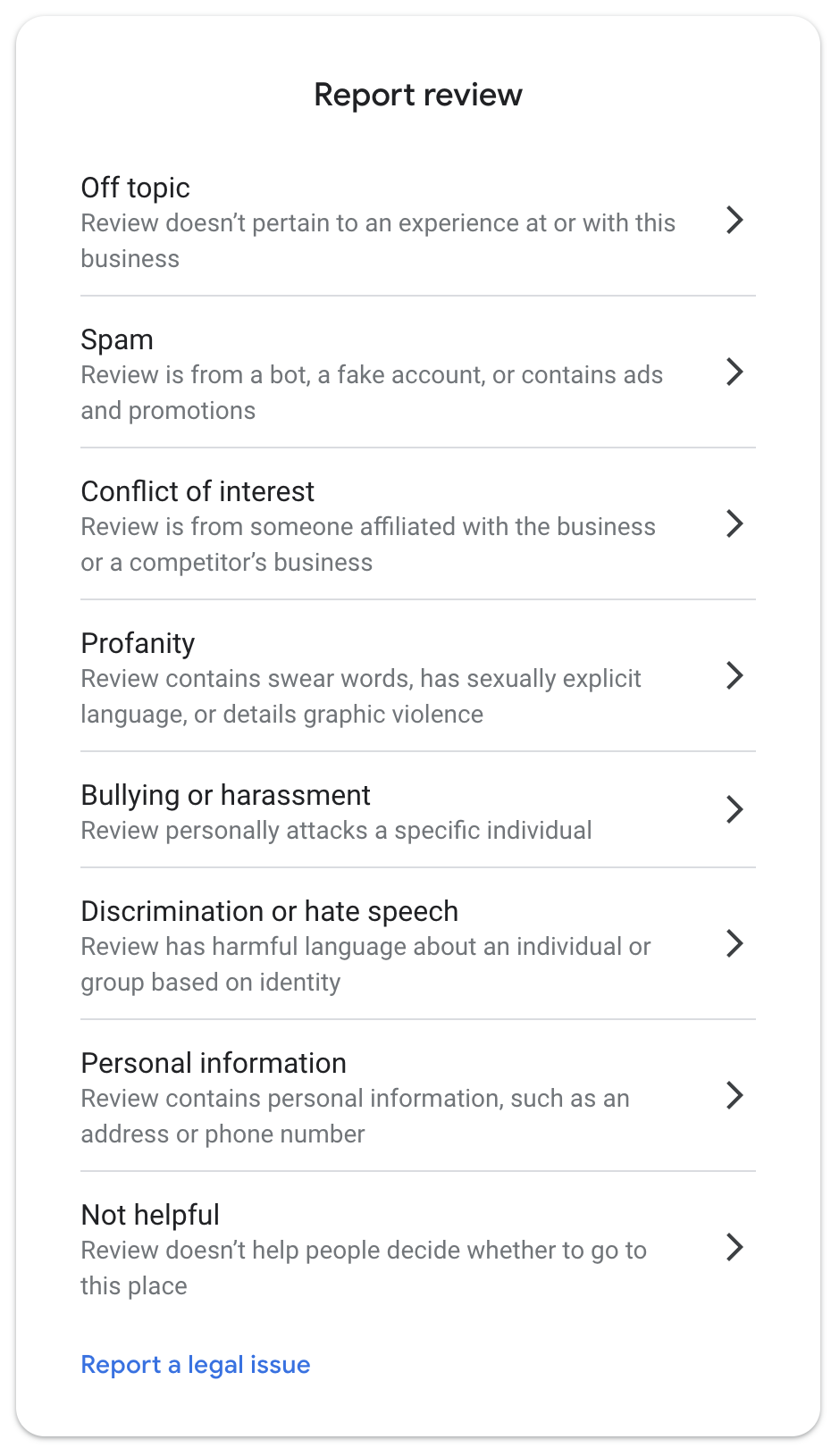
From this dialog, your users can file a report with Google for the appropriate
issue type. For example, they can report profanity, bullying, or a legal issue
with the content.
## Display the content reporting link
The `flagContentUri` field is available in the following objects that are
already part of the Places API (New) response:
- [`Review`](https://developers.google.com/maps/documentation/places/web-service/reference/rest/v1/places.md.txt#review)
- [`Photo`](https://developers.google.com/maps/documentation/places/web-service/reference/rest/v1/places.md.txt#photo)
- [`GenerativeSummary`](https://developers.google.com/maps/documentation/places/web-service/reference/rest/v1/places.md.txt#generativesummary)
- [`NeighborhoodSummary`](https://developers.google.com/maps/documentation/places/web-service/reference/rest/v1/places.md.txt#neighborhoodsummary)
- [`EvChargeAmenitySummary`](https://developers.google.com/maps/documentation/places/web-service/reference/rest/v1/places.md.txt#evchargeamenitysummary)
- [`ReviewSummary`](https://developers.google.com/maps/documentation/places/web-service/reference/rest/v1/places.md.txt#reviewsummary)
- [`ContextualContent`](https://developers.google.com/maps/documentation/places/web-service/reference/rest/v1/places/searchText.md.txt#ContextualContent)
You must display the content reporting link when you display these objects so
that your customers can report any content issues.
## Access the content reporting link in the response
> [!NOTE]
> **Note:** See the [Gemini model capabilities for
> Places API (New)](https://developers.google.com/maps/documentation/places/web-service/experimental/places-generative) for examples using `GenerativeSummary`, `NeighborhoodSummary`, `EvChargeAmenitySummary`, and `ReviewSummary`.
The following Place Details (New) request includes place reviews in the
response:
```
curl -X GET -H 'Content-Type: application/json' \
-H "X-Goog-Api-Key: API_KEY" \
-H "X-Goog-FieldMask: id,displayName,reviews" \
https://places.googleapis.com/v1/places/ChIJj61dQgK6j4AR4GeTYWZsKWw
```
The response is in the form:
> [!NOTE]
> **Note:** The example URLs shown in the responses below are placeholders for real content URLs and cannot be used to report an issue.
```
{
"id": "ChIJj61dQgK6j4AR4GeTYWZsKWw",
"displayName": {
"text": "Googleplex",
"languageCode": "en"
},
"reviews": [
{
"name": "places/ChIJj61dQgK6j4AR4GeTYWZsKWw/reviews/ChdDjNnRRAB",
"relativePublishTimeDescription": "7 months ago",
"rating": 3,
"text": {
"text": "Came here for a tour and honestly,...",
"languageCode": "en"
},
"originalText": {
"text": "Came here for a tour and honestly,...",
"languageCode": "en"
},
"authorAttribution": {
"displayName": "John Smith",
"uri": "https://www.google.com/maps/contrib/10198693/reviews",
"photoUri": "https://lh3.googleusercontent.com/a-/A-c00-cc-rp-mo-ba6"
},
"publishTime": "2024-02-24T19:26:18.091264Z",
"flagContentUri": "https://www.google.com/local/review/rap/report?postId=CJ2&t=1",
"googleMapsUri": "https://www.google.com/maps/reviews/data=!4m6!14m5"
},
…
]
}
```
Each entry in the `reviews` array contains the `flagContentUri` field, including
a unique identifier for that specific review. Browsing to that link lets your
customers report inappropriate content for that specific review.
If you include `photos` in the field mask:
```
curl -X GET -H 'Content-Type: application/json' \
-H "X-Goog-Api-Key: API_KEY" \
-H "X-Goog-FieldMask: id,displayName,reviews,photos" \
https://places.googleapis.com/v1/places/ChIJj61dQgK6j4AR4GeTYWZsKWw
```
The response also includes the `photos` array where each element contains the
`flagContentUri` field:
```
...
"photos": [
{
"name": "places/ChIJj61dQgK6j4AR4GeTYWZsKWw/photos/AdCG2DNmA4zTnu24VKCwSW7ulKkgDA8cTe5sz74Q4Doo",
"widthPx": 4032,
"heightPx": 3024,
"authorAttributions": [
{
"displayName": "Jane Smith",
"uri": "https://maps.google.com/maps/contrib/107007354",
"photoUri": "https://lh3.googleusercontent.com/a-/ALV-UjXvHp8Kg932h80MpoDSJ_Sl4F-no-mo"
}
],
"flagContentUri": "https://www.google.com/local/imagery/report/?cb_client=maps_api_places&image_key=!1e10!2XtMU_GKr",
"googleMapsUri": "https://www.google.com/maps/reviews/data=!4m6!14m5"
},
...
]
```
### Link expiration
The content links remain active until the backing content is removed. The links
do continue to open the dialog for content that has been removed, but filing a
report on content that has already been removed has no effect.
## Try it!
The API Explorer lets you make sample requests so that you can get familiar with
the API and the API options.
1. Select the API icon, , on the right
side of the page.
2. Optionally expand **Show standard parameters** and set **the `fields`
parameter** to the [field
mask](https://developers.google.com/maps/documentation/places/web-service/choose-fields).
3. Optionally edit the **Request body**.
4. Select **Execute** button. In the dialog, choose the account that you want
to use to make the request.
5. In the API Explorer panel, select the expand icon, , to expand the API Explorer window.