The Route Optimization API's objective is to plan routes for a fleet of vehicles to
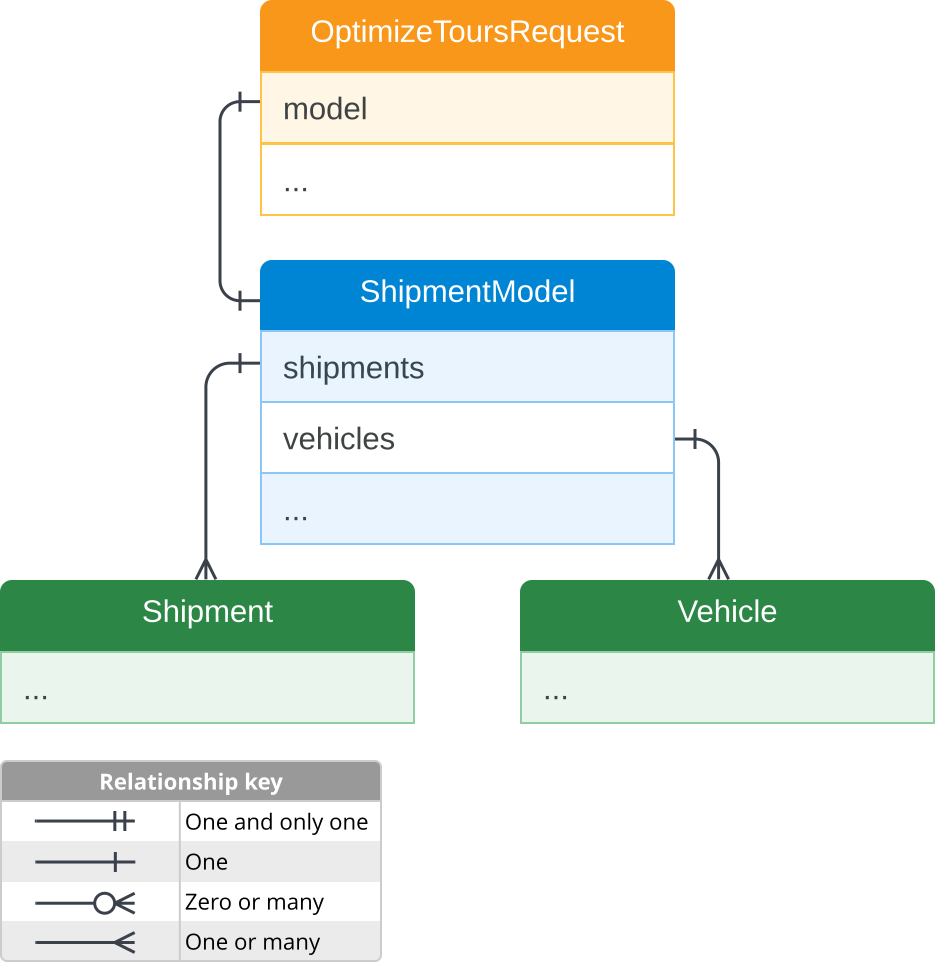
visit a set of locations. The `OptimizeToursRequest` object describes the
properties of these vehicles and locations and is the primary structure of
every endpoint's request body.
The **base structure** of the `OptimizeToursRequest` object is as follows:
- The [`model`](https://developers.google.com/maps/documentation/route-optimization/reference/rest/v1/projects/optimizeTours.md.txt#body.request_body.FIELDS.model) field holds a [`ShipmentModel`](https://developers.google.com/maps/documentation/route-optimization/reference/rest/v1/ShipmentModel.md.txt) message that contains two key fields:
- One [`shipments`](https://developers.google.com/maps/documentation/route-optimization/reference/rest/v1/ShipmentModel.md.txt#FIELDS.shipments) field, which contains one or several [`Shipment`](https://developers.google.com/maps/documentation/route-optimization/reference/rest/v1/ShipmentModel.md.txt#Shipment) messages.
- One [`vehicles`](https://developers.google.com/maps/documentation/route-optimization/reference/rest/v1/ShipmentModel.md.txt#FIELDS.vehicles) field, which contains one or several [`Vehicle`](https://developers.google.com/maps/documentation/route-optimization/reference/rest/v1/ShipmentModel.md.txt#Vehicle) messages.
This document describes the following message types:
- **[`ShipmentModel`](https://developers.google.com/maps/documentation/route-optimization/reference/rest/v1/ShipmentModel.md.txt):** Holds the list of shipments, available vehicles, and other objects that describe their relationships.
- **[`Shipment`](https://developers.google.com/maps/documentation/route-optimization/reference/rest/v1/ShipmentModel.md.txt#Shipment):** Describes locations to be visited by a vehicle. They can represent actual packages to pick up and deliver or places where the vehicle driver performs a service.
- **[`Vehicle`](https://developers.google.com/maps/documentation/route-optimization/reference/rest/v1/ShipmentModel.md.txt#Vehicle):** Describes the means of transportation between shipment locations. Each vehicle corresponds to an actual vehicle or a person moving around on foot.
## `ShipmentModel`
[`ShipmentModel`](https://developers.google.com/maps/documentation/route-optimization/reference/rest/v1/ShipmentModel.md.txt) holds the elements of the route optimization problem. It
contains a set of shipments that may be performed by a set of vehicles, while
considering constraints and minimizing the overall cost.
The table below describes some relevant properties of [`ShipmentModel`](https://developers.google.com/maps/documentation/route-optimization/reference/rest/v1/ShipmentModel.md.txt):
| Properties | Description |
|---|---|
| `shipments` and `vehicles` | Required objects that contain the details of one or many **shipments and vehicles**. |
| `globalStartTime` and `globalEndTime` | Indicates the **start and end of the time window** in which all vehicles must complete all shipments. While these properties are not required, it's **recommended to include them** since the optimizer works best when adhering to time constraints. |
See the reference documentation for the full list of the properties in
[`ShipmentModel`](https://developers.google.com/maps/documentation/route-optimization/reference/rest/v1/ShipmentModel.md.txt).
### `ShipmentModel` Example
In this example, you have a doggy daycare service and you are starting to
build your request. You are defining shipments and vehicles later,
but you want to start by setting your business hours and hourly operational
cost.
For this example, the [`ShipmentModel`](https://developers.google.com/maps/documentation/route-optimization/reference/rest/v1/ShipmentModel.md.txt) property values in your request are the
following:
| Property | Value | Description |
|---|---|---|
| `globalStartTime` | 2024-02-13T00:00:00.000Z | The start date and time of the business hours. |
| `globalEndTime` | 2024-02-14T06:00:00.000Z | The end date and time of the business hours. |
The following is a code sample of a [`ShipmentModel`](https://developers.google.com/maps/documentation/route-optimization/reference/rest/v1/ShipmentModel.md.txt) message incorporating the
example scenario values.
```json
{
"model": {
"shipments": [
...
],
"vehicles": [
...
],
"globalStartTime": "2024-02-13T00:00:00.000Z",
"globalEndTime": "2024-02-14T06:00:00.000Z"
}
}
```
## `Shipment`
The [`Shipment`](https://developers.google.com/maps/documentation/route-optimization/reference/rest/v1/ShipmentModel.md.txt#Shipment) message type defines the property structure of a shipment that
can be delivered or service that can be performed on a route.
As illustrated in the diagram:
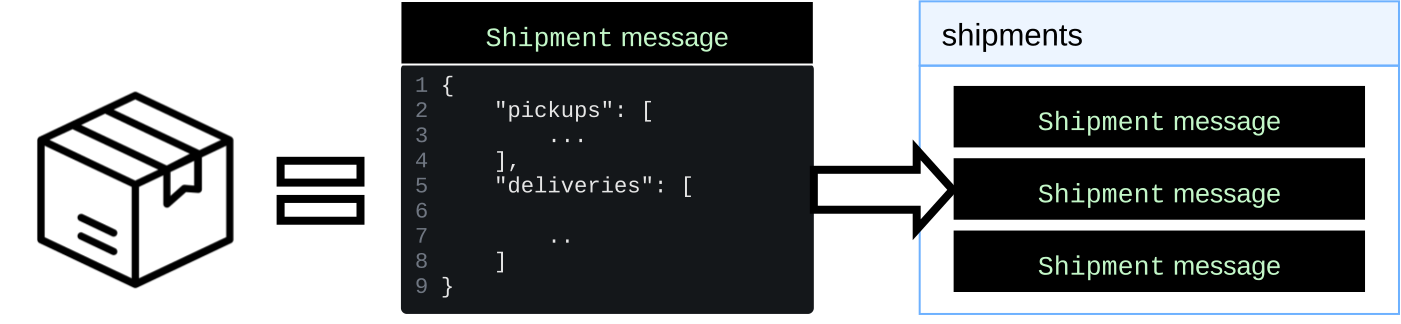
- A [`Shipment`](https://developers.google.com/maps/documentation/route-optimization/reference/rest/v1/ShipmentModel.md.txt#Shipment) message has all the information of a real-life shipment or service.
- All [`Shipment`](https://developers.google.com/maps/documentation/route-optimization/reference/rest/v1/ShipmentModel.md.txt#Shipment) messages are specified in the [`shipments`](https://developers.google.com/maps/documentation/route-optimization/reference/rest/v1/ShipmentModel.md.txt#FIELDS.shipments) field.
- The [`shipments`](https://developers.google.com/maps/documentation/route-optimization/reference/rest/v1/ShipmentModel.md.txt#FIELDS.shipments) field contains one or many [`Shipment`](https://developers.google.com/maps/documentation/route-optimization/reference/rest/v1/ShipmentModel.md.txt#Shipment) messages.
A [`Shipment`](https://developers.google.com/maps/documentation/route-optimization/reference/rest/v1/ShipmentModel.md.txt#Shipment) message requires **at least one** [`pickups`](https://developers.google.com/maps/documentation/route-optimization/reference/rest/v1/ShipmentModel.md.txt#Shipment.FIELDS.pickups) or [`deliveries`](https://developers.google.com/maps/documentation/route-optimization/reference/rest/v1/ShipmentModel.md.txt#Shipment.FIELDS.deliveries) object.
The definition of these objects are the following:
- [`pickups`](https://developers.google.com/maps/documentation/route-optimization/reference/rest/v1/ShipmentModel.md.txt#Shipment.FIELDS.pickups) defines the pickup location of a shipment.
- [`deliveries`](https://developers.google.com/maps/documentation/route-optimization/reference/rest/v1/ShipmentModel.md.txt#Shipment.FIELDS.deliveries) defines the delivery location of a shipment.
- Both [`pickups`](https://developers.google.com/maps/documentation/route-optimization/reference/rest/v1/ShipmentModel.md.txt#Shipment.FIELDS.pickups) and [`deliveries`](https://developers.google.com/maps/documentation/route-optimization/reference/rest/v1/ShipmentModel.md.txt#Shipment.FIELDS.deliveries) contain a [`VisitRequest`](https://developers.google.com/maps/documentation/route-optimization/reference/rest/v1/ShipmentModel.md.txt#VisitRequest) message type that defines locations and other details.
The following table describes the different scenarios based on the configuration
of `pickups` and `deliveries` in a [`Shipment`](https://developers.google.com/maps/documentation/route-optimization/reference/rest/v1/ShipmentModel.md.txt#Shipment) message.
| Scenario | Description |
|---|---|
| `pickups` only | It's assumed you are **only collecting the shipment**. |
| `deliveries` only | It's assumed you have **pre-loaded the shipment** or are **delivering a service**. |
| Both `pickups` and `deliveries` | The assigned vehicle must complete **the pickup first, then the delivery**. Only the vehicle that performed the pickup can perform the delivery. |
| Multiple `pickups` or `deliveries` | If a shipment lists multiple possibilities for `pickups` or `deliveries`, the optimizer **chooses one pickup option and one delivery option** to use, based on minimizing cost and meeting constraints. |
See the reference documentation for the full list of the properties in
[`Shipment`](https://developers.google.com/maps/documentation/route-optimization/reference/rest/v1/ShipmentModel.md.txt#Shipment).
### `Shipment` Example
In this example, you have a doggy daycare service where you pick up dogs from
their home and deliver them to your daycare. You want to set the pick up
location of two dogs, and set their delivery location to your business:
- The **first dog's home** is in Coit Tower, San Francisco. The coordinates to this location are latitude 37.8024 and longitude -122.4058.
- The **second dog's home** is in South Sunset Playground Park, San Francisco. The coordinates to this location are latitude 37.7359 and longitude -122.5011.
- Your **doggy daycare** is in Mission Dolores Park, San Francisco. The coordinates to this location are latitude 37.759773 and longitude -122.427063.
The following is a code sample of a [`Shipment`](https://developers.google.com/maps/documentation/route-optimization/reference/rest/v1/ShipmentModel.md.txt#Shipment) message, where the [`shipments`](https://developers.google.com/maps/documentation/route-optimization/reference/rest/v1/ShipmentModel.md.txt#FIELDS.shipments)
object contains two [`Shipment`](https://developers.google.com/maps/documentation/route-optimization/reference/rest/v1/ShipmentModel.md.txt#Shipment)message types with the example coordinates.
```json
{
"model": {
"shipments": [
{
"pickups": [
{
"arrivalLocation": {
"latitude": 37.8024,
"longitude": -122.4058
}
}
],
"deliveries": [
{
"arrivalLocation": {
"latitude": 37.759773,
"longitude": -122.427063
}
}
]
},
{
"pickups": [
{
"arrivalLocation": {
"latitude": 37.7359,
"longitude": -122.5011
}
}
],
"deliveries": [
{
"arrivalLocation": {
"latitude": 37.759773,
"longitude": -122.427063
}
}
]
}
],
"vehicles": [
...
]
}
}
```
## `Vehicle`
The [`Vehicle`](https://developers.google.com/maps/documentation/route-optimization/reference/rest/v1/ShipmentModel.md.txt#Vehicle) message type defines the property structure of a vehicle that can
perform a shipment in a route.
As illustrated in the diagram:
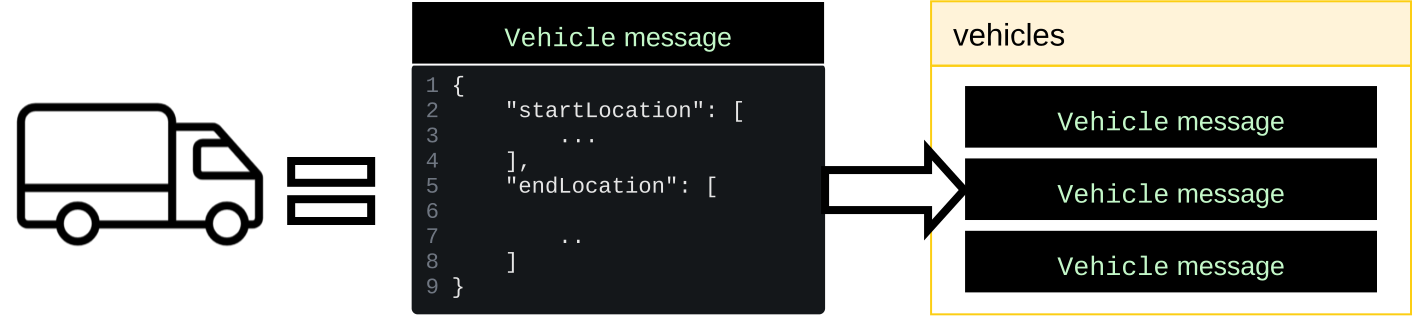
- A [`Vehicle`](https://developers.google.com/maps/documentation/route-optimization/reference/rest/v1/ShipmentModel.md.txt#Vehicle) message has all the information of a real-life vehicle.
- All [`Vehicle`](https://developers.google.com/maps/documentation/route-optimization/reference/rest/v1/ShipmentModel.md.txt#Vehicle) messages are specified in the [`vehicles`](https://developers.google.com/maps/documentation/route-optimization/reference/rest/v1/ShipmentModel.md.txt#FIELDS.vehicles) field.
- The [`vehicles`](https://developers.google.com/maps/documentation/route-optimization/reference/rest/v1/ShipmentModel.md.txt#FIELDS.vehicles) field contains multiple [`Vehicle`](https://developers.google.com/maps/documentation/route-optimization/reference/rest/v1/ShipmentModel.md.txt#Vehicle) messages.
The following table describes some relevant properties of a [`Vehicle`](https://developers.google.com/maps/documentation/route-optimization/reference/rest/v1/ShipmentModel.md.txt#Vehicle).
| Properties | Description |
|---|---|
| `startLocation` and `endLocation` | The **start and end location** of the vehicles, which are part of the final optimized route. If not defined, they default to the first shipment pickup and last shipment delivery locations. |
| `costPerHour`, `costPerKilometer`, `costPerTraveledHour` | Vehicle specific **cost parameters** . Its recommended you have **at least one** cost parameter in your request for the API to return an optimized route. See the [Cost model](https://developers.google.com/maps/documentation/route-optimization/concepts/costs.md.txt) key concept to learn more about costs. |
| `startTimeWindows` and `endTimeWindows` | Define the **time periods** when a vehicle can operate on a route. These must fall within the `globalStartTime` and `globalEndTime` time window set in `ShipmentModel`. While this property is not required, it's **recommended to include it** since the optimizer works best when adhering to time constraints. |
### `Vehicle` Example
In this example, you have a doggy daycare service and you want to define the
location of your vehicle's at the start and end of the day and how much gas it
spends. You don't need to specify the vehicle's working hours because they match
the hours you defined in the [`globalStartTime`](https://developers.google.com/maps/documentation/route-optimization/reference/rest/v1/ShipmentModel.md.txt#FIELDS.global_start_time) and [`globalEndTime`](https://developers.google.com/maps/documentation/route-optimization/reference/rest/v1/ShipmentModel.md.txt#FIELDS.global_end_time) properties
within the [`ShipmentModel`](https://developers.google.com/maps/documentation/route-optimization/reference/rest/v1/ShipmentModel.md.txt) object.
For this example, the [`Vehicle`](https://developers.google.com/maps/documentation/route-optimization/reference/rest/v1/ShipmentModel.md.txt#Vehicle) property values in your request are the
following:
| Property | Value | Description |
|---|---|---|
| `startLocation` | `latitude`: 37.759773, `longitude`: -122.427063 | The starting coordinates of the route for your vehicle. These match the location of your doggy daycare which is located in Mission Dolores Park, San Francisco. |
| `endLocation` | `latitude`: 37.759773, `longitude`: -122.427063 | The ending coordinates of the route for your vehicle. These match the location of your doggy daycare which is located in Mission Dolores Park, San Francisco. |
| `costPerHour` | 27 | How much you pay a driver for driving your doggy daycare vehicle. You pay the driver 27 dollars per hour. |
The following is a code sample of a [`Vehicle`](https://developers.google.com/maps/documentation/route-optimization/reference/rest/v1/ShipmentModel.md.txt#Vehicle) message incorporating the
example scenario values.
```json
{
"model": {
"shipments": [
...
],
"vehicles": [
{
"startLocation": {
"latitude": 37.759773,
"longitude": -122.427063
},
"endLocation": {
"latitude": 37.759773,
"longitude": -122.427063
},
"costPerHour": 27
}
]
}
}
```
See the reference documentation for the full list of the properties in
[`Vehicle`](https://developers.google.com/maps/documentation/route-optimization/reference/rest/v1/ShipmentModel.md.txt#Vehicle).
## Complete request example
The following code sample provides a complete request example, combining the
[`ShipmentModel`](https://developers.google.com/maps/documentation/route-optimization/reference/rest/v1/ShipmentModel.md.txt), [`Shipment`](https://developers.google.com/maps/documentation/route-optimization/reference/rest/v1/ShipmentModel.md.txt#Shipment), and [`Vehicle`](https://developers.google.com/maps/documentation/route-optimization/reference/rest/v1/ShipmentModel.md.txt#Vehicle) examples shown in this
document.
```json
{
"model": {
"shipments": [
{
"pickups": [
{
"arrivalLocation": {
"latitude": 37.8024,
"longitude": -122.4058
}
}
],
"deliveries": [
{
"arrivalLocation": {
"latitude": 37.759773,
"longitude": -122.427063
}
}
]
},
{
"pickups": [
{
"arrivalLocation": {
"latitude": 37.7359,
"longitude": -122.5011
}
}
],
"deliveries": [
{
"arrivalLocation": {
"latitude": 37.759773,
"longitude": -122.427063
}
}
]
}
],
"vehicles": [
{
"startLocation": {
"latitude": 37.759773,
"longitude": -122.427063
},
"endLocation": {
"latitude": 37.759773,
"longitude": -122.427063
},
"costPerHour": 27
}
],
"globalStartTime": "2024-02-13T00:00:00.000Z",
"globalEndTime": "2024-02-14T06:00:00.000Z"
}
}
```