
Load demands and limits are a type of constraint you can use to manage
**capacity** . This constraint specifies a **shipment's** *required capacity* and
a **vehicle's** *maximum capacity*, which lets you optimize route assignments
based on these constraints.
Load demands and limits can support objectives like:
- Prevent vehicles from being overloaded.
- Monitor how vehicle loads change as shipments are picked up and delivered.
- Prioritize the pairing of heavy duty vehicles with heavy load shipments.
Load demands and limits are specified in these properties:
- [`loadDemands`](https://developers.google.com/maps/documentation/route-optimization/reference/rest/v1/ShipmentModel.md.txt#Shipment.FIELDS.load_demands) specifies the capacity amount a particular **shipment** requires.
- [`loadLimits`](https://developers.google.com/maps/documentation/route-optimization/reference/rest/v1/ShipmentModel.md.txt#Vehicle.FIELDS.load_limits) specifies the maximum capacity for a given **vehicle**.
## Structure
As shown in the diagram, load demands and limits are structured as follows:
- **[`loadDemands`](https://developers.google.com/maps/documentation/route-optimization/reference/rest/v1/ShipmentModel.md.txt#Shipment.FIELDS.load_demands) is a property of [`Shipment`](https://developers.google.com/maps/documentation/route-optimization/reference/rest/v1/ShipmentModel.md.txt#shipment).** A [`Shipment`](https://developers.google.com/maps/documentation/route-optimization/reference/rest/v1/ShipmentModel.md.txt#shipment) can have multiple load demands.
- **[`loadLimits`](https://developers.google.com/maps/documentation/route-optimization/reference/rest/v1/ShipmentModel.md.txt#Vehicle.FIELDS.load_limits) is a property of [`Vehicle`](https://developers.google.com/maps/documentation/route-optimization/reference/rest/v1/ShipmentModel.md.txt#vehicle).** A [`Vehicle`](https://developers.google.com/maps/documentation/route-optimization/reference/rest/v1/ShipmentModel.md.txt#vehicle) can have multiple load limits.
> [!NOTE]
> **Note:** For advanced use cases, [`loadDemands`](https://developers.google.com/maps/documentation/route-optimization/reference/rest/v1/ShipmentModel.md.txt#Shipment.FIELDS.load_demands) can also be specified in [`VisitRequest`](https://developers.google.com/maps/documentation/route-optimization/reference/rest/v1/ShipmentModel.md.txt#visitrequest), a property of [`Shipment`](https://developers.google.com/maps/documentation/route-optimization/reference/rest/v1/ShipmentModel.md.txt#shipment).
## Essentials checklist
The following checklist describes essential knowledge that prevents potential
load-related mistakes. This list can help you validate your request and
troubleshoot your response.
**Load types are the base** of load demands and limits. They are string keys that identify the type of loads, like weight, volume, or other identifiers. **Load types are properties you define.** The system does not define any variables for load types. **Load type string keys must not be null**. **Load types are meant to be shared** between shipments and vehicles. A shipment will consume a vehicle's capacity only when their load types match. **A vehicle can carry an unlimited amount of any load type** if it doesn't have a load limit property.
## Properties
This section describes properties for load demands and limits, which are the
following:
- **Load type:** A shared property between load demands and limits.
- **[`Load`](https://developers.google.com/maps/documentation/route-optimization/reference/rest/v1/Load.md.txt) and [`LoadLimit`](https://developers.google.com/maps/documentation/route-optimization/reference/rest/v1/ShipmentModel.md.txt#loadlimit):** Unique properties present in load demands and load limits respectively.
### Load type
A load type is a string key that you apply equally to shipments and vehicles. A
single load type applies to a shipment's load demand as well as a vehicle's load
limit.
Load types use the [Protocol Buffers map type syntax](https://protobuf.dev/programming-guides/proto3/#maps). When
naming a load type, use identifiers describing the type of the load and its
unit. For example: *weightKg* , *volume_gallons* , *palletcount* , or
*frequencyDaily*.
### `Load` and `LoadLimit`
The [`Load`](https://developers.google.com/maps/documentation/route-optimization/reference/rest/v1/Load.md.txt) and [`LoadLimit`](https://developers.google.com/maps/documentation/route-optimization/reference/rest/v1/ShipmentModel.md.txt#loadlimit) objects contain specific properties to
define capacity requirements for shipments and vehicles, the following table
describes these properties:
| Object | Parent | Property | Property type | Property description |
|---|---|---|---|---|
| `Load` | `loadDemands` | `amount` | string (int64 format) | Defines the **shipment's** capacity requirement in the specified type. |
| `LoadLimit` | `loadLimits` | `maxLoad` | string (int64 format) | Defines the **vehicle's** maximum load capacity in the specified type. |
## Examples
This section covers three types of examples:
- [**Code samples**](https://developers.google.com/maps/documentation/route-optimization/concepts/load-demands-limits.md.txt#code_samples) that illustrate the structure of load demands and limits properties.
- [**An example scenario**](https://developers.google.com/maps/documentation/route-optimization/concepts/load-demands-limits.md.txt#example_scenario) that shows one way to use load demands and limits in an API request.
- [**A request example**](https://developers.google.com/maps/documentation/route-optimization/concepts/load-demands-limits.md.txt#request_example) that includes the values set in the example scenario.
### Code samples
The following example shows the structure of a load demand where you can set the
[`loadDemands`](https://developers.google.com/maps/documentation/route-optimization/reference/rest/v1/ShipmentModel.md.txt#Shipment.FIELDS.load_demands) type as a string and the [`amount`](https://developers.google.com/maps/documentation/route-optimization/reference/rest/v1/Load.md.txt#FIELDS.amount) property as a string
in the int64 format:
```json
{
"model": {
"shipments": [ ...
{
"loadDemands": {
"MATCHING_LOAD_TYPE": {
"amount": "YOUR_LOAD_AMOUNT"
}
}
}
],
"vehicles": [ ...
]
}
}
```
The following example shows the most basic structure of a load limit, where you
can set the [`loadLimits`](https://developers.google.com/maps/documentation/route-optimization/reference/rest/v1/ShipmentModel.md.txt#Vehicle.FIELDS.load_limits) type as a string, and the [`maxLoad`](https://developers.google.com/maps/documentation/route-optimization/reference/rest/v1/ShipmentModel.md.txt#LoadLimit.FIELDS.max_load) property
as a string in the int64 format:
```json
{
"model": {
"shipments": [ ...
],
"vehicles": [ ...
{
"loadLimits": {
"MATCHING_LOAD_TYPE": {
"maxLoad": "YOUR_MAX_LOAD"
}
}
}
]
}
}
```
### Example scenario
This section describes a scenario where you have a doggy daycare business and
you are optimizing a route to transport a few dogs in a vehicle with a limited
amount of crates.
Each shipment represents one stop where you pick up a certain number of dogs. In
this example, each shipment has a different pickup location, which is the home
of the dogs you take care of, and all shipments have the same delivery location,
the building of your doggy daycare.
For this example, the property values in your request are the
following:
| Parent | Property | Type | Value | Scenario |
|---|---|---|---|---|
| `loadDemands` | load type | string | `dogUnit` | Defines the type of load for the shipment. This example uses `dogUnit`, where each `dogUnit` represents one dog. |
| `loadDemands` | `amount` | number | 1st shipment: `1` 2nd shipment: `3` | Specifies the quantity of the defined load type. In this example, you are defining two shipments, in the first you are picking up one dog, in the second you are picking up 3 dogs. |
| `loadLimits` | load type | string | `dogUnit` | Defines the type of load limit applied to the vehicle. This **must match** the load type of the shipment for the limit to be relevant. |
| `loadLimits` | `maxLoad` | number | `6` | Specifies the maximum quantity of the load type the vehicle can carry. In this example, you have only one vehicle with a maximum capacity of 6 `dogUnit`, where each `dogUnit` represents one dog crate. |
The following diagram illustrates the load limits of the vehicle, the load
demands of each shipment, and how each shipment consumes the load limits of the
vehicle:
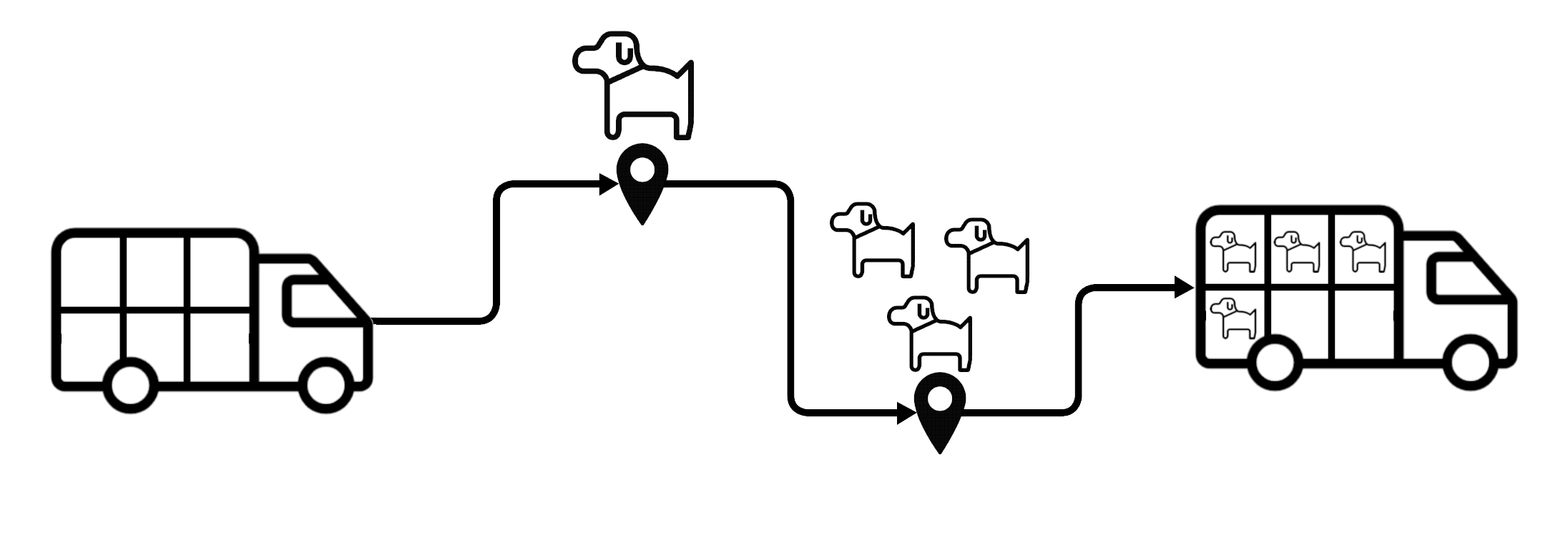
In this example, the load demands of each shipment and the load limits of the
vehicle have the following effects:
- The optimizer **won't have a problem** generating a route for
the vehicle to transport the dogs, since the vehicle can carry up to 6 dogs, and
you are only picking up 4 dogs.
- Having a 6 `dogUnit` load limit on the vehicle also means you
could only carry **two more dogs** on this specific vehicle.
- If the number of the dogs was larger than the load limit, the optimizer would
either **skip one of the pick ups** or assign it to a fitting
vehicle.
Remember **there's no set of predefined types**. In this example, you could
change the load type from dog units to weight units to limit the weight of the
dogs, or change it to linear measurements to limit their width or height. This
flexibility lets you tailor load demands and limits to your specific needs.
### Request example
The following example shows the structure of a basic `optimizeTours` request
incorporating the example scenario values:
```json
{
"model": {
"shipments": [
{
"pickups": [
{
"arrivalLocation": {
"latitude": 37.8024,
"longitude": -122.4058
}
}
],
"deliveries": [
{
"arrivalLocation": {
"latitude": 37.759773,
"longitude": -122.427063
}
}
],
"label": "One bernese mountain dog",
"loadDemands": {
"dogUnit": {
"amount": "1"
}
}
},
{
"pickups": [
{
"arrivalLocation": {
"latitude": 37.7359,
"longitude": -122.5011
}
}
],
"deliveries": [
{
"arrivalLocation": {
"latitude": 37.759773,
"longitude": -122.427063
}
}
],
"label": "Three chihuahuas",
"loadDemands": {
"dogUnit": {
"amount": "3"
}
}
}
],
"vehicles": [
{
"startLocation": {
"latitude": 37.759773,
"longitude": -122.427063
},
"endLocation": {
"latitude": 37.759773,
"longitude": -122.427063
},
"loadLimits": {
"dogUnit": {
"maxLoad": "6"
}
},
"costPerKilometer": 1.0
}
]
}
}
```
Remember that, unlike the case of this example, a shipment can have multiple
load demands, and a vehicle can have multiple load limits, allowing you to
provide complex constraints to take into consideration when optimizing your
fleet's routes.
## Soft load limits
You can set load limits as soft constraints by adding [`softMaxLoad`](https://developers.google.com/maps/documentation/route-optimization/reference/rest/v1/ShipmentModel.md.txt#LoadLimit.FIELDS.soft_max_load) and
[`costPerUnitAboveSoftMax`](https://developers.google.com/maps/documentation/route-optimization/reference/rest/v1/ShipmentModel.md.txt#LoadLimit.FIELDS.cost_per_unit_above_soft_max) on a vehicle's [`loadLimits`](https://developers.google.com/maps/documentation/route-optimization/reference/rest/v1/ShipmentModel.md.txt#Vehicle.FIELDS.load_limits). This allows
the optimizer to exceed the vehicle's maximum load at a cost, prioritizing route
completion over strict adherence to the load limit.
You can use [`maxLoad`](https://developers.google.com/maps/documentation/route-optimization/reference/rest/v1/ShipmentModel.md.txt#LoadLimit.FIELDS.max_load) and [`softMaxLoad`](https://developers.google.com/maps/documentation/route-optimization/reference/rest/v1/ShipmentModel.md.txt#LoadLimit.FIELDS.soft_max_load) together to set both a hard
and a soft load limit. In this case, [`softMaxLoad`](https://developers.google.com/maps/documentation/route-optimization/reference/rest/v1/ShipmentModel.md.txt#LoadLimit.FIELDS.soft_max_load) sets the load that can
be exceeded, and [`maxLoad`](https://developers.google.com/maps/documentation/route-optimization/reference/rest/v1/ShipmentModel.md.txt#LoadLimit.FIELDS.max_load) sets a hard limit that can't be exceeded. When
both are used, [`maxLoad`](https://developers.google.com/maps/documentation/route-optimization/reference/rest/v1/ShipmentModel.md.txt#LoadLimit.FIELDS.max_load) must be larger than [`softMaxLoad`](https://developers.google.com/maps/documentation/route-optimization/reference/rest/v1/ShipmentModel.md.txt#LoadLimit.FIELDS.soft_max_load).
> [!NOTE]
> **Note:** [`softMaxLoad`](https://developers.google.com/maps/documentation/route-optimization/reference/rest/v1/ShipmentModel.md.txt#LoadLimit.FIELDS.soft_max_load) can only be used on routes where vehicle's load changes in one direction only. This means the route must contain either all pickups where the load increases, or all deliveries where the load decreases. Routes with a mix of pickups and deliveries don't support soft load limits.
### Properties
The following table describes the soft constraint properties for load demands
and limits.
| Parent | Property name | Property type | Property description |
|---|---|---|---|
| `loadLimits` | [`softMaxLoad`](https://developers.google.com/maps/documentation/route-optimization/reference/rest/v1/ShipmentModel.md.txt#LoadLimit.FIELDS.soft_max_load) | string (int64 format) | The preferred maximum load for a vehicle. If the vehicle's load exceeds this value, a cost is incurred. |
| `loadLimits` | [`costPerUnitAboveSoftMax`](https://developers.google.com/maps/documentation/route-optimization/reference/rest/v1/ShipmentModel.md.txt#LoadLimit.FIELDS.cost_per_unit_above_soft_max) | number | The cost per unit of load above the `softMaxLoad`. This field is required when using `softMaxLoad`. See the [Cost model](https://developers.google.com/maps/documentation/route-optimization/concepts/costs.md.txt) key concept to learn more about costs. |
### Code sample
The following example shows the structure of the soft constraint properties of
`loadLimits`:
```json
{
"loadLimits": {
"LOAD_TYPE": {
"softMaxLoad": "LOAD_AMOUNT",
"costPerUnitAboveSoftMax": COST_PER_UNIT
}
}
}
```