**European Economic Area (EEA) developers**
> [!NOTE]
> If your billing address is in the European Economic Area, effective on 8 July 2025, the [Google
> Maps Platform EEA Terms of Service](https://cloud.google.com/terms/maps-platform/eea) will apply to your use of the Services. [Learn more](https://developers.google.com/maps/comms/eea/faq.md.txt). In addition, certain content from the Map Tiles API will no longer be returned. [Learn more](https://developers.google.com/maps/comms/eea/map-tiles.md.txt).
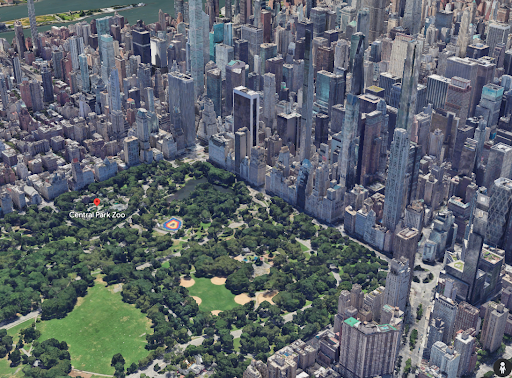Photorealistic 3D Tiles are a 3D mesh textured with high
resolution imagery. They offer high-resolution 3D maps in many of the world's
populated areas. They let you power next-generation, immersive 3D
visualization experiences to help your users:
- Understand an area
- Confidently navigate to a location
- Evaluate new places to make decisions
- Understand how the real world changes
## Before you begin
Before you start using the Photorealistic 3D Tiles API, you need to review the
[Terms of Service](https://cloud.google.com/maps-platform/terms/) and
[Map Tiles API Policies](https://developers.google.com/maps/documentation/tile/policies.md.txt). You may then
start a project with a billing account and enable the Map Tiles API. To
learn more, see [Setup in Cloud Console](https://developers.google.com/maps/documentation/tile/cloud-setup).
## Getting tiles
After obtaining your [API key](https://developers.google.com/maps/documentation/tile/get-api-key.md.txt), you can
begin accessing photorealistic tiles by specifying a root tileset URL to a 3D
Tiles renderer of your choice. After that, all subsequent calls for
photorealistic tiles are automatically made by the renderer as the end user
explores the map.
The render can make at least three hours of tile requests from a single root
tileset request. After reaching this limit, you must make another root tileset
request.
As an example, you can use the following JavaScript code to start exploring 3D
Tiles with [Cesium
JS](https://cesium.com/platform/cesiumjs/).
```html
```
> [!NOTE]
> **Note:** To render Google's photorealistic tiles, you must use a 3D Tiles renderer that supports the display of copyright attribution. You can use **CesiumJS version 1.91** and later, or **Cesium for Unreal version 1.12** and later.