This API is offered in beta, and is not subject to any SLA or deprecation policy. Changes may be made to this API that break backward compatibility.

With ML Kit's GenAI Image Description API, you can generate short content
descriptions for images. This can be useful in the following use cases:
- Generating titles of images
- Generating alternative text (alt text) to help visually impaired users better understand the content of images
- Using generated descriptions as metadata to help users search or organize images
- Utilizing short descriptions of images when the user is unable to look at their screen, such as when they are driving or listening to a podcast
## Key capabilities
- Return a short description for an input image
## Example results
|---|---|
| **Input** | **Output** |
| 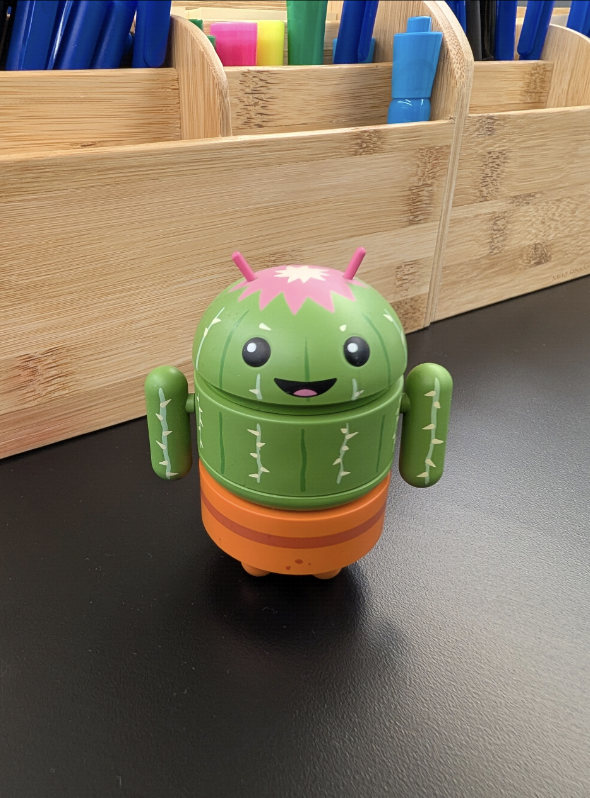 | A small, green Android robot with a cactus-like design sits on a black surface. |
|  | A small, white dog with a black nose and pink tongue runs across a grassy field with a bridge in the background. |
## Getting Started
> [!NOTE]
> **Note:** This API requires Android API level 26 or higher.
To get started with the GenAI Image Description API, add this dependency to your
project's build file.
implementation("com.google.mlkit:genai-image-description:1.0.0-beta1")
To integrate the Image Description API into your app, you will begin by getting
an [`ImageDescriber`](https://developers.google.com/android/reference/com/google/mlkit/genai/imagedescription/ImageDescriber.md.txt) client. You must then check the status of the necessary
on-device model features and download the model if it isn't already on the
device. After preparing your image input in an [`ImageDescriptionRequest`](https://developers.google.com/android/reference/com/google/mlkit/genai/imagedescription/ImageDescriptionRequest.md.txt),
you run the inference using the client to obtain the image description text, and
finally, remember to close the client to release resources.
### Kotlin
```kotlin
// Create an image describer
val options = ImageDescriberOptions.builder(context).build()
val imageDescriber = ImageDescription.getClient(options)
suspend fun prepareAndStartImageDescription(
bitmap: Bitmap
) {
// Check feature availability, status will be one of the following:
// UNAVAILABLE, DOWNLOADABLE, DOWNLOADING, AVAILABLE
val featureStatus = imageDescriber.checkFeatureStatus().await()
if (featureStatus == FeatureStatus.DOWNLOADABLE) {
// Download feature if necessary.
// If downloadFeature is not called, the first inference request
// will also trigger the feature to be downloaded if it's not
// already downloaded.
imageDescriber.downloadFeature(object : DownloadCallback {
override fun onDownloadStarted(bytesToDownload: Long) { }
override fun onDownloadFailed(e: GenAiException) { }
override fun onDownloadProgress(totalBytesDownloaded: Long) {}
override fun onDownloadCompleted() {
startImageDescriptionRequest(bitmap, imageDescriber)
}
})
} else if (featureStatus == FeatureStatus.DOWNLOADING) {
// Inference request will automatically run once feature is
// downloaded.
// If Gemini Nano is already downloaded on the device, the
// feature-specific LoRA adapter model will be downloaded
// very quickly. However, if Gemini Nano is not already
// downloaded, the download process may take longer.
startImageDescriptionRequest(bitmap, imageDescriber)
} else if (featureStatus == FeatureStatus.AVAILABLE) {
startImageDescriptionRequest(bitmap, imageDescriber)
}
}
fun startImageDescriptionRequest(
bitmap: Bitmap,
imageDescriber: ImageDescriber
) {
// Create task request
val imageDescriptionRequest = ImageDescriptionRequest
.builder(bitmap)
.build()
}
// Run inference with a streaming callback
val imageDescriptionResultStreaming =
imageDescriber.runInference(imageDescriptionRequest) { outputText ->
// Append new output text to show in UI
// This callback is called incrementally as the description
// is generated
}
// You can also get a non-streaming response from the request
// val imageDescription = imageDescriber.runInference(
// imageDescriptionRequest).await().description
}
// Be sure to release the resource when no longer needed
// For example, on viewModel.onCleared() or activity.onDestroy()
imageDescriber.close()
```
### Java
```java
// Create an image describer
ImageDescriberOptions options = ImageDescriberOptions.builder(context).build();
ImageDescriber imageDescriber = ImageDescription.getClient(options);
void prepareAndStartImageDescription(
Bitmap bitmap
) throws ExecutionException, InterruptedException {
// Check feature availability, status will be one of the following:
// UNAVAILABLE, DOWNLOADABLE, DOWNLOADING, AVAILABLE
try {
int featureStatus = imageDescriber.checkFeatureStatus().get();
if (featureStatus == FeatureStatus.DOWNLOADABLE) {
// Download feature if necessary.
// If downloadFeature is not called, the first inference request
// will also trigger the feature to be downloaded if it's not
// already downloaded.
imageDescriber.downloadFeature(new DownloadCallback() {
@Override
public void onDownloadCompleted() {
startImageDescriptionRequest(bitmap, imageDescriber);
}
@Override
public void onDownloadFailed(GenAIException e) {}
@Override
public void onDownloadProgress(long totalBytesDownloaded) {}
@Override
public void onDownloadStarted(long bytesDownloaded) {}
});
} else if (featureStatus == FeatureStatus.DOWNLOADING) {
// Inference request will automatically run once feature is
// downloaded.
// If Gemini Nano is already downloaded on the device, the
// feature-specific LoRA adapter model will be downloaded
// very quickly. However, if Gemini Nano is not already
// downloaded, the download process may take longer.
startImageDescriptionRequest(bitmap, imageDescriber);
} else if (featureStatus == FeatureStatus.AVAILABLE) {
startImageDescriptionRequest(bitmap, imageDescriber);
}
} catch (ExecutionException | InterruptedException e) {
e.printStackTrace();
}
}
void startImageDescriptionRequest(
Bitmap bitmap,
ImageDescriber imageDescriber
) {
// Create task request
ImageDescriptionRequest imageDescriptionRequest =
ImageDescriptionRequest.builder(bitmap).build();
// Start image description request with streaming response
imageDescriber.runInference(imageDescriptionRequest, newText -> {
// Append new output text to show in UI
// This callback is called incrementally as the description
// is generated
});
// You can also get a non-streaming response from the request
// String imageDescription = imageDescriber.runInference(
// imageDescriptionRequest).get().getDescription();
}
// Be sure to release the resource when no longer needed
// For example, on viewModel.onCleared() or activity.onDestroy()
imageDescriber.close();
```
## Supported features and limitations
The GenAI Image Description API supports English, with support for more
languages to be added in the future. The API returns one short description of
the image.
Availability of the specific feature configuration (specified by
`ImageDescriberOptions`) may vary depending on the particular device's
configuration and the models that have been downloaded to the device.
The most reliable way for developers to ensure that the intended API feature is
supported on a device with the requested `ImageDescriberOptions` is to call the
[`checkFeatureStatus()`](https://developers.google.com/android/reference/com/google/mlkit/genai/imagedescription/ImageDescriber.md.txt#getBaseModelName()) method. This method provides the definitive status
of feature availability on the device at runtime.
> [!NOTE]
> **Note:** Variations in hardware across different device types may lead to differences in Gemini Nano base model versions and, consequently, in ML Kit GenAI API outputs. LoRA adapters are applied to mitigate the differences.
## Common setup issues
> [!NOTE]
> **Note:** This API is not supported on devices with an [unlocked bootloader](https://source.android.com/docs/core/architecture/bootloader/locking_unlocking).
ML Kit GenAI APIs rely on the Android AICore app to access Gemini Nano. When a device is just setup (including reset), or the AICore app is just reset (e.g. clear data, uninstalled then reinstalled), the AICore app may not have enough time to finish initialization (including downloading latest configurations from server). As a result, the ML Kit GenAI APIs may not function as expected. Here are the common setup error messages you may see and how to handle them:
|---|---|
| **Example error message** | **How to handle** |
| AICore failed with error type 4-CONNECTION_ERROR and error code 601-BINDING_FAILURE: AICore service failed to bind. | This could happen when you install the app using ML Kit GenAI APIs immediately after device setup or when AICore is uninstalled after your app is installed. Updating AICore app then reinstalling your app should fix it. |
| AICore failed with error type 3-PREPARATION_ERROR and error code 606-FEATURE_NOT_FOUND: Feature ... is not available. | This could happen when AICore hasn't finished downloading the latest configurations. When the device is connected to the internet, it usually takes a few minutes to a few hours to update. Restarting the device can speed up the update.
Note that if the device's bootloader is unlocked, you'll also see this error---this API does not support devices with unlocked bootloaders. |
| AICore failed with error type 1-DOWNLOAD_ERROR and error code 0-UNKNOWN: Feature ... failed with failure status 0 and error esz: UNAVAILABLE: Unable to resolve host ... | Keep network connection, wait for a few minutes and retry. |
> [!NOTE]
> **Note:** While various resetting is common to developers, it is much less frequent to users. Also, all these setup failure cases can be caught by the `checkFeatureStatus()` or `checkStatus()` APIs. Make sure to call `checkFeatureStatus()` or `checkStatus()` first before showing any related UI, so your app users won't see these errors in any cases.
## Sample code
- [ML Kit GenAI Samples](https://github.com/googlesamples/mlkit/tree/master/android/genai)