# Minimizing browser reflow
Author: Lindsey Simon, UX Developer
Recommended knowledge: Basic HTML, basic JavaScript, working knowledge of CSS
Reflow is the name of the web browser process for re-calculating the
positions and geometries of elements in the document, for the purpose
of re-rendering part or all of the document. Because reflow is a
user-blocking operation in the browser, it is useful for developers to
understand how to improve reflow time and also to understand the
effects of various document properties (DOM depth, CSS rule efficiency,
different types of style changes) on reflow time. Sometimes reflowing a
single element in the document may require reflowing its parent
elements and also any elements which follow it.
There are a great variety of user actions and possible DHTML changes
that can trigger a reflow. Resizing the browser window, using
JavaScript methods involving [computed styles](http://www.w3.org/TR/1998/REC-CSS2-19980512/cascade.html#computed-value),
adding or removing elements from the DOM, and changing an element's
classes are a few of the things that can trigger reflow. It's also
worth noting that some operations may cause more reflow time than you
might have imagined - consider the following diagram from Steve
Souders' talk "[Even Faster Web Sites](https://developers.google.com/events/io/sessions/EvenFasterWebsites)":
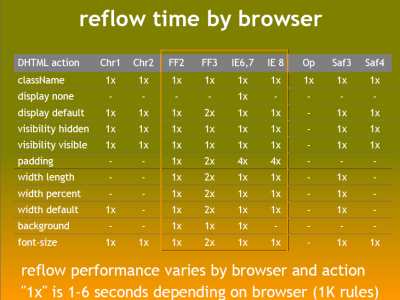
From the table above it's clear that not all changes to the style in
JavaScript cause a reflow in all browsers, and that the time it takes
to reflow varies. It is also somewhat clear that modern browsers are
getting better at reflow times.
At Google, we test the speed of our web pages and applications in a
variety of ways - and reflow is a key factor we consider when adding
features to our UIs. We strive to deliver lively, interactive and
delightful user experiences.
### Guidelines
Here are some easy guidelines to help you minimize reflow in your web pages:
1. Reduce unnecessary DOM depth. Changes at one level in the DOM tree can cause changes at every level of the tree - all the way up to the root, and all the way down into the children of the modified node. This leads to more time being spent performing reflow.
2. Minimize CSS rules, and remove unused CSS rules.
3. If you make complex rendering changes such as animations, do so out of the flow. Use position-absolute or position-fixed to accomplish this.
4. Avoid unnecessary complex CSS selectors - descendant selectors in particular - which require more CPU power to do selector matching.
In this video, Lindsey explains some simple ways to minimize reflow on your pages:
[Video](https://www.youtube.com/watch?v=ZHxbs5WEQzE)
### Additional resources
- [Opera's Repaints and reflows](http://dev.opera.com/articles/view/efficient-javascript/?page=3)
- Satoshi Ueyama's debug-Firefox reflow demos:
- [google.co.jp reflow](http://www.youtube.com/watch?v=nJtBUHyNBxs)
- [mozilla.org reflow](http://www.youtube.com/watch?v=ZTnIxIA5KGw)
- [ja.wikipedia.org reflow](http://www.youtube.com/watch?v=dndeRnzkJDU)
- [Nicole Sullivan on Reflows and Repaints](http://www.stubbornella.org/content/2009/03/27/reflows-repaints-css-performance-making-your-javascript-slow/)
## Feedback
Was this page helpful?
> [!TIP]
> Great! Thank you for the feedback. If you have a specific, answerable question about using PageSpeed Insights, ask the question in English on [Stack
> Overflow](https://stackoverflow.com/questions/tagged/pagespeed-insights). For general questions, feedback, and discussion, start a thread in the [mailing list](https://groups.google.com/forum/#!forum/pagespeed-insights-discuss).
> [!WARNING]
> Sorry to hear that. If you have a specific, answerable question about using PageSpeed Insights, ask the question in English on [Stack
> Overflow](https://stackoverflow.com/questions/tagged/pagespeed-insights). For general questions, feedback, and discussion, start a thread in the [mailing list](https://groups.google.com/forum/#!forum/pagespeed-insights-discuss).