Offer passes support template rendering. If no template is defined, the
default one is used.
## Template definition
A pass template is defined at the class level and it is used to display any object that's
associated with the class. The template defines which fields to display in different
sections of the pass.
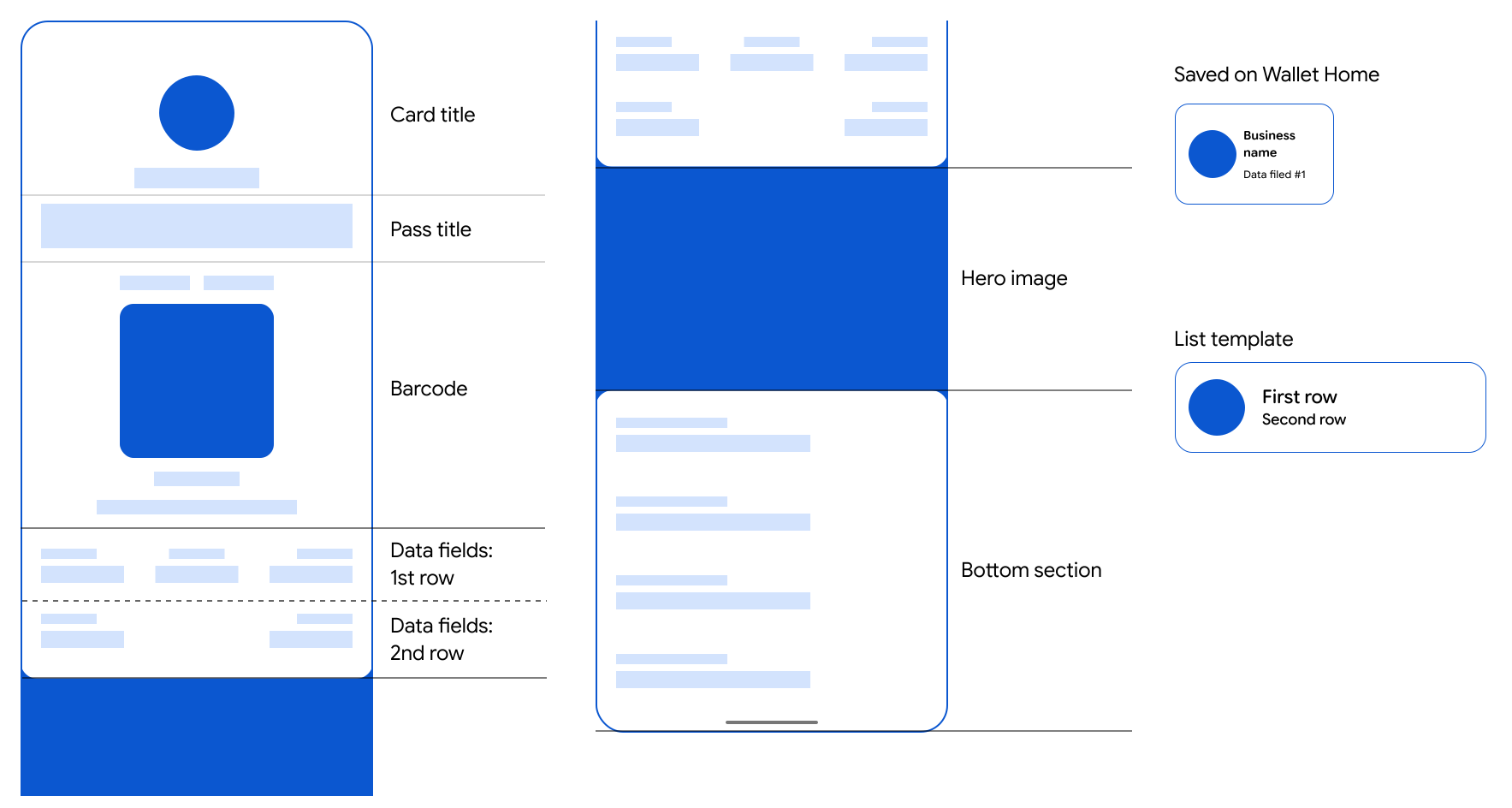
The template is divided into the following sections:
### Android
### Web

### Card title
### Android
|---|---|
| 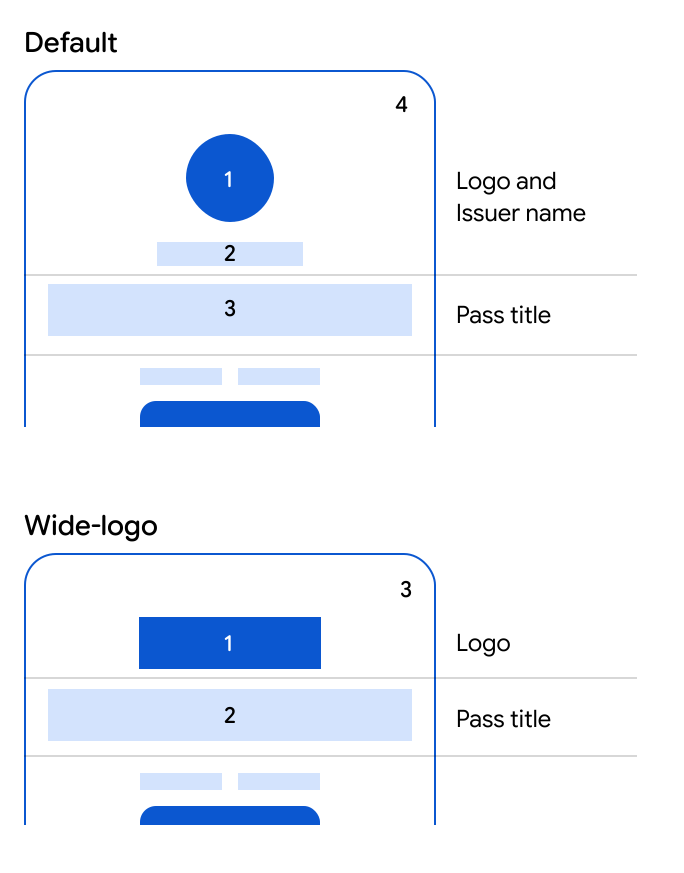 | **Default card title** 1. `class.titleImage` 2. `class.localizedIssuerName` or `class.issuerName` 3. `class.localizedTitle` or `class.title` 4. `class.hexBackgroundColor`
**Wide-logo card title** 1. `class.wideTitleImage` 2. `class.localizedTitle` or `class.title` 3. `class.hexBackgroundColor` |
### Web
|---|---|
|  | **Default card title** 1. `class.titleImage` 2. `class.localizedIssuerName` or `class.issuerName` 3. `class.localizedTitle` or `class.title` 4. `class.hexBackgroundColor`
**Wide-logo card title** 1. `class.wideTitleImage` 2. `class.localizedTitle` or `class.title` 3. `class.hexBackgroundColor` |
The card title section displays the logo, the name of the issuer, and the
offer title. Neither the field references used to populate them nor their
position can be changed.
When the wide logo field is set, on Android devices the default template header with the
logo and issuer name is replaced with the wide logo.
Follow the [wide logo image guidelines](https://developers.google.com/wallet/retail/offers/resources/brand-guidelines.md.txt#wide-logo-image-guidelines) when creating your wide header logo to optimally
display your image on your passes.
### Card template
### Android
### Web

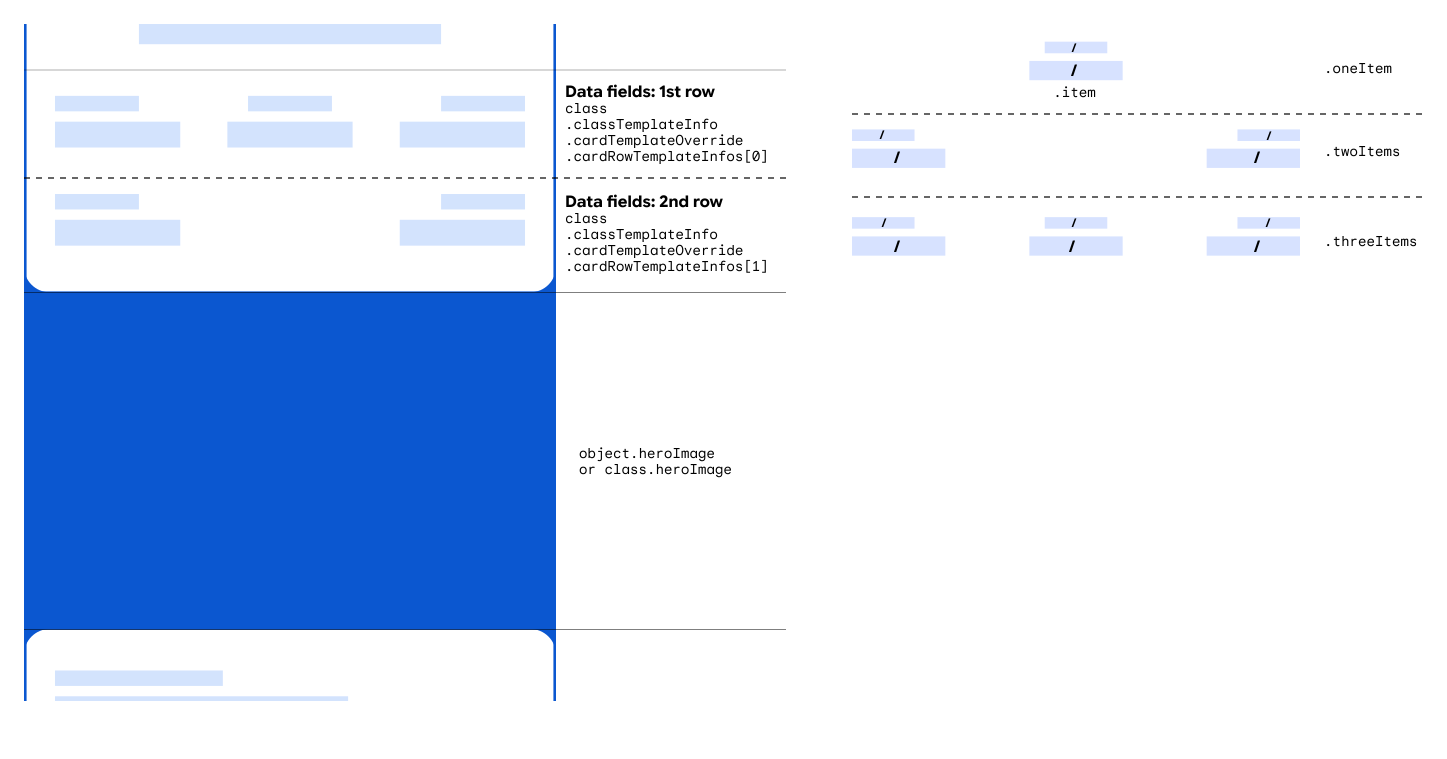
The card template section is used to display extra rows. These rows can
contain text-based structured data fields or text module fields.
You can specify the number of rows that define the number of objects in the
`class.classTemplateInfo.cardTemplateOverride.cardRowTemplateInfos[]`
list. The list requires at least one element and we recommend to use at most
two elements. Each element must be of one of the following types:
- `oneItem`, which accepts one item:
- `item`
- `twoItems`, which accepts two items:
- `startItem`
- `endItem`
- `threeItems`, which accepts three items:
- `startItem`
- `middleItem`
- `endItem`
Each item can be defined as either a single field selector
(`.firstValue`), two field selectors (`.firstValue` and
`.secondValue`), or a predefined item
(`.predefinedItem`). Both the selected field's values and their
respective labels are displayed. When you define two field selectors, the
values of the selected fields are displayed with a "/" separator. The same
goes for the labels of the selected fields. Predefined items are used to
define more complex rendering.
The following code sample shows how to override the card template card row
sections to specify two rows. Each row includes three items that each
reference six class-level `textModuleData` custom fields and their
headers as labels:
### Python
```python
{
... //Rest of class
"textModulesData": [
{
"header": "Label 1",
"body": "Some info 1",
"id": "myfield1"
},
{
"header": "Label 2",
"body": "Some info 2",
"id": "myfield2"
},
{
"header": "Label 3",
"body": "Some info 3",
"id": "myfield3"
},
{
"header": "Label 4",
"body": "Some info 4",
"id": "myfield4"
},
{
"header": "Label 5",
"body": "Some info 5",
"id": "myfield5"
},
{
"header": "Label 6",
"body": "Some info 6",
"id": "myfield6"
}
],
"classTemplateInfo": {
"cardTemplateOverride": {
"cardRowTemplateInfos": [{
"threeItems": {
"startItem": {
"firstValue": {
"fields": [{
"fieldPath": "class.textModulesData['myfield1']"
}]
}
},
"middleItem": {
"firstValue": {
"fields": [{
"fieldPath": "class.textModulesData['myfield2']"
}]
}
},
"endItem": {
"firstValue": {
"fields": [{
"fieldPath": "class.textModulesData['myfield3']"
}]
}
},
}
},{
"threeItems": {
"startItem": {
"firstValue": {
"fields": [{
"fieldPath": "class.textModulesData['myfield4']"
}]
}
},
"middleItem": {
"firstValue": {
"fields": [{
"fieldPath": "class.textModulesData['myfield5']"
}]
}
},
"endItem": {
"firstValue": {
"fields": [{
"fieldPath": "class.textModulesData['myfield6']"
}]
}
},
}
}]
}
}
}
```
### Java
```java
// Rest of class
.setTextModulesData((new ArrayList() {
{
add((new TextModuleData()).setHeader("Label 1")
.setBody("Some info 1")
.setId("myfield1"));
add((new TextModuleData()).setHeader("Label 2")
.setBody("Some info 1")
.setId("myfield2"));
add((new TextModuleData()).setHeader("Label 3")
.setBody("Some info 3")
.setId("myfield3"));
add((new TextModuleData()).setHeader("Label 4")
.setBody("Some info 4")
.setId("myfield4"));
add((new TextModuleData()).setHeader("Label 5")
.setBody("Some info 5")
.setId("myfield5"));
add((new TextModuleData()).setHeader("Label 6")
.setBody("Some info 5")
.setId("myfield6"));
}
}))
.setClassTemplateInfo((new ClassTemplateInfo())
.setCardTemplateOverride((new CardTemplateOverride())
.setCardRowTemplateInfos(new ArrayList() {
{
add((new CardRowTemplateInfo()).setThreeItems((new CardRowThreeItems())
.setStartItem((new TemplateItem()).setFirstValue((new FieldSelector()).setFields(new ArrayList(){
{
add((new FieldReference()).setFieldPath("class.textModulesData['myfield1']"));
}
})))
.setMiddleItem((new TemplateItem()).setFirstValue((new FieldSelector()).setFields(new ArrayList(){
{
add((new FieldReference()).setFieldPath("class.textModulesData['myfield2']"));
}
})))
.setEndItem((new TemplateItem()).setFirstValue((new FieldSelector()).setFields(new ArrayList(){
{
add((new FieldReference()).setFieldPath("class.textModulesData['myfield3']"));
}
})))
));
add((new CardRowTemplateInfo()).setThreeItems((new CardRowThreeItems())
.setStartItem((new TemplateItem()).setFirstValue((new FieldSelector()).setFields(new ArrayList(){
{
add((new FieldReference()).setFieldPath("class.textModulesData['myfield4']"));
}
})))
.setMiddleItem((new TemplateItem()).setFirstValue((new FieldSelector()).setFields(new ArrayList(){
{
add((new FieldReference()).setFieldPath("class.textModulesData['myfield5']"));
}
})))
.setEndItem((new TemplateItem()).setFirstValue((new FieldSelector()).setFields(new ArrayList(){
{
add((new FieldReference()).setFieldPath("class.textModulesData['myfield6']"));
}
})))
));
}
})))
```
### PHP
```php
// Rest of class
$textModulesData1 = new Google_Service_Walletobjects_TextModuleData();
$textModulesData1->setBody("Some info 1");
$textModulesData1->setHeader("Label 1");
$textModulesData1->setId("myfield1");
$textModulesData2 = new Google_Service_Walletobjects_TextModuleData();
$textModulesData2->setBody("Some info 2");
$textModulesData2->setHeader("Label 2");
$textModulesData2->setId("myfield2");
$textModulesData3 = new Google_Service_Walletobjects_TextModuleData();
$textModulesData3->setBody("Some info 3");
$textModulesData3->setHeader("Label 3");
$textModulesData3->setId("myfield3");
$textModulesData4 = new Google_Service_Walletobjects_TextModuleData();
$textModulesData4->setBody("Some info 4");
$textModulesData4->setHeader("Label 4");
$textModulesData4->setId("myfield4");
$textModulesData5 = new Google_Service_Walletobjects_TextModuleData();
$textModulesData5->setBody("Some info 5");
$textModulesData5->setHeader("Label 5");
$textModulesData5->setId("myfield5");
$textModulesData6 = new Google_Service_Walletobjects_TextModuleData();
$textModulesData6->setBody("Some info 6");
$textModulesData6->setHeader("Label 6");
$textModulesData6->setId("myfield6");
$textModulesDatas = array($textModulesData1, $textModulesData2, $textModulesData3,
$textModulesData4, $textModulesData5, $textModulesData6);
$startItemField = new Google_Service_Walletobjects_FieldReference();
$startItemField->setFieldPath("class.textModulesData['myfield1']");
$startItemFirstValue = new Google_Service_Walletobjects_FieldSelector();
$startItemFirstValue->setFields(array($startItemField));
$startItem = new Google_Service_Walletobjects_TemplateItem();
$startItem->setFirstValue($startItemFirstValue);
$middleItemField = new Google_Service_Walletobjects_FieldReference();
$middleItemField->setFieldPath("class.textModulesData['myfield2']");
$middleItemFirstValue = new Google_Service_Walletobjects_FieldSelector();
$middleItemFirstValue->setFields(array($middleItemField));
$middleItem = new Google_Service_Walletobjects_TemplateItem();
$middleItem->setFirstValue($middleItemFirstValue);
$endItemField = new Google_Service_Walletobjects_FieldReference();
$endItemField->setFieldPath("class.textModulesData['myfield3']");
$endItemFirstValue = new Google_Service_Walletobjects_FieldSelector();
$endItemFirstValue->setFields(array($endItemField));
$endItem = new Google_Service_Walletobjects_TemplateItem();
$endItem->setFirstValue($endItemFirstValue);
$cardRowTemplate = new Google_Service_Walletobjects_CardRowThreeItems();
$cardRowTemplate->setStartItem($startItem);
$cardRowTemplate->setMiddleItem($middleItem);
$cardRowTemplate->setEndItem($endItem);
$cardRowTemplateInfo1 = new Google_Service_Walletobjects_CardRowTemplateInfo();
$cardRowTemplateInfo1->setThreeItems($cardRowTemplate);
$startItemField2 = new Google_Service_Walletobjects_FieldReference();
$startItemField2->setFieldPath("class.textModulesData['myfield4']");
$startItemFirstValue2 = new Google_Service_Walletobjects_FieldSelector();
$startItemFirstValue2->setFields(array($startItemField2));
$startItem2 = new Google_Service_Walletobjects_TemplateItem();
$startItem2->setFirstValue($startItemFirstValue2);
$middleItemField2 = new Google_Service_Walletobjects_FieldReference();
$middleItemField2->setFieldPath("class.textModulesData['myfield5']");
$middleItemFirstValue2 = new Google_Service_Walletobjects_FieldSelector();
$middleItemFirstValue2->setFields(array($middleItemField2));
$middleItem2 = new Google_Service_Walletobjects_TemplateItem();
$middleItem2->setFirstValue($middleItemFirstValue2);
$endItemField2 = new Google_Service_Walletobjects_FieldReference();
$endItemField2->setFieldPath("class.textModulesData['myfield6']");
$endItemFirstValue2 = new Google_Service_Walletobjects_FieldSelector();
$endItemFirstValue2->setFields(array($endItemField2));
$endItem2 = new Google_Service_Walletobjects_TemplateItem();
$endItem2->setFirstValue($endItemFirstValue2);
$cardRowTemplate2 = new Google_Service_Walletobjects_CardRowThreeItems();
$cardRowTemplate2->setStartItem($startItem2);
$cardRowTemplate2->setMiddleItem($middleItem2);
$cardRowTemplate2->setEndItem($endItem2);
$cardRowTemplateInfo2 = new Google_Service_Walletobjects_CardRowTemplateInfo();
$cardRowTemplateInfo2->setThreeItems($cardRowTemplate2);
$cardTemplateOverride = new Google_Service_Walletobjects_CardTemplateOverride();
$cardTemplateOverride->setCardRowTemplateInfos(array($cardRowTemplateInfo1,
$cardRowTemplateInfo2));
$classTemplateInfo = new Google_Service_Walletobjects_ClassTemplateInfo();
$classTemplateInfo->setCardTemplateOverride($cardTemplateOverride);
$payload->setTextModulesData($textModulesDatas);
$payload->setClassTemplateInfo($classTemplateInfo);
```
The code creates a pass with the following code template section format:

If an item is empty, it isn't displayed. For more details, see
[Field References](https://developers.google.com/wallet/retail/offers/resources/template.md.txt#field-references). If all items in a row are
empty, the row isn't displayed. If some but not all items in a row are empty,
the non-empty items are re-arranged and displayed as a row with fewer items.
If you don't override the card template, the default number of rows, the
default number of items, and the default field references are used. For more
details, see [Default template](https://developers.google.com/wallet/retail/offers/resources/template.md.txt#default-template).
After you define a
[Hero Image](https://developers.google.com/wallet/retail/offers/resources/brand-guidelines.md.txt#hero-images), it can appear after the first row, if there are multiple rows in the
`cardRowTemplateInfos` list, or above the row, if there is only
one.
### Card barcode
### Android
|---|---|
| 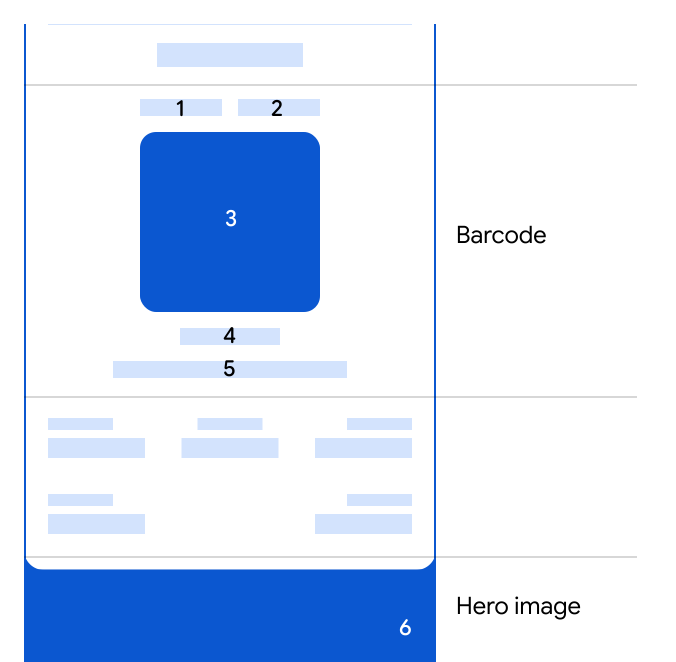 | 1. `class.classTemplateInfo` `.cardBarcodeSectionDetails` `.firstTopDetail` 2. `class.classTemplateInfo` `.cardBarcodeSectionDetails` `.secondTopDetail` 3. `object.barcode.type` and `object.barcode.value` 4. `object.barcode.alternateText` or `object.barcode.value` 5. `class.classTemplateInfo` `.cardBarcodeSectionDetails` `.firstBottomDetail` 6. `object.heroImage` or `class.heroImage` |
### Web
|---|---|
|  | 1. `class.classTemplateInfo` `.cardBarcodeSectionDetails` `.firstTopDetail` 2. `class.classTemplateInfo` `.cardBarcodeSectionDetails` `.secondTopDetail` 3. `object.barcode.type` and `object.barcode.value` 4. `object.barcode.alternateText` or `object.barcode.value` 5. `class.classTemplateInfo` `.cardBarcodeSectionDetails` `.firstBottomDetail` |
The card barcode section is used to display extra text or images preceding and following the
barcode. None of the fields in this section are required.
There are three field selectors that can be used to define two side-by-side fields
preceding and one following the barcode. These are displayed with no label and can either be
text-based structured data fields, text module fields, or image module fields. If you
use images, these should follow the [brand guidelines](https://developers.google.com/wallet/retail/offers/resources/brand-guidelines.md.txt).
The barcode is defined by a type and a value. For a list of supported barcode types,
see [Reference](https://developers.google.com/wallet/retail/offers/rest/v1/Barcode#BarcodeType). Furthermore, a text can be
shown right underneath the barcode. This text can make it easier to scan barcodes, among
other uses.
The following code sample shows how to override the barcode section of a pass to display
an image above the barcode:
### Python
```python
#... rest of class
"imageModulesData": [
{
"mainImage": {
"sourceUri": {
"uri": "http://farm4.staticflickr.com/3738/12440799783_3dc3c20606_b.jpg",
"description": "Coffee"
}
},
"id": "myimage"
}
],
"classTemplateInfo": {
"cardBarcodeSectionDetails": {
"firstTopDetail": {
"fieldSelector": {
"fields": [
{
"fieldPath": "class.imageModulesData['myimage'].mainImage"
}
]
}
}
}
}
}
```
### Java
```java
//... rest of class
.setImageModulesData((new ArrayList() {
{
add((new ImageModuleData())
.setId("myimage")
.setMainImage((new Image()).setSourceUri((new ImageUri()).setDescription("Coffee beans")
.setUri("http://farm4.staticflickr.com/3738/12440799783_3dc3c20606_b.jpg"))));
}
}))
.setClassTemplateInfo((new ClassTemplateInfo())
.setCardBarcodeSectionDetails((new CardBarcodeSectionDetails())
.setFirstTopDetail((new BarcodeSectionDetail())
.setFieldSelector((new FieldSelector())
.setFields((new ArrayList(){
{
add((new FieldReference()).setFieldPath("class.imageModulesData['myimage'].mainImage"));
}
})))))
}
```
### PHP
```php
//... rest of class
$imageUri = new Google_Service_Walletobjects_ImageUri();
$imageUri->setUri("https://farm8.staticflickr.com/7340/11177041185_a61a7f2139_o.jpg");
$imageUri->setDescription("Baconrista flights image");
$image = new Google_Service_Walletobjects_Image();
$image->setSourceUri($imageUri);
$imageModulesData = new Google_Service_Walletobjects_ImageModuleData();
$imageModulesData->setMainImage($image);
$imageModulesData->setId("myimage");
$cardBarcodeFieldReference = new Google_Service_Walletobjects_FieldReference();
$cardBarcodeFieldReference->setFieldPath("class.imageModulesData['myimage'].mainImage");
$cardBarcodeFieldSelector = new Google_Service_Walletobjects_FieldSelector();
$cardBarcodeFieldSelector->setFields(array($cardBarcodeFieldReference));
$cardBarcodeDetail = new Google_Service_Walletobjects_BarcodeSectionDetail();
$cardBarcodeDetail->setFieldSelector($cardBarcodeFieldSelector);
$cardBarcodeSectionDetails = new Google_Service_Walletobjects_CardBarcodeSectionDetails();
$cardBarcodeSectionDetails->setFirstTopDetail($cardBarcodeDetail);
$classTemplateInfo = new Google_Service_Walletobjects_ClassTemplateInfo();
$classTemplateInfo->setCardBarcodeSectionDetails($cardBarcodeSectionDetails);
$payload->setClassTemplateInfo($classTemplateInfo);
$payload->setImageModuleData($imageModulesData);
```
The code creates a pass with the following barcode section format:

If you don't override the barcode section, the default barcode fields are used.
For more information, see [Default template](https://developers.google.com/wallet/retail/offers/resources/template.md.txt#default-template).
### Bottom section
### Android
|---|---|
| 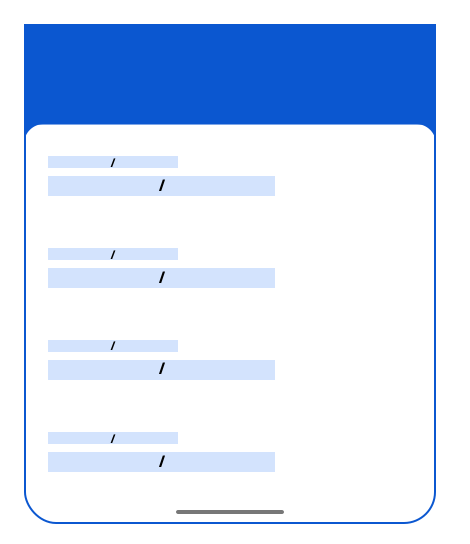 | - `class.classTemplateInfo.detailsTemplateOverride` `.detailsItemInfos[0].item` - `class.classTemplateInfo.detailsTemplateOverride` `.detailsItemInfos[1].item` - `class.classTemplateInfo.detailsTemplateOverride` `.detailsItemInfos[2].item` - `class.classTemplateInfo.detailsTemplateOverride` `.detailsItemInfos[3].item` - ... |
### Web
|---|---|
|  | - `class.classTemplateInfo.detailsTemplateOverride` `.detailsItemInfos[0].item` - `class.classTemplateInfo.detailsTemplateOverride` `.detailsItemInfos[1].item` - `class.classTemplateInfo.detailsTemplateOverride` `.detailsItemInfos[2].item` - `class.classTemplateInfo.detailsTemplateOverride` `.detailsItemInfos[3].item` - ... |
The bottom section is a list of items
`class.classTemplateInfo.detailsTemplateOverride.detailsItemInfos[]`. The items can
contain any kind of structured data fields, text module fields, link module fields, image module
fields, or messages.
Each item can be defined as either a single field selector (`.firstValue`),
two field selectors (`.firstValue` and `.secondValue`), or a
predefined item (`.predefinedItem`). Both the selected field's values and their
respective labels are displayed. When you define two field selectors, the values of the
selected fields are displayed with a "/" separator. The same goes for the labels of the
selected fields. Predefined items are used to define more complex rendering. Image module fields
are rendered at full-width without a label.
The following code sample shows how to override the bottom section of the pass to show a single
`linksModuleData` field with its label:
### Python
```python
//... rest of class
"linksModuleData": {
"uris": [
{
"uri": "http://maps.google.com/",
"description": "Nearby Locations",
"id":"mylink"
}
]
},
"classTemplateInfo": {
"detailsTemplateOverride": {
"detailsItemInfos": [
{
"item":{
"firstValue": {
"fields": [{
"fieldPath": "class.linksModuleData.uris['mylink']"
}]
}
}
}
]
}
}
//... rest of class
```
### Java
```java
//... rest of class
.setLinksModuleData((new ArrayList() {
{
add((new LinksModuleData()).setDescription("Nearby Locations")
.setUri("http://maps.google.com/")
.setId("mylink"));
}))
.setClassTemplateInfo((new ClassTemplateInfo())
.setDetailsTemplateOverride((new DetailsTemplateOverride())
.setDetailsItemInfos(new ArrayList(){
{
add((new DetailsItemInfo())
.setItem((new TemplateItem()).setFirstValue((new FieldSelector()).setFields(new ArrayList(){
{
add((new FieldReference()).setFieldPath("class.linksModuleData.uris['mylink']"));
}
}))));
}
}))
//... rest of class
```
### PHP
```php
//... rest of class building
$locationUri = new Google_Service_Walletobjects_Uri();
$locationUri->setUri("http://maps.google.com/");
$locationUri->setDescription("Nearby Locations");
$locationUri->setId("mylink");
$linksModuleData = new Google_Service_Walletobjects_LinksModuleData();
$linksModuleData->setUris(array($locationUri));
$detailItemFieldReference = new Google_Service_Walletobjects_FieldReference();
$detailItemFieldReference->setFieldPath("class.linksModuleData.uris['mylink']");
$detailItemFieldSelector = new Google_Service_Walletobjects_FieldSelector();
$detailItemFieldSelector->setFields(array($detailItemFieldReference));
$detailItem = new Google_Service_Walletobjects_TemplateItem();
$detailItem->setFirstValue($detailItemFieldSelector);
$detailsItemInfo = new Google_Service_Walletobjects_DetailsItemInfo();
$detailsItemInfo->setItem($detailItem);
$cardDetailsTemplateOverride = new Google_Service_Walletobjects_DetailsTemplateOverride();
$cardDetailsTemplateOverride->setDetailsItemInfos(array($detailsItemInfo));
$classTemplateInfo = new Google_Service_Walletobjects_ClassTemplateInfo();
$classTemplateInfo->setDetailsTemplateOverride($cardDetailsTemplateOverride);
$payload->setClassTemplateInfo($classTemplateInfo);
$payload->setLinksModuleData($linksModuleData);
//... rest of class
```
The code creates a pass with the following bottom section format:

If an item is empty, it isn't displayed. For more details, see
[Field References](https://developers.google.com/wallet/retail/offers/resources/template.md.txt#field-references).
If you don't override the bottom section, the default list of reference fields in the
default order is displayed. For more information,
see [Default template](https://developers.google.com/wallet/retail/offers/resources/template.md.txt#default-template).
### List template
|---|---|
|  | 1. `class.classTemplateInfo.listTemplateOverride` `.firstRowOption.fieldOption.fields[]` 2. `class.classTemplateInfo.listTemplateOverride` `.secondRowOption.fields[]` 3. `class.titleImage` 4. `class.hexBackgroundColor` |
The list template section is used to select what field to display in the "Passes" view of
the Google Wallet app. The pass is represented in the list with the logo, background color, and
three rows.
The following code sample shows how to override the list template of a pass to show a
single passes' object expiration date field in the first row of the list template:
### Python
```python
#... rest of class definition
"classTemplateInfo": {
"listTemplateOverride":{
"firstRowOption": {
"fieldOption":{
"fields": [{
"fieldPath": "object.validTimeInterval.end"
}]
}
}
}
}
}
```
### Java
```java
//... rest of class
.setClassTemplateInfo((new ClassTemplateInfo())
.setListTemplateOverride((new ListTemplateOverride())
.setFirstRowOption((new FirstRowOption())
.setFieldOption((new FieldSelector()).setFields(new ArrayList(){
{
add((new FieldReference()).setFieldPath("object.validTimeInterval.end"));
}
}))))
//... rest of class
```
### PHP
```php
//... rest of class
$fieldReference = new Google_Service_Walletobjects_FieldReference();
$fieldReference->setFieldPath("object.validTimeInterval.end");
$fieldOption = new Google_Service_Walletobjects_FieldSelector();
$fieldOption->setFields(array($fieldReference));
$firstRowOption = new Google_Service_Walletobjects_FirstRowOption();
$firstRowOption->setFieldOption($fieldOption);
$listTemplateOverride = new Google_Service_Walletobjects_ListTemplateOverride();
$listTemplateOverride->setFirstRowOption($firstRowOption);
$classTemplateInfo = new Google_Service_Walletobjects_ClassTemplateInfo();
$classTemplateInfo->setListTemplateOverride($listTemplateOverride);
$payload->setClassTemplateInfo($classTemplateInfo);
//... rest of class
```
The code creates a pass with the following list template rendition:

The three rows can be defined with a field selector.
The fields are displayed with no label.
### Labels
All structured data fields have a label provided by Google. Google is responsible for
providing a translation for each of these labels in all the supported languages.
You can customize some of these labels using one of
the `class.customLabel` fields. When you customize a label,
you become responsible for providing translations for that specific label in all the languages
that you wish to support.
### Field references
Field references are used in different parts of the template with the
form `class.classTemplateInfo.*.fields[]`. A field reference contains a list
of paths to structured data fields, text module fields, link module fields, image module
fields, or messages.
Not all types of paths are allowed in every field reference. For example, some field
references only allow paths to text-based structured data fields or text module fields.
Text-based structured fields are structured data fields of type string, localized string,
date, or money.
The list can be used to implement a fallback logic. This means that if the first path in
the list resolves to an empty field, the next path is evaluated. The fallback logic is
mainly targeted at text-based structured data fields or text module fields. Do not mix
different types of fields in the same list. Use the fallback logic with caution and only
in specific situations when you expect a consistent pattern of fields that exist in some
objects but not others. Most of the time, it's easier to create separate classes for
separate use cases.
If all paths in a field reference list resolve to empty fields, the item that uses the
field reference isn't displayed. If you want the item that uses the field reference to
always be present, make sure that at least one path isn't empty. We recommend that you
set a field to a special character, such as '-', to represent a null value, even if some
fields allow strings with just a space.
In order to reference a field contained in a list, you can use the index of the field in
the list or, in most cases, you can use a reference ID. Items of a list that can be referenced
by ID have a `.id` field. We recommend that you use a reference ID over the index
of the field in the list when available.
Here is an example of how to reference fields contained in a list.
- `object.imageModulesData[0].id = my-first-id`
- `object.imageModulesData[1].id = my-second-id`
- `class.detailsTemplateOverride.detailsItemInfos[0].item.firstValue.fields[0].fieldPath = object.imageModulesData['my-second-id']`
- `class.detailsTemplateOverride.detailsItemInfos[1].item.firstValue.fields[0].fieldPath = object.imageModulesData[0]`
In this case, the first item in the details section of the pass is the second image declared
in the object. While, the second item in the details section of the pass is the first image
declared in the object.
## Default template
### Android
|---|---|
| 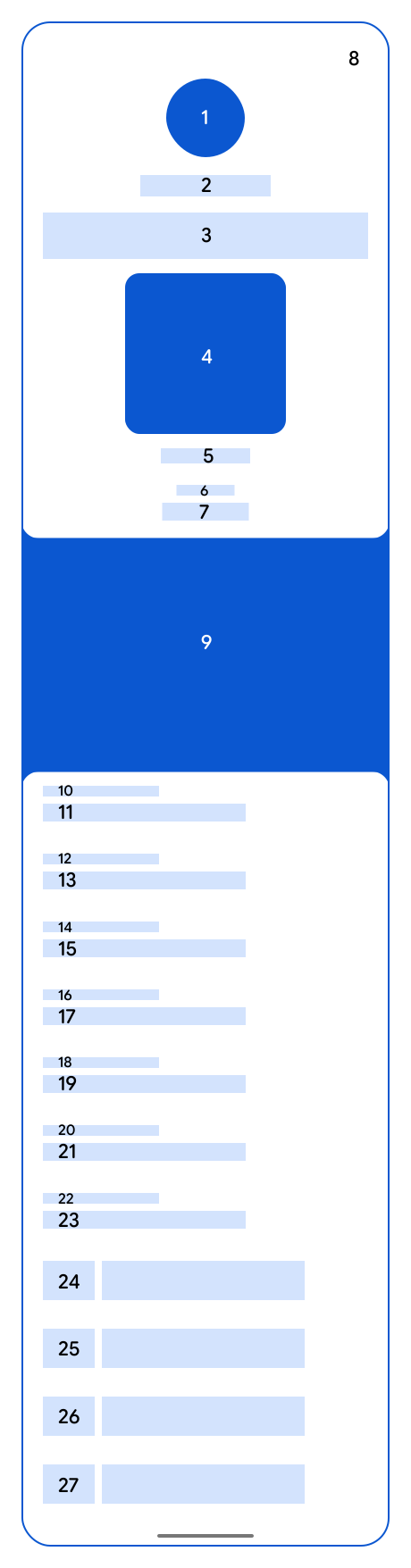 | 1. `class.titleImage` 2. `class.localizedIssuerName` or `class.issuerName` 3. `class.localizedTitle` or `class.title` 4. `object.barcode.type` and `object.barcode.value` 5. `object.barcode.alternateText` or `object.barcode.value` 6. EXPIRES 7. `object.validTimeInterval.end` 8. `class.hexBackgroundColor` 9. `object.heroImage` or `class.heroImage` 10. FROM 11. `class.localizedProvider` or `class.provider` 12. DETAILS 13. `class.localizedDetails` or `class.details` 14. DISCLAIMER 15. `class.localizedFinePrint` or `class.finePrint` 16. `class.messages[].header` 17. `class.messages[].body` 18. `object.messages[].header` 19. `object.messages[].body` 20. `class.textModulesData[0..9].header` 21. `class.textModulesData[0..9].body` 22. `object.textModulesData[0..9].header` 23. `object.textModulesData[0..9].body` 24. `class.linksModuleData.uris[].description` 25. `object.linksModuleData.uris[].description` 26. `class.homepageUri` 27. `class.helpUri` |
### Web
|---|---|
|  | 1. `class.titleImage` 2. `class.localizedIssuerName` or `class.issuerName` 3. `class.localizedTitle` or `class.title` 4. `object.barcode.type` and `object.barcode.value` 5. `object.barcode.alternateText` or `object.barcode.value` 6. EXPIRES 7. `object.validTimeInterval.end` 8. `class.hexBackgroundColor` 9. `object.heroImage` or `class.heroImage` 10. FROM 11. `class.localizedProvider` or `class.provider` 12. DETAILS 13. `class.localizedDetails` or `class.details` 14. DISCLAIMER 15. `class.localizedFinePrint` or `class.finePrint` 16. `class.messages[].header` 17. `class.messages[].body` 18. `object.messages[].header` 19. `object.messages[].body` 20. `class.textModulesData[0..9].header` 21. `class.textModulesData[0..9].body` 22. `object.textModulesData[0..9].header` 23. `object.textModulesData[0..9].body` 24. `class.linksModuleData.uris[].description` 25. `object.linksModuleData.uris[].description` 26. `class.homepageUri` 27. `class.helpUri` |
> [!NOTE]
> **Note:** This image includes all fields necessary to complete the default offer pass template. However, not all of these fields are required to create a valid `OfferClass` or `OfferObject`. Refer to the `OfferClass` `insert` and the `OfferObject` `insert` methods for a list of required fields.
For image module fields, we show one and only one image module field from the class and one and
only one image module field from the object. If you need more than one image module field at
either level, override the default template.
For text module fields, we only show a maximum of 20 text module fields from the class and 20
text module fields from the object. The fields are displayed in the same order in which they are
defined in the array. If you need more than 20 text module fields at either level, override the
default template.
For messages, we only show a maximum of 20 messages from the class and 20 messages from the
the object. We don't guarantee the order of the messages. If you need more than 20 messages at
either level, or a guarantee for any orders, override the default template.
For the links module field, there is no limit on the number of uris you can define. Uris are
diplayed grouped in the following order for each level (class or object):
1. Map coordinates
2. Telephone numbers
3. Email addresses
4. Web pages
For each group, URIs are displayed in the same order in which they are defined in the array.
If you need a different ordering, override the default template.
|---|---|
|  | 1. `class.localizedIssuerName` or `class.issuerName` 2. `class.localizedShortTitle` or `class.shortTitle` or `class.localizedTitle` or `class.title` 3. `class.titleImage` 4. `class.hexBackgroundColor` |