This page describes how to connect a Google Chat app with a service
or tool outside of Google Chat. While Chat apps are powerful on
their own, they often work in concert with other systems and require companion
applications to connect accounts, authorize data access, display additional
data, or configure user preferences.
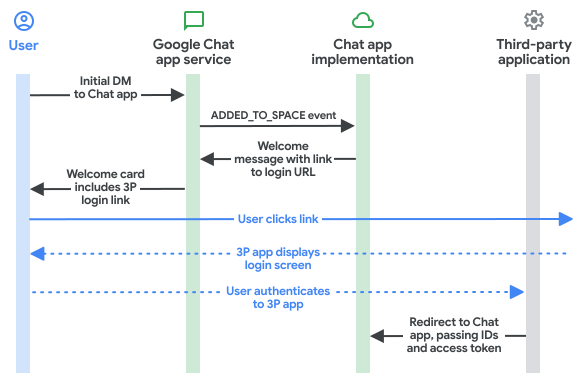
To authenticate users with a third-party service or OAuth flow, your
Chat app performs the following steps:
1. [Detect when authorization or configuration is required](https://developers.google.com/workspace/chat/connect-web-services-tools#detect-auth).
2. [Return a basic authorization card](https://developers.google.com/workspace/chat/connect-web-services-tools#basic-auth-card) that prompts the user to sign in or configure the service.
3. [Redirect to the completion URI](https://developers.google.com/workspace/chat/connect-web-services-tools#complete-configuration) so Google Chat automatically retries the original interaction after the user completes authorization.
## Prerequisites
### HTTP
A Google Chat app that receives and responds to
[user interactions](https://developers.google.com/workspace/chat/receive-respond-interactions).
To build one, complete the
[HTTP quickstart](https://developers.google.com/workspace/chat/quickstart/gcf-app).
> [!NOTE]
> **Note:** The code samples in this guide are written to run as a [Google Cloud
> Run function](https://cloud.google.com/functions/docs/quickstarts) for Node.js.
### Apps Script
A Google Chat app that receives and responds to
[user interactions](https://developers.google.com/workspace/chat/receive-respond-interactions).
To build one, complete the
[Apps Script quickstart](https://developers.google.com/workspace/chat/quickstart/apps-script-app).
## Detect that authorization is required
When interacting with your Chat app, users might not
be authorized to access a protected resource for a variety of reasons, such as
the following:
- An access token to connect to the third-party service hasn't been generated yet or is expired.
- The access token doesn't cover the requested resource.
- The access token doesn't cover the request's required scopes.
Your Chat app should detect these cases so that users
can sign in and authorize access to your service.
If you're building in Apps Script, you can use the
[OAuth2 for Google Apps Script library](https://github.com/googlesamples/apps-script-oauth2)
(or the [OAuth1 version](https://github.com/googlesamples/apps-script-oauth1)),
where the `hasAccess` function checks whether the user has authorized access to
a service. Alternatively, when using
[`UrlFetchApp.fetch`](https://developers.google.com/apps-script/reference/url-fetch/url-fetch-app#fetch(String,Object))
requests, you can set the `muteHttpExceptions` parameter to `true` to inspect
the response code and content in the returned
[`HttpResponse`](https://developers.google.com/apps-script/reference/url-fetch/http-response) object.
## Prompt users with a basic authorization card
When your Chat app detects that authorization or
configuration is required, return an `AuthorizationError` response to display a
private basic authorization card to the user.
> [!NOTE]
> **Note:** Custom authorization cards aren't supported in Chat. To prompt Chat users to sign in, your Chat app must return a basic authorization card.
The following image shows an example of Google's basic authorization card:
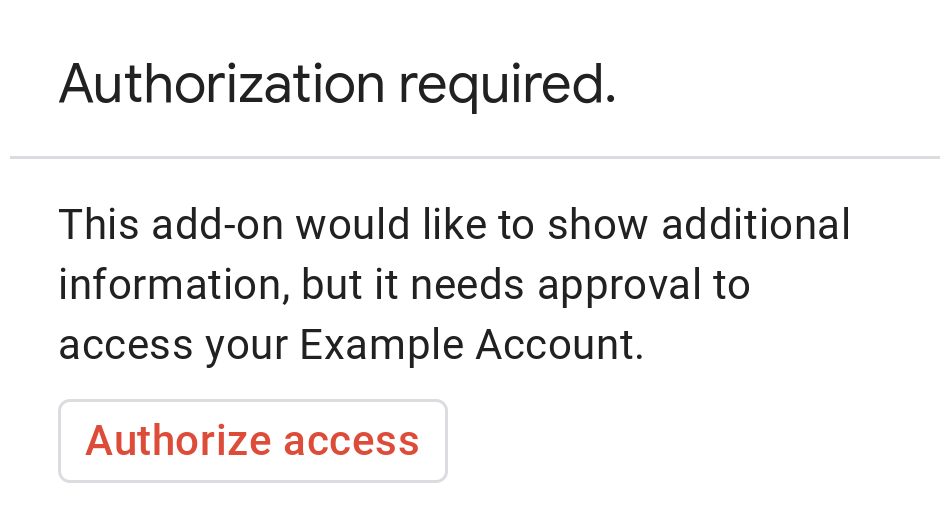 **Figure 1**: Basic authorization prompt for Example Account. The prompt says that the Chat app would like to show additional information, but it needs the user's approval to access the account.
To prompt users with a basic authorization card, return an
`AuthorizationError` object:
### HTTP
Return the following JSON response:
{
"basic_authorization_prompt": {
"authorization_url": "AUTHORIZATION_URL",
"resource": "RESOURCE_DISPLAY_NAME"
}
}
### Apps Script
CardService.newAuthorizationException()
.setAuthorizationUrl('AUTHORIZATION_URL')
.setResourceDisplayName('RESOURCE_DISPLAY_NAME')
.throwException();
Replace the following:
- `AUTHORIZATION_URL`: The HTTPS URL for the web app that handles authentication, authorization, or configuration.
- `RESOURCE_DISPLAY_NAME`: The display name for the protected resource or service. This name is displayed to the user on the authorization prompt. For example, if your `RESOURCE_DISPLAY_NAME` is `Example Account`, the prompt says that the app needs approval to access your `Example Account`.
## Complete the configuration request
In Chat, the user can complete the authorization process and
have Chat automatically retry the original interaction without a
manual refresh. Chat supports automatic retry if the
[trigger](https://developers.google.com/workspace/chat/receive-respond-interactions#triggers) is
**Message** , **Added to space** , or **App command**.
For these triggers, your Chat app receives a
completion redirect URI (`configCompleteRedirectUri` / `completeRedirectUri`) in
the [event payload](https://developers.google.com/workspace/chat/receive-respond-interactions#payload):
- **Message** : `chat.messagePayload.configCompleteRedirectUri`
- **Added to space** : `chat.addedToSpacePayload.configCompleteRedirectUri`
- **App command** : `chat.appCommandPayload.configCompleteRedirectUri`
You must encode this redirect URI in your `AUTHORIZATION_URL` and
redirect the user's browser to it after the authorization flow completes.
Redirecting to this URL signals to Google Chat that the authorization or
configuration request was fulfilled.
When a user is successfully redirected to the completion redirect URI provided
in the original event payload, Google Chat performs the following steps:
1. Erases the private authorization prompt displayed to the initiating user.
2. Converts the original message to public, making it visible to other members of the space.
3. Sends the original event object to your Chat app a second time.
If you don't redirect to the completion redirect URI, the user can still
complete the authorization flow, but Google Chat doesn't automatically retry
the previous execution and the user must manually invoke your
Chat app again.
Visiting a completion redirect URI only affects a single user interaction. If a
user has messaged a Chat app multiple times and
received multiple prompts, completing the authentication and configuration
process for one prompt only retries that specific interaction.
## Authenticate the Chat user outside of Chat
When linking to a URL outside of Chat (such as an OAuth web
callback), you often need to correlate the external web session with the user
identity in Chat. We recommend that you guard the destination
web app with [Google Sign-in](https://developers.google.com/identity).
Use the
[identity token](https://developers.google.com/identity/sign-in/web/backend-auth)
issued during sign-in to get the user ID. The `sub` claim contains the user's
unique Google ID and can be correlated with the user resource name (`chat.user.name`)
from Google Chat.
> [!CAUTION]
> **Caution:** Always [validate the integrity](https://developers.google.com/identity/sign-in/web/backend-auth#verify-the-integrity-of-the-id-token) of the token before accepting the asserted user ID.
To correlate the `sub` claim with a Google Chat `users/{user}` resource name,
prepend the `sub` claim value with `users/`. For example, a `sub` claim value
of `123` corresponds to `users/123` in event objects sent to your
Chat app.
## Code samples
The following code samples demonstrate how a Chat app
can request offline OAuth2 credentials using a basic authorization card, store
them in a database, redirect to the completion URI, and make API calls with
[user authentication](https://developers.google.com/workspace/guides/auth-overview):
### Node.js
[View on GitHub](https://github.com/googleworkspace/add-ons-samples/tree/main/node/chat/connectivity-app)
### Python
[View on GitHub](https://github.com/googleworkspace/add-ons-samples/tree/main/python/chat/connectivity-app)
### Java
[View on GitHub](https://github.com/googleworkspace/add-ons-samples/tree/main/java/chat/connectivity-app)
### Apps Script
[View on GitHub](https://github.com/googleworkspace/add-ons-samples/tree/main/apps-script/chat/connectivity-app)
## Related topics
- [Receive and respond to user interactions](https://developers.google.com/workspace/chat/receive-respond-interactions)
- [Authenticate and authorize Google Chat apps and Google Chat API requests](https://developers.google.com/workspace/chat/authenticate-authorize)
- [Connect your Google Workspace add-on to a third-party service](https://developers.google.com/workspace/add-ons/guides/connect-third-party-service)
## Chat apps that aren't add-ons: Connect a Chat app with other services and tools
If you maintain a Chat app that isn't a
Google Workspace add-on, your Chat app requests
configuration using an `actionResponse` of type `REQUEST_CONFIG` and reads
`configCompleteRedirectUrl` from the top-level
[`Event`](https://developers.google.com/workspace/chat/api/reference/rest/v1/Event) object.
To upgrade a Chat app that isn't an
add-on to the Google Workspace add-ons framework, see
[Convert a Google Chat app to a Google Workspace add-on](https://developers.google.com/workspace/chat/convert).
### Request configuration from a user in a Chat app that isn't an add-on
In a Chat app that isn't an
add-on, return a configuration URL to the user in the
following form:
{
"actionResponse": {
"type": "REQUEST_CONFIG",
"url": "CONFIGURATION_URL"
}
}
This tells Google Chat to present the user with a private prompt, where
`CONFIGURATION_URL` is a link for the user to visit for additional
authentication, authorization, or configuration. A `REQUEST_CONFIG` response is
mutually exclusive with a regular response message; any text, cards, or other
attributes are ignored.
### Complete the configuration request in a Chat app that isn't an add-on
Every `MESSAGE`, `ADDED_TO_SPACE`, and `APP_COMMAND` interaction
[`Event`](https://developers.google.com/workspace/chat/api/reference/rest/v1/Event) that a
Chat app that isn't an add-on
receives includes the top-level field `configCompleteRedirectUrl`. Encode this
URL in your configuration URL and redirect the user to it upon completion so
that Google Chat erases the prompt, converts the original message to public,
and resends the original interaction event to your
Chat app.
For sample implementations, see the
[Node.js connectivity app sample](https://github.com/googleworkspace/google-chat-samples/tree/main/node/connectivity-app)
and the
[Python MyProfile auth app sample](https://github.com/googleworkspace/google-chat-samples/tree/main/python/auth-app)
on GitHub.