[Video](https://www.youtube.com/watch?v=ow9TxcdfdNQ)
This page explains how Google Chat apps can receive and respond to
events in Google Chat.
A *Google Chat event* represents an activity or change in Chat,
such as a new message in a space. Your Chat app can use
events to understand what happened and take action or respond in a meaningful
way for your users.
Here are some examples of how you can use events:
- Monitor and respond to new messages in a space, such as checking for key words or phrases.
- Send a welcome message to users as they join the space, to explain the space guidelines or share tips about how to effectively use the Chat app.
- Track and analyze Chat activity. For example, to send a monthly report about new members or the messages that get the most reactions or replies.
- Communicate across messaging platforms. For example, users can send and receive messages from users on a different messaging platform without leaving Chat.
## How events work
Whenever something happens in Google Chat, a Google Chat API resource is
created, updated, or deleted. Chat uses events to deliver
information to your Chat app about the type of
activity that occurred, and the Chat API resource that was affected.
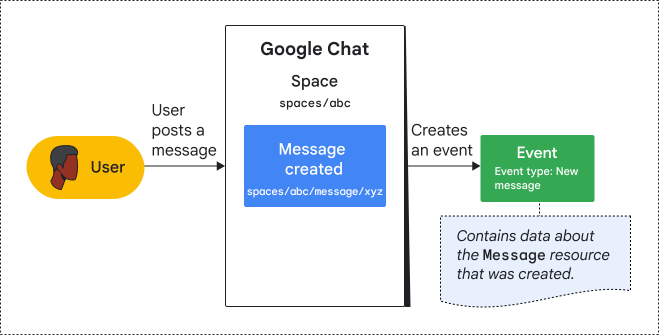 **Figure 1.** A user posts a message in a Chat space, which creates a `Message` resource. Chat then creates an event that contains data about the new message.
Chat categorizes events by type. Event types help you filter and
receive only the type of information you need, and let you handle similar
activities in the same way.
The following table shows how an activity in Chat affects a
related Chat API resource, and the type of event that your
Chat app receives:
| Activity | Chat API resource | Event type |
|---|---|---|
| A user posts a message in a Chat space | A [`Message`](https://developers.google.com/workspace/chat/api/reference/rest/v1/spaces.messages) resource is created. | New message |
| A user becomes a space manager. | A [`Membership`](https://developers.google.com/workspace/chat/api/reference/rest/v1/spaces.members) resource is updated. | Updated membership |
| A user reacts to a message. | A [`Reaction`](https://developers.google.com/workspace/chat/api/reference/rest/v1/spaces.messages.reactions) resource is created. | New reaction |
| A user leaves a space. | A [`Membership`](https://developers.google.com/workspace/chat/api/reference/rest/v1/spaces.members) resource is deleted. | Deleted membership |
> [!NOTE]
> **Note:** Your Chat app can also receive *interaction
> events* . These events help you respond to direct user interactions, such as when a user adds your Chat app to a space or @mentions your Chat app. To configure and receive interaction events, see [Receive and respond to interactions with your Google Chat
> app](https://developers.google.com/workspace/chat/receive-respond-interactions).
## Receive events from Google Chat
To receive events, your Chat app can do either of the
following:
- Subscribe to events using the Google Workspace Events API to receive events as they occur.
- Query for recent events by calling the Chat API.
The following table explains the difference and reasons for querying or
subscribing to events:
| | Subscribe to events | Query for events |
|---|---|---|
| Use cases | - Process or respond to events in real time. - Monitor users' membership activity and discover new spaces to monitor. | - Process or respond to events periodically, or through a trigger. - Fetch missed events from a subscription (due to an outage or inactive subscription). |
| API | Google Workspace Events API | Chat API |
| Source of events | Spaces, users, and Google Workspace organizations [( Developer Preview)](https://developers.google.com/workspace/preview) | Spaces only |
| Supported events | - Messages - Memberships - Reactions - Space
For a list of supported event types, see [Event types for creating subscriptions](https://developers.google.com/workspace/events/guides/events-chat#event_types_for_creating_subscriptions) in the Google Workspace Events API documentation. | - Messages - Memberships - Reactions - Space
For a list of supported event types, see the [`spaceEvents` resource](https://developers.google.com/workspace/chat/api/reference/rest/v1/spaces.spaceEvents#SpaceEvent.FIELDS.event_type) in the Chat API reference documentation. |
| Event format | A Google Cloud Pub/Sub message, formatted according to the CloudEvent specification. For details, see [Structure of Google Workspace events](https://developers.google.com/workspace/events#structure). | A Chat API resource ([`spaces.spaceEvent`](https://developers.google.com/workspace/chat/api/reference/rest/v1/spaces.spaceEvents)) |
| Event data | Base64-encoded string with or without resource data. For example payloads, see [Event data](https://developers.google.com/workspace/events/guides/events-chat#event-data). | JSON payload that contains resource data. Some event types only include certain resource fields. For example payloads, see the [reference documentation](https://developers.google.com/workspace/chat/api/reference/rest/v1/spaces.spaceEvents#SpaceEvent.FIELDS.oneof_payload). |
### Example: Query or subscribe to events about memberships in a space
In this example, a Chat app wants to receive
information about changes to members of a Chat space. In
the space, the following membership activity occurs:
- A user joins the space, which creates a `Membership` resource and triggers a new member event.
- A user becomes a space manager, which updates the `Membership` resource for the user and triggers an updated member event.
- A user leaves the space, which deletes the `Membership` resource for the user and triggers a member deleted event.
#### Subscribe to membership events
To receive events in real time, the
Chat app calls the Google Workspace Events API
[`subscriptions.create()`](https://developers.google.com/workspace/events/reference/rest/v1/subscriptions/create)
method to subscribe to the space for all types of membership events. After
creating the subscription, the Chat app can start to
receive membership events.
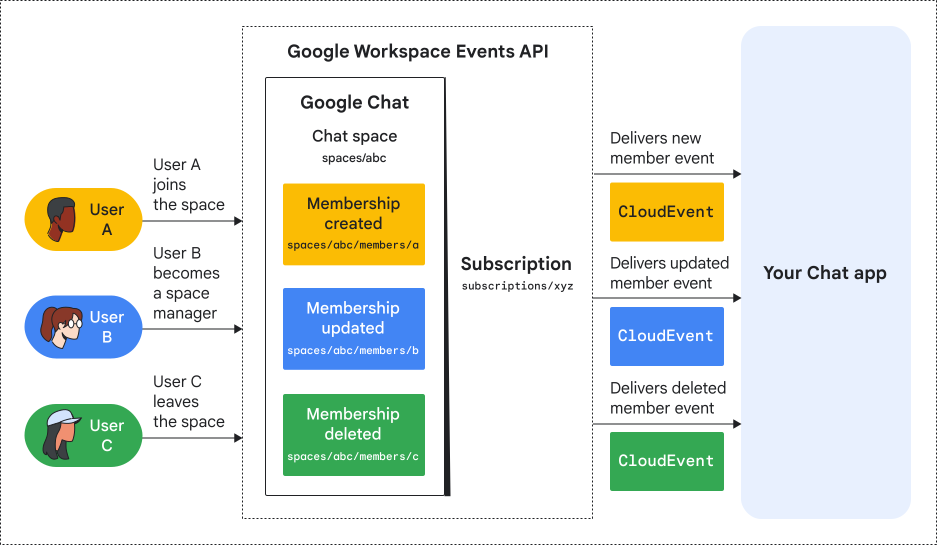 **Figure 2.** A Chat app receives membership events through a subscription using the Google Workspace Events API.
In figure 2, the Chat app has an active subscription to
the space, so the app receives an event whenever a membership in the space
changes. The Chat app can then process or respond in
real time to any of the activities, such as posting a private welcome message to
the member who joined the space.
To learn about creating subscriptions using the Google Workspace Events API,
see the [Google Workspace Events API documentation](https://developers.google.com/workspace/events).
#### Query for recent membership events
Instead of receiving the membership events as they occur, a
Chat app can call the Chat API to list
recent space events that are related to membership activity.
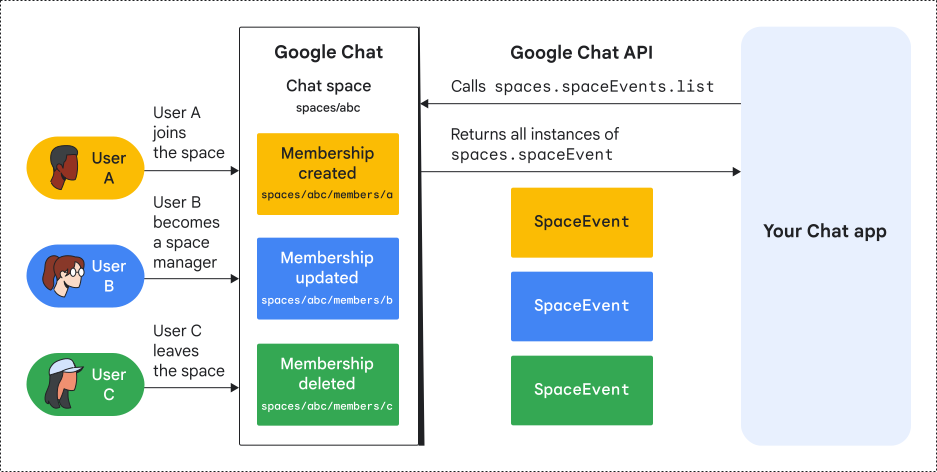 **Figure 3.** A Chat app receives recent membership events by querying for space events using the Chat API.
In figure 3, a Chat app calls the Chat API
[`spaces.spaceEvents.list()`](https://developers.google.com/workspace/chat/api/reference/rest/v1/spaces.spaceEvents/list)
method after all the membership activities have occurred, and filters the query
for new, updated, and deleted membership events. The Chat API returns
a list of `spaceEvent` resources that represent each of the membership changes.
The Chat app can then process or respond based on the
recent activity, such as posting a weekly message with a summary of the
space's membership activity in the past 7 days.
To query for events using the Chat API, see
[List events from a Google Chat space](https://developers.google.com/workspace/chat/list-space-events).
## Limitations and delivery behaviors
### General limitations
- To receive membership events, the user or Chat app must be a direct member of the space. If they were added, updated, or removed indirectly to a space through a Google Group, the subscription doesn't receive those membership events. To understand how Google Group memberships work, see [Add a Google Group to a space](https://support.google.com/chat/answer/13535086).
### User subscriptions
- For subscriptions to users, events about new members in direct messages or unnamed group chats (`google.workspace.chat.membership.v1.created`), only trigger after the first message is posted.
### Customer subscriptions
For customer subscriptions, the following limitations apply:
- The Google Workspace organization must have at least one Enterprise SKU license.
- A Chat app can only create one customer subscription for a given Google Workspace organization. A Google Workspace organization can have up to five customer subscriptions in total (created by different Chat apps).
For customer subscriptions, event delivery follows these general rules:
- **Space events**: Delivered only if the event occurs in a space managed by your Google Workspace organization.
- **User events**: Delivered only if the event occurs for a user who belongs to your Google Workspace organization.
The only exception to these rules is for **membership events**. Your subscription can receive membership events from both spaces managed by your organization and spaces managed by external organizations, but how they are delivered depends on which organization manages the space:
#### Spaces managed by your Google Workspace organization
If a membership change occurs in a space managed by the Google Workspace organization, it is delivered as a **space event**.
The resource name of a space event uses the following format:
`spaces/{spaceId}/spaceEvents/{spaceEventId}`
#### Spaces managed by external organizations
If the membership of a user managed by your Google Workspace organization changes in a space managed by an external organization (for example, an external named space or a direct message created by an external user), your subscription receives this event as a **user event**.
The resource name of a user event uses the following format:
`users/{userId}/userEvents/{userEventId}`
## Related topics
- [Google Workspace Events API overview](https://developers.google.com/workspace/events)
- [Create a subscription](https://developers.google.com/workspace/events/guides/create-subscription)
- [Get details about a Google Chat space event](https://developers.google.com/workspace/chat/get-space-event)
- [List events from a Google Chat space](https://developers.google.com/workspace/chat/list-space-events)