[Video](https://www.youtube.com/watch?v=-WVyG2L9gNc)
To prevent context switching when users share a link in Google Chat, your
Chat app can *preview* the link by attaching a
[card](https://developers.google.com/workspace/chat/create-messages#create) to their message that gives more
information and lets people take action right from Google Chat.
For example, imagine a Google Chat space that includes all of a company's
customer service agents plus a Chat app named Case-y.
Agents frequently share links to customer service cases in the Chat space, and
each time they do their colleagues must open the case link to see details like
assignee, status, and subject. Likewise, if someone wants to take ownership of
a case or change the status, then they need to open the link.
Link previewing enables the space's resident Chat app,
Case-y, to attach a card showing assignee, status, and subject whenever someone
shares a case link. Buttons on the card let agents take ownership of the
case and change the status directly from the chat stream.
## How link previewing works
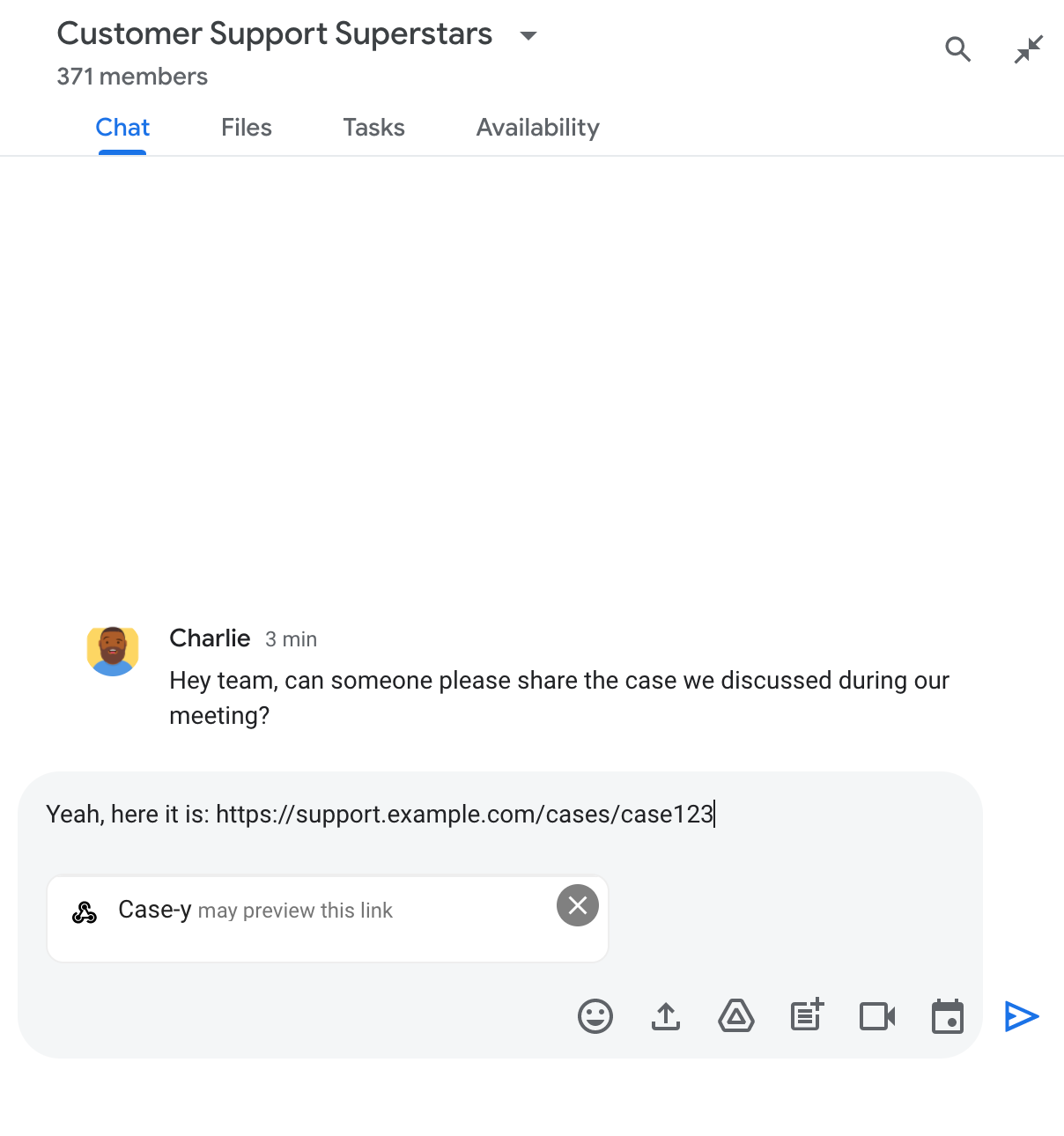
When someone adds a link to their message, a chip appears which lets them know
that a Chat app might preview the link.

After sending the message, the link is sent to the
Chat app, which then generates and attaches the
[card](https://developers.google.com/workspace/chat/create-messages#create) to the user's message.
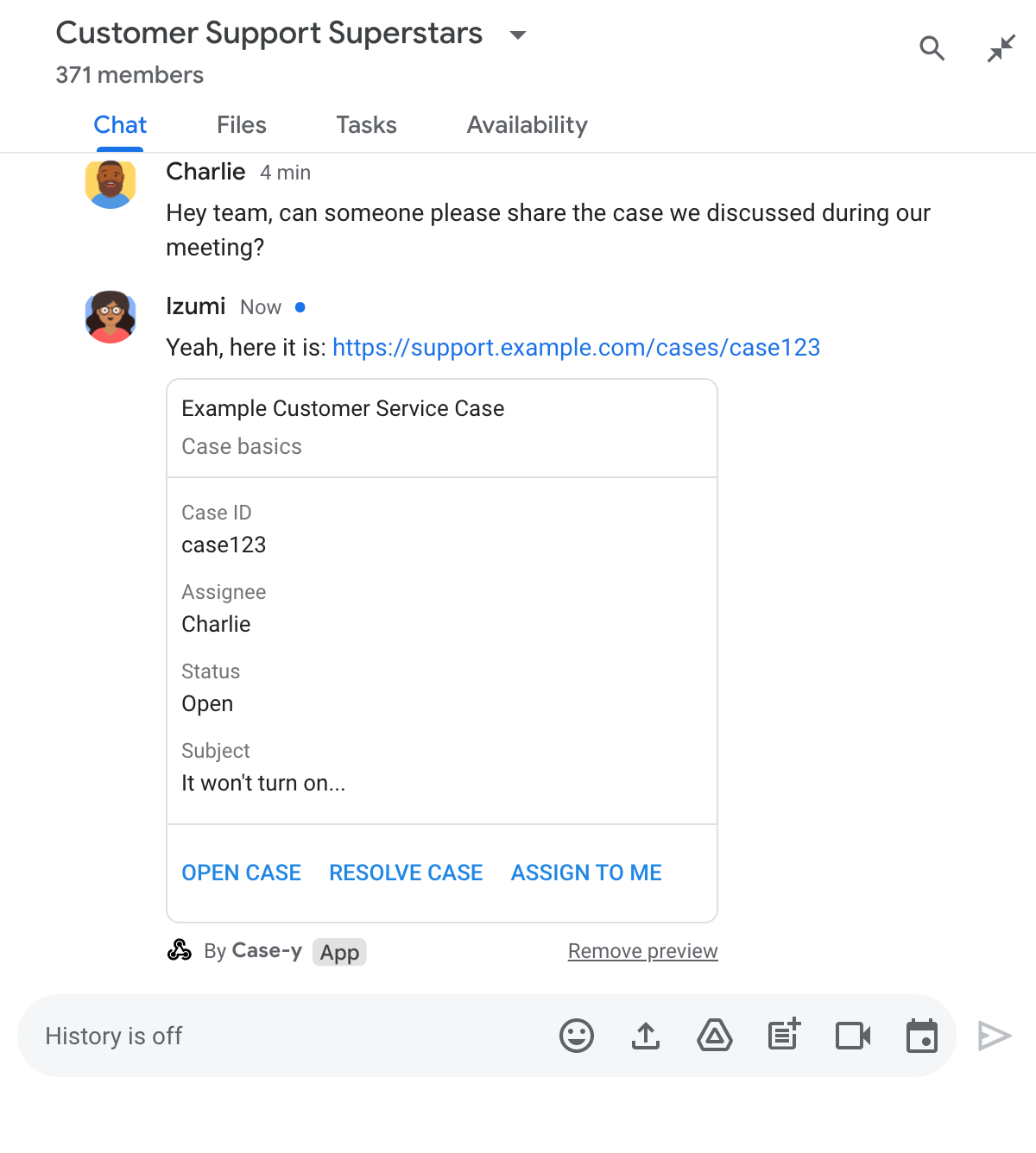

Alongside the link, the card provides additional information about the link,
including interactive elements like buttons. Your
Chat app can update the attached card in response to
user interactions, like button clicks.
If someone doesn't want the Chat app to preview their
link by attaching a card to their message, they can prevent previewing by
clicking on the preview chip. Users
can remove the attached card at any time by clicking **Remove preview**.
## Prerequisites
### HTTP
A Google Chat app that receives and responds to
[user interactions](https://developers.google.com/workspace/chat/receive-respond-interactions).
To build one, complete the
[HTTP quickstart](https://developers.google.com/workspace/chat/quickstart/gcf-app).
> [!NOTE]
> **Note:** The code samples in this guide are written to run as a [Google Cloud
> Run function](https://cloud.google.com/functions/docs/quickstarts) for Node.js.
### Apps Script
A Google Chat app that receives and responds to
[user interactions](https://developers.google.com/workspace/chat/receive-respond-interactions).
To build one, complete the
[Apps Script quickstart](https://developers.google.com/workspace/chat/quickstart/apps-script-app).
## Configure link previews
Register specific links - like `example.com`, `support.example.com`, and
`support.example.com/cases/` - as URL patterns on your
Chat app's configuration page in Google Cloud console so
your Chat app can preview them.

1. Open the [Google Cloud console](https://console.cloud.google.com/).
2. Next to "Google Cloud," click the Down arrow and open your Chat app's project.
3. In the search field, type `Google Chat API` and click **Google Chat API**.
4. Click **Manage \> Configuration**.
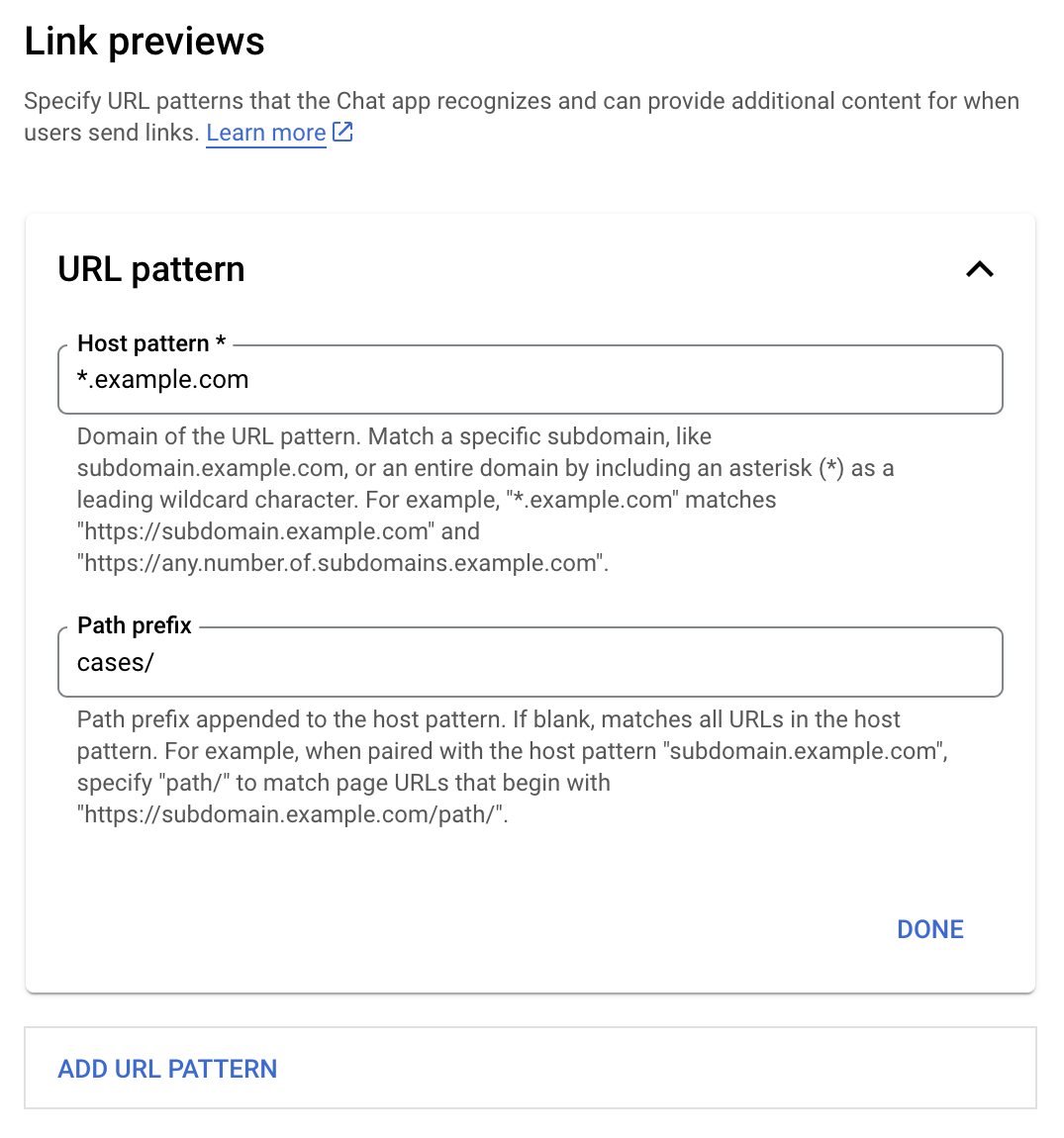
5. Under Link previews, add or edit a URL pattern.
1. To configure link previews for a new URL pattern, click **Add URL Pattern**.
2. To edit the configuration for an existing URL pattern, click the Down arrow .
6. In the **Host pattern** field, enter the domain of the URL pattern. The Chat app will preview links to this domain.
To have the Chat app preview links for a specific
subdomain, like `subdomain.example.com`, include the subdomain.
To have the Chat app preview links for the entire
domain, specify a wildcard character with an asterisk (\*) as the subdomain.
For example, `*.example.com` matches `subdomain.example.com` and
`any.number.of.subdomains.example.com`.
7. In the **Path prefix** field, enter a path to append to the host pattern domain.
To match all URLs in the host pattern domain, leave **Path prefix** empty.
For example, if the Host pattern is `support.example.com`, to match URLs for
cases hosted at `support.example.com/cases/`, enter `cases/`.
8. Click **Done**.
9. Click **Save**.
Now, whenever someone includes a link that matches a link preview URL pattern to
a message in a Chat space that includes your
Chat app, your app previews the link.
## Preview a link
After you configure link previewing for a given link, your
Chat app can recognize and preview the link by
attaching more information to it.
Inside Chat spaces that include your
Chat app, when someone's message contains a link that
matches a link preview URL pattern, your Chat app
receives an
[event object](https://developers.google.com/workspace/chat/receive-respond-interactions#event-objects) with
a [`MessagePayload`](https://developers.google.com/workspace/add-ons/concepts/event-objects#messagepayload).
In the payload, the
[`message.matchedUrl`](https://developers.google.com/workspace/chat/api/reference/rest/v1/spaces.messages#matchedurl)
(`chat.messagePayload.message.matchedUrl.url`) object contains the link that the
user included in the message:
### JSON
message: {
matchedUrl: {
url: "https://support.example.com/cases/case123"
},
... // other message attributes redacted
}
By checking for the presence of the `matchedUrl` field in the `MESSAGE` event
payload (`chat.messagePayload.message.matchedUrl.url`), your
Chat app can add information to the message with the
previewed link. Your Chat app can either reply with a
basic text message or attach a card.
### Reply with a text message
For basic responses, your Chat app can preview a link
by replying with a [simple text message](https://developers.google.com/workspace/chat/create-messages)
to a link. This example attaches a message that repeats the link URL that
matches a link preview URL pattern.
### Node.js
node/chat/preview-link/index.js [View on GitHub](https://github.com/googleworkspace/add-ons-samples/blob/main/node/chat/preview-link/index.js)
```javascript
// Reply with a text message for URLs of the subdomain "text"
if (chatMessage.matchedUrl.url.includes("text.example.com")) {
return { hostAppDataAction: { chatDataAction: { createMessageAction: { message: {
text: 'event.chat.messagePayload.message.matchedUrl.url: ' + chatMessage.matchedUrl.url
}}}}};
}
```
Replace `FUNCTION_URL` with the HTTP endpoint that handles
button clicks.
### Python
python/chat/preview-link/main.py [View on GitHub](https://github.com/googleworkspace/add-ons-samples/blob/main/python/chat/preview-link/main.py)
```python
# Reply with a text message for URLs of the subdomain "text"
if "text.example.com" in chatMessage.get('matchedUrl').get('url'):
return { 'hostAppDataAction': { 'chatDataAction': { 'createMessageAction': { 'message': {
'text': 'event.chat.messagePayload.message.matchedUrl.url: ' + chatMessage.get('matchedUrl').get('url')
}}}}}
```
Replace `FUNCTION_URL` with the HTTP endpoint that handles
button clicks.
### Java
java/chat/preview-link/src/main/java/com/google/chat/previewLink/App.java [View on GitHub](https://github.com/googleworkspace/add-ons-samples/blob/main/java/chat/preview-link/src/main/java/com/google/chat/previewLink/App.java)
```java
// Reply with a text message for URLs of the subdomain "text"
if (chatMessage.at("/matchedUrl/url").asText().contains("text.example.com")) {
return new GenericJson() {{
put("hostAppDataAction", new GenericJson() {{
put("chatDataAction", new GenericJson() {{
put("createMessageAction", new GenericJson() {{
put("message", new Message()
.setText("event.chat.messagePayload.message.matchedUrl.url: " + chatMessage.at("/matchedUrl/url").asText()));
}});
}});
}});
}};
}
```
Replace `FUNCTION_URL` with the HTTP endpoint that handles
button clicks.
### Apps Script
apps-script/chat/preview-link/preview-link.gs [View on GitHub](https://github.com/googleworkspace/add-ons-samples/blob/main/apps-script/chat/preview-link/preview-link.gs)
```javascript
// Reply with a text message for URLs of the subdomain "text".
if (chatMessage.matchedUrl.url.includes("text.example.com")) {
return { hostAppDataAction: { chatDataAction: { createMessageAction: { message: {
text: 'event.chat.messagePayload.message.matchedUrl.url: ' + chatMessage.matchedUrl.url
}}}}};
}
```
### Attach a card that previews the link
To attach a card to a previewed link,
return the action [`DataActions`](https://developers.google.com/workspace/add-ons/reference/rpc/google.apps.card.v1#google.apps.card.v1.DataActions) with
the `ChatDataActionMarkup` object of type
[`UpdateInlinePreviewAction`](https://developers.google.com/workspace/add-ons/reference/rpc/apps.extensions.markup#updateinlinepreviewaction).
In the following example, a Chat app adds a preview
card to messages that contain the URL pattern `support.example.com`.


### Node.js
node/chat/preview-link/index.js [View on GitHub](https://github.com/googleworkspace/add-ons-samples/blob/main/node/chat/preview-link/index.js)
```javascript
// Attach a card to the message for URLs of the subdomain "support"
if (chatMessage.matchedUrl.url.includes("support.example.com")) {
// A hard-coded card is used in this example. In a real-life scenario,
// the case information would be fetched and used to build the card.
return { hostAppDataAction: { chatDataAction: { updateInlinePreviewAction: { cardsV2: [{
cardId: 'attachCard',
card: {
header: {
title: 'Example Customer Service Case',
subtitle: 'Case basics',
},
sections: [{ widgets: [
{ decoratedText: { topLabel: 'Case ID', text: 'case123'}},
{ decoratedText: { topLabel: 'Assignee', text: 'Charlie'}},
{ decoratedText: { topLabel: 'Status', text: 'Open'}},
{ decoratedText: { topLabel: 'Subject', text: 'It won\'t turn on...' }},
{ buttonList: { buttons: [{
text: 'OPEN CASE',
onClick: { openLink: {
url: 'https://support.example.com/orders/case123'
}},
}, {
text: 'RESOLVE CASE',
onClick: { openLink: {
url: 'https://support.example.com/orders/case123?resolved=y',
}},
}, {
text: 'ASSIGN TO ME',
onClick: { action: { function: FUNCTION_URL }}
}]}}
]}]
}
}]}}}};
}
```
Replace `FUNCTION_URL` with the HTTP endpoint that handles
button clicks.
### Python
python/chat/preview-link/main.py [View on GitHub](https://github.com/googleworkspace/add-ons-samples/blob/main/python/chat/preview-link/main.py)
```python
# Attach a card to the message for URLs of the subdomain "support"
if "support.example.com" in chatMessage.get('matchedUrl').get('url'):
# A hard-coded card is used in this example. In a real-life scenario,
# the case information would be fetched and used to build the card.
return { 'hostAppDataAction': { 'chatDataAction': { 'updateInlinePreviewAction': { 'cardsV2': [{
'cardId': 'attachCard',
'card': {
'header': {
'title': 'Example Customer Service Case',
'subtitle': 'Case basics',
},
'sections': [{ 'widgets': [
{ 'decoratedText': { 'topLabel': 'Case ID', 'text': 'case123'}},
{ 'decoratedText': { 'topLabel': 'Assignee', 'text': 'Charlie'}},
{ 'decoratedText': { 'topLabel': 'Status', 'text': 'Open'}},
{ 'decoratedText': { 'topLabel': 'Subject', 'text': 'It won\'t turn on...' }},
{ 'buttonList': { 'buttons': [{
'text': 'OPEN CASE',
'onClick': { 'openLink': {
'url': 'https://support.example.com/orders/case123'
}},
}, {
'text': 'RESOLVE CASE',
'onClick': { 'openLink': {
'url': 'https://support.example.com/orders/case123?resolved=y',
}},
}, {
'text': 'ASSIGN TO ME',
'onClick': { 'action': { 'function': FUNCTION_URL }}
}]}}
]}]
}
}]}}}}
```
Replace `FUNCTION_URL` with the HTTP endpoint that handles
button clicks.
### Java
java/chat/preview-link/src/main/java/com/google/chat/previewLink/App.java [View on GitHub](https://github.com/googleworkspace/add-ons-samples/blob/main/java/chat/preview-link/src/main/java/com/google/chat/previewLink/App.java)
```java
// Attach a card to the message for URLs of the subdomain "support"
if (chatMessage.at("/matchedUrl/url").asText().contains("support.example.com")) {
// A hard-coded card is used in this example. In a real-life scenario,
// the case information would be fetched and used to build the card.
CardWithId cardV2 = new CardWithId()
.setCardId("attachCard")
.setCard(new GoogleAppsCardV1Card()
.setHeader(new GoogleAppsCardV1CardHeader()
.setTitle("Example Customer Service Case")
.setSubtitle("Case basics"))
.setSections(List.of(new GoogleAppsCardV1Section().setWidgets(List.of(
new GoogleAppsCardV1Widget().setDecoratedText(new GoogleAppsCardV1DecoratedText()
.setTopLabel("Case ID")
.setText("case123")),
new GoogleAppsCardV1Widget().setDecoratedText(new GoogleAppsCardV1DecoratedText()
.setTopLabel("Assignee")
.setText("Charlie")),
new GoogleAppsCardV1Widget().setDecoratedText(new GoogleAppsCardV1DecoratedText()
.setTopLabel("Status")
.setText("Open")),
new GoogleAppsCardV1Widget().setDecoratedText(new GoogleAppsCardV1DecoratedText()
.setTopLabel("Subject")
.setText("It won't turn on...")),
new GoogleAppsCardV1Widget().setButtonList(new GoogleAppsCardV1ButtonList()
.setButtons(List.of(
new GoogleAppsCardV1Button()
.setText("OPEN CASE")
.setOnClick(new GoogleAppsCardV1OnClick()
.setOpenLink(new GoogleAppsCardV1OpenLink()
.setUrl("https://support.example.com/orders/case123"))),
new GoogleAppsCardV1Button()
.setText("RESOLVE CASE")
.setOnClick(new GoogleAppsCardV1OnClick()
.setOpenLink(new GoogleAppsCardV1OpenLink()
.setUrl("https://support.example.com/orders/case123?resolved=y"))),
new GoogleAppsCardV1Button()
.setText("ASSIGN TO ME")
.setOnClick(new GoogleAppsCardV1OnClick()
.setAction(new GoogleAppsCardV1Action().setFunction(FUNCTION_URL)))
))
)
))))
);
return new GenericJson() {{
put("hostAppDataAction", new GenericJson() {{
put("chatDataAction", new GenericJson() {{
put("updateInlinePreviewAction", new GenericJson() {{
put("cardsV2", List.of(cardV2));
}});
}});
}});
}};
}
```
Replace `FUNCTION_URL` with the HTTP endpoint that handles
button clicks.
### Apps Script
apps-script/chat/preview-link/preview-link.gs [View on GitHub](https://github.com/googleworkspace/add-ons-samples/blob/main/apps-script/chat/preview-link/preview-link.gs)
```javascript
// Attach a card to the message for URLs of the subdomain "support".
if (chatMessage.matchedUrl.url.includes("support.example.com")) {
// A hard-coded card is used in this example. In a real-life scenario,
// the case information would be fetched and used to build the card.
return { hostAppDataAction: { chatDataAction: { updateInlinePreviewAction: { cardsV2: [{
cardId: 'attachCard',
card: {
header: {
title: 'Example Customer Service Case',
subtitle: 'Case summary',
},
sections: [{ widgets: [
{ decoratedText: { topLabel: 'Case ID', text: 'case123'}},
{ decoratedText: { topLabel: 'Assignee', text: 'Charlie'}},
{ decoratedText: { topLabel: 'Status', text: 'Open'}},
{ decoratedText: { topLabel: 'Subject', text: 'It won\'t turn on...' }},
{ buttonList: { buttons: [{
text: 'OPEN CASE',
onClick: { openLink: {
url: 'https://support.example.com/orders/case123'
}},
}, {
text: 'RESOLVE CASE',
onClick: { openLink: {
url: 'https://support.example.com/orders/case123?resolved=y',
}},
}, {
text: 'ASSIGN TO ME',
// Clicking this button triggers the execution of the function
// "assign" from the Apps Script project.
onClick: { action: { function: 'assign'}}
}]}}
]}]
}
}]}}}};
}
```
### Update a link preview card
Your Chat app can update a link preview card when
users interact with it, such as clicking a button on the card.
To update the card, your Chat app
must return the action [`DataActions`](https://developers.google.com/workspace/add-ons/reference/rpc/google.apps.card.v1#google.apps.card.v1.DataActions) with
one of the following `ChatDataActionMarkup` objects:
- If a user sent the message, return an [`UpdateMessageAction`](https://developers.google.com/workspace/add-ons/reference/rpc/apps.extensions.markup#updatemessageaction) object.
- If the Chat app sent the message, return an [`UpdateInlinePreviewAction`](https://developers.google.com/workspace/add-ons/reference/rpc/apps.extensions.markup#updateinlinepreviewaction) object.
To determine who sent the message, use the event payload
([`buttonClickedPayload`](https://developers.google.com/workspace/add-ons/concepts/event-objects#buttonclickedpayload))
to check whether the sender (`message.sender.type`) is set to `HUMAN` (user) or
`BOT` (Chat app).
The following example shows how a Chat app updates
a link preview whenever a user clicks the **Assign to Me**
button by updating the card's **Assignee** field and disabling the button.


### Node.js
node/chat/preview-link/index.js [View on GitHub](https://github.com/googleworkspace/add-ons-samples/blob/main/node/chat/preview-link/index.js)
```javascript
/**
* Respond to clicks by assigning and updating the card that's attached to a
* message previewed link of the pattern "support.example.com".
*
* @param {Object} chatMessage The chat message object from Google Workspace Add On event.
* @return {Object} Action response depending on the message author.
*/
function handleCardClick(chatMessage) {
// Creates the updated card that displays "You" for the assignee
// and that disables the button.
//
// A hard-coded card is used in this example. In a real-life scenario,
// an actual assign action would be performed before building the card.
const message = { cardsV2: [{
cardId: 'attachCard',
card: {
header: {
title: 'Example Customer Service Case',
subtitle: 'Case basics',
},
sections: [{ widgets: [
{ decoratedText: { topLabel: 'Case ID', text: 'case123'}},
// The assignee is now "You"
{ decoratedText: { topLabel: 'Assignee', text: 'You'}},
{ decoratedText: { topLabel: 'Status', text: 'Open'}},
{ decoratedText: { topLabel: 'Subject', text: 'It won\'t turn on...' }},
{ buttonList: { buttons: [{
text: 'OPEN CASE',
onClick: { openLink: {
url: 'https://support.example.com/orders/case123'
}},
}, {
text: 'RESOLVE CASE',
onClick: { openLink: {
url: 'https://support.example.com/orders/case123?resolved=y',
}},
}, {
text: 'ASSIGN TO ME',
// The button is now disabled
disabled: true,
onClick: { action: { function: FUNCTION_URL }}
}]}}
]}]
}
}]};
// Use the adequate action response type. It depends on whether the message
// the preview link card is attached to was created by a human or a Chat app.
if(chatMessage.sender.type === 'HUMAN') {
return { hostAppDataAction: { chatDataAction: { updateInlinePreviewAction: message }}};
} else {
return { hostAppDataAction: { chatDataAction: { updateMessageAction: message }}};
}
}
```
Replace `FUNCTION_URL` with the HTTP endpoint that handles
button clicks.
### Python
python/chat/preview-link/main.py [View on GitHub](https://github.com/googleworkspace/add-ons-samples/blob/main/python/chat/preview-link/main.py)
```python
def handle_card_click(chatMessage: dict) -> dict:
"""Respond to clicks by assigning and updating the card that's attached to a
message previewed link of the pattern "support.example.com".
- Reply with text messages that echo "text.example.com" link URLs in messages.
- Attach cards to messages with "support.example.com" link URLs.
Args:
chatMessage (Mapping[str, Any]): The chat message object from Google Workspace Add On event.
Returns:
Mapping[str, Any]: Action response depending on the message author.
"""
# Creates the updated card that displays "You" for the assignee
# and that disables the button.
#
# A hard-coded card is used in this example. In a real-life scenario,
# an actual assign action would be performed before building the card.
message = { 'cardsV2': [{
'cardId': 'attachCard',
'card': {
'header': {
'title': 'Example Customer Service Case',
'subtitle': 'Case basics',
},
'sections': [{ 'widgets': [
{ 'decoratedText': { 'topLabel': 'Case ID', 'text': 'case123'}},
# The assignee is now "You"
{ 'decoratedText': { 'topLabel': 'Assignee', 'text': 'You'}},
{ 'decoratedText': { 'topLabel': 'Status', 'text': 'Open'}},
{ 'decoratedText': { 'topLabel': 'Subject', 'text': 'It won\'t turn on...' }},
{ 'buttonList': { 'buttons': [{
'text': 'OPEN CASE',
'onClick': { 'openLink': {
'url': 'https://support.example.com/orders/case123'
}},
}, {
'text': 'RESOLVE CASE',
'onClick': { 'openLink': {
'url': 'https://support.example.com/orders/case123?resolved=y',
}},
}, {
'text': 'ASSIGN TO ME',
# The button is now disabled
'disabled': True,
'onClick': { 'action': { 'function': FUNCTION_URL }}
}]}}
]}]
}
}]}
# Use the adequate action response type. It depends on whether the message
# the preview link card is attached to was created by a human or a Chat app.
if chatMessage.get('sender').get('type') == 'HUMAN':
return { 'hostAppDataAction': { 'chatDataAction': { 'updateInlinePreviewAction': message }}}
else:
return { 'hostAppDataAction': { 'chatDataAction': { 'updateMessageAction': message }}}
```
Replace `FUNCTION_URL` with the HTTP endpoint that handles
button clicks.
### Java
java/chat/preview-link/src/main/java/com/google/chat/previewLink/App.java [View on GitHub](https://github.com/googleworkspace/add-ons-samples/blob/main/java/chat/preview-link/src/main/java/com/google/chat/previewLink/App.java)
```java
/**
* Respond to clicks by assigning and updating the card that's attached to a
* message previewed link of the pattern "support.example.com".
*
* @param chatMessage The chat message object from Google Workspace Add On event.
* @return Action response depending on the message author.
*/
GenericJson handleCardClick(JsonNode chatMessage) {
// Creates the updated card that displays "You" for the assignee
// and that disables the button.
//
// A hard-coded card is used in this example. In a real-life scenario,
// an actual assign action would be performed before building the card.
Message message = new Message().setCardsV2(List.of(new CardWithId()
.setCardId("attachCard")
.setCard(new GoogleAppsCardV1Card()
.setHeader(new GoogleAppsCardV1CardHeader()
.setTitle("Example Customer Service Case")
.setSubtitle("Case basics"))
.setSections(List.of(new GoogleAppsCardV1Section().setWidgets(List.of(
new GoogleAppsCardV1Widget().setDecoratedText(new GoogleAppsCardV1DecoratedText()
.setTopLabel("Case ID")
.setText("case123")),
// The assignee is now "You"
new GoogleAppsCardV1Widget().setDecoratedText(new GoogleAppsCardV1DecoratedText()
.setTopLabel("Assignee")
.setText("You")),
new GoogleAppsCardV1Widget().setDecoratedText(new GoogleAppsCardV1DecoratedText()
.setTopLabel("Status")
.setText("Open")),
new GoogleAppsCardV1Widget().setDecoratedText(new GoogleAppsCardV1DecoratedText()
.setTopLabel("Subject")
.setText("It won't turn on...")),
new GoogleAppsCardV1Widget().setButtonList(new GoogleAppsCardV1ButtonList()
.setButtons(List.of(
new GoogleAppsCardV1Button()
.setText("OPEN CASE")
.setOnClick(new GoogleAppsCardV1OnClick()
.setOpenLink(new GoogleAppsCardV1OpenLink()
.setUrl("https://support.example.com/orders/case123"))),
new GoogleAppsCardV1Button()
.setText("RESOLVE CASE")
.setOnClick(new GoogleAppsCardV1OnClick()
.setOpenLink(new GoogleAppsCardV1OpenLink()
.setUrl("https://support.example.com/orders/case123?resolved=y"))),
new GoogleAppsCardV1Button()
.setText("ASSIGN TO ME")
// The button is now disabled
.setDisabled(true)
.setOnClick(new GoogleAppsCardV1OnClick()
.setAction(new GoogleAppsCardV1Action().setFunction(FUNCTION_URL)))
))
)
))))
)
));
// Use the adequate action response type. It depends on whether the message
// the preview link card is attached to was created by a human or a Chat app.
if("HUMAN".equals(chatMessage.at("/sender/type").asText())) {
return new GenericJson() {{
put("hostAppDataAction", new GenericJson() {{
put("chatDataAction", new GenericJson() {{
put("updateInlinePreviewAction", message);
}});
}});
}};
} else {
return new GenericJson() {{
put("hostAppDataAction", new GenericJson() {{
put("chatDataAction", new GenericJson() {{
put("updateMessageAction", message);
}});
}});
}};
}
}
```
Replace `FUNCTION_URL` with the HTTP endpoint that handles
button clicks.
### Apps Script
apps-script/chat/preview-link/preview-link.gs [View on GitHub](https://github.com/googleworkspace/add-ons-samples/blob/main/apps-script/chat/preview-link/preview-link.gs)
```javascript
/**
* Assigns and updates the card that's attached to a message with a
* previewed link of the pattern "support.example.com".
*
* @param {Object} event The event object from the Google Workspace add-on.
* @return {Object} Action response depending on the message author.
*/
function assign(event) {
// Creates the updated card that displays "You" for the assignee
// and that disables the button.
//
// A hard-coded card is used in this example. In a real-life scenario,
// an actual assign action would be performed before building the card.
const message = { cardsV2: [{
cardId: 'attachCard',
card: {
header: {
title: 'Example Customer Service Case',
subtitle: 'Case summary',
},
sections: [{ widgets: [
{ decoratedText: { topLabel: 'Case ID', text: 'case123'}},
// The assignee is now "You"
{ decoratedText: { topLabel: 'Assignee', text: 'You'}},
{ decoratedText: { topLabel: 'Status', text: 'Open'}},
{ decoratedText: { topLabel: 'Subject', text: 'It won\'t turn on...' }},
{ buttonList: { buttons: [{
text: 'OPEN CASE',
onClick: { openLink: {
url: 'https://support.example.com/orders/case123'
}},
}, {
text: 'RESOLVE CASE',
onClick: { openLink: {
url: 'https://support.example.com/orders/case123?resolved=y',
}},
}, {
text: 'ASSIGN TO ME',
// The button is now disabled
disabled: true,
onClick: { action: { function: 'assign'}}
}]}}
]}]
}
}]};
// Use the adequate action response type. It depends on whether the message
// the preview link card is attached to was created by a human or a Chat app.
if(event.chat.buttonClickedPayload.message.sender.type === 'HUMAN') {
return { hostAppDataAction: { chatDataAction: { updateInlinePreviewAction: message }}};
} else {
return { hostAppDataAction: { chatDataAction: { updateMessageAction: message }}};
}
}
```
## Limits and considerations
As you configure link previews for your Chat app, take
note of these limits and considerations:
- Each Chat app supports link previews for up to 5 URL patterns.
- Chat apps preview one link per message. If multiple previewable links are present in a single message, only the first previewable link previews.
- Chat apps only preview links that begin with `https://`, so `https://support.example.com/cases/` previews, but `support.example.com/cases/` does not.
- Unless the message includes other information that gets sent to the Chat app, such as a [slash command](https://developers.google.com/workspace/chat/commands), only the link URL is sent to the Chat app by link previews.
- If a user posts the link, a Chat app can only update the link preview card if users interact with the card, such as with a button click. You can't call the Chat API's `update()` method on the `Message` resource to update a user's message asynchronously.
- Chat apps must preview links for everyone in the space, so the message must omit the [`privateMessageViewer`](https://developers.google.com/workspace/chat/api/reference/rest/v1/spaces.messages#Message.FIELDS.private_message_viewer) field.
## Debug link previews
As you implement link previews, you might need to debug your
Chat app by reading the app's logs. To read the logs,
visit the [Logs Explorer](https://console.cloud.google.com/logs/query) on Google Cloud console.
## Chat apps that aren't add-ons: Preview links
The following documentation applies to Chat apps that aren't Google Workspace add-ons. To migrate a Chat app that isn't an add-on, see [Convert a Google Chat app to a Google Workspace add-on](https://developers.google.com/workspace/chat/convert).
Inside Chat spaces that include a
Chat app that isn't an add-on,
when someone's message contains a link that
matches a link preview URL pattern, the Chat app
receives a
[`MESSAGE` interaction event](https://developers.google.com/workspace/chat/events). The JSON
payload for the interaction event contains the `matchedUrl` field:
### JSON
message: {
matchedUrl: {
url: "https://support.example.com/cases/case123"
},
... // other message attributes redacted
}
By checking for the presence of the `matchedUrl` field in the `MESSAGE` event
payload, a Chat app that isn't an
add-on can add information to the
message with the previewed link.
### Reply with a text message
For basic responses, a Chat app that isn't an
add-on can preview a
link by replying with a [simple text message](https://developers.google.com/workspace/chat/create-messages)
to a link. This example attaches a message that repeats the link URL that
matches a link preview URL pattern:
### Node.js
node/preview-link/index.js [View on GitHub](https://github.com/googleworkspace/google-chat-samples/blob/main/node/preview-link/index.js)
```javascript
// Reply with a text message for URLs of the subdomain "text"
if (event.message.matchedUrl.url.includes("text.example.com")) {
return {
text: 'event.message.matchedUrl.url: ' + event.message.matchedUrl.url
};
}
```
### Python
python/preview-link/main.py [View on GitHub](https://github.com/googleworkspace/google-chat-samples/blob/main/python/preview-link/main.py)
```python
# Reply with a text message for URLs of the subdomain "text"
if 'text.example.com' in event.get('message').get('matchedUrl').get('url'):
return {
'text': 'event.message.matchedUrl.url: ' +
event.get('message').get('matchedUrl').get('url')
}
```
### Java
java/preview-link/src/main/java/com/google/chat/preview/App.java [View on GitHub](https://github.com/googleworkspace/google-chat-samples/blob/main/java/preview-link/src/main/java/com/google/chat/preview/App.java)
```java
// Reply with a text message for URLs of the subdomain "text"
if (event.at("/message/matchedUrl/url").asText().contains("text.example.com")) {
return new Message().setText("event.message.matchedUrl.url: " +
event.at("/message/matchedUrl/url").asText());
}
```
### Apps Script
apps-script/preview-link/preview-link.gs [View on GitHub](https://github.com/googleworkspace/google-chat-samples/blob/main/apps-script/preview-link/preview-link.gs)
```javascript
// Reply with a text message for URLs of the subdomain "text"
if (event.message.matchedUrl.url.includes("text.example.com")) {
return {
text: 'event.message.matchedUrl.url: ' + event.message.matchedUrl.url
};
}
```
### Attach a card that previews the link
To attach a [card](https://developers.google.com/workspace/chat/create-messages#create) to a previewed link
in a Chat app that isn't an
add-on, return an
[`ActionResponse`](https://developers.google.com/workspace/chat/reference/rest/v1/spaces.messages#actionresponse)
of type `UPDATE_USER_MESSAGE_CARDS`. This example attaches a basic card:
### Node.js
node/preview-link/index.js [View on GitHub](https://github.com/googleworkspace/google-chat-samples/blob/main/node/preview-link/index.js)
```javascript
// Attach a card to the message for URLs of the subdomain "support"
if (event.message.matchedUrl.url.includes("support.example.com")) {
// A hard-coded card is used in this example. In a real-life scenario,
// the case information would be fetched and used to build the card.
return {
actionResponse: { type: 'UPDATE_USER_MESSAGE_CARDS' },
cardsV2: [{
cardId: 'attachCard',
card: {
header: {
title: 'Example Customer Service Case',
subtitle: 'Case basics',
},
sections: [{ widgets: [
{ decoratedText: { topLabel: 'Case ID', text: 'case123'}},
{ decoratedText: { topLabel: 'Assignee', text: 'Charlie'}},
{ decoratedText: { topLabel: 'Status', text: 'Open'}},
{ decoratedText: { topLabel: 'Subject', text: 'It won\'t turn on...' }},
{ buttonList: { buttons: [{
text: 'OPEN CASE',
onClick: { openLink: {
url: 'https://support.example.com/orders/case123'
}},
}, {
text: 'RESOLVE CASE',
onClick: { openLink: {
url: 'https://support.example.com/orders/case123?resolved=y',
}},
}, {
text: 'ASSIGN TO ME',
onClick: { action: { function: 'assign'}}
}]}}
]}]
}
}]
};
}
```
### Python
python/preview-link/main.py [View on GitHub](https://github.com/googleworkspace/google-chat-samples/blob/main/python/preview-link/main.py)
```python
# Attach a card to the message for URLs of the subdomain "support"
if 'support.example.com' in event.get('message').get('matchedUrl').get('url'):
# A hard-coded card is used in this example. In a real-life scenario,
# the case information would be fetched and used to build the card.
return {
'actionResponse': { 'type': 'UPDATE_USER_MESSAGE_CARDS' },
'cardsV2': [{
'cardId': 'attachCard',
'card': {
'header': {
'title': 'Example Customer Service Case',
'subtitle': 'Case basics',
},
'sections': [{ 'widgets': [
{ 'decoratedText': { 'topLabel': 'Case ID', 'text': 'case123'}},
{ 'decoratedText': { 'topLabel': 'Assignee', 'text': 'Charlie'}},
{ 'decoratedText': { 'topLabel': 'Status', 'text': 'Open'}},
{ 'decoratedText': { 'topLabel': 'Subject', 'text': 'It won\'t turn on...' }},
{ 'buttonList': { 'buttons': [{
'text': 'OPEN CASE',
'onClick': { 'openLink': {
'url': 'https://support.example.com/orders/case123'
}},
}, {
'text': 'RESOLVE CASE',
'onClick': { 'openLink': {
'url': 'https://support.example.com/orders/case123?resolved=y',
}},
}, {
'text': 'ASSIGN TO ME',
'onClick': { 'action': { 'function': 'assign'}}
}]}}
]}]
}
}]
}
```
### Java
java/preview-link/src/main/java/com/google/chat/preview/App.java [View on GitHub](https://github.com/googleworkspace/google-chat-samples/blob/main/java/preview-link/src/main/java/com/google/chat/preview/App.java)
```java
// Attach a card to the message for URLs of the subdomain "support"
if (event.at("/message/matchedUrl/url").asText().contains("support.example.com")) {
// A hard-coded card is used in this example. In a real-life scenario,
// the case information would be fetched and used to build the card.
return new Message()
.setActionResponse(new ActionResponse()
.setType("UPDATE_USER_MESSAGE_CARDS"))
.setCardsV2(List.of(new CardWithId()
.setCardId("attachCard")
.setCard(new GoogleAppsCardV1Card()
.setHeader(new GoogleAppsCardV1CardHeader()
.setTitle("Example Customer Service Case")
.setSubtitle("Case basics"))
.setSections(List.of(new GoogleAppsCardV1Section().setWidgets(List.of(
new GoogleAppsCardV1Widget().setDecoratedText(new GoogleAppsCardV1DecoratedText()
.setTopLabel("Case ID")
.setText("case123")),
new GoogleAppsCardV1Widget().setDecoratedText(new GoogleAppsCardV1DecoratedText()
.setTopLabel("Assignee")
.setText("Charlie")),
new GoogleAppsCardV1Widget().setDecoratedText(new GoogleAppsCardV1DecoratedText()
.setTopLabel("Status")
.setText("Open")),
new GoogleAppsCardV1Widget().setDecoratedText(new GoogleAppsCardV1DecoratedText()
.setTopLabel("Subject")
.setText("It won't turn on...")),
new GoogleAppsCardV1Widget()
.setButtonList(new GoogleAppsCardV1ButtonList().setButtons(List.of(
new GoogleAppsCardV1Button()
.setText("OPEN CASE")
.setOnClick(new GoogleAppsCardV1OnClick()
.setOpenLink(new GoogleAppsCardV1OpenLink()
.setUrl("https://support.example.com/orders/case123"))),
new GoogleAppsCardV1Button()
.setText("RESOLVE CASE")
.setOnClick(new GoogleAppsCardV1OnClick()
.setOpenLink(new GoogleAppsCardV1OpenLink()
.setUrl("https://support.example.com/orders/case123?resolved=y"))),
new GoogleAppsCardV1Button()
.setText("ASSIGN TO ME")
.setOnClick(new GoogleAppsCardV1OnClick()
.setAction(new GoogleAppsCardV1Action().setFunction("assign")))))))))))));
}
```
### Apps Script
This example sends a card message by returning
[card JSON](https://developers.google.com/workspace/chat/api/reference/rest/v1/cards).
You can also use the
[Apps Script card service](https://developers.google.com/apps-script/reference/card-service).
apps-script/preview-link/preview-link.gs [View on GitHub](https://github.com/googleworkspace/google-chat-samples/blob/main/apps-script/preview-link/preview-link.gs)
```javascript
// Attach a card to the message for URLs of the subdomain "support"
if (event.message.matchedUrl.url.includes("support.example.com")) {
// A hard-coded card is used in this example. In a real-life scenario,
// the case information would be fetched and used to build the card.
return {
actionResponse: { type: 'UPDATE_USER_MESSAGE_CARDS' },
cardsV2: [{
cardId: 'attachCard',
card: {
header: {
title: 'Example Customer Service Case',
subtitle: 'Case basics',
},
sections: [{ widgets: [
{ decoratedText: { topLabel: 'Case ID', text: 'case123'}},
{ decoratedText: { topLabel: 'Assignee', text: 'Charlie'}},
{ decoratedText: { topLabel: 'Status', text: 'Open'}},
{ decoratedText: { topLabel: 'Subject', text: 'It won\'t turn on...' }},
{ buttonList: { buttons: [{
text: 'OPEN CASE',
onClick: { openLink: {
url: 'https://support.example.com/orders/case123'
}},
}, {
text: 'RESOLVE CASE',
onClick: { openLink: {
url: 'https://support.example.com/orders/case123?resolved=y',
}},
}, {
text: 'ASSIGN TO ME',
onClick: { action: { function: 'assign'}}
}]}}
]}]
}
}]
};
}
```
### Update a link preview card
To update a link preview card in a Chat app that isn't
an add-on,
handle the [`CARD_CLICKED`](https://developers.google.com/workspace/chat/api/reference/rest/v1/Event)
interaction event and return an
[`actionResponse`](https://developers.google.com/workspace/chat/reference/rest/v1/spaces.messages#actionresponse)
based on who sent the message that contains the link preview:
- If a user sent the message, set the `actionResponse.type` to `UPDATE_USER_MESSAGE_CARDS`.
- If the Chat app sent the message, set the `actionResponse.type` to `UPDATE_MESSAGE`.
To determine who sent the message, you can use the `message.sender.type` field
of the interaction event to see whether the sender was a `HUMAN` user or `BOT`.
The following example shows how a Chat app that isn't
an add-on
updates a link preview whenever a user clicks the **Assign to Me**
button by updating the card's **Assignee** field and disabling the button:
### Node.js
node/preview-link/index.js [View on GitHub](https://github.com/googleworkspace/google-chat-samples/blob/main/node/preview-link/index.js)
```javascript
/**
* Updates a card that was attached to a message with a previewed link.
*
* @param {Object} event The event object from Chat.
*
* @return {Object} Response from the Chat app. Either a new card attached to
* the message with the previewed link, or an update to an existing card.
*/
function onCardClick(event) {
// To respond to the correct button, checks the button's actionMethodName.
if (event.action.actionMethodName === 'assign') {
// A hard-coded card is used in this example. In a real-life scenario,
// an actual assign action would be performed before building the card.
// Checks whether the message event originated from a human or a Chat app
// and sets actionResponse.type to "UPDATE_USER_MESSAGE_CARDS if human or
// "UPDATE_MESSAGE" if Chat app.
const actionResponseType = event.message.sender.type === 'HUMAN' ?
'UPDATE_USER_MESSAGE_CARDS' :
'UPDATE_MESSAGE';
// Returns the updated card that displays "You" for the assignee
// and that disables the button.
return {
actionResponse: { type: actionResponseType },
cardsV2: [{
cardId: 'attachCard',
card: {
header: {
title: 'Example Customer Service Case',
subtitle: 'Case basics',
},
sections: [{ widgets: [
{ decoratedText: { topLabel: 'Case ID', text: 'case123'}},
// The assignee is now "You"
{ decoratedText: { topLabel: 'Assignee', text: 'You'}},
{ decoratedText: { topLabel: 'Status', text: 'Open'}},
{ decoratedText: { topLabel: 'Subject', text: 'It won\'t turn on...' }},
{ buttonList: { buttons: [{
text: 'OPEN CASE',
onClick: { openLink: {
url: 'https://support.example.com/orders/case123'
}},
}, {
text: 'RESOLVE CASE',
onClick: { openLink: {
url: 'https://support.example.com/orders/case123?resolved=y',
}},
}, {
text: 'ASSIGN TO ME',
// The button is now disabled
disabled: true,
onClick: { action: { function: 'assign'}}
}]}}
]}]
}
}]
};
}
}
```
### Python
python/preview-link/main.py [View on GitHub](https://github.com/googleworkspace/google-chat-samples/blob/main/python/preview-link/main.py)
```python
def on_card_click(event: dict) -> dict:
"""Updates a card that was attached to a message with a previewed link."""
# To respond to the correct button, checks the button's actionMethodName.
if 'assign' == event.get('action').get('actionMethodName'):
# A hard-coded card is used in this example. In a real-life scenario,
# an actual assign action would be performed before building the card.
# Checks whether the message event originated from a human or a Chat app
# and sets actionResponse.type to "UPDATE_USER_MESSAGE_CARDS if human or
# "UPDATE_MESSAGE" if Chat app.
actionResponseType = 'UPDATE_USER_MESSAGE_CARDS' if \
event.get('message').get('sender').get('type') == 'HUMAN' else \
'UPDATE_MESSAGE'
# Returns the updated card that displays "You" for the assignee
# and that disables the button.
return {
'actionResponse': { 'type': actionResponseType },
'cardsV2': [{
'cardId': 'attachCard',
'card': {
'header': {
'title': 'Example Customer Service Case',
'subtitle': 'Case basics',
},
'sections': [{ 'widgets': [
{ 'decoratedText': { 'topLabel': 'Case ID', 'text': 'case123'}},
# The assignee is now "You"
{ 'decoratedText': { 'topLabel': 'Assignee', 'text': 'You'}},
{ 'decoratedText': { 'topLabel': 'Status', 'text': 'Open'}},
{ 'decoratedText': { 'topLabel': 'Subject', 'text': 'It won\'t turn on...' }},
{ 'buttonList': { 'buttons': [{
'text': 'OPEN CASE',
'onClick': { 'openLink': {
'url': 'https://support.example.com/orders/case123'
}},
}, {
'text': 'RESOLVE CASE',
'onClick': { 'openLink': {
'url': 'https://support.example.com/orders/case123?resolved=y',
}},
}, {
'text': 'ASSIGN TO ME',
# The button is now disabled
'disabled': True,
'onClick': { 'action': { 'function': 'assign'}}
}]}}
]}]
}
}]
}
```
### Java
java/preview-link/src/main/java/com/google/chat/preview/App.java [View on GitHub](https://github.com/googleworkspace/google-chat-samples/blob/main/java/preview-link/src/main/java/com/google/chat/preview/App.java)
```java
// Updates a card that was attached to a message with a previewed link.
Message onCardClick(JsonNode event) {
// To respond to the correct button, checks the button's actionMethodName.
if (event.at("/action/actionMethodName").asText().equals("assign")) {
// A hard-coded card is used in this example. In a real-life scenario,
// an actual assign action would be performed before building the card.
// Checks whether the message event originated from a human or a Chat app
// and sets actionResponse.type to "UPDATE_USER_MESSAGE_CARDS if human or
// "UPDATE_MESSAGE" if Chat app.
String actionResponseType =
event.at("/message/sender/type").asText().equals("HUMAN")
? "UPDATE_USER_MESSAGE_CARDS" : "UPDATE_MESSAGE";
// Returns the updated card that displays "You" for the assignee
// and that disables the button.
return new Message()
.setActionResponse(new ActionResponse()
.setType(actionResponseType))
.setCardsV2(List.of(new CardWithId()
.setCardId("attachCard")
.setCard(new GoogleAppsCardV1Card()
.setHeader(new GoogleAppsCardV1CardHeader()
.setTitle("Example Customer Service Case")
.setSubtitle("Case basics"))
.setSections(List.of(new GoogleAppsCardV1Section().setWidgets(List.of(
new GoogleAppsCardV1Widget().setDecoratedText(new GoogleAppsCardV1DecoratedText()
.setTopLabel("Case ID")
.setText("case123")),
new GoogleAppsCardV1Widget().setDecoratedText(new GoogleAppsCardV1DecoratedText()
.setTopLabel("Assignee")
// The assignee is now "You"
.setText("You")),
new GoogleAppsCardV1Widget().setDecoratedText(new GoogleAppsCardV1DecoratedText()
.setTopLabel("Status")
.setText("Open")),
new GoogleAppsCardV1Widget().setDecoratedText(new GoogleAppsCardV1DecoratedText()
.setTopLabel("Subject")
.setText("It won't turn on...")),
new GoogleAppsCardV1Widget()
.setButtonList(new GoogleAppsCardV1ButtonList().setButtons(List.of(
new GoogleAppsCardV1Button()
.setText("OPEN CASE")
.setOnClick(new GoogleAppsCardV1OnClick()
.setOpenLink(new GoogleAppsCardV1OpenLink()
.setUrl("https://support.example.com/orders/case123"))),
new GoogleAppsCardV1Button()
.setText("RESOLVE CASE")
.setOnClick(new GoogleAppsCardV1OnClick()
.setOpenLink(new GoogleAppsCardV1OpenLink()
.setUrl("https://support.example.com/orders/case123?resolved=y"))),
new GoogleAppsCardV1Button()
.setText("ASSIGN TO ME")
// The button is now disabled
.setDisabled(true)
.setOnClick(new GoogleAppsCardV1OnClick()
.setAction(new GoogleAppsCardV1Action().setFunction("assign")))))))))))));
}
return null;
}
```
### Apps Script
This example sends a card message by returning
[card JSON](https://developers.google.com/workspace/chat/api/reference/rest/v1/cards).
You can also use the
[Apps Script card service](https://developers.google.com/apps-script/reference/card-service).
apps-script/preview-link/preview-link.gs [View on GitHub](https://github.com/googleworkspace/google-chat-samples/blob/main/apps-script/preview-link/preview-link.gs)
```javascript
/**
* Updates a card that was attached to a message with a previewed link.
*
* @param {Object} event The event object from Chat.
*
* @return {Object} Response from the Chat app. Either a new card attached to
* the message with the previewed link, or an update to an existing card.
*/
function onCardClick(event) {
// To respond to the correct button, checks the button's actionMethodName.
if (event.action.actionMethodName === 'assign') {
// A hard-coded card is used in this example. In a real-life scenario,
// an actual assign action would be performed before building the card.
// Checks whether the message event originated from a human or a Chat app
// and sets actionResponse.type to "UPDATE_USER_MESSAGE_CARDS if human or
// "UPDATE_MESSAGE" if Chat app.
const actionResponseType = event.message.sender.type === 'HUMAN' ?
'UPDATE_USER_MESSAGE_CARDS' :
'UPDATE_MESSAGE';
// Returns the updated card that displays "You" for the assignee
// and that disables the button.
return {
actionResponse: { type: actionResponseType },
cardsV2: [{
cardId: 'attachCard',
card: {
header: {
title: 'Example Customer Service Case',
subtitle: 'Case basics',
},
sections: [{ widgets: [
{ decoratedText: { topLabel: 'Case ID', text: 'case123'}},
// The assignee is now "You"
{ decoratedText: { topLabel: 'Assignee', text: 'You'}},
{ decoratedText: { topLabel: 'Status', text: 'Open'}},
{ decoratedText: { topLabel: 'Subject', text: 'It won\'t turn on...' }},
{ buttonList: { buttons: [{
text: 'OPEN CASE',
onClick: { openLink: {
url: 'https://support.example.com/orders/case123'
}},
}, {
text: 'RESOLVE CASE',
onClick: { openLink: {
url: 'https://support.example.com/orders/case123?resolved=y',
}},
}, {
text: 'ASSIGN TO ME',
// The button is now disabled
disabled: true,
onClick: { action: { function: 'assign'}}
}]}}
]}]
}
}]
};
}
}
```