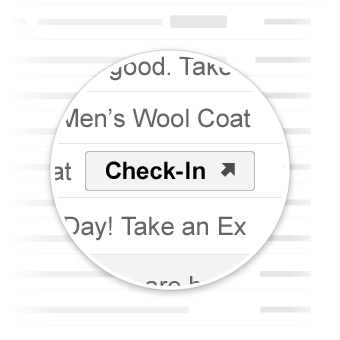
Go-to actions take the user to your website where the action can be completed.
Unlike [one-click actions](https://developers.google.com/workspace/gmail/markup/reference/one-click-action),
go-to actions can be interacted with multiple times.
![Go-to actions in Gmail](https://developers.google.com/workspace/gmail/markup/images/actions-go-to-action.png)

## Use cases

Go-to actions supported by Gmail are:

- [ViewAction](https://developers.google.com/workspace/gmail/markup/reference/go-to-action#view_action)
- [TrackAction](https://developers.google.com/workspace/gmail/markup/reference/go-to-action#track_action)

More actions might be supported in the future.

> [!NOTE]
> **Note:** Before you start, review how to [embed schemas in emails](https://developers.google.com/workspace/gmail/markup/getting-started) and [test schemas](https://developers.google.com/workspace/gmail/markup/testing-your-schema).

## View Action

You can add a `ViewAction` button to emails requiring users to go to your site to
complete the action.

The following declaration adds a `ViewAction` button to an email:

### JSON-LD

    <script type="application/ld+json">
    {
      "@context": "http://schema.org",
      "@type": "EmailMessage",
      "potentialAction": {
        "@type": "ViewAction",
        "url": "https://watch-movies.com/watch?movieId=abc123",
        "name": "Watch movie"
      },
      "description": "Watch the 'Avengers' movie online"
    }
    </script>

### Microdata

    <div itemscope itemtype="http://schema.org/EmailMessage">
      <div itemprop="potentialAction" itemscope itemtype="http://schema.org/ViewAction">
        <link itemprop="target" href="https://watch-movies.com/watch?movieId=abc123"/>
        <meta itemprop="name" content="Watch movie"/>
      </div>
      <meta itemprop="description" content="Watch the 'Avengers' movie online"/>
    </div>

### Publisher data

You can add details about the organization sending the email message by setting
the `publisher` field:

### JSON-LD

    <script type="application/ld+json">
    {
      "@context": "http://schema.org",
      "@type": "EmailMessage",
      "description": "Watch the 'Avengers' movie online",
      "potentialAction": {
        "@type": "ViewAction",
        "url": "https://watch-movies.com/watch?movieId=abc123",
        "name": "Watch movie"
      },
      "publisher": {
        "@type": "Organization",
        "name": "Google Play",
        "url": "https://play.google.com",
        "url/googlePlus": "https://plus.google.com/106886664866983861036"
      }
    }
    </script>

### Microdata

    <div itemscope itemtype="http://schema.org/EmailMessage">
      <meta itemprop="description" content="Watch the 'Avengers' movie online"/>
      <div itemprop="potentialAction" itemscope itemtype="http://schema.org/ViewAction">
        <link itemprop="target" href="https://watch-movies.com/watch?movieId=abc123"/>
        <meta itemprop="name" content="Watch movie"/>
      </div>
      <div itemprop="publisher" itemscope itemtype="http://schema.org/Organization">
        <meta itemprop="name" content="Google Play"/>
        <link itemprop="url" href="https://play.google.com"/>
        <link itemprop="url/googlePlus" href="https://plus.google.com/106886664866983861036"/>
      </div>
    </div>

## Track Action

You can add a `TrackAction` button to emails requiring users to go to your site
to track packages being delivered.

An action is automatically generated when you specify the `trackingUrl`
property. To link directly to a mobile application, also include a `TrackAction`
as shown in the following example:

### JSON-LD

    <script type="application/ld+json">
    {
      "@context": "http://schema.org",
      "@type": "ParcelDelivery",
      "deliveryAddress": {
        "@type": "PostalAddress",
        "streetAddress": "24 Willie Mays Plaza",
        "addressLocality": "San Francisco",
        "addressRegion": "CA",
        "addressCountry": "US",
        "postalCode": "94107"
      },
      "expectedArrivalUntil": "2013-03-12T12:00:00-08:00",
      "carrier": {
        "@type": "Organization",
        "name": "FedEx"
      },
      "itemShipped": {
        "@type": "Product",
        "name": "iPod Mini"
      },
      "partOfOrder": {
        "@type": "Order",
        "orderNumber": "176057",
        "merchant": {
          "@type": "Organization",
          "name": "Bob Dole"
        }
      },
      "trackingUrl": "http://fedex.com/track/1234567890"
      "potentialAction": {
        "@type": "TrackAction",
        "target": "http://fedex.com/track/1234567890"
      },
    }
    </script>

### Microdata

    <div itemscope itemtype="http://schema.org/ParcelDelivery">
      <div itemprop="deliveryAddress" itemscope itemtype="http://schema.org/PostalAddress">
        <meta itemprop="streetAddress" content="24 Willie Mays Plaza"/>
        <meta itemprop="addressLocality" content="San Francisco"/>
        <meta itemprop="addressRegion" content="CA"/>
        <meta itemprop="addressCountry" content="US"/>
        <meta itemprop="postalCode" content="94107"/>
      </div>
      <meta itemprop="expectedArrivalUntil" content="2013-03-12T12:00:00-08:00"/>
      <div itemprop="carrier" itemscope itemtype="http://schema.org/Organization">
        <meta itemprop="name" content="FedEx"/>
      </div>
      <div itemprop="itemShipped" itemscope itemtype="http://schema.org/Product">
        <meta itemprop="name" content="iPod Mini"/>
      </div>
      <div itemprop="partOfOrder" itemscope itemtype="http://schema.org/Order">
        <meta itemprop="orderNumber" content="176057"/>
        <div itemprop="merchant" itemscope itemtype="http://schema.org/Organization">
          <meta itemprop="name" content="Bob Dole"/>
        </div>
      </div>
      <link itemprop="trackingUrl" href="http://fedex.com/track/1234567890"/>
      <div itemprop="potentialAction" itemscope itemtype="http://schema.org/TrackAction">
        <link itemprop="target" href="http://fedex.com/track/1234567890"/>
      </div>
    </div>

## Test your markup

You can validate your markup using the
[Email Markup Tester Tool](https://www.google.com/webmasters/markup-tester/).
Paste in your markup code and click the **Validate** button to scan the content
and receive a report on any errors present.

## Specification

For a specification of the various go-to action types, see the documentation
for the specific type
[ViewAction](https://developers.google.com/workspace/gmail/markup/reference/types/ViewAction) or
[TrackAction](https://developers.google.com/workspace/gmail/markup/reference/types/TrackAction).

> [!NOTE]
> **Note:** Some schemas that Google uses are still going through the standardization process of [Schema.org](https://schema.org) and might change in the future. For more information, see [Schema.org proposals](https://developers.google.com/workspace/gmail/markup/reference/schema-org-proposals).