This quickstart guide explains how to set up a simple, PHP
command-line application that makes requests to the YouTube Data API. This
quickstart actually explains how to make two API requests:
1. You will use an API key, which identifies your application, to retrieve information about the GoogleDevelopers YouTube channel.
2. You will use an OAuth 2.0 client ID to submit an *authorized* request that retrieves information about your own YouTube channel.
> [!NOTE]
> **Note:** More generally, you can follow the instructions for the first example for any use case that uses an API key or the instructions for the second example for any use case that requires authorization using OAuth 2.0. See the [use cases and code samples tool](https://developers.google.com/youtube/data/code_samples/code_snippets.md.txt) for more examples.
## Prerequisites
To run this quickstart, you'll need:
- PHP 5.4 or greater with the command-line interface (CLI) and JSON extension installed.
- The Composer dependency management tool [installed globally](https://getcomposer.org/doc/00-intro.md#globally)
- The Google APIs Client Library for PHP:
- If you have not previously installed the client library:
```
composer require google/apiclient:^2.0
```
- If you previously installed the client library, we recommend updating it to ensure that you have the most up-to-date classes for the library you are testing:
```
composer update google/apiclient --with-dependencies
```
## Step 1: Set up your project and credentials
Create or select a project in the [Cloud console](https://console.cloud.google.com/). Complete the following tasks in the Cloud console for your project:
1. In the [library panel](https://console.developers.google.com/apis/library),
search for the YouTube Data API v3. Click into the listing for that API and
make sure the API is enabled for your project.
2. In the [credentials
panel](https://console.developers.google.com/apis/credentials),
create two credentials:
1. **Create an API key**
You will use the API key to make API requests that do
not require user authorization. For example, you do not need user
authorization to retrieve information about a public YouTube channel.
2. **Create an OAuth 2.0 client ID**
Set the application type to **Desktop app**. You need to use OAuth 2.0
credentials for requests that require user authorization. For example,
you need user authorization to retrieve information about the currently
authenticated user's YouTube channel.
Download the JSON file that contains your OAuth 2.0 credentials. The
file has a name like `client_secret_CLIENTID.json`, where `CLIENTID` is
the client ID for your project.
## Step 2: Set up and run the sample
Use the APIs Explorer widget in the side panel to obtain sample code for
retrieving information about the GoogleDevelopers YouTube channel. This request
uses an API key to identify your application, and it does not require user
authorization or any special permissions from the user running the sample.
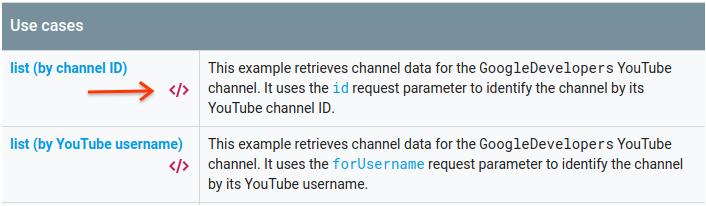
1. Open the documentation for the API's [channels.list](https://developers.google.com/youtube/data/reference/rest/v3/channels/list.md.txt) method.
2. On that page, the "Common use cases" section contains a table that explains
several common ways that the method is used. The first listing in the table
is for listing results by channel ID.
Click the code symbol for the first listing to open and populate the
fullscreen APIs Explorer.
3. The left side of the fullscreen APIs Explorer shows the following:
1. Below the **Request parameters** header, there is a list of parameters
that the method supports. The `part` and `id` parameter values should
be set. The `id` parameter value, `UC_x5XG1OV2P6uZZ5FSM9Ttw`, is the
ID for the GoogleDevelopers YouTube channel.
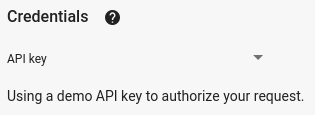
2. Below the parameters, there is a section named **Credentials** . The
pulldown menu in that section should display the value **API key**. The
APIs Explorer uses demo credentials by default to make it easier to get
started. But you'll use your own API key to run the sample locally.
4. The right side of the fullscreen APIs Explorer shows tabs with code samples
in different languages. Select the **PHP** tab.
5. Copy the code sample and save it in a file named
`example.php`.
6. In the sample that you downloaded, find the `YOUR_API_KEY` string and
replace that with the API key that you created in step 1 of this quickstart.
7. Run the sample from the command line. In your working directory, run:
`php example.php`
8. The sample should execute the request and print the response to `STDOUT`.
## Step 3: Run an authorized request
In this step, you'll modify your code sample so that instead of retrieving
information about the GoogleDevelopers YouTube channel, it retrieves information
about *your* YouTube channel. This request does require user authorization.
1. Go back to the documentation for the API's
[channels.list](https://developers.google.com/youtube/data/reference/rest/v3/channels/list.md.txt) method.
2. In the "Common use cases" section, click the code symbol for the third
listing in the table. That use case is to call the `list` method for "my
channel."
3. Again, in the left side of the fullscreen APIs Explorer, you will see a
list of parameters followed by the **Credentials** section. However, there
are two changes from the example where you retrieved information about the
GoogleDevelopers channel:
1. In the parameters section, instead of the `id` parameter value being
set, the `mine` parameter value should be set to `true`. This instructs
the API server to retrieve information about the currently authenticated
user's channel.
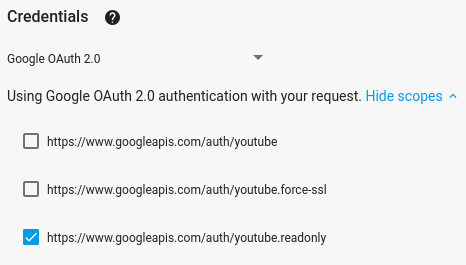
2. In the **Credentials** section, the pulldown menu should select the
option for **Google OAuth 2.0**.
In addition, if you click the **Show scopes** link, the
**https://www.googleapis.com/auth/youtube.readonly** scope should be
checked.
4. As with the previous example, select the **PHP** tab,
copy the code sample, and save it to `example.php`.
In the code, find the `YOUR_CLIENT_SECRET_FILE.json` string and replace
it with the location of the client secret file you downloaded in step 1
of this quickstart.
5. Run the sample from the command line. In your working directory, run:
`php example.php`
6.
Copy the URL from the console and open it in your browser.
If you are not already logged into your Google account, you will be
prompted to log in. If you are logged into multiple Google accounts, you
will be asked to select one account to use for the authorization.
7. Click the button to grant your application access to the scopes specified in
your code sample.
8.
Copy the auth code from the browser and paste it into your terminal. You can
then close the browser tab used for the auth flow.
The API response should again be printed to `STDOUT`.
## Further reading
- [Google Developers Console help documentation](https://developers.google.com/console/help/new)
- [Google APIs Client Library for PHP documentation](https://developers.google.com/api-client-library/php)
- [Google APIs Client Library for PHP on GitHub](https://github.com/googleapis/google-api-php-client) and [autogenerated classes](https://github.com/googleapis/google-api-php-client-services/tree/master/src/Google/Service) for the YouTube API. (On the page, find the `YouTube` folder and the `YouTube.php` file.
- [YouTube Data API reference documentation](https://developers.google.com/youtube/data/reference/rest.md.txt)