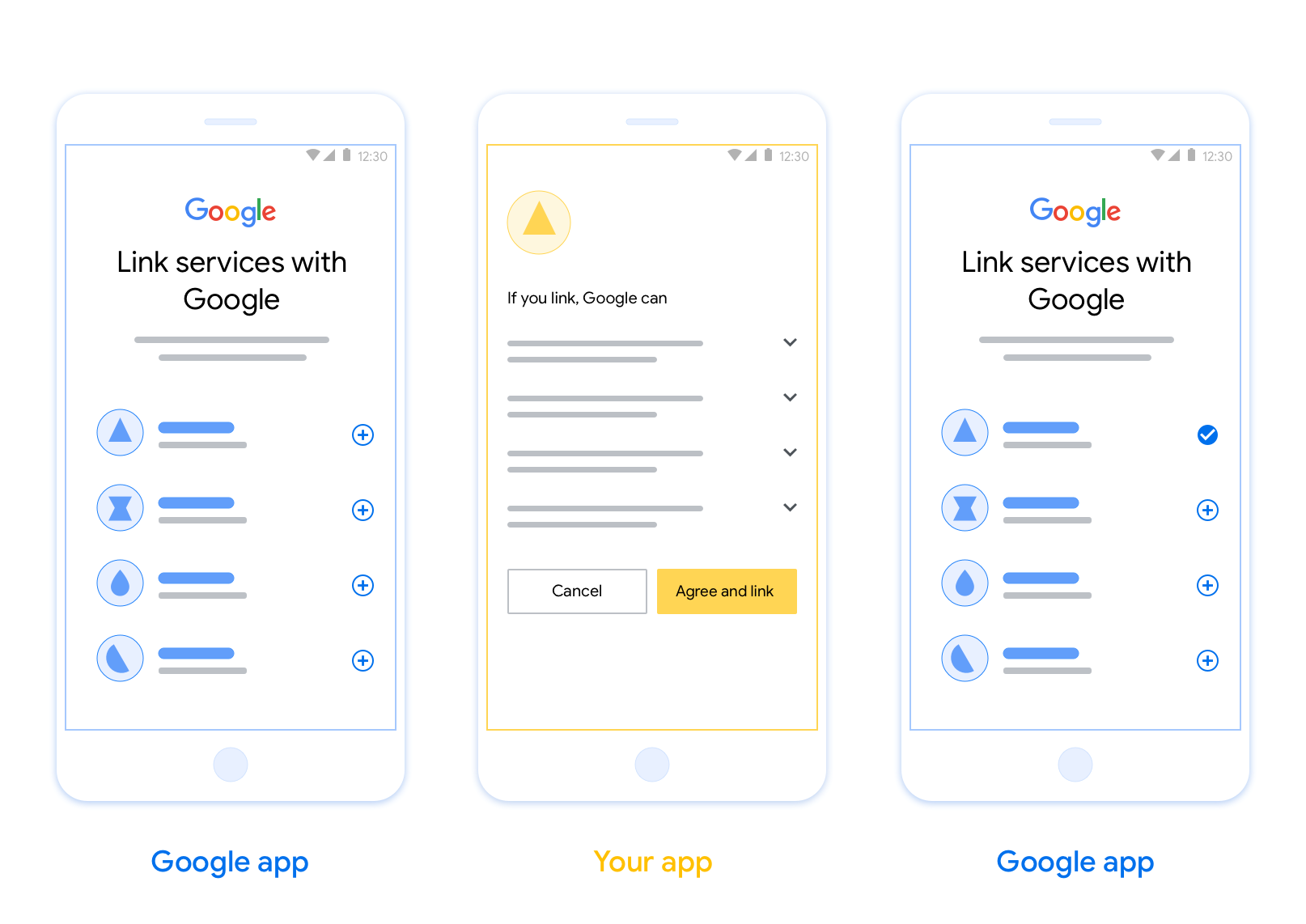
基于 OAuth 的应用快速关联 (App Flip) 关联功能可让用户快速将其在您的身份验证系统中的账号关联到其 Google 账号。 如果用户在发起账户关联过程时手机上已安装您的应用,系统会顺畅地将他们转到您的应用以获取用户授权。
这种方法可提供更快的账户关联过程,因为用户无需重新输入用户名和密码进行身份验证;相反,App Flip 会利用用户在您的应用中的账号凭据。用户将其 Google 账号与您的应用关联后,便可利用您开发的任何集成。
您可以为 iOS 和 Android 应用设置 App Flip。
要求
如需实现 App Flip,您必须满足以下要求:
- 您必须拥有 Android 或 iOS 应用。
- 您必须拥有、管理和维护支持 OAuth 2.0 授权代码流程的 OAuth 2.0 服务器。
基于 OAuth 的 App Flip 流程
以下序列图详细说明了用户、Google 应用、您的应用和您的授权服务器之间针对 App Flip 的交互。
角色和职责
下表定义了 App Flip 流程中执行者的角色和职责。
| 执行者 / 组件 | GAL 角色 | 职责 |
|---|---|---|
| Google 应用 / 服务器 | OAuth 客户端 | 发起账户关联过程,触发到您的移动应用深层链接,将授权代码交换为令牌,并安全地存储这些令牌以访问您服务的 API。 |
| 您的应用 | 授权代理 | 对用户进行身份验证(通常使用现有应用凭据), 获取意见征求,并从您的服务器检索授权代码。 |
| 您的授权服务器 | 授权服务器 | 验证授权代码和刷新令牌,并向 Google 服务器颁发访问 令牌。 |
设计准则
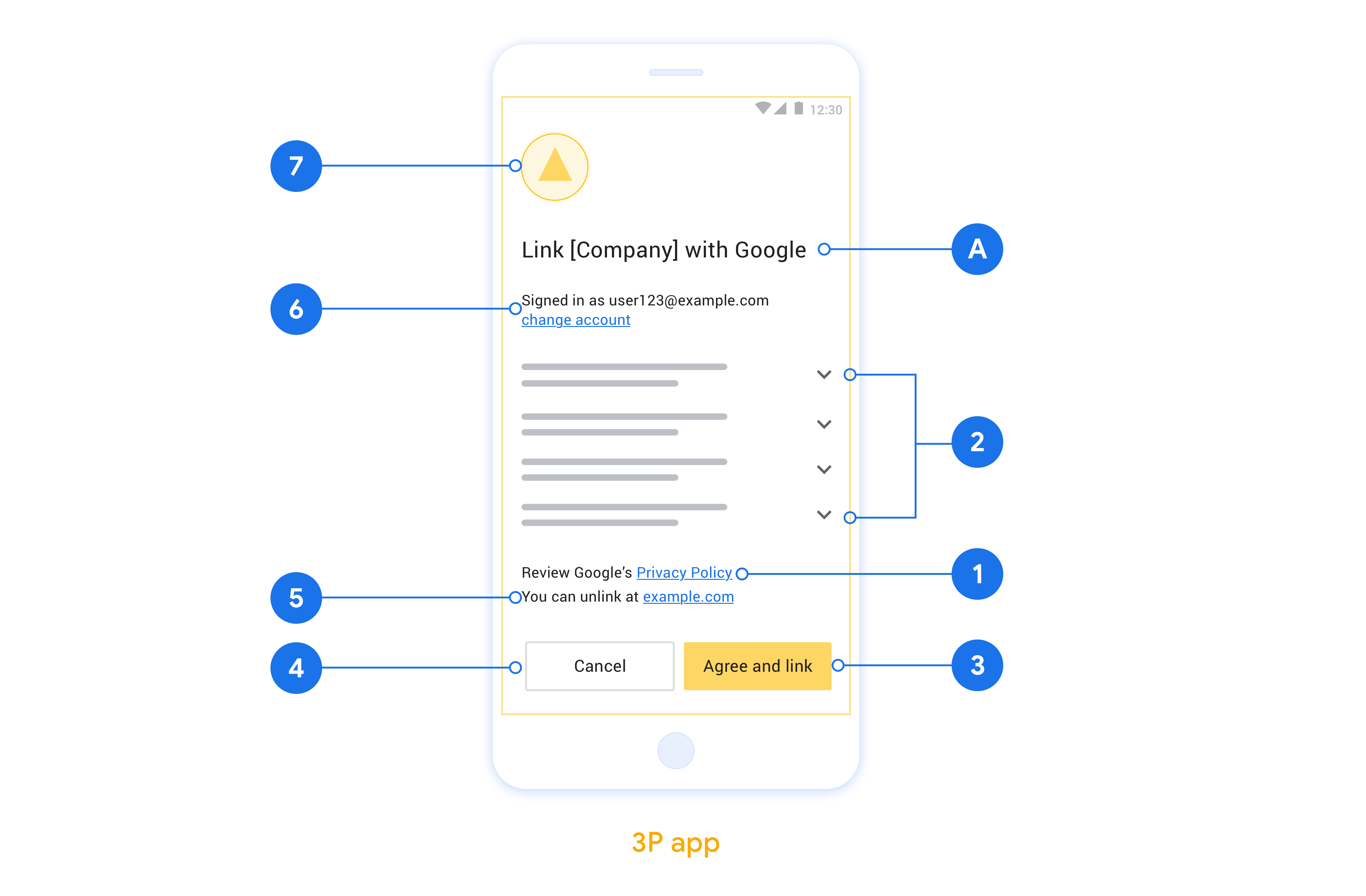
本部分介绍了应用翻转账号关联同意屏幕的设计要求和建议。在 Google 调用您的应用后,您的应用会向用户显示同意屏幕。
要求
- 您必须告知用户,其账号将与 Google 关联,而非与 Google Home 或 Google 助理等特定 Google 产品关联。
建议
建议您执行以下操作:
显示 Google 的隐私权政策。在意见征求屏幕上添加指向 Google 隐私权政策的链接。
要分享的数据。使用简洁明了的语言告知用户 Google 需要哪些用户数据以及原因。
明确的号召性用语。在同意屏幕上提供清晰的号召性用语,例如“同意并关联”。这是因为用户需要了解他们必须与 Google 分享哪些数据才能关联其账号。
能够拒绝或取消。如果用户选择不关联,请提供一种供用户返回、拒绝或取消的方式。
能够解除关联。提供一种可供用户取消关联的机制,例如指向您平台上的账号设置的网址。或者,您也可以添加指向 Google 账号的链接,以便用户管理其关联的账号。
能够更改用户账号。建议用户切换账号的方法。如果用户倾向于使用多个账号,此功能尤其有用。
- 如果用户必须关闭同意屏幕才能切换账号,请向 Google 发送可恢复的错误,以便用户可以通过 OAuth 关联和隐式流程登录所需账号。
添加您的徽标。在权限请求页面上显示公司徽标。 根据样式指南放置徽标。如果您还想显示 Google 的徽标,请参阅徽标和商标。
在应用中实现 App Flip
如需实现 App Flip,你需要修改应用中的用户授权代码,以接受来自 Google 的深层链接。
如需在 Android 应用中支持 App Flip,请按照 Android 实现指南中的说明操作。
如需在 iOS 应用中支持 App Flip,请按照 iOS 实现指南中的说明操作。
测试 App Flip
在经过验证的正式版应用和可正常运行的 OAuth 2.0 服务器可用之前,可以使用示例应用和测试应用模拟 App Flip。
在 App Flip 期间,Google 应用会先打开您的应用,然后您的应用会向 OAuth 2.0 服务器请求授权代码响应,最后,响应会返回给 Google 应用。
前提条件
如需模拟 Google 应用并触发启动应用的 intent, 请下载并安装适用于 Android 和 iOS的 App Flip 测试工具。
下载并安装适用于 Android 和 iOS 的 App Flip 示例,以模拟您的应用并选择 OAuth 2.0 响应类型。
测试顺序
- 打开 App Flip 测试工具。
- 按
Try Flip!启动 App Flip 示例应用。 - 从示例应用中的单选按钮中选择一个响应。
- 按
Send将模拟的 OAuth 2.0 响应返回给测试工具。 - 检查测试工具日志消息,了解 auth_code 或错误详情。
生产环境测试
完成 注册和 OAuth 2.0 服务器 实现后,可以在生产环境中测试 App Flip。
建议使用单个 Google 账号和 特定于任务的电子邮件地址 进行自动化测试。
以 Google 账号持有人的身份登录后,可以使用 “关联的账号”查看账号关联状态。您也可以在此处解除账号关联,以便在重复测试之间进行操作。
(可选)您可以选择实现 RISC,以 编程方式解除关联并通知 Google 这一更改。