

本开发者指南介绍了如何在移动应用中实现 Google 跟踪代码管理器。
简介
通过使用 Google 跟踪代码管理器界面,开发者可在其移动应用中更改配置值,而无需重新生成应用二进制文件并将其重新提交到应用市场。
这对于管理应用中您日后可能需要更改的任何配置值或标志非常有用,包括:
- 各种界面设置和显示字符串
- 应用中投放的广告的尺寸、位置或类型
- 游戏设置
配置值也可以在运行时使用规则进行评估,从而实现动态配置,例如:
- 使用屏幕尺寸确定广告横幅尺寸
- 使用语言和位置配置界面元素
Google 跟踪代码管理器还支持在应用中动态实现跟踪代码 和像素。开发者可以将重要事件推送到数据 层,然后决定应触发哪些跟踪代码或像素。 跟踪代码管理器支持以下代码:
- Google 移动应用分析
- 自定义函数调用代码
准备工作
在使用本入门指南之前,您需要做好以下准备:
- 一个 Google 跟踪代码管理器账号
- 新的跟踪代码管理器 容器和值集合宏
- 用于实现 Google 跟踪代码管理器的 iOS 移动应用
- Google Analytics 服务 SDK,其中包含跟踪代码管理器库。
如果您是 Google 跟踪代码管理器的新用户,建议您先 详细了解容器、宏和规则(帮助中心),然后再继续阅读本指南。
使用入门
本部分将引导开发者了解典型的跟踪代码管理器工作流程:
1. 将 Google 跟踪代码管理器 SDK 添加到您的项目中
在使用 Google 跟踪代码管理器 SDK 之前,您需要将 libGoogleAnalyticsServices.a 和 Google 跟踪代码管理器 (GTM) 头文件从 SDK 软件包的 Library 目录添加到您的项目中。
接下来,如果以下内容尚未添加到应用目标的关联库中,请将其 添加进去:
CoreData.frameworkSystemConfiguration.frameworklibz.dyliblibsqlite3.dyliblibGoogleAnalyticsServices.a
如果您希望应用通过 Google 跟踪代码管理器 SDK 宏访问该框架提供的广告标识符 (IDFA) 和跟踪标志,还需要关联以下其他库:
libAdIdAccess.aAdSupport.framework
2. 向您的项目添加默认容器文件
Google 跟踪代码管理器会在应用首次运行时使用默认容器。在应用能够通过网络检索新 容器之前,系统会一直使用默认 容器。
如需下载默认容器二进制文件并将其添加到您的应用,请按以下步骤操作:
- 登录 Google 跟踪代码管理器网页界面。
- 选择要下载的容器版本 。
- 点击下载 按钮以检索容器二进制文件。
- 将二进制文件添加到 项目的根目录以及项目中的“Supporting Files”文件夹。
默认文件名应为容器 ID(例如 GTM-1234)。下载二进制文件后,请务必从文件名中移除版本后缀,以确保您遵循正确的命名惯例。
虽然建议使用二进制文件,但如果您的容器不包含规则或代码,
您可以选择改用属性列表或 JSON 文件。该文件应位于主软件包中,并遵循
以下命名惯例:<Container_ID>.<plist|json>.
例如,如果您的容器 ID 为 GTM-1234,您可以在名为 GTM-1234.plist 的属性列表文件中指定默认容器值。
3. 打开容器
在从容器检索值之前,您的应用需要打开该容器。打开容器会从磁盘加载容器(如果可用),或者从网络请求容器(如果需要)。
在 iOS 上打开容器的最简单方法是使用 openContainerWithId:tagManager:openType:timeout:notifier:,如以下示例所示:
// MyAppDelegate.h
// This example assumes this file is using ARC.
#import <UIKit/UIKit.h>

@class TAGManager;
@class TAGContainer;

@interface MyAppDelegate : UIResponder <UIApplicationDelegate>

@property (nonatomic, strong) TAGManager *tagManager;
@property (nonatomic, strong) TAGContainer *container;

@end


// MyAppDelegate.m
// This example assumes this file is using ARC.
#import "MyAppDelegate.h"
#import "TAGContainer.h"
#import "TAGContainerOpener.h"
#import "TAGManager.h"

@interface MyAppDelegate ()<TAGContainerOpenerNotifier>
@end

@implementation MyAppDelegate

- (BOOL)application:(UIApplication *)application didFinishLaunchingWithOptions:(NSDictionary *)launchOptions {
  self.tagManager = [TAGManager instance];

  // Optional: Change the LogLevel to Verbose to enable logging at VERBOSE and higher levels.
  [self.tagManager.logger setLogLevel:kTAGLoggerLogLevelVerbose];

  /*
   * Opens a container.
   *
   * @param containerId The ID of the container to load.
   * @param tagManager The TAGManager instance for getting the container.
   * @param openType The choice of how to open the container.
   * @param timeout The timeout period (default is 2.0 seconds).
   * @param notifier The notifier to inform on container load events.
   */
  [TAGContainerOpener openContainerWithId:@"GTM-XXXX"   // Update with your Container ID.
                               tagManager:self.tagManager
                                 openType:kTAGOpenTypePreferFresh
                                  timeout:nil
                                 notifier:self];

  // Method calls that don't need the container.

  return YES;
}

// TAGContainerOpenerNotifier callback.
- (void)containerAvailable:(TAGContainer *)container {
  // Note that containerAvailable may be called on any thread, so you may need to dispatch back to
  // your main thread.
  dispatch_async(dispatch_get_main_queue(), ^{
    self.container = container;
  });
}

// The rest of your app delegate implementation.
4. 从容器获取配置值
打开容器后,可以使用
<type>ForKey: 方法检索配置值:
// Retrieving a configuration value from a Tag Manager Container.

MyAppDelegate *appDelegate = (MyAppDelegate *)[[UIApplication sharedApplication] delegate];
TAGContainer *container = appDelegate.container;

// Get the configuration value by key.
NSString *title = [container stringForKey:@"title_string"];
使用不存在的键发出的请求将返回适合所请求类型的默认值 :
// Empty keys will return a default value depending on the type requested.

// Key does not exist. An empty string is returned.
NSString subtitle = [container stringForKey:@"Non-existent-key"];
[subtitle isEqualToString:@""]; // Evaluates to true.
5. 将值推送到 DataLayer
DataLayer 是一个映射,可让容器中的跟踪代码管理器宏和代码获取有关应用的运行时信息,例如触摸 事件或屏幕浏览。
例如,通过将有关屏幕浏览的信息推送到 DataLayer 映射中, 您可以在跟踪代码管理器网页界面中设置代码,以触发转化像素 和跟踪调用来响应这些屏幕浏览,而无需将它们硬 编码到应用中。
事件使用 push: 推送到 DataLayer
//
//  ViewController.m
//  Pushing an openScreen event with a screen name into the data layer.
//

#import "MyAppDelegate.h"
#import "TAGDataLayer.h"
#import "ViewController.h"

@implementation ViewController

- (void)viewDidAppear:(BOOL)animated {
    [super viewDidAppear:animated];

    // The container should have already been opened, otherwise events pushed to
    // the data layer will not fire tags in that container.
    TAGDataLayer *dataLayer = [TAGManager instance].dataLayer;

    [dataLayer push:@{@"event": @"openScreen", @"screenName": @"Home Screen"}];
}

// Rest of the ViewController implementation

@end
在网页界面中,您现在可以创建代码(例如 Google Analytics 代码) 以便通过创建以下规则为每次屏幕浏览量触发代码: 等于“openScreen”。如需将屏幕名称 传递给其中一个代码,请创建一个数据层宏,该宏引用数据层中的“screenName” 键。您还可以创建一个代码 (例如 Google Ads 转化像素),以便仅为特定屏幕浏览触发代码,方法是 创建以下规则: 等于 "openScreen" && 等于 "ConfirmationScreen"。
6. 预览和发布容器
宏值将始终与当前已发布版本对应。 在发布最新版本的容器之前,您可以预览容器草稿。
如需预览容器,请在 Google 跟踪代码管理器网页界面中选择要预览的容器版本,然后选择 Preview,从而生成预览网址。保存此预览网址,以便在后续步骤中使用。

如需启用容器预览,您必须将代码添加到应用委托实现文件中,并在项目的属性列表中定义 Google 跟踪代码管理器预览网址架构。
首先,将以下加粗的代码段添加到应用委托文件中:
@implementation MyAppDelegate

- (BOOL)application:(UIApplication *)application didFinishLaunchingWithOptions:(NSDictionary *)launchOptions {

  self.tagManager = [TAGManager instance];

  // Add the code in bold below to preview a Google Tag Manager container.
  // IMPORTANT: This code must be called before the container is opened.
  NSURL *url = [launchOptions valueForKey:UIApplicationLaunchOptionsURLKey];
  if (url != nil) {
    [self.tagManager previewWithUrl:url];
  }

  id<TAGContainerFuture> future =
      [TAGContainerOpener openContainerWithId:@"GTM-XXXX"    // Placeholder Container ID.
                                   tagManager:self.tagManager
                                     openType:kTAGOpenTypePreferNonDefault
                                      timeout:nil];

  // The rest of your method implementation.

  self.container = [future get];

  return YES;
}


// Add the code in bold below preview a Google Tag Manager container.
- (BOOL)application:(UIApplication *)application
            openURL:(NSURL *)url
  sourceApplication:(NSString *)sourceApplication
         annotation:(id)annotation {

  if ([self.tagManager previewWithUrl:url]) {
    return YES;
  }

  // Code to handle other urls.
  return NO;
}
接下来,在应用的属性列表文件的网址类型键下注册以下网址标识符和网址协议:
URL identifier: your.package_name
URL scheme: tagmanager.c.your.package.name

在模拟器或实体设备上打开该链接,即可预览应用中的容器草稿。
当您准备好让应用使用配置值草稿时,请 发布容器。
高级配置
移动版 Google 跟踪代码管理器提供了许多高级配置选项,可让您使用规则根据运行时条件选择值、手动刷新容器,以及获取用于打开容器的其他选项。以下部分概述了几个最常见的高级配置。
用于打开容器的高级选项
Google 跟踪代码管理器 SDK 提供了多种用于打开容器的方法,可让您更好地控制加载过程:
openContainerById:callback:
openContainerById:callback: 是用于打开容器的最低级别且最灵活的 API。它会立即返回默认容器,并且还会异步从磁盘或网络加载容器(如果不存在已保存的容器,或者已保存的容器不是最新的容器(超过 12 小时))。
@interface ContainerCallback : NSObject<TAGContainerCallback>

@end

@implementation ContainerCallback

/**
 * Called before the refresh is about to begin.
 *
 * @param container The container being refreshed.
 * @param refreshType The type of refresh which is starting.
 */
- (void)containerRefreshBegin:(TAGContainer *)container
                  refreshType:(TAGContainerCallbackRefreshType)refreshType {
  // Notify UI that container refresh is beginning.
}

/**
 * Called when a refresh has successfully completed for the given refresh type.
 *
 * @param container The container being refreshed.
 * @param refreshType The type of refresh which completed successfully.
 */
- (void)containerRefreshSuccess:(TAGContainer *)container
                    refreshType:(TAGContainerCallbackRefreshType)refreshType {
  // Notify UI that container is available.
}

/**
 * Called when a refresh has failed to complete for the given refresh type.
 *
 * @param container The container being refreshed.
 * @param failure The reason for the refresh failure.
 * @param refreshType The type of refresh which failed.
 */
- (void)containerRefreshFailure:(TAGContainer *)container
                        failure:(TAGContainerCallbackRefreshFailure)failure
                    refreshType:(TAGContainerCallbackRefreshType)refreshType {
  // Notify UI that container request has failed.
}
@end
在整个加载过程中,openContainerById:callback: 会发出多个生命周期回调,以便您的代码可以了解加载请求何时开始、是否失败以及失败或成功的原因,以及容器最终是从磁盘还是网络加载的。
除非您的应用可以使用默认值,否则您需要使用这些回调来了解已保存的容器或网络容器何时加载完毕。请注意,如果这是应用首次运行且没有网络连接,您将无法加载已保存的容器或网络容器。
openContainerById:callback: 会将以下 enum 值作为参数传递给这些回调:
RefreshType
| 值 | 说明 |
|---|---|
kTAGContainerCallbackRefreshTypeSaved
|
刷新请求正在加载本地保存的容器。 |
kTAGContainerCallbackRefreshTypeNetwork
|
刷新请求正在通过网络加载容器。 |
RefreshFailure
| 值 | 说明 |
|---|---|
kTAGContainerCallbackRefreshFailureNoSavedContainer
|
没有可用的已保存容器。 |
kTAGContainerCallbackRefreshFailureIoError
|
I/O 错误阻止了容器刷新。 |
kTAGContainerCallbackRefreshFailureNoNetwork
|
没有可用的网络连接。 |
kTAGContainerCallbackRefreshFailureNetworkError
|
发生了网络错误。 |
kTAGContainerCallbackRefreshFailureServerError
|
服务器上发生了错误。 |
kTAGContainerCallbackRefreshFailureUnknownError
|
发生了无法分类的错误。 |
用于打开非默认容器和新容器的方法
TAGContainerOpener 封装了 openContainerById:callback:
并提供了两种用于打开容器的便利方法:
openContainerWithId:tagManager:openType:timeout:notifier: 和
openContainerWithId:tagManager:openType:timeout:。
每种方法都采用枚举,请求非默认容器或新容器。
对于大多数应用,建议使用 kTAGOpenTypePreferNonDefault,它会尝试在给定的超时期限内从磁盘或网络返回第一个可用的非默认容器,即使该容器已超过 12 小时也是如此。如果它返回过时的已保存容器,还会异步发出网络请求以获取新容器。
使用 kTAGOpenTypePreferNonDefault 时,如果没有其他容器可用,或者超时期限已过,系统将返回默认容器。
kTAGOpenTypePreferFresh 会尝试在给定的超时期限内从磁盘或网络返回新容器。
如果网络连接不可用和/或超时期限已过,它会返回已保存的容器。
不建议在请求时间较长可能会明显影响用户体验的地方使用 kTAGOpenTypePreferFresh,例如界面标志或显示字符串。您还可以随时使用
TAGContainer::refresh强制发出网络容器请求。
这两种便利方法都是非阻塞的。
openContainerWithId:tagManager:openType:timeout: 会返回一个
TAGContainerFuture 对象,其 get 方法会在加载后立即返回
TAGContainer(但在此之前会阻塞)。
openContainerWithId:tagManager:openType:timeout:notifier: 方法采用单个回调,该回调会在容器可用时调用。这两种方法的默认超时期限均为
2.0 秒。
在运行时使用规则评估宏
容器可以在运行时使用规则评估值。规则可以基于设备语言、平台或任何其他宏值等条件。例如,规则可用于在运行时根据设备的语言选择本地化的显示字符串。您可以使用以下规则进行配置:
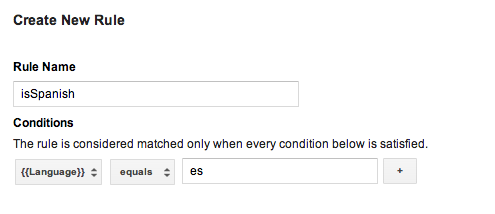
然后,您可以为每种语言创建值集合宏,并将此规则添加到每个宏中,插入相应的语言代码。发布此容器后,您的应用将能够根据用户设备在运行时的语言显示本地化的显示字符串。
请注意,如果您的默认容器需要规则,您必须使用 a 二进制容器文件作为您的默认 容器。
二进制默认容器文件
需要规则的默认容器应使用二进制容器文件 而不是 属性列表文件或 JSON 文件 作为默认容器。二进制容器支持使用 Google 跟踪代码管理器规则在运行时确定宏值,而属性列表或 JSON 文件则不支持。
二进制容器文件可以从 Google 跟踪代码管理器网页界面下载,并且应按照以下命名惯例添加到您的主应用软件包中:GTM-XXXX,其中文件名表示您的容器 ID。
如果同时存在属性列表文件和/或 JSON 文件以及二进制容器文件,SDK 将使用二进制容器文件作为默认容器。
使用函数调用宏
函数调用宏是指设置为应用中指定函数的返回值的宏。函数调用宏可用于将运行时值与 Google 跟踪代码管理器规则结合使用,例如在运行时根据设备的配置语言和货币确定向用户显示的价格。
如需配置函数调用宏,请执行以下操作:
- 在 Google 跟踪代码管理器网页界面中定义函数调用宏。 您可以选择将参数配置为键值对。
- 定义一个实现
TAGFunctionCallMacroHandler协议的处理程序:// MyFunctionCallMacroHandler.h #import "TAGContainer.h" // The function name field of the macro, as defined in the Google Tag Manager // web interface. extern NSString *const kMyMacroFunctionName; @interface MyFunctionCallMacroHandler : NSObject<TAGFunctionCallMacroHandler> @end // MyFunctionCallMacroHandler.m #import "MyFunctionCallMacroHandler.h" // Corresponds to the function name field in the Google Tag Manager interface. NSString *const kMyMacroFunctionName = @"myConfiguredFunctionName"; @implementation MacroHandler - (id)valueForMacro:(NSString *)functionName parameters:(NSDictionary *)parameters { if ([functionName isEqualToString:kMyMacroFunctionName]) { // Process and return the calculated value of this macro accordingly. return macro_value; } return nil; } @end
- 使用 TAGContainer::registerFunctionCallMacroHandler:forMacro: 和 Google 跟踪代码管理器界面中指定的函数名称
注册处理程序:
//
// MyAppDelegate.h
//
#import <UIKit/UIKit.h>

@interface MyAppDelegate : UIResponder <UIApplicationDelegate>

@end


//
// MyAppDelegate.m
//
#import "MyAppDelegate.h"
#import "MyFunctionCallMacroHandler.h"
#import "TAGContainer.h"
#import "TAGContainerOpener.h"
#import "TAGManager.h"

@implementation MyAppDelegate

- (BOOL)application:(UIApplication *)application didFinishLaunchingWithOptions:(NSDictionary *)launchOptions
{
  // Open the container.
  id<TAGContainerFuture> future =
      [TAGContainerOpener openContainerWithId:@"GTM-XXXX"    // Placeholder Container ID.
                                   tagManager:[TAGManager instance]
                                     openType:kTAGOpenTypePreferNonDefault
                                      timeout:nil];

  // Method calls that don't need the container.

  self.container = [future get];

  // Register a function call macro handler using the macro name defined
  // in the Google Tag Manager web interface.
  [self.container registerFunctionCallMacroHandler:[[MyFunctionCallMacroHandler alloc] init]
                                          forMacro:kMyMacroFunctionName];
}

@end
使用函数调用代码
每当事件被推送到数据层且代码规则
评估为 true 时,函数调用代码都会执行预注册函数。
如需配置函数调用代码,请执行以下操作:
- 在 Google 跟踪代码管理器网页界面中定义函数调用代码。 您可以选择将参数配置为键值对。
- 实现
TAGFunctionCallTagHandler协议:// // MyFunctionCallTagHandler.h // #import "TAGContainer.h" extern NSString *const kMyTagFunctionName; @interface MyFunctionCallTagHandler : NSObject<TAGFunctionCallTagHandler> @end // // MyFunctionCallTagHandler.m // // Corresponds to the function name field in the Google Tag Manager interface. NSString *const kMyTagFunctionName = @"myConfiguredFunctionName"; @implementation MyFunctionCallTagHandler /** * This method will be called when any custom tag's rule(s) evaluate to true and * should check the functionName and process accordingly. * * @param functionName corresponds to the function name field, not tag * name field, defined in the Google Tag Manager web interface. * @param parameters An optional map of parameters as defined in the Google * Tag Manager web interface. */ - (void)execute:(NSString *)functionName parameters:(NSDictionary *)parameters { if ([functionName isEqualToString:kMyTagFunctionName]) { // Process accordingly. } } @end
- 使用在
Google 跟踪代码管理器网页界面中配置的代码名称注册函数调用代码处理程序:
//
// MyAppDelegate.h
//
#import <UIKit/UIKit.h>

@interface MyAppDelegate : UIResponder <UIApplicationDelegate>

@end


//
// MyAppDelegate.m
//
#import "MyAppDelegate.h"
#import "MyFunctionCallTagHandler.h"
#import "TAGContainer.h"
#import "TAGContainerOpener.h"
#import "TAGManager.h"

@implementation MyAppDelegate

- (BOOL)application:(UIApplication *)application didFinishLaunchingWithOptions:(NSDictionary *)launchOptions {

  // Open the container.
  id<TAGContainerFuture> future =
      [TAGContainerOpener openContainerWithId:@"GTM-XXXX"    // Placeholder Container ID.
                                   tagManager:[TAGManager instance]
                                     openType:kTAGOpenTypePreferNonDefault
                                      timeout:nil];

  // Method calls that don't need the container.

  self.container = [future get];

  // Register a function call tag handler using the function name of the tag as
  // defined in the Google Tag Manager web interface.
  [self.container registerFunctionCallTagHandler:[[MyFunctionCallTagHandler alloc] init]
                                          forTag:kMyTagFunctionName];
}
@end
设置自定义刷新周期
如果当前容器的年龄超过 12 小时,Google 跟踪代码管理器 SDK 将尝试检索新容器。如需设置
自定义容器刷新周期,请使用
NSTimer,如以下
示例所示:
- (void)refreshContainer:(NSTimer *)timer {
  [self.container refresh];
}

self.refreshTimer = [NSTimer scheduledTimerWithTimeInterval:<refresh_interval>
                                                     target:self
                                                   selector:@selector(refreshContainer:)
                                                   userInfo:nil
                                                    repeats:YES];
使用 Logger 进行调试
默认情况下,Google 跟踪代码管理器 SDK 会将错误和警告输出到日志。
启用更详细的日志记录有助于调试,您可以通过实现自己的 Logger 来实现此目的,如以下示例所示:
// MyAppDelegate.h
// This example assumes this file is using ARC.
// This Logger class will print out not just errors and warnings (as the default
// logger does), but also info, debug, and verbose messages.
@interface MyLogger: NSObject<TAGLogger>
@end

@implementation MyLogger
- (void)error:(NSString *)message {
  NSLog(@"Error: %@", message);
}

- (void)warning:(NSString *)message {
  NSLog(@"Warning: %@", message);
}

- (void)info:(NSString *)message {
  NSLog(@"Info: %@", message);
}

- (void)debug:(NSString *)message {
  NSLog(@"Debug: %@", message);
}

- (void)verbose:(NSString *)message {
  NSLog(@"Verbose: %@", message);
}
@end

// MyAppDelegate.m
// This example assumes this file is using ARC.
@implementation MyAppDelegate

- (BOOL)application:(UIApplication *)application didFinishLaunchingWithOptions:(NSDictionary *)launchOptions {
  self.tagManager = [TAGManager instance];

  self.tagManager.logger = [[MyLogger alloc] init];

  // Rest of Tag Manager and method implementation.
  return YES;
}
// Rest of app delegate implementation.
@end
或者,您可以使用
TagManager::logger::setLogLevel,
设置现有 Logger 的 LogLevel,如以下示例所示:
// Change the LogLevel to INFO to enable logging at INFO and higher levels.
self.tagManager = [TAGManager instance];
[self.tagManager.logger setLogLevel:kTAGLoggerLogLevelInfo];