

مقدمة
يوضّح هذا الدليل بالتفصيل كيفية استخدام ميزات الإعلانات ذات الصلة في "إدارة إعلانات Google" مع واجهة برمجة التطبيقات. قبل البدء، تأكَّد من فهم أساسيات الإعلانات ذات الصلة في "إدارة إعلانات Google".
استرداد شكل إعلان مدمج مع المحتوى
يتم تمثيل أشكال "الإعلانات المدمجة مع المحتوى" من خلال
CreativeTemplate
في Ad Manager API. لاسترداد أشكال الإعلانات المدمجة مع المحتوى من شبكتك، استخدِم
CreativeTemplateService.
للتمييز بين نماذج تصميمات الإعلانات وأشكال الإعلانات المدمجة مع المحتوى، استخدِم الحقل
isNativeEligible. عندما يكون هذا الحقل صحيحًا، يمثّل نموذج تصميم الإعلان شكل إعلان مدمج مع المحتوى.
جافا
StatementBuilder statementBuilder = new StatementBuilder()
    .where("isNativeEligible = :isNativeEligible")
    .orderBy("id DESC")
    .limit(StatementBuilder.SUGGESTED_PAGE_LIMIT)
    .withBindVariableValue("isNativeEligible", true);;

CreativeTemplatePage page = creativeTemplateService.getCreativeTemplatesByStatement(
    statementBuilder.toStatement());
Python
query = 'WHERE isNativeEligible = :isNativeEligible'
values = [
    {'key': 'isNativeEligible',
     'value': {
         'xsi_type': 'BooleanValue',
         'value': 'true'
     }},
]
statement = ad_manager.FilterStatement(query, values)

response = creative_template_service.getCreativeTemplatesByStatement(
    statement.ToStatement())
PHP
$pageSize = StatementBuilder::SUGGESTED_PAGE_LIMIT;
$statementBuilder = (new StatementBuilder())
    ->where('isNativeEligible = :isNativeEligible')
    ->orderBy('id ASC')
    ->limit($pageSize)
    ->withBindVariableValue('isNativeEligible', true);

$page = $creativeTemplateService->getCreativeTemplatesByStatement(
    $statementBuilder->ToStatement());
NET.
StatementBuilder statementBuilder = new StatementBuilder()
    .Where("isNativeEligible = :isNativeEligible")
    .OrderBy("id ASC")
    .Limit(StatementBuilder.SUGGESTED_PAGE_LIMIT)
    .AddValue("isNativeEligible", true);

CreativeTemplatePage page = creativeTemplateService.getCreativeTemplatesByStatement(
      statementBuilder.ToStatement());
Ruby
query = 'WHERE isNativeEligible = :isNativeEligible'
values = [
  {
    :key => 'isNativeEligible',
    :value => {
      :xsi_type => 'BooleanValue',
      :value => 'true'
    }
  },
]
statement = AdManagerApi::FilterStatement.new(query, values)

page = creative_template_service.get_creative_templates_by_statement(
  statement.toStatement())
إنشاء تصميم إعلان مدمج مع المحتوى
تستند تصاميم الإعلانات المدمجة مع المحتوى إلى
TemplateCreatives
في Ad Manager API. ولا تشكّل كيانًا منفصلاً. لإنشاء تصاميم إعلانات مدمجة مع المحتوى، أنشِئ TemplateCreative لـ CreativeTemplate مؤهَّل للإعلانات المدمجة مع المحتوى. يتم تخزين مكوّنات تصميم الإعلان المدمج مع المحتوى في عناصر
CreativeTemplateVariable.
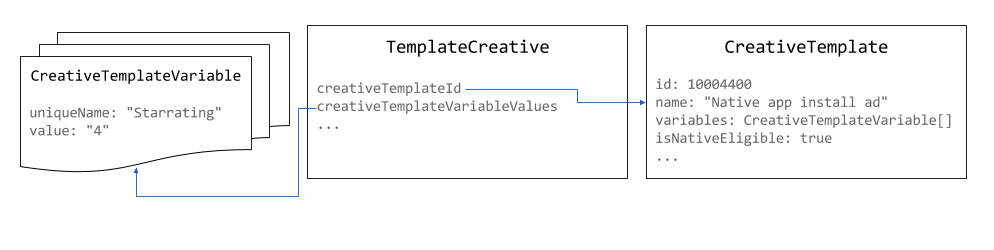
استخدِم 1x1 بكسل كحجم لتصاميم الإعلانات المدمجة مع المحتوى. يمكن ضبط حجم الإعلان المعروض في
NativeStyle
أو تحديده من خلال العرض المخصّص.
جافا
// Use the system defined native app install creative template.
long nativeAppInstallTemplateId = 10004400L;

// Use 1x1 as the size for native creatives.
Size size = new Size();
size.setWidth(1);
size.setHeight(1);
size.setIsAspectRatio(false);

TemplateCreative nativeAppInstallCreative = new TemplateCreative();
nativeAppInstallCreative.setName("Native creative #" + new Random().nextInt(Integer.MAX_VALUE));
nativeAppInstallCreative.setCreativeTemplateId(nativeAppInstallTemplateId);
nativeAppInstallCreative.setSize(size);

List<BaseCreativeTemplateVariableValue> templateVariables = Lists.newArrayList();

// Set the star rating.
StringCreativeTemplateVariableValue starRatingVariableValue =
    new StringCreativeTemplateVariableValue();
starRatingVariableValue.setUniqueName("Starrating");
starRatingVariableValue.setValue("4");
templateVariables.add(starRatingVariableValue);
Python
# Use the system defined native app install creative template.
native_app_install_template_id = '10004400'

creative = {
    'xsi_type': 'TemplateCreative',
    'name': 'Native creative',
    'creativeTemplateId': native_app_install_template_id,
    'size': {'width': 1, 'height': 1, 'isAspectRatio': false},
    'creativeTemplateVariableValues': [
        {
            'xsi_type': 'StringCreativeTemplateVariableValue',
            'uniqueName': 'Starrating',
            'value': '4'
        }
    ]
}
PHP
// Use the system defined native app install creative template.
$nativeAppInstallTemplateId = 10004400;

// Use 1x1 as the size for native creatives.
$size = new Size();
$size->width = 1;
$size->height = 1;
$size->isAspectRatio = false;

$nativeAppInstallCreative = new TemplateCreative();
$nativeAppInstallCreative->name = 'Native creative #' . uniqid();
$nativeAppInstallCreative->creativeTemplateId = $nativeAppInstallTemplateId;
$nativeAppInstallCreative->size = $size;

$starRatingVariableValue = new StringCreativeTemplateVariableValue();
$starRatingVariableValue->uniqueName = 'Starrating';
$starRatingVariableValue->value = '4';
$nativeAppInstallCreative->creativeTemplateVariableValues[] =
    $starRatingVariableValue;
#C
// Use the system defined native app install creative template.
long nativeAppInstallTemplateId = 10004400L;

TemplateCreative nativeAppInstallCreative = new TemplateCreative();
nativeAppInstallCreative.name =
    String.Format("Native creative #{0}", new Random().Next(int.MaxValue));
nativeAppInstallCreative.creativeTemplateId = nativeAppInstallTemplateId;

// Use 1x1 as the size for native creatives.
Size size = new Size();
size.width = 1;
size.height = 1;
size.isAspectRatio = false;
nativeAppInstallCreative.size = size;

List<BaseCreativeTemplateVariableValue> templateVariables =
    new List<BaseCreativeTemplateVariableValue>();

templateVariables.Add(new StringCreativeTemplateVariableValue() {
  uniqueName = "Starrating",
  value = "4"
});
Ruby
# Use the system defined native app install creative template.
creative_template_id = 10004400

creative = {
    :xsi_type => 'TemplateCreative',
    :name => "Native creative %d" % Time.new.to_i,
    :creative_template_id => creative_template_id,
    :size => {:width => 1, :height => 1, :is_aspect_ratio => false}
}

starrating_variable_value = {
    :xsi_type => 'StringCreativeTemplateVariableValue',
    :unique_name => 'Starrating',
    :value => '4'
}

creative[:creative_template_variable_values] = [
    starrating_variable_value
]
إنشاء نمط إعلان مدمج مع المحتوى
يمكن إنشاء أنماط الإعلانات المدمجة مع المحتوى باستخدام
NativeStyleService.
لا تتحقّق واجهة برمجة التطبيقات حاليًا من صحة مقتطفات CSS وHTML التي تقدّمها. عند ضبط معلومات الاستهداف، تكون الحقول الوحيدة المتاحة هي
inventoryTargeting
و
customTargeting.
جافا
long nativeAppInstallTemplateId = 10004400L;

// Create a native style for native app install ads.
NativeStyle nativeStyle = new NativeStyle();
nativeStyle.setName("Native style #" + new Random().nextInt(Integer.MAX_VALUE));
nativeStyle.setCreativeTemplateId(nativeAppInstallTemplateId);
nativeStyle.setSize(size);
nativeStyle.setHtmlSnippet(htmlSnippet);
nativeStyle.setCssSnippet(cssSnippet);
Python
native_app_install_template_id = '10004400'

# Create a style for native app install ads.
native_style = {
    'name': 'Native style #%d' % uuid.uuid4(),
    'htmlSnippet': html_snippet,
    'cssSnippet': css_snippet,
    'creativeTemplateId': native_app_install_template_id,
    'size': {
        'width': width,
        'height': height,
        'isAspectRatio': False
    }
}
PHP
$nativeAppInstallTemplateId = 10004400;

// Create a style for native app install ads.
$nativeStyle = new NativeStyle();
$nativeStyle->setName('Native style #'. uniqid());
$nativeStyle->setCreativeTemplateId($nativeAppInstallTemplateId);
$nativeStyle->setSize($size);
$nativeStyle->setHtmlSnippet($htmlSnippet);
$nativeStyle->setCssSnippet($cssSnippet);
#C
long nativeAppInstallTemplateId = 10004400L;

// Create a style for native app install ads.
NativeStyle nativeStyle = new NativeStyle();
nativeStyle.name = string.Format("Native style #{0}", new Random().Next());
nativeStyle.creativeTemplateId = nativeAppInstallTemplateId;
nativeStyle.size = size;
nativeStyle.htmlSnippet = htmlSnippet;
nativeStyle.cssSnippet = cssSnippet;
Ruby
native_app_install_template_id = 10004400

# Create a style for native app install ads.
native_style = {
  :name => 'Native style #%d' % (Time.new.to_f * 1000),
  :html_snippet => html_snippet,
  :css_snippet => css_snippet,
  :creative_template_id => native_app_install_template_id,
  :size => size
}
إذا كان النمط لحجم مرن، اضبط الحقل
isFluid
على "صحيح" واضبط
size
على 1x1 بكسل.
عرض "إعلان مدمج مع المحتوى"
عند إنشاء
LineItem
لإعلان مدمج مع المحتوى،
يجب أن يضبط
CreativePlaceholder
نوع
CreativeSizeType
على NATIVE، وضبط
creativeTemplateId
لشكل الإعلان المدمج مع المحتوى المطلوب.
جافا
// Create creative placeholder size.
Size size = new Size();
size.setWidth(1);
size.setHeight(1);
size.setIsAspectRatio(false);

long nativeAppInstallTemplateId = 10004400L;

// Create the creative placeholder.
CreativePlaceholder creativePlaceholder = new CreativePlaceholder();
creativePlaceholder.setSize(size);
creativePlaceholder.setCreativeTemplateId(nativeAppInstallTemplateId);
creativePlaceholder.setCreativeSizeType(CreativeSizeType.NATIVE);
Python
native_app_install_template_id = '10004400'

# Create the creative placeholder.
creative_placeholder = {
    'size': {
        'width': '1',
        'height': '1'
    },
    'creativeTemplateId': native_app_install_template_id,
    'creativeSizeType': 'NATIVE'
}
PHP
$nativeAppInstallTemplateId = 10004400;

// Create the creative placeholder.
$creativePlaceholder = new CreativePlaceholder();
$creativePlaceholder->setSize(new Size(1, 1, false));
$creativePlaceholder->setCreativeTemplateId($nativeAppInstallTemplateId);
$creativePlaceholder->setCreativeSizeType(CreativeSizeType::NATIVE);
#C
// Create the creative placeholder size.
Size size = new Size();
size.width = 1;
size.height = 1;
size.isAspectRatio = false;

long nativeAppInstallTemplateId = 10004400L;

// Create the creative placeholder.
CreativePlaceholder creativePlaceholder = new CreativePlaceholder();
creativePlaceholder.size = size;
creativePlaceholder.creativeTemplateId = nativeAppInstallTemplateId;
creativePlaceholder.creativeSizeType = CreativeSizeType.NATIVE;
Ruby
# Create the creative placeholder.
creative_placeholder = {
    :size => {:width => 1, :height => 1, :is_aspect_ratio => false},
    :creative_template_id => 10004400,
    :creative_size_type => 'NATIVE'
}