

کاوش در Dialogflow
برای وارد کردن نمونه «پاسخهای» ما در Dialogflow، روی ادامه کلیک کنید. سپس، مراحل زیر را برای استقرار و آزمایش نمونه دنبال کنید:
- نام عاملی را وارد کنید و عامل Dialogflow جدیدی برای نمونه ایجاد کنید.
- پساز اینکه وارد کردن عامل تمام شد، روی رفتن به عامل کلیک کنید.
- از منو پیمایش اصلی، به تکمیل بروید.
- ویرایشگر درونخطی را فعال کنید، سپس روی استقرار کلیک کنید. ویرایشگر حاوی کد نمونه است.
- از منو پیمایش اصلی، به ادغامها بروید، سپس روی دستیار Google کلیک کنید.
- در پنجره مقیدی که ظاهر میشود، پیشنمایش خودکار تغییرات را فعال کنید و روی آزمایش کلیک کنید تا شبیهساز «کنشها» باز شود.
- در شبیهساز،
Talk to my test appرا برای آزمایش نمونه وارد کنید!
اگر میخواهید کاربر برای ادامه دادن «کنش» شما از بین چند گزینه یکی را انتخاب کند، از پاسخ انتخاب دیداری استفاده کنید.
پاسخهای انتخاب تصویری میتواند در تجربههای فقط صفحهنمایش یا در تجربههایی که هم مؤلفههای صوتی و هم مؤلفههای صفحهنمایش را دربرمیگیرد نشان داده شود.
پاسخهای انتخاب تصویری میتواند شامل مؤلفههای زیر باشد:
- یک یا دو پاسخ ساده (حبابک گپ).
- کارت پایه اختیاری.
- تراشههای پیشنهاد اختیاری.
- تراشه پیوند خروجی اختیاری.
- میانای گزینهای مانند فهرست یا گردونه.
همچنین میتوانید رهنمودهای طراحی مکالمه ما را مرور کنید تا با نحوه گنجاندن این عناصر دیداری در «کنش» خود آشنا شوید.
مشخصات
پاسخهای انتخاب بصری الزامات و ویژگیهای اختیاری زیر را دارند که میتوانید پیکربندی کنید:
- در سطوح دارای قابلیت
actions.capability.SCREEN_OUTPUTپشتیبانی میشود. - اولین مورد در پاسخ انتخاب دیداری باید پاسخ ساده باشد.
- حداکثر یک پاسخ ساده.
- حداکثر یک کارت پایه، میانای گزینه (فهرست یا گردونه)،
یا
StructuredResponse. (نمیتوانید همزمان هم کارت پایه و هم واسط گزینه داشته باشید). - حداکثر ۸ تراشه پیشنهاد.
- تراشههای پیشنهاد در
FinalResponseمجاز نیست.
بخشهای زیر نحوه ساخت انواع مختلف پاسخهای انتخاب بصری را نشان میدهد.
فهرست

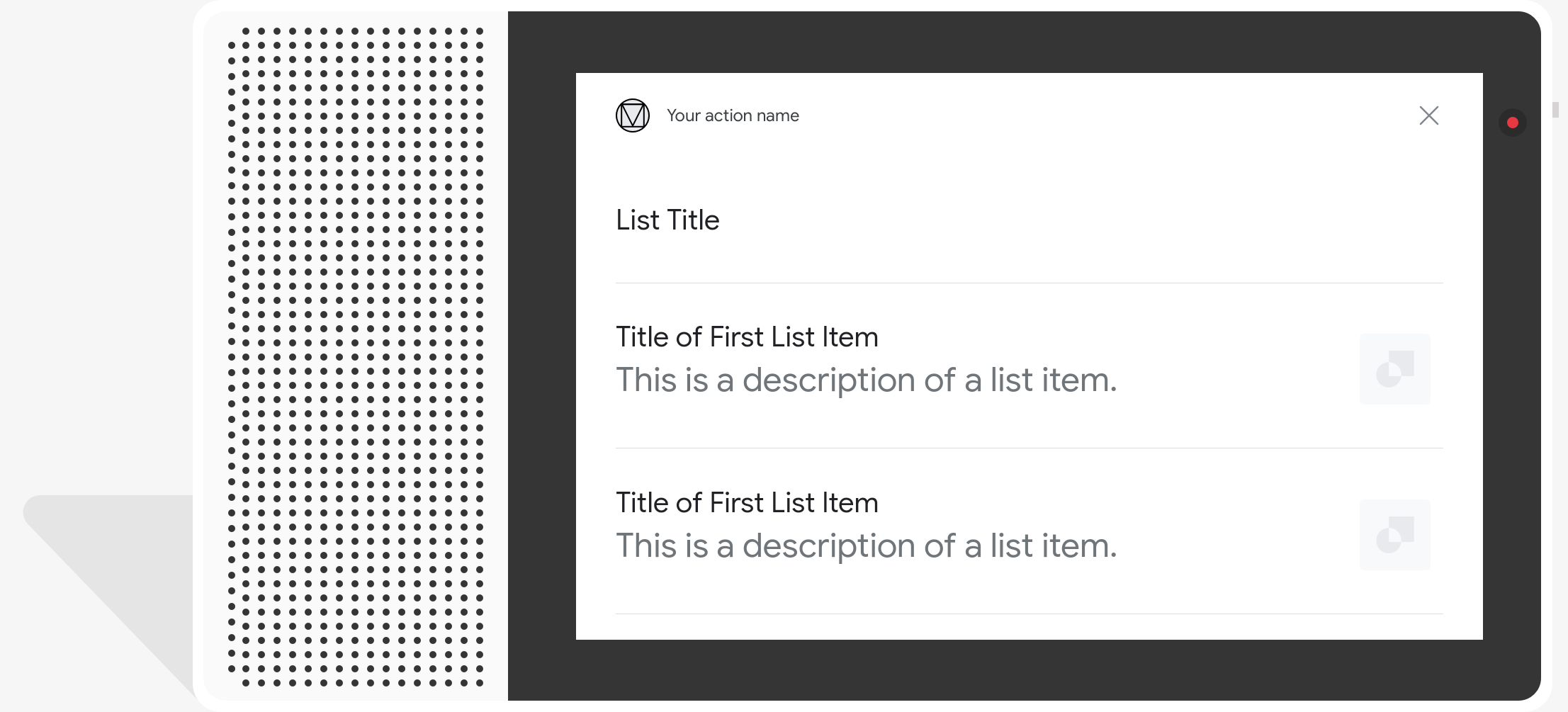
فهرست تکانتخابی فهرستی عمودی از چند مورد را به کاربر ارائه میدهد و به کاربر اجازه میدهد یکی از آنها را انتخاب کند. انتخاب کردن موردی از فهرست یک پُرسمان کاربر (حبابک گپ) حاوی عنوان مورد فهرست ایجاد میکند.
نوع پاسخ فهرست در سطوح دارای قابلیت
actions.capability.SCREEN_OUTPUT پشتیبانی میشود.
مشخصات
فهرستها باید حداقل ۲ و حداکثر ۳۰ مورد داشته باشند. فهرستها ویژگیهای زیر را دارند:
- عنوان فهرست (اختیاری)
- قلم و اندازه قلم ثابت
- محدود به یک خط. (نویسههای اضافی کوتاه میشوند.)
- نوشتار ساده، Markdown پشتیبانی نمیشود.
- اگر عنوانی مشخص نشده باشد، ارتفاع کارت جمع میشود.
- مورد فهرست
- عنوان
- قلم و اندازه قلم ثابت
- حداکثر طول: ۱ خط (با سهنقطه کوتاه میشود…)
- باید منحصربهفرد باشد (برای پشتیبانی از انتخاب صدا)
- توضیحات (اختیاری)
- قلم و اندازه قلم ثابت
- حداکثر طول: ۲ خط (با سهنقطه کوتاه میشود…)
- تصویر (اختیاری)
- اندازه: ۴۸×۴۸ پیکسل
- عنوان
- تعامل
- صدا/نوشتار
- کاربر همیشه میتواند بهجای ضربه زدن روی عنوان مورد، آن را بگوید یا تایپ کند.
- باید قصدی برای ورودی لمسی داشته باشد که رویداد
actions_intent_OPTIONرا مدیریت کند.
- صدا/نوشتار
راهنمایی
فهرستها برای زمانی مناسب هستند که ابهامزدایی از گزینهها مهم باشد، یا زمانی که کاربر باید بین گزینههایی انتخاب کند که باید در یک نگاه اسکن شوند. برای مثال، با کدام «Peter» میخواهید صحبت کنید، Peter Jons یا Peter Hans؟
توصیه میکنیم تراشههای پیشنهاد را به زیر فهرست اضافه کنید تا کاربر بتواند مکالمه را تغییر دهد یا گسترش دهد. هرگز گزینههای ارائهشده در فهرست را بهعنوان تراشههای پیشنهادی تکرار نکنید. تراشهها در این بافت برای تغییر جهت مکالمه استفاده میشوند (نه برای انتخاب گزینه).
توجه داشته باشید که در مثال همراه، حبابک گپی که همراه کارت فهرست است زیرمجموعهای از صدا (نوشتار به گفتار/SSML) است. خروجی صوتی فقط شامل اولین مورد فهرست است. توصیه میکنیم همه عناصر فهرست را نخوانید.
مطمئن شوید «کنش» شما آنچه را که برای کاربران شما مهمتر است در بالای فهرست نشان میدهد (برای مثال، محبوبترین، اخیراً خریداریشده، یا پربحثترین). این فهرست در ابتدا حداکثر ۱۰ عنصر را نمایش میدهد، اما کاربران میتوانند فهرست را ازهم باز کنند تا عناصر بیشتری را ببینند. تعداد مواردی که فهرست قبلاز گسترش نشان میدهد نیز ممکن است بسته به سطح و زمان تغییر کند.
کدگذاری نمونه
Node.js
app.intent('List', (conv) => { if (!conv.screen) { conv.ask('Sorry, try this on a screen device or select the ' + 'phone surface in the simulator.'); return; } conv.ask('This is a list example.'); // Create a list conv.ask(new List({ title: 'List Title', items: { // Add the first item to the list 'SELECTION_KEY_ONE': { synonyms: [ 'synonym 1', 'synonym 2', 'synonym 3', ], title: 'Title of First List Item', description: 'This is a description of a list item.', image: new Image({ url: 'https://storage.googleapis.com/actionsresources/logo_assistant_2x_64dp.png', alt: 'Image alternate text', }), }, // Add the second item to the list 'SELECTION_KEY_GOOGLE_HOME': { synonyms: [ 'Google Home Assistant', 'Assistant on the Google Home', ], title: 'Google Home', description: 'Google Home is a voice-activated speaker powered by ' + 'the Google Assistant.', image: new Image({ url: 'https://storage.googleapis.com/actionsresources/logo_assistant_2x_64dp.png', alt: 'Google Home', }), }, // Add the third item to the list 'SELECTION_KEY_GOOGLE_PIXEL': { synonyms: [ 'Google Pixel XL', 'Pixel', 'Pixel XL', ], title: 'Google Pixel', description: 'Pixel. Phone by Google.', image: new Image({ url: 'https://storage.googleapis.com/actionsresources/logo_assistant_2x_64dp.png', alt: 'Google Pixel', }), }, }, })); });
جاوا
@ForIntent("List") public ActionResponse list(ActionRequest request) { ResponseBuilder responseBuilder = getResponseBuilder(request); if (!request.hasCapability(Capability.SCREEN_OUTPUT.getValue())) { return responseBuilder .add("Sorry, try ths on a screen device or select the phone surface in the simulator.") .add("Which response would you like to see next?") .build(); } responseBuilder .add("This is a list example.") .add( new SelectionList() .setTitle("List Title") .setItems( Arrays.asList( new ListSelectListItem() .setTitle("Title of First List Item") .setDescription("This is a description of a list item.") .setImage( new Image() .setUrl( "https://storage.googleapis.com/actionsresources/logo_assistant_2x_64dp.png") .setAccessibilityText("Image alternate text")) .setOptionInfo( new OptionInfo() .setSynonyms( Arrays.asList("synonym 1", "synonym 2", "synonym 3")) .setKey("SELECTION_KEY_ONE")), new ListSelectListItem() .setTitle("Google Home") .setDescription( "Google Home is a voice-activated speaker powered by the Google Assistant.") .setImage( new Image() .setUrl( "https://storage.googleapis.com/actionsresources/logo_assistant_2x_64dp.png") .setAccessibilityText("Google Home")) .setOptionInfo( new OptionInfo() .setSynonyms( Arrays.asList( "Google Home Assistant", "Assistant on the Google Home")) .setKey("SELECTION_KEY_GOOGLE_HOME")), new ListSelectListItem() .setTitle("Google Pixel") .setDescription("Pixel. Phone by Google.") .setImage( new Image() .setUrl( "https://storage.googleapis.com/actionsresources/logo_assistant_2x_64dp.png") .setAccessibilityText("Google Pixel")) .setOptionInfo( new OptionInfo() .setSynonyms( Arrays.asList("Google Pixel XL", "Pixel", "Pixel XL")) .setKey("SELECTION_KEY_GOOGLE_PIXEL"))))); return responseBuilder.build(); }
Node.js
if (!conv.screen) { conv.ask('Sorry, try this on a screen device or select the ' + 'phone surface in the simulator.'); return; } conv.ask('This is a list example.'); // Create a list conv.ask(new List({ title: 'List Title', items: { // Add the first item to the list 'SELECTION_KEY_ONE': { synonyms: [ 'synonym 1', 'synonym 2', 'synonym 3', ], title: 'Title of First List Item', description: 'This is a description of a list item.', image: new Image({ url: 'https://storage.googleapis.com/actionsresources/logo_assistant_2x_64dp.png', alt: 'Image alternate text', }), }, // Add the second item to the list 'SELECTION_KEY_GOOGLE_HOME': { synonyms: [ 'Google Home Assistant', 'Assistant on the Google Home', ], title: 'Google Home', description: 'Google Home is a voice-activated speaker powered by ' + 'the Google Assistant.', image: new Image({ url: 'https://storage.googleapis.com/actionsresources/logo_assistant_2x_64dp.png', alt: 'Google Home', }), }, // Add the third item to the list 'SELECTION_KEY_GOOGLE_PIXEL': { synonyms: [ 'Google Pixel XL', 'Pixel', 'Pixel XL', ], title: 'Google Pixel', description: 'Pixel. Phone by Google.', image: new Image({ url: 'https://storage.googleapis.com/actionsresources/logo_assistant_2x_64dp.png', alt: 'Google Pixel', }), }, }, }));
جاوا
ResponseBuilder responseBuilder = getResponseBuilder(request); if (!request.hasCapability(Capability.SCREEN_OUTPUT.getValue())) { return responseBuilder .add("Sorry, try ths on a screen device or select the phone surface in the simulator.") .add("Which response would you like to see next?") .build(); } responseBuilder .add("This is a list example.") .add( new SelectionList() .setTitle("List Title") .setItems( Arrays.asList( new ListSelectListItem() .setTitle("Title of First List Item") .setDescription("This is a description of a list item.") .setImage( new Image() .setUrl( "https://storage.googleapis.com/actionsresources/logo_assistant_2x_64dp.png") .setAccessibilityText("Image alternate text")) .setOptionInfo( new OptionInfo() .setSynonyms( Arrays.asList("synonym 1", "synonym 2", "synonym 3")) .setKey("SELECTION_KEY_ONE")), new ListSelectListItem() .setTitle("Google Home") .setDescription( "Google Home is a voice-activated speaker powered by the Google Assistant.") .setImage( new Image() .setUrl( "https://storage.googleapis.com/actionsresources/logo_assistant_2x_64dp.png") .setAccessibilityText("Google Home")) .setOptionInfo( new OptionInfo() .setSynonyms( Arrays.asList( "Google Home Assistant", "Assistant on the Google Home")) .setKey("SELECTION_KEY_GOOGLE_HOME")), new ListSelectListItem() .setTitle("Google Pixel") .setDescription("Pixel. Phone by Google.") .setImage( new Image() .setUrl( "https://storage.googleapis.com/actionsresources/logo_assistant_2x_64dp.png") .setAccessibilityText("Google Pixel")) .setOptionInfo( new OptionInfo() .setSynonyms( Arrays.asList("Google Pixel XL", "Pixel", "Pixel XL")) .setKey("SELECTION_KEY_GOOGLE_PIXEL"))))); return responseBuilder.build();
JSON
توجه داشته باشید که JSON زیر پاسخ وبقلاب را شرح میدهد.
{
  "payload": {
    "google": {
      "expectUserResponse": true,
      "systemIntent": {
        "intent": "actions.intent.OPTION",
        "data": {
          "@type": "type.googleapis.com/google.actions.v2.OptionValueSpec",
          "listSelect": {
            "title": "List Title",
            "items": [
              {
                "optionInfo": {
                  "key": "SELECTION_KEY_ONE",
                  "synonyms": [
                    "synonym 1",
                    "synonym 2",
                    "synonym 3"
                  ]
                },
                "description": "This is a description of a list item.",
                "image": {
                  "url": "https://storage.googleapis.com/actionsresources/logo_assistant_2x_64dp.png",
                  "accessibilityText": "Image alternate text"
                },
                "title": "Title of First List Item"
              },
              {
                "optionInfo": {
                  "key": "SELECTION_KEY_GOOGLE_HOME",
                  "synonyms": [
                    "Google Home Assistant",
                    "Assistant on the Google Home"
                  ]
                },
                "description": "Google Home is a voice-activated speaker powered by the Google Assistant.",
                "image": {
                  "url": "https://storage.googleapis.com/actionsresources/logo_assistant_2x_64dp.png",
                  "accessibilityText": "Google Home"
                },
                "title": "Google Home"
              },
              {
                "optionInfo": {
                  "key": "SELECTION_KEY_GOOGLE_PIXEL",
                  "synonyms": [
                    "Google Pixel XL",
                    "Pixel",
                    "Pixel XL"
                  ]
                },
                "description": "Pixel. Phone by Google.",
                "image": {
                  "url": "https://storage.googleapis.com/actionsresources/logo_assistant_2x_64dp.png",
                  "accessibilityText": "Google Pixel"
                },
                "title": "Google Pixel"
              }
            ]
          }
        }
      },
      "richResponse": {
        "items": [
          {
            "simpleResponse": {
              "textToSpeech": "This is a list example."
            }
          }
        ]
      }
    }
  }
}
JSON
توجه داشته باشید که JSON زیر پاسخ وبقلاب را شرح میدهد.
{
  "expectUserResponse": true,
  "expectedInputs": [
    {
      "possibleIntents": [
        {
          "intent": "actions.intent.OPTION",
          "inputValueData": {
            "@type": "type.googleapis.com/google.actions.v2.OptionValueSpec",
            "listSelect": {
              "title": "List Title",
              "items": [
                {
                  "optionInfo": {
                    "key": "SELECTION_KEY_ONE",
                    "synonyms": [
                      "synonym 1",
                      "synonym 2",
                      "synonym 3"
                    ]
                  },
                  "description": "This is a description of a list item.",
                  "image": {
                    "url": "https://storage.googleapis.com/actionsresources/logo_assistant_2x_64dp.png",
                    "accessibilityText": "Image alternate text"
                  },
                  "title": "Title of First List Item"
                },
                {
                  "optionInfo": {
                    "key": "SELECTION_KEY_GOOGLE_HOME",
                    "synonyms": [
                      "Google Home Assistant",
                      "Assistant on the Google Home"
                    ]
                  },
                  "description": "Google Home is a voice-activated speaker powered by the Google Assistant.",
                  "image": {
                    "url": "https://storage.googleapis.com/actionsresources/logo_assistant_2x_64dp.png",
                    "accessibilityText": "Google Home"
                  },
                  "title": "Google Home"
                },
                {
                  "optionInfo": {
                    "key": "SELECTION_KEY_GOOGLE_PIXEL",
                    "synonyms": [
                      "Google Pixel XL",
                      "Pixel",
                      "Pixel XL"
                    ]
                  },
                  "description": "Pixel. Phone by Google.",
                  "image": {
                    "url": "https://storage.googleapis.com/actionsresources/logo_assistant_2x_64dp.png",
                    "accessibilityText": "Google Pixel"
                  },
                  "title": "Google Pixel"
                }
              ]
            }
          }
        }
      ],
      "inputPrompt": {
        "richInitialPrompt": {
          "items": [
            {
              "simpleResponse": {
                "textToSpeech": "This is a list example."
              }
            }
          ]
        }
      }
    }
  ]
}
مدیریت مورد انتخابشده
وقتی کاربران موردی را انتخاب میکنند، مقدار مورد انتخابشده بهعنوان آرگومان به شما ارسال میشود. در مقدار آرگومان، شناسه key را برای مورد انتخابشده دریافت خواهید کرد:
Node.js
app.intent('List - OPTION', (conv, params, option) => { const SELECTED_ITEM_RESPONSES = { 'SELECTION_KEY_ONE': 'You selected the first item', 'SELECTION_KEY_GOOGLE_HOME': 'You selected the Google Home!', 'SELECTION_KEY_GOOGLE_PIXEL': 'You selected the Google Pixel!', }; conv.ask(SELECTED_ITEM_RESPONSES[option]); conv.ask('Which response would you like to see next?'); });
جاوا
@ForIntent("List - OPTION") public ActionResponse listSelected(ActionRequest request) { ResponseBuilder responseBuilder = getResponseBuilder(request); String selectedItem = request.getSelectedOption(); String response; if (selectedItem.equals("SELECTION_KEY_ONE")) { response = "You selected the first item"; } else if (selectedItem.equals("SELECTION_KEY_GOOGLE_HOME")) { response = "You selected the Google Home!"; } else if (selectedItem.equals("SELECTION_KEY_GOOGLE_PIXEL")) { response = "You selected the Google Pixel!"; } else { response = "You did not select a valid item"; } return responseBuilder.add(response).add("Which response would you like to see next?").build(); }
Node.js
app.intent('actions.intent.OPTION', (conv, params, option) => { const SELECTED_ITEM_RESPONSES = { 'SELECTION_KEY_ONE': 'You selected the first item', 'SELECTION_KEY_GOOGLE_HOME': 'You selected the Google Home!', 'SELECTION_KEY_GOOGLE_PIXEL': 'You selected the Google Pixel!', }; conv.ask(SELECTED_ITEM_RESPONSES[option]); conv.ask('Which response would you like to see next?'); });
جاوا
@ForIntent("actions.intent.OPTION") public ActionResponse listSelected(ActionRequest request) { ResponseBuilder responseBuilder = getResponseBuilder(request); String selectedItem = request.getSelectedOption(); String response; if (selectedItem.equals("SELECTION_KEY_ONE")) { response = "You selected the first item"; } else if (selectedItem.equals("SELECTION_KEY_GOOGLE_HOME")) { response = "You selected the Google Home!"; } else if (selectedItem.equals("SELECTION_KEY_GOOGLE_PIXEL")) { response = "You selected the Google Pixel!"; } else { response = "You did not select a valid item"; } return responseBuilder.add(response).add("Which response would you like to see next?").build(); } public ActionResponse carousel(ActionRequest request) { ResponseBuilder responseBuilder = getResponseBuilder(request); if (!request.hasCapability(Capability.SCREEN_OUTPUT.getValue())) { return responseBuilder .add("Sorry, try ths on a screen device or select the phone surface in the simulator.") .add("Which response would you like to see next?") .build(); } responseBuilder .add("This is a carousel example.") .add( new SelectionCarousel() .setItems( Arrays.asList( new CarouselSelectCarouselItem() .setTitle("Title of First List Item") .setDescription("This is a description of a list item.") .setImage( new Image() .setUrl( "https://storage.googleapis.com/actionsresources/logo_assistant_2x_64dp.png") .setAccessibilityText("Image alternate text")) .setOptionInfo( new OptionInfo() .setSynonyms( Arrays.asList("synonym 1", "synonym 2", "synonym 3")) .setKey("SELECTION_KEY_ONE")), new CarouselSelectCarouselItem() .setTitle("Google Home") .setDescription( "Google Home is a voice-activated speaker powered by the Google Assistant.") .setImage( new Image() .setUrl( "https://storage.googleapis.com/actionsresources/logo_assistant_2x_64dp.png") .setAccessibilityText("Google Home")) .setOptionInfo( new OptionInfo() .setSynonyms( Arrays.asList( "Google Home Assistant", "Assistant on the Google Home")) .setKey("SELECTION_KEY_GOOGLE_HOME")), new CarouselSelectCarouselItem() .setTitle("Google Pixel") .setDescription("Pixel. Phone by Google.") .setImage( new Image() .setUrl( "https://storage.googleapis.com/actionsresources/logo_assistant_2x_64dp.png") .setAccessibilityText("Google Pixel")) .setOptionInfo( new OptionInfo() .setSynonyms( Arrays.asList("Google Pixel XL", "Pixel", "Pixel XL")) .setKey("SELECTION_KEY_GOOGLE_PIXEL"))))); return responseBuilder.build(); } }
JSON
توجه داشته باشید که JSON زیر درخواست وبقلاب را شرح میدهد.
{
  "responseId": "5d7732d1-d22d-4a0e-ad34-8bc0a7fde20c-21947381",
  "queryResult": {
    "queryText": "actions_intent_OPTION",
    "action": "List.List-custom",
    "parameters": {},
    "allRequiredParamsPresent": true,
    "fulfillmentText": "Webhook failed for intent: List - OPTION",
    "fulfillmentMessages": [
      {
        "text": {
          "text": [
            "Webhook failed for intent: List - OPTION"
          ]
        }
      }
    ],
    "outputContexts": [
      {
        "name": "projects/df-responses-kohler/agent/sessions/ABwppHHsebncupHK11oKhsCTgyH96GRNYH-xpeeMTqb-cvOxbd67QenbRlZM4bGAIB8_KXdTfI7-7lYVKN1ovAhCaA/contexts/actions_capability_screen_output"
      },
      {
        "name": "projects/df-responses-kohler/agent/sessions/ABwppHHsebncupHK11oKhsCTgyH96GRNYH-xpeeMTqb-cvOxbd67QenbRlZM4bGAIB8_KXdTfI7-7lYVKN1ovAhCaA/contexts/actions_capability_account_linking"
      },
      {
        "name": "projects/df-responses-kohler/agent/sessions/ABwppHHsebncupHK11oKhsCTgyH96GRNYH-xpeeMTqb-cvOxbd67QenbRlZM4bGAIB8_KXdTfI7-7lYVKN1ovAhCaA/contexts/actions_capability_media_response_audio"
      },
      {
        "name": "projects/df-responses-kohler/agent/sessions/ABwppHHsebncupHK11oKhsCTgyH96GRNYH-xpeeMTqb-cvOxbd67QenbRlZM4bGAIB8_KXdTfI7-7lYVKN1ovAhCaA/contexts/actions_capability_audio_output"
      },
      {
        "name": "projects/df-responses-kohler/agent/sessions/ABwppHHsebncupHK11oKhsCTgyH96GRNYH-xpeeMTqb-cvOxbd67QenbRlZM4bGAIB8_KXdTfI7-7lYVKN1ovAhCaA/contexts/actions_capability_web_browser"
      },
      {
        "name": "projects/df-responses-kohler/agent/sessions/ABwppHHsebncupHK11oKhsCTgyH96GRNYH-xpeeMTqb-cvOxbd67QenbRlZM4bGAIB8_KXdTfI7-7lYVKN1ovAhCaA/contexts/google_assistant_input_type_touch"
      },
      {
        "name": "projects/df-responses-kohler/agent/sessions/ABwppHHsebncupHK11oKhsCTgyH96GRNYH-xpeeMTqb-cvOxbd67QenbRlZM4bGAIB8_KXdTfI7-7lYVKN1ovAhCaA/contexts/list-followup",
        "lifespanCount": 1
      },
      {
        "name": "projects/df-responses-kohler/agent/sessions/ABwppHHsebncupHK11oKhsCTgyH96GRNYH-xpeeMTqb-cvOxbd67QenbRlZM4bGAIB8_KXdTfI7-7lYVKN1ovAhCaA/contexts/actions_intent_option",
        "parameters": {
          "OPTION": "SELECTION_KEY_GOOGLE_PIXEL",
          "text": "Google Pixel"
        }
      }
    ],
    "intent": {
      "name": "projects/df-responses-kohler/agent/intents/88904350-193e-4472-a2de-977eb5d9e26e",
      "displayName": "List - OPTION"
    },
    "intentDetectionConfidence": 1,
    "languageCode": "en"
  },
  "originalDetectIntentRequest": {
    "source": "google",
    "version": "2",
    "payload": {
      "user": {
        "locale": "en-US",
        "lastSeen": "2019-08-04T23:56:32Z",
        "userVerificationStatus": "VERIFIED"
      },
      "conversation": {
        "conversationId": "ABwppHHsebncupHK11oKhsCTgyH96GRNYH-xpeeMTqb-cvOxbd67QenbRlZM4bGAIB8_KXdTfI7-7lYVKN1ovAhCaA",
        "type": "ACTIVE",
        "conversationToken": "[\"list-followup\"]"
      },
      "inputs": [
        {
          "intent": "actions.intent.OPTION",
          "rawInputs": [
            {
              "inputType": "TOUCH",
              "query": "Google Pixel"
            }
          ],
          "arguments": [
            {
              "name": "OPTION",
              "textValue": "SELECTION_KEY_GOOGLE_PIXEL"
            },
            {
              "name": "text",
              "rawText": "Google Pixel",
              "textValue": "Google Pixel"
            }
          ]
        }
      ],
      "surface": {
        "capabilities": [
          {
            "name": "actions.capability.SCREEN_OUTPUT"
          },
          {
            "name": "actions.capability.ACCOUNT_LINKING"
          },
          {
            "name": "actions.capability.MEDIA_RESPONSE_AUDIO"
          },
          {
            "name": "actions.capability.AUDIO_OUTPUT"
          },
          {
            "name": "actions.capability.WEB_BROWSER"
          }
        ]
      },
      "isInSandbox": true,
      "availableSurfaces": [
        {
          "capabilities": [
            {
              "name": "actions.capability.WEB_BROWSER"
            },
            {
              "name": "actions.capability.SCREEN_OUTPUT"
            },
            {
              "name": "actions.capability.AUDIO_OUTPUT"
            }
          ]
        }
      ],
      "requestType": "SIMULATOR"
    }
  },
  "session": "projects/df-responses-kohler/agent/sessions/ABwppHHsebncupHK11oKhsCTgyH96GRNYH-xpeeMTqb-cvOxbd67QenbRlZM4bGAIB8_KXdTfI7-7lYVKN1ovAhCaA"
}
JSON
توجه داشته باشید که JSON زیر درخواست وبقلاب را شرح میدهد.
{
  "user": {
    "locale": "en-US",
    "lastSeen": "2019-08-06T07:37:53Z",
    "userVerificationStatus": "VERIFIED"
  },
  "conversation": {
    "conversationId": "ABwppHGcqunXh1M6IE0lu2sVqXdpJfdpC5FWMkMSXQskK1nzb4IkSUSRqQzoEr0Ly0z_G3mwyZlk5rFtd1w",
    "type": "NEW"
  },
  "inputs": [
    {
      "intent": "actions.intent.OPTION",
      "rawInputs": [
        {
          "inputType": "TOUCH",
          "query": "Google Home"
        }
      ],
      "arguments": [
        {
          "name": "OPTION",
          "textValue": "SELECTION_KEY_GOOGLE_HOME"
        },
        {
          "name": "text",
          "rawText": "Google Home",
          "textValue": "Google Home"
        }
      ]
    }
  ],
  "surface": {
    "capabilities": [
      {
        "name": "actions.capability.AUDIO_OUTPUT"
      },
      {
        "name": "actions.capability.MEDIA_RESPONSE_AUDIO"
      },
      {
        "name": "actions.capability.ACCOUNT_LINKING"
      },
      {
        "name": "actions.capability.SCREEN_OUTPUT"
      },
      {
        "name": "actions.capability.WEB_BROWSER"
      }
    ]
  },
  "isInSandbox": true,
  "availableSurfaces": [
    {
      "capabilities": [
        {
          "name": "actions.capability.WEB_BROWSER"
        },
        {
          "name": "actions.capability.AUDIO_OUTPUT"
        },
        {
          "name": "actions.capability.SCREEN_OUTPUT"
        }
      ]
    }
  ],
  "requestType": "SIMULATOR"
}
گردونه
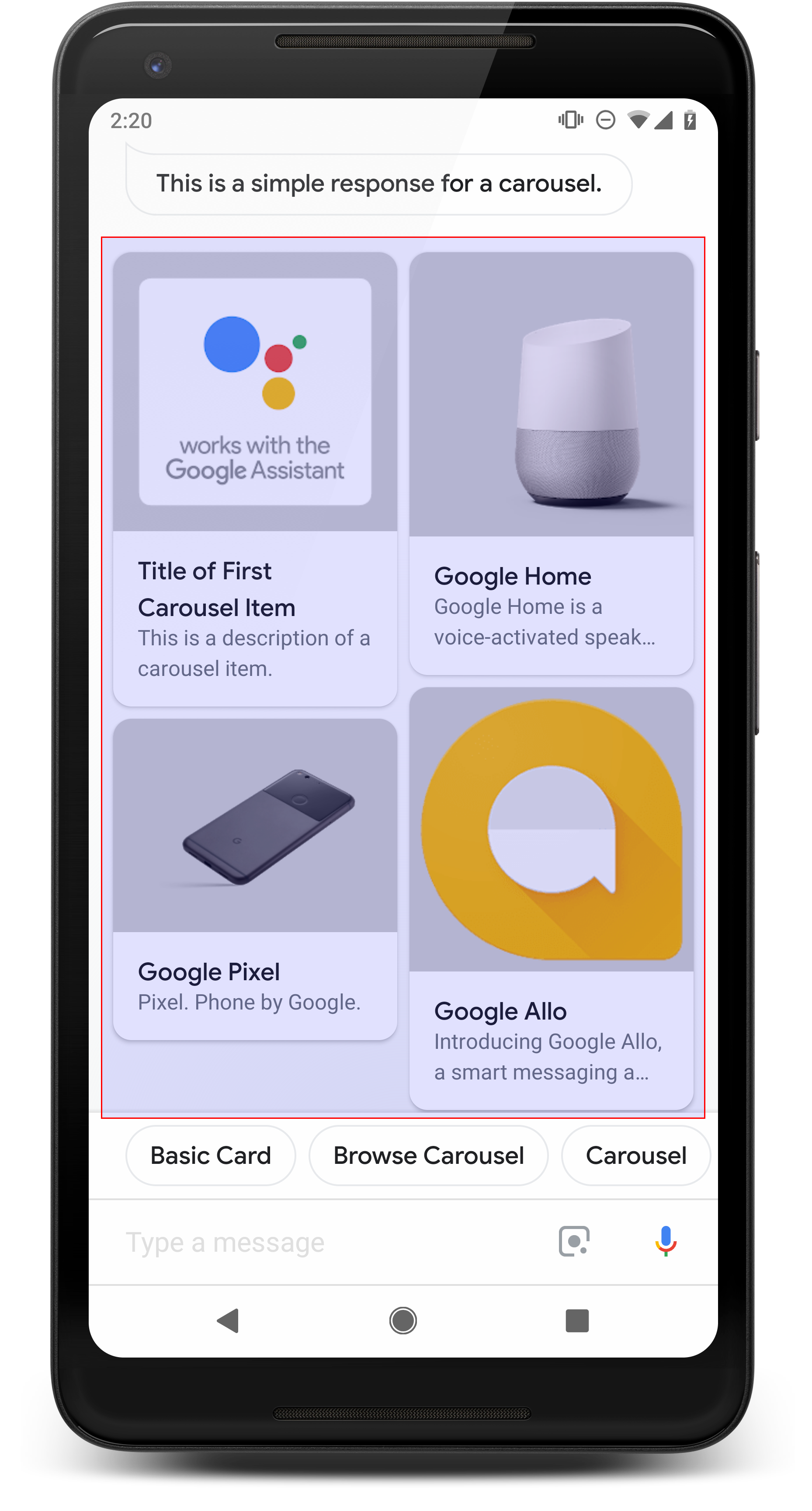
گردونه بهصورت افقی پیمایش میشود و امکان انتخاب یک مورد را فراهم میکند. درمقایسه با انتخابگر فهرست، کاشیهای بزرگی دارد که امکان نمایش محتوای غنیتر را فراهم میکند. کاشیهایی که گردونه را تشکیل میدهند شبیه کارت پایه با تصویر هستند. انتخاب کردن موردی از گردونه، حبابک گپی را بهعنوان پاسخ تولید میکند، درست مثل انتخابگر فهرست.
مشخصات
نوع پاسخ گردونهای الزامات و ویژگیهای اختیاری زیر را دارد که میتوانید پیکربندی کنید:
- در سطوح دارای قابلیت
actions.capability.SCREEN_OUTPUTپشتیبانی میشود. - گردونه
- حداکثر ده کاشی.
- حداقل دو کاشی.
- نوشتار ساده، Markdown پشتیبانی نمیشود.
- کاشی گردونه
- تصویر (اختیاری)
- تصویر باید ۱۲۸ دیپی ارتفاع و ۲۳۲ دیپی عرض داشته باشد
- اگر نسبت ابعادی تصویر با کادر مرزی تصویر مطابقت نداشته باشد، تصویر در مرکز قرار میگیرد و در دو طرف آن نوار قرار میگیرد
- اگر پیوند تصویر خراب باشد، بهجای آن از تصویر جایبان استفاده میشود
- عنوان (الزامی)
- همانند «کارت نوشتاری پایه»
- عنوانها باید منحصربهفرد باشند (برای پشتیبانی از انتخاب صوتی)
- توضیحات (اختیاری)
- همان گزینههای قالببندی «کارت نوشتاری پایه»
- حداکثر ۴ خط
- نوشتار ساده، Markdown پشتیبانی نمیشود.
- تصویر (اختیاری)
- تعامل
- تند کشیدن به چپ/راست: گردونه را بلغزانید تا کارتهای مختلف نشان داده شود.
- کارت تکضرب: تکضرب زدن روی یک مورد بهسادگی یک حبابک گپ با همان نوشتار عنوان عنصر ایجاد میکند.
- باید قصدی برای ورودی لمسی داشته باشد که رویداد
actions_intent_OPTIONرا مدیریت کند.
- باید قصدی برای ورودی لمسی داشته باشد که رویداد
- صدا/ صفحهکلید: پاسخ دادن با عنوان کارت (درصورت مشخص شدن) عملکردی مشابه با انتخاب آن مورد دارد.
راهنمایی
گردونهها زمانی خوب هستند که گزینههای مختلفی به کاربر ارائه میشود، اما مقایسه مستقیم بین آنها لازم نیست (درمقابل فهرستها). بهطور کلی، فهرستها را به گردونهها ترجیح دهید زیرا فهرستها ازنظر بصری راحتتر اسکن میشوند و تعامل با آنها ازطریق صدا آسانتر است.
اگر میخواهید گردونهای با مواردی بسازید که به صفحههای وب پیوند میدهند، شاید بهتر باشد گردونه مرور بسازید.
اگر میخواهید مکالمه را ادامه دهید، توصیه میکنیم تراشههای پیشنهاد را زیر گردونه اضافه کنید.
هرگز گزینههای ارائهشده در فهرست را بهعنوان تراشههای پیشنهادی تکرار نکنید. تراشهها در این بافت برای تغییر جهت مکالمه استفاده میشوند (نه برای انتخاب گزینه).
همانند فهرستها، حبابک گپی که همراه با کارت گردونه است، زیرمجموعهای از صدا (تبدیل نوشتار به گفتار/ SSML) است. صدای (نوشتار به گفتار/ SSML) اینجا اولین کاشی را در گردونه ادغام میکند، و همچنین اکیداً توصیه میکنیم که همه عناصر را از گردونه نخوانید. بهتر است اولین مورد و دلیل وجود آن را ذکر کنید (برای مثال، پرطرفدارترین، جدیدترین مورد خریداریشده، یا موردی که بیشترین صحبت درباره آن شده است).

کدگذاری نمونه
Node.js
app.intent('Carousel', (conv) => { if (!conv.screen) { conv.ask('Sorry, try this on a screen device or select the ' + 'phone surface in the simulator.'); return; } conv.ask('This is a carousel example.'); // Create a carousel conv.ask(new Carousel({ title: 'Carousel Title', items: { // Add the first item to the carousel 'SELECTION_KEY_ONE': { synonyms: [ 'synonym 1', 'synonym 2', 'synonym 3', ], title: 'Title of First Carousel Item', description: 'This is a description of a carousel item.', image: new Image({ url: 'https://storage.googleapis.com/actionsresources/logo_assistant_2x_64dp.png', alt: 'Image alternate text', }), }, // Add the second item to the carousel 'SELECTION_KEY_GOOGLE_HOME': { synonyms: [ 'Google Home Assistant', 'Assistant on the Google Home', ], title: 'Google Home', description: 'Google Home is a voice-activated speaker powered by ' + 'the Google Assistant.', image: new Image({ url: 'https://storage.googleapis.com/actionsresources/logo_assistant_2x_64dp.png', alt: 'Google Home', }), }, // Add the third item to the carousel 'SELECTION_KEY_GOOGLE_PIXEL': { synonyms: [ 'Google Pixel XL', 'Pixel', 'Pixel XL', ], title: 'Google Pixel', description: 'Pixel. Phone by Google.', image: new Image({ url: 'https://storage.googleapis.com/actionsresources/logo_assistant_2x_64dp.png', alt: 'Google Pixel', }), }, }, })); });
جاوا
@ForIntent("Carousel") public ActionResponse carousel(ActionRequest request) { ResponseBuilder responseBuilder = getResponseBuilder(request); if (!request.hasCapability(Capability.SCREEN_OUTPUT.getValue())) { return responseBuilder .add("Sorry, try ths on a screen device or select the phone surface in the simulator.") .add("Which response would you like to see next?") .build(); } responseBuilder .add("This is a carousel example.") .add( new SelectionCarousel() .setItems( Arrays.asList( new CarouselSelectCarouselItem() .setTitle("Title of First List Item") .setDescription("This is a description of a list item.") .setImage( new Image() .setUrl( "https://storage.googleapis.com/actionsresources/logo_assistant_2x_64dp.png") .setAccessibilityText("Image alternate text")) .setOptionInfo( new OptionInfo() .setSynonyms( Arrays.asList("synonym 1", "synonym 2", "synonym 3")) .setKey("SELECTION_KEY_ONE")), new CarouselSelectCarouselItem() .setTitle("Google Home") .setDescription( "Google Home is a voice-activated speaker powered by the Google Assistant.") .setImage( new Image() .setUrl( "https://storage.googleapis.com/actionsresources/logo_assistant_2x_64dp.png") .setAccessibilityText("Google Home")) .setOptionInfo( new OptionInfo() .setSynonyms( Arrays.asList( "Google Home Assistant", "Assistant on the Google Home")) .setKey("SELECTION_KEY_GOOGLE_HOME")), new CarouselSelectCarouselItem() .setTitle("Google Pixel") .setDescription("Pixel. Phone by Google.") .setImage( new Image() .setUrl( "https://storage.googleapis.com/actionsresources/logo_assistant_2x_64dp.png") .setAccessibilityText("Google Pixel")) .setOptionInfo( new OptionInfo() .setSynonyms( Arrays.asList("Google Pixel XL", "Pixel", "Pixel XL")) .setKey("SELECTION_KEY_GOOGLE_PIXEL"))))); return responseBuilder.build(); }
Node.js
if (!conv.screen) { conv.ask('Sorry, try this on a screen device or select the ' + 'phone surface in the simulator.'); return; } conv.ask('This is a carousel example.'); // Create a carousel conv.ask(new Carousel({ title: 'Carousel Title', items: { // Add the first item to the carousel 'SELECTION_KEY_ONE': { synonyms: [ 'synonym 1', 'synonym 2', 'synonym 3', ], title: 'Title of First Carousel Item', description: 'This is a description of a carousel item.', image: new Image({ url: 'https://storage.googleapis.com/actionsresources/logo_assistant_2x_64dp.png', alt: 'Image alternate text', }), }, // Add the second item to the carousel 'SELECTION_KEY_GOOGLE_HOME': { synonyms: [ 'Google Home Assistant', 'Assistant on the Google Home', ], title: 'Google Home', description: 'Google Home is a voice-activated speaker powered by ' + 'the Google Assistant.', image: new Image({ url: 'https://storage.googleapis.com/actionsresources/logo_assistant_2x_64dp.png', alt: 'Google Home', }), }, // Add the third item to the carousel 'SELECTION_KEY_GOOGLE_PIXEL': { synonyms: [ 'Google Pixel XL', 'Pixel', 'Pixel XL', ], title: 'Google Pixel', description: 'Pixel. Phone by Google.', image: new Image({ url: 'https://storage.googleapis.com/actionsresources/logo_assistant_2x_64dp.png', alt: 'Google Pixel', }), }, }, }));
جاوا
ResponseBuilder responseBuilder = getResponseBuilder(request); if (!request.hasCapability(Capability.SCREEN_OUTPUT.getValue())) { return responseBuilder .add("Sorry, try ths on a screen device or select the phone surface in the simulator.") .add("Which response would you like to see next?") .build(); } responseBuilder .add("This is a carousel example.") .add( new SelectionCarousel() .setItems( Arrays.asList( new CarouselSelectCarouselItem() .setTitle("Title of First List Item") .setDescription("This is a description of a list item.") .setImage( new Image() .setUrl( "https://storage.googleapis.com/actionsresources/logo_assistant_2x_64dp.png") .setAccessibilityText("Image alternate text")) .setOptionInfo( new OptionInfo() .setSynonyms( Arrays.asList("synonym 1", "synonym 2", "synonym 3")) .setKey("SELECTION_KEY_ONE")), new CarouselSelectCarouselItem() .setTitle("Google Home") .setDescription( "Google Home is a voice-activated speaker powered by the Google Assistant.") .setImage( new Image() .setUrl( "https://storage.googleapis.com/actionsresources/logo_assistant_2x_64dp.png") .setAccessibilityText("Google Home")) .setOptionInfo( new OptionInfo() .setSynonyms( Arrays.asList( "Google Home Assistant", "Assistant on the Google Home")) .setKey("SELECTION_KEY_GOOGLE_HOME")), new CarouselSelectCarouselItem() .setTitle("Google Pixel") .setDescription("Pixel. Phone by Google.") .setImage( new Image() .setUrl( "https://storage.googleapis.com/actionsresources/logo_assistant_2x_64dp.png") .setAccessibilityText("Google Pixel")) .setOptionInfo( new OptionInfo() .setSynonyms( Arrays.asList("Google Pixel XL", "Pixel", "Pixel XL")) .setKey("SELECTION_KEY_GOOGLE_PIXEL"))))); return responseBuilder.build();
JSON
توجه داشته باشید که JSON زیر درخواست وبقلاب را شرح میدهد.
{
  "payload": {
    "google": {
      "expectUserResponse": true,
      "systemIntent": {
        "intent": "actions.intent.OPTION",
        "data": {
          "@type": "type.googleapis.com/google.actions.v2.OptionValueSpec",
          "carouselSelect": {
            "items": [
              {
                "optionInfo": {
                  "key": "SELECTION_KEY_ONE",
                  "synonyms": [
                    "synonym 1",
                    "synonym 2",
                    "synonym 3"
                  ]
                },
                "description": "This is a description of a carousel item.",
                "image": {
                  "url": "https://storage.googleapis.com/actionsresources/logo_assistant_2x_64dp.png",
                  "accessibilityText": "Image alternate text"
                },
                "title": "Title of First Carousel Item"
              },
              {
                "optionInfo": {
                  "key": "SELECTION_KEY_GOOGLE_HOME",
                  "synonyms": [
                    "Google Home Assistant",
                    "Assistant on the Google Home"
                  ]
                },
                "description": "Google Home is a voice-activated speaker powered by the Google Assistant.",
                "image": {
                  "url": "https://storage.googleapis.com/actionsresources/logo_assistant_2x_64dp.png",
                  "accessibilityText": "Google Home"
                },
                "title": "Google Home"
              },
              {
                "optionInfo": {
                  "key": "SELECTION_KEY_GOOGLE_PIXEL",
                  "synonyms": [
                    "Google Pixel XL",
                    "Pixel",
                    "Pixel XL"
                  ]
                },
                "description": "Pixel. Phone by Google.",
                "image": {
                  "url": "https://storage.googleapis.com/actionsresources/logo_assistant_2x_64dp.png",
                  "accessibilityText": "Google Pixel"
                },
                "title": "Google Pixel"
              }
            ]
          }
        }
      },
      "richResponse": {
        "items": [
          {
            "simpleResponse": {
              "textToSpeech": "This is a carousel example."
            }
          }
        ]
      }
    }
  }
}
JSON
توجه داشته باشید که JSON زیر درخواست وبقلاب را شرح میدهد.
{
  "expectUserResponse": true,
  "expectedInputs": [
    {
      "possibleIntents": [
        {
          "intent": "actions.intent.OPTION",
          "inputValueData": {
            "@type": "type.googleapis.com/google.actions.v2.OptionValueSpec",
            "carouselSelect": {
              "items": [
                {
                  "optionInfo": {
                    "key": "SELECTION_KEY_ONE",
                    "synonyms": [
                      "synonym 1",
                      "synonym 2",
                      "synonym 3"
                    ]
                  },
                  "description": "This is a description of a carousel item.",
                  "image": {
                    "url": "https://storage.googleapis.com/actionsresources/logo_assistant_2x_64dp.png",
                    "accessibilityText": "Image alternate text"
                  },
                  "title": "Title of First Carousel Item"
                },
                {
                  "optionInfo": {
                    "key": "SELECTION_KEY_GOOGLE_HOME",
                    "synonyms": [
                      "Google Home Assistant",
                      "Assistant on the Google Home"
                    ]
                  },
                  "description": "Google Home is a voice-activated speaker powered by the Google Assistant.",
                  "image": {
                    "url": "https://storage.googleapis.com/actionsresources/logo_assistant_2x_64dp.png",
                    "accessibilityText": "Google Home"
                  },
                  "title": "Google Home"
                },
                {
                  "optionInfo": {
                    "key": "SELECTION_KEY_GOOGLE_PIXEL",
                    "synonyms": [
                      "Google Pixel XL",
                      "Pixel",
                      "Pixel XL"
                    ]
                  },
                  "description": "Pixel. Phone by Google.",
                  "image": {
                    "url": "https://storage.googleapis.com/actionsresources/logo_assistant_2x_64dp.png",
                    "accessibilityText": "Google Pixel"
                  },
                  "title": "Google Pixel"
                }
              ]
            }
          }
        }
      ],
      "inputPrompt": {
        "richInitialPrompt": {
          "items": [
            {
              "simpleResponse": {
                "textToSpeech": "This is a carousel example."
              }
            }
          ]
        }
      }
    }
  ]
}
درحال رسیدگی به مورد انتخابشده
وقتی کاربران موردی را انتخاب میکنند، مقدار مورد انتخابشده بهعنوان آرگومان به شما ارسال میشود. در مقدار آرگومان، شناسه key را برای مورد انتخابشده دریافت خواهید کرد:
Node.js
app.intent('Carousel - OPTION', (conv, params, option) => { const SELECTED_ITEM_RESPONSES = { 'SELECTION_KEY_ONE': 'You selected the first item', 'SELECTION_KEY_GOOGLE_HOME': 'You selected the Google Home!', 'SELECTION_KEY_GOOGLE_PIXEL': 'You selected the Google Pixel!', }; conv.ask(SELECTED_ITEM_RESPONSES[option]); conv.ask('Which response would you like to see next?'); });
جاوا
@ForIntent("Carousel - OPTION") public ActionResponse carouselSelected(ActionRequest request) { ResponseBuilder responseBuilder = getResponseBuilder(request); String selectedItem = request.getSelectedOption(); String response; if (selectedItem.equals("SELECTION_KEY_ONE")) { response = "You selected the first item"; } else if (selectedItem.equals("SELECTION_KEY_GOOGLE_HOME")) { response = "You selected the Google Home!"; } else if (selectedItem.equals("SELECTION_KEY_GOOGLE_PIXEL")) { response = "You selected the Google Pixel!"; } else { response = "You did not select a valid item"; } return responseBuilder.add(response).add("Which response would you like to see next?").build(); }
Node.js
app.intent('actions.intent.OPTION', (conv, params, option) => { const SELECTED_ITEM_RESPONSES = { 'SELECTION_KEY_ONE': 'You selected the first item', 'SELECTION_KEY_GOOGLE_HOME': 'You selected the Google Home!', 'SELECTION_KEY_GOOGLE_PIXEL': 'You selected the Google Pixel!', }; conv.ask(SELECTED_ITEM_RESPONSES[option]); conv.ask('Which response would you like to see next?'); });
جاوا
@ForIntent("actions.intent.OPTION") public ActionResponse listSelected(ActionRequest request) { ResponseBuilder responseBuilder = getResponseBuilder(request); String selectedItem = request.getSelectedOption(); String response; if (selectedItem.equals("SELECTION_KEY_ONE")) { response = "You selected the first item"; } else if (selectedItem.equals("SELECTION_KEY_GOOGLE_HOME")) { response = "You selected the Google Home!"; } else if (selectedItem.equals("SELECTION_KEY_GOOGLE_PIXEL")) { response = "You selected the Google Pixel!"; } else { response = "You did not select a valid item"; } return responseBuilder.add(response).add("Which response would you like to see next?").build(); } public ActionResponse carousel(ActionRequest request) { ResponseBuilder responseBuilder = getResponseBuilder(request); if (!request.hasCapability(Capability.SCREEN_OUTPUT.getValue())) { return responseBuilder .add("Sorry, try ths on a screen device or select the phone surface in the simulator.") .add("Which response would you like to see next?") .build(); } responseBuilder .add("This is a carousel example.") .add( new SelectionCarousel() .setItems( Arrays.asList( new CarouselSelectCarouselItem() .setTitle("Title of First List Item") .setDescription("This is a description of a list item.") .setImage( new Image() .setUrl( "https://storage.googleapis.com/actionsresources/logo_assistant_2x_64dp.png") .setAccessibilityText("Image alternate text")) .setOptionInfo( new OptionInfo() .setSynonyms( Arrays.asList("synonym 1", "synonym 2", "synonym 3")) .setKey("SELECTION_KEY_ONE")), new CarouselSelectCarouselItem() .setTitle("Google Home") .setDescription( "Google Home is a voice-activated speaker powered by the Google Assistant.") .setImage( new Image() .setUrl( "https://storage.googleapis.com/actionsresources/logo_assistant_2x_64dp.png") .setAccessibilityText("Google Home")) .setOptionInfo( new OptionInfo() .setSynonyms( Arrays.asList( "Google Home Assistant", "Assistant on the Google Home")) .setKey("SELECTION_KEY_GOOGLE_HOME")), new CarouselSelectCarouselItem() .setTitle("Google Pixel") .setDescription("Pixel. Phone by Google.") .setImage( new Image() .setUrl( "https://storage.googleapis.com/actionsresources/logo_assistant_2x_64dp.png") .setAccessibilityText("Google Pixel")) .setOptionInfo( new OptionInfo() .setSynonyms( Arrays.asList("Google Pixel XL", "Pixel", "Pixel XL")) .setKey("SELECTION_KEY_GOOGLE_PIXEL"))))); return responseBuilder.build(); } }
JSON
توجه داشته باشید که JSON زیر درخواست وبقلاب را شرح میدهد.
{
  "responseId": "fd9c865a-e628-4e89-ae72-14a002361244-21947381",
  "queryResult": {
    "queryText": "actions_intent_OPTION",
    "action": "Carousel.Carousel-custom",
    "parameters": {},
    "allRequiredParamsPresent": true,
    "fulfillmentText": "Webhook failed for intent: Carousel - OPTION",
    "fulfillmentMessages": [
      {
        "text": {
          "text": [
            "Webhook failed for intent: Carousel - OPTION"
          ]
        }
      }
    ],
    "outputContexts": [
      {
        "name": "projects/df-responses-kohler/agent/sessions/ABwppHHsebncupHK11oKhsCTgyH96GRNYH-xpeeMTqb-cvOxbd67QenbRlZM4bGAIB8_KXdTfI7-7lYVKN1ovAhCaA/contexts/actions_capability_media_response_audio"
      },
      {
        "name": "projects/df-responses-kohler/agent/sessions/ABwppHHsebncupHK11oKhsCTgyH96GRNYH-xpeeMTqb-cvOxbd67QenbRlZM4bGAIB8_KXdTfI7-7lYVKN1ovAhCaA/contexts/actions_capability_account_linking"
      },
      {
        "name": "projects/df-responses-kohler/agent/sessions/ABwppHHsebncupHK11oKhsCTgyH96GRNYH-xpeeMTqb-cvOxbd67QenbRlZM4bGAIB8_KXdTfI7-7lYVKN1ovAhCaA/contexts/actions_capability_web_browser"
      },
      {
        "name": "projects/df-responses-kohler/agent/sessions/ABwppHHsebncupHK11oKhsCTgyH96GRNYH-xpeeMTqb-cvOxbd67QenbRlZM4bGAIB8_KXdTfI7-7lYVKN1ovAhCaA/contexts/actions_capability_screen_output"
      },
      {
        "name": "projects/df-responses-kohler/agent/sessions/ABwppHHsebncupHK11oKhsCTgyH96GRNYH-xpeeMTqb-cvOxbd67QenbRlZM4bGAIB8_KXdTfI7-7lYVKN1ovAhCaA/contexts/actions_capability_audio_output"
      },
      {
        "name": "projects/df-responses-kohler/agent/sessions/ABwppHHsebncupHK11oKhsCTgyH96GRNYH-xpeeMTqb-cvOxbd67QenbRlZM4bGAIB8_KXdTfI7-7lYVKN1ovAhCaA/contexts/google_assistant_input_type_touch"
      },
      {
        "name": "projects/df-responses-kohler/agent/sessions/ABwppHHsebncupHK11oKhsCTgyH96GRNYH-xpeeMTqb-cvOxbd67QenbRlZM4bGAIB8_KXdTfI7-7lYVKN1ovAhCaA/contexts/carousel-followup",
        "lifespanCount": 1
      },
      {
        "name": "projects/df-responses-kohler/agent/sessions/ABwppHHsebncupHK11oKhsCTgyH96GRNYH-xpeeMTqb-cvOxbd67QenbRlZM4bGAIB8_KXdTfI7-7lYVKN1ovAhCaA/contexts/actions_intent_option",
        "parameters": {
          "OPTION": "SELECTION_KEY_ONE",
          "text": "Title of First Carousel Item"
        }
      }
    ],
    "intent": {
      "name": "projects/df-responses-kohler/agent/intents/89289810-95e0-4dfd-a26a-b49a2ac51406",
      "displayName": "Carousel - OPTION"
    },
    "intentDetectionConfidence": 1,
    "languageCode": "en"
  },
  "originalDetectIntentRequest": {
    "source": "google",
    "version": "2",
    "payload": {
      "user": {
        "locale": "en-US",
        "lastSeen": "2019-08-04T23:59:37Z",
        "userVerificationStatus": "VERIFIED"
      },
      "conversation": {
        "conversationId": "ABwppHHsebncupHK11oKhsCTgyH96GRNYH-xpeeMTqb-cvOxbd67QenbRlZM4bGAIB8_KXdTfI7-7lYVKN1ovAhCaA",
        "type": "ACTIVE",
        "conversationToken": "[\"carousel-followup\"]"
      },
      "inputs": [
        {
          "intent": "actions.intent.OPTION",
          "rawInputs": [
            {
              "inputType": "TOUCH",
              "query": "Title of First Carousel Item"
            }
          ],
          "arguments": [
            {
              "name": "OPTION",
              "textValue": "SELECTION_KEY_ONE"
            },
            {
              "name": "text",
              "rawText": "Title of First Carousel Item",
              "textValue": "Title of First Carousel Item"
            }
          ]
        }
      ],
      "surface": {
        "capabilities": [
          {
            "name": "actions.capability.MEDIA_RESPONSE_AUDIO"
          },
          {
            "name": "actions.capability.ACCOUNT_LINKING"
          },
          {
            "name": "actions.capability.WEB_BROWSER"
          },
          {
            "name": "actions.capability.SCREEN_OUTPUT"
          },
          {
            "name": "actions.capability.AUDIO_OUTPUT"
          }
        ]
      },
      "isInSandbox": true,
      "availableSurfaces": [
        {
          "capabilities": [
            {
              "name": "actions.capability.WEB_BROWSER"
            },
            {
              "name": "actions.capability.AUDIO_OUTPUT"
            },
            {
              "name": "actions.capability.SCREEN_OUTPUT"
            }
          ]
        }
      ],
      "requestType": "SIMULATOR"
    }
  },
  "session": "projects/df-responses-kohler/agent/sessions/ABwppHHsebncupHK11oKhsCTgyH96GRNYH-xpeeMTqb-cvOxbd67QenbRlZM4bGAIB8_KXdTfI7-7lYVKN1ovAhCaA"
}
JSON
توجه داشته باشید که JSON زیر درخواست وبقلاب را شرح میدهد.
{
  "user": {
    "locale": "en-US",
    "lastSeen": "2019-08-06T07:37:15Z",
    "userVerificationStatus": "VERIFIED"
  },
  "conversation": {
    "conversationId": "ABwppHGcqunXh1M6IE0lu2sVqXdpJfdpC5FWMkMSXQskK1nzb4IkSUSRqQzoEr0Ly0z_G3mwyZlk5rFtd1w",
    "type": "NEW"
  },
  "inputs": [
    {
      "intent": "actions.intent.OPTION",
      "rawInputs": [
        {
          "inputType": "TOUCH",
          "query": "Google Home"
        }
      ],
      "arguments": [
        {
          "name": "OPTION",
          "textValue": "SELECTION_KEY_GOOGLE_HOME"
        },
        {
          "name": "text",
          "rawText": "Google Home",
          "textValue": "Google Home"
        }
      ]
    }
  ],
  "surface": {
    "capabilities": [
      {
        "name": "actions.capability.AUDIO_OUTPUT"
      },
      {
        "name": "actions.capability.MEDIA_RESPONSE_AUDIO"
      },
      {
        "name": "actions.capability.WEB_BROWSER"
      },
      {
        "name": "actions.capability.SCREEN_OUTPUT"
      },
      {
        "name": "actions.capability.ACCOUNT_LINKING"
      }
    ]
  },
  "isInSandbox": true,
  "availableSurfaces": [
    {
      "capabilities": [
        {
          "name": "actions.capability.WEB_BROWSER"
        },
        {
          "name": "actions.capability.AUDIO_OUTPUT"
        },
        {
          "name": "actions.capability.SCREEN_OUTPUT"
        }
      ]
    }
  ],
  "requestType": "SIMULATOR"
}