
选择集成路径
选择最符合您需求的路径:
| 路径 | 适用场景 | 了解详情 |
|---|---|---|
| 通用商务协议 (UCP) | 商家和零售商。 | UCP 文档 |
| 标准账号关联 | 智能家居、电视和 YouTube。 | 文档 |
账号关联功能可让 Google 账号持有者快速、无缝且安全地连接到您的服务。您可以选择实现 Google 账号关联,以便将用户在您平台上的数据与 Google 应用和服务共享。
借助安全的 OAuth 2.0 协议,您可以安全地将用户的 Google 账号与其在您平台上的账号相关联,从而授予 Google 应用和设备访问您服务的权限。
用户可以关联或解除关联账号,也可以视需要在您的平台上通过 Google 账号关联创建新账号。
使用场景
实现 Google 账号关联的一些原因如下:
将用户在您平台上的数据与 Google 应用和服务共享。
使用 通用商务协议 (UCP)与 Google 购物和 AI 界面(搜索、Gemini)集成。
使用 Google TV播放视频和电影内容。
使用 Google Home 应用和 Google 助理管理和控制 Google 智能家居 关联设备,例如“Hey Google,打开灯”。
使用 对话型 Action创建用户自定义的 Google 助理体验和功能, 例如“Hey Google,从星巴克订购我常点的东西”。
让用户在将 Google 账号与 奖励合作伙伴账号关联后,通过观看 YouTube 上符合条件的直播来赢取奖励。
在注册期间,使用 a Google 账号个人资料中经用户同意共享的数据预先填充新账号。
功能和要求
下表定义了对每种关联流程的支持和建议。
| 关联流程 | 标准功能 | UCP 功能 |
|---|---|---|
| 应用快速关联 | 推荐 | 推荐 |
| 简化关联 | 推荐 | 推荐 |
| OAuth 关联 | 必需(后备) | 必需(后备) |
| OAuth 2.1 | 推荐 | 推荐 |
智能体开发 (MCP 和 UCP)
大语言模型 (LLM) 和 AI 智能体需要强大的身份验证才能访问用户数据。Google 账号关联支持以下新兴范例:
- Model Context Protocol (MCP):GAL 充当安全握手。 智能体使用 OAuth 2.1 令牌安全地查询您的 MCP 服务器工具。
通用商务协议 (UCP):让购物智能体能够安全地访问 用户个人资料和付款方式。
通过定义自定义范围来仅共享必要的数据,从而提高用户隐私保护水平;通过明确定义用户数据的使用方式,从而提高用户信任度。
通过 解除关联账号,可以撤消对您平台上托管的数据和服务的访问权限。实现可选的 令牌撤消端点 可让您与 Google 发起的事件保持同步,而跨账号 保护 (RISC) 可让您将平台上发生的任何解除关联事件通知 Google。
账号关联流程
Google 账号关联流程共有 3 种,它们都基于 OAuth,并且要求您管理或控制符合 OAuth 2.0 标准的授权和令牌交换端点。
在关联过程中,您在获得账号持有者同意关联其账号并共享数据后,向 Google 颁发各个 Google 账号的访问令牌。
OAuth 关联
这是将用户发送到您的网站 进行关联的 OAuth 关联流程。用户会被重定向到您的网站以登录其账号。 登录后,用户同意将其在您服务中的数据与 Google 共享。此时,用户的 Google 账号和您的服务已关联。
OAuth 关联支持授权代码和隐式 OAuth 流程。您的服务必须为隐式流程托管符合 OAuth 2.0 标准的授权端点,并且在使用授权代码流程时必须同时公开授权端点和令牌交换端点。

图 1. 在用户手机上使用 OAuth 关联进行账号关联
基于 OAuth 的应用快速关联(“应用快速关联”)
一种 OAuth 流程,可将用户发送到您的应用 进行关联。
基于 OAuth 的应用快速关联会引导用户在经过验证的 Android 或 iOS 移动应用与 Google 的平台之间移动,以查看建议的数据访问权限更改并同意将其在您平台上的账号与其 Google 账号相关联。如需启用应用快速关联,您的服务必须 支持 OAuth 关联或 基于 OAuth 的“使用 Google 账号登录”关联 ,并使用授权代码流程。
工作方式:
Google 应用会检查用户的设备上是否安装了您的应用:
- 如果找到该应用,用户会被“快速关联”到您的应用。您的应用会征求用户同意将其账号与 Google 相关联,然后“快速关联回”Google 界面。
- 如果找不到该应用,或者在应用快速关联过程中发生错误,用户会被重定向到简化关联或 OAuth 关联流程。
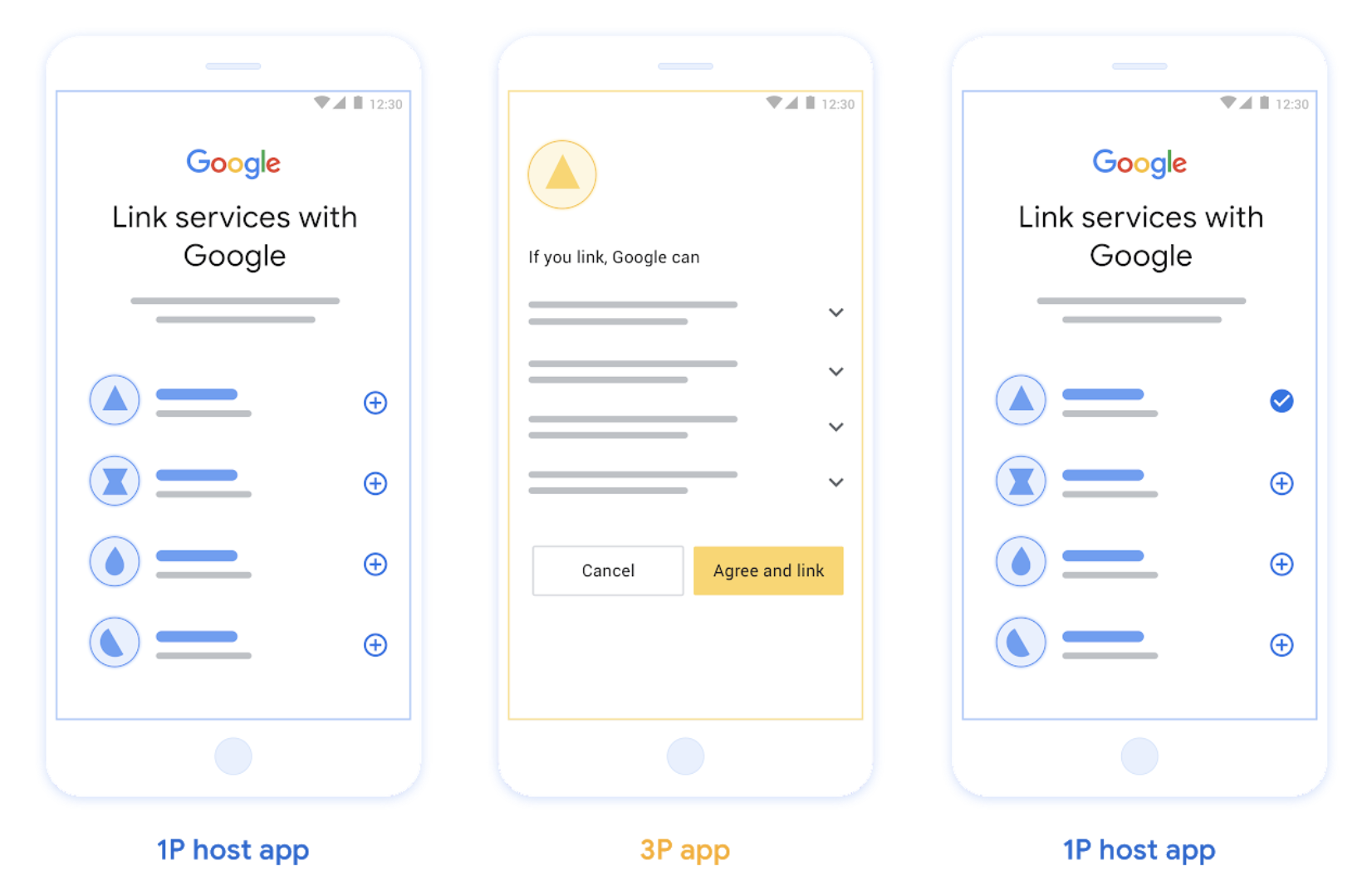
图 2. 在用户手机上使用应用快速关联进行账号关联
基于 OAuth 的简化关联(“简化关联”)
基于 OAuth 的“使用 Google 账号登录”简化关联在 OAuth 关联的基础上添加了“使用 Google 账号登录”功能,让用户无需离开 Google 界面即可完成关联流程,从而减少摩擦和用户流失。 基于 OAuth 的简化关联将“使用 Google 账号登录”与 OAuth 关联相结合,提供无缝登录、账号创建和账号
关联,从而提供最佳用户体验。您的服务必须支持符合 OAuth 2.0 标准的授权和令牌交换端点。
此外,您的令牌交换端点必须支持
JSON Web 令牌 (JWT)
断言,并实现必需的 check 和 get intent,以及
可选的 create intent。
工作方式:
Google 会断言用户账号并将此信息传递给您:
- 如果您的数据库中存在用户的账号,用户会成功将其 Google 账号与其在您服务中的账号相关联。
- 如果您的数据库中不存在用户的账号,并且您的服务支持账号创建,用户可以使用 Google 提供的断言信息(电子邮件地址、姓名和个人资料照片)创建新的第三方账号,也可以选择使用 OAuth 关联登录并关联其他电子邮件地址。
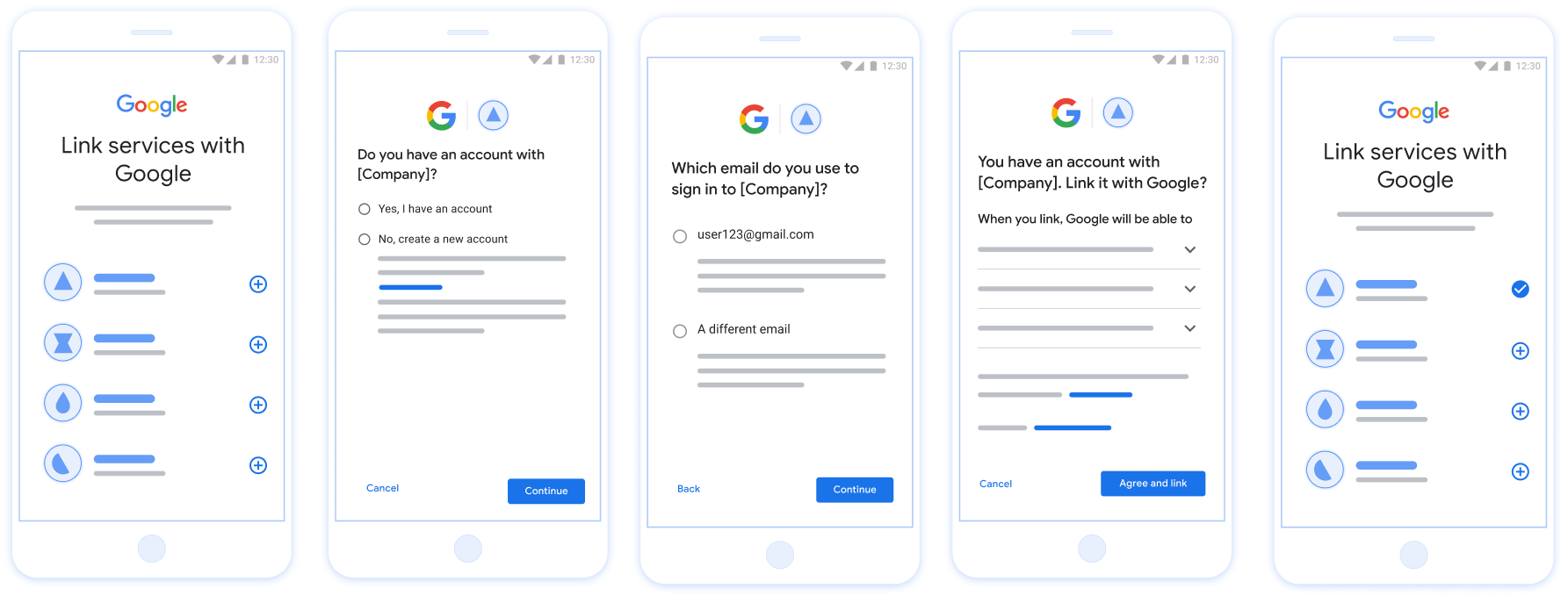
图 3. 在用户手机上使用简化关联进行账号关联
您应该使用哪种流程?
我们建议您实现所有流程,以确保用户获得最佳关联体验。简化关联和应用快速关联流程减少了关联摩擦,因为用户只需很少的步骤即可完成关联流程。OAuth 关联流程的工作量最低,是一个不错的起点,之后您可以添加其他关联流程。
使用令牌
Google 账号关联依赖于标准 OAuth 2.0 令牌机制。在用户同意关联其账号后,您会向 Google 颁发访问令牌和刷新令牌。
- 访问令牌:Google 用于访问您的 API 的短期令牌。
- 刷新令牌:Google 用于在访问令牌过期时获取新访问令牌的长期令牌。
如需了解详细的协议合同和参数要求,请参阅令牌交换端点。
持久关联
持久关联是稳定集成的核心要求。它可确保用户账号即使在网络暂时出现故障或凭据定期刷新期间仍保持关联状态。
如需实现持久关联,请使用“滑动窗口”方法:延长现有刷新令牌的过期时间,而不是轮换它(请参阅 RFC 6749 第 6 节)。 这样可以防止在 Google 颁发新刷新令牌但未成功接收或存储时可能发生的竞态条件和意外解除关联。
向 Google 注册
我们需要了解您的 OAuth 2.0 设置的详细信息并共享凭据,以启用账号关联。如需了解详情,请参阅注册。