Nhà xuất bản chủ yếu sử dụng chế độ tích hợp phía máy chủ để quản lý độc giả và các quyền của họ. Nhà xuất bản sử dụng UpdateReaderEntitlements để cập nhật bản ghi của Google về quyền sử dụng mã sản phẩm cho một PPID.
Thiết lập Google Cloud
Việc định cấu hình tính năng Liên kết gói thuê bao trong Google Cloud bao gồm 2 thành phần chính:
- Bật API cho một dự án nhất định
- Tạo tài khoản dịch vụ để truy cập vào API
Bật Subscription Linking API
Để sử dụng tài khoản dịch vụ và quản lý các quyền của người đọc, dự án Google Cloud cần bật Subscription Linking API và định cấu hình đúng tài khoản dịch vụ OAuth. Để bật Subscription Linking API cho một dự án, hãy chuyển từ trình đơn -> API và dịch vụ -> Thư viện rồi tìm Subscription Linking hoặc truy cập trực tiếp vào trang:
https://console.cloud.google.com/apis/library?project=gcp_project_id
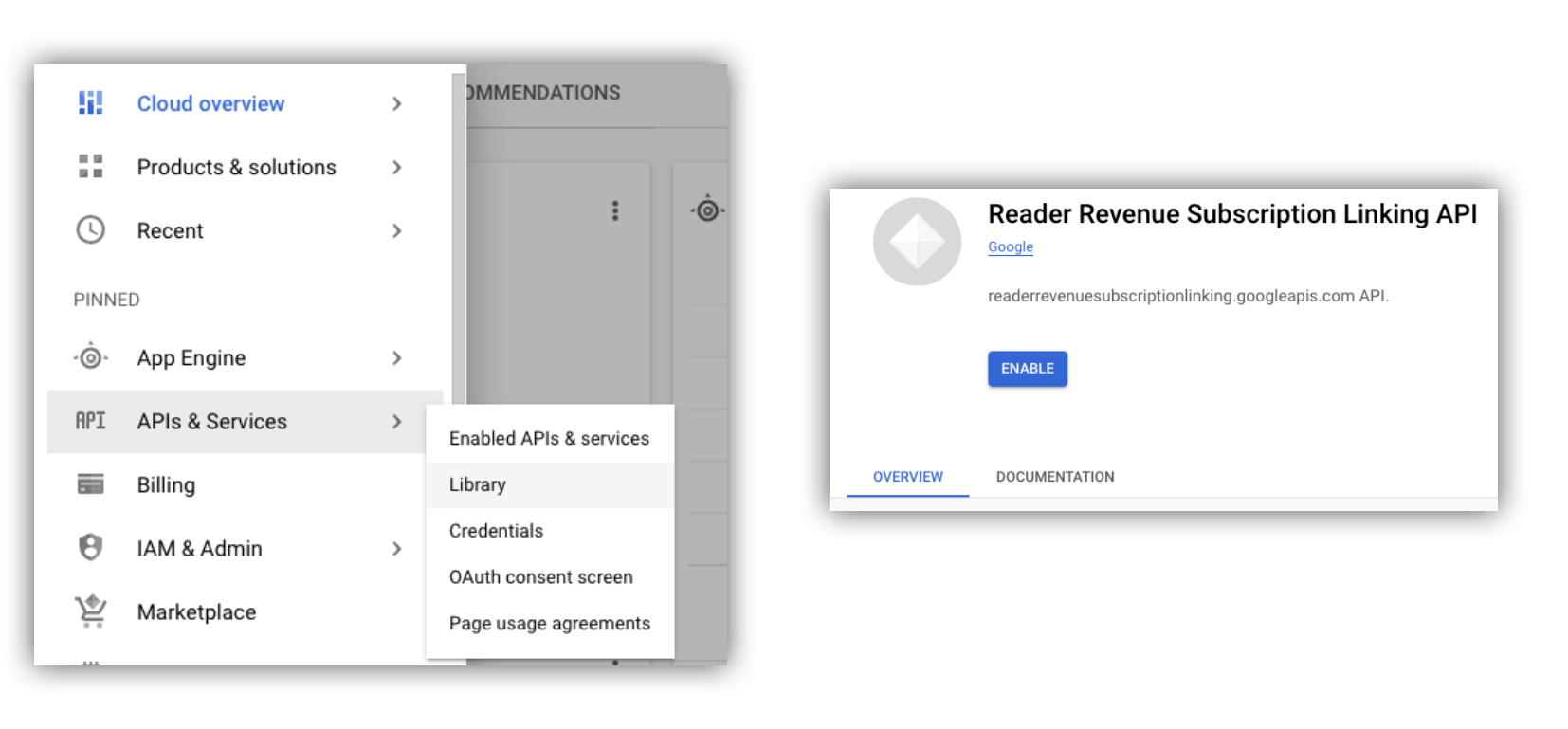
Hình 1. Chuyển đến Thư viện API và bật API cho một dự án trên đám mây của Google Cloud.
Tạo tài khoản dịch vụ
Tài khoản dịch vụ được dùng để cho phép ứng dụng của bạn truy cập vào Subscription Linking API.
- Tạo một tài khoản dịch vụ trong bảng điều khiển của dự án.
- Tạo thông tin xác thực cho tài khoản dịch vụ và lưu trữ tệp
credentials.jsonở một vị trí an toàn mà ứng dụng của bạn có thể truy cập. - Cấp vai trò IAM "Quản trị viên liên kết thuê bao" cho tài khoản dịch vụ mà bạn đã tạo. Để kiểm soát thật chi tiết các chức năng của tài khoản dịch vụ, bạn có thể chỉ định vai trò thích hợp trong bảng sau.
| Chức năng / Vai trò | Quản trị viên liên kết gói thuê bao | Người xem thông qua đường liên kết chia sẻ | Người xem quyền liên kết gói thuê bao |
|---|---|---|---|
| Nhận quyền truy cập của độc giả | |||
| Thu hút độc giả | |||
| Cập nhật quyền của người đọc | |||
| Xoá người đọc |
Sử dụng Tài khoản dịch vụ với Subscription Linking API
Để xác thực các lệnh gọi đến Subscription Linking API bằng tài khoản dịch vụ, hãy sử dụng thư viện ứng dụng googleapis (tự động xử lý các yêu cầu access_token) hoặc ký trực tiếp các yêu cầu bằng API REST. Nếu sử dụng API REST, trước tiên, bạn phải lấy access_token (thông qua Thư viện xác thực của Google hoặc sử dụng JWT tài khoản dịch vụ), sau đó đưa mã này vào tiêu đề Authorization
Cả thư viện ứng dụng và API REST đều có mã mẫu về cách gọi getReader(), getReaderEntitlements(), updateReaderEntitlements() và deleteReader().
Khoá tài khoản dịch vụ và Thông tin xác thực mặc định của ứng dụng (ADC)
Để gọi Subscription Linking API, bạn phải có khoá tài khoản dịch vụ. Nếu không thể xuất khoá tài khoản dịch vụ do chính sách tổ chức, bạn có thể sử dụng phương thức Thông tin xác thực mặc định của ứng dụng (ADC).
Dưới đây là một lệnh mẫu để thiết lập ADC bằng lệnh gcloud auth application-default login:
gcloud config set project [YOUR_PROJECT_ID]
gcloud auth application-default login --impersonate-service-account [YOUR_SERVICE_ACCOUNT_NAME@xxx.iam.gserviceaccount.com]
Lệnh này sẽ tạo một tệp JSON chứa thông tin đăng nhập tài khoản dịch vụ và đặt tệp đó vào một vị trí quen thuộc trên hệ thống tệp của bạn. Vị trí này tuỳ thuộc vào hệ điều hành của bạn:
- Linux, macOS:
$HOME/.config/gcloud/application_default_credentials.json - Windows:
%APPDATA%\gcloud\application_default_credentials.json
Bạn không cần cung cấp đường dẫn đến tệp khoá trong mã của mình, vì ADC sẽ tự động tìm kiếm thông tin đăng nhập.
this.auth = new Auth.GoogleAuth({
   // keyFile: process.env.KEY_FILE, - You don't need to provide this field
    'https://www.googleapis.com/auth/readerrevenue.subscriptionlinking.manage'
  ],
  ...
});
Thư viện ứng dụng
Phần này giải thích cách sử dụng thư viện ứng dụng googleapis trong Node.js.
Yêu cầu mẫu
import {readerrevenuesubscriptionlinking_v1, Auth} from 'googleapis';
const subscriptionLinking = readerrevenuesubscriptionlinking_v1.Readerrevenuesubscriptionlinking;

class SubscriptionLinking {
  constructor() {
    this.auth = new Auth.GoogleAuth({
      keyFile: process.env.KEY_FILE,
      scopes: [
        'https://www.googleapis.com/auth/readerrevenue.subscriptionlinking.manage'
      ],
    })
  }

  init() {
    return new subscriptionLinking(
        {version: 'v1', auth: this.auth})
  }
}

const subscriptionLinkingApi = new SubscriptionLinking();
const client = subscriptionLinkingApi.init();

/**
 * Retrieves details for a specific reader associated with the publication.
 * @async
 * @param {string} ppid - The Publisher Provided ID (ppid) for the reader.
 * @return {Promise<object>} A promise that resolves with the reader's details
 *  from the API.
 */
async function getReader(ppid) {
  const publicationId = process.env.PUBLICATION_ID;
  return await client.publications.readers.get({
    name: `publications/${publicationId}/readers/${ppid}`,
  });
}

/**
 * Updates the entitlements for a specific reader.
 * @async
 * @param {string} ppid - The Publisher Provided ID (ppid) for the reader whose
 *  entitlements are being updated.
 * @return {Promise<object>} A promise that resolves with the result of the
 *  updated entitlements object.
 */
async function updateReaderEntitlements(ppid) {
  const publicationId = process.env.PUBLICATION_ID;
  const requestBody = {
    /*
    Refer to
    https://developers.google.com/news/subscribe/subscription-linking/appendix/glossary#entitlements_object
    */
    entitlements : [{
      product_id: `${publicationId}:basic`,
      subscription_token: 'abc1234',
      detail: 'This is our basic plan',
      expire_time: '2025-10-21T03:05:08.200564Z'
    }]
  };
  return await client.publications.readers.updateEntitlements({
    name: `publications/${publicationId}/readers/${ppid}/entitlements`,
    requestBody
  });
}

/**
 * Retrieves the current entitlements for a specific reader.
 * @async
 * @param {string} ppid - The Publisher Provided ID (ppid) for the reader.
 * @return {Promise<object>} A promise that resolves with the reader's entitlements object.
 */
async function getReaderEntitlements(ppid) {
  const publicationId = process.env.PUBLICATION_ID;
  return await client.publications.readers.getEntitlements({
    name: `publications/${publicationId}/readers/${ppid}/entitlements`
  });
}

/**
 * Deletes a specific Subscription Linking reader record associated with the publication.
 * @async
 * @param {string} ppid - The Publisher Provided ID (ppid) for the reader to be deleted.
 * @param {boolean=} forceDelete - If true, delete the user even if their
 *  entitlements are not empty
 * @return {Promise<object>} A promise that resolves upon successful deletion
 *  with an empty object ({})
 */
async function deleteReader(ppid, forceDelete = false) {
  const publicationId = process.env.PUBLICATION_ID;
  return await client.publications.readers.delete({
    name: `publications/${publicationId}/readers/${ppid}`
    force: forceDelete
  });
}
API REST
Nếu muốn gọi các điểm cuối API REST, bạn có thể sử dụng một trong hai phương thức để lấy accessToken để đặt thành tiêu đề Authorization.
1. Sử dụng thư viện GoogleAuth
import { GoogleAuth } from 'google-auth-library';
import credentialJson from 'path_to_your_json_file' with { type: 'json' };

const auth = new GoogleAuth({
    credentials: credential_json,
    scopes: [
      'https://www.googleapis.com/auth/readerrevenue.subscriptionlinking.manage'
    ]
});

async function getAccessToken() {
    const accessToken = await auth.getAccessToken();
    return accessToken;
}
2. Tạo access_token bằng JWT của tài khoản dịch vụ
import fetch from 'node-fetch';
import jwt from 'jsonwebtoken';

function getSignedJwt() {
  /*
    Either store the service account credentials string in an environment variable
    Or implement logic to fetch it.
  */
  const key_file = process.env.CREDENTIALS_STRING

  const issueDate = new Date();
  const expireMinutes = 60;
  const offsetInSeconds = issueDate.getTimezoneOffset() * 60000;
  const expireDate = new Date(issueDate.getTime() + (expireMinutes * 60000));
  const iat = Math.floor((issueDate.getTime() + offsetInSeconds) / 1000);
  const exp = Math.floor((expireDate.getTime() + offsetInSeconds) / 1000);

  const token = {
    iss: key_file.client_email,
    iat,
    exp,
    aud: 'https://oauth2.googleapis.com/token',
    scope:'https://www.googleapis.com/auth/readerrevenue.subscriptionlinking.manage',
  }
  return jwt.sign(token, key_file.private_key, {
    algorithm: 'RS256',
    keyid: key_file.private_key_id,
  })
}

async function getAccessToken(signedJwt) {
  let body = new URLSearchParams();
  body.set('grant_type', 'urn:ietf:params:oauth:grant-type:jwt-bearer');
  body.set('assertion', signedJwt);
  const response = await fetch('https://oauth2.googleapis.com/token', {
    method: 'POST',
    headers: {'Content-Type': 'application/x-www-form-urlencoded'},
    body
  })
  const accessResponse = await response.json();
  return accessResponse.access_token;
}
Mã mẫu cho các lệnh gọi API REST bằng thư viện Google Xác thực
import { GoogleAuth } from 'google-auth-library';
import fetch from 'node-fetch'
import credentialJson from 'path_to_your_json_file' with { type: 'json' };

const BASE_SUBSCRIPTION_LINKING_API_URL='https://readerrevenuesubscriptionlinking.googleapis.com/v1';
const publicationId = process.env.PUBLICATION_ID

const auth = new GoogleAuth({
    credentials: credentialJson,
    scopes: [
      'https://www.googleapis.com/auth/readerrevenue.subscriptionlinking.manage'
    ]
});

async function getAccessToken() {
    const accessToken = await auth.getAccessToken();
    return accessToken;
}

/**
 * Retrieves details for a specific reader associated with the publication.
 * @async
 * @param {string} ppid - The Publisher Provided ID (ppid) for the reader.
 * @return {object} reader json for the given ppid
 */
async function getReader(ppid) {
  const endpoint = `${BASE_SUBSCRIPTION_LINKING_API_URL}/publications/${publicationId}/readers/${ppid}`;
  const accessToken = await getAccessToken();
  const response = await fetch(endpoint, {
     method: 'GET',
     headers: {
       Authorization: `Bearer ${accessToken}`,
     },
   });
  const reader = await response.json();
  return reader;
}

/**
 * Updates the entitlements for a specific reader.
 * @async
 * @param {string} ppid - The Publisher Provided ID (ppid) for the reader.
 * @return {object} the updated entitlements object in json.
 */
async function updateReaderEntitlements(ppid) {
  const endpoint = `${BASE_SUBSCRIPTION_LINKING_API_URL}/publications/${publicationId}/readers/${ppid}/entitlements`;
  const requestBody = {
    /*
    Refer to
    https://developers.google.com/news/subscribe/subscription-linking/appendix/glossary#entitlements_object
    */
    entitlements : [{
      product_id: `${publicationId}:basic`,
      subscription_token: 'abc1234',
      detail: 'This is our basic plan',
      expire_time: '2025-10-21T03:05:08.200564Z'
    }]
  };
  const response = await fetch(endpoint, {
     method: 'PATCH',
     headers: {
       Authorization: `Bearer ${accessToken}`,
       'Content-Type': 'application/json',
     },
     body: JSON.stringify(requestBody)
   })
  const updatedEntitlements = await response.json();
  return updatedEntitlements;
}

/**
 * Retrieves the current entitlements for a specific reader.
 * @async
 * @param {string} ppid - The Publisher Provided ID (ppid) for the reader.
 * @return {object} the reader's entitlements object in json.
 */
async function getReaderEntitlements(ppid) {
  const endpoint = `${BASE_SUBSCRIPTION_LINKING_API_URL}/publications/${publicationId}/readers/${ppid}/entitlements`;
  const accessToken = await getAccessToken();
  const response = await fetch(endpoint, {
     method: 'GET',
     headers: {
       Authorization: `Bearer ${accessToken}`,
     },
   });
  const entitlements = await response.json();
  return entitlements;
}

/**
 * Deletes a specific Subscription Linkikng reader record associated with the publication.
 * @async
 * @param {string} ppid - The Publisher Provided ID (ppid) for the reader.
 * @param {boolean=} forceDelete - If true, delete the user even if their
 *  entitlements are not empty
 * @return {object} returns an empty object ({}) if the delete operation is successful
 */
async function deleteReader(ppid, forceDelete = false) {
  const endpoint = `${BASE_SUBSCRIPTION_LINKING_API_URL}/publications/${publicationId}/readers/${ppid}?force=${forceDelete}`;
  const response = await fetch(endpoint, {
     method: 'DELETE',
     headers: {
       Authorization: `Bearer ${accessToken}`,
     }
   });
  const result = await response.json();
  return result;
}