

คู่มือนักพัฒนาซอฟต์แวร์นี้จะอธิบายวิธีติดตั้งใช้งาน Google Tag Manager ใน แอปพลิเคชันบนอุปกรณ์เคลื่อนที่
บทนำ
Google Tag Manager ช่วยให้นักพัฒนาซอฟต์แวร์เปลี่ยนการกำหนดค่าได้ ในแอปพลิเคชันบนอุปกรณ์เคลื่อนที่โดยใช้ Google Tag Manager อินเทอร์เฟซโดยไม่ต้องสร้างและส่งไบนารีของแอปพลิเคชันไปยังแอปอีกครั้ง มาร์เก็ตเพลส
ซึ่งจะมีประโยชน์ในการจัดการค่าของการกำหนดค่า หรือ Flag ในแอปพลิเคชัน ที่คุณอาจต้องเปลี่ยนแปลงในอนาคต ซึ่งรวมถึง
- การตั้งค่า UI ต่างๆ และสตริงที่แสดง
- ขนาด สถานที่ตั้ง หรือประเภทของโฆษณาที่แสดงในแอปพลิเคชันของคุณ
- การตั้งค่าเกม
นอกจากนี้ ยังอาจประเมินค่าการกำหนดค่าขณะรันไทม์โดยใช้กฎ การเปิดใช้การกำหนดค่าแบบไดนามิก เช่น
- การใช้ขนาดหน้าจอเพื่อกำหนดขนาดของแบนเนอร์โฆษณา
- การใช้ภาษาและตำแหน่งเพื่อกำหนดค่าองค์ประกอบ UI
Google Tag Manager ยังเปิดใช้การใช้แท็กติดตามแบบไดนามิก และพิกเซลในแอปพลิเคชัน นักพัฒนาแอปสามารถพุชเหตุการณ์สำคัญลงในข้อมูล และตัดสินใจในภายหลังว่าควรเริ่มการทำงานของแท็กหรือพิกเซลการติดตามใด ปัจจุบัน Tag Manager รองรับแท็กต่อไปนี้
- Analytics สำหรับแอปบนมือถือของ Google
- แท็กการเรียกฟังก์ชันที่กำหนดเอง
ก่อนที่คุณจะเริ่ม
ก่อนใช้คู่มือเริ่มต้นใช้งานนี้ คุณจะต้องมีสิ่งต่อไปนี้
- บัญชี Google Tag Manager
- เครื่องจัดการแท็กใหม่ คอนเทนเนอร์และมาโครคอลเล็กชันค่า
- แอปพลิเคชันบนอุปกรณ์เคลื่อนที่สำหรับ iOS ซึ่งใช้ Google Tag Manager
- บริการ Google Analytics SDK ซึ่งมีไลบรารี Tag Manager
หากคุณเพิ่งเริ่มใช้ Google Tag Manager เราขอแนะนำให้คุณ ดูข้อมูลเพิ่มเติมเกี่ยวกับคอนเทนเนอร์ มาโคร และกฎ (ศูนย์ช่วยเหลือ) ก่อนดำเนินการต่อในคู่มือนี้
เริ่มต้นใช้งาน
ส่วนนี้จะแนะนำนักพัฒนาเกี่ยวกับเวิร์กโฟลว์ทั่วไปของเครื่องจัดการแท็ก ดังนี้
- เพิ่ม SDK ของ Google Tag Manager ลงในโปรเจ็กต์
- ตั้งค่าคอนเทนเนอร์เริ่มต้น
- เปิดคอนเทนเนอร์
- รับการกำหนดค่าจากคอนเทนเนอร์
- พุชเหตุการณ์ไปยังชั้นข้อมูล
- ดูตัวอย่างและ นำคอนเทนเนอร์ไปใช้จริง
1. การเพิ่ม SDK ของ Google Tag Manager ลงในโปรเจ็กต์ของคุณ
ก่อนที่จะใช้ SDK ของ Google เครื่องจัดการแท็ก คุณจะต้องเพิ่ม
libGoogleAnalyticsServices.a
และไฟล์ส่วนหัว Google Tag Manager (GTM) จาก Library
ของแพ็กเกจ SDK ในโปรเจ็กต์ของคุณ
ถัดไป ให้เพิ่มรายการต่อไปนี้ลงในไลบรารีที่ลิงก์ของเป้าหมายแอปพลิเคชันหาก ไม่มีอยู่:
CoreData.frameworkSystemConfiguration.frameworklibz.dyliblibsqlite3.dyliblibGoogleAnalyticsServices.a
หากคุณต้องการให้แอปพลิเคชันของคุณเข้าถึงตัวระบุสำหรับ ผู้ลงโฆษณา (IDFA) และธงการติดตามที่ได้จากกรอบงานดังกล่าวผ่านทาง มาโครของ Google Tag Manager SDK คุณจะต้องลิงก์ไลบรารีเพิ่มเติมต่อไปนี้ด้วย
libAdIdAccess.aAdSupport.framework
2. การเพิ่มไฟล์คอนเทนเนอร์เริ่มต้นลงในโครงการ
Google Tag Manager ใช้คอนเทนเนอร์เริ่มต้นในการเรียกใช้แอปพลิเคชันครั้งแรก ค่าเริ่มต้น จนกว่าแอปจะสามารถเรียกคอนเทนเนอร์ใหม่ทับ เครือข่าย
หากต้องการดาวน์โหลดและเพิ่มไบนารีของคอนเทนเนอร์เริ่มต้นลงในแอปพลิเคชัน ให้ทำตามขั้นตอนต่อไปนี้
- ลงชื่อเข้าใช้อินเทอร์เฟซเว็บของ Google Tag Manager
- เลือกเวอร์ชันของคอนเทนเนอร์ที่คุณต้องการดาวน์โหลด
- คลิกปุ่มดาวน์โหลดเพื่อดึงข้อมูลไบนารีของคอนเทนเนอร์
- เพิ่มไฟล์ไบนารีไปยัง ไดเรกทอรีรากของโปรเจ็กต์และไปยัง "ไฟล์สนับสนุน" ในโฟลเดอร์โปรเจ็กต์ของคุณ
ชื่อไฟล์เริ่มต้นควรเป็นรหัสคอนเทนเนอร์ (เช่น GTM-1234) เมื่อ
ดาวน์โหลดไฟล์ไบนารีแล้ว อย่าลืมนำคำต่อท้ายเวอร์ชันออกจากชื่อไฟล์
เพื่อให้แน่ใจว่าคุณทำตามแบบแผนการตั้งชื่อที่ถูกต้อง
แม้ว่าแนะนำให้ใช้ไฟล์ไบนารี แต่หากคอนเทนเนอร์ไม่มีกฎหรือแท็ก
คุณอาจเลือกใช้
รายการพร็อพเพอร์ตี้หรือ JSON
แทน
ไฟล์ควรอยู่ในแพ็กเกจหลักและควรเป็นไปตามนี้
แบบแผนการตั้งชื่อนี้: <Container_ID>.<plist|json>
ตัวอย่างเช่น หากรหัสคอนเทนเนอร์คือ GTM-1234 คุณจะระบุ
ค่าคอนเทนเนอร์เริ่มต้นของคุณในไฟล์รายการพร็อพเพอร์ตี้ชื่อ
GTM-1234.plist
3. การเปิดคอนเทนเนอร์
ก่อนที่จะดึงข้อมูลค่าจากคอนเทนเนอร์ แอปพลิเคชันต้องเปิด คอนเทนเนอร์ การเปิดคอนเทนเนอร์จะโหลดคอนเทนเนอร์จากดิสก์ (หากมี) หรือ จะขอจากเครือข่าย (หากจำเป็น)
วิธีที่ง่ายที่สุดในการเปิดคอนเทนเนอร์บน iOS คือการใช้
openContainerWithId:tagManager:openType:timeout:notifier: ตามตัวอย่างต่อไปนี้
// MyAppDelegate.h
// This example assumes this file is using ARC.
#import <UIKit/UIKit.h>

@class TAGManager;
@class TAGContainer;

@interface MyAppDelegate : UIResponder <UIApplicationDelegate>

@property (nonatomic, strong) TAGManager *tagManager;
@property (nonatomic, strong) TAGContainer *container;

@end


// MyAppDelegate.m
// This example assumes this file is using ARC.
#import "MyAppDelegate.h"
#import "TAGContainer.h"
#import "TAGContainerOpener.h"
#import "TAGManager.h"

@interface MyAppDelegate ()<TAGContainerOpenerNotifier>
@end

@implementation MyAppDelegate

- (BOOL)application:(UIApplication *)application didFinishLaunchingWithOptions:(NSDictionary *)launchOptions {
  self.tagManager = [TAGManager instance];

  // Optional: Change the LogLevel to Verbose to enable logging at VERBOSE and higher levels.
  [self.tagManager.logger setLogLevel:kTAGLoggerLogLevelVerbose];

  /*
   * Opens a container.
   *
   * @param containerId The ID of the container to load.
   * @param tagManager The TAGManager instance for getting the container.
   * @param openType The choice of how to open the container.
   * @param timeout The timeout period (default is 2.0 seconds).
   * @param notifier The notifier to inform on container load events.
   */
  [TAGContainerOpener openContainerWithId:@"GTM-XXXX"   // Update with your Container ID.
                               tagManager:self.tagManager
                                 openType:kTAGOpenTypePreferFresh
                                  timeout:nil
                                 notifier:self];

  // Method calls that don't need the container.

  return YES;
}

// TAGContainerOpenerNotifier callback.
- (void)containerAvailable:(TAGContainer *)container {
  // Note that containerAvailable may be called on any thread, so you may need to dispatch back to
  // your main thread.
  dispatch_async(dispatch_get_main_queue(), ^{
    self.container = container;
  });
}

// The rest of your app delegate implementation.
4. การรับค่าของการกำหนดค่าจากคอนเทนเนอร์
เมื่อคอนเทนเนอร์เปิดอยู่ ระบบจะดึงค่าของการกำหนดค่าโดยใช้
เวลา
<type>ForKey: วิธี:
// Retrieving a configuration value from a Tag Manager Container.

MyAppDelegate *appDelegate = (MyAppDelegate *)[[UIApplication sharedApplication] delegate];
TAGContainer *container = appDelegate.container;

// Get the configuration value by key.
NSString *title = [container stringForKey:@"title_string"];
คำขอที่สร้างด้วยคีย์ที่ไม่มีอยู่จริงจะแสดงค่าเริ่มต้นที่เหมาะสม เป็นประเภทที่ขอ:
// Empty keys will return a default value depending on the type requested.

// Key does not exist. An empty string is returned.
NSString subtitle = [container stringForKey:@"Non-existent-key"];
[subtitle isEqualToString:@""]; // Evaluates to true.
5. การพุชค่าไปยังชั้นข้อมูล
DataLayer คือแผนที่ที่เปิดใช้ข้อมูลรันไทม์เกี่ยวกับแอปของคุณ เช่น การแตะ หรือการดูหน้าจอ เพื่อให้มาโครและแท็กของ Tag Manager ใช้งานได้ใน คอนเทนเนอร์
ตัวอย่างเช่น พุชข้อมูลเกี่ยวกับการดูหน้าจอลงในแมป DataLayer คุณตั้งค่าแท็กในอินเทอร์เฟซเว็บ Tag Manager เพื่อเริ่มทำให้พิกเซล Conversion เริ่มทำงานได้ และติดตามการโทรเพื่อตอบสนองต่อการดูหน้าจอเหล่านั้นได้โดยไม่ต้อง เขียนโค้ดลงในแอป
ระบบจะพุชเหตุการณ์ไปยังชั้นข้อมูลโดยใช้ push:
//
//  ViewController.m
//  Pushing an openScreen event with a screen name into the data layer.
//

#import "MyAppDelegate.h"
#import "TAGDataLayer.h"
#import "ViewController.h"

@implementation ViewController

- (void)viewDidAppear:(BOOL)animated {
    [super viewDidAppear:animated];

    // The container should have already been opened, otherwise events pushed to
    // the data layer will not fire tags in that container.
    TAGDataLayer *dataLayer = [TAGManager instance].dataLayer;

    [dataLayer push:@{@"event": @"openScreen", @"screenName": @"Home Screen"}];
}

// Rest of the ViewController implementation

@end
ตอนนี้คุณสามารถสร้างแท็ก (เช่น แท็ก Google Analytics) ในเว็บอินเทอร์เฟซได้แล้ว ที่จะเริ่มทำงานสำหรับการดูหน้าจอแต่ละครั้งโดยการสร้างกฎนี้: เท่ากับ "openScreen" วิธีส่งชื่อหน้าจอ ลงในแท็กใดแท็กหนึ่งเหล่านี้ ให้สร้างมาโครชั้นข้อมูลที่อ้างอิงถึง "screenName" ในชั้นข้อมูล คุณยังสามารถสร้างแท็ก (เช่น พิกเซล Conversion ของ Google Ads) ให้เริ่มทำงานเฉพาะการดูหน้าจอที่เจาะจงเท่านั้น โดย การสร้างกฎที่ เท่ากับ "openScreen" && เท่ากับ "ConfirmationScreen"
6. การดูตัวอย่างและ การเผยแพร่คอนเทนเนอร์
ค่ามาโครจะสอดคล้องกับเวอร์ชันที่เผยแพร่ปัจจุบันเสมอ คุณดูตัวอย่างคอนเทนเนอร์เวอร์ชันล่าสุดได้ คอนเทนเนอร์แบบร่าง
หากต้องการแสดงตัวอย่างคอนเทนเนอร์ ให้สร้าง URL ตัวอย่างใน
เว็บอินเทอร์เฟซของ Tag Manager โดยเลือกเวอร์ชันของคอนเทนเนอร์
ที่ต้องการดูตัวอย่าง แล้วเลือกPreview รอต่อ
URL ตัวอย่างนี้เพราะจะต้องใช้ในขั้นตอนถัดไป

หากต้องการเปิดใช้การแสดงตัวอย่างคอนเทนเนอร์ คุณต้องเพิ่มโค้ดลงในแอป มอบสิทธิ์ไฟล์การติดตั้งใช้งานและกำหนด URL แสดงตัวอย่างของ Google Tag Manager Scheme ในรายการพร็อพเพอร์ตี้ของโปรเจ็กต์
ก่อนอื่นให้เพิ่มข้อมูลโค้ดที่เป็นตัวหนาต่อไปนี้ลงในไฟล์ผู้รับมอบสิทธิ์แอป
@implementation MyAppDelegate

- (BOOL)application:(UIApplication *)application didFinishLaunchingWithOptions:(NSDictionary *)launchOptions {

  self.tagManager = [TAGManager instance];

  // Add the code in bold below to preview a Google Tag Manager container.
  // IMPORTANT: This code must be called before the container is opened.
  NSURL *url = [launchOptions valueForKey:UIApplicationLaunchOptionsURLKey];
  if (url != nil) {
    [self.tagManager previewWithUrl:url];
  }

  id<TAGContainerFuture> future =
      [TAGContainerOpener openContainerWithId:@"GTM-XXXX"    // Placeholder Container ID.
                                   tagManager:self.tagManager
                                     openType:kTAGOpenTypePreferNonDefault
                                      timeout:nil];

  // The rest of your method implementation.

  self.container = [future get];

  return YES;
}


// Add the code in bold below preview a Google Tag Manager container.
- (BOOL)application:(UIApplication *)application
            openURL:(NSURL *)url
  sourceApplication:(NSString *)sourceApplication
         annotation:(id)annotation {

  if ([self.tagManager previewWithUrl:url]) {
    return YES;
  }

  // Code to handle other urls.
  return NO;
}
จากนั้น ให้ลงทะเบียนตัวระบุ URL และรูปแบบ URL ต่อไปนี้ภายใต้ คีย์ประเภท URL ของไฟล์รายการพร็อพเพอร์ตี้ของแอปพลิเคชัน
URL identifier: your.package_name
URL scheme: tagmanager.c.your.package.name

เปิดลิงก์ในโปรแกรมจำลองหรืออุปกรณ์จริงเพื่อ ดูตัวอย่างคอนเทนเนอร์ฉบับร่างในแอป
เมื่อพร้อมทำให้ค่าของการกำหนดค่าฉบับร่างมีผลกับ แอปพลิเคชัน นำคอนเทนเนอร์ไปใช้จริง
การกำหนดค่าขั้นสูง
Google เครื่องจัดการแท็กสำหรับอุปกรณ์เคลื่อนที่มีการกำหนดค่าขั้นสูงจำนวนหนึ่ง ตัวเลือกที่ให้คุณเลือกค่าตามเงื่อนไขรันไทม์โดยใช้ รีเฟรชคอนเทนเนอร์ด้วยตนเอง และรับตัวเลือกเพิ่มเติมสำหรับการเปิด คอนเทนเนอร์ ส่วนต่อไปนี้จะอธิบายถึงขั้นตอนขั้นสูงหลายอย่างที่พบได้บ่อย การกำหนดค่าเอง
ตัวเลือกขั้นสูงสำหรับการเปิดคอนเทนเนอร์
Google Tag Manager SDK มีวิธีเปิดหลายวิธี คอนเทนเนอร์ที่ช่วยให้คุณควบคุมกระบวนการโหลดได้มากขึ้น ดังนี้
openContainerById:callback:
openContainerById:callback: เป็น API ระดับต่ำสุดและมีความยืดหยุ่นมากที่สุดสำหรับการเปิด
คอนเทนเนอร์ โดยจะแสดงผลทันทีด้วยคอนเทนเนอร์เริ่มต้นและ
โหลดคอนเทนเนอร์แบบไม่พร้อมกันจากดิสก์หรือเครือข่ายด้วยหากไม่ได้บันทึก
มีคอนเทนเนอร์อยู่ หรือคอนเทนเนอร์ที่บันทึกไว้ไม่ใช่ข้อมูลล่าสุด (เก่ากว่า 12 ชั่วโมง)
@interface ContainerCallback : NSObject<TAGContainerCallback>

@end

@implementation ContainerCallback

/**
 * Called before the refresh is about to begin.
 *
 * @param container The container being refreshed.
 * @param refreshType The type of refresh which is starting.
 */
- (void)containerRefreshBegin:(TAGContainer *)container
                  refreshType:(TAGContainerCallbackRefreshType)refreshType {
  // Notify UI that container refresh is beginning.
}

/**
 * Called when a refresh has successfully completed for the given refresh type.
 *
 * @param container The container being refreshed.
 * @param refreshType The type of refresh which completed successfully.
 */
- (void)containerRefreshSuccess:(TAGContainer *)container
                    refreshType:(TAGContainerCallbackRefreshType)refreshType {
  // Notify UI that container is available.
}

/**
 * Called when a refresh has failed to complete for the given refresh type.
 *
 * @param container The container being refreshed.
 * @param failure The reason for the refresh failure.
 * @param refreshType The type of refresh which failed.
 */
- (void)containerRefreshFailure:(TAGContainer *)container
                        failure:(TAGContainerCallbackRefreshFailure)failure
                    refreshType:(TAGContainerCallbackRefreshType)refreshType {
  // Notify UI that container request has failed.
}
@end
พบปัญหา openContainerById:callback: รายการตลอดกระบวนการโหลด
Callback หลายๆ วงจรเพื่อให้โค้ดของคุณดูได้ว่าเมื่อใด
คำขอโหลดเริ่มต้นหรือไม่ และเพราะเหตุใดคำขอจึงล้มเหลวหรือสำเร็จ และ
คอนเทนเนอร์โหลดจากดิสก์หรือเครือข่ายในท้ายที่สุด
เว้นแต่แอปพลิเคชันของคุณอนุญาตให้ใช้ค่าเริ่มต้น คุณจะต้องใช้ Callback เหล่านี้เพื่อให้ทราบว่าเมื่อ คอนเทนเนอร์ได้โหลดแล้ว โปรดทราบว่าคุณจะไม่สามารถโหลด คอนเทนเนอร์เครือข่าย หากนี่เป็นครั้งแรกที่เรียกใช้แอป และไม่มี การเชื่อมต่อเครือข่าย
openContainerById:callback: ข้ามenumต่อไปนี้
เป็นอาร์กิวเมนต์ใน Callback เหล่านี้
RefreshType
| ค่า | คำอธิบาย |
|---|---|
kTAGContainerCallbackRefreshTypeSaved
|
คำขอรีเฟรชกำลังโหลดคอนเทนเนอร์ที่บันทึกไว้ในเครื่อง |
kTAGContainerCallbackRefreshTypeNetwork
|
คำขอรีเฟรชกำลังโหลดคอนเทนเนอร์ผ่านเครือข่าย |
RefreshFailure
| ค่า | คำอธิบาย |
|---|---|
kTAGContainerCallbackRefreshFailureNoSavedContainer
|
ไม่มีคอนเทนเนอร์ที่บันทึกไว้ |
kTAGContainerCallbackRefreshFailureIoError
|
ข้อผิดพลาด I/O ทำให้รีเฟรชคอนเทนเนอร์ไม่ได้ |
kTAGContainerCallbackRefreshFailureNoNetwork
| ไม่มีการเชื่อมต่อเครือข่ายที่ใช้ได้ |
kTAGContainerCallbackRefreshFailureNetworkError
|
เกิดข้อผิดพลาดเกี่ยวกับเครือข่าย |
kTAGContainerCallbackRefreshFailureServerError
|
เกิดข้อผิดพลาดในเซิร์ฟเวอร์ |
kTAGContainerCallbackRefreshFailureUnknownError
|
เกิดข้อผิดพลาดที่ไม่สามารถจัดหมวดหมู่ได้ |
วิธีการเปิดคอนเทนเนอร์ที่ไม่ใช่ค่าเริ่มต้นและคอนเทนเนอร์ใหม่
TAGContainerOpener รวม openContainerById:callback:
และเปิดคอนเทนเนอร์ได้สะดวก 2 วิธี ได้แก่
openContainerWithId:tagManager:openType:timeout:notifier: และ
openContainerWithId:tagManager:openType:timeout:
แต่ละวิธีเหล่านี้จะมีการแจกแจงขอจำนวนที่ไม่ใช่ค่าเริ่มต้น หรือ คอนเทนเนอร์ใหม่
แนะนำให้ใช้ kTAGOpenTypePreferNonDefault สำหรับแอปพลิเคชันส่วนใหญ่และ
พยายามแสดงผลคอนเทนเนอร์ที่ไม่ใช่ค่าเริ่มต้นรายการแรกภายใน
ระยะหมดเวลา ไม่ว่าจากดิสก์หรือเครือข่าย แม้ว่าคอนเทนเนอร์นั้นจะมากกว่า
12 ชั่วโมงขึ้นไป หากส่งคืนคอนเทนเนอร์ที่บันทึกไว้ซึ่งไม่มีการอัปเดต ก็จะทำให้
คำขอเครือข่ายแบบไม่พร้อมกันเพื่อขอเครือข่ายใหม่
เมื่อใช้ kTAGOpenTypePreferNonDefault ระบบจะใช้ค่าเริ่มต้น
คอนเทนเนอร์จะส่งกลับหากไม่มีคอนเทนเนอร์อื่นที่ใช้ได้ หรือหากระยะหมดเวลาคือ
เกิน
kTAGOpenTypePreferFresh พยายามแสดงผลคอนเทนเนอร์ใหม่จาก
ดิสก์หรือเครือข่ายภายในระยะหมดเวลาที่กำหนด
โดยจะแสดงคอนเทนเนอร์ที่บันทึกไว้หากเครือข่าย
การเชื่อมต่อไม่พร้อมใช้งานและ/หรือเกินระยะหมดเวลา
ไม่แนะนำให้ใช้ kTAGOpenTypePreferFresh
ในสถานที่ที่การส่งคำขอนานขึ้นอาจส่งผลต่อประสบการณ์ของผู้ใช้อย่างเห็นได้ชัด
เช่น ธง UI หรือสตริงที่แสดง นอกจากนี้ คุณยังอาจใช้
TAGContainer::refresh ตลอดเวลา
เพื่อบังคับใช้คำขอคอนเทนเนอร์เครือข่าย
สะดวกสบายทั้ง 2 วิธีนี้ไม่บล็อก
openContainerWithId:tagManager:openType:timeout: แสดงผล
TAGContainerFuture ซึ่งเมธอด get จะแสดงผล
TAGContainer ทันทีที่โหลด (แต่จะบล็อกจนกว่าจะถึงตอนนั้น)
เมธอด openContainerWithId:tagManager:openType:timeout:notifier: จะได้รับการเรียกกลับเพียงครั้งเดียว
เรียกใช้เมื่อคอนเทนเนอร์พร้อมใช้งาน
ทั้ง 2 วิธีมีระยะหมดเวลาเริ่มต้นคือ
2.0 วินาที
การประเมินมาโครในรันไทม์โดยใช้กฎ
คอนเทนเนอร์จะประเมินค่าขณะรันไทม์ได้โดยใช้กฎ อาจอิงตามกฎ ตามเกณฑ์ เช่น ภาษาของอุปกรณ์ แพลตฟอร์ม หรือค่ามาโครอื่นๆ สำหรับ เช่น คุณสามารถใช้กฎเพื่อเลือกสตริงที่แสดงที่แปลแล้วตาม ภาษาของอุปกรณ์ขณะรันไทม์ ซึ่งสามารถกำหนดค่าได้โดยใช้ กฎต่อไปนี้
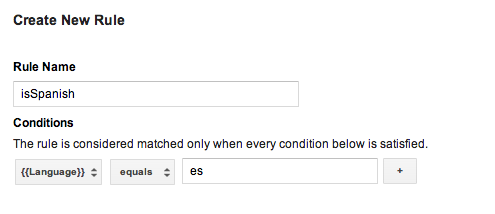
จากนั้นคุณจะสร้างมาโครคอลเล็กชันค่าสำหรับแต่ละภาษา แล้วเพิ่มมาโครนี้ ลงในมาโครแต่ละรายการ โดยใส่รหัสภาษาที่เหมาะสม เมื่อคอนเทนเนอร์นี้ ได้รับการเผยแพร่แล้ว แอปพลิเคชันของคุณจะสามารถแสดง หน้าจอที่แปลเป็นภาษาท้องถิ่น ขึ้นอยู่กับภาษาอุปกรณ์ของผู้ใช้ขณะรันไทม์
โปรดทราบว่าหากคอนเทนเนอร์เริ่มต้นต้องมีกฎ คุณต้องใช้ ไฟล์คอนเทนเนอร์ไบนารีเป็นค่าเริ่มต้น คอนเทนเนอร์
ดูข้อมูลเพิ่มเติมเกี่ยวกับการกำหนดค่ากฎ (ศูนย์ช่วยเหลือ)
ไฟล์คอนเทนเนอร์เริ่มต้นแบบไบนารี
คอนเทนเนอร์เริ่มต้นที่ต้องใช้กฎควรใช้ไฟล์คอนเทนเนอร์ไบนารี แทนที่จะเป็นไฟล์รายการพร็อพเพอร์ตี้หรือ JSON เป็นคอนเทนเนอร์เริ่มต้น คอนเทนเนอร์ไบนารีรองรับการพิจารณา ขณะรันไทม์ด้วยกฎ Google Tag Manager ขณะที่ รายการพร็อพเพอร์ตี้หรือ JSON ไม่ให้เข้าถึง
คุณสามารถดาวน์โหลดไฟล์คอนเทนเนอร์ไบนารีได้จากเว็บ Google Tag Manager
อินเทอร์เฟซและ
ควรเพิ่มลงใน Bundle แอปพลิเคชันหลักตามรูปแบบการตั้งชื่อนี้
GTM-XXXX โดยที่ชื่อไฟล์แสดงถึง
รหัสคอนเทนเนอร์
ในกรณีที่ไฟล์รายการพร็อพเพอร์ตี้และ/หรือไฟล์ JSON และมีไฟล์คอนเทนเนอร์ไบนารี SDK จะใช้คอนเทนเนอร์ไบนารี เป็นคอนเทนเนอร์เริ่มต้น
การใช้มาโครการเรียกใช้ฟังก์ชัน
มาโครการเรียกฟังก์ชัน คือมาโครที่ถูกตั้งค่าเป็นค่าส่งคืนของ ฟังก์ชันที่ระบุในแอปพลิเคชัน มาโครการเรียกใช้ฟังก์ชันสามารถใช้เพื่อ รวมค่ารันไทม์กับกฎ Google Tag Manager เช่น กำหนดราคาที่จะแสดงต่อผู้ใช้ขณะรันไทม์ตามที่กำหนดค่าไว้ ภาษาและสกุลเงินของอุปกรณ์
วิธีกำหนดค่ามาโครการเรียกใช้ฟังก์ชัน
- กำหนดมาโครการเรียกใช้ฟังก์ชันในอินเทอร์เฟซเว็บของ Google เครื่องจัดการแท็ก คุณกำหนดค่าอาร์กิวเมนต์เป็นคู่คีย์-ค่าได้
- กำหนดเครื่องจัดการที่ใช้
TAGFunctionCallMacroHandlerโปรโตคอล:// MyFunctionCallMacroHandler.h #import "TAGContainer.h" // The function name field of the macro, as defined in the Google Tag Manager // web interface. extern NSString *const kMyMacroFunctionName; @interface MyFunctionCallMacroHandler : NSObject<TAGFunctionCallMacroHandler> @end // MyFunctionCallMacroHandler.m #import "MyFunctionCallMacroHandler.h" // Corresponds to the function name field in the Google Tag Manager interface. NSString *const kMyMacroFunctionName = @"myConfiguredFunctionName"; @implementation MacroHandler - (id)valueForMacro:(NSString *)functionName parameters:(NSDictionary *)parameters { if ([functionName isEqualToString:kMyMacroFunctionName]) { // Process and return the calculated value of this macro accordingly. return macro_value; } return nil; } @end
- ลงทะเบียนเครื่องจัดการโดยใช้ TAGContainer::registerFunctionCallMacroHandler:forMacro: และชื่อฟังก์ชัน ที่ระบุในอินเทอร์เฟซ Google Tag Manager
//
// MyAppDelegate.h
//
#import <UIKit/UIKit.h>

@interface MyAppDelegate : UIResponder <UIApplicationDelegate>

@end


//
// MyAppDelegate.m
//
#import "MyAppDelegate.h"
#import "MyFunctionCallMacroHandler.h"
#import "TAGContainer.h"
#import "TAGContainerOpener.h"
#import "TAGManager.h"

@implementation MyAppDelegate

- (BOOL)application:(UIApplication *)application didFinishLaunchingWithOptions:(NSDictionary *)launchOptions
{
  // Open the container.
  id<TAGContainerFuture> future =
      [TAGContainerOpener openContainerWithId:@"GTM-XXXX"    // Placeholder Container ID.
                                   tagManager:[TAGManager instance]
                                     openType:kTAGOpenTypePreferNonDefault
                                      timeout:nil];

  // Method calls that don't need the container.

  self.container = [future get];

  // Register a function call macro handler using the macro name defined
  // in the Google Tag Manager web interface.
  [self.container registerFunctionCallMacroHandler:[[MyFunctionCallMacroHandler alloc] init]
                                          forMacro:kMyMacroFunctionName];
}

@end
การใช้แท็กการเรียกฟังก์ชัน
แท็กการเรียกฟังก์ชันช่วยให้เรียกใช้ฟังก์ชันที่ลงทะเบียนล่วงหน้าได้ทุกเมื่อ
ระบบจะพุชเหตุการณ์เข้าไปในชั้นข้อมูลและกฎแท็ก
ประเมินผลเป็น true
วิธีกำหนดค่าแท็กการเรียกใช้ฟังก์ชัน
- กำหนดแท็กการเรียกฟังก์ชันในอินเทอร์เฟซเว็บของ Google เครื่องจัดการแท็ก คุณกำหนดค่าอาร์กิวเมนต์เป็นคู่คีย์-ค่าได้
- ใช้โปรโตคอล
TAGFunctionCallTagHandlerดังนี้// // MyFunctionCallTagHandler.h // #import "TAGContainer.h" extern NSString *const kMyTagFunctionName; @interface MyFunctionCallTagHandler : NSObject<TAGFunctionCallTagHandler> @end // // MyFunctionCallTagHandler.m // // Corresponds to the function name field in the Google Tag Manager interface. NSString *const kMyTagFunctionName = @"myConfiguredFunctionName"; @implementation MyFunctionCallTagHandler /** * This method will be called when any custom tag's rule(s) evaluate to true and * should check the functionName and process accordingly. * * @param functionName corresponds to the function name field, not tag * name field, defined in the Google Tag Manager web interface. * @param parameters An optional map of parameters as defined in the Google * Tag Manager web interface. */ - (void)execute:(NSString *)functionName parameters:(NSDictionary *)parameters { if ([functionName isEqualToString:kMyTagFunctionName]) { // Process accordingly. } } @end
- ลงทะเบียนเครื่องจัดการแท็กการเรียกใช้ฟังก์ชันโดยใช้ชื่อแท็กที่กำหนดค่าไว้ใน เว็บอินเทอร์เฟซของ Google Tag Manager
//
// MyAppDelegate.h
//
#import <UIKit/UIKit.h>

@interface MyAppDelegate : UIResponder <UIApplicationDelegate>

@end


//
// MyAppDelegate.m
//
#import "MyAppDelegate.h"
#import "MyFunctionCallTagHandler.h"
#import "TAGContainer.h"
#import "TAGContainerOpener.h"
#import "TAGManager.h"

@implementation MyAppDelegate

- (BOOL)application:(UIApplication *)application didFinishLaunchingWithOptions:(NSDictionary *)launchOptions {

  // Open the container.
  id<TAGContainerFuture> future =
      [TAGContainerOpener openContainerWithId:@"GTM-XXXX"    // Placeholder Container ID.
                                   tagManager:[TAGManager instance]
                                     openType:kTAGOpenTypePreferNonDefault
                                      timeout:nil];

  // Method calls that don't need the container.

  self.container = [future get];

  // Register a function call tag handler using the function name of the tag as
  // defined in the Google Tag Manager web interface.
  [self.container registerFunctionCallTagHandler:[[MyFunctionCallTagHandler alloc] init]
                                          forTag:kMyTagFunctionName];
}
@end
การตั้งค่าระยะเวลาการรีเฟรชที่กำหนดเอง
Google Tag Manager SDK จะพยายามเรียก
คอนเทนเนอร์ใหม่หากอายุคอนเทนเนอร์ปัจจุบันเกิน 12 ชั่วโมง วิธีตั้งค่า
ระยะเวลารีเฟรชคอนเทนเนอร์ที่กำหนดเอง ใช้
NSTimer เช่นเดียวกับใน
ตัวอย่างต่อไปนี้
- (void)refreshContainer:(NSTimer *)timer {
  [self.container refresh];
}

self.refreshTimer = [NSTimer scheduledTimerWithTimeInterval:<refresh_interval>
                                                     target:self
                                                   selector:@selector(refreshContainer:)
                                                   userInfo:nil
                                                    repeats:YES];
การแก้ไขข้อบกพร่องด้วย Logger
Google Tag Manager SDK จะพิมพ์ข้อผิดพลาดและคำเตือนไปยังบันทึกโดยค่าเริ่มต้น
การเปิดใช้การบันทึกที่มีข้อมูลขนาดใหญ่มากขึ้นอาจมีประโยชน์ในการแก้ไขข้อบกพร่อง และจะทำได้โดย
จะใช้ Logger ของคุณเองตามตัวอย่างนี้
// MyAppDelegate.h
// This example assumes this file is using ARC.
// This Logger class will print out not just errors and warnings (as the default
// logger does), but also info, debug, and verbose messages.
@interface MyLogger: NSObject<TAGLogger>
@end

@implementation MyLogger
- (void)error:(NSString *)message {
  NSLog(@"Error: %@", message);
}

- (void)warning:(NSString *)message {
  NSLog(@"Warning: %@", message);
}

- (void)info:(NSString *)message {
  NSLog(@"Info: %@", message);
}

- (void)debug:(NSString *)message {
  NSLog(@"Debug: %@", message);
}

- (void)verbose:(NSString *)message {
  NSLog(@"Verbose: %@", message);
}
@end

// MyAppDelegate.m
// This example assumes this file is using ARC.
@implementation MyAppDelegate

- (BOOL)application:(UIApplication *)application didFinishLaunchingWithOptions:(NSDictionary *)launchOptions {
  self.tagManager = [TAGManager instance];

  self.tagManager.logger = [[MyLogger alloc] init];

  // Rest of Tag Manager and method implementation.
  return YES;
}
// Rest of app delegate implementation.
@end
หรือคุณสามารถตั้งค่า LogLevel ของตัวบันทึกที่มีอยู่โดยใช้
TagManager::logger::setLogLevel,
ดังตัวอย่างนี้
// Change the LogLevel to INFO to enable logging at INFO and higher levels.
self.tagManager = [TAGManager instance];
[self.tagManager.logger setLogLevel:kTAGLoggerLogLevelInfo];