

Page Summary
-
Device registration involves creating and storing an identity key within the Issuer's system to prepare a device for Digital Credential (DC) storage.
-
The registration process initiates with the user's device requesting a
getDeviceRegistrationNonce, which is relayed through Google to the Issuer. -
The Issuer generates and stores a nonce with a
deviceReferenceId, returning it to the device through Google, after which the device signs the nonce in an x509 certificate. -
Device integrity verification is performed by the Issuer by validating the certificate chain against a Google-provided root certificate and ensuring it is not on the Certificate Revocation List.
-
The leaf certificate's extensions, including
attestationChallengeandteeEnforced.rootOfTrustproperties, are parsed to confirm device authenticity during the integrity check.
The device registration phase prepares a device for storing an VDC by registering an identity key in the Issuer's system.
Request flow
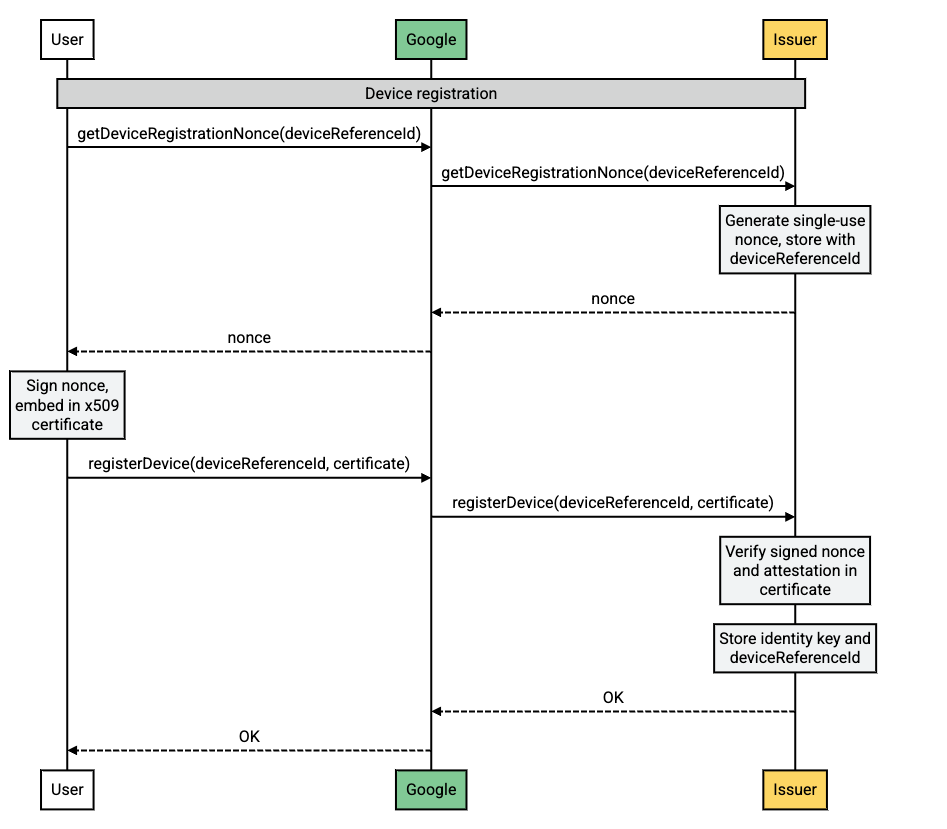
Flow description
| Step | Source | Description |
|---|---|---|
| 1 | Android-powered device |
A new VDC request has been created on the user's
device. A new identity key must be created by the Issuer. The user's
device calls getDeviceRegistrationNonce to initiate this
process.
|
| 2 | Google servers |
Google relays the getDeviceRegistrationNonce request to the
Issuer.
|
| 3 | Issuer servers |
The Issuer generates a nonce, stores it with the
deviceReferenceId, and returns the nonce to Google.
|
| 4 | Google servers | Google relays the nonce to the user's device. |
| 5 | Android-powered device |
The user's device signs the nonce and embeds it in an x509 certificate.
This is included in the registerDevice call to verify the
device.
|
| 6 | Google servers | Google relays the registerDevice call to the Issuer. |
| 7 | Issuer servers | The Issuer performs the device integrity checks and stores the identity key associated with the device. |
How to verify the integrity of a device
Device attestation is a security feature that allows issuers to verify the integrity of a device before registering it. This helps to prevent the registration of devices that have been tampered with or that are running unauthorized software.
To verify the integrity of the device, the issuer should:
- Validate the certificate chain sent in the
/registerDevicerequest. The root certificate in the chain must match the certificate provided by Google. - Ensure that the root certificate is not part of the Certificate Revocation List.
- Parse the leaf certificate, read the extensions, and verify the following:
- The
attestationChallengevalue matches thenoncesent during the/getDeviceRegistrationNonceoperation. teeEnforced.rootOfTrusthas the following properties:deviceLocked=TRUEverifiedBootState=VERIFIED
- Package names in
softwareEnforced.attestationApplicationIdmatchcom.google.android.gmsorcom.google.android.gsf.
- The
Explanation of the different parts of the device attestation process
- Certificate chain: The certificate chain is a series of certificates that authenticate the identity of the device. The root certificate in the chain is the most trusted certificate, and each subsequent certificate in the chain is signed by the certificate above it.
- Certificate Revocation List: The Certificate Revocation List (CRL) is a list of certificates that have been revoked for some reason. If the root certificate in the device attestation certificate chain is on the CRL, then the certificate is invalid and the device attestation shouldn't be trusted.
- Leaf certificate: The leaf certificate is the certificate that is specific to the device. It contains information about the device, such as its hardware identifiers and its software version.
- Extensions: The extensions are additional pieces of information that are included in the certificate. The device attestation certificate contains a number of extensions that are used to verify the integrity of the device. For more information, refer to the certificate extension data schema.