قالب بندی مشروط

قالب‌بندی شرطی به شما امکان می‌دهد سلول‌ها را طوری قالب‌بندی کنید که ظاهر آنها به صورت پویا با توجه به مقداری که دارند یا با توجه به مقادیر موجود در سلول‌های دیگر تغییر کند. کاربردهای زیادی برای قالب‌بندی شرطی وجود دارد، از جمله این کاربردها:

  • سلول‌هایی را که از یک آستانه مشخص بالاتر هستند، هایلایت کنید (برای مثال، استفاده از متن پررنگ برای همه تراکنش‌های بالای ۲۰۰۰ دلار).
  • سلول‌ها را طوری قالب‌بندی کنید که رنگ آنها با مقدارشان تغییر کند (برای مثال، با افزایش مبلغ بالای ۲۰۰۰ دلار، پس‌زمینه قرمز پررنگ‌تری اعمال شود).
  • قالب‌بندی پویای سلول‌ها بر اساس محتوای سایر سلول‌ها (برای مثال، هایلایت کردن آدرس املاکی که فیلد «زمان فروش» آنها > 90 روز است).

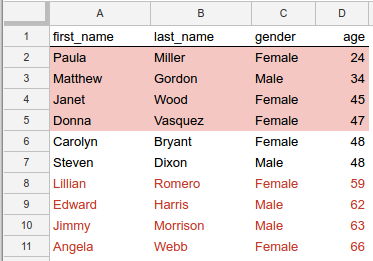
شما حتی می‌توانید سلول‌ها را بر اساس مقدار خودشان و سلول‌های دیگر قالب‌بندی کنید. برای مثال، می‌توانید طیفی از سلول‌ها را بر اساس مقدارشان در مقایسه با مقدار میانه آن طیف قالب‌بندی کنید:

قالب‌بندی برای برجسته کردن مقادیر بالاتر یا پایین‌تر از میانگین سنی.

شکل ۱. قالب‌بندی برای برجسته کردن مقادیر بالاتر یا پایین‌تر از میانگین سنی.

در این مثال، سلول‌های هر ردیف بر اساس مقایسه مقدار ستون age آنها با مقدار میانه همه سنین، قالب‌بندی می‌شوند. ردیف‌هایی که سن آنها بالاتر از میانه است، متن قرمز و ردیف‌هایی که زیر میانه هستند، پس‌زمینه قرمز دارند. دو ردیف دارای مقداری برای age هستند که با میانه سن (۴۸) مطابقت دارد و این سلول‌ها هیچ قالب‌بندی خاصی دریافت نمی‌کنند. (برای کد منبعی که این قالب‌بندی شرطی را ایجاد می‌کند، به مثال زیر مراجعه کنید.)

قوانین قالب‌بندی شرطی

قالب‌بندی شرطی با استفاده از قوانین قالب‌بندی بیان می‌شود. هر صفحه‌گسترده فهرستی از این قوانین را ذخیره می‌کند و آنها را به همان ترتیبی که در لیست ظاهر می‌شوند، اعمال می‌کند. API گوگل شیت به شما امکان می‌دهد این قوانین قالب‌بندی را اضافه، به‌روزرسانی و حذف کنید.

هر قانون، محدوده هدف، نوع قانون، شرایط اجرای قانون و هرگونه قالب‌بندی مورد نظر برای اعمال را مشخص می‌کند.

محدوده هدف - این می‌تواند یک سلول واحد، مجموعه‌ای از سلول‌ها یا چندین محدوده باشد.

نوع قانون - دو دسته قانون وجود دارد:

  • قوانین بولی فقط در صورت برآورده شدن معیارهای خاص، قالب را اعمال می‌کنند.
  • قوانین گرادیان، رنگ پس‌زمینه یک سلول را بر اساس مقدار آن سلول محاسبه می‌کنند.

شرایطی که ارزیابی می‌شوند و قالب‌هایی که می‌توانید اعمال کنید، برای هر یک از این انواع قوانین متفاوت است، همانطور که در بخش‌های بعدی به تفصیل توضیح داده شده است.

قوانین بولی

یک BooleanRule بر اساس یک BooleanCondition که به صورت true یا false ارزیابی می‌شود، تعریف می‌کند که آیا یک قالب خاص اعمال شود یا خیر. یک قانون Boolean به شکل زیر است:

{
  "condition": {
    object(BooleanCondition)
  },
  "format": {
    object(CellFormat)
  },
}

این شرط می‌تواند از ConditionType داخلی استفاده کند، یا می‌تواند از یک فرمول سفارشی برای ارزیابی‌های پیچیده‌تر استفاده کند.

انواع داخلی به شما امکان می‌دهند قالب‌بندی را بر اساس آستانه‌های عددی، مقایسه متن یا اینکه آیا یک سلول پر شده است یا خیر، اعمال کنید. برای مثال، NUMBER_GREATER به این معنی است که مقدار سلول باید بزرگتر از مقدار شرط باشد. قوانین همیشه در برابر سلول هدف ارزیابی می‌شوند.

فرمول سفارشی یک نوع شرط خاص است که به شما امکان می‌دهد قالب‌بندی را طبق یک عبارت دلخواه اعمال کنید، که همچنین امکان ارزیابی هر سلولی، نه فقط سلول هدف، را فراهم می‌کند. فرمول شرط باید به true ارزیابی شود.

برای تعریف قالب‌بندی اعمال شده توسط یک قانون بولی، از زیرمجموعه‌ای از نوع CellFormat برای تعریف موارد زیر استفاده می‌کنید:

  • اینکه متن داخل سلول پررنگ، ایتالیک یا خط خورده باشد.
  • رنگ متن در سلول.
  • رنگ پس‌زمینه سلول.

قوانین گرادیان

یک GradientRule طیفی از رنگ‌ها را تعریف می‌کند که با طیفی از مقادیر مطابقت دارند. یک قانون گرادیان به شکل زیر است:

{
  "minpoint": {
    object(InterpolationPoint)
  },
  "midpoint": {
    object(InterpolationPoint)
  },
  "maxpoint": {
    object(InterpolationPoint)
  },
}

هر InterpolationPoint یک رنگ و مقدار متناظر با آن را تعریف می‌کند. مجموعه‌ای از سه نقطه، یک گرادیان رنگ را تعریف می‌کند.

مدیریت قوانین قالب‌بندی شرطی

برای ایجاد، تغییر یا حذف قوانین قالب‌بندی شرطی، از متد spreadsheets.batchUpdate با نوع درخواست مناسب استفاده کنید:

مثال

مثال زیر نحوه ایجاد قالب‌بندی شرطی نشان داده شده در تصویر بالای این صفحه را نشان می‌دهد. برای مثال‌های بیشتر، به صفحه نمونه‌های قالب‌بندی شرطی مراجعه کنید.

اسکریپت برنامه‌ها

sheets/api/spreadsheet_snippets.gs
/**
 * conditional formatting
 * @param {string} spreadsheetId spreadsheet ID
 * @returns {*} spreadsheet
 */
Snippets.prototype.conditionalFormatting = (spreadsheetId) => {
  try {
    const myRange = Sheets.newGridRange();
    myRange.sheetId = 0;
    myRange.startRowIndex = 0;
    myRange.endRowIndex = 11;
    myRange.startColumnIndex = 0;
    myRange.endColumnIndex = 4;

    // Request 1
    const rule1ConditionalValue = Sheets.newConditionValue();
    rule1ConditionalValue.userEnteredValue = "=GT($D2,median($D$2:$D$11))";

    const rule1ConditionFormat = Sheets.newCellFormat();
    rule1ConditionFormat.textFormat = Sheets.newTextFormat();
    rule1ConditionFormat.textFormat.foregroundColor = Sheets.newColor();
    rule1ConditionFormat.textFormat.foregroundColor.red = 0.8;

    const rule1Condition = Sheets.newBooleanCondition();
    rule1Condition.type = "CUSTOM_FORMULA";
    rule1Condition.values = [rule1ConditionalValue];

    const rule1BooleanRule = Sheets.newBooleanRule();
    rule1BooleanRule.condition = rule1Condition;
    rule1BooleanRule.format = rule1ConditionFormat;

    const rule1 = Sheets.newConditionalFormatRule();
    rule1.ranges = [myRange];
    rule1.booleanRule = rule1BooleanRule;

    const request1 = Sheets.newRequest();
    const addConditionalFormatRuleRequest1 =
      Sheets.newAddConditionalFormatRuleRequest();
    addConditionalFormatRuleRequest1.rule = rule1;
    addConditionalFormatRuleRequest1.index = 0;
    request1.addConditionalFormatRule = addConditionalFormatRuleRequest1;

    // Request 2
    const rule2ConditionalValue = Sheets.newConditionValue();
    rule2ConditionalValue.userEnteredValue = "=LT($D2,median($D$2:$D$11))";

    const rule2ConditionFormat = Sheets.newCellFormat();
    rule2ConditionFormat.textFormat = Sheets.newTextFormat();
    rule2ConditionFormat.textFormat.foregroundColor = Sheets.newColor();
    rule2ConditionFormat.textFormat.foregroundColor.red = 1;
    rule2ConditionFormat.textFormat.foregroundColor.green = 0.4;
    rule2ConditionFormat.textFormat.foregroundColor.blue = 0.4;

    const rule2Condition = Sheets.newBooleanCondition();
    rule2Condition.type = "CUSTOM_FORMULA";
    rule2Condition.values = [rule2ConditionalValue];

    const rule2BooleanRule = Sheets.newBooleanRule();
    rule2BooleanRule.condition = rule2Condition;
    rule2BooleanRule.format = rule2ConditionFormat;

    const rule2 = Sheets.newConditionalFormatRule();
    rule2.ranges = [myRange];
    rule2.booleanRule = rule2BooleanRule;

    const request2 = Sheets.newRequest();
    const addConditionalFormatRuleRequest2 =
      Sheets.newAddConditionalFormatRuleRequest();
    addConditionalFormatRuleRequest2.rule = rule2;
    addConditionalFormatRuleRequest2.index = 0;
    request2.addConditionalFormatRule = addConditionalFormatRuleRequest2;

    // Batch send the requests
    const requests = [request1, request2];
    const batchUpdate = Sheets.newBatchUpdateSpreadsheetRequest();
    batchUpdate.requests = requests;
    const response = Sheets.Spreadsheets.batchUpdate(
      batchUpdate,
      spreadsheetId,
    );
    return response;
  } catch (err) {
    // TODO (developer) - Handle exception
    console.log("Failed with error %s", err.message);
  }
};

جاوا

sheets/snippets/src/main/java/ConditionalFormatting.java
import com.google.api.client.googleapis.json.GoogleJsonError;
import com.google.api.client.googleapis.json.GoogleJsonResponseException;
import com.google.api.client.http.HttpRequestInitializer;
import com.google.api.client.http.javanet.NetHttpTransport;
import com.google.api.client.json.gson.GsonFactory;
import com.google.api.services.sheets.v4.Sheets;
import com.google.api.services.sheets.v4.SheetsScopes;
import com.google.api.services.sheets.v4.model.AddConditionalFormatRuleRequest;
import com.google.api.services.sheets.v4.model.BatchUpdateSpreadsheetRequest;
import com.google.api.services.sheets.v4.model.BatchUpdateSpreadsheetResponse;
import com.google.api.services.sheets.v4.model.BooleanCondition;
import com.google.api.services.sheets.v4.model.BooleanRule;
import com.google.api.services.sheets.v4.model.CellFormat;
import com.google.api.services.sheets.v4.model.Color;
import com.google.api.services.sheets.v4.model.ConditionValue;
import com.google.api.services.sheets.v4.model.ConditionalFormatRule;
import com.google.api.services.sheets.v4.model.GridRange;
import com.google.api.services.sheets.v4.model.Request;
import com.google.api.services.sheets.v4.model.TextFormat;
import com.google.auth.http.HttpCredentialsAdapter;
import com.google.auth.oauth2.GoogleCredentials;
import java.io.IOException;
import java.util.Arrays;
import java.util.Collections;
import java.util.List;

/* Class to demonstrate the use of Spreadsheet Conditional Formatting API */
public class ConditionalFormatting {
  /**
   * Create conditional formatting.
   *
   * @param spreadsheetId - Id of the spreadsheet.
   * @return updated changes count.
   * @throws IOException - if credentials file not found.
   */
  public static BatchUpdateSpreadsheetResponse conditionalFormat(String spreadsheetId)
      throws IOException {
        /* Load pre-authorized user credentials from the environment.
           TODO(developer) - See https://developers.google.com/identity for
            guides on implementing OAuth2 for your application. */
    GoogleCredentials credentials = GoogleCredentials.getApplicationDefault()
        .createScoped(Collections.singleton(SheetsScopes.SPREADSHEETS));
    HttpRequestInitializer requestInitializer = new HttpCredentialsAdapter(
        credentials);

    // Create the sheets API client
    Sheets service = new Sheets.Builder(new NetHttpTransport(),
        GsonFactory.getDefaultInstance(),
        requestInitializer)
        .setApplicationName("Sheets samples")
        .build();

    List<GridRange> ranges = Collections.singletonList(new GridRange()
        .setSheetId(0)
        .setStartRowIndex(1)
        .setEndRowIndex(11)
        .setStartColumnIndex(0)
        .setEndColumnIndex(4)
    );
    List<Request> requests = Arrays.asList(
        new Request().setAddConditionalFormatRule(new AddConditionalFormatRuleRequest()
            .setRule(new ConditionalFormatRule()
                .setRanges(ranges)
                .setBooleanRule(new BooleanRule()
                    .setCondition(new BooleanCondition()
                        .setType("CUSTOM_FORMULA")
                        .setValues(Collections.singletonList(
                            new ConditionValue().setUserEnteredValue(
                                "=GT($D2,median($D$2:$D$11))")
                        ))
                    )
                    .setFormat(new CellFormat().setTextFormat(
                        new TextFormat().setForegroundColor(
                            new Color().setRed(0.8f))
                    ))
                )
            )
            .setIndex(0)
        ),
        new Request().setAddConditionalFormatRule(new AddConditionalFormatRuleRequest()
            .setRule(new ConditionalFormatRule()
                .setRanges(ranges)
                .setBooleanRule(new BooleanRule()
                    .setCondition(new BooleanCondition()
                        .setType("CUSTOM_FORMULA")
                        .setValues(Collections.singletonList(
                            new ConditionValue().setUserEnteredValue(
                                "=LT($D2,median($D$2:$D$11))")
                        ))
                    )
                    .setFormat(new CellFormat().setBackgroundColor(
                        new Color().setRed(1f).setGreen(0.4f).setBlue(0.4f)
                    ))
                )
            )
            .setIndex(0)
        )
    );

    BatchUpdateSpreadsheetResponse result = null;
    try {
      // Execute the requests.
      BatchUpdateSpreadsheetRequest body =
          new BatchUpdateSpreadsheetRequest()
              .setRequests(requests);
      result = service.spreadsheets()
          .batchUpdate(spreadsheetId, body)
          .execute();
      System.out.printf("%d cells updated.", result.getReplies().size());
    } catch (GoogleJsonResponseException e) {
      // TODO(developer) - handle error appropriately
      GoogleJsonError error = e.getDetails();
      if (error.getCode() == 404) {
        System.out.printf("Spreadsheet not found with id '%s'.\n", spreadsheetId);
      } else {
        throw e;
      }
    }
    return result;
  }
}

جاوا اسکریپت

sheets/snippets/sheets_conditional_formatting.js
function conditionalFormatting(spreadsheetId, callback) {
  const myRange = {
    sheetId: 0,
    startRowIndex: 1,
    endRowIndex: 11,
    startColumnIndex: 0,
    endColumnIndex: 4,
  };
  const requests = [{
    addConditionalFormatRule: {
      rule: {
        ranges: [myRange],
        booleanRule: {
          condition: {
            type: 'CUSTOM_FORMULA',
            values: [{userEnteredValue: '=GT($D2,median($D$2:$D$11))'}],
          },
          format: {
            textFormat: {foregroundColor: {red: 0.8}},
          },
        },
      },
      index: 0,
    },
  }, {
    addConditionalFormatRule: {
      rule: {
        ranges: [myRange],
        booleanRule: {
          condition: {
            type: 'CUSTOM_FORMULA',
            values: [{userEnteredValue: '=LT($D2,median($D$2:$D$11))'}],
          },
          format: {
            backgroundColor: {red: 1, green: 0.4, blue: 0.4},
          },
        },
      },
      index: 0,
    },
  }];

  const body = {
    requests,
  };
  try {
    gapi.client.sheets.spreadsheets.batchUpdate({
      spreadsheetId: spreadsheetId,
      resource: body,
    }).then((response) => {
      const result = response.result;
      console.log(`${result.replies.length} cells updated.`);
      if (callback) callback(response);
    });
  } catch (err) {
    document.getElementById('content').innerText = err.message;
    return;
  }
}

نود جی اس

sheets/snippets/sheets_conditional_formatting.js
import {GoogleAuth} from 'google-auth-library';
import {google} from 'googleapis';

/**
 * Applies conditional formatting to a spreadsheet.
 * @param {string} spreadsheetId The ID of the spreadsheet.
 * @return {Promise<object>} The response from the batch update.
 */
async function conditionalFormatting(spreadsheetId) {
  // Authenticate with Google and get an authorized client.
  const auth = new GoogleAuth({
    scopes: 'https://www.googleapis.com/auth/spreadsheets',
  });

  // Create a new Sheets API client.
  const service = google.sheets({version: 'v4', auth});

  // The range to apply the conditional formatting to.
  const myRange = {
    sheetId: 0,
    startRowIndex: 1,
    endRowIndex: 11,
    startColumnIndex: 0,
    endColumnIndex: 4,
  };

  // The requests to apply conditional formatting.
  const requests = [
    {
      addConditionalFormatRule: {
        rule: {
          ranges: [myRange],
          booleanRule: {
            condition: {
              type: 'CUSTOM_FORMULA',
              values: [{userEnteredValue: '=GT($D2,median($D$2:$D$11))'}],
            },
            format: {
              textFormat: {foregroundColor: {red: 0.8}},
            },
          },
        },
        index: 0,
      },
    },
    {
      addConditionalFormatRule: {
        rule: {
          ranges: [myRange],
          booleanRule: {
            condition: {
              type: 'CUSTOM_FORMULA',
              values: [{userEnteredValue: '=LT($D2,median($D$2:$D$11))'}],
            },
            format: {
              backgroundColor: {red: 1, green: 0.4, blue: 0.4},
            },
          },
        },
        index: 0,
      },
    },
  ];

  // Create the batch update request.
  const resource = {
    requests,
  };

  // Execute the batch update request.
  const response = await service.spreadsheets.batchUpdate({
    spreadsheetId,
    resource,
  });
  console.log(`${response.data.replies.length} cells updated.`);
  return response;
}

پی اچ پی

sheets/snippets/src/SpreadsheetConditionalFormatting.php
<?php
use Google\Client;
use Google\Service\Drive;
use Google\Service\Sheets\BatchUpdateSpreadsheetRequest;
use Google\Service\Sheets\Request;

function conditionalFormatting($spreadsheetId)
    {
        /* Load pre-authorized user credentials from the environment.
           TODO(developer) - See https://developers.google.com/identity for
            guides on implementing OAuth2 for your application. */
        $client = new Google\Client();
        $client->useApplicationDefaultCredentials();
        $client->addScope(Google\Service\Drive::DRIVE);
        $service = new Google_Service_Sheets($client);

        try{
            $myRange = [
                'sheetId' => 0,
                'startRowIndex' => 1,
                'endRowIndex' => 11,
                'startColumnIndex' => 0,
                'endColumnIndex' => 4,
            ];
            //execute the request
            $requests = [
                new Google_Service_Sheets_Request([
                'addConditionalFormatRule' => [
                    'rule' => [
                        'ranges' => [ $myRange ],
                        'booleanRule' => [
                            'condition' => [
                                'type' => 'CUSTOM_FORMULA',
                                'values' => [ [ 'userEnteredValue' => '=GT($D2,median($D$2:$D$11))' ] ]
                            ],
                            'format' => [
                                'textFormat' => [ 'foregroundColor' => [ 'red' => 0.8 ] ]
                                ]
                                ]
                            ],
                            'index' => 0
                            ]
                        ]),
                        new Google_Service_Sheets_Request([
                'addConditionalFormatRule' => [
                    'rule' => [
                        'ranges' => [ $myRange ],
                        'booleanRule' => [
                            'condition' => [
                                'type' => 'CUSTOM_FORMULA',
                                'values' => [ [ 'userEnteredValue' => '=LT($D2,median($D$2:$D$11))' ] ]
                            ],
                            'format' => [
                                'backgroundColor' => [ 'red' => 1, 'green' => 0.4, 'blue' => 0.4 ]
                            ]
                            ]
                        ],
                    'index' => 0
                ]
                ])
        ];

        $batchUpdateRequest = new Google_Service_Sheets_BatchUpdateSpreadsheetRequest([
            'requests' => $requests
        ]);
        $response = $service->spreadsheets->batchUpdate($spreadsheetId, $batchUpdateRequest);
        printf("%d cells updated.", count($response->getReplies()));
        return $response;
    }
    catch(Exception $e) {
        // TODO(developer) - handle error appropriately
        echo 'Message: ' .$e->getMessage();
    }
}

پایتون

sheets/snippets/sheets_conditional_formatting.py
import google.auth
from googleapiclient.discovery import build
from googleapiclient.errors import HttpError


def conditional_formatting(spreadsheet_id):
  """
  Creates the batch_update the user has access to.
  Load pre-authorized user credentials from the environment.
  TODO(developer) - See https://developers.google.com/identity
  for guides on implementing OAuth2 for the application.
  """
  creds, _ = google.auth.default()
  # pylint: disable=maybe-no-member
  try:
    service = build("sheets", "v4", credentials=creds)

    my_range = {
        "sheetId": 0,
        "startRowIndex": 1,
        "endRowIndex": 11,
        "startColumnIndex": 0,
        "endColumnIndex": 4,
    }
    requests = [
        {
            "addConditionalFormatRule": {
                "rule": {
                    "ranges": [my_range],
                    "booleanRule": {
                        "condition": {
                            "type": "CUSTOM_FORMULA",
                            "values": [
                                {
                                    "userEnteredValue": (
                                        "=GT($D2,median($D$2:$D$11))"
                                    )
                                }
                            ],
                        },
                        "format": {
                            "textFormat": {"foregroundColor": {"red": 0.8}}
                        },
                    },
                },
                "index": 0,
            }
        },
        {
            "addConditionalFormatRule": {
                "rule": {
                    "ranges": [my_range],
                    "booleanRule": {
                        "condition": {
                            "type": "CUSTOM_FORMULA",
                            "values": [
                                {
                                    "userEnteredValue": (
                                        "=LT($D2,median($D$2:$D$11))"
                                    )
                                }
                            ],
                        },
                        "format": {
                            "backgroundColor": {
                                "red": 1,
                                "green": 0.4,
                                "blue": 0.4,
                            }
                        },
                    },
                },
                "index": 0,
            }
        },
    ]
    body = {"requests": requests}
    response = (
        service.spreadsheets()
        .batchUpdate(spreadsheetId=spreadsheet_id, body=body)
        .execute()
    )
    print(f"{(len(response.get('replies')))} cells updated.")
    return response

  except HttpError as error:
    print(f"An error occurred: {error}")
    return error


if __name__ == "__main__":
  # Pass: spreadsheet_id
  conditional_formatting("1CM29gwKIzeXsAppeNwrc8lbYaVMmUclprLuLYuHog4k")

روبی

sheets/snippets/lib/spreadsheet_snippets.rb
my_range = {
  sheet_id:           0,
  start_row_index:    1,
  end_row_index:      11,
  start_column_index: 0,
  end_column_index:   4
}
requests = [{
  add_conditional_format_rule: {
    rule:  {
      ranges:       [my_range],
      boolean_rule: {
        condition: {
          type:   'CUSTOM_FORMULA',
          values: [{ user_entered_value: '=GT($D2,median($D$2:$D$11))' }]
        },
        format:    {
          text_format: { foreground_color: { red: 0.8 } }
        }
      }
    },
    index: 0
  }
}, {
  add_conditional_format_rule: {
    rule:  {
      ranges:       [my_range],
      boolean_rule: {
        condition: {
          type:   'CUSTOM_FORMULA',
          values: [{ user_entered_value: '=LT($D2,median($D$2:$D$11))' }]
        },
        format:    {
          background_color: { red: 1, green: 0.4, blue: 0.4 }
        }
      }
    },
    index: 0
  }
}]
body = {
  requests: requests
}
batch_update = Google::Apis::SheetsV4::BatchUpdateSpreadsheetRequest.new
batch_update.requests = requests
result = service.batch_update_spreadsheet(spreadsheet_id, batch_update)
puts "#{result.replies.length} cells updated."