Scalanie danych w prezentację

Jednym z przydatnych zastosowań interfejsu Google Slides API jest scalanie informacji z co najmniej 1 źródła danych w prezentacji opartej na szablonie.

Na tej stronie dowiesz się, jak pobrać dane ze źródła zewnętrznego i wstawić je do istniejącej prezentacji opartej na szablonie. Koncepcja jest podobna do kreatora e-maili z użyciem procesora tekstu i arkusza kalkulacyjnego.

Istnieje kilka powodów, dla których to podejście jest przydatne:

  • Projektanci mogą łatwo dopracować wygląd prezentacji za pomocą edytora Prezentacji Google. Jest to znacznie łatwiejsze niż dostosowywanie parametrów w aplikacji w celu ustawienia wyglądu renderowanego slajdu.

  • Oddzielenie treści od prezentacji to znana zasada projektowania, która ma wiele zalet.
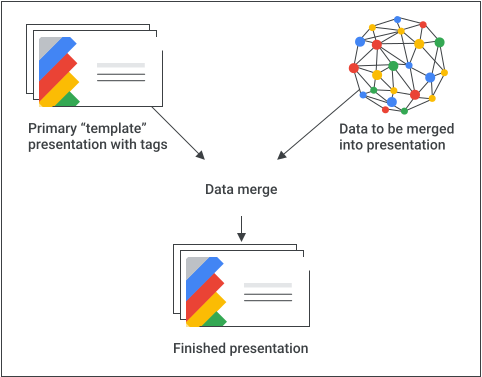
Schemat koncepcyjny scalania.

Podstawowy przepis

Oto przykład, jak możesz użyć interfejsu Slides API do scalania danych w prezentacji:

  1. Utwórz prezentację w taki sposób, w jaki ma się ona wyświetlać, używając treści zastępczej, która pomoże Ci w projektowaniu.

  2. W przypadku każdego elementu treści, który będziesz wstawiać, zastąp treść zastępczą tagiem. Tagi to pola tekstowe lub kształty z unikalnym ciągiem znaków. Używaj ciągów znaków, które raczej nie występują w normalnym tekście. Dobrym tagiem może być na przykład {{account-holder-name}}.

  3. W kodzie użyj interfejsu Google Drive API, aby utworzyć kopię prezentacji.

  4. W kodzie użyj metody interfejsu Slides API batchUpdate z zestawem żądań replaceAllText , aby wykonać wszystkie zamiany tekstu w prezentacji. Użyj replaceAllShapesWithImage żądania, aby zastąpić obrazy w całej prezentacji.

Gdy utworzysz prezentację z tagami, utwórz jej kopię i użyj interfejsu Slides API, aby nią manipulować. Nie używaj interfejsu Slides API do manipulowania główną kopią „szablonu”.

W kolejnych sekcjach znajdziesz fragmenty kodu, które ilustrują część tego procesu. Możesz też obejrzeć powyższy film, aby zobaczyć kompletny przykład (w Pythonie) łączący kilka koncepcji z poszczególnych sekcji poniżej.

Scalanie tekstu

Możesz użyć żądania replaceAllText aby zastąpić wszystkie wystąpienia danego ciągu tekstowego w prezentacji nowym tekstem. W przypadku scalania jest to prostsze niż wyszukiwanie i zastępowanie każdego wystąpienia tekstu osobno. Jednym z powodów, dla których jest to najbardziej zaawansowane podejście, jest to, że identyfikatory elementów strony są trudne do przewidzenia, zwłaszcza gdy współpracownicy dopracowują i utrzymują prezentację opartą na szablonie.

Przykład

Ten przykład używa interfejsu Drive API do skopiowania prezentacji opartej na szablonie, tworząc nową instancję prezentacji. Następnie używa interfejsu Google Sheets API do odczytywania danych z arkusza kalkulacyjnego Arkuszy, a na koniec używa interfejsu Slides API do zaktualizowania nowej prezentacji.

Przykład pobiera dane z 3 komórek w jednym wierszu zakresu nazwanego w arkuszu kalkulacyjnym. Następnie zastępuje te dane w prezentacji wszędzie tam, gdzie występują ciągi znaków {{customer-name}}, {{case-description}}, lub {{total-portfolio}}.

Apps Script

slides/api/Snippets.gs
/**
 * Use the Sheets API to load data, one record per row.
 * @param {string} templatePresentationId
 * @param {string} dataSpreadsheetId
 * @returns {*[]}
 */
function textMerging(templatePresentationId, dataSpreadsheetId) {
  const responses = [];
  const dataRangeNotation = "Customers!A2:M6";
  try {
    const values = SpreadsheetApp.openById(dataSpreadsheetId)
      .getRange(dataRangeNotation)
      .getValues();

    // For each record, create a new merged presentation.
    for (let i = 0; i < values.length; ++i) {
      const row = values[i];
      const customerName = row[2]; // name in column 3
      const caseDescription = row[5]; // case description in column 6
      const totalPortfolio = row[11]; // total portfolio in column 12

      // Duplicate the template presentation using the Drive API.
      const copyTitle = `${customerName} presentation`;
      let copyFile = {
        title: copyTitle,
        parents: [{ id: "root" }],
      };
      copyFile = Drive.Files.copy(copyFile, templatePresentationId);
      const presentationCopyId = copyFile.id;

      // Create the text merge (replaceAllText) requests for this presentation.
      const requests = [
        {
          replaceAllText: {
            containsText: {
              text: "{{customer-name}}",
              matchCase: true,
            },
            replaceText: customerName,
          },
        },
        {
          replaceAllText: {
            containsText: {
              text: "{{case-description}}",
              matchCase: true,
            },
            replaceText: caseDescription,
          },
        },
        {
          replaceAllText: {
            containsText: {
              text: "{{total-portfolio}}",
              matchCase: true,
            },
            replaceText: `${totalPortfolio}`,
          },
        },
      ];

      // Execute the requests for this presentation.
      const result = Slides.Presentations.batchUpdate(
        {
          requests: requests,
        },
        presentationCopyId,
      );
      // Count the total number of replacements made.
      let numReplacements = 0;
      for (const reply of result.replies) {
        numReplacements += reply.replaceAllText.occurrencesChanged;
      }
      console.log(
        "Created presentation for %s with ID: %s",
        customerName,
        presentationCopyId,
      );
      console.log("Replaced %s text instances", numReplacements);
    }
  } catch (err) {
    // TODO (Developer) - Handle exception
    console.log("Failed with error: %s", err.error);
  }
}

Go

slides/snippets/presentations.go
// Use the Sheets API to load data, one record per row.
dataRangeNotation := "Customers!A2:M6"
sheetsResponse, _ := sheetsService.Spreadsheets.Values.Get(dataSpreadsheetId, dataRangeNotation).Do()
values := sheetsResponse.Values

// For each record, create a new merged presentation.
for _, row := range values {
	customerName := row[2].(string)
	caseDescription := row[5].(string)
	totalPortfolio := row[11].(string)

	// Duplicate the template presentation using the Drive API.
	copyTitle := customerName + " presentation"
	file := drive.File{
		Title: copyTitle,
	}
	presentationFile, _ := driveService.Files.Copy(templatePresentationId, &file).Do()
	presentationId := presentationFile.Id

	// Create the text merge (replaceAllText) requests for this presentation.
	requests := []*slides.Request{{
		ReplaceAllText: &slides.ReplaceAllTextRequest{
			ContainsText: &slides.SubstringMatchCriteria{
				Text:      "{{customer-name}}",
				MatchCase: true,
			},
			ReplaceText: customerName,
		},
	}, {
		ReplaceAllText: &slides.ReplaceAllTextRequest{
			ContainsText: &slides.SubstringMatchCriteria{
				Text:      "{{case-description}}",
				MatchCase: true,
			},
			ReplaceText: caseDescription,
		},
	}, {
		ReplaceAllText: &slides.ReplaceAllTextRequest{
			ContainsText: &slides.SubstringMatchCriteria{
				Text:      "{{total-portfolio}}",
				MatchCase: true,
			},
			ReplaceText: totalPortfolio,
		},
	}}

	// Execute the requests for this presentation.
	body := &slides.BatchUpdatePresentationRequest{
		Requests: requests,
	}
	response, _ := slidesService.Presentations.BatchUpdate(presentationId, body).Do()

Java

slides/snippets/src/main/java/TextMerging.java
import com.google.api.client.googleapis.json.GoogleJsonError;
import com.google.api.client.googleapis.json.GoogleJsonResponseException;
import com.google.api.client.http.HttpRequestInitializer;
import com.google.api.client.http.javanet.NetHttpTransport;
import com.google.api.client.json.gson.GsonFactory;
import com.google.api.services.drive.Drive;
import com.google.api.services.drive.model.File;
import com.google.api.services.sheets.v4.Sheets;
import com.google.api.services.sheets.v4.model.ValueRange;
import com.google.api.services.slides.v1.Slides;
import com.google.api.services.slides.v1.SlidesScopes;
import com.google.api.services.slides.v1.model.BatchUpdatePresentationRequest;
import com.google.api.services.slides.v1.model.BatchUpdatePresentationResponse;
import com.google.api.services.slides.v1.model.ReplaceAllTextRequest;
import com.google.api.services.slides.v1.model.Request;
import com.google.api.services.slides.v1.model.Response;
import com.google.api.services.slides.v1.model.SubstringMatchCriteria;
import com.google.auth.http.HttpCredentialsAdapter;
import com.google.auth.oauth2.GoogleCredentials;

import java.io.IOException;
import java.util.ArrayList;
import java.util.Arrays;
import java.util.List;

/* Class to demonstrate the use of Slides Text Merging API */
public class TextMerging {
  /**
   * Changes specified texts with data from spreadsheet.
   *
   * @param templatePresentationId - id of the presentation.
   * @param dataSpreadsheetId      - id of the spreadsheet containing data.
   * @return merged presentation id
   * @throws IOException - if credentials file not found.
   */
  public static List<BatchUpdatePresentationResponse> textMerging(
      String templatePresentationId, String dataSpreadsheetId) throws IOException {
        /* Load pre-authorized user credentials from the environment.
           TODO(developer) - See https://developers.google.com/identity for
            guides on implementing OAuth2 for your application. */
    GoogleCredentials credentials = GoogleCredentials.getApplicationDefault()
        .createScoped(Arrays.asList(SlidesScopes.PRESENTATIONS,
            SlidesScopes.DRIVE, SlidesScopes.SPREADSHEETS));
    HttpRequestInitializer requestInitializer = new HttpCredentialsAdapter(
        credentials);

    // Create the slides API client
    Slides service = new Slides.Builder(new NetHttpTransport(),
        GsonFactory.getDefaultInstance(),
        requestInitializer)
        .setApplicationName("Slides samples")
        .build();

    // Create the drive API client
    Drive driveService = new Drive.Builder(new NetHttpTransport(),
        GsonFactory.getDefaultInstance(),
        requestInitializer)
        .setApplicationName("Slides samples")
        .build();

    // Create the sheets API client
    Sheets sheetsService = new Sheets.Builder(new NetHttpTransport(),
        GsonFactory.getDefaultInstance(),
        requestInitializer)
        .setApplicationName("Slides samples")
        .build();

    List<BatchUpdatePresentationResponse> responses = new ArrayList<>(5);
    // Use the Sheets API to load data, one record per row.
    String dataRangeNotation = "Customers!A2:M6";
    ValueRange sheetsResponse = sheetsService.spreadsheets().values()
        .get(dataSpreadsheetId, dataRangeNotation).execute();
    List<List<Object>> values = sheetsResponse.getValues();

    try {
      // For each record, create a new merged presentation.
      for (List<Object> row : values) {
        String customerName = row.get(2).toString();     // name in column 3
        String caseDescription = row.get(5).toString();  // case description in column 6
        String totalPortfolio = row.get(11).toString();  // total portfolio in column 12

        // Duplicate the template presentation using the Drive API.
        String copyTitle = customerName + " presentation";
        File content = new File().setName(copyTitle);
        File presentationFile =
            driveService.files().copy(templatePresentationId, content).execute();
        String presentationId = presentationFile.getId();

        // Create the text merge (replaceAllText) requests for this presentation.
        List<Request> requests = new ArrayList<>();
        requests.add(new Request()
            .setReplaceAllText(new ReplaceAllTextRequest()
                .setContainsText(new SubstringMatchCriteria()
                    .setText("{{customer-name}}")
                    .setMatchCase(true))
                .setReplaceText(customerName)));
        requests.add(new Request()
            .setReplaceAllText(new ReplaceAllTextRequest()
                .setContainsText(new SubstringMatchCriteria()
                    .setText("{{case-description}}")
                    .setMatchCase(true))
                .setReplaceText(caseDescription)));
        requests.add(new Request()
            .setReplaceAllText(new ReplaceAllTextRequest()
                .setContainsText(new SubstringMatchCriteria()
                    .setText("{{total-portfolio}}")
                    .setMatchCase(true))
                .setReplaceText(totalPortfolio)));

        // Execute the requests for this presentation.
        BatchUpdatePresentationRequest body =
            new BatchUpdatePresentationRequest().setRequests(requests);
        BatchUpdatePresentationResponse response =
            service.presentations().batchUpdate(presentationId, body).execute();

        // Count total number of replacements made.
        int numReplacements = 0;
        for (Response resp : response.getReplies()) {
          numReplacements += resp.getReplaceAllText().getOccurrencesChanged();
        }
        // Prints the merged presentation id and count of replacements.
        System.out.println("Created merged presentation for " +
            customerName + " with ID: " + presentationId);
        System.out.println("Replaced " + numReplacements + " text instances.");
      }
    } catch (NullPointerException ne) {
      System.out.println("Text not found to replace with image.");
    } catch (GoogleJsonResponseException e) {
      // TODO(developer) - handle error appropriately
      GoogleJsonError error = e.getDetails();
      if (error.getCode() == 404) {
        System.out.printf("Presentation not found with id '%s'.\n", templatePresentationId);
      } else {
        throw e;
      }
    }
    return responses;
  }
}

JavaScript

slides/snippets/slides_text_merging.js
function textMerging(templatePresentationId, dataSpreadsheetId, callback) {
  // Use the Sheets API to load data, one record per row.
  const responses = [];
  const dataRangeNotation = 'Customers!A2:M6';
  try {
    gapi.client.sheets.spreadsheets.values.get({
      spreadsheetId: dataSpreadsheetId,
      range: dataRangeNotation,
    }).then((sheetsResponse) => {
      const values = sheetsResponse.result.values;
      // For each record, create a new merged presentation.
      for (let i = 0; i < values.length; ++i) {
        const row = values[i];
        const customerName = row[2]; // name in column 3
        const caseDescription = row[5]; // case description in column 6
        const totalPortfolio = row[11]; // total portfolio in column 12

        // Duplicate the template presentation using the Drive API.
        const copyTitle = customerName + ' presentation';
        const request = {
          name: copyTitle,
        };
        gapi.client.drive.files.copy({
          fileId: templatePresentationId,
          requests: request,
        }).then((driveResponse) => {
          const presentationCopyId = driveResponse.result.id;

          // Create the text merge (replaceAllText) requests for this presentation.
          const requests = [{
            replaceAllText: {
              containsText: {
                text: '{{customer-name}}',
                matchCase: true,
              },
              replaceText: customerName,
            },
          }, {
            replaceAllText: {
              containsText: {
                text: '{{case-description}}',
                matchCase: true,
              },
              replaceText: caseDescription,
            },
          }, {
            replaceAllText: {
              containsText: {
                text: '{{total-portfolio}}',
                matchCase: true,
              },
              replaceText: totalPortfolio,
            },
          }];

          // Execute the requests for this presentation.
          gapi.client.slides.presentations.batchUpdate({
            presentationId: presentationCopyId,
            requests: requests,
          }).then((batchUpdateResponse) => {
            const result = batchUpdateResponse.result;
            responses.push(result.replies);
            // Count the total number of replacements made.
            let numReplacements = 0;
            for (let i = 0; i < result.replies.length; ++i) {
              numReplacements += result.replies[i].replaceAllText.occurrencesChanged;
            }
            console.log(`Created presentation for ${customerName} with ID: ${presentationCopyId}`);
            console.log(`Replaced ${numReplacements} text instances`);
            if (responses.length === values.length) { // callback for the last value
              if (callback) callback(responses);
            }
          });
        });
      }
    });
  } catch (err) {
    document.getElementById('content').innerText = err.message;
    return;
  }
}

Node.js

slides/snippets/slides_text_merging.js
import {GoogleAuth} from 'google-auth-library';
import {google} from 'googleapis';

/**
 * Merges text from a spreadsheet into a template presentation.
 * @param {string} templatePresentationId The ID of the template presentation.
 * @param {string} dataSpreadsheetId The ID of the spreadsheet containing the data.
 */
async function textMerging(templatePresentationId, dataSpreadsheetId) {
  // Authenticate with Google and get an authorized client.
  const auth = new GoogleAuth({
    scopes: [
      'https://www.googleapis.com/auth/presentations',
      'https://www.googleapis.com/auth/drive',
      'https://www.googleapis.com/auth/spreadsheets',
    ],
  });

  // Create new clients for Slides, Sheets, and Drive APIs.
  const slidesService = google.slides({version: 'v1', auth});
  const sheetsService = google.sheets({version: 'v4', auth});
  const driveService = google.drive({version: 'v2', auth});

  // Use the Sheets API to load data from the spreadsheet.
  const dataRangeNotation = 'A2:M6';
  const sheetsResponse = await sheetsService.spreadsheets.values.get({
    spreadsheetId: dataSpreadsheetId,
    range: dataRangeNotation,
  });
  const values = sheetsResponse.data.values;

  // For each row of data, create a new presentation by copying the template
  // and replacing the placeholder text with the data.
  for (let i = 0; i < values.length; ++i) {
    const row = values[i];
    const customerName = row[2]; // Column 3
    const caseDescription = row[5]; // Column 6
    const totalPortfolio = row[11]; // Column 12

    // Duplicate the template presentation.
    const title = `${customerName} presentation`;
    const driveResponse = await driveService.files.copy({
      fileId: templatePresentationId,
      requestBody: {
        title,
      },
    });
    const presentationCopyId = driveResponse.data.id;

    // Create the text merge requests for this presentation.
    const requests = [
      {
        replaceAllText: {
          containsText: {
            text: '{{customer-name}}',
            matchCase: true,
          },
          replaceText: customerName,
        },
      },
      {
        replaceAllText: {
          containsText: {
            text: '{{case-description}}',
            matchCase: true,
          },
          replaceText: caseDescription,
        },
      },
      {
        replaceAllText: {
          containsText: {
            text: '{{total-portfolio}}',
            matchCase: true,
          },
          replaceText: totalPortfolio,
        },
      },
    ];

    // Execute the requests to replace the placeholder text.
    const batchUpdateResponse = await slidesService.presentations.batchUpdate({
      presentationId: presentationCopyId,
      requestBody: {
        requests,
      },
    });
    const result = batchUpdateResponse.data;

    // Count the total number of replacements made.
    let numReplacements = 0;
    for (let i = 0; i < result.replies.length; ++i) {
      numReplacements += result.replies[i].replaceAllText.occurrencesChanged;
    }
    console.log(
      `Created presentation for ${customerName} with ID: ${presentationCopyId}`,
    );
    console.log(`Replaced ${numReplacements} text instances.`);
  }
}

PHP

slides/snippets/src/SlidesTextMerging.php
<?php
use Google\Client;
use Google\Service\Drive;
use Google\Service\Slides;
use Google\Service\Slides\Request;

function textMerging($templatePresentationId, $dataSpreadsheetId)
{

    /* Load pre-authorized user credentials from the environment.
       TODO(developer) - See https://developers.google.com/identity for
        guides on implementing OAuth2 for your application. */
    $client = new Google\Client();
    $client->useApplicationDefaultCredentials();
    $client->addScope(Google\Service\Drive::DRIVE);
    $slidesService = new Google_Service_Slides($client);
    $driveService = new Google_Service_Drive($client);
    $sheetsService = new Google_Service_Sheets($client);
    try {
        $responses = array();
        // Use the Sheets API to load data, one record per row.
        $dataRangeNotation = 'Customers!A2:M6';
        $sheetsResponse =
            $sheetsService->spreadsheets_values->get($dataSpreadsheetId, $dataRangeNotation);
        $values = $sheetsResponse['values'];

        // For each record, create a new merged presentation.
        foreach ($values as $row) {
            $customerName = $row[2];     // name in column 3
            $caseDescription = $row[5];  // case description in column 6
            $totalPortfolio = $row[11];  // total portfolio in column 12

            // Duplicate the template presentation using the Drive API.
            $copy = new Google_Service_Drive_DriveFile(array(
                'name' => $customerName . ' presentation'
            ));
            $driveResponse = $driveService->files->copy($templatePresentationId, $copy);
            $presentationCopyId = $driveResponse->id;

            // Create the text merge (replaceAllText) requests for this presentation.
            $requests = array();
            $requests[] = new Google_Service_Slides_Request(array(
                'replaceAllText' => array(
                    'containsText' => array(
                        'text' => '{{customer-name}}',
                        'matchCase' => true
                    ),
                    'replaceText' => $customerName
                )
            ));
            $requests[] = new Google_Service_Slides_Request(array(
                'replaceAllText' => array(
                    'containsText' => array(
                        'text' => '{{case-description}}',
                        'matchCase' => true
                    ),
                    'replaceText' => $caseDescription
                )
            ));
            $requests[] = new Google_Service_Slides_Request(array(
                'replaceAllText' => array(
                    'containsText' => array(
                        'text' => '{{total-portfolio}}',
                        'matchCase' => true
                    ),
                    'replaceText' => $totalPortfolio
                )
            ));

            // Execute the requests for this presentation.
            $batchUpdateRequest = new Google_Service_Slides_BatchUpdatePresentationRequest(array(
                'requests' => $requests
            ));
            $response =
                $slidesService->presentations->batchUpdate($presentationCopyId, $batchUpdateRequest);
            $responses[] = $response;
            // Count the total number of replacements made.
            $numReplacements = 0;
            foreach ($response->getReplies() as $reply) {
                $numReplacements += $reply->getReplaceAllText()->getOccurrencesChanged();
            }
            printf("Created presentation for %s with ID: %s\n", $customerName, $presentationCopyId);
            printf("Replaced %d text instances.\n", $numReplacements);
        }
        return $responses;
    } catch (Exception $e) {
        echo 'Message: ' . $e->getMessage();
    }
}

Python

slides/snippets/slides_text_merging.py
import google.auth
from googleapiclient.discovery import build
from googleapiclient.errors import HttpError


def text_merging(template_presentation_id, data_spreadsheet_id):
  """
  Run Text merging the user has access to.
  Load pre-authorized user credentials from the environment.
  TODO(developer) - See https://developers.google.com/identity
  for guides on implementing OAuth2 for the application.
  """
  creds, _ = google.auth.default()
  # pylint: disable=maybe-no-member

  try:
    service = build("slides", "v1", credentials=creds)
    sheets_service = build("sheets", "v4", credentials=creds)
    drive_service = build("drive", "v3", credentials=creds)
    # Use the Sheets API to load data, one record per row.
    data_range_notation = "Customers!A2:M6"
    sheets_response = (
        sheets_service.spreadsheets()
        .values()
        .get(spreadsheetId=data_spreadsheet_id, range=data_range_notation)
        .execute()
    )
    values = sheets_response.get("values")

    # For each record, create a new merged presentation.
    for row in values:
      customer_name = row[2]  # name in column 3
      case_description = row[5]  # case description in column 6
      total_portfolio = row[11]  # total portfolio in column 12

      # Duplicate the template presentation using the Drive API.
      copy_title = customer_name + " presentation"
      body = {"name": copy_title}
      drive_response = (
          drive_service.files()
          .copy(fileId=template_presentation_id, body=body)
          .execute()
      )
      presentation_copy_id = drive_response.get("id")

      # Create the text merge (replaceAllText) requests
      # for this presentation.
      requests = [
          {
              "replaceAllText": {
                  "containsText": {
                      "text": "{{customer-name}}",
                      "matchCase": True,
                  },
                  "replaceText": customer_name,
              }
          },
          {
              "replaceAllText": {
                  "containsText": {
                      "text": "{{case-description}}",
                      "matchCase": True,
                  },
                  "replaceText": case_description,
              }
          },
          {
              "replaceAllText": {
                  "containsText": {
                      "text": "{{total-portfolio}}",
                      "matchCase": True,
                  },
                  "replaceText": total_portfolio,
              }
          },
      ]

      # Execute the requests for this presentation.
      body = {"requests": requests}
      response = (
          service.presentations()
          .batchUpdate(presentationId=presentation_copy_id, body=body)
          .execute()
      )

      # Count the total number of replacements made.
      num_replacements = 0
      for reply in response.get("replies"):
        if reply.get("occurrencesChanged") is not None:
          num_replacements += reply.get("replaceAllText").get(
              "occurrencesChanged"
          )
      print(
          "Created presentation for "
          f"{customer_name} with ID: {presentation_copy_id}"
      )
      print(f"Replaced {num_replacements} text instances")

  except HttpError as error:
    print(f"An error occurred: {error}")
    return error


if __name__ == "__main__":
  # Put the template_presentation_id, data_spreadsheet_id
  # of slides

  text_merging(
      "10QnVUx1X2qHsL17WUidGpPh_SQhXYx40CgIxaKk8jU4",
      "17eqFZl_WK4WVixX8PjvjfLD77DraoFwMDXeiHB3dvuM",
  )

Ruby

slides/snippets/lib/file_snippets.rb
# Use the Sheets API to load data, one record per row.
data_range_notation = 'Customers!A2:M6'
sheets_response = sheets_service.get_spreadsheet_values(
  data_spreadsheet_id,
  data_range_notation
)
values = sheets_response.values

# For each record, create a new merged presentation.
values.each do |row|
  customer_name = row[2]       # name in column 3
  case_description = row[5]    # case description in column 6
  total_portfolio = row[11]    # total portfolio in column 12

  # Duplicate the template presentation using the Drive API.
  copy_title = customer_name + ' presentation'
  body = Google::Apis::SlidesV1::Presentation.new
  body.title = copy_title
  drive_response = drive_service.copy_file(template_presentation_id, body)
  presentation_copy_id = drive_response.id

  # Create the text merge (replace_all_text) requests for this presentation.
  requests = [] << {
    replace_all_text: {
      contains_text: {
        text:       '{{customer-name}}',
        match_case: true
      },
      replace_text:  customer_name
    }
  } << {
    replace_all_text: {
      contains_text: {
        text:       '{{case-description}}',
        match_case: true
      },
      replace_text:  case_description
    }
  } << {
    replace_all_text: {
      contains_text: {
        text:       '{{total-portfolio}}',
        match_case: true
      },
      replace_text:  total_portfolio
    }
  }

  # Execute the requests for this presentation.
  req = Google::Apis::SlidesV1::BatchUpdatePresentationRequest.new(requests: requests)
  response = slides_service.batch_update_presentation(
    presentation_copy_id,
    req
  )

Scalanie obrazów

Możesz też scalić obrazy w prezentacji za pomocą żądania replaceAllShapesWithImage. To żądanie zastępuje wszystkie wystąpienia kształtów zawierających podany ciąg tekstowy podanym obrazem. Żądanie automatycznie ustawia i skaluje obraz, aby pasował do granic kształtu tagu, zachowując przy tym proporcje obrazu.

Przykład

Ten przykład używa interfejsu Google Drive API do skopiowania prezentacji opartej na szablonie, tworząc nową instancję prezentacji. Następnie używa interfejsu Slides API, aby znaleźć dowolny kształt z tekstem {{company-logo}} i zastąpić go obrazem logo firmy. Żądanie zastępuje też dowolny kształt z tekstem {{customer-graphic}} innym obrazem.

Apps Script

slides/api/Snippets.gs
/**
 * Duplicate the template presentation using the Drive API.
 * @param {string} templatePresentationId
 * @param {string} imageUrl
 * @param {string} customerName
 * @returns {*}
 */
function imageMerging(templatePresentationId, imageUrl, customerName) {
  const logoUrl = imageUrl;
  const customerGraphicUrl = imageUrl;

  const copyTitle = `${customerName} presentation`;
  let copyFile = {
    title: copyTitle,
    parents: [{ id: "root" }],
  };

  try {
    copyFile = Drive.Files.copy(copyFile, templatePresentationId);
    const presentationCopyId = copyFile.id;

    // Create the image merge (replaceAllShapesWithImage) requests.
    const requests = [
      {
        replaceAllShapesWithImage: {
          imageUrl: logoUrl,
          imageReplaceMethod: "CENTER_INSIDE",
          containsText: {
            text: "{{company-logo}}",
            matchCase: true,
          },
        },
      },
      {
        replaceAllShapesWithImage: {
          imageUrl: customerGraphicUrl,
          imageReplaceMethod: "CENTER_INSIDE",
          containsText: {
            text: "{{customer-graphic}}",
            matchCase: true,
          },
        },
      },
    ];

    // Execute the requests for this presentation.
    const batchUpdateResponse = Slides.Presentations.batchUpdate(
      {
        requests: requests,
      },
      presentationCopyId,
    );
    let numReplacements = 0;
    for (const reply of batchUpdateResponse.replies) {
      numReplacements += reply.replaceAllShapesWithImage.occurrencesChanged;
    }
    console.log("Created merged presentation with ID: %s", presentationCopyId);
    console.log("Replaced %s shapes with images.", numReplacements);

    return batchUpdateResponse;
  } catch (err) {
    // TODO (Developer) - Handle exception
    console.log("Failed with error: %s", err.error);
  }
}

Go

slides/snippets/presentations.go
// Duplicate the template presentation using the Drive API.
copyTitle := customerName + " presentation"
file := drive.File{
	Title: copyTitle,
}
presentationFile, _ := driveService.Files.Copy(templatePresentationId, &file).Do()
presentationId := presentationFile.Id

// Create the image merge (replaceAllShapesWithImage) requests.
requests := []*slides.Request{{
	ReplaceAllShapesWithImage: &slides.ReplaceAllShapesWithImageRequest{
		ImageUrl:      logoURL,
		ReplaceMethod: "CENTER_INSIDE",
		ContainsText: &slides.SubstringMatchCriteria{
			Text:      "{{company-logo}}",
			MatchCase: true,
		},
	},
}, {
	ReplaceAllShapesWithImage: &slides.ReplaceAllShapesWithImageRequest{
		ImageUrl:      customerGraphicURL,
		ReplaceMethod: "CENTER_INSIDE",
		ContainsText: &slides.SubstringMatchCriteria{
			Text:      "{{customer-graphic}}",
			MatchCase: true,
		},
	},
}}

// Execute the requests for this presentation.
body := &slides.BatchUpdatePresentationRequest{Requests: requests}
response, _ := slidesService.Presentations.BatchUpdate(presentationId, body).Do()

// Count total number of replacements made.
var numReplacements int64 = 0
for _, resp := range response.Replies {
	numReplacements += resp.ReplaceAllShapesWithImage.OccurrencesChanged
}
fmt.Printf("Created merged presentation with ID %s\n", presentationId)
fmt.Printf("Replaced %d shapes instances with images.\n", numReplacements)

Java

slides/snippets/src/main/java/ImageMerging.java
import com.google.api.client.http.HttpRequestInitializer;
import com.google.api.client.http.javanet.NetHttpTransport;
import com.google.api.client.json.gson.GsonFactory;
import com.google.api.services.drive.Drive;
import com.google.api.services.drive.model.File;
import com.google.api.services.slides.v1.Slides;
import com.google.api.services.slides.v1.SlidesScopes;
import com.google.api.services.slides.v1.model.BatchUpdatePresentationRequest;
import com.google.api.services.slides.v1.model.BatchUpdatePresentationResponse;
import com.google.api.services.slides.v1.model.Request;
import com.google.api.services.slides.v1.model.Response;
import com.google.api.services.slides.v1.model.ReplaceAllShapesWithImageRequest;
import com.google.api.services.slides.v1.model.SubstringMatchCriteria;
import com.google.auth.http.HttpCredentialsAdapter;
import com.google.auth.oauth2.GoogleCredentials;

import java.io.IOException;
import java.util.ArrayList;
import java.util.Arrays;
import java.util.List;

/* Class to demonstrate the use of Slides Image Merging API */
public class ImageMerging {
  /**
   * Changes specified texts into images.
   *
   * @param templatePresentationId - id of the presentation.
   * @param imageUrl               - Url of the image.
   * @param customerName           - Name of the customer.
   * @return merged presentation id
   * @throws IOException - if credentials file not found.
   */
  public static BatchUpdatePresentationResponse imageMerging(String templatePresentationId,
                                                             String imageUrl,
                                                             String customerName)
      throws IOException {
        /* Load pre-authorized user credentials from the environment.
           TODO(developer) - See https://developers.google.com/identity for
            guides on implementing OAuth2 for your application. */
    GoogleCredentials credentials = GoogleCredentials.getApplicationDefault()
        .createScoped(Arrays.asList(SlidesScopes.PRESENTATIONS,
            SlidesScopes.DRIVE));
    HttpRequestInitializer requestInitializer = new HttpCredentialsAdapter(
        credentials);

    // Create the slides API client
    Slides service = new Slides.Builder(new NetHttpTransport(),
        GsonFactory.getDefaultInstance(),
        requestInitializer)
        .setApplicationName("Slides samples")
        .build();

    // Create the drive API client
    Drive driveService = new Drive.Builder(new NetHttpTransport(),
        GsonFactory.getDefaultInstance(),
        requestInitializer)
        .setApplicationName("Slides samples")
        .build();

    // Duplicate the template presentation using the Drive API.
    String copyTitle = customerName + " presentation";
    File content = new File().setName(copyTitle);
    File presentationFile =
        driveService.files().copy(templatePresentationId, content).execute();
    String presentationId = presentationFile.getId();

    // Create the image merge (replaceAllShapesWithImage) requests.
    List<Request> requests = new ArrayList<>();
    requests.add(new Request()
        .setReplaceAllShapesWithImage(new ReplaceAllShapesWithImageRequest()
            .setImageUrl(imageUrl)
            .setImageReplaceMethod("CENTER_INSIDE")
            .setContainsText(new SubstringMatchCriteria()
                .setText("{{company-logo}}")
                .setMatchCase(true))));

    // Execute the requests.
    BatchUpdatePresentationRequest body =
        new BatchUpdatePresentationRequest().setRequests(requests);
    BatchUpdatePresentationResponse response =
        service.presentations().batchUpdate(presentationId, body).execute();

    int numReplacements = 0;
    try {
      // Count total number of replacements made.
      for (Response resp : response.getReplies()) {
        numReplacements += resp.getReplaceAllShapesWithImage().getOccurrencesChanged();
      }

      // Prints the merged presentation id and count of replacements.
      System.out.println("Created merged presentation with ID: " + presentationId);
      System.out.println("Replaced " + numReplacements + " shapes instances with images.");
    } catch (NullPointerException ne) {
      System.out.println("Text not found to replace with image.");
    }
    return response;
  }
}

JavaScript

slides/snippets/slides_image_merging.js
function imageMerging(
    templatePresentationId,
    imageUrl,
    customerName,
    callback,
) {
  const logoUrl = imageUrl;
  const customerGraphicUrl = imageUrl;

  // Duplicate the template presentation using the Drive API.
  const copyTitle = customerName + ' presentation';
  try {
    gapi.client.drive.files
        .copy({
          fileId: templatePresentationId,
          resource: {
            name: copyTitle,
          },
        })
        .then((driveResponse) => {
          const presentationCopyId = driveResponse.result.id;

          // Create the image merge (replaceAllShapesWithImage) requests.
          const requests = [
            {
              replaceAllShapesWithImage: {
                imageUrl: logoUrl,
                replaceMethod: 'CENTER_INSIDE',
                containsText: {
                  text: '{{company-logo}}',
                  matchCase: true,
                },
              },
            },
            {
              replaceAllShapesWithImage: {
                imageUrl: customerGraphicUrl,
                replaceMethod: 'CENTER_INSIDE',
                containsText: {
                  text: '{{customer-graphic}}',
                  matchCase: true,
                },
              },
            },
          ];
          // Execute the requests for this presentation.
          gapi.client.slides.presentations
              .batchUpdate({
                presentationId: presentationCopyId,
                requests: requests,
              })
              .then((batchUpdateResponse) => {
                let numReplacements = 0;
                for (
                  let i = 0;
                  i < batchUpdateResponse.result.replies.length;
                  ++i
                ) {
                  numReplacements +=
                batchUpdateResponse.result.replies[i].replaceAllShapesWithImage
                    .occurrencesChanged;
                }
                console.log(
                    `Created merged presentation with ID: ${presentationCopyId}`,
                );
                console.log(`Replaced ${numReplacements} shapes with images.`);
                if (callback) callback(batchUpdateResponse.result);
              });
        });
  } catch (err) {
    document.getElementById('content').innerText = err.message;
    return;
  }
}

Node.js

slides/snippets/slides_image_merging.js
import {GoogleAuth} from 'google-auth-library';
import {google} from 'googleapis';

/**
 * Replaces shapes in a presentation with images.
 * @param {string} templatePresentationId The ID of the template presentation.
 * @param {string} imageUrl The URL of the image to use.
 * @param {string} customerName The name of the customer for the new presentation title.
 * @return {Promise<object>} The response from the batch update.
 */
async function imageMerging(templatePresentationId, imageUrl, customerName) {
  // Authenticate with Google and get an authorized client.
  const auth = new GoogleAuth({
    scopes: [
      'https://www.googleapis.com/auth/presentations',
      'https://www.googleapis.com/auth/drive',
    ],
  });

  // Create new clients for Slides and Drive APIs.
  const slidesService = google.slides({version: 'v1', auth});
  const driveService = google.drive({version: 'v2', auth});

  const logoUrl = imageUrl;
  const customerGraphicUrl = imageUrl;

  // Duplicate the template presentation.
  const copyTitle = `${customerName} presentation`;
  const driveResponse = await driveService.files.copy({
    fileId: templatePresentationId,
    requestBody: {
      name: copyTitle,
    },
  });
  const presentationCopyId = driveResponse.data.id;

  // Create the image merge requests.
  const requests = [
    {
      replaceAllShapesWithImage: {
        imageUrl: logoUrl,
        replaceMethod: 'CENTER_INSIDE',
        containsText: {
          text: '{{company-logo}}',
          matchCase: true,
        },
      },
    },
    {
      replaceAllShapesWithImage: {
        imageUrl: customerGraphicUrl,
        replaceMethod: 'CENTER_INSIDE',
        containsText: {
          text: '{{customer-graphic}}',
          matchCase: true,
        },
      },
    },
  ];

  // Execute the requests to replace the shapes with images.
  const batchUpdateResponse = await slidesService.presentations.batchUpdate({
    presentationId: presentationCopyId,
    requestBody: {
      requests,
    },
  });

  // Count the total number of replacements made.
  let numReplacements = 0;
  for (let i = 0; i < batchUpdateResponse.data.replies.length; ++i) {
    numReplacements +=
      batchUpdateResponse.data.replies[i].replaceAllShapesWithImage
        .occurrencesChanged;
  }
  console.log(`Created merged presentation with ID: ${presentationCopyId}`);
  console.log(`Replaced ${numReplacements} shapes with images.`);
  return batchUpdateResponse.data;
}

PHP

slides/snippets/src/SlidesImageMerging.php
<?php
use Google\Client;
use Google\Service\Drive;
use Google\Service\Slides;
use Google\Service\DriveFile;
use Google\Service\Slides\Request;


function imageMerging($templatePresentationId, $imageUrl, $customerName)
{
    /* Load pre-authorized user credentials from the environment.
       TODO(developer) - See https://developers.google.com/identity for
        guides on implementing OAuth2 for your application. */
    $client = new Google\Client();
    $client->useApplicationDefaultCredentials();
    $client->addScope(Google\Service\Drive::DRIVE);
    $slidesService = new Google_Service_Slides($client);
    $driveService = new Google_Service_Drive($client);
    // Duplicate the template presentation using the Drive API.
    $copy = new Google_Service_Drive_DriveFile([
        'name' => $customerName . ' presentation'
    ]);

    $driveResponse = $driveService->files->copy($templatePresentationId, $copy);
    $presentationCopyId = $driveResponse->id;

    // Create the image merge (replaceAllShapesWithImage) requests.

    $requests[] = new Google_Service_Slides_Request([
        'replaceAllShapesWithImage' => [
            'imageUrl' => $imageUrl,
            'replaceMethod' => 'CENTER_INSIDE',
            'containsText' => [
                'text' => '{{company-logo}}',
                'matchCase' => true
            ]
        ]
    ]);
    $requests[] = new Google_Service_Slides_Request([
        'replaceAllShapesWithImage' => [
            'imageUrl' => $imageUrl,
            'replaceMethod' => 'CENTER_INSIDE',
            'containsText' => [
                'text' => '{{customer-graphic}}',
                'matchCase' => true
            ]
        ]
    ]);

    // Execute the requests.
    $batchUpdateRequest = new Google_Service_Slides_BatchUpdatePresentationRequest([
        'requests' => $requests
    ]);
    $response =
        $slidesService->presentations->batchUpdate($presentationCopyId, $batchUpdateRequest);

    // Count the total number of replacements made.
    $numReplacements = 0;
    foreach ($response->getReplies() as $reply) {
        $numReplacements += $reply->getReplaceAllShapesWithImage()->getOccurrencesChanged();
    }
    printf("Created presentation for %s with ID: %s\n", $customerName, $presentationCopyId);
    printf("Replaced %d shapes with images.\n", $numReplacements);
    return $response;
}

Python

slides/snippets/slides_image_merging.py
import google.auth
from googleapiclient.discovery import build
from googleapiclient.errors import HttpError


def image_merging(template_presentation_id, image_url, customer_name):
  """image_merging require template_presentation_id,
  image_url and customer_name
  Load pre-authorized user credentials from the environment.
  TODO(developer) - See https://developers.google.com/identity
  for guides on implementing OAuth2 for the application.
  """
  creds, _ = google.auth.default()
  # pylint: disable=maybe-no-member
  try:
    slides_service = build("slides", "v1", credentials=creds)
    drive_service = build("drive", "v3", credentials=creds)
    logo_url = image_url

    customer_graphic_url = image_url

    # Duplicate the template presentation using the Drive API.
    copy_title = customer_name + " presentation"
    drive_response = (
        drive_service.files()
        .copy(fileId=template_presentation_id, body={"name": copy_title})
        .execute()
    )
    presentation_copy_id = drive_response.get("id")

    # Create the image merge (replaceAllShapesWithImage) requests.
    requests = []
    requests.append(
        {
            "replaceAllShapesWithImage": {
                "imageUrl": logo_url,
                "replaceMethod": "CENTER_INSIDE",
                "containsText": {
                    "text": "{{company-logo}}",
                    "matchCase": True,
                },
            }
        }
    )
    requests.append(
        {
            "replaceAllShapesWithImage": {
                "imageUrl": customer_graphic_url,
                "replaceMethod": "CENTER_INSIDE",
                "containsText": {
                    "text": "{{customer-graphic}}",
                    "matchCase": True,
                },
            }
        }
    )

    # Execute the requests.
    body = {"requests": requests}
    response = (
        slides_service.presentations()
        .batchUpdate(presentationId=presentation_copy_id, body=body)
        .execute()
    )

    # Count the number of replacements made.
    num_replacements = 0

    for reply in response.get("replies"):
      # add below line

      if reply.get("occurrencesChanged") is not None:
        # end tag
        num_replacements += reply.get("replaceAllShapesWithImage").get(
            "occurrencesChanged"
        )

    print(f"Created merged presentation with ID:{presentation_copy_id}")
    print(f"Replaced {num_replacements} shapes with images")
  except HttpError as error:
    print(f"An error occurred: {error}")
    print("Images is not merged")
    return error

  return response


if __name__ == "__main__":
  # Put the template_presentation_id, image_url and customer_name

  image_merging(
      "10QnVUx1X2qHsL17WUidGpPh_SQhXYx40CgIxaKk8jU4",
      "https://www.google.com/images/branding/"
      "googlelogo/2x/googlelogo_color_272x92dp.png",
      "Fake Customer",
  )

Ruby

slides/snippets/lib/file_snippets.rb
# Duplicate the template presentation using the Drive API.
copy_title = customer_name + ' presentation'
body = Google::Apis::SlidesV1::Presentation.new
body.title = copy_title
drive_response = drive_service.copy_file(template_presentation_id, body)
presentation_copy_id = drive_response.id

# Create the image merge (replace_all_shapes_with_image) requests.
requests = [] << {
  replace_all_shapes_with_image: {
    image_url:      logo_url,
    replace_method: 'CENTER_INSIDE',
    contains_text:  {
      text:       '{{company-logo}}',
      match_case: true
    }
  }
} << {
  replace_all_shapes_with_image: {
    image_url:      customer_graphic_url,
    replace_method: 'CENTER_INSIDE',
    contains_text:  {
      text:       '{{customer-graphic}}',
      match_case: true
    }
  }
}

# Execute the requests.
req = Google::Apis::SlidesV1::BatchUpdatePresentationRequest.new(requests: requests)
response = slides_service.batch_update_presentation(
  presentation_copy_id,
  req
)

# Count the number of replacements made.
num_replacements = 0
response.replies.each do |reply|
  num_replacements += reply.replace_all_shapes_with_image.occurrences_changed
end
puts "Created presentation for #{customer_name} with ID: #{presentation_copy_id}"
puts "Replaced #{num_replacements} shapes with images"

Zastępowanie konkretnych wystąpień pola tekstowego lub obrazu

Żądania replaceAllText i replaceAllShapesWithImage są przydatne do zastępowania tagów w całej prezentacji, ale czasami trzeba zastąpić elementy według innych kryteriów, np. według ich położenia na konkretnym slajdzie.

W takich przypadkach musisz pobrać identyfikatory kształtów tagów, które chcesz zastąpić. W przypadku zastępowania tekstu usuń istniejący tekst w tych kształtach, a następnie wstaw nowy tekst (zobacz przykład Edytowanie tekstu w określonym kształcie).

Zastępowanie obrazów jest bardziej złożone. Aby scalić obraz, musisz:

  1. pobrać identyfikator kształtu tagu;
  2. skopiować informacje o rozmiarze i przekształceniu z tagu;
  3. dodać obraz do strony, używając informacji o rozmiarze i przekształceniu;
  4. usunąć kształt tagu.

Zachowanie proporcji obrazu podczas skalowania go do żądanego rozmiaru może wymagać pewnej ostrożności, jak opisano w następnej sekcji. Zobacz też ten przykład: Zastępowanie tagu kształtu obrazem.

Zachowywanie proporcji

Gdy tworzysz obrazy za pomocą interfejsu Slides API, dopasowanie proporcji zależy tylko od rozmiaru obrazu, a nie od rozmiaru i danych przekształcenia. Dane o rozmiarze podane w createImage żądaniu są traktowane jako żądany rozmiar obrazu. Interfejs API dopasowuje proporcje obrazu do tego żądanego rozmiaru, a następnie stosuje podane przekształcenie.

Podczas zastępowania tagu obrazem zachowujesz proporcje obrazu, ustawiając jego rozmiar i skalowanie w ten sposób:

  • width: ustaw na iloczyn width i scaleX tagu;
  • height: ustaw na iloczyn height i scaleY tagu;
  • scale_x: ustaw na 1;
  • scale_y: ustaw na 1

Powoduje to, że interfejs Slides API dopasowuje proporcje obrazu do wizualnego rozmiaru tagu, a nie do jego rozmiaru bez skalowania (zobacz Zastępowanie tagu kształtu obrazem). Ustawienie parametrów skalowania na 1 zapobiega dwukrotnemu skalowaniu obrazu.

Dzięki temu proporcje obrazu są zachowywane, a obraz nie przekracza rozmiaru kształtu tagu. Obraz ma ten sam punkt środkowy co kształt tagu.

Zarządzanie szablonami

W przypadku prezentacji opartych na szablonach, które są zdefiniowane i należą do aplikacji, utwórz szablon za pomocą dedykowanego konta reprezentującego aplikację. Konta usługi są dobrym rozwiązaniem i pozwalają uniknąć komplikacji związanych z zasadami Google Workspace, które ograniczają udostępnianie.

Podczas tworzenia instancji prezentacji na podstawie szablonów zawsze używaj danych logowania użytkownika. Dzięki temu użytkownicy mają pełną kontrolę nad wynikową prezentacją i unikają problemów ze skalowaniem związanych z limitami na użytkownika na Dysku Google.

Aby utworzyć szablon za pomocą konta usługi, wykonaj te czynności z użyciem danych logowania aplikacji:

  1. Utwórz prezentację za pomocą presentations.create w interfejsie Slides API.
  2. Zaktualizuj uprawnienia, aby umożliwić odbiorcom prezentacji jej odczytanie, za pomocą permissions.create w interfejsie Drive API.
  3. Zaktualizuj uprawnienia, aby umożliwić autorom szablonu zapisywanie w nim, za pomocą metody permissions.create w interfejsie Drive API.
  4. W razie potrzeby edytuj szablon.

Aby utworzyć instancję prezentacji, wykonaj te czynności z użyciem danych logowania użytkownika:

  1. Utwórz kopię szablonu za pomocą files.copy w interfejsie Drive API.
  2. Zastąp wartości za pomocą presentation.batchUpdate w interfejsie Slides API.