

Page Summary
-
The AMAPI SDK enables your application to access device trust signals from the Android Device Policy app for computing device trust state and enacting business logic.
-
Access to device trust signals requires integration with the AMAPI SDK version 1.3.0+ and declaring necessary permissions like
ACCESS_NETWORK_STATEandREQUEST_PASSWORD_COMPLEXITYfor specific signals. -
Before accessing signals, you must verify the client environment using
EnvironmentClientto ensure the Android Device Policy app is installed and up to date, preparing the environment withprepareEnvironmentif necessary. -
Accessing device trust signals involves using a
DeviceClientinstance to request theDeviceobject once the environment is ready and up to date. -
You can track user interaction during the Android Device Policy app installation by implementing a
NotificationReceiverServiceand overridinggetPrepareEnvironmentListener.
This document should be your primary guide for usage of the AMAPI SDK for the purposes of receiving device trust signals.
The AMAPI SDK enables your application to access device trust signals from the Android Device Policy (ADP) app. Your app can then use these signals to compute the device's trust state and enact business logic as chosen.
Prerequisites
- Your application must be authorized to read device trust signals:
- Companion apps on AMAPI-managed devices: Applications assigned the
COMPANION_APProle in policy can access device trust signals without being on the allowlist on fully managed devices or from inside a work profile (with access limited to signals from the work profile). For details, see Manage application roles, Policy Configuration, and Access signals from a companion app. - All other applications and environments: Accessing device trust signals
from inside a personal profile, on a non-managed device, on a device
managed by a custom DPC, or without the
COMPANION_APProle requires your application to be on the allowlist. For information on how to apply, go to the device trust signals access page.
- Companion apps on AMAPI-managed devices: Applications assigned the
- Android Enterprise recommends integrating the Play Integrity suite of APIs into your client application and referring to the result prior to reading and relying on the device trust signals. Devices that fail Play Integrity API checks shouldn't be trusted, nor any signals derived from the device used to make trust posture determinations. You can refer to Play Integrity's documentation for more details.
Integrate with the AMAPI SDK in your application
To access the device trust signals your application has to integrate with the AMAPI SDK. You can find more information about this library and how to add it to your application in the AMAPI SDK integration guide.
Add required permissions
A few of the signals returned from the Device Trust from Android Enterprise API requires that the app declares the same permission that would be required to access this information in the first place, in particular:
| Signal | Required permission |
|---|---|
| Network State | ACCESS_NETWORK_STATE |
| Screen lock complexity | REQUEST_PASSWORD_COMPLEXITY |
If these permissions are not included in the app's AndroidManifest.xml, the
Device Trust from Android Enterprise API will return PERMISSION_ISSUE in the
metadata of the related signal:
internalDeviceSettings=DeviceSettings{
  screenLockComplexity=COMPLEXITY_UNSPECIFIED,
  internalScreenLockComplexityMetadata=Metadata{
    dataIssues=[
      DataIssue{
        issueType=PERMISSION_ISSUE,
        issueLevel=WARNING,
        issueDetails=IssueDetailsCase{none}
      }
    ]
  },
For additional details see the list of the available device trust signals.
Steps to access the device trust signals
Applications on the allowlist (including apps running inside a personal profile or on a non-managed device) must verify that the client environment is up to date and prepare it if necessary before requesting signals.
The steps for applications on the allowlist to access the device trust signals are:
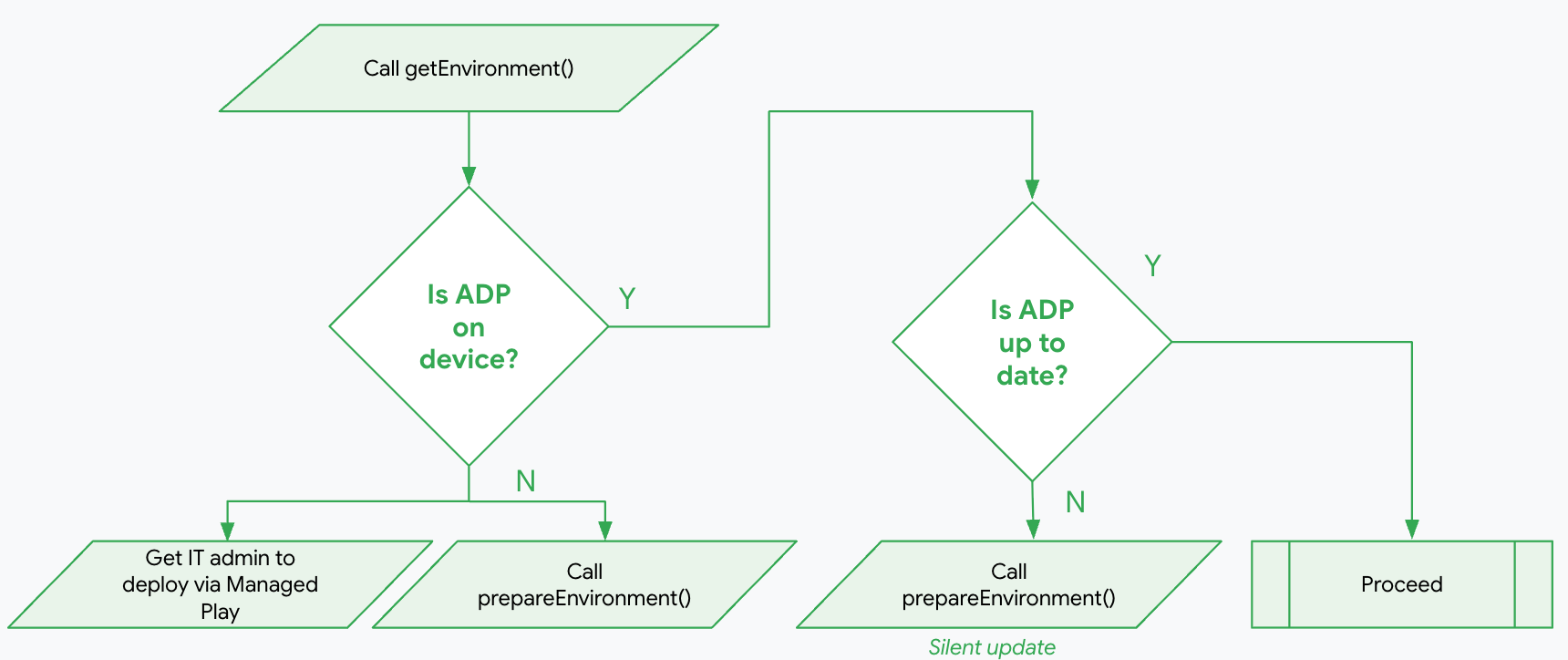
Verify the client environment
The following code example shows how to use getEnvironment to read the
current state of the ADP app. Your application can then use a cached
deviceClient instance to access the device trust signals if the environment
is ready and up to date (see Access device trust signals).
Kotlin
import com.google.android.managementapi.common.model.Role
import com.google.android.managementapi.device.DeviceClient
import com.google.android.managementapi.device.DeviceClientFactory
import com.google.android.managementapi.device.model.GetDeviceRequest
import com.google.android.managementapi.environment.EnvironmentClient
import com.google.android.managementapi.environment.EnvironmentClientFactory
import com.google.android.managementapi.environment.model.Environment.AndroidDevicePolicyEnvironment.State.INSTALLED
import com.google.android.managementapi.environment.model.Environment.AndroidDevicePolicyEnvironment.State.NOT_INSTALLED
import com.google.android.managementapi.environment.model.Environment.AndroidDevicePolicyEnvironment.State.READY
import com.google.android.managementapi.environment.model.Environment.AndroidDevicePolicyEnvironment.Version.UP_TO_DATE
import com.google.android.managementapi.environment.model.GetEnvironmentRequest
import com.google.android.managementapi.environment.model.PrepareEnvironmentRequest

try {
    val context = applicationContext

    val roles = listOf(Role.builder().setRoleType(Role.RoleType.IDENTITY_PROVIDER).build())
    val request = GetEnvironmentRequest.builder().setRoles(roles).build()
    val environmentClient = EnvironmentClientFactory.create(context)
    val environmentResponse = environmentClient.getEnvironment(request)

    if (environmentResponse.hasAndroidDevicePolicyEnvironment()) {
        val adpEnvironment = environmentResponse.androidDevicePolicyEnvironment

        if (adpEnvironment.state == READY && adpEnvironment.version == UP_TO_DATE) {
            // AMAPI Environment State OK, Version OK. Requesting Device signals..
            checkDevice(deviceClient)
        } else if (adpEnvironment.state == INSTALLED) {
            // prepareEnvironment should be called, calling
            // prepareEnvironment won't show the UI
            prepareEnvironment(context, environmentClient)
        } else if (adpEnvironment.state == NOT_INSTALLED) {
            // prepareEnvironment should be called, calling
            // prepareEnvironment will show the UI
            prepareEnvironment(context, environmentClient)
        }
    }
} catch (e: Exception) {
    Log.e(TAG, "Exception", e)
}
Java
import static com.google.android.managementapi.environment.model.Environment.AndroidDevicePolicyEnvironment.State.INSTALLED; import static com.google.android.managementapi.environment.model.Environment.AndroidDevicePolicyEnvironment.State.NOT_INSTALLED; import static com.google.android.managementapi.environment.model.Environment.AndroidDevicePolicyEnvironment.State.READY; import static com.google.android.managementapi.environment.model.Environment.AndroidDevicePolicyEnvironment.Version.UP_TO_DATE; import com.google.android.managementapi.common.model.Role; import com.google.android.managementapi.device.DeviceClient; import com.google.android.managementapi.device.DeviceClientFactory; import com.google.android.managementapi.device.model.Device; import com.google.android.managementapi.device.model.GetDeviceRequest; import com.google.android.managementapi.environment.EnvironmentClient; import com.google.android.managementapi.environment.EnvironmentClientFactory; import com.google.android.managementapi.environment.model.Environment; import com.google.android.managementapi.environment.model.Environment.AndroidDevicePolicyEnvironment; import com.google.android.managementapi.environment.model.GetEnvironmentRequest; import com.google.android.managementapi.environment.model.PrepareEnvironmentRequest; import com.google.android.managementapi.environment.model.PrepareEnvironmentResponse; try { Context context = getApplicationContext(); ImmutableListroles = new ImmutableList.Builder () .add(Role.builder() .setRoleType(Role.RoleType.IDENTITY_PROVIDER) .build()) .build(); EnvironmentClient environmentClient = EnvironmentClientFactory.create(context); GetEnvironmentRequest request = GetEnvironmentRequest.builder() .setRoles(roles) .build(); ListenableFuture getEnvironmentFuture = environmentClient.getEnvironmentAsync(request); Futures.addCallback(getEnvironmentFuture, new FutureCallback<>() { @Override public void onSuccess(Environment environment) { AndroidDevicePolicyEnvironment adpEnvironment = environment.getAndroidDevicePolicyEnvironment(); AndroidDevicePolicyEnvironment.State state = adpEnvironment.getState(); AndroidDevicePolicyEnvironment.Version version = adpEnvironment.getVersion(); if (state == READY && version == UP_TO_DATE) { // AMAPI Environment State OK, Version OK. Requesting Device signals.. checkDevice(deviceClient); } else if (state == INSTALLED) { // prepareEnvironment should be called, calling // prepareEnvironment won't show the UI prepareEnvironment(context, environmentClient); } else if (state == NOT_INSTALLED) { // prepareEnvironment should be called, calling // prepareEnvironment will show the UI prepareEnvironment(context, environmentClient); } } @Override public void onFailure(Throwable t) { Log.d(TAG, t.toString()); } }, MoreExecutors.directExecutor()); } catch (Exception e) { Log.d(TAG, e.toString()); }
If the ADP app is installed but not up to date, your application should call
prepareEnvironment to silently update the ADP app without user intervention.
If the ADP app is not installed, your application can call prepareEnvironment
to prompt the user to install the ADP app. See
Prepare the client environment.
Prepare the client environment
If the ADP app is already installed, the API will silently update it with no user intervention.
If the ADP app is not installed, the API will prompt the user to accept the installation of the ADP app.
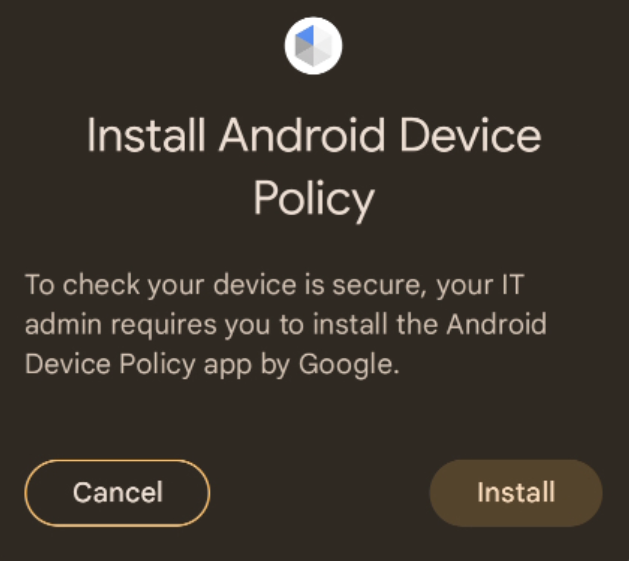
It is possible to register a callback to monitor the user choice. See Track user interaction during the ADP app installation for additional details.
We recommend that the prepareEnvironment call is done from a foreground
process, during the onboarding UX flow to avoid surprising the user with the
Install Android Device Policy modal dialog.
If calling from a foreground process is not possible, because this is a Web flow
and the Android component has no UI, calling from background is permitted with
the requirement that this happens during the onboarding UX flow.
Kotlin
try {
    val myNotificationReceiverService = ComponentName(
        context, MyNotificationReceiverService::class.java
    )

    val roles = listOf(Role.builder().setRoleType(Role.RoleType.IDENTITY_PROVIDER).build())
    val request = PrepareEnvironmentRequest.builder().setRoles(roles).build()

    val response =
        environmentClient.prepareEnvironment(request, myNotificationReceiverService)

    val environment = response.environment
    val adpEnvironment = environment.androidDevicePolicyEnvironment

    val state = adpEnvironment.state
    val version = adpEnvironment.version
    if (state == READY && version == UP_TO_DATE) {
        // Environment is prepared, access device posture signals using
        // DeviceClient.
        checkDevice(deviceClient)
    } else {
        // The prepareEnvironment call failed to prepare
        Log.w(
            TAG, "AMAPI environment was not ready: " + state + " - " + version
        )
    }

} catch (e: java.lang.Exception) {
    Log.d(TAG, e.toString())
}
Java
try { ComponentName myNotificationReceiverService = new ComponentName( context, MyNotificationReceiverService.class ); ImmutableListroles = new ImmutableList.Builder () .add(Role.builder() .setRoleType(Role.RoleType.IDENTITY_PROVIDER) .build()) .build(); PrepareEnvironmentRequest request = PrepareEnvironmentRequest.builder() .setRoles(roles) .build(); ListenableFuture environmentFuture = environmentClient.prepareEnvironmentAsync( request, myNotificationReceiverService ); Futures.addCallback(environmentFuture, new FutureCallback<>() { @Override public void onSuccess(PrepareEnvironmentResponse response) { Environment environment = response.getEnvironment(); AndroidDevicePolicyEnvironment adpEnvironment = environment.getAndroidDevicePolicyEnvironment(); AndroidDevicePolicyEnvironment.State state = adpEnvironment.getState(); AndroidDevicePolicyEnvironment.Version version = adpEnvironment.getVersion(); if (state == READY && version == UP_TO_DATE) { // AMAPI Environment State OK, Version OK. Requesting Device signals.. checkDevice(deviceClient); } else { // The prepareEnvironment call failed to prepare Log.w( TAG, "AMAPI environment was not ready: " + adpEnvironment.getState() + " - " + adpEnvironment.getVersion() ); } } @Override public void onFailure(@NonNull Throwable t) { // Handle the error Log.d(TAG, "AMAPI response did not contain an ADP environment"); } }, MoreExecutors.directExecutor()); } catch (Exception e) { Log.d(TAG, e.toString()); }
Access device trust signals
DeviceClient usage recommendation
Creating a deviceClient instance (or an EnvironmentClient instance)
establishes a communication channel with the Android Device Policy (ADP) app
that automatically unbinds when idle. Because client instances don't expose an
explicit shutdown method, creating and discarding multiple instances leaves
orphaned channels to be garbage-collected.
To optimize performance and avoid orphaned channels, create a single instance of
DeviceClient at application scope using
DeviceClientFactory.create(context.applicationContext) and cache it for reuse
throughout your application—for example, as an application-scoped singleton or
using dependency injection.
To access the device trust signals you are interested in, use your cached
deviceClient instance to request the Device object:
Kotlin
runCatching {
    deviceClient.getDeviceAwait(GetDeviceRequest.getDefaultInstance())
}.onFailure { t ->
    Log.d(TAG, t.toString())
}.onSuccess { device ->
    // Access device posture signals available in device
    val deviceString = device.toString()
    Log.d(TAG, deviceString)
}
Java
ListenableFuturedeviceFuture = deviceClient.getDevice(GetDeviceRequest.getDefaultInstance()); Futures.addCallback(deviceFuture, new FutureCallback () { @Override public void onSuccess(Device device) { // Access device posture signals available in device String deviceString = device.toString(); Log.d(TAG, deviceString); } @Override public void onFailure(Throwable t) { Log.d(TAG, t.toString()); } }, MoreExecutors.directExecutor());
Access signals from a companion app
On fully managed devices or from inside a work profile managed with the
Android Management API (AMAPI), an application assigned the
COMPANION_APP role can read device trust signals without
being registered on the allowlist.
When called from inside a work profile (on either a company-owned or personally-owned device), your app must run inside the work profile, and access is limited to signals from the work profile (for example, management state, screen lock complexity, and installed applications reflect only the work profile).
1. Assign the COMPANION_APP role in policy
Configure your EMM policy to grant roleType: "COMPANION_APP" to your
application in the applications policy list:
- To configure your app's manifest and optionally listen for role assignments, see Manage application roles.
- For the policy configuration syntax, see Policy Configuration.
2. Read signals directly with DeviceClient
Create and cache a single deviceClient instance at application scope using
DeviceClientFactory.create (see
DeviceClient usage recommendation), then
request the Device object directly:
Kotlin
import android.content.Context
import android.util.Log
import com.google.android.managementapi.device.DeviceClient
import com.google.android.managementapi.device.DeviceClientFactory
import com.google.android.managementapi.device.model.GetDeviceRequest

// Instantiate once at application scope (for example, using dependency injection)
// to reuse a single DeviceClient instance across your app.
class DeviceTrustRepository(context: Context) {
    private val deviceClient: DeviceClient =
        DeviceClientFactory.create(context.applicationContext)

    suspend fun readSignalsFromCompanionApp() {
        runCatching {
            deviceClient.getDeviceAwait(GetDeviceRequest.getDefaultInstance())
        }.onSuccess { device ->
            Log.d(TAG, "Device signals: $device")
        }.onFailure { t ->
            Log.e(TAG, "Failed to read device signals", t)
        }
    }

    companion object {
        private const val TAG = "DeviceTrustRepository"
    }
}
Java
import android.content.Context; import android.util.Log; import com.google.android.managementapi.device.DeviceClient; import com.google.android.managementapi.device.DeviceClientFactory; import com.google.android.managementapi.device.model.Device; import com.google.android.managementapi.device.model.GetDeviceRequest; import com.google.common.util.concurrent.FutureCallback; import com.google.common.util.concurrent.Futures; import com.google.common.util.concurrent.ListenableFuture; import com.google.common.util.concurrent.MoreExecutors; // Instantiate once at application scope (for example, using dependency injection) // to reuse a single DeviceClient instance across your app. public class DeviceTrustRepository { private static final String TAG = "DeviceTrustRepository"; private final DeviceClient deviceClient; public DeviceTrustRepository(Context context) { this.deviceClient = DeviceClientFactory.create(context.getApplicationContext()); } public void readSignalsFromCompanionApp() { ListenableFuturedeviceFuture = deviceClient.getDevice(GetDeviceRequest.getDefaultInstance()); Futures.addCallback(deviceFuture, new FutureCallback () { @Override public void onSuccess(Device device) { Log.d(TAG, "Device signals: " + device); } @Override public void onFailure(Throwable t) { Log.e(TAG, "Failed to read device signals", t); } }, MoreExecutors.directExecutor()); } }
Handle errors
If your app makes a device trust request and the call fails, your app receives an exception. These exceptions can happen for various reasons, such as:
SecurityException- your app isn't authorized to make the request (for example, your app isn't registered on the allowlist when required, isn't assigned theCOMPANION_APProle on an AMAPI-managed device, or calledprepareEnvironmentas a companion app that isn't on the allowlist). See device trust signals access and Access signals from a companion app.- A subclass of
AmapiSdkException- ADP is not present or not ready. This can be caused by a transient condition and you should retry the call.
Retry strategies
For exceptions due to a transient condition implement a retry strategy with an exponential backoff. After the first failure, start with an initial delay of 5 seconds before retrying.
Implement a retry strategy with a maximum number of attempts as an exit condition using an exponentially increased delay each time (10s, 20s, etc.).
Track user interaction during ADP app installation
If the device needs to install the ADP app during the prepareEnvironment your
application can track the user interaction implementing a
NotificationReceiverService to receive notifications overriding
getPrepareEnvironmentListener:
Kotlin
import android.util.Log
import com.google.android.managementapi.environment.EnvironmentListener
import com.google.android.managementapi.environment.model.EnvironmentEvent.EventCase.Kind.ANDROID_DEVICE_POLICY_INSTALL_CONSENT_ACCEPTED
import com.google.android.managementapi.environment.model.EnvironmentEvent
import com.google.android.managementapi.notification.NotificationReceiverService

class MyNotificationReceiverService : NotificationReceiverService() {
    override fun getPrepareEnvironmentListener(): EnvironmentListener {
        return MyEnvironmentListener()
    }
}

class MyEnvironmentListener : EnvironmentListener {
    override fun onEnvironmentEvent(
        event: EnvironmentEvent
    ) {
        if (event.event.kind == ANDROID_DEVICE_POLICY_INSTALL_CONSENT_ACCEPTED) {
            Log.d(TAG, "User provided install consent")
        } else {
            Log.d(TAG, "User rejected install consent")
        }
    }

    companion object {
        private val TAG: String = MyEnvironmentListener::class.java.simpleName
    }
}
Java
import static com.google.android.managementapi.environment.model.EnvironmentEvent.EventCase.Kind.ANDROID_DEVICE_POLICY_INSTALL_CONSENT_ACCEPTED;

import android.util.Log;
import androidx.annotation.NonNull;
import com.google.android.managementapi.environment.EnvironmentListener;
import com.google.android.managementapi.environment.model.EnvironmentEvent;
import com.google.android.managementapi.notification.NotificationReceiverService;

class MyNotificationReceiverService extends NotificationReceiverService {
    @NonNull
    @Override
    protected EnvironmentListener getPrepareEnvironmentListener() {
        return new MyEnvironmentListener();
    }
}
class MyEnvironmentListener implements EnvironmentListener {
    final private String TAG = MyEnvironmentListener.class.getSimpleName();

    @Override
    public void onEnvironmentEvent(EnvironmentEvent event) {
        if (event.getEvent().getKind() == ANDROID_DEVICE_POLICY_INSTALL_CONSENT_ACCEPTED)
        {
            Log.d(TAG, "User provided install consent");
        } else {
            Log.d(TAG, "User rejected install consent");
        }
    }
}
Known issues
There are no known issues at the moment.