

Page Summary
-
Account Linking, specifically "Link from your Platform" on Android, allows users to connect their account on your service with their Google Account directly within your mobile app.
-
This method improves performance and user experience by keeping the account linking process within the familiar context of your app, leveraging existing user authentication.
-
Developers benefit from increased control over where and how to promote linking, higher conversion rates, reduced drop-off rates, and low implementation effort if an OAuth2.0 implementation exists.
-
The linking process involves user consent on both Google and your service's screens before the link is established, granting Google access to shared data.
-
Implementing "Link from your Platform" requires an Android app and an OAuth 2.0 server supporting the authorization code flow, and involves setting up the development environment and configuring your app with necessary dependencies.
Account Linking can be completed directly within your mobile app, allowing your users to link their account on your service with their Google Account. The established link grants Google access to the data the user consents to share.
This approach improves account linking performance by engaging users within the familiar context of your app instead of an Assistant conversation. It can be integrated into user onboarding, settings, and other app surfaces, creating opportunities for discovery and engagement of your Google Assistant Action. For example, after linking you could offer to take the user directly to your Action.
用户可享有的优势包括:
- 用户可以在您的应用中开始并完成帐号关联流程,这是他们熟悉的环境。
- 用户无需登录凭据,因为已在设备和您的移动应用中通过身份验证。
开发者获得的好处包括:
- 在移动应用中(例如,在用户设置中,在插页式广告上或用户登录移动应用后)宣传和启动帐号关联,以提高互动度和关联的帐号数量。
- 转化率有所提高,因为用户可以完成的步骤比基于网络的标准 OAuth 流程少。
- 实现您的平台 (Android) 链接的工程工作量很少,因为此流程已利用您现有的 OAuth2.0 实现(假设您已实现一个)。
- 提升了用户流失率,因为用户无需重新输入登录凭据,用更少的步骤就能完成此流程。 在要求用户召回和输入登录凭据的流程中,流失率可能高达 80%。
运作方式
通过以下步骤,即可从您的平台完成关联:
- 用户在您的移动应用中点击/切换关联触发器。
- 用户选择要关联的 Google 账号。
- 用户选择设备上现有的 Google 账号进行关联,或使用新账号登录
- 系统会向用户显示 Google 托管的权限请求页面,用户必须同意才能继续,或者取消以停止关联流程。
- 系统会向用户显示您的权限请求页面,用户必须同意才能继续,或者取消以停止关联流程。
- 关联是在用户在您服务中的账号与其 Google 账号之间建立的。
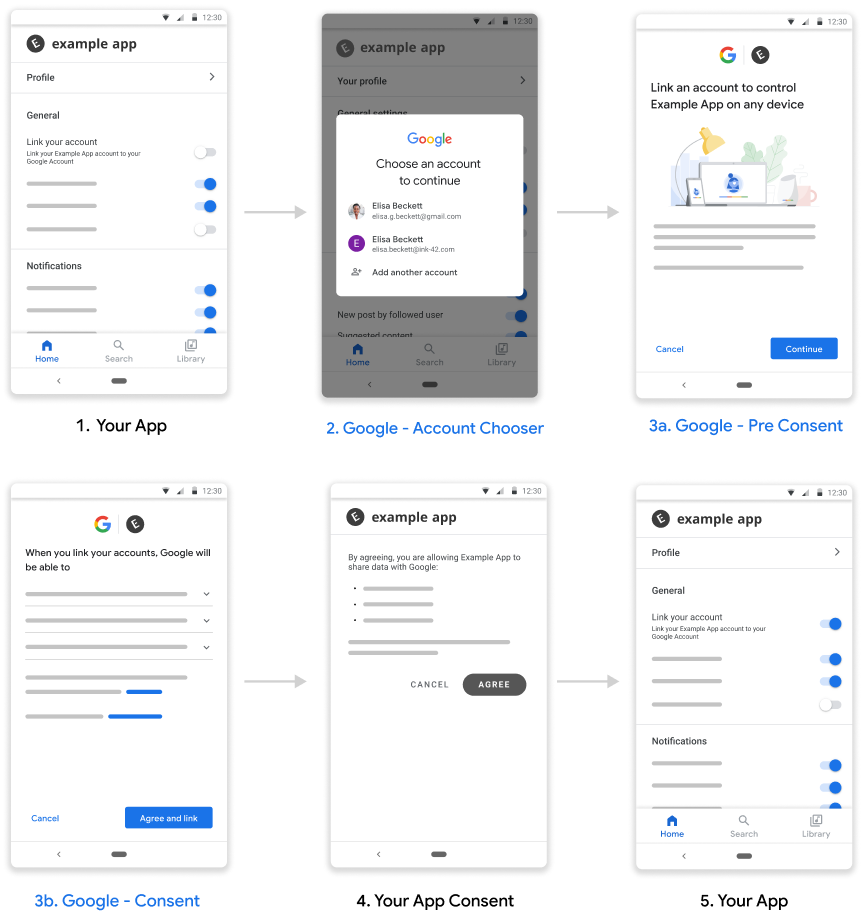
图 1. 通过平台流程进行关联
要求
如需从您的平台实现 Link,您需要满足以下条件:
- Android 应用。
- 拥有、管理和维护支持 OAuth 2.0 授权代码流程的 OAuth 2.0 服务器。
设置
在继续执行以下步骤之前,您必须先完成账号关联注册流程。
设置开发环境
在开发主机上获取最新的 Google Play 服务:
- 打开 Android SDK 管理器。
在 SDK 工具 下,找到 Google Play 服务。
如果这些软件包的状态不是“已安装”,请同时选择这两个软件包,然后点击安装软件包。
配置您的应用
在您的项目级
build.gradle文件中,同时在buildscript和allprojects两个部分中添加 Google 的 Maven 仓库。buildscript { repositories { google() } } allprojects { repositories { google() } }将“使用 Google 账号关联”API 的依赖项添加到模块的应用级 Gradle 文件(通常为
app/build.gradle):dependencies { implementation 'com.google.android.gms:play-services-auth:22.0.0' }
添加对“从您的平台关联”的支持
通过“从您的平台关联”流程,Google 会保存由您的服务提供的访问令牌。必须先征得用户同意,然后才能返回用户的令牌。
请按照以下步骤征得用户同意,并通过 Google Play 服务 SDK 返回授权代码令牌。
构建一个可启动意见征求 activity 的 PendingIntent - 意见征求 activity 由 Play 服务 API 启动。调用 API 时,您需要提供
PendingIntent(为清晰起见,下文称为consentPendingIntent)Kotlin
// Build a PendingIntent that can launch the consent activity
val consentPendingIntent = buildConsentPendingIntent()
Java
// Build a PendingIntent that can launch your consent activity
PendingIntent consentPendingIntent =
          buildConsentPendingIntent();
创建相应的 Activity 来处理意见征求 intent
Kotlin
  class ConsentActivity : AppCompatActivity

  private fun onConsentAccepted() {
      // Obtain a token (for simplicity, we’ll ignore the async nature
      // of the following call)
      val token = getToken()
      val intent = Intent()
                  .putExtra(SaveAccountLinkingTokenRequest.EXTRA_TOKEN,
                            token)
      setResult(Activity.RESULT_OK, intent)
      finish()
  }

  private fun onConsentRejectedOrCanceled() {
      setResult(Activity.RESULT_CANCELED)
      finish()
  }
Java
  public class ConsentActivity extends AppCompatActivity {
    ...
    private void onConsentAccepted() {
      // Obtain a token (for simplicity, we’ll ignore the async nature of
      // the following call
      String token = getToken();
      Intent intent = new Intent();
      intent.putExtra(SaveAccountLinkingTokenRequest.EXTRA_TOKEN, token);
      setResult(Activity.RESULT_OK, intent);
      finish();
    }

    private void onConsentRejectedOrCanceled() {
      setResult(Activity.RESULT_CANCELED, null);
      finish();
    }
 }
我们假设,如果用户接受或拒绝/取消您的意见征求,系统会分别调用
onConsentAccpeted()和onConsentRejectedOrCanceled()方法。创建用于保存令牌的请求,并在其他配置参数中传递在上述第 1 步中创建的
PendingIntent。Kotlin
  // Create an ActivityResultLauncher which registers a callback for the
  // Activity result contract
  val activityResultLauncher = registerForActivityResult(
    ActivityResultContracts.StartIntentSenderForResult())
    { result ->
      if (result.resultCode == RESULT_OK) {
        // Successfully finished the flow and saved the token
      } else {
        // Flow failed, for example the user may have canceled the flow
      }
    }

  // Build token save request
  val request = SaveAccountLinkingTokenRequest.builder()
    .setTokenType(SaveAccountLinkingTokenRequest.TOKEN_TYPE_AUTH_CODE)
    .setConsentPendingIntent(consentPendingIntent)
    .setServiceId("service-id-of-and-defined-by-developer")
    //Set the scopes that the token is valid for on your platform
    .setScopes(scopes)
    .build()

   // Launch consent activity and retrieve token
   Identity.getCredentialSavingClient(this)
     .saveAccountLinkingToken(request)
     .addOnSuccessListener( saveAccountLinkingTokenResult -> {
        if (saveAccountLinkingTokenResult.hasResolution()) {
          val pendingIntent = saveAccountLinkingTokenResult
                              .getPendingIntent()
          val intentSenderRequest = IntentSenderRequest
                                    .Builder(pendingIntent).build()
          activityResultLauncher.launch(intentSenderRequest)
        } else {
           // This should not happen, let’s log this
           Log.e(TAG, "Failed to save token");
        }
      })
      .addOnFailureListener(e -> Log.e(TAG, “Failed to save token”, e))
Java
  // Create an ActivityResultLauncher which registers a callback for the
  // Activity result contract
  ActivityResultLauncher<IntentSenderRequest>
      activityResultLauncher =
      registerForActivityResult(new ActivityResultContracts
                                    .StartIntentSenderForResult(),
                                result -> {
      if (result.getResultCode() == RESULT_OK) {
          // Successfully finished the flow and saved the token
      } else {
          // Flow failed, for example the user may have canceled the flow
      }
  });

 // Build token save request
 SaveAccountLinkingTokenRequest request =
    SaveAccountLinkingTokenRequest.builder()
        .setTokenType(
            SaveAccountLinkingTokenRequest.TOKEN_TYPE_AUTH_CODE)
        .setConsentPendingIntent(consentPendingIntent)
        .setServiceId("service-id-of-and-defined-by-developer")
        //Set the scopes that the token is valid for on your platform
        .setScopes(scopes)
        .build();

  // Launch consent activity and retrieve token
  Identity.getCredentialSavingClient(this)
      .saveAccountLinkingToken(request)
      .addOnSuccessListener(
          saveAccountLinkingTokenResult -> {
            if (saveAccountLinkingTokenResult.hasResolution()) {
              // Launch the resolution intent
              PendingIntent pendingIntent =
                  saveAccountLinkingTokenResult.getPendingIntent();
              IntentSenderRequest intentSenderRequest =
                  new IntentSenderRequest.Builder(pendingIntent).build();
              activityResultLauncher.launch(intentSenderRequest);
            } else {
              // This should not happen, let’s log this
              Log.e(TAG, "Failed to save token");
            }
          })
      .addOnFailureListener(e -> Log.e(TAG, "Failed to save token", e));
  ```
上述步骤会提示用户同意,并向 Google 返回授权代码。
最佳做法
您的应用应通过按钮、切换开关或类似的视觉元素向用户指明关联状态。

图 1. 示例链接状态图片
您应在关联成功后通知用户,例如显示消息框、触发切换状态更改或将用户重定向到单独的关联成功页面。
您应考虑提示应用内用户关联账号,最好是根据明确的信号来判断关联是否会使这些用户受益。
成功关联后,您应向用户举例说明如何使用关联的账号,例如,如果用户刚刚关联了在线媒体服务,则可以请 Google 助理播放音乐。
让用户能够管理其关联的账号,包括解除关联的选项。请他们前往 Google 关联的账号管理页面,即 https://myaccount.google.com/accountlinking。