
The MediaPipe Text Summarizer task lets you identify the most important information in a text and generate a shorter version while maintaining the original context meaning. This task operates on text data with a machine learning (ML) model and outputs a summary string.
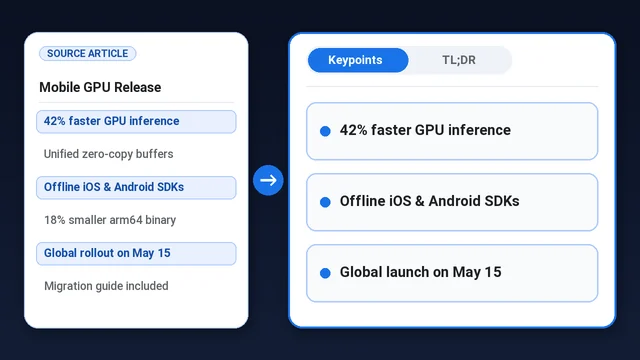
This task supports two modes:
- TLDR: Generates a short paragraph of 1–2 sentences.
- Keypoints: Generates a bulleted list of 3–5 key points.
Quickstart
Install the SDK for your platform, initialize the task with a model, and run inference.
Android (Kotlin)
import com.google.mediapipe.tasks.text.textsummarizer.TextSummarizer
import com.google.mediapipe.tasks.text.textsummarizer.TextSummarizer.TextSummarizerOptions

val options = TextSummarizerOptions.builder()
    .setModelPath("${context.filesDir}/summarization_quant_200m_2modes.litertlm")
    .setMode(TextSummarizerOptions.Mode.TLDR)
    .build()

val summarizer = TextSummarizer.createFromOptions(context, options)

val articleText = "Here is a long meeting transcript..."
val result = summarizer.summarize(articleText)
val summary = result.summary
Android (Java)
import com.google.mediapipe.tasks.text.textsummarizer.TextSummarizer;
import com.google.mediapipe.tasks.text.textsummarizer.TextSummarizer.TextSummarizerOptions;
import com.google.mediapipe.tasks.text.textsummarizer.TextSummarizerResult;

TextSummarizerOptions options = TextSummarizerOptions.builder()
    .setModelPath(context.getFilesDir() + "/summarization_quant_200m_2modes.litertlm")
    .setMode(TextSummarizerOptions.Mode.TLDR)
    .build();

TextSummarizer summarizer = TextSummarizer.createFromOptions(context, options);

String articleText = "Here is a long meeting transcript...";
TextSummarizerResult result = summarizer.summarize(articleText);
String summary = result.getSummary();
iOS
import Foundation
import MediaPipeTasksText

guard let modelPath = Bundle.main.path(
    forResource: "summarization_quant_200m_2modes",
    ofType: "litertlm"
) else { return }

let options = TextSummarizerOptions()
options.baseOptions.modelAssetPath = modelPath
options.mode = .tldr

let textSummarizer = try TextSummarizer(options: options)

let articleText = "Here is a long meeting transcript..."
let result = try textSummarizer.summarize(text: articleText)
let summary = result.summary
Python
import mediapipe as mp

BaseOptions = mp.tasks.BaseOptions
TextSummarizer = mp.tasks.text.TextSummarizer
TextSummarizerOptions = mp.tasks.text.TextSummarizerOptions
TextSummarizerMode = mp.tasks.text.TextSummarizerMode

model_path = "summarization_quant_200m_2modes.litertlm"
options = TextSummarizerOptions(
    base_options=BaseOptions(model_asset_path=model_path),
    mode=TextSummarizerMode.TLDR,
)

article_text = "Here is a long meeting transcript..."
with TextSummarizer.create_from_options(options) as text_summarizer:
    result = text_summarizer.summarize(article_text)
    summary = result.summary
Flutter
Text Summarizer isn't available in Flutter web apps yet.
import 'package:mediapipe_text/mediapipe_text.dart';

Future<void> summarize(String article) async {
  final task = await TextSummarizer.create(
    TextSummarizerOptions(
      model: TextModels.summarizer,
      mode: TextSummarizerMode.tldr,
    ),
  );
  try {
    print((await task.summarize(article)).summary);
    await for (final update in task.summarizeStream(article)) {
      if (update.chunk != null) print(update.chunk);
    }
  } finally {
    await task.dispose();
  }
}
Task details
This section describes the capabilities, inputs, outputs, and configuration options of this task.
Features
- Two summary modes - Produce a short TL;DR paragraph or a list of key points.
- String
- String: represents the summary.
Configuration options
This task has the following configuration options:
Android
| Option Name | Description | Value Range | Default Value |
|---|---|---|---|
modelPath |
Path to the .litertlm model file in device storage (or use modelAssetFileDescriptor). |
String |
Required |
mode |
Summarization format: either a concise paragraph (TLDR) or a bulleted list of key points (KEYPOINTS). |
{TLDR, KEYPOINTS} |
KEYPOINTS |
maxNumTokens |
Maximum number of tokens for input and generated summary. If unset or 0, defaults to the model's built-in capacity (8192 tokens). |
Integer |
0 (model default 8k) |
iOS
| Option Name | Description | Value Range | Default Value |
|---|---|---|---|
baseOptions.modelAssetPath |
Path or URL to the summarizer model (modelPath or modelAssetFileDescriptor on Android). |
String |
Required |
mode |
Summarization format: either a concise paragraph (TLDR) or a bulleted list of key points (KEYPOINTS). |
{TLDR, KEYPOINTS} |
KEYPOINTS |
maxNumTokens |
Maximum number of tokens for input and generated summary. If unset or 0, defaults to the model's built-in capacity (8192 tokens). |
Integer |
0 (model default 8k) |
cacheDirectory |
Optional writable directory for the model weight and program caches. Pass ":nocache" to disable caching. |
String |
Not set |
Python
| Option Name | Description | Value Range | Default Value |
|---|---|---|---|
base_options.model_asset_path |
Path or URL to the summarizer model (modelPath or modelAssetFileDescriptor on Android). |
String |
Required |
mode |
Summarization format: either a concise paragraph (TLDR) or a bulleted list of key points (KEYPOINTS). |
{TLDR, KEYPOINTS} |
KEYPOINTS |
max_num_tokens |
Maximum number of tokens for input and generated summary. If unset or 0, defaults to the model's built-in capacity (8192 tokens). |
Integer |
0 (model default 8k) |
cache_dir |
Optional writable directory for the model weight and program caches. Pass ":nocache" to disable caching. |
str |
":nocache" |
Flutter
| Option Name | Description | Value Range | Default Value |
|---|---|---|---|
model |
Google's pinned summarizer model, TextModels.summarizer, bundled at build time (or modelPath to a .litertlm file on the device). Supply exactly one; modelBytes isn't accepted. |
DownloadAsset |
Required |
mode |
Summarization format: either a concise paragraph (TextSummarizerMode.tldr) or a bulleted list of key points (TextSummarizerMode.keypoints). Fixed for the task's lifetime. |
{TextSummarizerMode.tldr, TextSummarizerMode.keypoints} |
TextSummarizerMode.keypoints |
maxNumTokens |
Maximum number of tokens for input and generated summary. If null or 0, defaults to the model's built-in capacity (8192 tokens). |
int [0, 2147483647] |
null (model default 8k) |
cacheDirectory |
Optional writable directory where Google's runtime caches the prepared model. If null, Google's default (beside the model) is used. |
String |
null |
Task output
Each TextSummarizerResult returns the generated summary text formatted according to the configured mode (KEYPOINTS bullet list or TLDR paragraph):
| Field | Type | Description |
|---|---|---|
summary |
string |
Extractive/abstractive summary generated by the on-device language model (result.summary / result.getSummary(); a nullable String? in Dart). |
Example TextSummarizerResult payload
The following example shows a KEYPOINTS bullet summary returned by TextSummarizer:
{
  summary: "• On-device inference keeps user data private.\n• Hardware acceleration on CPU, GPU, and NPU reduces latency.\n• Shared model bundles run across Android, iOS, and Python."
}
Models

We offer a default, recommended model when you start developing with this task.
Summarization 200M model (recommended)
A lightweight, 200M-parameter model fine-tuned to generate two types of summaries in real time: TLDR and Keypoints. This model is subject to the Gemma Terms of Use.
| Model name | Input | Quantization type | Terms of use | Versions |
|---|---|---|---|---|
| Summarization 200M | string | Mixed Precision (Int4 + Int8) | Gemma | Latest |
Task benchmarks
Here are the task benchmarks for the whole pipeline on a Pixel 10 Pro CPU, presenting the average latency across both Keypoints and TLDR modes. Peak memory usage for on-device model inference varies from approximately 200MB to 350MB depending on the input length (100 to 2000 words).
MediaPipe E2E Benchmark
| Device | Input Words (tokens) | Prefill (tokens/s) | Decode (tokens/s) | E2E Latency (ms) |
|---|---|---|---|---|
| Pixel 10 Pro CPU | 100 (~200 tokens) | 980 | 133 | 900 |
| 500 (~900 tokens) | 950 | 130 | 1790 | |
| 1000 (~1900 tokens) | 690 | 100 | 5,000 | |
| 2000 (~3600 tokens) | 470 | 55 | 12,000–17,000 |