
Cloud Search lets employees search and retrieve information, such as internal documents, database fields, and CRM data, from internal data repositories.
Architectural overview
Figure 1 shows the key components of a Cloud Search implementation:
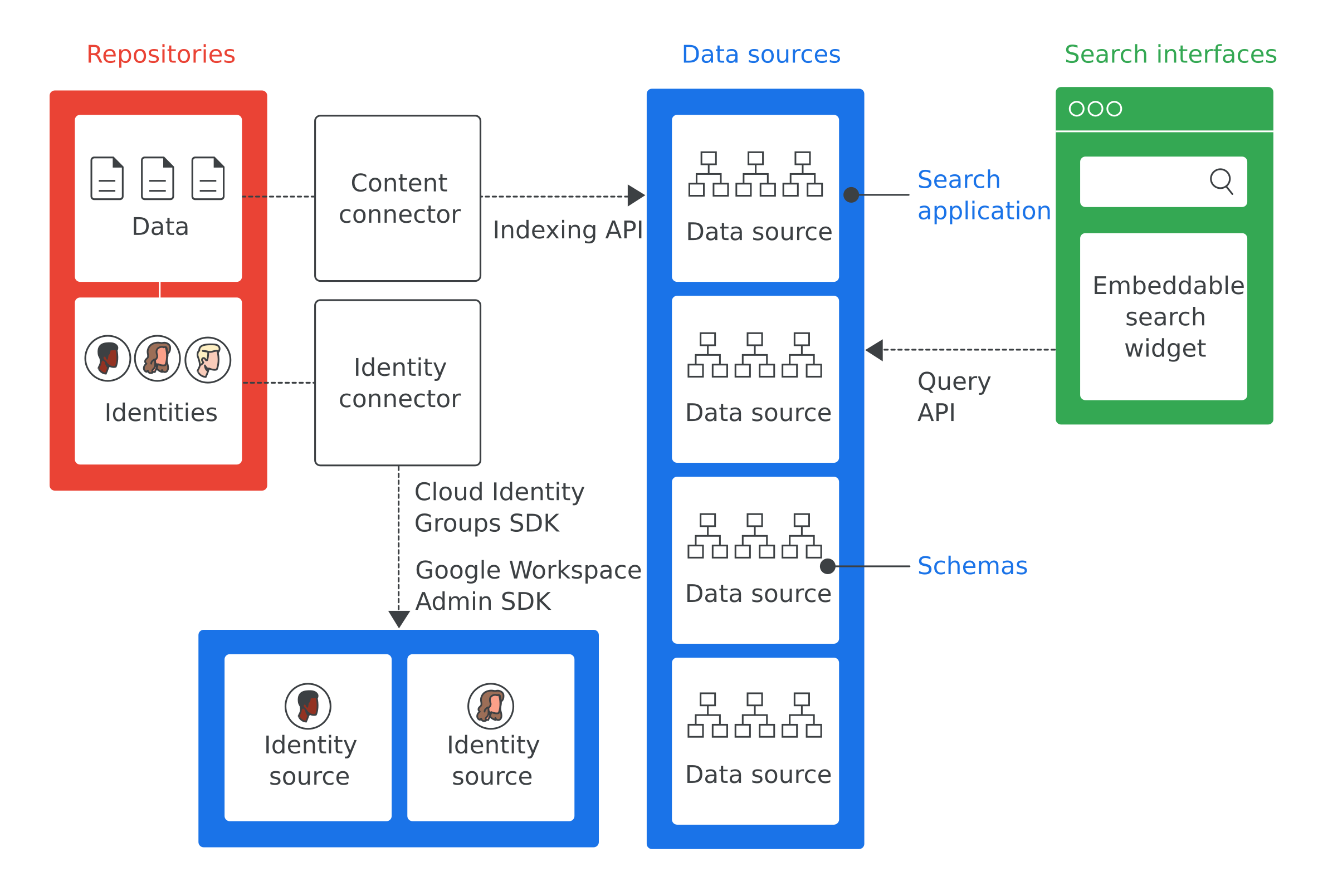
Here are the definitions of the most important terms from Figure 1:
- Repository
- Software used by an enterprise to store data, such as a database used to store employee information.
- Data source
- Data from a repository that Cloud Search indexes and stores.
- Search interface
- The user interface employees use to search a data source. You can develop a search interface for any device, such as a mobile phone or a desktop computer. You can also deploy the Google-provided search widget to enable search within your internal websites. Each search includes the search application ID to identify the search context, such as within a customer service tool. The site cloudsearch.google.com contains a search interface.
- Search application
- A group of settings that, when associated with a search interface, provide contextual information about searches. Contextual information includes the data sources and search rankings used for a search. Search applications also include mechanisms for filtering results and enable reporting on data sources, such as the number of queries made over a given time period.
- Schema
- A data structure outlining how to represent data in an enterprise repository for Cloud Search. A schema defines the employee Cloud Search experience, such as how users filter and view data.
- Content connector
- A software program that traverses data in an enterprise repository and populates a data source.
- Identity connector
- A software program that syncs enterprise identities (users and groups) to the identities required by Cloud Search.
Cloud Search use cases
Example use cases for Cloud Search:
- Employees need to find corporate policies, documents, and content authored by other employees.
- Customer service team members need to find relevant troubleshooting documents to send to customers.
- Employees need to find internal information about company projects.
- A sales representative wants to view the status of all support issues for a particular customer.
- Employees want a definition for a company-specific term.
The first step in implementing Cloud Search is to identify the relevant use cases.
Implement Cloud Search
By default, Cloud Search indexes Google Workspace data, such as Google documents and spreadsheets. You don't need to implement Cloud Search for Google Workspace data. However, you must implement Cloud Search for non-Google Workspace data, such as data stored in a third-party database, file systems like Windows File Share, OneDrive, or intranet portals like SharePoint. Follow these steps to implement Cloud Search for your enterprise.
- Determine a use case that Cloud Search helps to solve.
- Identify the repositories holding data relevant to the use case.
- Identify the identity systems used by your company to manage access to data in each repository.
- Configure access to the Google Cloud Search API.
- Add a data source to Cloud Search.
- Create and register a schema for each data source.
- Determine if a content connector is available for your repository. For a list of prebuilt connectors, refer to the Cloud Search connector directory. If a content connector is available, skip to step 9.
- Create a content connector to access data in each repository and index it into a Cloud Search data source.
- Determine if you need an identity connector. If you don't need an identity connector, skip to step 11.
- Create an identity connector to map your repository or enterprise identities to Google identities.
- Set up search applications.
- Create a search interface to perform search queries.
- Deploy your connectors and search interfaces. If you used a pre-built connector, follow the instructions for the connector to obtain and deploy the connector. Available connectors are listed in the Cloud Search Connector Directory.
Next steps
- Try the Cloud Search getting started tutorial.
- Determine use case(s) for which you'll use Cloud Search.
- Identify the repositories relevant to these use cases.
- Identify any identity systems used by your repositories.
- Continue to Configure access to the Cloud Search API.