

इस दस्तावेज़ में, Java सर्वलेट का इस्तेमाल करके, OAuth 2.0 ऑथराइज़ेशन कॉलबैक हैंडलर को लागू करने का तरीका बताया गया है. इसके लिए, एक सैंपल वेब ऐप्लिकेशन का इस्तेमाल किया गया है. यह ऐप्लिकेशन, Google Tasks API का इस्तेमाल करके, उपयोगकर्ता के टास्क दिखाता है. सैंपल ऐप्लिकेशन, सबसे पहले उपयोगकर्ता के Google Tasks को ऐक्सेस करने की अनुमति मांगता है. इसके बाद, उपयोगकर्ता के टास्क को डिफ़ॉल्ट टास्क लिस्ट में दिखाता है.
ऑडियंस
यह दस्तावेज़ उन लोगों के लिए है जिन्हें Java और J2EE वेब ऐप्लिकेशन आर्किटेक्चर के बारे में जानकारी है. हमारा सुझाव है कि आपको OAuth 2.0 के ऑथराइज़ेशन फ़्लो के बारे में कुछ जानकारी हो.
सामग्री
इस तरह के पूरी तरह से काम करने वाले सैंपल के लिए, कई चरणों को पूरा करना ज़रूरी है. आपको ये काम करने होंगे:
- web.xml फ़ाइल में servlet मैपिंग के बारे में जानकारी देना
- उपयोगकर्ताओं के सिस्टम पर उनकी पुष्टि करना और उनके Tasks ऐक्सेस करने की अनुमति का अनुरोध करना
- Google के ऑथराइज़ेशन एंडपॉइंट से मिले ऑथराइज़ेशन कोड को सुनें
- ऑथराइज़ेशन कोड को रीफ़्रेश और ऐक्सेस टोकन के लिए बदलना
- उपयोगकर्ता के टास्क पढ़ना और उन्हें दिखाना
web.xml फ़ाइल में servlet मैपिंग के बारे में जानकारी देना
यह ऐप्लिकेशन इन दो सर्वलेट का इस्तेमाल करता है:
- PrintTasksTitlesServlet (
/पर मैप किया गया): यह ऐप्लिकेशन का एंट्री पॉइंट है. यह उपयोगकर्ता की पुष्टि करेगा और उसके टास्क दिखाएगा - OAuthCodeCallbackHandlerServlet (
/oauth2callbackपर मैप किया गया): यह OAuth 2.0 कॉलबैक है. यह OAuth ऑथराइज़ेशन एंडपॉइंट से मिले जवाब को हैंडल करता है
यहां दी गई web.xml फ़ाइल, हमारे ऐप्लिकेशन में इन दो सर्वलेट को यूआरएल से मैप करती है:
<?xml version="1.0" encoding="UTF-8"?>
<web-app version="2.5" xmlns="http://java.sun.com/xml/ns/javaee"
    xmlns:xsi="http://www.w3.org/2001/XMLSchema-instance"
    xsi:schemaLocation="http://java.sun.com/xml/ns/javaee http://java.sun.com/xml/ns/javaee/web-app_2_5.xsd">

 <servlet>
   <servlet-name>PrintTasksTitles</servlet-name>
   <servlet-class>com.google.oauthsample.PrintTasksTitlesServlet</servlet-class>
 </servlet>

 <servlet-mapping>
   <servlet-name>PrintTasksTitles</servlet-name>
   <url-pattern>/</url-pattern>
 </servlet-mapping>

 <servlet>
   <servlet-name>OAuthCodeCallbackHandlerServlet</servlet-name>
   <servlet-class>com.google.oauthsample.OAuthCodeCallbackHandlerServlet</servlet-class>
 </servlet>

 <servlet-mapping>
   <servlet-name>OAuthCodeCallbackHandlerServlet</servlet-name>
   <url-pattern>/oauth2callback</url-pattern>
 </servlet-mapping>

</web-app>उपयोगकर्ताओं की उनके सिस्टम पर पुष्टि करना और उनके टास्क ऐक्सेस करने के लिए अनुमति का अनुरोध करना
उपयोगकर्ता, रूट '/' यूआरएल के ज़रिए ऐप्लिकेशन में प्रवेश करता है. यह यूआरएल, PrintTaskListsTitlesServlet servlet पर मैप किया जाता है. उस सर्वलेट में, ये काम किए जाते हैं:
- यह कुकी, यह जांच करती है कि उपयोगकर्ता की सिस्टम पर पुष्टि हुई है या नहीं.
- अगर उपयोगकर्ता की पुष्टि नहीं हुई है, तो उसे पुष्टि वाले पेज पर रीडायरेक्ट कर दिया जाता है.
- अगर उपयोगकर्ता की पुष्टि हो जाती है, तो डेटा स्टोरेज में पहले से मौजूद रीफ़्रेश टोकन की जांच की जाती है. इसे यहां दिए गए
OAuthTokenDaoमैनेज करता है. अगर उपयोगकर्ता के लिए स्टोरेज में टोकन उपलब्ध नहीं हैं, तो इसका मतलब है कि उपयोगकर्ता ने अब तक ऐप्लिकेशन को अपने टास्क ऐक्सेस करने की अनुमति नहीं दी है. इसके बाद, उपयोगकर्ता को Google के OAuth 2.0 ऑथराइज़ेशन एंडपॉइंट पर रीडायरेक्ट कर दिया जाता है.
इसे लागू करने का तरीका यहां बताया गया है:
package com.google.oauthsample;

import ...

/**
 * Simple sample Servlet which will display the tasks in the default task list of the user.
 */
@SuppressWarnings("serial")
public class PrintTasksTitlesServlet extends HttpServlet {

  /**
   * The OAuth Token DAO implementation, used to persist the OAuth refresh token.
   * Consider injecting it instead of using a static initialization. Additionally, a
   * simple memory implementation is used as a mock. Change the implementation to
   * using the user's own user/login implementation.
   */
  public static OAuthTokenDao oauthTokenDao = new OAuthTokenDaoMemoryImpl();

  public void doGet(HttpServletRequest req, HttpServletResponse resp) throws IOException {
    // Getting the current user
    // This is using App Engine's User Service but you should replace this to
    // your own user/login implementation
    UserService userService = UserServiceFactory.getUserService();
    User user = userService.getCurrentUser();

    // If the user is not logged-in it is redirected to the login service, then back to this page
    if (user == null) {
      resp.sendRedirect(userService.createLoginURL(getFullRequestUrl(req)));
      return;
    }

    // Checking if we already have tokens for this user in store
    AccessTokenResponse accessTokenResponse = oauthTokenDao.getKeys(user.getEmail());

    // If tokens are not available for this user
    if (accessTokenResponse == null) {
      OAuthProperties oauthProperties = new OAuthProperties();
      // Redirects to the Google OAuth 2.0 authorization endpoint
      resp.sendRedirect(new GoogleAuthorizationRequestUrl(oauthProperties.getClientId(),
          OAuthCodeCallbackHandlerServlet.getOAuthCodeCallbackHandlerUrl(req), oauthProperties
              .getScopesAsString()).build());
      return;
    }
  }

  /**
   * Construct the request's URL without the parameter part.
   *
   * @param req the HttpRequest object
   * @return The constructed request's URL
   */
  public static String getFullRequestUrl(HttpServletRequest req) {
    String scheme = req.getScheme() + "://";
    String serverName = req.getServerName();
    String serverPort = (req.getServerPort() == 80) ? "" : ":" + req.getServerPort();
    String contextPath = req.getContextPath();
    String servletPath = req.getServletPath();
    String pathInfo = (req.getPathInfo() == null) ? "" : req.getPathInfo();
    String queryString = (req.getQueryString() == null) ? "" : "?" + req.getQueryString();
    return scheme + serverName + serverPort + contextPath + servletPath + pathInfo + queryString;
  }
}
ध्यान दें: ऊपर दिए गए कोड में, App Engine की कुछ लाइब्रेरी का इस्तेमाल किया गया है. इनका इस्तेमाल, जानकारी को आसान बनाने के लिए किया जाता है. अगर किसी दूसरे प्लैटफ़ॉर्म के लिए डेवलपमेंट किया जा रहा है, तो उपयोगकर्ता की पुष्टि करने वाले UserService इंटरफ़ेस को फिर से लागू करें.
यह ऐप्लिकेशन, DAO का इस्तेमाल करके उपयोगकर्ता के ऑथराइज़ेशन टोकन को सेव करता है और उन्हें ऐक्सेस करता है.
इस सैंपल में इस्तेमाल किए गए OAuthTokenDao इंटरफ़ेस और मॉक (मेमोरी में मौजूद) लागू करने की सुविधा OAuthTokenDaoMemoryImpl को यहां दिए गए उदाहरणों में दिखाया गया है:
package com.google.oauthsample;

import com.google.api.client.auth.oauth2.draft10.AccessTokenResponse;

/**
 * Allows easy storage and access of authorization tokens.
 */
public interface OAuthTokenDao {

  /**
   * Stores the given AccessTokenResponse using the {@code username}, the OAuth
   * {@code clientID} and the tokens scopes as keys.
   *
   * @param tokens The AccessTokenResponse to store
   * @param userName The userName associated wit the token
   */
  public void saveKeys(AccessTokenResponse tokens, String userName);

  /**
   * Returns the AccessTokenResponse stored for the given username, clientId and
   * scopes. Returns {@code null} if there is no AccessTokenResponse for this
   * user and scopes.
   *
   * @param userName The username of which to get the stored AccessTokenResponse
   * @return The AccessTokenResponse of the given username
   */
  public AccessTokenResponse getKeys(String userName);
}
package com.google.oauthsample;

import com.google.api.client.auth.oauth2.draft10.AccessTokenResponse;
...

/**
 * Quick and Dirty memory implementation of {@link OAuthTokenDao} based on
 * HashMaps.
 */
public class OAuthTokenDaoMemoryImpl implements OAuthTokenDao {

  /** Object where all the Tokens will be stored */
  private static Map<String, AccessTokenResponse> tokenPersistance = new HashMap<String, AccessTokenResponse>();

  public void saveKeys(AccessTokenResponse tokens, String userName) {
    tokenPersistance.put(userName, tokens);
  }

  public AccessTokenResponse getKeys(String userName) {
    return tokenPersistance.get(userName);
  }
}
ऐप्लिकेशन के लिए OAuth 2.0 क्रेडेंशियल, प्रॉपर्टी फ़ाइल में सेव किए जाते हैं.
इसके अलावा, उन्हें अपनी किसी Java क्लास में किसी कॉन्स्टेंट के तौर पर सेव किया जा सकता है.
यहां OAuthProperties क्लास और oauth.properties फ़ाइल दी गई है, जिसका इस्तेमाल सैंपल में किया जा रहा है:
package com.google.oauthsample;

import ...

/**
 * Object representation of an OAuth properties file.
 */
public class OAuthProperties {

  public static final String DEFAULT_OAUTH_PROPERTIES_FILE_NAME = "oauth.properties";

  /** The OAuth 2.0 Client ID */
  private String clientId;

  /** The OAuth 2.0 Client Secret */
  private String clientSecret;

  /** The Google APIs scopes to access */
  private String scopes;

  /**
   * Instantiates a new OauthProperties object reading its values from the
   * {@code OAUTH_PROPERTIES_FILE_NAME} properties file.
   *
   * @throws IOException IF there is an issue reading the {@code propertiesFile}
   * @throws OauthPropertiesFormatException If the given {@code propertiesFile}
   *           is not of the right format (does not contains the keys {@code
   *           clientId}, {@code clientSecret} and {@code scopes})
   */
  public OAuthProperties() throws IOException {
    this(OAuthProperties.class.getResourceAsStream(DEFAULT_OAUTH_PROPERTIES_FILE_NAME));
  }

  /**
   * Instantiates a new OAuthProperties object, reading its values from the given
   * properties file.
   *
   * @param propertiesFile the InputStream to read an OAuth Properties file. The
   *          file should contain the keys {@code clientId}, {@code
   *          clientSecret} and {@code scopes}
   * @throws IOException if there is an issue reading the {@code propertiesFile}
   * @throws OAuthPropertiesFormatException If the given {@code propertiesFile}
   *           is not in the correct format (does not contain the keys {@code
   *           clientId}, {@code clientSecret} and {@code scopes})
   */
  public OAuthProperties(InputStream propertiesFile) throws IOException {
    Properties oauthProperties = new Properties();
    oauthProperties.load(propertiesFile);
    clientId = oauthProperties.getProperty("clientId");
    clientSecret = oauthProperties.getProperty("clientSecret");
    scopes = oauthProperties.getProperty("scopes");
    if ((clientId == null) || (clientSecret == null) || (scopes == null)) {
      throw new OAuthPropertiesFormatException();
    }
  }

  /**
   * @return the clientId
   */
  public String getClientId() {
    return clientId;
  }

  /**
   * @return the clientSecret
   */
  public String getClientSecret() {
    return clientSecret;
  }

  /**
   * @return the scopes
   */
  public String getScopesAsString() {
    return scopes;
  }

  /**
   * Thrown when the OAuth properties file was not at the right format, i.e not
   * having the right properties names.
   */
  @SuppressWarnings("serial")
  public class OAuthPropertiesFormatException extends RuntimeException {
  }
}
oauth.properties फ़ाइल में आपके ऐप्लिकेशन के लिए OAuth 2.0 क्रेडेंशियल होते हैं. इस फ़ाइल का उदाहरण यहां दिया गया है.
आपको इस फ़ाइल में मौजूद वैल्यू बदलनी होंगी.
# Client ID and secret. They can be found in the APIs console.
clientId=1234567890.apps.googleusercontent.com
clientSecret=aBcDeFgHiJkLmNoPqRsTuVwXyZ
# API scopes. Space separated.
scopes=https://www.googleapis.com/auth/tasks
OAuth 2.0 क्लाइंट आईडी और क्लाइंट सीक्रेट से ऐप्लिकेशन की पहचान होती है. साथ ही, Tasks API को ऐप्लिकेशन के लिए तय किए गए फ़िल्टर और कोटा के नियमों को लागू करने की अनुमति मिलती है. क्लाइंट आईडी और सीक्रेट, Google API (एपीआई) कंसोल में मिल सकते हैं. कंसोल पर पहुंचने के बाद, उपयोगकर्ता को यह काम करना होगा:
- कोई प्रोजेक्ट बनाएं या चुनें.
- सेवाओं की सूची में, Tasks API की स्थिति को चालू है पर सेट करके, Tasks API को चालू करें.
- अगर आपने अब तक OAuth 2.0 क्लाइंट आईडी नहीं बनाया है, तो एपीआई ऐक्सेस में जाकर इसे बनाएं.
- पक्का करें कि प्रोजेक्ट के OAuth 2.0 कोड कॉलबैक हैंडलर यूआरएल को रीडायरेक्ट यूआरआई में रजिस्टर किया गया हो या अनुमति वाली सूची में शामिल किया गया हो. उदाहरण के लिए, इस सैंपल प्रोजेक्ट में, अगर वेब ऐप्लिकेशन को
https://www.example.com/oauth2callbackडोमेन से दिखाया जाता है, तो उपयोगकर्ता कोhttps://www.example.com/oauth2callbackके लिए रजिस्टर करना होगा.https://www.example.com

Google के ऑथराइज़ेशन एंडपॉइंट से मिले ऑथराइज़ेशन कोड को मैनेज करना
अगर उपयोगकर्ता ने ऐप्लिकेशन को अपने टास्क ऐक्सेस करने की अनुमति नहीं दी है, तो उसे Google के OAuth 2.0 ऑथराइज़ेशन एंडपॉइंट पर रीडायरेक्ट किया जाता है. ऐसे में, उपयोगकर्ता को Google का एक ऑथराइज़ेशन डायलॉग दिखता है. इसमें उपयोगकर्ता को ऐप्लिकेशन को अपने टास्क ऐक्सेस करने की अनुमति देने के लिए कहा जाता है:
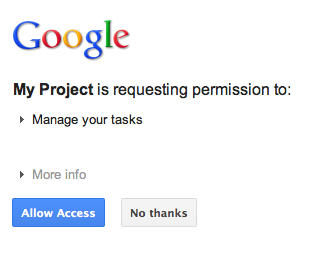
ऐक्सेस देने या अस्वीकार करने के बाद, उपयोगकर्ता को OAuth 2.0 कोड कॉलबैक हैंडलर पर वापस रीडायरेक्ट कर दिया जाता है. इसे Google ऑथराइज़ेशन यूआरएल बनाते समय, रीडायरेक्ट/कॉलबैक के तौर पर सेट किया गया था:
new GoogleAuthorizationRequestUrl(oauthProperties.getClientId(),
      OAuthCodeCallbackHandlerServlet.getOAuthCodeCallbackHandlerUrl(req), oauthProperties
          .getScopesAsString()).build()
OAuth 2.0 कोड कॉलबैक हैंडलर - OAuthCodeCallbackHandlerServlet - Google OAuth 2.0 एंडपॉइंट से रीडायरेक्ट को हैंडल करता है. इन दो स्थितियों में, ऑफ़र उपलब्ध कराने की शर्तें तय की जा सकती हैं:
- उपयोगकर्ता ने ऐक्सेस दिया है: अनुरोध को पार्स किया जाता है, ताकि यूआरएल पैरामीटर से OAuth 2.0 कोड मिल सके.
- उपयोगकर्ता ने ऐक्सेस देने से मना कर दिया है: उपयोगकर्ता को एक मैसेज दिखाया जाता है.
package com.google.oauthsample;

import ...

/**
 * Servlet handling the OAuth callback from the authentication service. We are
 * retrieving the OAuth code, then exchanging it for a refresh and an access
 * token and saving it.
 */
@SuppressWarnings("serial")
public class OAuthCodeCallbackHandlerServlet extends HttpServlet {

  /** The name of the Oauth code URL parameter */
  public static final String CODE_URL_PARAM_NAME = "code";

  /** The name of the OAuth error URL parameter */
  public static final String ERROR_URL_PARAM_NAME = "error";

  /** The URL suffix of the servlet */
  public static final String URL_MAPPING = "/oauth2callback";

  public void doGet(HttpServletRequest req, HttpServletResponse resp) throws IOException {
    // Getting the "error" URL parameter
    String[] error = req.getParameterValues(ERROR_URL_PARAM_NAME);

    // Checking if there was an error such as the user denied access
    if (error != null && error.length > 0) {
      resp.sendError(HttpServletResponse.SC_NOT_ACCEPTABLE, "There was an error: \""+error[0]+"\".");
      return;
    }
    // Getting the "code" URL parameter
    String[] code = req.getParameterValues(CODE_URL_PARAM_NAME);

    // Checking conditions on the "code" URL parameter
    if (code == null || code.length == 0) {
      resp.sendError(HttpServletResponse.SC_BAD_REQUEST, "The \"code\" URL parameter is missing");
      return;
    }
  }

  /**
   * Construct the OAuth code callback handler URL.
   *
   * @param req the HttpRequest object
   * @return The constructed request's URL
   */
  public static String getOAuthCodeCallbackHandlerUrl(HttpServletRequest req) {
    String scheme = req.getScheme() + "://";
    String serverName = req.getServerName();
    String serverPort = (req.getServerPort() == 80) ? "" : ":" + req.getServerPort();
    String contextPath = req.getContextPath();
    String servletPath = URL_MAPPING;
    String pathInfo = (req.getPathInfo() == null) ? "" : req.getPathInfo();
    return scheme + serverName + serverPort + contextPath + servletPath + pathInfo;
  }
}
ऑथराइज़ेशन कोड को रीफ़्रेश और ऐक्सेस टोकन के लिए बदलना
इसके बाद, OAuthCodeCallbackHandlerServlet, Auth 2.0 कोड को रीफ़्रेश और ऐक्सेस टोकन के लिए एक्सचेंज करता है. साथ ही, इसे डेटा स्टोर में सेव करता है और उपयोगकर्ता को OAuthCodeCallbackHandlerServlet यूआरएल पर वापस रीडायरेक्ट करता है:PrintTaskListsTitlesServlet
फ़ाइल में जोड़े गए कोड को हाइलाइट किया गया है.
package com.google.oauthsample;

import ...

/**
 * Servlet handling the OAuth callback from the authentication service. We are
 * retrieving the OAuth code, then exchanging it for a refresh and an access
 * token and saving it.
 */
@SuppressWarnings("serial")
public class OAuthCodeCallbackHandlerServlet extends HttpServlet {

  /** The name of the Oauth code URL parameter */
  public static final String CODE_URL_PARAM_NAME = "code";

  /** The name of the OAuth error URL parameter */
  public static final String ERROR_URL_PARAM_NAME = "error";

  /** The URL suffix of the servlet */
  public static final String URL_MAPPING = "/oauth2callback";
  /** The URL to redirect the user to after handling the callback. Consider
   * saving this in a cookie before redirecting users to the Google
   * authorization URL if you have multiple possible URL to redirect people to. */
  public static final String REDIRECT_URL = "/";

  /** The OAuth Token DAO implementation. Consider injecting it instead of using
   * a static initialization. Also we are using a simple memory implementation
   * as a mock. Change the implementation to using your database system. */
  public static OAuthTokenDao oauthTokenDao = new OAuthTokenDaoMemoryImpl();

  public void doGet(HttpServletRequest req, HttpServletResponse resp) throws IOException {
    // Getting the "error" URL parameter
    String[] error = req.getParameterValues(ERROR_URL_PARAM_NAME);

    // Checking if there was an error such as the user denied access
    if (error != null && error.length > 0) {
      resp.sendError(HttpServletResponse.SC_NOT_ACCEPTABLE, "There was an error: \""+error[0]+"\".");
      return;
    }

    // Getting the "code" URL parameter
    String[] code = req.getParameterValues(CODE_URL_PARAM_NAME);

    // Checking conditions on the "code" URL parameter
    if (code == null || code.length == 0) {
      resp.sendError(HttpServletResponse.SC_BAD_REQUEST, "The \"code\" URL parameter is missing");
      return;
    }
    // Construct incoming request URL
    String requestUrl = getOAuthCodeCallbackHandlerUrl(req);

    // Exchange the code for OAuth tokens
    AccessTokenResponse accessTokenResponse = exchangeCodeForAccessAndRefreshTokens(code[0],
        requestUrl);

    // Getting the current user
    // This is using App Engine's User Service, but the user should replace this
    // with their own user/login implementation
    UserService userService = UserServiceFactory.getUserService();
    String email = userService.getCurrentUser().getEmail();

    // Save the tokens
    oauthTokenDao.saveKeys(accessTokenResponse, email);

    resp.sendRedirect(REDIRECT_URL);
  }

  /**
   * Construct the OAuth code callback handler URL.
   *
   * @param req the HttpRequest object
   * @return The constructed request's URL
   */
  public static String getOAuthCodeCallbackHandlerUrl(HttpServletRequest req) {
    String scheme = req.getScheme() + "://";
    String serverName = req.getServerName();
    String serverPort = (req.getServerPort() == 80) ? "" : ":" + req.getServerPort();
    String contextPath = req.getContextPath();
    String servletPath = URL_MAPPING;
    String pathInfo = (req.getPathInfo() == null) ? "" : req.getPathInfo();
    return scheme + serverName + serverPort + contextPath + servletPath + pathInfo;
  }
  /**
   * Exchanges the given code for an exchange and a refresh token.
   *
   * @param code The code gotten back from the authorization service
   * @param currentUrl The URL of the callback
   * @param oauthProperties The object containing the OAuth configuration
   * @return The object containing both an access and refresh token
   * @throws IOException
   */
  public AccessTokenResponse exchangeCodeForAccessAndRefreshTokens(String code, String currentUrl)
      throws IOException {

    HttpTransport httpTransport = new NetHttpTransport();
    JacksonFactory jsonFactory = new JacksonFactory();

    // Loading the oauth config file
    OAuthProperties oauthProperties = new OAuthProperties();

    return new GoogleAuthorizationCodeGrant(httpTransport, jsonFactory, oauthProperties
        .getClientId(), oauthProperties.getClientSecret(), code, currentUrl).execute();
  }
}
ध्यान दें: ऊपर दिए गए उदाहरण में, App Engine की कुछ लाइब्रेरी का इस्तेमाल किया गया है. इनका इस्तेमाल सिर्फ़ उदाहरण को आसान बनाने के लिए किया गया है. अगर आपको किसी दूसरे प्लैटफ़ॉर्म के लिए डेवलप करना है, तो उपयोगकर्ता की पुष्टि करने वाले UserService इंटरफ़ेस को फिर से लागू करें.
उपयोगकर्ता के टास्क पढ़ना और उन्हें दिखाना
उपयोगकर्ता ने ऐप्लिकेशन को अपने टास्क ऐक्सेस करने की अनुमति दी हो. ऐप्लिकेशन के पास एक रीफ़्रेश टोकन है, जो OAuthTokenDao के ज़रिए ऐक्सेस किए जा सकने वाले डेटास्टोर में सेव किया जाता है. अब PrintTaskListsTitlesServlet servlet, इन टोकन का इस्तेमाल करके उपयोगकर्ता के टास्क ऐक्सेस कर सकता है और उन्हें दिखा सकता है:
फ़ाइल में जोड़े गए कोड को हाइलाइट किया गया है.
package com.google.oauthsample;

import ...

/**
 * Simple sample Servlet which will display the tasks in the default task list of the user.
 */
@SuppressWarnings("serial")
public class PrintTasksTitlesServlet extends HttpServlet {

  /**
   * The OAuth Token DAO implementation, used to persist the OAuth refresh token.
   * Consider injecting it instead of using a static initialization. Additionally, a
   * simple memory implementation is used as a mock. Change the implementation to
   * use your own database system.
   */
  public static OAuthTokenDao oauthTokenDao = new OAuthTokenDaoMemoryImpl();

  public void doGet(HttpServletRequest req, HttpServletResponse resp) throws IOException {
    // Getting the current user
    // This is using App Engine's User Service but you should replace this to
    // your own user/login implementation
    UserService userService = UserServiceFactory.getUserService();
    User user = userService.getCurrentUser();

    // If the user is not logged-in it is redirected to the login service, then back to this page
    if (user == null) {
      resp.sendRedirect(userService.createLoginURL(getFullRequestUrl(req)));
      return;
    }

    // Checking if we already have tokens for this user in store
    AccessTokenResponse accessTokenResponse = oauthTokenDao.getKeys(user.getEmail());

    // If we don't have tokens for this user
    if (accessTokenResponse == null) {
      OAuthProperties oauthProperties = new OAuthProperties();
      // Redirect to the Google OAuth 2.0 authorization endpoint
      resp.sendRedirect(new GoogleAuthorizationRequestUrl(oauthProperties.getClientId(),
          OAuthCodeCallbackHandlerServlet.getOAuthCodeCallbackHandlerUrl(req), oauthProperties
              .getScopesAsString()).build());
      return;
    }
// Prints the user's task list titles in the response
    resp.setContentType("text/plain");
    resp.getWriter().append("Task Lists titles for user " + user.getEmail() + ":\n\n");
    printTasksTitles(accessTokenResponse, resp.getWriter());
  }

  /**
   * Construct the request's URL without the parameter part.
   *
   * @param req the HttpRequest object
   * @return The constructed request's URL
   */
  public static String getFullRequestUrl(HttpServletRequest req) {
    String scheme = req.getScheme() + "://";
    String serverName = req.getServerName();
    String serverPort = (req.getServerPort() == 80) ? "" : ":" + req.getServerPort();
    String contextPath = req.getContextPath();
    String servletPath = req.getServletPath();
    String pathInfo = (req.getPathInfo() == null) ? "" : req.getPathInfo();
    String queryString = (req.getQueryString() == null) ? "" : "?" + req.getQueryString();
    return scheme + serverName + serverPort + contextPath + servletPath + pathInfo + queryString;
  }
  /**
   * Uses the Google Tasks API to retrieve a list of the user's tasks in the default
   * tasks list.
   *
   * @param accessTokenResponse The OAuth 2.0 AccessTokenResponse object
   *          containing the access token and a refresh token.
   * @param output The output stream writer to write the task list titles to.
   * @return A list of the user's task titles in the default task list.
   * @throws IOException
   */
  public void printTasksTitles(AccessTokenResponse accessTokenResponse, Writer output) throws IOException {

    // Initializing the Tasks service
    HttpTransport transport = new NetHttpTransport();
    JsonFactory jsonFactory = new JacksonFactory();
    OAuthProperties oauthProperties = new OAuthProperties();

    GoogleAccessProtectedResource accessProtectedResource = new GoogleAccessProtectedResource(
        accessTokenResponse.accessToken, transport, jsonFactory, oauthProperties.getClientId(),
        oauthProperties.getClientSecret(), accessTokenResponse.refreshToken);

    Tasks service = new Tasks(transport, accessProtectedResource, jsonFactory);

    // Using the initialized Tasks API service to query the list of tasks lists
    com.google.api.services.tasks.model.Tasks tasks = service.tasks.list("@default").execute();

    for (Task task : tasks.items) {
      output.append(task.title + "\n");
    }
  }
}
उपयोगकर्ता के टास्क इस तरह दिखाए जाते हैं:
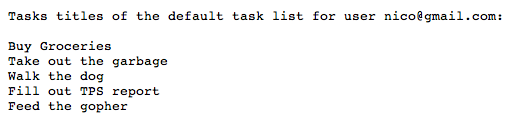
सैंपल ऐप्लिकेशन
इस सैंपल ऐप्लिकेशन का कोड डाउनलोड किया जा सकता है.