reviews Get a Maps Demo Key: Try out select Maps JavaScript API and Places UI Kit features at no cost with a Maps Demo Key—no billing information required.
本页面介绍了 Maps JavaScript API 随附的客户端库。如果您想在服务器上使用 Places API 网络服务,请参阅适用于 Google 地图服务的 Node.js 客户端。该链接指向的页面还介绍了适用于 Google 地图服务的 Java 客户端、Python 客户端和 Go 客户端。
简介
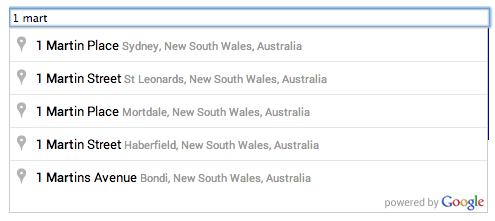
自动补全是 Maps JavaScript API 中地点库的一项功能。借助自动补全,您可以让自己的应用具有 Google 地图搜索字段的“即输即找”功能。自动补全服务可以根据完整字词和子字符串进行匹配,从而解析地点名称、地址和 Plus Codes。这样,应用就可以在用户输入内容时发送查询,从而即时进行地点预测。按照 Places API 的定义,“地点”可以是某个场所、地理位置或重要的地图注点。
使用入门
在使用 Maps JavaScript API 中的地点库之前,请先前往 Google Cloud 控制台,验证是否已针对您为 Maps JavaScript API 设置的同一项目启用了 Places API。
constcenter={lat:50.064192,lng:-130.605469};// Create a bounding box with sides ~10km away from the center pointconstdefaultBounds={north:center.lat+0.1,south:center.lat-0.1,east:center.lng+0.1,west:center.lng-0.1,};constinput=document.getElementById("pac-input")asHTMLInputElement;constoptions={bounds:defaultBounds,componentRestrictions:{country:"us"},fields:["address_components","geometry","icon","name"],strictBounds:false,};constautocomplete=newgoogle.maps.places.Autocomplete(input,options);
constcenter={lat:50.064192,lng:-130.605469};// Create a bounding box with sides ~10km away from the center pointconstdefaultBounds={north:center.lat+0.1,south:center.lat-0.1,east:center.lng+0.1,west:center.lng-0.1,};constinput=document.getElementById("pac-input");constoptions={bounds:defaultBounds,componentRestrictions:{country:"us"},fields:["address_components","geometry","icon","name"],strictBounds:false,};constautocomplete=newgoogle.maps.places.Autocomplete(input,options);
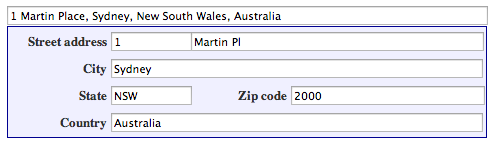
functionfillInAddress(){// Get the place details from the autocomplete object.constplace=autocomplete.getPlace();letaddress1="";letpostcode="";// Get each component of the address from the place details,// and then fill-in the corresponding field on the form.// place.address_components are google.maps.GeocoderAddressComponent objects// which are documented at http://goo.gle/3l5i5Mrfor(constcomponentofplace.address_componentsasgoogle.maps.GeocoderAddressComponent[]){// @ts-ignore remove once typings fixedconstcomponentType=component.types[0];switch(componentType){case"street_number":{address1=`${component.long_name}${address1}`;break;}case"route":{address1+=component.short_name;break;}case"postal_code":{postcode=`${component.long_name}${postcode}`;break;}case"postal_code_suffix":{postcode=`${postcode}-${component.long_name}`;break;}case"locality":(document.querySelector("#locality")asHTMLInputElement).value=component.long_name;break;case"administrative_area_level_1":{(document.querySelector("#state")asHTMLInputElement).value=component.short_name;break;}case"country":(document.querySelector("#country")asHTMLInputElement).value=component.long_name;break;}}address1Field.value=address1;postalField.value=postcode;// After filling the form with address components from the Autocomplete// prediction, set cursor focus on the second address line to encourage// entry of subpremise information such as apartment, unit, or floor number.address2Field.focus();}
functionfillInAddress(){// Get the place details from the autocomplete object.constplace=autocomplete.getPlace();letaddress1="";letpostcode="";// Get each component of the address from the place details,// and then fill-in the corresponding field on the form.// place.address_components are google.maps.GeocoderAddressComponent objects// which are documented at http://goo.gle/3l5i5Mrfor(constcomponentofplace.address_components){// @ts-ignore remove once typings fixedconstcomponentType=component.types[0];switch(componentType){case"street_number":{address1=`${component.long_name}${address1}`;break;}case"route":{address1+=component.short_name;break;}case"postal_code":{postcode=`${component.long_name}${postcode}`;break;}case"postal_code_suffix":{postcode=`${postcode}-${component.long_name}`;break;}case"locality":document.querySelector("#locality").value=component.long_name;break;case"administrative_area_level_1":{document.querySelector("#state").value=component.short_name;break;}case"country":document.querySelector("#country").value=component.long_name;break;}}address1Field.value=address1;postalField.value=postcode;// After filling the form with address components from the Autocomplete// prediction, set cursor focus on the second address line to encourage// entry of subpremise information such as apartment, unit, or floor number.address2Field.focus();}window.initAutocomplete=initAutocomplete;
// Listen for the event fired when the user selects a prediction and retrieve// more details for that place.searchBox.addListener("places_changed",()=>{constplaces=searchBox.getPlaces();if(places.length==0){return;}// Clear out the old markers.markers.forEach((marker)=>{marker.setMap(null);});markers=[];// For each place, get the icon, name and location.constbounds=newgoogle.maps.LatLngBounds();places.forEach((place)=>{if(!place.geometry||!place.geometry.location){console.log("Returned place contains no geometry");return;}consticon={url:place.iconasstring,size:newgoogle.maps.Size(71,71),origin:newgoogle.maps.Point(0,0),anchor:newgoogle.maps.Point(17,34),scaledSize:newgoogle.maps.Size(25,25),};// Create a marker for each place.markers.push(newgoogle.maps.Marker({map,icon,title:place.name,position:place.geometry.location,}));if(place.geometry.viewport){// Only geocodes have viewport.bounds.union(place.geometry.viewport);}else{bounds.extend(place.geometry.location);}});map.fitBounds(bounds);});
// Listen for the event fired when the user selects a prediction and retrieve// more details for that place.searchBox.addListener("places_changed",()=>{constplaces=searchBox.getPlaces();if(places.length==0){return;}// Clear out the old markers.markers.forEach((marker)=>{marker.setMap(null);});markers=[];// For each place, get the icon, name and location.constbounds=newgoogle.maps.LatLngBounds();places.forEach((place)=>{if(!place.geometry||!place.geometry.location){console.log("Returned place contains no geometry");return;}consticon={url:place.icon,size:newgoogle.maps.Size(71,71),origin:newgoogle.maps.Point(0,0),anchor:newgoogle.maps.Point(17,34),scaledSize:newgoogle.maps.Size(25,25),};// Create a marker for each place.markers.push(newgoogle.maps.Marker({map,icon,title:place.name,position:place.geometry.location,}),);if(place.geometry.viewport){// Only geocodes have viewport.bounds.union(place.geometry.viewport);}else{bounds.extend(place.geometry.location);}});map.fitBounds(bounds);});
place_id 是指用于唯一标识地点的文本标识符。如需检索地点的相关信息,请在“地点详情”请求的 placeId 字段中传递此标识符。详细了解如何通过地点 ID 引用地点。
terms 是指包含查询元素的数组。对于地点,每个元素通常都构成地址的一部分。
offset 是指从说明字符串的开头(即匹配的子字符串出现的位置)测量的字符偏移量。
value 是指匹配字词。
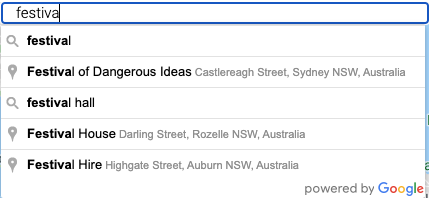
以下示例针对词组“北京烤”执行了一次查询预测请求,并在列表中显示结果。
TypeScript
// This example retrieves autocomplete predictions programmatically from the// autocomplete service, and displays them as an HTML list.// This example requires the Places library. Include the libraries=places// parameter when you first load the API. For example:// <script src="https://maps.googleapis.com/maps/api/js?key=YOUR_API_KEY&libraries=places">functioninitService():void{constdisplaySuggestions=function(predictions:google.maps.places.QueryAutocompletePrediction[]|null,status:google.maps.places.PlacesServiceStatus){if(status!=google.maps.places.PlacesServiceStatus.OK||!predictions){alert(status);return;}predictions.forEach((prediction)=>{constli=document.createElement("li");li.appendChild(document.createTextNode(prediction.description));(document.getElementById("results")asHTMLUListElement).appendChild(li);});};constservice=newgoogle.maps.places.AutocompleteService();service.getQueryPredictions({input:"pizza near Syd"},displaySuggestions);}declareglobal{interfaceWindow{initService:()=>void;}}window.initService=initService;
// This example retrieves autocomplete predictions programmatically from the// autocomplete service, and displays them as an HTML list.// This example requires the Places library. Include the libraries=places// parameter when you first load the API. For example:// <script src="https://maps.googleapis.com/maps/api/js?key=YOUR_API_KEY&libraries=places">functioninitService(){constdisplaySuggestions=function(predictions,status){if(status!=google.maps.places.PlacesServiceStatus.OK||!predictions){alert(status);return;}predictions.forEach((prediction)=>{constli=document.createElement("li");li.appendChild(document.createTextNode(prediction.description));document.getElementById("results").appendChild(li);});};constservice=newgoogle.maps.places.AutocompleteService();service.getQueryPredictions({input:"pizza near Syd"},displaySuggestions);}window.initService=initService;
<html>
<head>
<title>Retrieving Autocomplete Predictions</title>
<link rel="stylesheet" type="text/css" href="./style.css" />
<script type="module" src="./index.js"></script>
</head>
<body>
<p>Query suggestions for 'pizza near Syd':</p>
<ul id="results"></ul>
<!-- Replace Powered By Google image src with self hosted image. https://developers.google.com/maps/documentation/places/web-service/policies#other_attribution_requirements -->
<img
class="powered-by-google"
src="https://storage.googleapis.com/geo-devrel-public-buckets/powered_by_google_on_white.png"
alt="Powered by Google"
/>
<!--
The `defer` attribute causes the script to execute after the full HTML
document has been parsed. For non-blocking uses, avoiding race conditions,
and consistent behavior across browsers, consider loading using Promises. See
https://developers.google.com/maps/documentation/javascript/load-maps-js-api
for more information.
-->
<script
src="https://maps.googleapis.com/maps/api/js?key=AIzaSyB41DRUbKWJHPxaFjMAwdrzWzbVKartNGg&callback=initService&libraries=places&v=weekly"
defer
></script>
</body>
</html>
// Create a new session token.varsessionToken=newgoogle.maps.places.AutocompleteSessionToken();// Pass the token to the autocomplete service.varautocompleteService=newgoogle.maps.places.AutocompleteService();autocompleteService.getPlacePredictions({input:'pizza near Syd',sessionToken:sessionToken},displaySuggestions);
请考虑通过程序化方式实现地点自动补全(旧版),以便采用SKU:自动补全 - 按请求结算定价模式,并请求关于所选地点(而不是地点详情 [旧版])的 Geocoding API 结果。如果同时满足以下两个条件,与采用“按会话”(基于会话)定价模式相比,将“按请求”定价模式与 Geocoding API 搭配使用的性价比更高:
如果您只需要用户所选地点的纬度/经度或地址,那么采用 Geocoding API 提供此类信息所需的费用会低于调用地点详情(旧版)。