
Structured Data สำหรับเบรดครัมบ์ (BreadcrumbList)
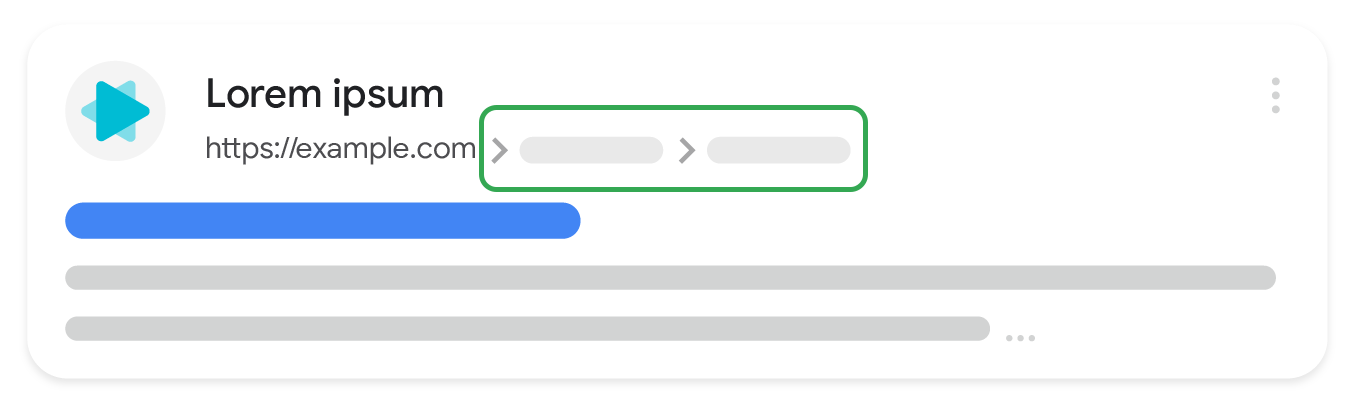
เส้นทางเบรดครัมบ์ในหน้าแสดงถึงตำแหน่งของหน้าเว็บในลำดับชั้นของเว็บไซต์ และอาจช่วยให้ผู้ใช้ทำความเข้าใจและสำรวจเว็บไซต์ได้อย่างมีประสิทธิภาพ ผู้ใช้จะไปจนถึงระดับบนสุดในลำดับชั้นของเว็บไซต์ได้โดยไปยังส่วนต่างๆ ทีละระดับ เริ่มจากเบรดครัมบ์ล่าสุดในเส้นทางเบรดครัมบ์
ความพร้อมใช้งานของฟีเจอร์
ฟีเจอร์นี้มีให้บริการบนเดสก์ท็อปในทุกภูมิภาคและภาษาที่ Google Search พร้อมให้บริการ
วิธีเพิ่ม Structured Data
ข้อมูลที่มีโครงสร้างคือรูปแบบมาตรฐานในการแจ้งข้อมูลเกี่ยวกับหน้าและจำแนกประเภทเนื้อหาของหน้า หากคุณเพิ่งใช้ข้อมูลที่มีโครงสร้างเป็นครั้งแรก โปรดดูข้อมูลเพิ่มเติมเกี่ยวกับวิธีการทำงานของข้อมูลที่มีโครงสร้าง
ต่อไปนี้เป็นภาพรวมเกี่ยวกับวิธีสร้าง ทดสอบ และเผยแพร่ข้อมูลที่มีโครงสร้าง
- เพิ่มพร็อพเพอร์ตี้ที่จำเป็น ดูตำแหน่งการแทรก Structured Data ในหน้าเว็บตามรูปแบบที่คุณใช้อยู่
- ปฏิบัติตามหลักเกณฑ์
- ตรวจสอบความถูกต้องของโค้ดโดยใช้การทดสอบผลการค้นหาที่เป็นริชมีเดีย และแก้ไขข้อผิดพลาดที่สําคัญทั้งหมด พิจารณาแก้ไขปัญหาที่ไม่สําคัญซึ่งอาจมีการรายงานในเครื่องมือด้วย เพราะอาจช่วยปรับปรุงคุณภาพของ Structured Data ได้ (แต่ไม่จําเป็นว่าต้องมีสิทธิ์ปรากฏในผลการค้นหาที่เป็นริชมีเดีย)
- ทำให้หน้าบางหน้าที่มีข้อมูลที่มีโครงสร้างใช้งานได้และใช้เครื่องมือตรวจสอบ URL เพื่อทดสอบว่า Google เห็นหน้าในลักษณะใด ตรวจสอบว่า Google เข้าถึงหน้าดังกล่าวได้และไม่มีการบล็อกหน้าด้วยไฟล์ robots.txt, แท็ก
noindexหรือข้อกำหนดให้เข้าสู่ระบบ หากหน้าเว็บดูถูกต้องดีแล้ว คุณขอให้ Google ทำการ Crawl URL อีกครั้งได้ - หากต้องการให้ Google ทราบถึงการเปลี่ยนแปลงที่จะเกิดขึ้นในอนาคตอยู่ตลอด เราขอแนะนำให้ส่ง Sitemap ซึ่งกำหนดให้ดำเนินการแบบอัตโนมัติได้โดยใช้ Search Console Sitemap API
ตัวอย่าง
Google Search ใช้มาร์กอัปเบรดครัมบ์ในส่วนเนื้อหาของหน้าเว็บเพื่อจัดหมวดหมู่ข้อมูลจากหน้าเว็บในผลการค้นหา ตามที่แสดงให้เห็นในกรณีการใช้งานต่อไปนี้ ส่วนมากแล้วผู้ใช้จะมาถึงที่หน้าเว็บจากประเภทคำค้นหาที่แตกต่างกันมาก แม้ว่าการค้นหาแต่ละรายการอาจแสดงหน้าเว็บเดียวกัน แต่เบรดครัมบ์จะจัดหมวดหมู่เนื้อหาภายในบริบทของคำค้นหาใน Google Search หน้าสำหรับผู้ชนะรางวัลหนังสือนวนิยายอาจใช้เส้นทางเบรดครัมบ์ต่อไปนี้
เส้นทางเบรดครัมบ์เดี่ยว
หากมีเส้นทางเบรดครัมบ์เพียงเส้นทางเดียวที่นำไปสู่หน้าเว็บ หน้าเว็บอาจระบุเส้นทางเบรดครัมบ์ต่อไปนี้
หนังสือ › นิยายวิทยาศาสตร์ › ชนะรางวัล
JSON-LD
ต่อไปนี้คือตัวอย่าง JSON-LD เพื่อรองรับเบรดครัมบ์ดังกล่าว
<html>
  <head>
    <title>Award Winners</title>
    <script type="application/ld+json">
    {
      "@context": "https://schema.org",
      "@type": "BreadcrumbList",
      "itemListElement": [{
        "@type": "ListItem",
        "position": 1,
        "name": "Books",
        "item": "https://example.com/books"
      },{
        "@type": "ListItem",
        "position": 2,
        "name": "Science Fiction",
        "item": "https://example.com/books/sciencefiction"
      },{
        "@type": "ListItem",
        "position": 3,
        "name": "Award Winners"
      }]
    }
    </script>
  </head>
  <body>
  </body>
</html>
RDFa
ต่อไปนี้คือตัวอย่าง RDFa เพื่อรองรับเบรดครัมบ์ดังกล่าว
<html>
  <head>
    <title>Award Winners</title>
  </head>
  <body>
    <ol vocab="https://schema.org/" typeof="BreadcrumbList">
      <li property="itemListElement" typeof="ListItem">
        <a property="item" typeof="WebPage"
            href="https://example.com/books">
          <span property="name">Books</span></a>
        <meta property="position" content="1">
      </li>
      ›
      <li property="itemListElement" typeof="ListItem">
        <a property="item" typeof="WebPage"
            href="https://example.com/books/sciencefiction">
          <span property="name">Science Fiction</span></a>
        <meta property="position" content="2">
      </li>
      ›
      <li property="itemListElement" typeof="ListItem">
        <span property="name">Award Winners</span>
        <meta property="position" content="3">
      </li>
    </ol>
  </body>
</html>
Microdata
ต่อไปนี้คือตัวอย่าง Microdata เพื่อรองรับเบรดครัมบ์ดังกล่าว
<html>
  <head>
    <title>Award Winners</title>
  </head>
  <body>
    <ol itemscope itemtype="https://schema.org/BreadcrumbList">
      <li itemprop="itemListElement" itemscope
          itemtype="https://schema.org/ListItem">
        <a itemprop="item" href="https://example.com/books">
            <span itemprop="name">Books</span></a>
        <meta itemprop="position" content="1" />
      </li>
      ›
      <li itemprop="itemListElement" itemscope
          itemtype="https://schema.org/ListItem">
        <a itemscope itemtype="https://schema.org/WebPage"
           itemprop="item" itemid="https://example.com/books/sciencefiction"
           href="https://example.com/books/sciencefiction">
          <span itemprop="name">Science Fiction</span></a>
        <meta itemprop="position" content="2" />
      </li>
      ›
      <li itemprop="itemListElement" itemscope
          itemtype="https://schema.org/ListItem">
        <span itemprop="name">Award winners</span>
        <meta itemprop="position" content="3" />
      </li>
    </ol>
  </body>
</html>
HTML
ต่อไปนี้คือตัวอย่างการบล็อกเบรดครัมบ์ HTML ภายในหน้าซึ่งเป็นส่วนหนึ่งของการออกแบบภาพ
<html>
  <head>
    <title>Award Winners</title>
  </head>
  <body>
    <ol>
      <li>
        <a href="https://www.example.com/books">Books</a>
      </li>
      <li>
        <a href="https://www.example.com/sciencefiction">Science Fiction</a>
      </li>
      <li>
        Award Winners
      </li>
    </ol>
  </body>
</html>
เส้นทางเบรดครัมบ์หลายเส้นทาง
หากการไปยังหน้าบนเว็บไซต์อาจทำได้หลายวิธี คุณก็ระบุเส้นทางเบรดครัมบ์หลายเส้นทางสำหรับหน้าเดียวได้ ด้านล่างนี้คือเส้นทางเบรดครัมบ์เส้นทางหนึ่งที่นำไปสู่หน้าเว็บของหนังสือที่ชนะรางวัล
หนังสือ › นิยายวิทยาศาสตร์ › ชนะรางวัล
ด้านล่างนี้คือเส้นทางเบรดครัมบ์อีกเส้นทางที่นำไปสู่หน้าเว็บเดียวกัน
วรรณกรรม › ผู้ชนะรางวัล
JSON-LD
ต่อไปนี้คือตัวอย่าง JSON-LD ที่รองรับเส้นทางเบรดครัมบ์หลายเส้นทาง
<html>
  <head>
    <title>Award Winners</title>
    <script type="application/ld+json">
    [{
      "@context": "https://schema.org",
      "@type": "BreadcrumbList",
      "itemListElement": [{
        "@type": "ListItem",
        "position": 1,
        "name": "Books",
        "item": "https://example.com/books"
      },{
        "@type": "ListItem",
        "position": 2,
        "name": "Science Fiction",
        "item": "https://example.com/books/sciencefiction"
      },{
        "@type": "ListItem",
        "position": 3,
        "name": "Award Winners"
      }]
    },
    {
      "@context": "https://schema.org",
      "@type": "BreadcrumbList",
      "itemListElement": [{
        "@type": "ListItem",
        "position": 1,
        "name": "Literature",
        "item": "https://example.com/literature"
      },{
        "@type": "ListItem",
        "position": 2,
        "name": "Award Winners"
      }]
    }]
    </script>
  </head>
  <body>
  </body>
</html>
RDFa
ต่อไปนี้คือ RDFa ตัวอย่างที่รองรับเส้นทางเบรดครัมบ์หลายเส้นทาง
<html>
  <head>
    <title>Award Winners</title>
  </head>
  <body>
    <ol vocab="https://schema.org/" typeof="BreadcrumbList">
      <li property="itemListElement" typeof="ListItem">
        <a property="item" typeof="WebPage"
            href="https://example.com/books">
          <span property="name">Books</span></a>
        <meta property="position" content="1">
      </li>
      ›
      <li property="itemListElement" typeof="ListItem">
        <a property="item" typeof="WebPage"
            href="https://example.com/books/sciencefiction">
          <span property="name">Science Fiction</span></a>
        <meta property="position" content="2">
      </li>
      ›
      <li property="itemListElement" typeof="ListItem">
        <a property="item" typeof="WebPage"
            href="https://example.com/books/sciencefiction/awardwinners">
          <span property="name">Award Winners</span></a>
        <meta property="position" content="3">
      </li>
    </ol>
    <ol vocab="https://schema.org/" typeof="BreadcrumbList">
      <li property="itemListElement" typeof="ListItem">
        <a property="item" typeof="WebPage"
            href="https://example.com/literature">
          <span property="name">Literature</span></a>
        <meta property="position" content="1">
      </li>
      ›
      <li property="itemListElement" typeof="ListItem">
        <span property="name">Award Winners</span>
        <meta property="position" content="2">
      </li>
    </ol>
  </body>
</html>
Microdata
ต่อไปนี้คือตัวอย่าง Microdata ที่รองรับเส้นทางเบรดครัมบ์หลายเส้นทาง
<html>
  <head>
    <title>Award Winners</title>
  </head>
  <body>
    <ol itemscope itemtype="https://schema.org/BreadcrumbList">
      <li itemprop="itemListElement" itemscope
          itemtype="https://schema.org/ListItem">
        <a itemprop="item" href="https://example.com/books">
            <span itemprop="name">Books</span></a>
        <meta itemprop="position" content="1" />
      </li>
      ›
      <li itemprop="itemListElement" itemscope
          itemtype="https://schema.org/ListItem">
        <a itemscope itemtype="https://schema.org/WebPage"
           itemprop="item" itemid="https://example.com/books/sciencefiction"
           href="https://example.com/books/sciencefiction">
          <span itemprop="name">Science Fiction</span></a>
        <meta itemprop="position" content="2" />
      </li>
      ›
      <li itemprop="itemListElement" itemscope
          itemtype="https://schema.org/ListItem">
        <a itemprop="item" href="https://example.com/books/sciencefiction/awardwinners">
          <span itemprop="name">Award Winners</span></a>
        <meta itemprop="position" content="3" />
      </li>
    </ol>
    <ol itemscope itemtype="https://schema.org/BreadcrumbList">
      <li itemprop="itemListElement" itemscope
          itemtype="https://schema.org/ListItem">
        <a itemprop="item" href="https://example.com/literature">
          <span itemprop="name">Literature</span></a>
        <meta itemprop="position" content="1" />
      </li>
      ›
      <li itemprop="itemListElement" itemscope
          itemtype="https://schema.org/ListItem">
        <span itemprop="name">Award Winners</span>
        <meta itemprop="position" content="2" />
      </li>
    </ol>
  </body>
</html>
HTML
ต่อไปนี้คือตัวอย่างการบล็อกเบรดครัมบ์ HTML ภายในหน้าซึ่งเป็นส่วนหนึ่งของการออกแบบภาพ
<html>
  <head>
    <title>Award Winners</title>
  </head>
  <body>
    <ol>
      <li>
        <a href="https://www.example.com/books">Books</a>
      </li>
      <li>
        <a href="https://www.example.com/books/sciencefiction">Science Fiction</a>
      </li>
      <li>
        Award Winners
      </li>
    </ol>
    <ol>
      <li>
        <a href="https://www.example.com/literature">Literature</a>
      </li>
      <li>
        Award Winners
      </li>
    </ol>
  </body>
</html>
หลักเกณฑ์
คุณต้องทำตามหลักเกณฑ์เหล่านี้เพื่อให้มีสิทธิ์ปรากฏขึ้นพร้อมกับเบรดครัมบ์ใน Google Search
เราจึงขอแนะนำให้ระบุเบรดครัมบ์ที่แสดงถึงเส้นทางไปยังหน้าเว็บดังกล่าวสำหรับผู้ใช้ทั่วไป แทนที่จะใช้โครงสร้างเหมือนกับ URL ทุกประการ คุณไม่จำเป็นต้องใส่เบรดครัมบ์ ListItem สำหรับเส้นทางระดับบนสุด (โดเมนหรือชื่อโฮสต์ของเว็บไซต์) หรือสำหรับหน้าเว็บเอง
คำจำกัดความของประเภท Structured Data
ในการระบุเบรดครัมบ์ ให้กำหนด BreadcrumbList ที่มี ListItems อย่างน้อย 2 รายการ คุณต้องใส่พร็อพเพอร์ตี้ที่จำเป็นลงในเนื้อหาเพื่อให้มีสิทธิ์แสดงพร้อมกับเบรดครัมบ์
BreadcrumbList
BreadcrumbList เป็นคอนเทนเนอร์ที่เก็บรวบรวมทุกเอลิเมนต์ในลิสต์ ดูคำจำกัดความที่สมบูรณ์ของ BreadcrumbList ได้ที่ schema.org/BreadcrumbList
พร็อพเพอร์ตี้ที่ Google รองรับมีดังต่อไปนี้
| พร็อพเพอร์ตี้ที่จำเป็น | |
|---|---|
itemListElement |
อาร์เรย์ของเบรดครัมบ์ที่ระบุไว้ในลำดับเฉพาะ ระบุเบรดครัมบ์แต่ละรายการด้วย { "@context": "https://schema.org", "@type": "BreadcrumbList", "itemListElement": [{ "@type": "ListItem", "position": 1, "name": "Books", "item": "https://example.com/books" },{ "@type": "ListItem", "position": 2, "name": "Authors", "item": "https://example.com/books/authors" },{ "@type": "ListItem", "position": 3, "name": "Ann Leckie", "item": "https://example.com/books/authors/annleckie" }] } |
ListItem
ListItem มีรายละเอียดเกี่ยวกับแต่ละรายการในลิสต์รายการ ดูคำจำกัดความที่สมบูรณ์ของ ListItem ได้ที่ schema.org/ListItem
พร็อพเพอร์ตี้ที่ Google รองรับมีดังต่อไปนี้
| พร็อพเพอร์ตี้ที่จำเป็น | |
|---|---|
item |
URL ไปยังหน้าเว็บที่เป็นตัวแทนเบรดครัมบ์ มีวิธีระบุ
ไม่จำเป็นต้องใช้ |
name |
ชื่อของเบรดครัมบ์ที่แสดงให้ผู้ใช้เห็น หากคุณใช้ |
position |
ตำแหน่งของเบรดครัมบ์ในเส้นทางเบรดครัมบ์ ตำแหน่งที่ 1 หมายถึงจุดเริ่มต้นของเส้นทาง |
ตรวจสอบผลการค้นหาที่เป็นสื่อสมบูรณ์ด้วย Search Console
Search Console เป็นเครื่องมือที่ช่วยในการตรวจสอบประสิทธิภาพของหน้าเว็บใน Google Search คุณไม่จำเป็นต้องลงชื่อสมัครใช้ Search Console เพื่อให้เนื้อหาได้แสดงในผลการค้นหาของ Google แต่การลงชื่อสมัครใช้จะช่วยให้คุณเข้าใจและปรับปรุงวิธีที่ Google เห็นเว็บไซต์ได้ เราขอแนะนำให้ไปดูข้อมูลใน Search Console ในกรณีต่อไปนี้
- หลังจากทำให้ข้อมูลที่มีโครงสร้างใช้งานได้เป็นครั้งแรก
- หลังจากเผยแพร่เทมเพลตใหม่หรืออัปเดตโค้ด
- วิเคราะห์การเข้าชมเป็นระยะ
หลังจากทำให้ข้อมูลที่มีโครงสร้างใช้งานได้เป็นครั้งแรก
หลังจากที่ Google ได้จัดทำดัชนีหน้าของคุณแล้ว ให้ตรวจหาปัญหาโดยใช้รายงานสถานะผลการค้นหาที่เป็นสื่อสมบูรณ์ที่เกี่ยวข้อง ตามหลักแล้ว รายการที่ถูกต้องควรจะมีจํานวนเพิ่มขึ้น และรายการที่ไม่ถูกต้องไม่ควรจะมีจำนวนเพิ่มขึ้น หากพบปัญหาในข้อมูลที่มีโครงสร้าง ให้ทำดังนี้
- แก้ไขรายการที่ไม่ถูกต้อง
- ตรวจสอบ URL ที่เผยแพร่เพื่อดูว่ายังมีปัญหาอยู่หรือไม่
- ขอการตรวจสอบโดยใช้รายงานสถานะ
หลังจากเผยแพร่เทมเพลตใหม่หรืออัปเดตโค้ด
เมื่อทําการเปลี่ยนแปลงที่สําคัญในเว็บไซต์ ให้คอยตรวจสอบการเพิ่มขึ้นของรายการที่ไม่ถูกต้องของ Structured Data- หากเห็นว่าจำนวนรายการที่ไม่ถูกต้องเพิ่มขึ้น อาจเป็นเพราะคุณเผยแพร่เทมเพลตใหม่ที่ใช้งานไม่ได้ หรือเว็บไซต์โต้ตอบกับเทมเพลตที่มีอยู่ด้วยวิธีใหม่และไม่ถูกต้อง
- หากเห็นว่าจำนวนรายการที่ถูกต้องลดลง (ไม่สอดคล้องกับรายการที่ถูกต้องซึ่งเพิ่มขึ้น) บางทีอาจเป็นเพราะคุณไม่ได้ฝัง Structured Data ไว้ในหน้าอีกแล้ว ให้ใช้เครื่องมือตรวจสอบ URL เพื่อดูสาเหตุของปัญหา
วิเคราะห์การเข้าชมเป็นระยะ
วิเคราะห์การเข้าชมจาก Google Search โดยใช้รายงานประสิทธิภาพ ข้อมูลจะแสดงความถี่ที่หน้าปรากฏเป็นผลการค้นหาที่เป็นสื่อสมบูรณ์ใน Search ความถี่ที่ผู้ใช้คลิกหน้า และอันดับเฉลี่ยที่หน้าปรากฏในผลการค้นหา คุณจะใช้ Search Console API ดึงผลการค้นหาเหล่านี้โดยอัตโนมัติก็ได้เช่นกันการแก้ปัญหา
หากประสบปัญหาในการใช้หรือแก้ไขข้อบกพร่องของ Structured Data โปรดดูแหล่งข้อมูลต่อไปนี้ซึ่งอาจช่วยคุณได้
- หากคุณใช้ระบบจัดการเนื้อหา (CMS) หรือมีผู้อื่นดูแลเว็บไซต์ ให้ขอความช่วยเหลือจากฝ่ายสนับสนุนของระบบหรือผู้ดูแลเว็บดังกล่าว และอย่าลืมส่งต่อข้อความจาก Search Console ที่ระบุรายละเอียดปัญหาด้วย
- Google ไม่รับประกันว่าฟีเจอร์ที่ใช้ Structured Data จะแสดงในผลการค้นหา ดูรายการสาเหตุทั่วไปที่ Google อาจไม่แสดงเนื้อหาของคุณเป็นผลการค้นหาที่เป็นริชมีเดียได้ในหลักเกณฑ์ทั่วไปเกี่ยวกับ Structured Data
- Structured Data ของคุณอาจมีข้อผิดพลาดอยู่ ตรวจสอบรายการข้อผิดพลาดของ Structured Data และรายงาน Structured Data ที่แยกวิเคราะห์ไม่ได้
- หากมีการดำเนินการกับ Structured Data โดยเจ้าหน้าที่ในหน้าของคุณ ระบบจะไม่สนใจ Structured Data ในหน้าดังกล่าว (แม้ว่าหน้าจะยังปรากฏในผลการค้นหาของ Google Search ก็ตาม) วิธีแก้ปัญหาเกี่ยวกับ Structured Data คือใช้รายงานการดำเนินการโดยเจ้าหน้าที่
- อ่านหลักเกณฑ์อีกครั้งเพื่อดูว่าเนื้อหาของคุณละเมิดหลักเกณฑ์หรือไม่ ปัญหาอาจเกิดจากเนื้อหาที่เป็นสแปมหรือการใช้มาร์กอัปที่เป็นสแปม อย่างไรก็ตาม ปัญหาอาจไม่ได้เป็นปัญหาด้านไวยากรณ์ ซึ่งทำให้การทดสอบผลการค้นหาที่เป็นริชมีเดียระบุปัญหาเหล่านั้นไม่ได้
- แก้ปัญหาเกี่ยวกับผลการค้นหาที่เป็นริชมีเดียขาดหายไป/จำนวนรวมของผลการค้นหาที่เป็นริชมีเดียลดลง
- ขอให้อดทนรอระหว่างที่เราทำการ Crawl และจัดทำดัชนีอีกครั้ง และโปรดทราบว่าหลังจากที่คุณเผยแพร่หน้าหนึ่งๆ แล้ว อาจใช้เวลาหลายวันกว่า Google จะพบและทำการ Crawl หน้าดังกล่าว ดูคำถามทั่วไปเกี่ยวกับการรวบรวมข้อมูลและการจัดทำดัชนีได้ในคำถามที่พบบ่อยเกี่ยวกับการรวบรวมข้อมูลและการจัดทำดัชนีของ Google Search
- โพสต์คำถามในฟอรัม Google Search Central